Home › Lifestyle

 US
US
 CAen-CAUSen-US
 AENot Available
 AFNot Available
 ALNot Available
 AMNot Available
 ATNot Available
 AUNot Available
 AZNot Available
 BANot Available
 BENot Available
 BGNot Available
 BHNot Available
 BMNot Available
 BNNot Available
 BTNot Available
 BYNot Available
 CHNot Available
 CNNot Available
 CYNot Available
 CZNot Available
 DENot Available
 DKNot Available
 EENot Available
 EGNot Available
 ESNot Available
 FINot Available
 FJNot Available
 FMNot Available
 FRNot Available
 GBNot Available
 GENot Available
 GRNot Available
 HKNot Available
 HRNot Available
 HUNot Available
 IDNot Available
 IENot Available
 ILNot Available
 INNot Available
 IQNot Available
 ISNot Available
 ITNot Available
 JONot Available
 JPNot Available
 KGNot Available
 KRNot Available
 KWNot Available
 KZNot Available
 LANot Available
 LBNot Available
 LKNot Available
 LTNot Available
 LUNot Available
 LVNot Available
 MDNot Available
 MENot Available
 MKNot Available
 MMNot Available
 MNNot Available
 MONot Available
 MRNot Available
 MTNot Available
 MVNot Available
 MYNot Available
 NLNot Available
 NONot Available
 NRNot Available
 NZNot Available
 PGNot Available
 PHNot Available
 PKNot Available
 PLNot Available
 PTNot Available
 PWNot Available
 QANot Available
 RONot Available
 RSNot Available
 RUNot Available
 SANot Available
 SBNot Available
 SENot Available
 SGNot Available
 SINot Available
 SKNot Available
 THNot Available
 TJNot Available
 TMNot Available
 TONot Available
 TRNot Available
 TWNot Available
 UANot Available
 UZNot Available
 VNNot Available
 VUNot Available
 XKNot Available
 YENot Available
 ZANot Available
2 of 98 storefronts
Content in en-US
Content in en-US
Information
Preview 3 platforms
iPhone 3 images


iPad 3 images


Apple Watch 3 images


What’s New Version 5.12.3
This mobile release includes issue resolutions, minor enhancements, and behind-the-scenes work to prepare for future releases.
Description
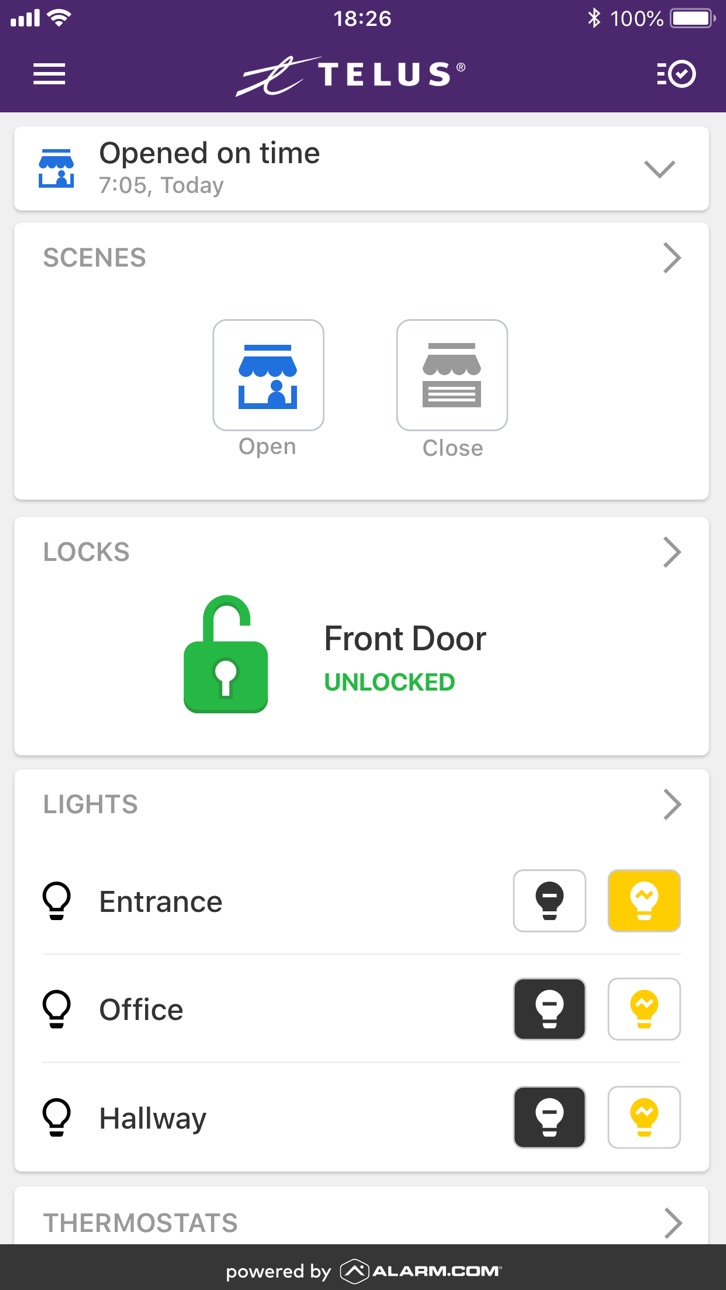
TELUS Secure Business is your complete all-in-one security, safety and smart business solution. Protect, automate and control your business in real-time from anywhere in the world, from any current mobile device. All you need is Internet or mobile service, a Secure Business service plan and the smart devices you wish to install in your business.
The TELUS Secure Business app offers solutions for:
- Security and safety alerts
- Interactive video monitoring
- Remote awareness (knowing when your business has opened and closed)
- Business automation
Optimize your business from wherever you are. Just tap your app, and you'll have real time access to what's happening at your business. View your video screens or clips, change and control settings and make your business the safest and smartest it can be.
Whether you're at a customer meeting or halfway around the world, TELUS Secure Business has you covered. The app can send you notifications, you can instantly view your front door or back office, make and change rules to maximize energy efficiency, and have direct access to every security and smart device you've installed.
Simple icons and easy-to-follow screens give you remote access and control. Tap a button to view your cameras, pre-program your system to arm and disarm automatically, get reporting to provide you with graphs of volume and timing of traffic into your business.
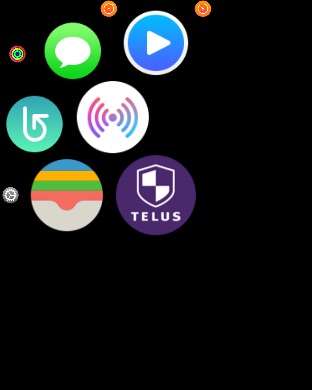
Have an Apple watch? Keep your business running smart with a flick of the wrist. Arm and disarm your system, check notifications, and control all of your installed devices right from your watch.
Note: This TELUS Secure Business app requires a compatible system, internet access and a Secure Business service plan. The app features and their usage varies based on the solution chosen, equipment and service plan. Visit our website for more information.
With the TELUS Secure Business app, you can:
- Receive real-time emails, text messages, and push notifications for unexpected activity and events that matter to you
- View your business and property from your installed video cameras
- Pre-program or turn lights on or off
- Set the ideal temperature on your smart thermostat
- Receive reports of traffic volumes broken down by days and times
- Search your complete event history
- Provide, remove, or limit access to employees based on days and times
How the TELUS Secure Business app helps you stay connected to your business:
- Know instantly when your business has been opened or closed
- Arm and disarm your system from anywhere, or automatically as you leave the business
- Know when people access restricted areas
- Be alerted when certain doors are left open
- Know if someone changes any of your system settings
- Limit false alarms by remotely viewing your cameras, disarming, then re-arming your system without having to drive to your business.
Accessibility
ipadiphonemacrealityDevicetvoswatch
Version history 17 versions
Build 870902485v5.12.32026-02-13 19:53:55
This mobile release includes issue resolutions, minor enhancements, and behind-the-scenes work to prepare for future releases.
Build 862757507v5.42024-06-20 16:36:00
Bottom navigation: The app menu is now found at the bottom of your screen.
Landscape Activity Feed for Mobile Continuous Video Player: Jump right to recorded events from
the landscape view.
Camera Device Quick Links for Mobile Continuous Recording Player: Camera-device quick links are now in the mobile continuous recording player. Customers can link cameras with 24/7 recording to specific devices, such as locks or door sensors.
Build 859235500v4.21.27 2023-08-24 13:10:57
Clip Limit Notifications (Push Notification, Usage Report, Rule Revision Recommendations) - Introducing enhanced monthly clip limit alerts—a new and improved early warning system that helps your customers spot and fix recording issues before limits are reached and rules are paused.
Build 856483651v4.21.242023-04-24 13:30:10
Dismiss severe weather alerts remotely. This feature ensures property owners are aware of severe weather (tornados, fire, and tsunamis) with the flexibility to silence and pause continued alerts. Note: All panels allow customers to pause alerts, only customers with select panels can also silence alerts.
Updated the video analytics recording rules pause durations available via Push notifications.
Build 851043814v4.21.132022-08-16 14:11:55
What's new:
- Various accessibility enhancements to screen reader performance with our mobile apps
- Continued bug fixes and enhancements for the Places feature on iOS
- Minor UI enhancements and bug fixes
Build 848443393v4.21.82022-04-20 15:54:35
* Video Analytics push notifications now dynamically link customers to the most relevant information as it is available.
* Add, delete, and edit your geo-fences (now called "Places") via the app from your mobile device. Enable location sharing from the Location Services (formerly "Geo-Services") screen under App Settings.
* Fixed a bug on iPad where the logout button for Multi-System Access would disappear from the footer.
* Minor UI enhancements and bug fixes
Build 845926467v4.21.42022-03-21 13:15:59
* Video Analytics push notifications now dynamically link customers to the most relevant information as it is available.
* Add, delete, and edit your geo-fences (now called "Places") via the app from your mobile device. Enable location sharing from the Location Services (formerly "Geo-Services") screen under App Settings.
* Fixed a bug on iPad where the logout button for Multi-System Access would disappear from the footer.
* Minor UI enhancements and bug fixes
Build 845168930v4.20.12021-11-07 07:42:59
New this version:
• Introducing multi-location management capabilities.
• UI improvements to the Support page.
• Support for Landscape Mode.
• UI changes to the panic, police, fire, and auxiliary alarm buttons.
• Updated the UI for the date time picker for Video.
• Fixed issue where the doorbell call screen was being dismissed when the video stream times out.
• Other minor bug fixes.
Build 843341782v4.192021-07-30 16:11:31
This version includes minor bug fixes and enhancements.
Build 842673709v4.18.22021-06-16 14:37:48
o Control locks with new Siri Voice shortcuts
- Please note: when setting up your Siri shortcut, ensure that the phrase you use when speaking to Siri is exactly the same as the phrase you type when creating your prompt.
o Manage Devices Screen: Edit, rename, and remove smartphones, cameras, and other devices that are on your account in the mobile app.
o Minor bug fixes and enhancements
Build 840471078v4.17.32021-03-26 00:48:10
Minor bug fixes
Build 839668025v4.172020-12-16 17:49:00
• (iOS Only) You can now create Siri Shortcut commands to control "All Lights" under App Settings.
• Webview Elements
• Santa Tracker
Build 836703209v4.11.132020-07-08 18:49:12
New this version:
● Critical Alerts: Never miss an important alarm even when your phone is in Do Not Disturb or Silent mode. Enable Push Notifications for Alarm Events.
● Save and Share Highlights: Now you can easily share Highlight videos of funny and interesting moments captured on your cameras from the Secure Business App.
● Multi-Account Swipe: Users who have multiple linked Secure Business accounts can easily swipe between different accounts from the top of their app home screen.
● Grouped iOS Notifications: Multiple Push Notifications of the same category will now be grouped on your iOS device’ home screen.
Add Devices: You can now easily add devices to your TELUS Business account when first setting up your security system, or afterwards from the sidebar menu.
Minor Small Bug Fixes:
● Fixed keyboard issue when creating/editing a Scene name
● Fixed link from iOS Settings page that takes you to the Notification Settings in the app
● Resolved scrolling issue on Video Feature screen if one camera is zoomed in
Build 831953312v4.10.102020-01-31 15:53:14
- Siri Shortcuts
- Under App Settings, iOS 12 users can now set up voice shortcuts to control the alarm system via Siri. You can also choose to share your in-app activity so that Siri can recommend commonly used actions on your lock screen, or Spotlight Search.
- Create, view, or edit security system and lock user codes through the new Users screen, available in the navigation menu of the app.
- A new Login Information screen, available in the navigation menu of the app, lets you link multiple systems to a single login, set up two factor authentication for additional security, and more.
- Highlights
- Sonos integration support
- An enhanced notifications experience lets you more easily manage your push notifications. Now you can enable, disable, and add new notifications from a single screen.
Emergency contact update
- Ability to create/edit/delete Video Analytics Rules
Build 828668412v4.7.42018-09-21 18:55:01
Bug fixes
Build 828007491v4.7.22018-08-07 15:05:11
Bug fixes
Build 827479106v4.72018-07-21 17:25:43
No pricing data captured yet — comparisons appear once the app has paid storefronts or in-app purchases.
Availability 2 of 98 storefronts
| Region | Language | Price | Ratings | Avg | Version |
|---|---|---|---|---|---|
| CA | en-CA | Free | 344 | 4.7 | 5.12.3 |
| US | en-US | Free | 1 | 5.0 | 5.12.3 |
Not available in: AE, AF, AL, AM, AT, AU, AZ, BA, BE, BG, BH, BM, BN, BT, BY, CH, CN, CY, CZ, DE, DK, EE, EG, ES, FI, FJ, FM, FR, GB, GE, GR, HK, HR, HU, ID, IE, IL, IN, IQ, IS, IT, JO, JP, KG, KR, KW, KZ, LA, LB, LK, LT, LU, LV, MD, ME, MK, MM, MN, MO, MR, MT, MV, MY, NL, NO, NR, NZ, PG, PH, PK, PL, PT, PW, QA, RO, RS, RU, SA, SB, SE, SG, SI, SK, TH, TJ, TM, TO, TR, TW, UA, UZ, VN, VU, XK, YE, ZA
Change log 20 changes · US
✎
releaseNotes updated
This mobile release includes issue resolutions, minor enhancements, and behind-the-scenes work to prepare for future releases.
✎
description updated
TELUS Secure Business is your complete all-in-one security, safety and smart business solution. Protect, automate and control your business in real-time from a
✎
name updated
TELUS Secure Business
◆
Version 5.12.3 released
This mobile release includes issue resolutions, minor enhancements, and behind-the-scenes work to prepare for future releases.
◆
Version 5.4 released
Bottom navigation: The app menu is now found at the bottom of your screen.
Landscape Activity Feed for Mobile Continuous Video Player: Jump right to recorded events from
the landscape view.
Camera Device Quick Links for Mobile Continuous
◆
Version 4.21.27 released
Clip Limit Notifications (Push Notification, Usage Report, Rule Revision Recommendations) - Introducing enhanced monthly clip limit alerts—a new and improved early warning system that helps your customers spot and fix recording issues befor
◆
Version 4.21.24 released
Dismiss severe weather alerts remotely. This feature ensures property owners are aware of severe weather (tornados, fire, and tsunamis) with the flexibility to silence and pause continued alerts. Note: All panels allow customers to pause al
◆
Version 4.21.13 released
What's new:
- Various accessibility enhancements to screen reader performance with our mobile apps
- Continued bug fixes and enhancements for the Places feature on iOS
- Minor UI enhancements and bug fixes
◆
Version 4.21.8 released
* Video Analytics push notifications now dynamically link customers to the most relevant information as it is available.
* Add, delete, and edit your geo-fences (now called "Places") via the app from your mobile device. Enable location shar
◆
Version 4.21.4 released
* Video Analytics push notifications now dynamically link customers to the most relevant information as it is available.
* Add, delete, and edit your geo-fences (now called "Places") via the app from your mobile device. Enable location shar
◆
Version 4.20.1 released
New this version:
• Introducing multi-location management capabilities.
• UI improvements to the Support page.
• Support for Landscape Mode.
• UI changes to the panic, police, fire, and auxiliary alarm buttons.
• Updated the UI for the date
◆
Version 4.19 released
This version includes minor bug fixes and enhancements.
◆
Version 4.18.2 released
o Control locks with new Siri Voice shortcuts
- Please note: when setting up your Siri shortcut, ensure that the phrase you use when speaking to Siri is exactly the same as the phrase you type when creating your prompt.
o Manage
◆
Version 4.17.3 released
Minor bug fixes
◆
Version 4.17 released
• (iOS Only) You can now create Siri Shortcut commands to control "All Lights" under App Settings.
• Webview Elements
• Santa Tracker
◆
Version 4.11.13 released
New this version:
● Critical Alerts: Never miss an important alarm even when your phone is in Do Not Disturb or Silent mode. Enable Push Notifications for Alarm Events.
● Save and Share Highlights: Now you can easily share Highlight
◆
Version 4.10.10 released
- Siri Shortcuts
- Under App Settings, iOS 12 users can now set up voice shortcuts to control the alarm system via Siri. You can also choose to share your in-app activity so that Siri can recommend commonly used actions on your lock screen,
◆
Version 4.7.4 released
Bug fixes
◆
Version 4.7.2 released
Bug fixes
◆
Version 4.7 released