Home › Music

 US
US
1 of 1 storefronts
Content in en-US
Content in en-US
Information
Apple ID1393212799
Bundle IDinfo.hijo.VocalRemoverIOS
SellerSeller
Min iOS18.0
Min macOS15.0
Device familiesiphone, ipad
Released2018-07-08
Copyright© 2015-2026 Kasidej Khunvattanakarn. All right reserved.
Privacy policyLink ↗
Preview 2 platforms
iPhone 6 images



iPad 6 images


What’s New Version 2.0.2
• Fixed audio export and playback issues — exporting tracks and seeking during playback is now smoother and more reliable.
• Improved app stability under the hood to prevent unexpected freezes.
• Fixed Analytics and Crash Reporting to respect your privacy settings properly.
Description
Vocal Remover uses advanced on-device AI and signal processing to separate vocals from music in real time, transforming any music in your library into instant karaoke — no internet required, no uploads, no waiting. Your music stays private on your device.
KEY FEATURES
Real-Time Vocal Removal
Instantly remove vocals from any song as it plays. Adjust the strength from 0–100% and preview the result before saving.
Two Powerful Algorithms
- Neural (ML) — On-device Core ML model trained for high-quality vocal isolation
- Classic — Fast center-channel extraction for quick results
Three Processing Modes
- Instrumental — Strip the vocals, keep the music
- Vocals Only — Isolate the singer, remove the instruments
- Original — Play the track untouched
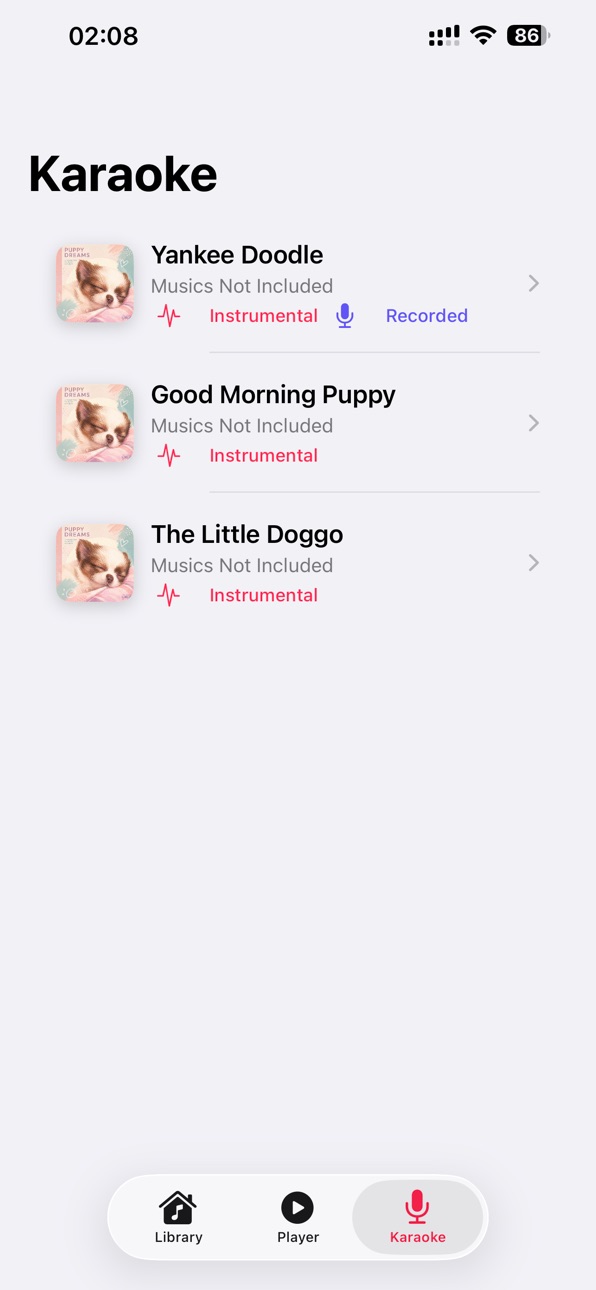
Karaoke Mode
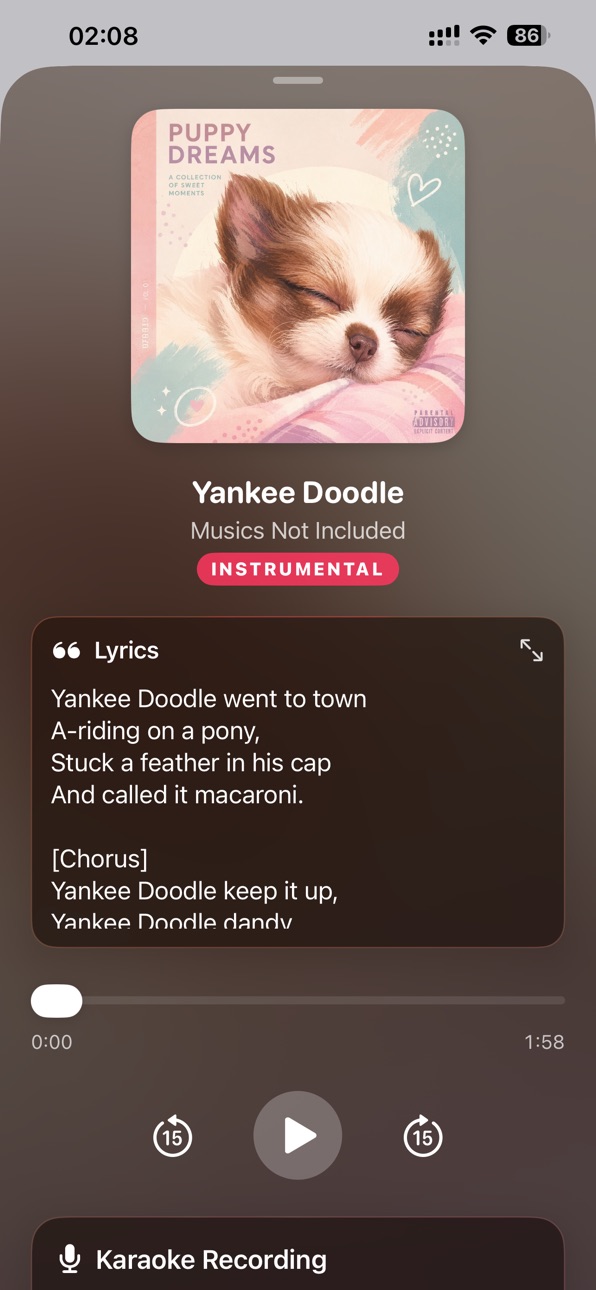
Record yourself singing along with any instrumental track. Play back your performance, re-record until you're happy, and share your voice recording with friends.
Built-In Lyrics Display
View embedded lyrics from your music files. No lyrics? Search for them directly in-app using our integrated lyrics lookup. (experimental)
Equalizer
Fine-tune your sound with bass and treble controls. Boost the low end or brighten the highs — adjustments apply in real time.
Smart Library
Browse your entire music library organized by album. Import files from Files, iCloud, or any app. Search by title, artist, or album.
Export & Share
Save processed tracks as high-quality files. Share instrumentals, vocal tracks, or karaoke recordings directly from the app.
100% Private
All processing happens on your device. Your music is never uploaded to any server.
PERFECT FOR
- Karaoke lovers — Create instant backing tracks from any song
- Musicians & producers — Isolate vocals for sampling or practice
- DJ's — Get clean instrumentals for remixes and mashups
- Language learners — Practice singing with lyrics and isolated vocals
- Content creators — Make reaction videos, covers, and tutorials
SUPPORTED FORMATS
MP3, M4A, AAC, WAV, AIFF
WHAT MAKES US DIFFERENT
- No subscription — use main features for free
- No cloud processing — works offline
- High quality — exports in high-quality AAC
- Real-time preview — hear changes instantly
- On-device AI — private and fast
Special in No-Ads Pro Version (One time purchase)
- No Ads
- Pitch-shifting — Change the keys of instruments track
Download Vocal Remover today and turn your music library into the ultimate karaoke stage!
Note: This App is an audio processing app for processing music files on your device and didn’t contain any music (Music is not included), Result may vary according to the type of music and device performance.
Accessibility
ipadiphonemacrealityDevicetvoswatch
Version history 8 versions
Build 887832376v2.0.22026-07-07 03:41:03
• Fixed audio export and playback issues — exporting tracks and seeking during playback is now smoother and more reliable.
• Improved app stability under the hood to prevent unexpected freezes.
• Fixed Analytics and Crash Reporting to respect your privacy settings properly.
Build 885669447v2.0.12026-05-16 12:30:07
- All new redesigned interface.
- New in-house developed ML-based vocal remover algorithm
- Karaoke recorder - Record your own sing-along with instrumentals track.
- Lyric display and search function.
- Equalizer for bass and treble adjustment.
Build 870116867v1.2.32024-11-01 16:55:04
- Change Banner ads position to avoid interference with navigation bar.
- Bug-fix: Improve Stability, Fix noise on first playback.
Build 851680375v1.2.22022-09-12 23:08:22
+ Bug-fix black navigation bar on some iOS 13 devices.
+ Minor bug-fix and api update.
Build 837201162v1.2.12020-08-14 23:07:53
- Add Saved tab for easy access.
- Add no music file label and instruction for opening media file.
- Saved file extension .m4a for compatiblity.
- Add share button.
Build 836523654v1.2.02020-06-22 23:51:22
- Add Browse menu for opening of media file from Downloads, iCloud and more.
- Exported file can now visible on Files app.
- Some minor bug-fixes.
Build 830285740v1.1.02019-02-14 16:04:56
+ Improved performance and stability.
+ Add Save feature.
+ Add View saved file menu for playback of previously saved file.
+ Add Privacy Policy link.
Build 827392866v1.02018-06-05 22:46:39
No pricing data captured yet — comparisons appear once the app has paid storefronts or in-app purchases.
Availability 1 of 1 storefronts
| Region | Language | Price | Ratings | Avg | Version |
|---|---|---|---|---|---|
| US | en-US | Free | 68 | 2.2 | 2.0.2 |
Change log 11 changes · US
✎
releaseNotes updated
• Fixed audio export and playback issues — exporting tracks and seeking during playback is now smoother and more reliable.
• Improved app stability under the ho
✎
description updated
Vocal Remover uses advanced on-device AI and signal processing to separate vocals from music in real time, transforming any music in your library into instant k
✎
name updated
Vocal Remover for Karaoke
◆
Version 2.0.2 released
• Fixed audio export and playback issues — exporting tracks and seeking during playback is now smoother and more reliable.
• Improved app stability under the hood to prevent unexpected freezes.
• Fixed Analytics and Crash Reporting to respe
◆
Version 2.0.1 released
- All new redesigned interface.
- New in-house developed ML-based vocal remover algorithm
- Karaoke recorder - Record your own sing-along with instrumentals track.
- Lyric display and search function.
- Equalizer for bass and treble adjustm
◆
Version 1.2.3 released
- Change Banner ads position to avoid interference with navigation bar.
- Bug-fix: Improve Stability, Fix noise on first playback.
◆
Version 1.2.2 released
+ Bug-fix black navigation bar on some iOS 13 devices.
+ Minor bug-fix and api update.
◆
Version 1.2.1 released
- Add Saved tab for easy access.
- Add no music file label and instruction for opening media file.
- Saved file extension .m4a for compatiblity.
- Add share button.
◆
Version 1.2.0 released
- Add Browse menu for opening of media file from Downloads, iCloud and more.
- Exported file can now visible on Files app.
- Some minor bug-fixes.
◆
Version 1.1.0 released
+ Improved performance and stability.
+ Add Save feature.
+ Add View saved file menu for playback of previously saved file.
+ Add Privacy Policy link.
◆
Version 1.0 released