Home › Education

 US
US
1 of 1 storefronts
Content in en-US
Content in en-US
Information
Preview 2 platforms
iPhone 6 images


iPad 6 images


What’s New Version 1.1.4
1. Modified the discovered issues
2. Added support for new sensors
3. Optimized user experience
Description
一、Basic Description
1、This software is mainly used in the digital experiment of primary and middle schools, including physical, chemical and biological experiments.
2、To work properly, the software needs to be used with sensors and bluetooth transmitter modules (sensors are connected to bluetooth launch modules). The sensor data is sent to the receiving end of the iPad or iPhone via a connected bluetooth module.
3、The software operates on portable mobile devices such as iphone or ipad, which has bluetooth low power consumption of BLE 4.0.
4、The overall design of this software adopts the Qt5.12.0 technical framework and Objective-C mixing method.
二、Use Instructions
1、Start the App software,scan the QR code on the back of the wireless transmitter module, and establish the connection between the mobile terminal and the module.
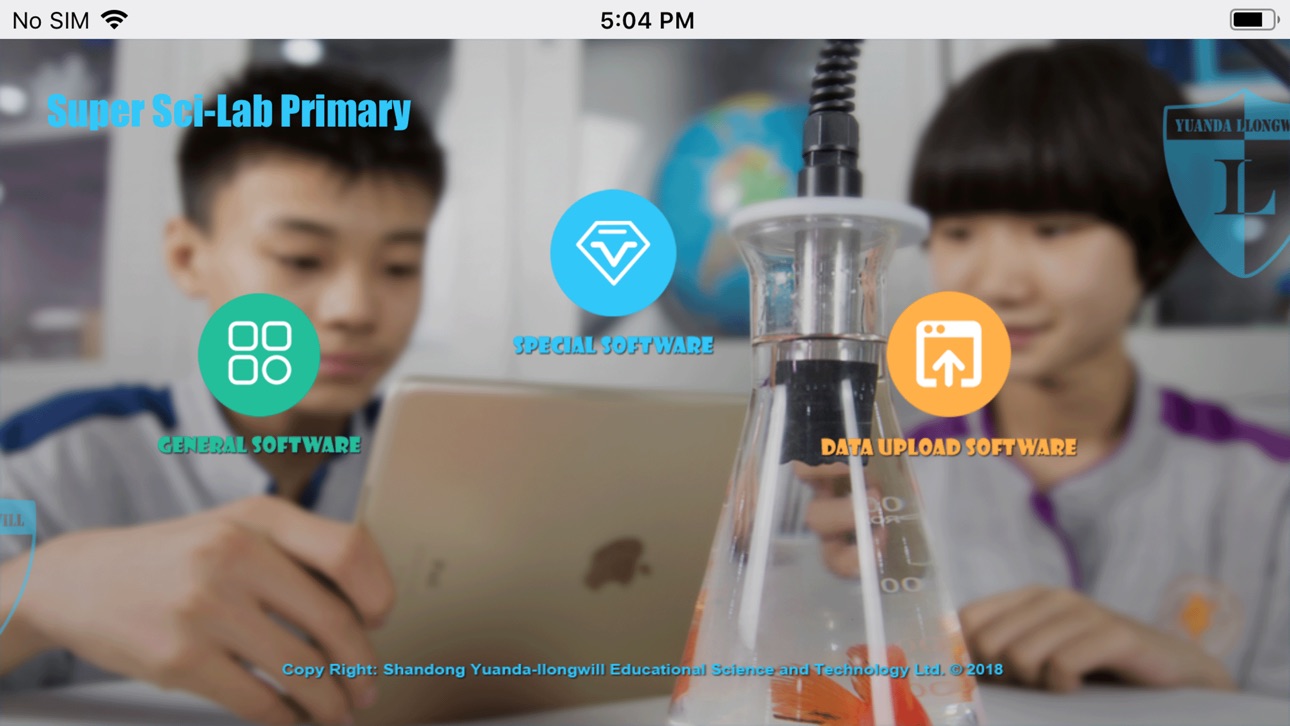
2、There are three kinds of software in App: general, special, and data upload software.
• General software
The general software has a "one-to-several" function, which supports four-channel parallel data logging and data recording, calculating, and graph analysis, without shifting the software interface.
• The special software
The special software is a software package composed of multiple independent software interfaces. Each independent software interface corresponds to a scientific experiment or inquiry project. According to project requirements, special software presets the corresponding operation steps and sequence. The current list of specific items for specific software is as follows:
• Data Upload
The data stored in the module can be uploaded to the mobile terminal by the data upload software.
For easy control, it is recommended that the software be installed on the device with a screen of 4.7 inches and above.
Please ensure that the operating system version is iOS 11.0 or above.
Accessibility
ipadiphonemacrealityDevicetvoswatch
Version history 23 versions
Build 871165284v1.1.42024-12-16 09:54:01
1. Modified the discovered issues
2. Added support for new sensors
3. Optimized user experience
Build 869581680v1.1.32024-10-09 14:21:55
Optimize user experience
Build 865457828v1.1.22024-06-07 09:56:04
Modify software features to optimize user experience
Build 861290153v1.1.12023-11-07 11:28:20
Modified the data function bug of some sensors
Build 860811005v1.1.02023-10-24 13:40:54
1. Added support for multiple sensors.
2. Upgrade software architecture to improve software performance.
3. Modify the user interface to improve user interaction.
Build 844030256v1.0.172021-09-18 10:36:29
1. Modify existing problems
2. Add new sensor
Build 843793770v1.0.162021-08-26 18:47:24
1. Added functional support for data display module v3.0
2. Added support for new sensors
3. The bug that caused the error was modified
Build 839695372v1.0.152021-02-03 22:54:17
1. New features added
2. Modify the bug of the software
Build 837387857v1.0.142020-08-17 11:09:06
The default color of real-time data line is modified to facilitate users to observe data changes.
Build 837363496v1.0.132020-08-14 20:46:35
1. Changed the default color and thickness of composite lines
2. The thickness of real-time data line is modified
Build 830591916v1.0.122019-03-14 16:56:55
Fix problems and optimize user experience
Build 830028804v1.0.112019-01-22 22:48:38
Fix problems and optimize user experience
Build 829172957v1.0.102019-01-09 20:04:18
Fix problems and optimize user experience
Build 828131654v1.0.92018-08-07 13:05:57
Fix problems and optimize user experience
Build 828105343v1.0.82018-08-03 21:40:24
Fix problems and optimize user experience
Build 827843759v1.0.72018-07-18 19:30:37
Fix problems and optimize user experience
Build 827409083v1.0.62018-06-04 19:59:20
Fix problems and optimize user experience
Build 827402434v1.0.52018-06-03 22:32:56
Fix problems and optimize user experience
Build 827381485v1.0.42018-06-01 16:24:15
Fix problems and optimize user experience
Build 827353248v1.0.32018-05-30 16:35:49
Fix problems and optimize user experience
Build 827317706v1.0.22018-05-29 17:50:09
Fix problems and optimize user experience
Build 827254376v1.0.12018-05-27 20:09:24
Fix problems and optimize user experience
Build 827216001v1.0.02018-05-22 22:34:12
No pricing data captured yet — comparisons appear once the app has paid storefronts or in-app purchases.
Availability 1 of 1 storefronts
| Region | Language | Price | Ratings | Avg | Version |
|---|---|---|---|---|---|
| US | en-US | Free | 0 | — | 1.1.4 |
Change log 26 changes · US
✎
releaseNotes updated
1. Modified the discovered issues
2. Added support for new sensors
3. Optimized user experience
✎
description updated
一、Basic Description
1、This software is mainly used in the digital experiment of primary and middle schools, including physical, chemical and biol
✎
name updated
Sci-Lab Primary
◆
Version 1.1.4 released
1. Modified the discovered issues
2. Added support for new sensors
3. Optimized user experience
◆
Version 1.1.3 released
Optimize user experience
◆
Version 1.1.2 released
Modify software features to optimize user experience
◆
Version 1.1.1 released
Modified the data function bug of some sensors
◆
Version 1.1.0 released
1. Added support for multiple sensors.
2. Upgrade software architecture to improve software performance.
3. Modify the user interface to improve user interaction.
◆
Version 1.0.17 released
1. Modify existing problems
2. Add new sensor
◆
Version 1.0.16 released
1. Added functional support for data display module v3.0
2. Added support for new sensors
3. The bug that caused the error was modified
◆
Version 1.0.15 released
1. New features added
2. Modify the bug of the software
◆
Version 1.0.14 released
The default color of real-time data line is modified to facilitate users to observe data changes.
◆
Version 1.0.13 released
1. Changed the default color and thickness of composite lines
2. The thickness of real-time data line is modified
◆
Version 1.0.12 released
Fix problems and optimize user experience
◆
Version 1.0.11 released
Fix problems and optimize user experience
◆
Version 1.0.10 released
Fix problems and optimize user experience
◆
Version 1.0.9 released
Fix problems and optimize user experience
◆
Version 1.0.8 released
Fix problems and optimize user experience
◆
Version 1.0.7 released
Fix problems and optimize user experience
◆
Version 1.0.6 released
Fix problems and optimize user experience
◆
Version 1.0.5 released
Fix problems and optimize user experience
◆
Version 1.0.4 released
Fix problems and optimize user experience
◆
Version 1.0.3 released
Fix problems and optimize user experience
◆
Version 1.0.2 released
Fix problems and optimize user experience
◆
Version 1.0.1 released
Fix problems and optimize user experience
◆
Version 1.0.0 released