Home › Entertainment

 US
US
USen-US AGNot Available
 AINot Available
 AONot Available
 ARNot Available
 ATNot Available
 BBNot Available
 BENot Available
 BFNot Available
 BGNot Available
 BJNot Available
 BRNot Available
 BSNot Available
 BYNot Available
 BZNot Available
 CDNot Available
 CGNot Available
 CHNot Available
 CINot Available
 CLNot Available
 CMNot Available
 CONot Available
 CVNot Available
 CZNot Available
 DENot Available
 DKNot Available
 DMNot Available
 DZNot Available
 ECNot Available
 EENot Available
 ESNot Available
 FINot Available
 FRNot Available
 GANot Available
 GDNot Available
 GHNot Available
 GMNot Available
 GRNot Available
 GWNot Available
 GYNot Available
 HRNot Available
 HUNot Available
 ISNot Available
 ITNot Available
 JMNot Available
 KENot Available
 KNNot Available
 KYNot Available
 LCNot Available
 LRNot Available
 LTNot Available
 LUNot Available
 LVNot Available
 LYNot Available
 MANot Available
 MGNot Available
 MLNot Available
 MUNot Available
 MWNot Available
 MXNot Available
 MZNot Available
 NANot Available
 NENot Available
 NGNot Available
 NLNot Available
 NONot Available
 PENot Available
 PLNot Available
 PTNot Available
 RONot Available
 RSNot Available
 RUNot Available
 RWNot Available
 SCNot Available
 SENot Available
 SINot Available
 SKNot Available
 SLNot Available
 SNNot Available
 SRNot Available
 STNot Available
 SZNot Available
 TDNot Available
 TNNot Available
 TTNot Available
 TZNot Available
 UANot Available
 UGNot Available
 VCNot Available
 ZWNot Available
1 of 90 storefronts
Content in en-US
Content in en-US
Information
Preview 2 platforms
iPhone 6 images


iPad 6 images




What’s New Version 8.4.1
We're constantly updating our app to help ensure you have the best viewing experience. In this release, we focused on improvements and bug fixes.
Description
Verizon Fios TV Mobile lets you watch TV from virtually anywhere with a Fios TV subscription.
With the app, you can:
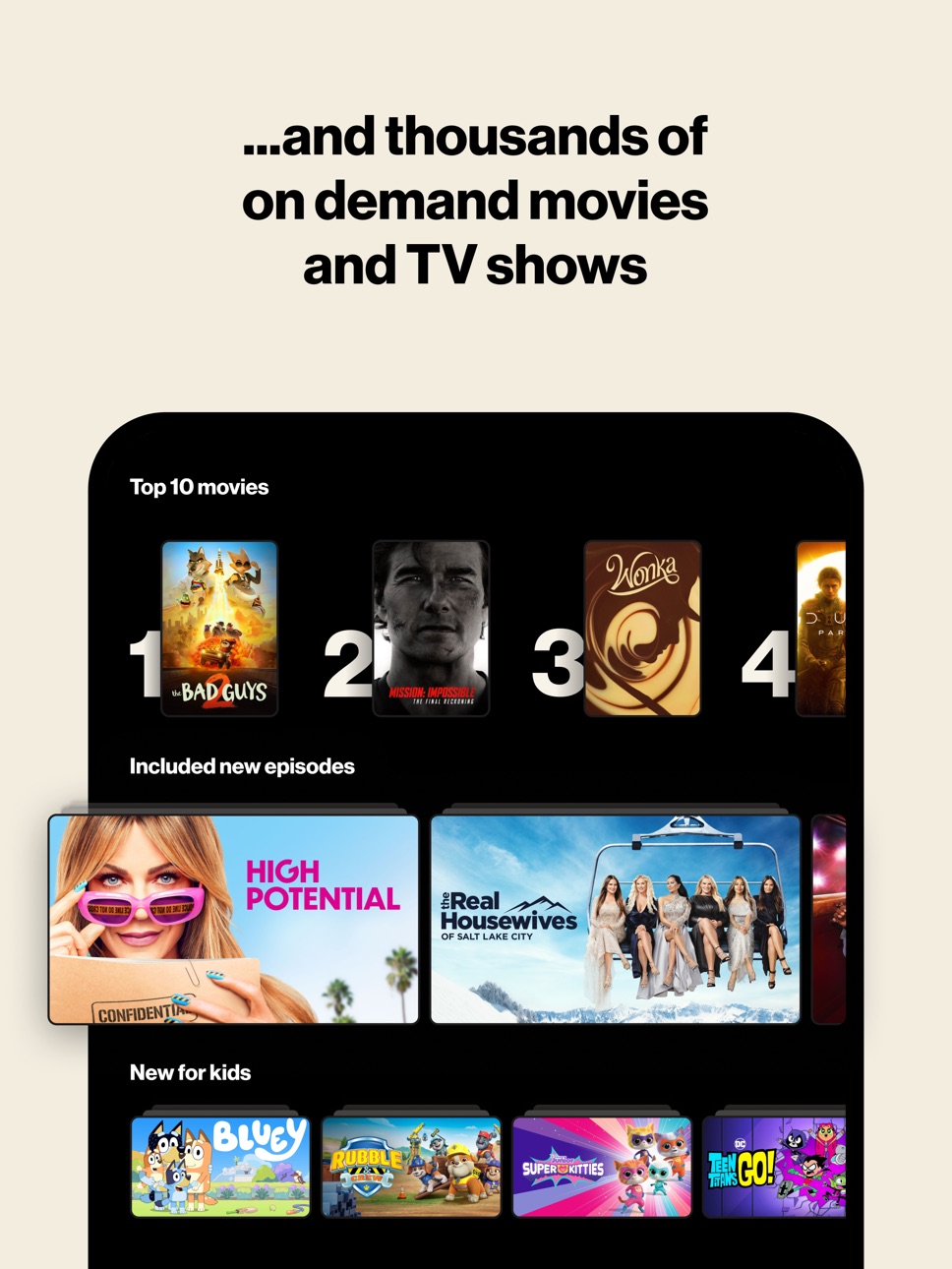
- Choose from hundreds of live TV channels and stream thousands of On
Demand movies and shows.
- Search for your favorite entertainment easily. Filter by genre, ratings, favorite
channels and more.
- View your personal library of DVR recordings, On Demand purchases,
downloads, bookmarks and more. Get recommendations for shows and
movies you’ll love.
- Download content to watch offline or stream data-free as a Verizon Wireless
Customer (data-free offer not available in California).
- Control your TV through the app to play content, manage your DVR, watch
recordings and more.
Download the app and start streaming instantly on your mobile device, with a Fios TV subscription.
*The Fios TV Mobile app is included with the Fios TV subscription.
Req. compatible device and Fios® TV. Content restrictions may apply. Fios Internet req’d for in-home use. Full channel access and DVR streaming require Fios Multi-Room DVR Enhanced or Premium Service. Max. combined 4 simultaneous Live TV and/or DVR streams per media server. Verizon Wireless Data-Free Streaming (not available in California): Req. postpay 4G LTE service. Non-streaming activity and app diagnostics (e.g., app downloads, starting/restarting the app, going off airplane mode and transitioning from Wi-Fi to 4G LTE) will incur data charges. For Verizon Unlimited customers, app data usage will be counted, not billed.
Early access to Fios TV Mobile app begins with activation & ends upon installation or in 14 days, whichever comes first.
Remote control functionality requires use of Fios® router & HD set-top box.
CA Privacy Notice https://www.verizon.com/about/privacy/full-privacy-policy?scrollto=index-1#acc-item-55
Please note: This app features Nielsen’s proprietary measurement software which contributes to market research, like Nielsen’s TV Ratings. Please see http://www.nielsen.com/digitalprivacy for more information.
Accessibility
ipadiphonemacrealityDevicetvoswatch
Version history 25 versions
Build 884077787v8.4.12026-04-08 20:21:36
We're constantly updating our app to help ensure you have the best viewing experience. In this release, we focused on improvements and bug fixes.
Build 878808657v8.42025-11-18 14:44:02
We're constantly updating our app to help ensure you have the best viewing experience. In this release, we have added a new 'Help Me Decide' feature, made performance improvements, and implemented bug fixes.
Build 877558323v8.2.12025-08-27 15:23:15
Bug fixes and improvement.
Build 876264872v8.22025-07-14 14:42:32
We're constantly updating our app to help ensure you have the best viewing experience. In this release, we added new Top 10 rails, made improvements, and implemented bug fixes.
Build 873877676v8.0.12025-04-15 19:28:30
We're constantly updating our app to help ensure you have the best viewing experience. In this release, we added a few new features, made improvements, and implemented bug fixes.
Set a reminder so that you don’t forget when to tune in to your program
We added more ways for you to manage how kids view content
Take a tour and learn about your Fios TV features
Improvements and bug fixes
Build 872571845v8.02025-03-24 12:32:54
We're constantly updating our app to help ensure you have the best viewing experience. In this release, we added a few new features, made improvements, and implemented bug fixes.
Set a reminder so that you don’t forget when to tune in to your program
We added more ways for you to manage how kids view content
Take a tour and learn about your Fios TV features
Improvements and bug fixes
Build 872447896v7.4.12025-02-17 14:48:30
Big fixing and improvements.
Build 869134387v7.42024-11-14 14:01:42
We're constantly updating our app to help ensure you have the best viewing experience. In this release, we added a few new features, made improvements, and implemented bug fixes.
You can now continue watching using Picture in Picture (PIP) mode
Check out the new Sports page for all your favorite sports and game-defining moments
Explore the new Kids page, a friendly experience for young viewers
Rate your movie to help us make better recommendations for you
Bug fixes and improvements
Build 868725625v7.2.22024-09-09 15:49:52
Bug fixes and improvement.
Build 868238933v7.2.12024-08-22 02:34:09
Bug fixes and improvement.
Build 867584502v7.22024-08-05 12:28:21
We're constantly updating our app to help ensure you have the best viewing experience. In this release, we focused on improvements and bug fixes.
Build 866508076v7.0.12024-06-10 15:35:14
We're constantly making improvements to help ensure you have the best viewing experience. In this release we focused on bug fixes.
Build 864830190v7.02024-05-06 16:29:15
Try a 48-hour ‘Free Preview’ of premium channels like HBO, Showtime, and Starz
Personalized ‘Because you watched’ recommendations
Improved Channel Guide filtering.
All playback screens now include a ‘Mute’ button.
Enhanced troubleshooting flows.
Now add Fios TV Mobile as a widget on your device.
Bug fixes and improvements.
Build 861448098v6.32023-11-29 15:05:36
Guide channel landing improvements.
New “last” button on player screen allows user to quickly switch between channels.
Playback error message now includes a report button.
Additional streams can support pause, rewind, and fast forward of live channels.
DVR support enhancements.
Bug Fixes and Improvements.
Build 858713948v6.22023-08-03 20:24:08
Bug fixes and improvement.
Build 857961075v6.1.52023-06-28 15:24:53
Bug fixes and improvements.
Build 857392884v6.1.42023-05-30 13:59:02
Bug fixes and improvements.
Build 856513079v6.1.32023-04-24 20:49:26
Bug fixes and improvement.
Build 856069467v6.1.12023-04-05 19:49:34
Bug fixes and improvement.
Build 855694790v6.12023-03-22 18:04:13
Improved Guide navigation and control.
Ability to turn on/off the Guide mini-player.
Introducing the My Stuff section to browse recordings, purchases, rentals, watchlist and downloads all in one place.
Bug Fixes and Improvement.
Build 854810640v6.0.42023-02-08 20:09:38
Sleek new user interface.
Enhanced navigation and functionality.
On Now features in-guide mini-player to watch tv while you scroll.
Tap to set favorite channels in the guide.
Stream from your DVR and manage DVR recordings.
DVR accessible via My Recordings rail on Home or in Settings.
Download movies and shows.
View storage capacity in Downloads.
Bug fixes and improvement.
Build 854301474v6.0.32023-01-10 18:50:29
Sleek new user interface.
Enhanced navigation and functionality.
On Now features in-guide mini-player to watch tv while you scroll.
Tap to set favorite channels in the guide.
Stream from your DVR and manage DVR recordings.
DVR accessible via My Recordings rail on Home or in Settings.
Download movies and shows.
View storage capacity in Downloads.
Bug fixes and improvement.
Build 853606704v6.0.12022-12-12 16:58:55
Sleek new user interface.
Enhanced navigation and functionality.
On Now features in-guide mini-player to watch tv while you scroll.
Tap to set favorite channels in the guide.
Stream from your DVR and manage DVR recordings.
DVR accessible via My Recordings rail on Home or in Settings.
Download movies and shows.
View storage capacity in Downloads.
Bug fixes and improvement.
Build 852515159v6.02022-11-16 21:00:58
Sleek new user interface.
Enhanced navigation and functionality.
On Now features in-guide mini-player to watch tv while you scroll.
Tap to set favorite channels in the guide.
Stream from your DVR and manage DVR recordings.
DVR accessible via My Recordings rail on Home or in Settings.
Download movies and shows.
View storage capacity in Downloads.
Build 851686645v5.22022-08-29 19:02:40
Improvements & Bug Fixing.
No pricing data captured yet — comparisons appear once the app has paid storefronts or in-app purchases.
Availability 1 of 90 storefronts
| Region | Language | Price | Ratings | Avg | Version |
|---|---|---|---|---|---|
| US | en-US | Free | 332.6k | 4.5 | 8.4.1 |
Not available in: AG, AI, AO, AR, AT, BB, BE, BF, BG, BJ, BR, BS, BY, BZ, CD, CG, CH, CI, CL, CM, CO, CV, CZ, DE, DK, DM, DZ, EC, EE, ES, FI, FR, GA, GD, GH, GM, GR, GW, GY, HR, HU, IS, IT, JM, KE, KN, KY, LC, LR, LT, LU, LV, LY, MA, MG, ML, MU, MW, MX, MZ, NA, NE, NG, NL, NO, PE, PL, PT, RO, RS, RU, RW, SC, SE, SI, SK, SL, SN, SR, ST, SZ, TD, TN, TT, TZ, UA, UG, VC, ZW
Change log 28 changes · US
✎
releaseNotes updated
We're constantly updating our app to help ensure you have the best viewing experience. In this release, we focused on improvements and bug fixes.
✎
description updated
Verizon Fios TV Mobile lets you watch TV from virtually anywhere with a Fios TV subscription.
With the app, you can:
- Choose from hundreds of live TV channels
✎
name updated
Fios TV Mobile
◆
Version 8.4.1 released
We're constantly updating our app to help ensure you have the best viewing experience. In this release, we focused on improvements and bug fixes.
◆
Version 8.4 released
We're constantly updating our app to help ensure you have the best viewing experience. In this release, we have added a new 'Help Me Decide' feature, made performance improvements, and implemented bug fixes.
◆
Version 8.2.1 released
Bug fixes and improvement.
◆
Version 8.2 released
We're constantly updating our app to help ensure you have the best viewing experience. In this release, we added new Top 10 rails, made improvements, and implemented bug fixes.
◆
Version 8.0.1 released
We're constantly updating our app to help ensure you have the best viewing experience. In this release, we added a few new features, made improvements, and implemented bug fixes.
Set a reminder so that you don’t forget when to tune in to y
◆
Version 8.0 released
We're constantly updating our app to help ensure you have the best viewing experience. In this release, we added a few new features, made improvements, and implemented bug fixes.
Set a reminder so that you don’t forget when to tune in to y
◆
Version 7.4.1 released
Big fixing and improvements.
◆
Version 7.4 released
We're constantly updating our app to help ensure you have the best viewing experience. In this release, we added a few new features, made improvements, and implemented bug fixes.
You can now continue watching using Picture in Picture (PIP)
◆
Version 7.2.2 released
Bug fixes and improvement.
◆
Version 7.2.1 released
Bug fixes and improvement.
◆
Version 7.2 released
We're constantly updating our app to help ensure you have the best viewing experience. In this release, we focused on improvements and bug fixes.
◆
Version 7.0.1 released
We're constantly making improvements to help ensure you have the best viewing experience. In this release we focused on bug fixes.
◆
Version 7.0 released
Try a 48-hour ‘Free Preview’ of premium channels like HBO, Showtime, and Starz
Personalized ‘Because you watched’ recommendations
Improved Channel Guide filtering.
All playback screens now include a ‘Mute’ button.
Enhanced troubleshooting
◆
Version 6.3 released
Guide channel landing improvements.
New “last” button on player screen allows user to quickly switch between channels.
Playback error message now includes a report button.
Additional streams can support pause, rewind, and fast forward of li
◆
Version 6.2 released
Bug fixes and improvement.
◆
Version 6.1.5 released
Bug fixes and improvements.
◆
Version 6.1.4 released
Bug fixes and improvements.
◆
Version 6.1.3 released
Bug fixes and improvement.
◆
Version 6.1.1 released
Bug fixes and improvement.
◆
Version 6.1 released
Improved Guide navigation and control.
Ability to turn on/off the Guide mini-player.
Introducing the My Stuff section to browse recordings, purchases, rentals, watchlist and downloads all in one place.
Bug Fixes and Improvement.
◆
Version 6.0.4 released
Sleek new user interface.
Enhanced navigation and functionality.
On Now features in-guide mini-player to watch tv while you scroll.
Tap to set favorite channels in the guide.
Stream from your DVR and manage DVR recordings.
DVR accessible vi
◆
Version 6.0.3 released
Sleek new user interface.
Enhanced navigation and functionality.
On Now features in-guide mini-player to watch tv while you scroll.
Tap to set favorite channels in the guide.
Stream from your DVR and manage DVR recordings.
DVR accessible vi
◆
Version 6.0.1 released
Sleek new user interface.
Enhanced navigation and functionality.
On Now features in-guide mini-player to watch tv while you scroll.
Tap to set favorite channels in the guide.
Stream from your DVR and manage DVR recordings.
DVR accessible v
◆
Version 6.0 released
Sleek new user interface.
Enhanced navigation and functionality.
On Now features in-guide mini-player to watch tv while you scroll.
Tap to set favorite channels in the guide.
Stream from your DVR and manage DVR recordings.
DVR accessible vi
◆
Version 5.2 released
Improvements & Bug Fixing.