Home › Lifestyle

 US
US
1 of 1 storefronts
Content in en-US
Content in en-US
Information
Preview 2 platforms
iPhone 6 images


iPad 6 images



What’s New Version 7.0.9
Expanded Scene Sequencing: We have significantly upgraded scene automation. Previously, users were limited to adding only remotes to a scene sequence. You can now add, sequence, and configure delays for all supported smart node devices, including lighting, tunable switches, curtains, and door locks.
Description
Introducing SmartNode, an application that lets you turn off every Light/Fan in your home, dim each light, schedule the lights, Lock the appliances and monitor power usage for each outlet from your mobile phone.
SmartNode is a smart Wi-Fi-enabled device that lets you control your lights and electronic devices from your smartphone, anywhere, anytime.
The SmartNode App communicates via Wi-Fi or 3G/4G/5G to keep you connected while at home, at the office or anywhere in the world.
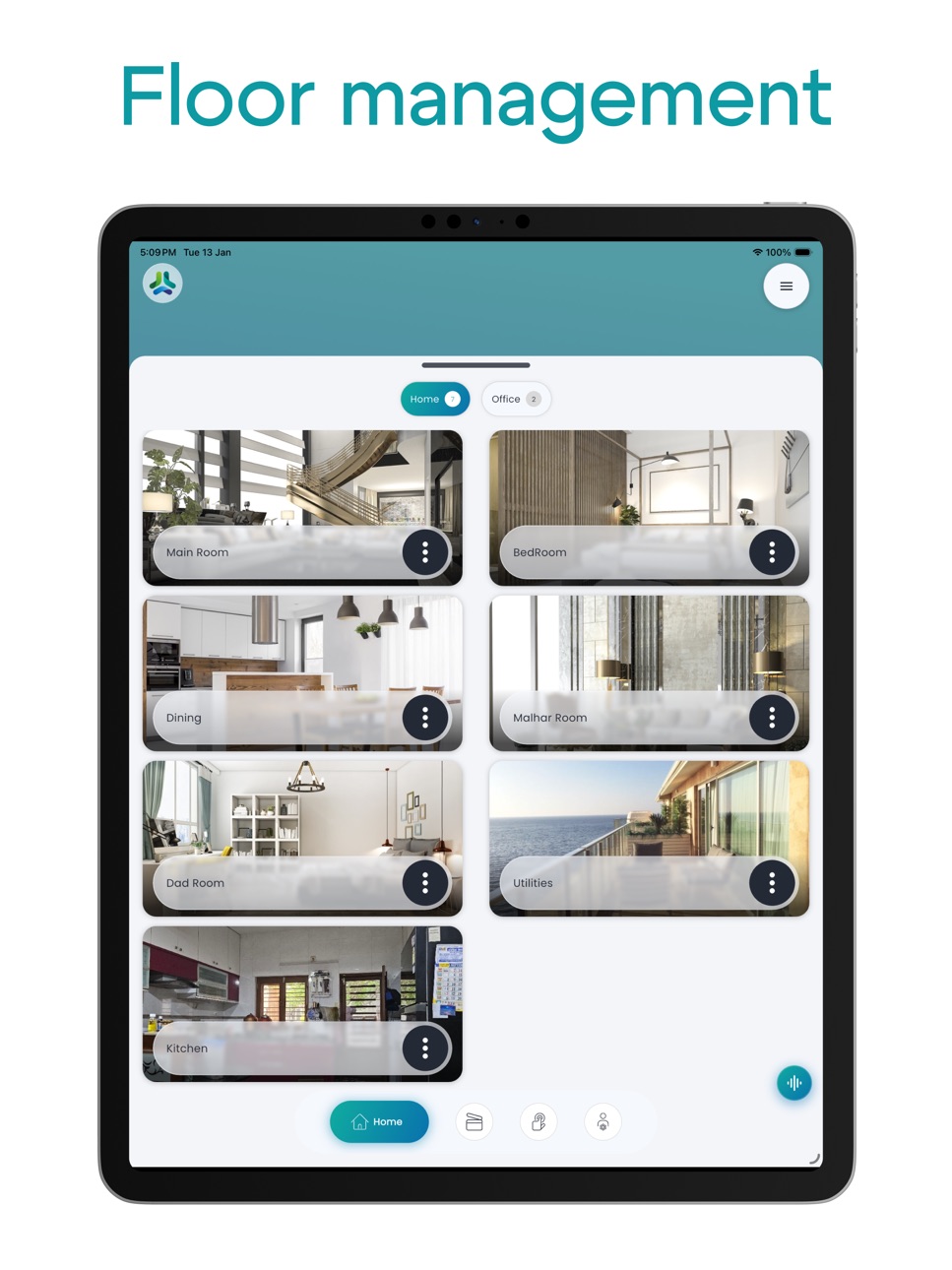
You can create Groups like Home, Office, Bedroom, Main-hall and many others with SmartNode. Add most used switches into one group and you can control all on them on a single dashboard.
We also have series of Touch enabled switches in different design.
Our products help you to simplify and speed up certain activities of your life. It is a significant step in making a home, a true smart home.
Go ahead, purchase our hardware and download the free mobile app and take the control of your whole house in your hands.
Accessibility
ipadiphonemacrealityDevicetvoswatch
Version history 25 versions
Build 887585574v7.0.92026-06-29 19:16:24
Expanded Scene Sequencing: We have significantly upgraded scene automation. Previously, users were limited to adding only remotes to a scene sequence. You can now add, sequence, and configure delays for all supported smart node devices, including lighting, tunable switches, curtains, and door locks.
Build 886879564v7.0.82026-06-12 21:06:50
Experience improvements and bug fixes across the app.
Build 884844264v7.0.72026-04-23 20:33:44
Streamlining performance and resolving minor issues.
Build 884492767v7.0.62026-04-14 19:14:25
Streamlining performance and resolving minor issues.
Build 884235051v7.0.52026-04-07 18:49:24
Performance enhancement and stability improvements
Build 883673449v7.0.42026-03-23 21:57:57
Performance enhancement and stability improvements
Build 883467584v7.0.32026-03-17 22:31:19
Performance enhancement and stability improvements
Build 883313666v7.0.22026-03-12 23:45:14
Performance enhancement and stability improvements
Build 882054552v7.0.12026-02-02 17:03:09
- Performance enhancement and stability improvements
Build 881563374v7.0.02026-01-18 09:53:04
We've given SmartNode a complete makeover!
- Brand new design – cleaner, faster, more intuitive
- Smoother interactions and improved reliability
- Enhanced performance for a faster experience
- NEW: Bolt series support
- Bug fixes and stability improvements
Build 878200035v6.0.412025-09-18 08:02:28
- Bug fixes and enhancements.
Build 877895497v6.0.402025-09-08 14:30:43
Bug fixes and performance improvements.
Build 877500942v6.0.392025-08-24 08:46:12
Bug fixes and performance improvements.
Build 876506034v6.0.382025-07-18 20:57:28
• Scene Controller Enhancements: Now supporting "On Tap" and "On Release" actions.
• Smarter Curtain Control: New Auto On/Off, Dead Time, and Motor Speed Regulation.
• Improved User Customisation: Mute Device Buzzer and configure Touch Indications.
• Seamless AC Integration: AC State Sync with your HomeLink device.
• Enhanced DALI Management: Display DALI scenes linked to Global scenes, plus a redesigned DALI configuration screen also added rename directly in DALI configuration page.
• Fresh Look: New icons added for switches.
Build 872988445v6.0.372025-03-05 13:08:38
- Mid-graph point configuration
- Flexible switch-on dimmer values
- Easy device replacement functionality
- Touch and buzzer configuration mechanisms
- Comprehensive auto-control features (on/off, delay management)
- DALI scene RGB support
- Global scene DALI switches support
- Performance & Stability Improvements
Build 871519286v6.0.362025-01-03 21:35:21
Optimised performance and reliability
Build 871373277v6.0.352024-12-26 11:38:10
- Dual DALI support
- Performance enhancement and bug fixes
Build 869944300v6.0.342024-10-29 13:59:49
- Stability improvements
- Performance enhancement
Build 869415454v6.0.332024-10-01 22:26:30
- Fixed various bugs for increased stability
- Enhanced app performance for faster operation
Build 868758321v6.0.322024-09-05 02:53:55
- New and improved DALI schedule interface
- Favourite switches now show room names for easier identification
- Added room names to scenes in the automation section
- Redesigned tunable slider for better user experience
- New universal tunning feature for enhanced lighting control
Build 867781723v6.0.312024-07-27 20:11:11
- DALI Universal Dimming Support
- Support for DALI RGB
- Introduce the Apply to All feature for DALI Configuration
- Minor Bugs Fixed.
Build 866699232v6.0.292024-06-19 19:13:53
- Integrated DALI Flush Mount: Added support for DALI Flush Mount for better lighting control.
- Curtain Flow Invert: Added support for curtain flow invert.
- Improved Performance: We've optimised the app for faster and smoother performance.
Build 866110959v6.0.262024-05-21 22:37:58
- Redesigned DALI configuration screen for easier customisation and setup
- Support for iOS 17's interactive widgets for scenes and switch executions directly from the home screen, with customisable widget
- Bug fixes and performance improvements to enhance your Dali experience
Build 865666745v6.0.252024-05-03 19:16:07
- Stay informed with notifications for DALI switches.
- Track your DALI executions with the added execution history feature. Now you
can easily review and manage your past DALI operations.
- Introducing the Switch Execution Widget – Control your lighting switches with a single tap from your home screen.
- Performance optimisations and bug fixes for a smoother user experience.
Build 865305975v6.0.242024-04-18 18:43:09
- Implemented support for the new scene controller
- Various bug fixes and performance enhancements for a smoother app operation
No pricing data captured yet — comparisons appear once the app has paid storefronts or in-app purchases.
Availability 1 of 1 storefronts
| Region | Language | Price | Ratings | Avg | Version |
|---|---|---|---|---|---|
| US | en-US | Free | 1 | 5.0 | 7.0.9 |
Change log 28 changes · US
✎
releaseNotes updated
Expanded Scene Sequencing: We have significantly upgraded scene automation. Previously, users were limited to adding only remotes to a scene sequence. You can n
✎
description updated
Introducing SmartNode, an application that lets you turn off every Light/Fan in your home, dim each light, schedule the lights, Lock the appliances and monitor
✎
name updated
Smart Node Automation
◆
Version 7.0.9 released
Expanded Scene Sequencing: We have significantly upgraded scene automation. Previously, users were limited to adding only remotes to a scene sequence. You can now add, sequence, and configure delays for all supported smart node devices, inc
◆
Version 7.0.8 released
Experience improvements and bug fixes across the app.
◆
Version 7.0.7 released
Streamlining performance and resolving minor issues.
◆
Version 7.0.6 released
Streamlining performance and resolving minor issues.
◆
Version 7.0.5 released
Performance enhancement and stability improvements
◆
Version 7.0.4 released
Performance enhancement and stability improvements
◆
Version 7.0.3 released
Performance enhancement and stability improvements
◆
Version 7.0.2 released
Performance enhancement and stability improvements
◆
Version 7.0.1 released
- Performance enhancement and stability improvements
◆
Version 7.0.0 released
We've given SmartNode a complete makeover!
- Brand new design – cleaner, faster, more intuitive
- Smoother interactions and improved reliability
- Enhanced performance for a faster experience
- NEW: Bolt series support
- Bug fixes and sta
◆
Version 6.0.41 released
- Bug fixes and enhancements.
◆
Version 6.0.40 released
Bug fixes and performance improvements.
◆
Version 6.0.39 released
Bug fixes and performance improvements.
◆
Version 6.0.38 released
• Scene Controller Enhancements: Now supporting "On Tap" and "On Release" actions.
• Smarter Curtain Control: New Auto On/Off, Dead Time, and Motor Speed Regulation.
• Improved User Customisation: Mute Device Buzzer and configure Touch Indi
◆
Version 6.0.37 released
- Mid-graph point configuration
- Flexible switch-on dimmer values
- Easy device replacement functionality
- Touch and buzzer configuration mechanisms
- Comprehensive auto-control features (on/off, delay management)
- DALI scene RGB support
◆
Version 6.0.36 released
Optimised performance and reliability
◆
Version 6.0.35 released
- Dual DALI support
- Performance enhancement and bug fixes
◆
Version 6.0.34 released
- Stability improvements
- Performance enhancement
◆
Version 6.0.33 released
- Fixed various bugs for increased stability
- Enhanced app performance for faster operation
◆
Version 6.0.32 released
- New and improved DALI schedule interface
- Favourite switches now show room names for easier identification
- Added room names to scenes in the automation section
- Redesigned tunable slider for better user experience
- New universal tunn
◆
Version 6.0.31 released
- DALI Universal Dimming Support
- Support for DALI RGB
- Introduce the Apply to All feature for DALI Configuration
- Minor Bugs Fixed.
◆
Version 6.0.29 released
- Integrated DALI Flush Mount: Added support for DALI Flush Mount for better lighting control.
- Curtain Flow Invert: Added support for curtain flow invert.
- Improved Performance: We've optimised the app for faster and smoother performance
◆
Version 6.0.26 released
- Redesigned DALI configuration screen for easier customisation and setup
- Support for iOS 17's interactive widgets for scenes and switch executions directly from the home screen, with customisable widget
- Bug fixes and performance improv
◆
Version 6.0.25 released
- Stay informed with notifications for DALI switches.
- Track your DALI executions with the added execution history feature. Now you
can easily review and manage your past DALI operations.
- Introducing the Switch Execution Widget – Contro
◆
Version 6.0.24 released
- Implemented support for the new scene controller
- Various bug fixes and performance enhancements for a smoother app operation