Home › Utilities

 US
US
1 of 1 storefronts
Content in en-US
Content in en-US
Information
Preview 2 platforms
iPhone 8 images




iPad 1 image

What’s New Version 4.5.0
- Fixed some issues.
Description
The Cramer Connect app allows full connectivity with your Robotic Mowers, Ride on mowers and Bluetooth batteries. Control, stay informed, and get an overview of all your Cramer smart products.
Product Remote Control
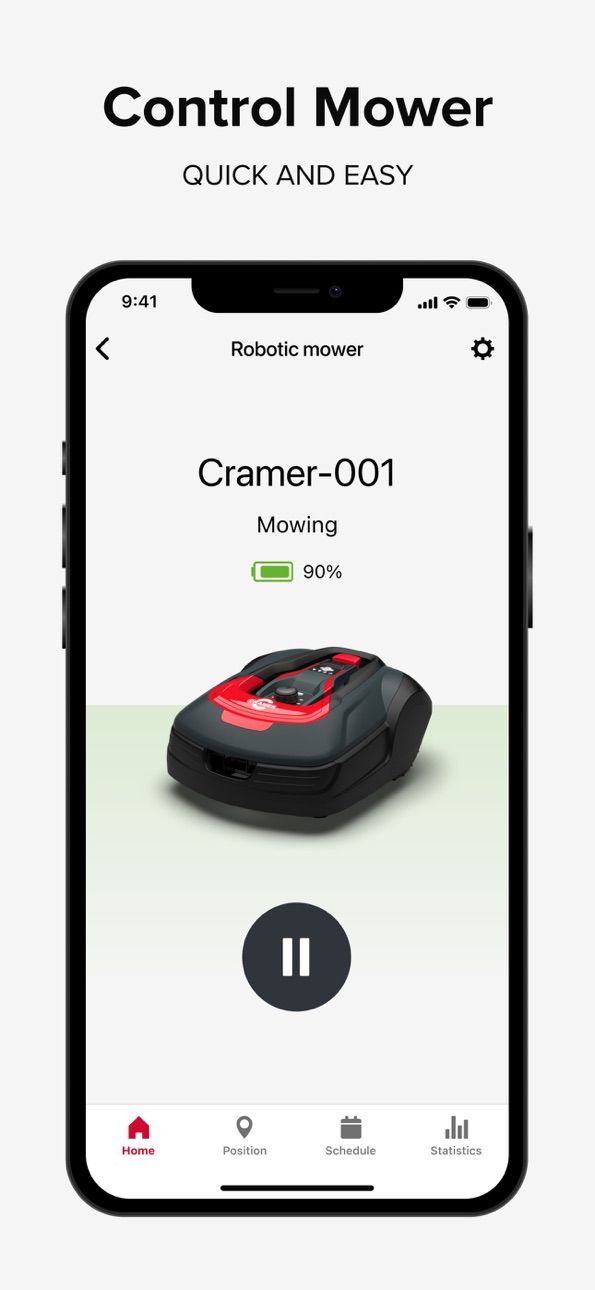
Take control of your Cramer product from a smartphone with Cramer Connect. Access your product through the intuitive mobile App to easily check current product status and access all relevant product information.
The Cramer ride on mowers and certain robotic mowers feature an onboard 2G/4G connection giving you remote access to the product from anywhere in the world.
• Send mowing commands* (pause, park, and resume robotic mowers)
• Set a mowing schedule* (choose days and times to suit you)
• View product settings and status
• Receive notifications and software information
Remote After Sales Service
Cramer products are built to the highest quality standards for consumers and commercial users. In the unlikely event that a problem occurs, our after sales service system is designed to diagnose and resolve any issues in a simple, fast and hassle-free way.
Cramer specialist dealers can connect to your machine remotely, accessing information stored from the numerous sensors to diagnose the problem.
• Remote software upgrades
• Cramer remote access to diagnose issues
• Resolves issues faster
• Less downtime for your product
* Robotic Mowers
Accessibility
ipadiphonemacrealityDevicetvoswatch
Version history 25 versions
Build 886756605v4.5.02026-06-22 02:05:38
- Fixed some issues.
Build 884220038v4.4.02026-04-09 02:53:18
- Fixed some issues.
Build 882232643v4.3.02026-02-26 10:20:32
- Fixed some issues.
Build 879633953v4.2.02025-11-14 03:22:34
1. Updated Help Center.
2. Fixed some issues.
Build 878762320v4.1.02025-10-10 09:28:57
Improvements & Enhancements:
Flow Activation during activation process.
Bug Fixes:
Other minor bug fixes to improve overall experience.
Build 877699038v4.0.12025-09-01 02:19:25
Cramer – Version 4.0.1 Release Notes
Improvements & Enhancements:
Flow Activation during activation process.
Bug Fixes:
Other minor bug fixes to improve overall experience.
Build 876754014v4.0.02025-08-11 02:40:24
Important Update:
We're announcing a significant evolution of our application.
This release represents a significant milestone: Cramer Connect has been completely rebuilt from the ground up.
Key Changes
Modernized Technology Stack:
The application has been entirely rewritten using the latest technologies for enhanced performance and stability.
This foundational update enables faster future development and long-term platform sustainability.
Redesigned User Interface (UI):
A completely new UI has been implemented, focusing on modern design principles, improved usability, and accessibility.
Navigation and interaction have been streamlined for a clearer user experience.
Important Note: Functional Continuity
All core application features and functionality remain unchanged.
Existing user accounts, settings, and data are unaffected.
This release is a platform and UI upgrade, not a change to the application's fundamental purpose. Continue to use this application to connect and manage your Cramer devices - mowers, zero-turns, bluetooth batteries.
Build 874795415v3.7.02025-05-16 05:14:54
App now support our Optimus and Maximus ride-on and stand-on machines, also more Bluetooth battery models are supported.
We found and fixed some bugs.
Build 871332119v3.6.22024-12-23 09:53:53
Bug fixes.
Build 868435809v3.6.02024-08-28 10:52:07
With this update we added support for Cramer OPTIMUS ride-on mowers.
Some bug fixes and UI improvements are also implemented.
Build 866094707v3.5.42024-05-23 09:15:47
In this version we improved the firmware upgrade process for Bluetooth connected mowers.
Build 858271396v3.5.22023-07-12 07:33:57
In this version, Statistics page for ride-on mowers, showing information about historical and ongoing work, are reactivated.
We also introduce our Installation guide for our robotic mowers, a step-by-step guide that will make the setup process easy!
Build 855777396v3.5.12023-04-03 05:58:05
With this update we added support for new Cramer ride-on mowers.
We also improved and added functionality for Robotic mowers, like Test wire, Secondary area and Scheduled Park.
Some Bug fixes and UI improvements are also implemented.
Build 852142652v3.3.12022-09-13 13:48:06
Text update for some languages.
Build 850481391v3.3.02022-07-06 10:06:47
• Upgraded communication from app and web to use a faster communication channel
• Product filter function has been simplified and aligns better
• We now show disconnected products in the map
• Products in map has been updated to a clearer look
• Stability enhancements
• Polished user interface
• Now we store and shows last known positions for Bluetooth mowers.
• Be able to communicate and get more information for Bluetooth mowers when connecting to customer support (A3S)
Build 847804371v3.2.12022-03-21 12:19:00
Sales promotion information for robotic mowers.
Bug fixes.
Build 846709169v3.2.02022-01-25 07:14:22
New improved professional user interface where you easily can manage multiple products and get a good overview using map and lists.
App now also support the brand new Zero Turn mower 82ZT132.
Build 843665332v2.8.22021-09-20 11:56:24
Bug fixes.
Build 843236071v2.8.02021-07-27 08:58:34
1.Support functionality for BLE connected robotic mowers added.
2.Minor bugfixes.
Build 842543924v2.7.02021-07-05 12:24:22
In this release we added "Dealer consent" so that you can give your consent for the dealer to access the data from your mower directly in the app when support is needed.
1. External support organizations can now ask for permission to access mower data and user accept this in app
2. For Robotic mower, you can now test your starting points.
3. Bluetooth connected robotic mower can update more firmwares via app.
4. Minor bug fixes.
Build 842109183v2.6.02021-05-10 09:41:45
In this release we made some language corrections and fixed some minor bugs.
Build 840661291v2.5.12021-03-02 15:42:45
In this release we added settings for handling boundary and guide wires
1. Improved the settings about how mower find its way back to charging station.
2. Added possibility to adjust the distance mower drives past the boundary wire.
3. Minor bug fixes.
Build 840128437v2.5.02021-01-25 07:55:25
In this release we made improvements when edit schedule and added new settings for push messages
1. Improved schedule handling.
2. Added support for new robotic mower models.
3. Ability to change push message settings, for supported models.
4. Added links to electronic manuals for each model.
5. License agreement updated to comply with new data privacy laws
6. Added support for new smart battery models.
7. Minor bug fixes.
Build 837232271v2.3.22020-08-11 11:30:32
1. Improve the mower status display in app.
2. Improve app to comply with legal regulations.
3. Minor bug fixes.
Build 836282963v2.3.12020-06-08 19:24:45
In this release we are introducing native push messages so that you get notified if your mower needs your attention.
1. Push notifications
2. Minor bug fixes
No pricing data captured yet — comparisons appear once the app has paid storefronts or in-app purchases.
Availability 1 of 1 storefronts
| Region | Language | Price | Ratings | Avg | Version |
|---|---|---|---|---|---|
| US | en-US | Free | 0 | — | 4.5.0 |
Change log 29 changes · US
✎
releaseNotes updated
- Fixed some issues.
✎
description updated
The Cramer Connect app allows full connectivity with your Robotic Mowers, Ride on mowers and Bluetooth batteries. Control, stay informed, and get an overview of
✎
subtitle updated
Outdoor power equipment
✎
name updated
Cramer Connect
◆
Version 4.5.0 released
- Fixed some issues.
◆
Version 4.4.0 released
- Fixed some issues.
◆
Version 4.3.0 released
- Fixed some issues.
◆
Version 4.2.0 released
1. Updated Help Center.
2. Fixed some issues.
◆
Version 4.1.0 released
Improvements & Enhancements:
Flow Activation during activation process.
Bug Fixes:
Other minor bug fixes to improve overall experience.
◆
Version 4.0.1 released
Cramer – Version 4.0.1 Release Notes
Improvements & Enhancements:
Flow Activation during activation process.
Bug Fixes:
Other minor bug fixes to improve overall experience.
◆
Version 4.0.0 released
Important Update:
We're announcing a significant evolution of our application.
This release represents a significant milestone: Cramer Connect has been completely rebuilt from the ground up.
Key Changes
Modernized Technology Sta
◆
Version 3.7.0 released
App now support our Optimus and Maximus ride-on and stand-on machines, also more Bluetooth battery models are supported.
We found and fixed some bugs.
◆
Version 3.6.2 released
Bug fixes.
◆
Version 3.6.0 released
With this update we added support for Cramer OPTIMUS ride-on mowers.
Some bug fixes and UI improvements are also implemented.
◆
Version 3.5.4 released
In this version we improved the firmware upgrade process for Bluetooth connected mowers.
◆
Version 3.5.2 released
In this version, Statistics page for ride-on mowers, showing information about historical and ongoing work, are reactivated.
We also introduce our Installation guide for our robotic mowers, a step-by-step guide that will make the setup pro
◆
Version 3.5.1 released
With this update we added support for new Cramer ride-on mowers.
We also improved and added functionality for Robotic mowers, like Test wire, Secondary area and Scheduled Park.
Some Bug fixes and UI improvements are also implemented.
◆
Version 3.3.1 released
Text update for some languages.
◆
Version 3.3.0 released
• Upgraded communication from app and web to use a faster communication channel
• Product filter function has been simplified and aligns better
• We now show disconnected products in the map
• Products in map has been updated to a clea
◆
Version 3.2.1 released
Sales promotion information for robotic mowers.
Bug fixes.
◆
Version 3.2.0 released
New improved professional user interface where you easily can manage multiple products and get a good overview using map and lists.
App now also support the brand new Zero Turn mower 82ZT132.
◆
Version 2.8.2 released
Bug fixes.
◆
Version 2.8.0 released
1.Support functionality for BLE connected robotic mowers added.
2.Minor bugfixes.
◆
Version 2.7.0 released
In this release we added "Dealer consent" so that you can give your consent for the dealer to access the data from your mower directly in the app when support is needed.
1. External support organizations can now ask for permission to acces
◆
Version 2.6.0 released
In this release we made some language corrections and fixed some minor bugs.
◆
Version 2.5.1 released
In this release we added settings for handling boundary and guide wires
1. Improved the settings about how mower find its way back to charging station.
2. Added possibility to adjust the distance mower drives past the boundary wire.
3. M
◆
Version 2.5.0 released
In this release we made improvements when edit schedule and added new settings for push messages
1. Improved schedule handling.
2. Added support for new robotic mower models.
3. Ability to change push message settings, for supported models
◆
Version 2.3.2 released
1. Improve the mower status display in app.
2. Improve app to comply with legal regulations.
3. Minor bug fixes.
◆
Version 2.3.1 released
In this release we are introducing native push messages so that you get notified if your mower needs your attention.
1. Push notifications
2. Minor bug fixes