Home › Productivity

 US
US
1 of 1 storefronts
Content in en-US
Content in en-US
Information
Preview 2 platforms
iPhone 7 images


iPad 6 images

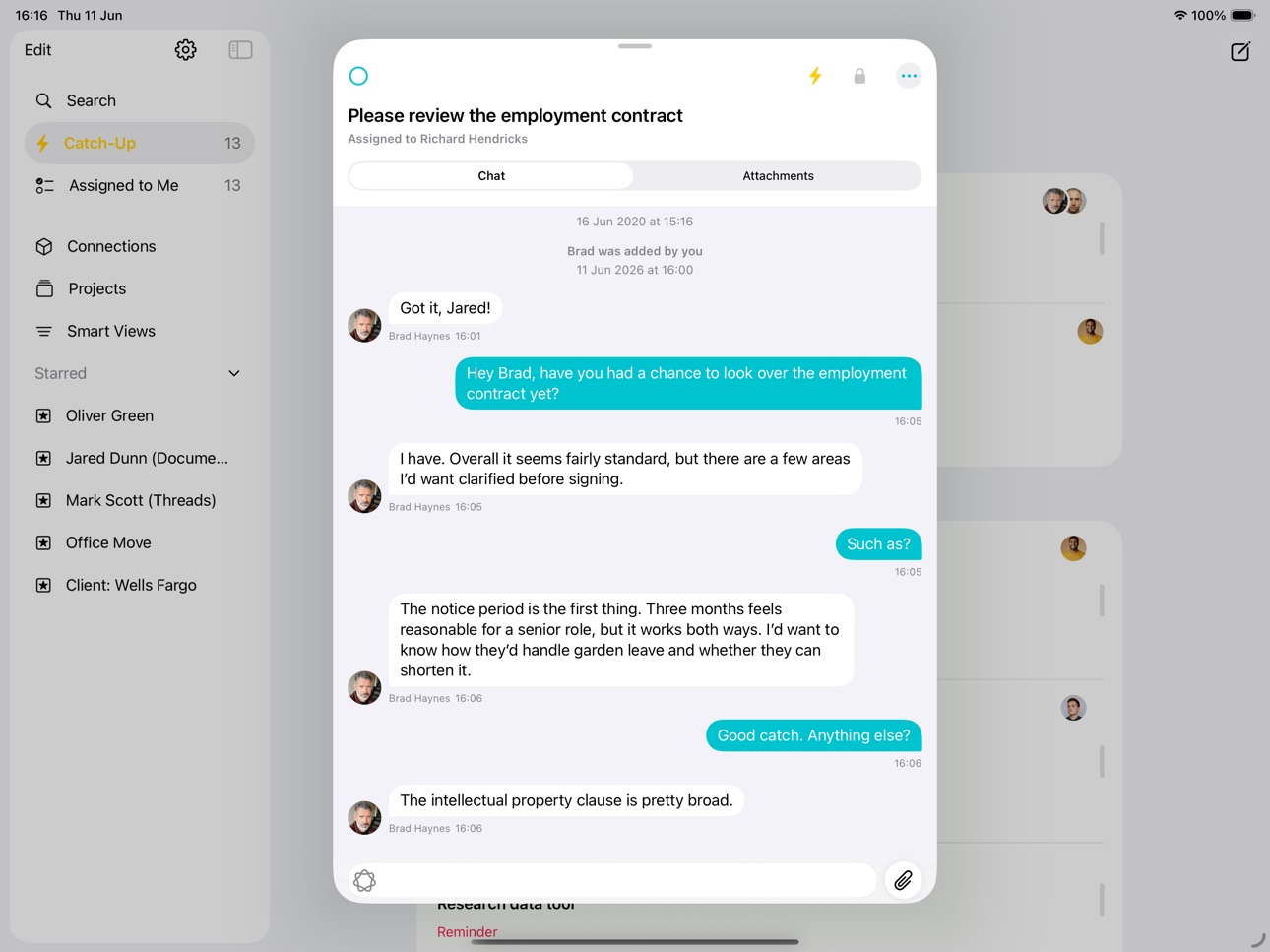


What’s New Version 3.67.0
Users can now add Guidance and Details when creating and editing tasks, signatures, and notes, with an updated layout for a more consistent experience.
Description
Workiro provides a unique combination of features that help build exceptional relationships through incredible work.
• Documents: Capture, classify and store.
• Shared tasks: Work with anyone, in a structured and clear way.
• Communication: Communicate quickly and securely.
• Signatures: Unlimited E-Signatures with a simple client experience.
• Custom branding: Represent your brand with every interaction.
• Alerts, reminders & more: Smart nudging and notifications.
Join 65,000+ users from small to enterprise businesses around the world.
Help us build the product you need. We love your feedback, either in the app, or email help@workiro.com
Accessibility
ipadiphonemacrealityDevicetvoswatch
Version history 25 versions
Build 887998363v3.67.02026-07-10 18:07:22
Users can now add Guidance and Details when creating and editing tasks, signatures, and notes, with an updated layout for a more consistent experience.
Build 886826587v3.66.02026-06-11 22:00:20
This update focuses on improving overall app stability and performance to give you a smoother experience.
Improvements included in this release:
• General bug fixes and reliability improvements
• Performance enhancements across the app
Build 886379109v3.65.02026-06-01 18:57:56
This release makes it easier to get back to the things that matter most — star anything in Workiro and find it instantly from your Home screen.
What’s new in this release:
• Star people, threads, documents, and more to save them for quick access
• Starred items appear together in a new Starred section on your Home screen
• Rename, reorder, and drag to organise your starred items your way
• Bug fixes and performance improvements
Build 885592390v3.64.02026-05-15 22:46:17
This update focuses on improving overall app stability and performance to give you a smoother experience.
Improvements included in this release:
• General bug fixes and reliability improvements
• Performance enhancements across the app
• Behind-the-scenes updates to keep everything running smoothly
Build 885126370v3.63.02026-05-01 19:50:16
Record what your work actually achieved — not just that it was done.
Outcomes is a new way to capture the result of a task when marking it complete. Add a brief note about what was decided or delivered, so your team always has the full picture — not just a completed checkbox.
Build 884513981v3.62.02026-04-15 17:16:57
New
• Tidying up the threads experience to improve usability and consistency.
• Bug Fixes and Performance Improvements.
New(ish)
• iOS 26 support for Liquid Glass.
• Improved tag filtering: Filters now include tag-based properties for more accurate document results.
• Long-press a document to quickly preview it in Global Search and the Global Search document list.
Build 882986402v3.61.02026-03-03 20:14:52
New
• Addressed and resolved a previous issue where notifications would unexpectedly cease after a certain period.
• Bug Fixes and Performance Improvements.
New(ish)
• iOS 26 support for Liquid Glass.
• Improved tag filtering: Filters now include tag-based properties for more accurate document results.
• Long-press a document to quickly preview it in Global Search and the Global Search document list.
Build 882705507v3.60.02026-02-27 22:45:28
New
• addressed and resolved a previous issue where notifications would unexpectedly cease after a certain period
•
New(ish)
• iOS 26 support for Liquid Glass.
• Improved tag filtering: Filters now include tag-based properties for more accurate document results.
• Long-press a document to quickly preview it in Global Search and the Global Search document list.
Build 882075709v3.59.02026-02-03 14:44:16
New
• You can now see tag property values directly in the document preview for clearer context.
• Added a Certificates Repository in the Documentation section.
• Long-press a document to quickly preview it in Global Search and the Global Search document list.
New(ish)
• iOS 26 support for Liquid Glass.
• Improved tag filtering: Filters now include tag-based properties for more accurate document results.
• Long-press a document to view its details.
• Document date is now the default for displaying, sorting, and filtering documents
Build 881566508v3.58.02026-01-19 23:47:20
New
• Long-press a document to quickly preview it in Global Search and the Global Search document list.
• Improved handling of account deletion requests for smoother support.
• Updated document upload and contact details page for iOS 26.
New(ish)
• iOS 26 support for Liquid Glass.
• Improved tag filtering: Filters now include tag-based properties for more accurate document results.
• Long-press a document to view its details.
• Document date is now the default for displaying, sorting, and filtering documents
Build 880567209v3.57.02025-12-12 02:15:31
New
• Improved handling of account deletion requests for smoother support.
• Updated document upload and contact details page for iOS 26.
• General behind-the-scenes improvements to keep the app running smoothly.
New(ish)
• iOS 26 support for Liquid Glass.
• Improved tag filtering: Filters now include tag-based properties for more accurate document results.
• Long-press a document to view its details.
• Document date is now the default for displaying, sorting, and filtering documents
Build 880376977v3.56.02025-12-05 22:07:35
New
• Improved iPad sidebar with native gestures, better sizing, full iOS 26 support, and fixed search title clipping and layout alignment.
• Added inline search on iPhone for a faster and efficient Home screen experience.
New(ish)
• iOS 26 support for Liquid Glass.
• Improved tag filtering: Filters now include tag-based properties for more accurate document results.
• Long-press a document to view its details.
• Document date is now the default for displaying, sorting, and filtering documents
Build 880150840v3.55.02025-11-29 01:27:01
New
• Document date is now the default for displaying, sorting, and filtering documents
• General performance and stability improvements.
New(ish)
• iOS 26 support for Liquid Glass.
• Improved tag filtering: Filters now include tag-based properties for more accurate document results.
• Long-press a document to view its details.
Build 879308708v3.54.02025-11-18 17:16:36
New
• Improved tag filtering: Filters now include tag-based properties for more accurate document results.
• Better tag details: Tag property values are now shown in a simple collapsible list.
• Pull-to-refresh: Refresh your data anytime on Home by pulling down.
New(ish)
• iOS 26 support for Liquid Glass.
• Admins can now show only relevant workspaces.
• Long-press a document to view its details.
Fixed
• General performance and stability improvements.
Build 878986660v3.53.02025-10-21 19:38:46
We’ve been busy polishing things up for Apple’s latest updates!
New:
Filter by Date: Easily narrow down documents by date range and find exactly what you need, fast and simple.
New(ish):
• iOS 26: Added full support for Refresh and Liquid Glass, so the app feels right at home with Apple’s newest design language and performance enhancements.
• iPadOS 26: Improved layouts for windowed apps, making multitasking smoother and more flexible than ever.
• Stay focused – admins can now show only the workspaces that matter.
• Long-press a document in workspaces or threads to see its details instantly.
As always, we’ve also made a number of under-the-hood fixes and performance improvements to keep everything running smoothly.
Build 878712430v3.52.02025-10-08 19:53:45
We’ve been busy polishing things up for Apple’s latest updates!
New:
• Stay focused – admins can now show only the workspaces that matter.
• Long-press a document in workspaces or threads to see its details instantly.
• Cleaner Home screen with improved workspace spacing.
New(ish):
• iOS 26: Added full support for Refresh and Liquid Glass, so the app feels right at home with Apple’s newest design language and performance enhancements.
• iPadOS 26: Improved layouts for windowed apps, making multitasking smoother and more flexible than ever.
As always, we’ve also made a number of under-the-hood fixes and performance improvements to keep everything running smoothly.
Build 878433190v3.51.02025-10-01 07:33:34
We’ve been busy polishing things up for Apple’s latest updates!
• iOS 26: Added full support for Refresh and Liquid Glass, so the app feels right at home with Apple’s newest design language and performance enhancements.
• iPadOS 26: Improved layouts for windowed apps, making multitasking smoother and more flexible than ever.
As always, we’ve also made a number of under-the-hood fixes and performance improvements to keep everything running smoothly.
Build 878033529v3.50.02025-09-12 14:49:08
Thanks for using Workiro! We love your feedback, please keep it coming.
New:
• UI Updates: Improved navigation menu experience on iPad.
• View document tags and classifications at a glance with new long-press preview
• We've fixed a selection of bugs we've found since the last release.
New(ish): We did this bunch of cool stuff recently too...
• Easily select, add, or remove people in organisations with a new edit mode and streamlined actions.
• Connection syncing is now smarter and faster, keeping your data fresh with fewer network calls.
• Enhanced document icons for instant type recognition and faster connection syncing for smoother performance.
• Refined lock screen widgets, updated classification colors, and optimized “Assigned to Me” task management.
• Enhanced catch-up workflow with an improved connection picker for seamless selection.
• Small visual refinements to match the new iOS 26 design style.
• Filter documents directly from a Connection to quickly find what you need.
• Quickly relate people to an organisation directly from the Connection Overview
• Improved accessibility support for users with custom iOS settings.
• We’ve made subtle improvements to navigation and user flows for a smoother experience.
• Deeper classifications.
• Find your documents faster with our new “Added by Me” filter, showing you all the documents you personally uploaded.
• New Assigned to Me widget lets you stay on top of your work from your home screen.
• View roles and groups for your team members on their profiles.
• Team Admins will now have access to their elevated permissions.
• We've improved load times across the app when your account has a high number of connections.
• Get stuff done with multiple Documents
• Create a new Thread more easily than ever before, with a refreshed experience, including quickly switching between Task and Note.
• Delightful haptics in response to clearing from Catch-up or completing a Task.
• New Dark and Tinted versions of the App Icon, for users who've updated their device.
• Delete Documents.
• Find the Thread you are looking for on a Connection or Project quicker.
• More powerful search when looking for a Project or NetSuite item to relate to something.
• Beautiful new welcome screen, when launching the app for the first time or after signing out.
• View how things are related together at a glance across the app with metadata now displayed in your lists of threads, projects and NetSuite items.
• Our next level NetSuite integration arrives on iOS.
• Workiro connections get a new NetSuite tab listing all related transactions and projects, grouping them so they're easy to find and you can focus on getting things done.
• Documents and threads can now be 'Related to...' any NetSuite record for ultimate productivity on the move.
• Improved designs of Projects across the board and there have also been huge performance gains of lists across the app.
• Select Open, Closed or All on the Projects screen to filter your Projects by their current state.
• 'In order to find, you must first search…' and now you can! Results are grouped by Thread, Comment, Document, Project and Connection, so your most important information is always at your fingertips.
• Use the new document picker across the app to add one or more documents already in Workiro to a Connection or Project.
• Create groups of tags using a slash ‘/‘ in their name, allowing them to group together when filtering threads or documents.
Build 876999182v3.49.02025-08-07 00:29:21
Thanks for using Workiro! We love your feedback, please keep it coming.
New:
• Easily select, add, or remove people in organisations with a new edit mode and streamlined actions.
• Connection syncing is now smarter and faster, keeping your data fresh with fewer network calls.
• We've fixed a selection of bugs we've found since the last release.
New(ish): We did this bunch of cool stuff recently too...
• Enhanced document icons for instant type recognition and faster connection syncing for smoother performance.
• Refined lock screen widgets, updated classification colors, and optimized “Assigned to Me” task management.
• Enhanced catch-up workflow with an improved connection picker for seamless selection.
• Small visual refinements to match the new iOS 26 design style.
• Filter documents directly from a Connection to quickly find what you need.
• Quickly relate people to an organisation directly from the Connection Overview
• Improved accessibility support for users with custom iOS settings.
• We’ve made subtle improvements to navigation and user flows for a smoother experience.
• Deeper classifications.
• Find your documents faster with our new “Added by Me” filter, showing you all the documents you personally uploaded.
• New Assigned to Me widget lets you stay on top of your work from your home screen.
• View roles and groups for your team members on their profiles.
• Team Admins will now have access to their elevated permissions.
• We've improved load times across the app when your account has a high number of connections.
• Get stuff done with multiple Documents
• Create a new Thread more easily than ever before, with a refreshed experience, including quickly switching between Task and Note.
• Delightful haptics in response to clearing from Catch-up or completing a Task.
• New Dark and Tinted versions of the App Icon, for users who've updated their device.
• Delete Documents.
• Find the Thread you are looking for on a Connection or Project quicker.
• More powerful search when looking for a Project or NetSuite item to relate to something.
• Beautiful new welcome screen, when launching the app for the first time or after signing out.
• View how things are related together at a glance across the app with metadata now displayed in your lists of threads, projects and NetSuite items.
• Our next level NetSuite integration arrives on iOS.
• Workiro connections get a new NetSuite tab listing all related transactions and projects, grouping them so they're easy to find and you can focus on getting things done.
• Documents and threads can now be 'Related to...' any NetSuite record for ultimate productivity on the move.
• Improved designs of Projects across the board and there have also been huge performance gains of lists across the app.
• Select Open, Closed or All on the Projects screen to filter your Projects by their current state.
• 'In order to find, you must first search…' and now you can! Results are grouped by Thread, Comment, Document, Project and Connection, so your most important information is always at your fingertips.
• Use the new document picker across the app to add one or more documents already in Workiro to a Connection or Project.
• Create groups of tags using a slash ‘/‘ in their name, allowing them to group together when filtering threads or documents.
Build 876639339v3.48.02025-07-23 22:36:28
Thanks for using Workiro! We love your feedback, please keep it coming.
New:
• Enhanced document icons for instant type recognition and faster connection syncing for smoother performance.
• We've fixed a selection of bugs we've found since the last release.
New(ish): We did this bunch of cool stuff recently too...
• Refined lock screen widgets, updated classification colors, and optimized “Assigned to Me” task management.
• Enhanced catch-up workflow with an improved connection picker for seamless selection.
• Small visual refinements to match the new iOS 26 design style.
• Filter documents directly from a Connection to quickly find what you need.
• Quickly relate people to an organisation directly from the Connection Overview
• Improved accessibility support for users with custom iOS settings.
• We’ve made subtle improvements to navigation and user flows for a smoother experience.
• Deeper classifications.
• Find your documents faster with our new “Added by Me” filter, showing you all the documents you personally uploaded.
• New Assigned to Me widget lets you stay on top of your work from your home screen.
• View roles and groups for your team members on their profiles.
• Team Admins will now have access to their elevated permissions.
• We've improved load times across the app when your account has a high number of connections.
• Get stuff done with multiple Documents
• Create a new Thread more easily than ever before, with a refreshed experience, including quickly switching between Task and Note.
• Delightful haptics in response to clearing from Catch-up or completing a Task.
• New Dark and Tinted versions of the App Icon, for users who've updated their device.
• Delete Documents.
• Find the Thread you are looking for on a Connection or Project quicker.
• More powerful search when looking for a Project or NetSuite item to relate to something.
• Beautiful new welcome screen, when launching the app for the first time or after signing out.
• View how things are related together at a glance across the app with metadata now displayed in your lists of threads, projects and NetSuite items.
• Our next level NetSuite integration arrives on iOS.
• Workiro connections get a new NetSuite tab listing all related transactions and projects, grouping them so they're easy to find and you can focus on getting things done.
• Documents and threads can now be 'Related to...' any NetSuite record for ultimate productivity on the move.
• Improved designs of Projects across the board and there have also been huge performance gains of lists across the app.
• Select Open, Closed or All on the Projects screen to filter your Projects by their current state.
• 'In order to find, you must first search…' and now you can! Results are grouped by Thread, Comment, Document, Project and Connection, so your most important information is always at your fingertips.
• Use the new document picker across the app to add one or more documents already in Workiro to a Connection or Project.
• Create groups of tags using a slash ‘/‘ in their name, allowing them to group together when filtering threads or documents.
Build 876437844v3.47.02025-07-22 04:07:41
Thanks for using Workiro! We love your feedback, please keep it coming.
New:
• Refined lock screen widgets, updated classification colors, and optimized “Assigned to Me” task management.
• Enhanced catch-up workflow with an improved connection picker for seamless selection.
• We've fixed a selection of bugs we've found since the last release.
New(ish): We did this bunch of cool stuff recently too...
• Small visual refinements to match the new iOS 26 design style.
• Filter documents directly from a Connection to quickly find what you need.
• Quickly relate people to an organisation directly from the Connection Overview
• Improved accessibility support for users with custom iOS settings.
• We’ve made subtle improvements to navigation and user flows for a smoother experience.
• Deeper classifications.
• Find your documents faster with our new “Added by Me” filter, showing you all the documents you personally uploaded.
• New Assigned to Me widget lets you stay on top of your work from your home screen.
• View roles and groups for your team members on their profiles.
• Team Admins will now have access to their elevated permissions.
• We've improved load times across the app when your account has a high number of connections.
• Get stuff done with multiple Documents
• Create a new Thread more easily than ever before, with a refreshed experience, including quickly switching between Task and Note.
• Delightful haptics in response to clearing from Catch-up or completing a Task.
• New Dark and Tinted versions of the App Icon, for users who've updated their device.
• Delete Documents.
• Find the Thread you are looking for on a Connection or Project quicker.
• More powerful search when looking for a Project or NetSuite item to relate to something.
• Beautiful new welcome screen, when launching the app for the first time or after signing out.
• View how things are related together at a glance across the app with metadata now displayed in your lists of threads, projects and NetSuite items.
• Our next level NetSuite integration arrives on iOS.
• Workiro connections get a new NetSuite tab listing all related transactions and projects, grouping them so they're easy to find and you can focus on getting things done.
• Documents and threads can now be 'Related to...' any NetSuite record for ultimate productivity on the move.
• Improved designs of Projects across the board and there have also been huge performance gains of lists across the app.
• Select Open, Closed or All on the Projects screen to filter your Projects by their current state.
• 'In order to find, you must first search…' and now you can! Results are grouped by Thread, Comment, Document, Project and Connection, so your most important information is always at your fingertips.
• Use the new document picker across the app to add one or more documents already in Workiro to a Connection or Project.
• Create groups of tags using a slash ‘/‘ in their name, allowing them to group together when filtering threads or documents.
Build 875937970v3.46.12025-06-27 20:21:48
Thanks for using Workiro! We love your feedback, please keep it coming.
New:
• small visual refinements to match the new iOS 26 design style.
• We've fixed a selection of bugs we've found since the last release.
New(ish): We did this bunch of cool stuff recently too...
• Filter documents directly from a Connection to quickly find what you need.
• Quickly relate people to an organisation directly from the Connection Overview
• Improved accessibility support for users with custom iOS settings.
• We’ve made subtle improvements to navigation and user flows for a smoother experience.
• Deeper classifications.
• Find your documents faster with our new “Added by Me” filter, showing you all the documents you personally uploaded.
• New Assigned to Me widget lets you stay on top of your work from your home screen.
• View roles and groups for your team members on their profiles.
• Team Admins will now have access to their elevated permissions.
• We've improved load times across the app when your account has a high number of connections.
• Get stuff done with multiple Documents
• Create a new Thread more easily than ever before, with a refreshed experience, including quickly switching between Task and Note.
• Delightful haptics in response to clearing from Catch-up or completing a Task.
• New Dark and Tinted versions of the App Icon, for users who've updated their device.
• Delete Documents.
• Find the Thread you are looking for on a Connection or Project quicker.
• More powerful search when looking for a Project or NetSuite item to relate to something.
• Beautiful new welcome screen, when launching the app for the first time or after signing out.
• View how things are related together at a glance across the app with metadata now displayed in your lists of threads, projects and NetSuite items.
• Our next level NetSuite integration arrives on iOS.
• Workiro connections get a new NetSuite tab listing all related transactions and projects, grouping them so they're easy to find and you can focus on getting things done.
• Documents and threads can now be 'Related to...' any NetSuite record for ultimate productivity on the move.
• Improved designs of Projects across the board and there have also been huge performance gains of lists across the app.
• Select Open, Closed or All on the Projects screen to filter your Projects by their current state.
• 'In order to find, you must first search…' and now you can! Results are grouped by Thread, Comment, Document, Project and Connection, so your most important information is always at your fingertips.
• Use the new document picker across the app to add one or more documents already in Workiro to a Connection or Project.
• Create groups of tags using a slash ‘/‘ in their name, allowing them to group together when filtering threads or documents.
Build 875852172v3.46.02025-06-26 23:42:32
Thanks for using Workiro! We love your feedback, please keep it coming.
New:
• Updated app icon and visual refinements to match the new iOS 26 design style.
• We've fixed a selection of bugs we've found since the last release.
New(ish): We did this bunch of cool stuff recently too...
• Filter documents directly from a Connection to quickly find what you need.
• Quickly relate people to an organisation directly from the Connection Overview
• Improved accessibility support for users with custom iOS settings.
• We’ve made subtle improvements to navigation and user flows for a smoother experience.
• Deeper classifications.
• Find your documents faster with our new “Added by Me” filter, showing you all the documents you personally uploaded.
• New Assigned to Me widget lets you stay on top of your work from your home screen.
• View roles and groups for your team members on their profiles.
• Team Admins will now have access to their elevated permissions.
• We've improved load times across the app when your account has a high number of connections.
• Get stuff done with multiple Documents
• Create a new Thread more easily than ever before, with a refreshed experience, including quickly switching between Task and Note.
• Delightful haptics in response to clearing from Catch-up or completing a Task.
• New Dark and Tinted versions of the App Icon, for users who've updated their device.
• Delete Documents.
• Find the Thread you are looking for on a Connection or Project quicker.
• More powerful search when looking for a Project or NetSuite item to relate to something.
• Beautiful new welcome screen, when launching the app for the first time or after signing out.
• View how things are related together at a glance across the app with metadata now displayed in your lists of threads, projects and NetSuite items.
• Our next level NetSuite integration arrives on iOS.
• Workiro connections get a new NetSuite tab listing all related transactions and projects, grouping them so they're easy to find and you can focus on getting things done.
• Documents and threads can now be 'Related to...' any NetSuite record for ultimate productivity on the move.
• Improved designs of Projects across the board and there have also been huge performance gains of lists across the app.
• Select Open, Closed or All on the Projects screen to filter your Projects by their current state.
• 'In order to find, you must first search…' and now you can! Results are grouped by Thread, Comment, Document, Project and Connection, so your most important information is always at your fingertips.
• Use the new document picker across the app to add one or more documents already in Workiro to a Connection or Project.
• Create groups of tags using a slash ‘/‘ in their name, allowing them to group together when filtering threads or documents.
Build 875652863v3.45.02025-06-18 07:11:37
Thanks for using Workiro! We love your feedback, please keep it coming.
New:
• Filter documents directly from a Connection to quickly find what you need.
• We've fixed a selection of bugs we've found since the last release.
New(ish): We did this bunch of cool stuff recently too...
• Quickly relate people to an organisation directly from the Connection Overview
• Improved accessibility support for users with custom iOS settings.
• We’ve made subtle improvements to navigation and user flows for a smoother experience.
• Deeper classifications.
• Find your documents faster with our new “Added by Me” filter, showing you all the documents you personally uploaded.
• New Assigned to Me widget lets you stay on top of your work from your home screen.
• View roles and groups for your team members on their profiles.
• Team Admins will now have access to their elevated permissions.
• We've improved load times across the app when your account has a high number of connections.
• Get stuff done with multiple Documents
• Create a new Thread more easily than ever before, with a refreshed experience, including quickly switching between Task and Note.
• Delightful haptics in response to clearing from Catch-up or completing a Task.
• New Dark and Tinted versions of the App Icon, for users who've updated their device.
• Delete Documents.
• Find the Thread you are looking for on a Connection or Project quicker.
• More powerful search when looking for a Project or NetSuite item to relate to something.
• Beautiful new welcome screen, when launching the app for the first time or after signing out.
• View how things are related together at a glance across the app with metadata now displayed in your lists of threads, projects and NetSuite items.
• Our next level NetSuite integration arrives on iOS.
• Workiro connections get a new NetSuite tab listing all related transactions and projects, grouping them so they're easy to find and you can focus on getting things done.
• Documents and threads can now be 'Related to...' any NetSuite record for ultimate productivity on the move.
• Improved designs of Projects across the board and there have also been huge performance gains of lists across the app.
• Select Open, Closed or All on the Projects screen to filter your Projects by their current state.
• 'In order to find, you must first search…' and now you can! Results are grouped by Thread, Comment, Document, Project and Connection, so your most important information is always at your fingertips.
• Use the new document picker across the app to add one or more documents already in Workiro to a Connection or Project.
• Create groups of tags using a slash ‘/‘ in their name, allowing them to group together when filtering threads or documents.
Build 875355255v3.44.02025-06-05 20:25:30
Thanks for using Workiro! We love your feedback, please keep it coming.
New:
• Quickly relate people to an organisation directly from the Connection Overview
• We've fixed a selection of bugs we've found since the last release.
New(ish): We did this bunch of cool stuff recently too...
• Improved accessibility support for users with custom iOS settings.
• We’ve made subtle improvements to navigation and user flows for a smoother experience.
• Deeper classifications.
• Find your documents faster with our new “Added by Me” filter, showing you all the documents you personally uploaded.
• New Assigned to Me widget lets you stay on top of your work from your home screen.
• View roles and groups for your team members on their profiles.
• Team Admins will now have access to their elevated permissions.
• We've improved load times across the app when your account has a high number of connections.
• Get stuff done with multiple Documents
• Create a new Thread more easily than ever before, with a refreshed experience, including quickly switching between Task and Note.
• Delightful haptics in response to clearing from Catch-up or completing a Task.
• New Dark and Tinted versions of the App Icon, for users who've updated their device.
• Delete Documents.
• Find the Thread you are looking for on a Connection or Project quicker.
• More powerful search when looking for a Project or NetSuite item to relate to something.
• Beautiful new welcome screen, when launching the app for the first time or after signing out.
• View how things are related together at a glance across the app with metadata now displayed in your lists of threads, projects and NetSuite items.
• Our next level NetSuite integration arrives on iOS.
• Workiro connections get a new NetSuite tab listing all related transactions and projects, grouping them so they're easy to find and you can focus on getting things done.
• Documents and threads can now be 'Related to...' any NetSuite record for ultimate productivity on the move.
• Improved designs of Projects across the board and there have also been huge performance gains of lists across the app.
• Select Open, Closed or All on the Projects screen to filter your Projects by their current state.
• 'In order to find, you must first search…' and now you can! Results are grouped by Thread, Comment, Document, Project and Connection, so your most important information is always at your fingertips.
• Use the new document picker across the app to add one or more documents already in Workiro to a Connection or Project.
• Create groups of tags using a slash ‘/‘ in their name, allowing them to group together when filtering threads or documents.
No pricing data captured yet — comparisons appear once the app has paid storefronts or in-app purchases.
Availability 1 of 1 storefronts
| Region | Language | Price | Ratings | Avg | Version |
|---|---|---|---|---|---|
| US | en-US | Free | 7 | 4.1 | 3.67.0 |
Change log 29 changes · US
✎
releaseNotes updated
Users can now add Guidance and Details when creating and editing tasks, signatures, and notes, with an updated layout for a more consistent experience.
✎
description updated
Workiro provides a unique combination of features that help build exceptional relationships through incredible work.
• Documents: Capture, classify and store.
✎
subtitle updated
Everything for incredible work
✎
name updated
Workiro
◆
Version 3.67.0 released
Users can now add Guidance and Details when creating and editing tasks, signatures, and notes, with an updated layout for a more consistent experience.
◆
Version 3.66.0 released
This update focuses on improving overall app stability and performance to give you a smoother experience.
Improvements included in this release:
• General bug fixes and reliability improvements
• Performance enhancements across the app
◆
Version 3.65.0 released
This release makes it easier to get back to the things that matter most — star anything in Workiro and find it instantly from your Home screen.
What’s new in this release:
• Star people, threads, documents, and more to save them for quick
◆
Version 3.64.0 released
This update focuses on improving overall app stability and performance to give you a smoother experience.
Improvements included in this release:
• General bug fixes and reliability improvements
• Performance enhancements across the app
•
◆
Version 3.63.0 released
Record what your work actually achieved — not just that it was done.
Outcomes is a new way to capture the result of a task when marking it complete. Add a brief note about what was decided or delivered, so your team always has the full pic
◆
Version 3.62.0 released
New
• Tidying up the threads experience to improve usability and consistency.
• Bug Fixes and Performance Improvements.
New(ish)
• iOS 26 support for Liquid Glass.
• Improved tag filtering: Filters now include tag-based properties for more
◆
Version 3.61.0 released
New
• Addressed and resolved a previous issue where notifications would unexpectedly cease after a certain period.
• Bug Fixes and Performance Improvements.
New(ish)
• iOS 26 support for Liquid Glass.
• Improved tag filtering: Filters now
◆
Version 3.60.0 released
New
• addressed and resolved a previous issue where notifications would unexpectedly cease after a certain period
•
New(ish)
• iOS 26 support for Liquid Glass.
• Improved tag filtering: Filters now include tag-based properties for more ac
◆
Version 3.59.0 released
New
• You can now see tag property values directly in the document preview for clearer context.
• Added a Certificates Repository in the Documentation section.
• Long-press a document to quickly preview it in Global Search and the Global Se
◆
Version 3.58.0 released
New
• Long-press a document to quickly preview it in Global Search and the Global Search document list.
• Improved handling of account deletion requests for smoother support.
• Updated document upload and contact details page for iOS 26.
N
◆
Version 3.57.0 released
New
• Improved handling of account deletion requests for smoother support.
• Updated document upload and contact details page for iOS 26.
• General behind-the-scenes improvements to keep the app running smoothly.
New(ish)
• iOS 26 support
◆
Version 3.56.0 released
New
• Improved iPad sidebar with native gestures, better sizing, full iOS 26 support, and fixed search title clipping and layout alignment.
• Added inline search on iPhone for a faster and efficient Home screen experience.
New(ish)
• iOS 2
◆
Version 3.55.0 released
New
• Document date is now the default for displaying, sorting, and filtering documents
• General performance and stability improvements.
New(ish)
• iOS 26 support for Liquid Glass.
• Improved tag filtering: Filters now include tag-based p
◆
Version 3.54.0 released
New
• Improved tag filtering: Filters now include tag-based properties for more accurate document results.
• Better tag details: Tag property values are now shown in a simple collapsible list.
• Pull-to-refresh: Refresh your data anytime on
◆
Version 3.53.0 released
We’ve been busy polishing things up for Apple’s latest updates!
New:
Filter by Date: Easily narrow down documents by date range and find exactly what you need, fast and simple.
New(ish):
• iOS 26: Added full support for Refresh and Liqui
◆
Version 3.52.0 released
We’ve been busy polishing things up for Apple’s latest updates!
New:
• Stay focused – admins can now show only the workspaces that matter.
• Long-press a document in workspaces or threads to see its details instantly.
• Cleaner Home screen
◆
Version 3.51.0 released
We’ve been busy polishing things up for Apple’s latest updates!
• iOS 26: Added full support for Refresh and Liquid Glass, so the app feels right at home with Apple’s newest design language and performance enhancements.
• iPadOS 26: Improv
◆
Version 3.50.0 released
Thanks for using Workiro! We love your feedback, please keep it coming.
New:
• UI Updates: Improved navigation menu experience on iPad.
• View document tags and classifications at a glance with new long-press preview
• We've fixed a selec
◆
Version 3.49.0 released
Thanks for using Workiro! We love your feedback, please keep it coming.
New:
• Easily select, add, or remove people in organisations with a new edit mode and streamlined actions.
• Connection syncing is now smarter and faster, keeping your
◆
Version 3.48.0 released
Thanks for using Workiro! We love your feedback, please keep it coming.
New:
• Enhanced document icons for instant type recognition and faster connection syncing for smoother performance.
• We've fixed a selection of bugs we've found since
◆
Version 3.47.0 released
Thanks for using Workiro! We love your feedback, please keep it coming.
New:
• Refined lock screen widgets, updated classification colors, and optimized “Assigned to Me” task management.
• Enhanced catch-up workflow with an improved connec
◆
Version 3.46.1 released
Thanks for using Workiro! We love your feedback, please keep it coming.
New:
• small visual refinements to match the new iOS 26 design style.
• We've fixed a selection of bugs we've found since the last release.
New(ish): We did this bunc
◆
Version 3.46.0 released
Thanks for using Workiro! We love your feedback, please keep it coming.
New:
• Updated app icon and visual refinements to match the new iOS 26 design style.
• We've fixed a selection of bugs we've found since the last release.
New(ish): W
◆
Version 3.45.0 released
Thanks for using Workiro! We love your feedback, please keep it coming.
New:
• Filter documents directly from a Connection to quickly find what you need.
• We've fixed a selection of bugs we've found since the last release.
New(ish): We
◆
Version 3.44.0 released
Thanks for using Workiro! We love your feedback, please keep it coming.
New:
• Quickly relate people to an organisation directly from the Connection Overview
• We've fixed a selection of bugs we've found since the last release.
New(ish):