Home › Lifestyle

 US
US
1 of 1 storefronts
Content in en-US
Content in en-US
Information
Apple ID1330980890
Bundle IDcom.pascalandraos.ColdApproach
SellerSeller
Min iOS15.0
Min macOS12.0
Device familiesiphone, ipad, ipod
Released2018-01-17
Copyright© Sudokill
Privacy policyLink ↗
Preview 2 platforms
iPhone 10 images







iPad 10 images






What’s New Version 4.1
Minor improvements.
Description
Imagine having superpowers with women.
Imagine approaching any girl and effortlessly seducing her.
Pickup artists worldwide have mastered those skills.
You could be just like them.
Why keep getting paralyzed by approach anxiety, getting rejected, ghosted and flaked on?
The truth is, if you want consistent results with women, you have to get scientific.
To do that, it is vital to keep rigorous and systematic field reports of every minute detail of your approaches.
After all, what gets measured gets improved.
Cold Approach streamlines capturing your approaches on the go, in high fidelity, so you never have to forget any detail.
It aggregates your data so you can objectively track your performance and monitor your progress.
COLD APPROACH FEATURES
1-HOME SCREEN
• Browse through a timeline of all your saved approaches grouped by day.
Approaches are summarized as cards highlighting their most vital details.
• Tap a card to view the full details of an approach, edit it or delete it.
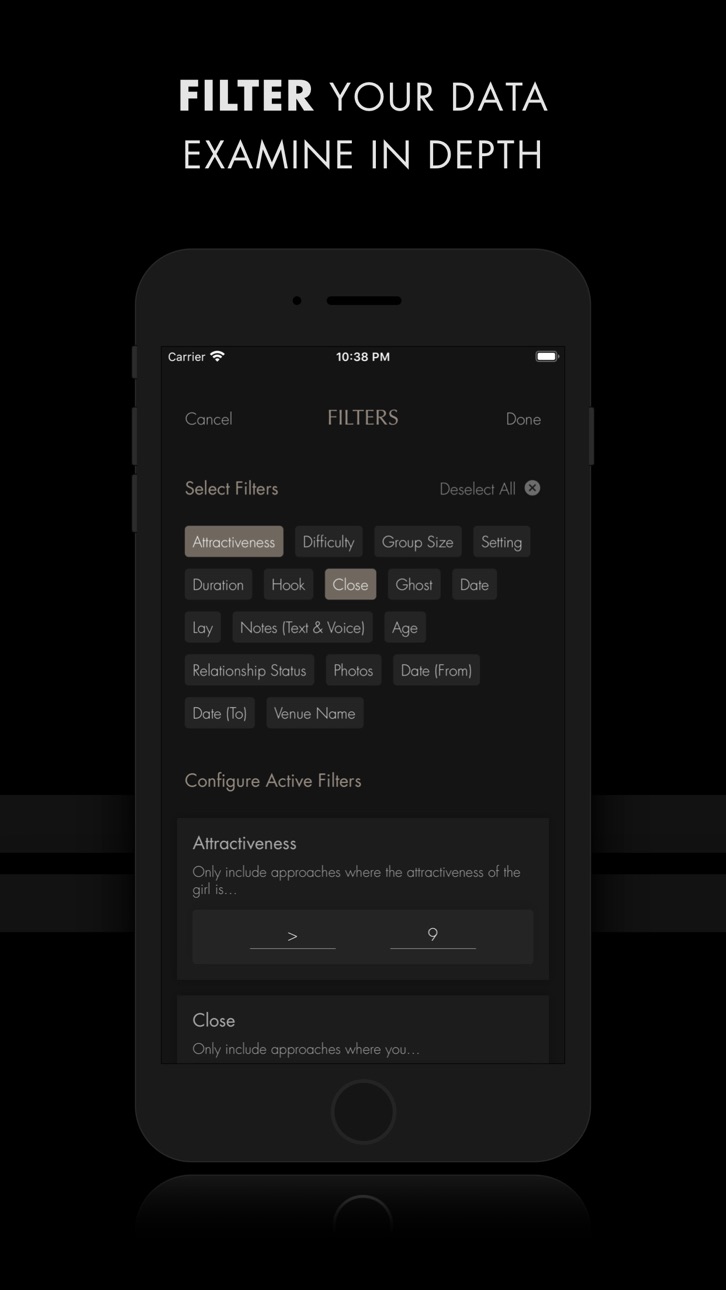
• Search or filter through your timeline.
• Track a weekly goal of approaches to reach.
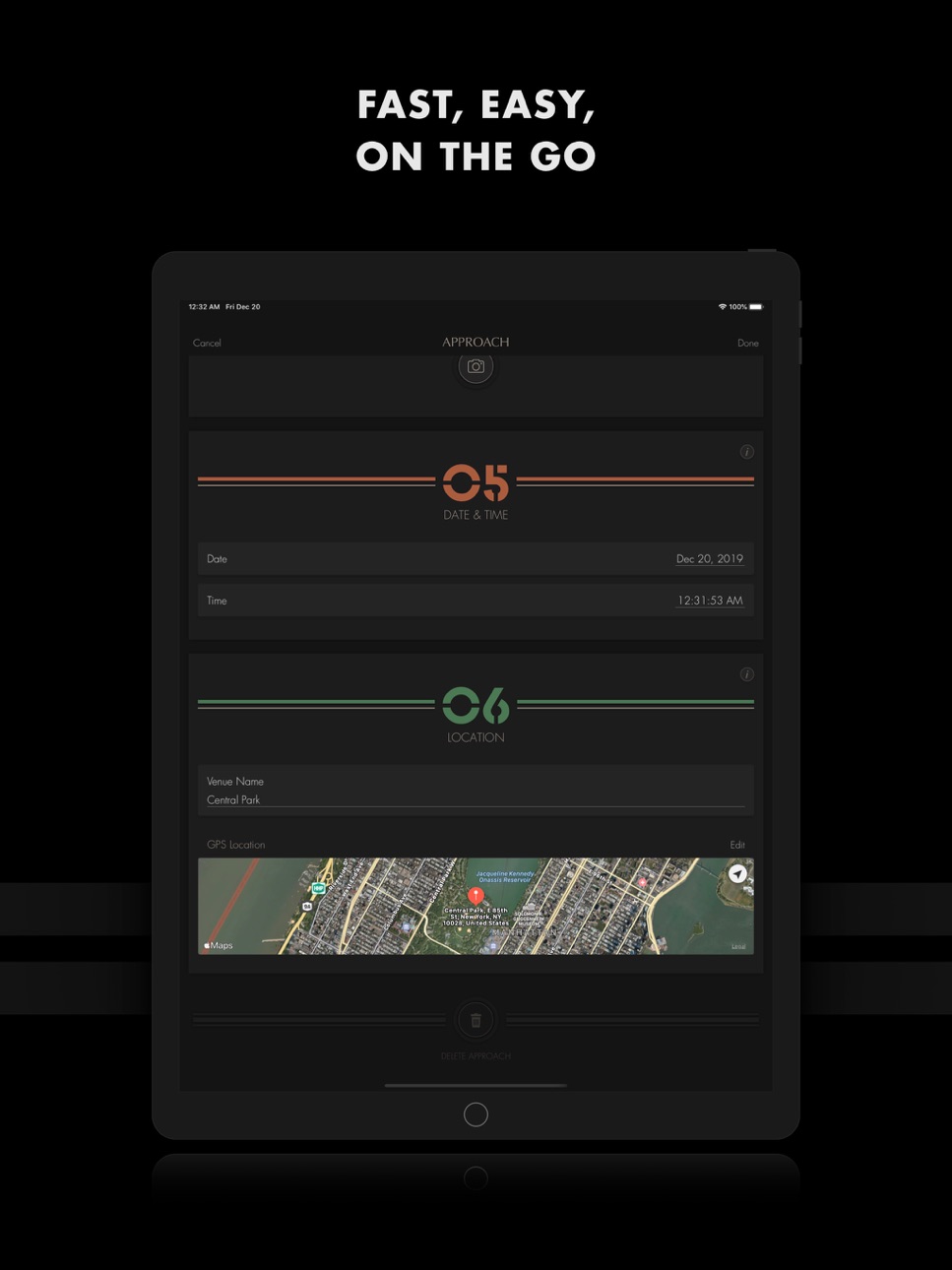
2-APPROACH SCREEN
Capture the details of a new approach or edit an older one.
This screen is split into six sections:
• CONTEXT covers the circumstances of the approach.
• OUTCOME covers the results of the approach.
• NOTES lets you add text or voice notes.
• PROFILE/BIO lets you set the personal information of the girl you approached as well as add photos.
• DATE & TIME lets you set the date and the time of the approach.
• LOCATION lets you set the name of the venue and its GPS location on the map.
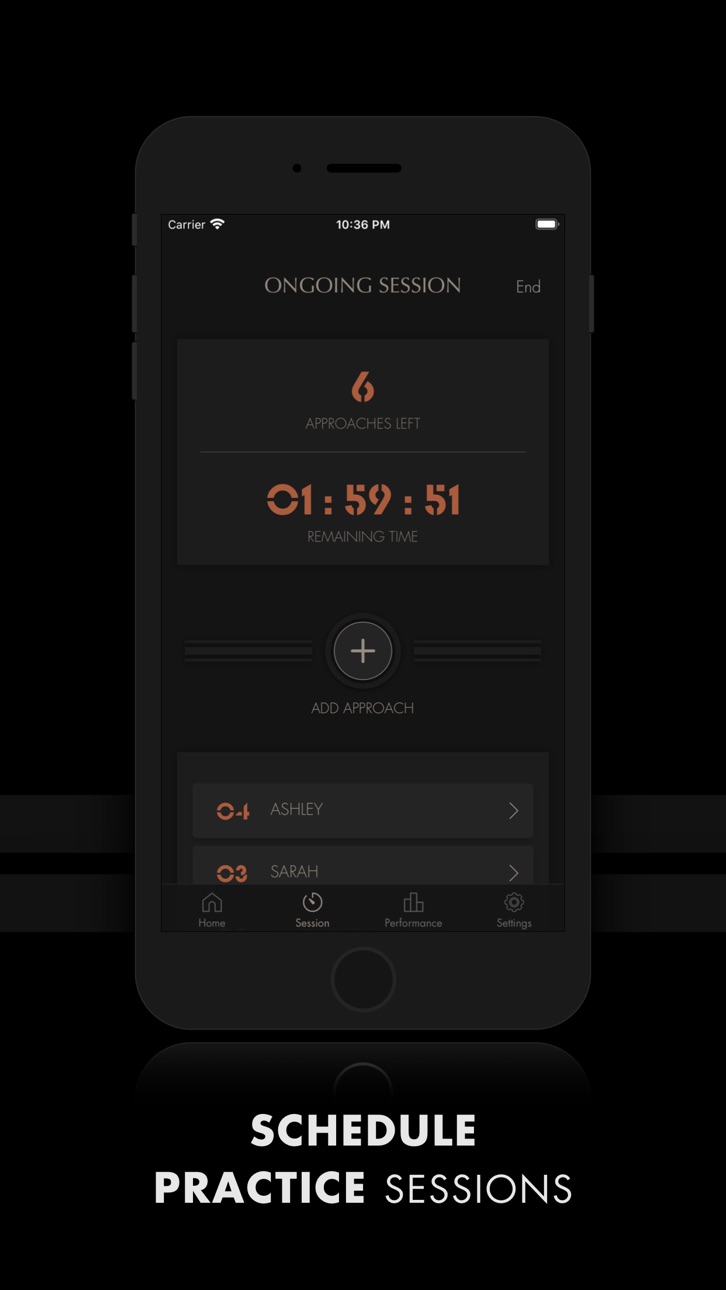
3-SESSION SCREEN
• Challenge yourself to approach a certain number of girls in a limited time.
• Get a summary of your performance at the end of every session.
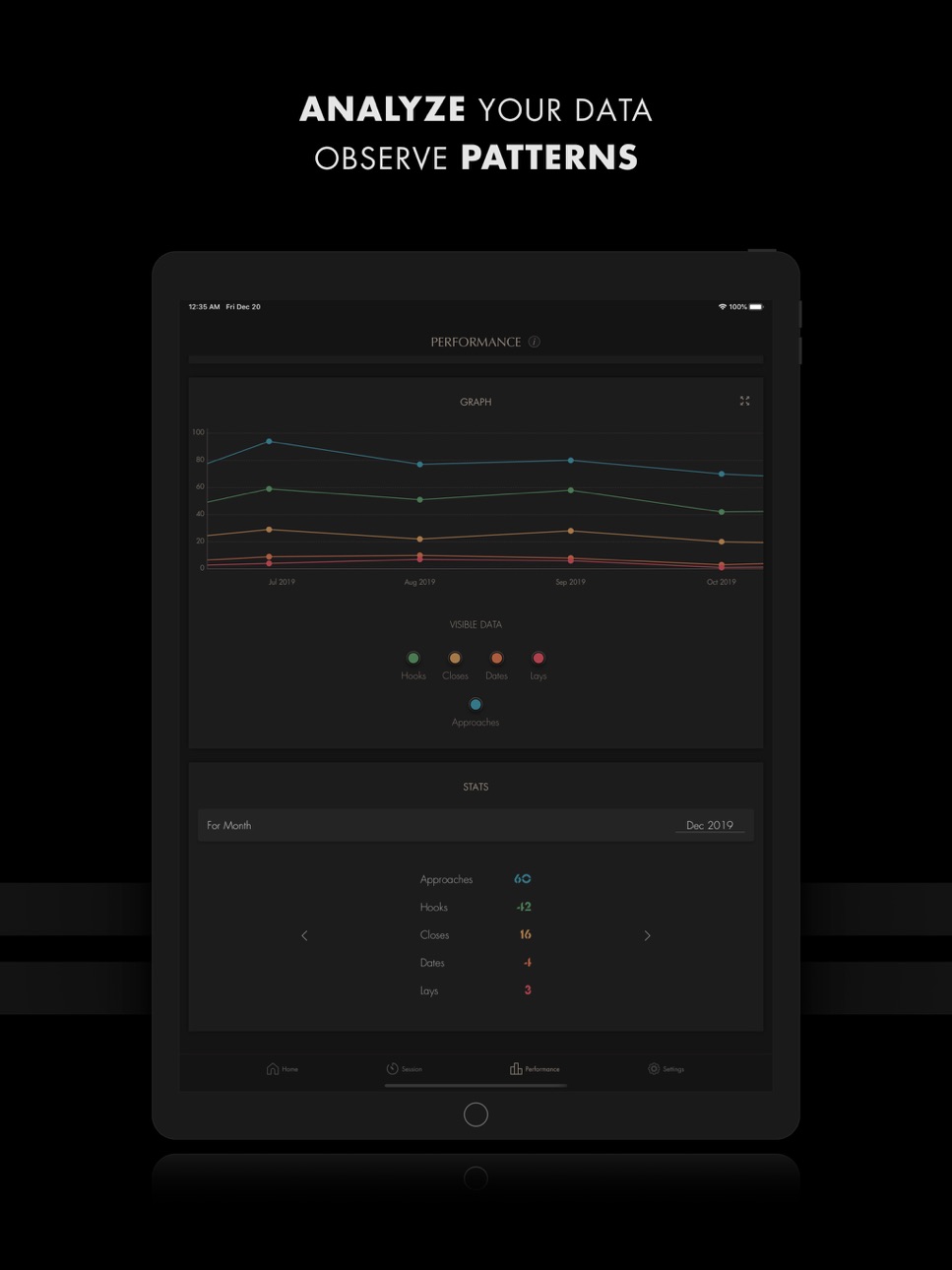
4-PERFORMANCE SCREEN
Analyze your progress, sticking points, strengths and weaknesses by breaking your data down and visualizing it in different ways:
• In graph form (line or bar graph) or as a breakdown of stats.
• By day, week, month, year or totals.
• As numbers or percentages.
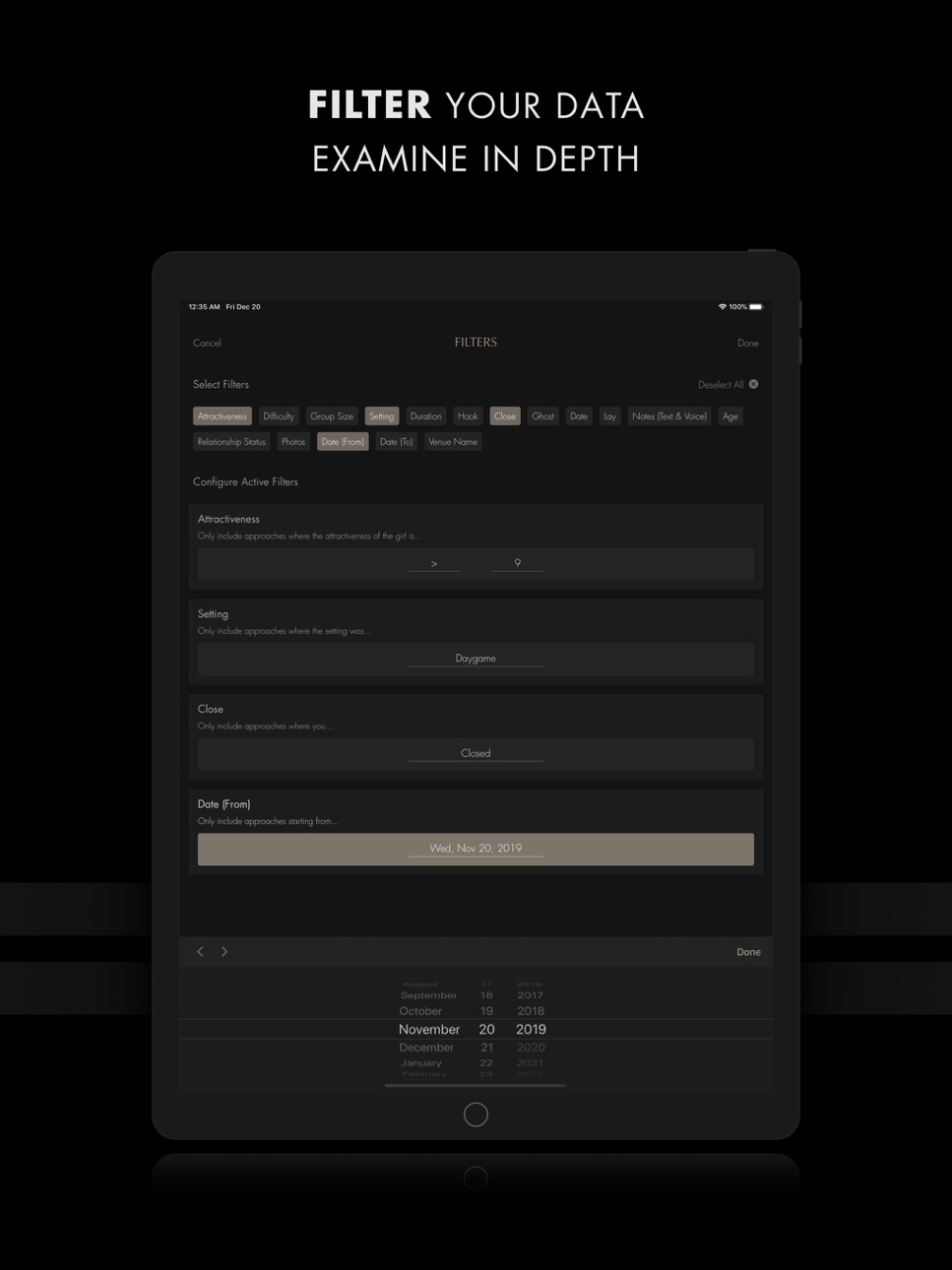
Focus your analysis even further by applying a wide array of filters.
5-SETTINGS
• Set a weekly goal of approaches to perform.
• Enable motivational notifications pushing you to take action towards your weekly goal.
• Back up all your saved approaches to your Dropbox or Google Drive account.
Cold Approach has been refined over the years with the help of thousands of pickup artists worldwide. It has matured into the ultimate pickup mentor.
Why keep investing in more coaching, online courses and bootcamps when you could take your results to the next level for a fraction of the cost, at your own pace and leisure?
If all Cold Approach did was help you get just one quality girlfriend or got you to overcome just one sticking point, would it not be worth it?
A life of ultimate confidence, abundance and success with women awaits you.
You can choose to get there the long and painful way or you can save yourself years of blind trial and error.
Get Cold Approach today and take your first step on a journey towards mastery.
SUBSCRIPTION PRICING & TERMS
COLD APPROACH is free to download.
Ongoing use requires an active subscription, available on a 1-month, 3-month or 1-year basis. Customers who choose a subscription are eligible for a 7-day free trial period.
Payment will be charged to your credit card through your iTunes account at confirmation of purchase. Subscription renews automatically unless cancelled at least 24 hours prior to the end of the subscription period.
Subscriptions can be managed and auto-renewal turned off in Account Settings in iTunes after purchase. Once purchased, refunds will not be provided for any unused portion of the term.
By purchasing, you accept our Terms of Use and Privacy Policy.
Terms of Use: https://sites.google.com/view/cold-approach/terms-of-use
Privacy Policy: https://sites.google.com/view/cold-approach/privacy-policy
In-App Purchases US pricing
Subscriptions Subscription
1-Year Subscription · Yearly 7-day free trial$99.99
3-Month Subscription · 3 months 7-day free trial$29.99
1-Month Subscription · Monthly 7-day free trial$12.99
Capabilities
In-App Purchases
Accessibility
ipadiphonemacrealityDevicetvoswatch
Version history 16 versions
Build 876487350v4.12025-07-19 22:30:28
Minor improvements.
Build 834238667v4.0.12020-01-07 16:25:54
Version 4.0.1:
• Fixed an issue affecting iPad users.
Version 4.0:
• Cold Approach has switched from being a paid app to being subscription-based.
• All of our early users (who bought the app prior to version 4.0) will receive lifetime access to the full features of the app.
• UI tweaks for improved visibility & legibility.
• iOS13 compatibility changes.
Build 833176017v4.02019-12-21 21:03:23
• Cold Approach has switched from being a paid app to being subscription-based.
• All of our early users (who bought the app prior to version 4.0) will receive lifetime access to the full features of the app.
• UI tweaks for improved visibility & legibility.
• iOS13 compatibility changes.
Build 832364975v3.1.02019-08-16 02:56:03
VERSION 3.1.0:
• Google Drive backups are now supported. Head to the Settings screen and choose to back up your data to your Google Drive or your Dropbox personal account.
• Improved responsiveness of pickers in the Performance screen.
Build 831810310v3.0.12019-06-27 16:02:26
VERSION 3.0.1:
Greatly improved graph generation performance.
VERSION 3.0:
GLOBAL CHANGES:
• Complete redesign of the User Experience and the User Interface introducing a new dark theme and many new or improved features (listed below).
• New info screens across the app provide additional help and declutter your experience by focusing it on what matters.
HOME SCREEN (UPDATED):
• New weekly goal progress bar allows you to track the number of girls you are approaching every week.
• New search feature allows you to quickly look through names of girls, names of venues or text notes.
FILTERS SCREEN (UPDATED):
• The Filters screen can now be accessed from the Home screen and from the Performance screen.
• New filters added that correspond to the new fields introduced in the APPROACH/FORM screen.
APPROACH/FORM SCREEN (UPDATED):
• The APPROACH screen has been structured into 6 distinct sections:
CONTEXT, OUTCOME, NOTES, PROFILE/BIO, DATE & TIME and LOCATION.
• “Attractiveness” now goes from 1 to 10.
• “Group Size” now accepts one of three values: 1, 2 or 3+.
• Added “Setting” field which represents the situation in which the interaction happened.
• Replaced the “Reply to Initial Text” field by the “Ghost” field.
• You can now record and attach multiple voice notes to every approach.
• Added a shortcut for the voice note recorder at the top of the screen for quick access.
• Replaced the “In a Relationship” field by the “Relationship Status” field. This field now accepts one of three values: Unknown, Single or Taken.
• You can now attach multiple photos to every approach from your camera or your photo library.
• Added “Venue Name” field.
• Added GPS location support. Cold Approach automatically detects the GPS coordinates on a map of every new approach you log.
• You can disable automatic location detection from the Settings screen.
• You can manually set or edit the GPS coordinates of an approach.
SESSION SCREEN (NEW):
• Challenge yourself to approach a certain number of girls in a limited time by using sessions.
• Configure a session by setting the approach target and its duration.
• Receive a quick summary of your performance at the end of each session.
PERFORMANCE SCREEN (NEW):
• The old Stats and Monthly Performance screens have been combined into the new and improved Performance screen.
• The CONFIGURE section at the top of the screen lets you choose how you want to break your data down.
- You can now aggregate your data by day, by week, by month, by year or view your total results.
- You can display your data as numbers or as a percentage of the number of approaches.
- You can apply additional filters for a more thorough analysis. These filters are separate from the filters applied in the Home screen.
• The GRAPH section lets you visualize your data as a line chart or a bar chart, depending on your configuration.
- You can now view line graphs in full screen and in landscape mode.
- Use the “VISIBLE DATA” section to control which data sets you want to see in the line or bar graph.
• The STATS section lets you go over your results and statistics as numbers rather than graphs.
SETTINGS SCREEN (UPDATE):
• New “Weekly Goal” section allows you to configure your weekly target number of approaches and to enable motivational notifications that push you to take action.
• Improved Dropbox backup performance.
• New “Save Photos” setting allows you to save any photos you attach to your approaches in your iPhone’s library.
• New “Detect Location” setting allows Cold Approach to automatically detect the GPS coordinates of every new approach.
Build 831526922v3.02019-06-20 16:28:54
GLOBAL CHANGES:
• Complete redesign of the User Experience and the User Interface introducing a new dark theme and many new or improved features (listed below).
• New info screens across the app provide additional help and declutter your experience by focusing it on what matters.
HOME SCREEN (UPDATED):
• New weekly goal progress bar allows you to track the number of girls you are approaching every week.
• New search feature allows you to quickly look through names of girls, names of venues or text notes.
FILTERS SCREEN (UPDATED):
• The Filters screen can now be accessed from the Home screen and from the Performance screen.
• New filters added that correspond to the new fields introduced in the APPROACH/FORM screen.
APPROACH/FORM SCREEN (UPDATED):
• The APPROACH screen has been structured into 6 distinct sections:
CONTEXT, OUTCOME, NOTES, PROFILE/BIO, DATE & TIME and LOCATION.
• “Attractiveness” now goes from 1 to 10.
• “Group Size” now accepts one of three values: 1, 2 or 3+.
• Added “Setting” field which represents the situation in which the interaction happened.
• Replaced the “Reply to Initial Text” field by the “Ghost” field.
• You can now record and attach multiple voice notes to every approach.
• Added a shortcut for the voice note recorder at the top of the screen for quick access.
• Replaced the “In a Relationship” field by the “Relationship Status” field. This field now accepts one of three values: Unknown, Single or Taken.
• You can now attach multiple photos to every approach from your camera or your photo library.
• Added “Venue Name” field.
• Added GPS location support. Cold Approach automatically detects the GPS coordinates on a map of every new approach you log.
• You can disable automatic location detection from the Settings screen.
• You can manually set or edit the GPS coordinates of an approach.
SESSION SCREEN (NEW):
• Challenge yourself to approach a certain number of girls in a limited time by using sessions.
• Configure a session by setting the approach target and its duration.
• Receive a quick summary of your performance at the end of each session.
PERFORMANCE SCREEN (NEW):
• The old Stats and Monthly Performance screens have been combined into the new and improved Performance screen.
• The CONFIGURE section at the top of the screen lets you choose how you want to break your data down.
- You can now aggregate your data by day, by week, by month, by year or view your total results.
- You can display your data as numbers or as a percentage of the number of approaches.
- You can apply additional filters for a more thorough analysis. These filters are separate from the filters applied in the Home screen.
• The GRAPH section lets you visualize your data as a line chart or a bar chart, depending on your configuration.
- You can now view line graphs in full screen and in landscape mode.
- Use the “VISIBLE DATA” section to control which data sets you want to see in the line or bar graph.
• The STATS section lets you go over your results and statistics as numbers rather than graphs.
SETTINGS SCREEN (UPDATE):
• New “Weekly Goal” section allows you to configure your weekly target number of approaches and to enable motivational notifications that push you to take action.
• Improved Dropbox backup performance.
• New “Save Photos” setting allows you to save any photos you attach to your approaches in your iPhone’s library.
• New “Detect Location” setting allows Cold Approach to automatically detect the GPS coordinates of every new approach.
Build 827372003v2.0.22018-05-31 19:16:00
iOS 9 and iOS 10 support.
Build 826790247v2.0.12018-04-24 01:40:35
Latest changes:
• Major revamp of UI.
• Added "Settings" screen.
• Added Dropbox backup feature in "Settings" screen.
• New app icon.
• Improved data migration from older versions.
Build 826777844v2.02018-04-23 13:25:37
Latest changes:
• Major revamp of UI.
• Added "Settings" screen.
• Added Dropbox backup feature in "Settings" screen.
• New app icon.
Build 826524702v1.62018-04-01 16:12:08
Latest changes:
• Added “Group Size” parameter (number of people in the group your approached) in approach creation form with the following values: 1, 2, 3 and 4+.
• Automatic migration: Existing approaches will get a default group size of 1.
• Added “Group Size” filter in the “Filters” screen.
• Added “Reply to Initial Text” parameter in approach creation form.
• This parameter will only be visible when the “Close” switch is enabled.
• Automatic migration: Existing approaches will have this switch disabled by default unless both the “Close” and the “Date” switches are enabled.
• Added “Replies to Initial Text” filter in the “Filters” screen.
Build 826375089v1.52018-03-21 12:44:22
New “Filtered Approaches” section in the “Stats” screen that allows you to view your stats for the approaches that satisfy all the filters enabled in the “Filters” screen.
This feature can be used to get a breakdown of your stats in different ways according to what you’re interested in.
For example, you can view your stats in a specific date range or for approaches over 15 minutes long… The possibilities are endless.
Build 826136585v1.42018-02-28 22:07:37
Latest changes:
• The “Stats” screen now includes date pickers to allow you to see your stats for a specific day or month.
• Minor UI updates.
Build 826107723v1.32018-02-26 22:00:59
Latest changes:
• New filters (name, age, notes).
• Added button to disable all filters in Filters screen.
• Polished interface.
• Approaches screen now contains a brief outcome summary for each approach.
• Date and time of approach is shown in creation and editing form.
• The date and time of an approach can be specified on creation or adjusted while editing.
Build 826023490v1.1.12018-02-16 21:08:51
Latest changes:
• Various performance improvements.
• New onboarding screen.
• New icons.
Build 825797375v1.12018-01-29 14:43:30
Latest changes:
• Simplified approach difficulty settings.
• Refined interface.
• Minor performance optimization.
Build 825512810v1.02018-01-17 21:46:11
Price history by region
Currency
Show
Columns
Search
Availability 1 of 1 storefronts
| Region | Language | Price | Ratings | Avg | Version |
|---|---|---|---|---|---|
| US | en-US | Free | 20 | 4.8 | 4.1 |
Change log 20 changes · US
✎
releaseNotes updated
Minor improvements.
✎
description updated
Imagine having superpowers with women.
Imagine approaching any girl and effortlessly seducing her.
Pickup artists worldwide have mastered those skills.
You cou
✎
subtitle updated
Meet, Pick Up & Date Hot Women
✎
name updated
Cold Approach: Pickup & Dating
◆
Version 4.1 released
Minor improvements.
◆
Version 4.0.1 released
Version 4.0.1:
• Fixed an issue affecting iPad users.
Version 4.0:
• Cold Approach has switched from being a paid app to being subscription-based.
• All of our early users (who bought the app prior to version 4.0) will receive lifetime
◆
Version 4.0 released
• Cold Approach has switched from being a paid app to being subscription-based.
• All of our early users (who bought the app prior to version 4.0) will receive lifetime access to the full features of the app.
• UI tweaks for improved visib
◆
Version 3.1.0 released
VERSION 3.1.0:
• Google Drive backups are now supported. Head to the Settings screen and choose to back up your data to your Google Drive or your Dropbox personal account.
• Improved responsiveness of pickers in the Performance screen.
◆
Version 3.0.1 released
VERSION 3.0.1:
Greatly improved graph generation performance.
VERSION 3.0:
GLOBAL CHANGES:
• Complete redesign of the User Experience and the User Interface introducing a new dark theme and many new or improved features (listed below).
◆
Version 3.0 released
GLOBAL CHANGES:
• Complete redesign of the User Experience and the User Interface introducing a new dark theme and many new or improved features (listed below).
• New info screens across the app provide additional help and declutter your e
◆
Version 2.0.2 released
iOS 9 and iOS 10 support.
◆
Version 2.0.1 released
Latest changes:
• Major revamp of UI.
• Added "Settings" screen.
• Added Dropbox backup feature in "Settings" screen.
• New app icon.
• Improved data migration from older versions.
◆
Version 2.0 released
Latest changes:
• Major revamp of UI.
• Added "Settings" screen.
• Added Dropbox backup feature in "Settings" screen.
• New app icon.
◆
Version 1.6 released
Latest changes:
• Added “Group Size” parameter (number of people in the group your approached) in approach creation form with the following values: 1, 2, 3 and 4+.
• Automatic migration: Existing approaches will get a default group size of
◆
Version 1.5 released
New “Filtered Approaches” section in the “Stats” screen that allows you to view your stats for the approaches that satisfy all the filters enabled in the “Filters” screen.
This feature can be used to get a breakdown of your stats in differe
◆
Version 1.4 released
Latest changes:
• The “Stats” screen now includes date pickers to allow you to see your stats for a specific day or month.
• Minor UI updates.
◆
Version 1.3 released
Latest changes:
• New filters (name, age, notes).
• Added button to disable all filters in Filters screen.
• Polished interface.
• Approaches screen now contains a brief outcome summary for each approach.
• Date and time of approach is show
◆
Version 1.1.1 released
Latest changes:
• Various performance improvements.
• New onboarding screen.
• New icons.
◆
Version 1.1 released
Latest changes:
• Simplified approach difficulty settings.
• Refined interface.
• Minor performance optimization.
◆
Version 1.0 released