Home › Business

 US
US
USen-US AGNot Available
 AINot Available
 AONot Available
 ARNot Available
 BBNot Available
 BFNot Available
 BJNot Available
 BONot Available
 BRNot Available
 BSNot Available
 BWNot Available
 BZNot Available
 CDNot Available
 CGNot Available
 CINot Available
 CLNot Available
 CMNot Available
 CONot Available
 CRNot Available
 CVNot Available
 DMNot Available
 DONot Available
 DZNot Available
 ECNot Available
 GANot Available
 GDNot Available
 GHNot Available
 GMNot Available
 GTNot Available
 GWNot Available
 GYNot Available
 HNNot Available
 JMNot Available
 KENot Available
 KNNot Available
 KYNot Available
 LCNot Available
 LRNot Available
 LYNot Available
 MANot Available
 MGNot Available
 MLNot Available
 MSNot Available
 MUNot Available
 MWNot Available
 MXNot Available
 MZNot Available
 NANot Available
 NENot Available
 NGNot Available
 NINot Available
 PANot Available
 PENot Available
 PYNot Available
 RWNot Available
 SCNot Available
 SLNot Available
 SNNot Available
 SRNot Available
 STNot Available
 SVNot Available
 SZNot Available
 TCNot Available
 TDNot Available
 TNNot Available
 TTNot Available
 TZNot Available
 UGNot Available
 UYNot Available
 VCNot Available
 VENot Available
 VGNot Available
 ZMNot Available
 ZWNot Available
1 of 75 storefronts
Content in en-US
Content in en-US
Information
Preview 2 platforms
iPhone 5 images


iPad 5 images


What’s New Version 2.0.1 (33)
This version 2.0.1 (33) contains fixes and enhancements to the previous 2.0.0 (27) release. I included more messaging when it is busy downloading data. This includes when you login and it is downloading a new order list, syncing the device with the cloud, getting field issues (especially the pictures), running a field issue report, downloading the graphic data for the 3d display, downloading a new order list for manage orders, forcing a refresh of the order data, downloading a new list of builders (internal only), getting truck photos. Anything that might take a significant amount of time will have the wait cursor and a message for what is happening. Corrections are: It now downloads a new order list when you click on manage orders (the pencil). An issue when a user that didn't have any orders in their "My Orders" list. Changed the color on switches to have a light green background when they are turned on. Part searching in previous versions would seem to lockup as you were typing in the part number, this was because the search started immediately. Now there is a 2.5 second pause before it starts the search to allow you to type in the part number. On a 1600+ ton order, searching for a specific part is now almost immediate. On iOS, if the search for a part returned enough packages that you needed to scroll, the keyboard wouldn't move out of the way so you could scroll to the bottom of the list. I now force the keyboard to disappear when you scroll. If you want the keyboard back, click in the search bar and it will return. Added the ability to request a field issue report on an individual field issue.
If you have any issues or ideas, don't hesitate to contact me.
Alan Anderson
AAnderson@vp.com
Description
VP Locate TM is an easy to use and unique jobsite coordination tool. This powerful tool is designed to help VP Builders and Erectors maintain visibility of incoming orders, save time unloading and staging steel, and locate material on site to speed the installation process. There is no special hardware required - all you need is your smart device.
• View the status of trucks loaded, in transit or on the jobsite in real-time
• View and search detailed truck and phase manifest
• Built-in scanning uses the device’s camera for scanning Bill of Ladings, parts, and packages
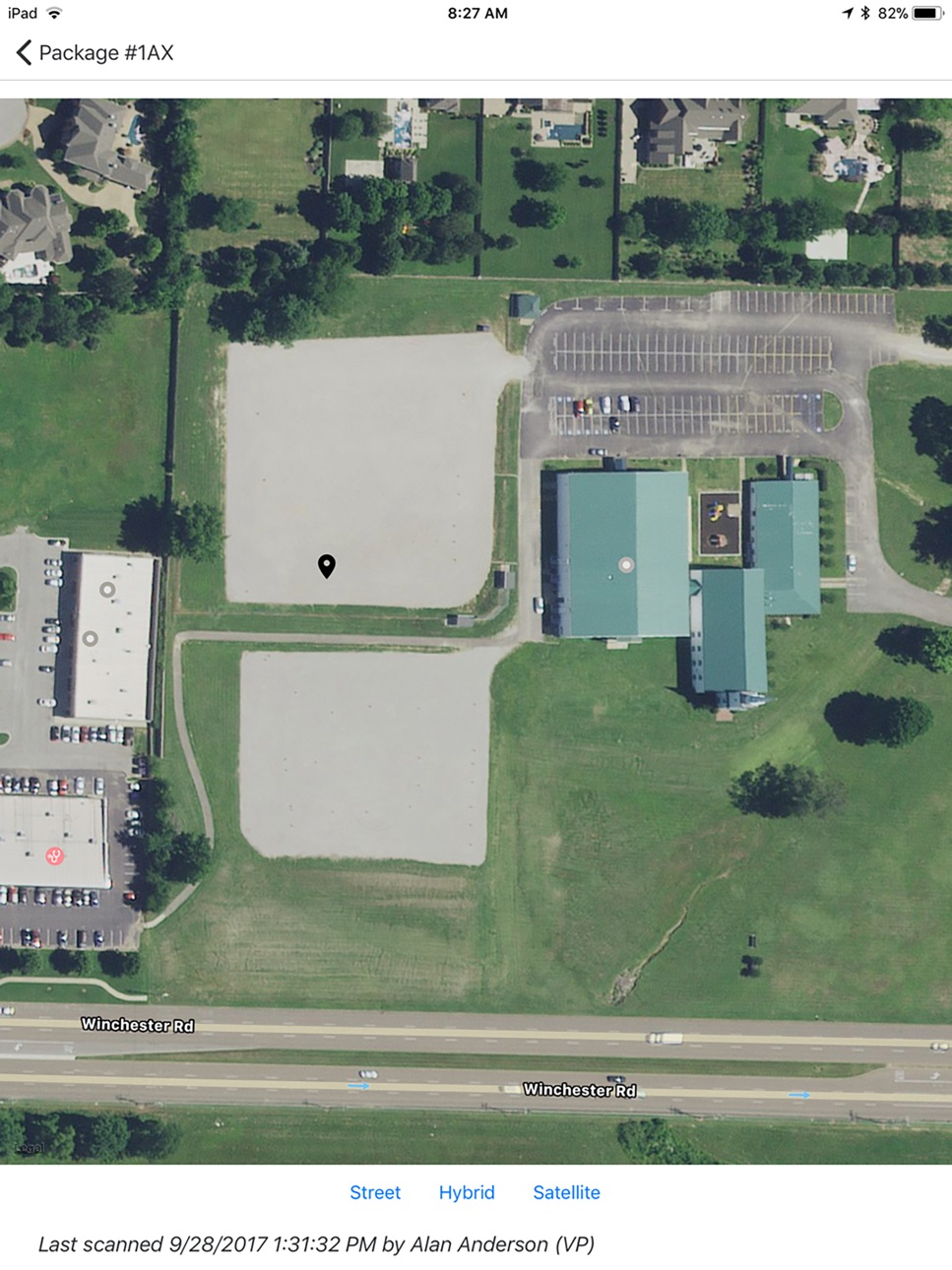
• Map functions help locate materials on the jobsite
• 3D Part search and display aides in staging materials to speed the installation process
• Wildcard search for parts, packages, or package contents
• Report field issues to Varco Pruden using the camera and communication features
• Communication feature allows for easy coordination with your VP Project Manager via phone or email with pictures from your jobsite
• Cloud based technology allows multiple users to operate independently
• Ability to work offline, storing data on the device to sync with the cloud when available
Accessibility
ipadiphonemacrealityDevicetvoswatch
Version history 5 versions
Build 866031122v2.0.1 (33)2024-05-23 18:50:09
This version 2.0.1 (33) contains fixes and enhancements to the previous 2.0.0 (27) release. I included more messaging when it is busy downloading data. This includes when you login and it is downloading a new order list, syncing the device with the cloud, getting field issues (especially the pictures), running a field issue report, downloading the graphic data for the 3d display, downloading a new order list for manage orders, forcing a refresh of the order data, downloading a new list of builders (internal only), getting truck photos. Anything that might take a significant amount of time will have the wait cursor and a message for what is happening. Corrections are: It now downloads a new order list when you click on manage orders (the pencil). An issue when a user that didn't have any orders in their "My Orders" list. Changed the color on switches to have a light green background when they are turned on. Part searching in previous versions would seem to lockup as you were typing in the part number, this was because the search started immediately. Now there is a 2.5 second pause before it starts the search to allow you to type in the part number. On a 1600+ ton order, searching for a specific part is now almost immediate. On iOS, if the search for a part returned enough packages that you needed to scroll, the keyboard wouldn't move out of the way so you could scroll to the bottom of the list. I now force the keyboard to disappear when you scroll. If you want the keyboard back, click in the search bar and it will return. Added the ability to request a field issue report on an individual field issue.
If you have any issues or ideas, don't hesitate to contact me.
Alan Anderson
AAnderson@vp.com
Build 864398938v2.0.0 (27)2024-03-15 18:22:50
This is the next major release of VP Locate. It has been re-written with modern technology and includes several enhancements and corrections. It also includes new scanning software that is much faster and better at recognizing bar codes. The performance on the local device is much better for large buildings. If you have any issues don't hesitate to report via the app or contact me or support via email.
Thanks for using VP Locate.
Alan Anderson
AAnderson@vp.com
Build 834553827v1.0.172020-01-31 20:46:17
•Improvement to the sync of orders. It now compares the last updated date/time on the device to information in the cloud. If the cloud data is newer, the altered data will be synced. The check for last updated normally only takes a few seconds.
•More data shown in the field issues list, now shows the truck, issue type, who created the issue and how many days since created
•Increased the number of images allowed for field issues
•Partial part number search – previously if a part had leading zeros, they would need to be specified in the search, now the leading zeros aren’t required
•Added estimated delivery date to the truck list, previously you needed to click on the truck to see the estimated delivery date
•Added option to show no scanned packages on the truck detail page (allows you to see packages not scanned without running the report)
•Add report option for all field issues. It will send a PDF containing all the field issues instead of running them one at a time
•Added version number to the login page
•Improved performance of the phase detail page
•Added claim reasons for field issues, these will feed the claim system
•The project manager (internal only) can now grant permission for direct sale orders
Build 825874679v1.0.162018-02-16 21:41:19
-Added option to mark a package as located here (provides a scan status and GPS recording when a package has a damaged barcode label)
-Correct issue with Field Issue with Fit-Up reason
-Ability to filter 3D display by phase (All is the default)
-Changed delivery percentage to use only Arrived and Scanned package status
-Less GPS battery usage (2M, 5 sec)
-Added 3D display to Phase Detail page
-Support for Wasp Bluetooth scanner (WWS-450) for detached scanning
-Removed Clean Database option
Build 825281374v1.0.142017-12-14 16:15:52
No pricing data captured yet — comparisons appear once the app has paid storefronts or in-app purchases.
Availability 1 of 75 storefronts
| Region | Language | Price | Ratings | Avg | Version |
|---|---|---|---|---|---|
| US | en-US | Free | 0 | — | 2.0.1 (33) |
Not available in: AG, AI, AO, AR, BB, BF, BJ, BO, BR, BS, BW, BZ, CD, CG, CI, CL, CM, CO, CR, CV, DM, DO, DZ, EC, GA, GD, GH, GM, GT, GW, GY, HN, JM, KE, KN, KY, LC, LR, LY, MA, MG, ML, MS, MU, MW, MX, MZ, NA, NE, NG, NI, PA, PE, PY, RW, SC, SL, SN, SR, ST, SV, SZ, TC, TD, TN, TT, TZ, UG, UY, VC, VE, VG, ZM, ZW
Change log 9 changes · US
✎
releaseNotes updated
This version 2.0.1 (33) contains fixes and enhancements to the previous 2.0.0 (27) release. I included more messaging when it is busy downloading data. This inc
✎
description updated
VP Locate TM is an easy to use and unique jobsite coordination tool. This powerful tool is designed to help VP Builders and Erectors maintain visibility of inco
✎
subtitle updated
Job Site Coordination Tool
✎
name updated
VP Locate
◆
Version 2.0.1 (33) released
This version 2.0.1 (33) contains fixes and enhancements to the previous 2.0.0 (27) release. I included more messaging when it is busy downloading data. This includes when you login and it is downloading a new order list, syncing the device
◆
Version 2.0.0 (27) released
This is the next major release of VP Locate. It has been re-written with modern technology and includes several enhancements and corrections. It also includes new scanning software that is much faster and better at recognizing bar codes. Th
◆
Version 1.0.17 released
•Improvement to the sync of orders. It now compares the last updated date/time on the device to information in the cloud. If the cloud data is newer, the altered data will be synced. The check for last updated normally only takes a few seco
◆
Version 1.0.16 released
-Added option to mark a package as located here (provides a scan status and GPS recording when a package has a damaged barcode label)
-Correct issue with Field Issue with Fit-Up reason
-Ability to filter 3D display by phase (All is the defa
◆
Version 1.0.14 released