Home › Utilities

Greenworks Connect
Outdoor power equipment
 US
US
1 of 1 storefronts
Content in en-US
Content in en-US
Information
Apple ID1321860070
Bundle IDcom.greenworks.guide
SellerSeller
Min iOS15.0
Min macOS12.0
Device familiesiphone, ipad, ipod
Released2017-12-13
Copyright© 2020 Globe group AB
Privacy policyLink ↗
Preview 2 platforms
iPhone 8 images




iPad 3 images


What’s New Version 4.5.0
- Fixed some issues.
Description
The official Greenworks app provides useful tools for connecting and communicating with Greenworks and Greenworks Pro Optimow robotic lawn mowers, ride-on mowers, batteries, and more. The app is packed with useful tools and functions. Overall, you can register products, get digital copies of your owners manuals and much more.
For robotic mowers, the Greenworks app lets you:
• View the installation guide
• Find useful tips for installation
• View and edit mower settings like scheduling, starting points, and security functions
• View mower status, like mowing, charging, and/or error messages
• Communicate commands with the mower like pause, park, and resume
• Get notified of mower errors and security messages (on select models)
• Track mower position (on select models)
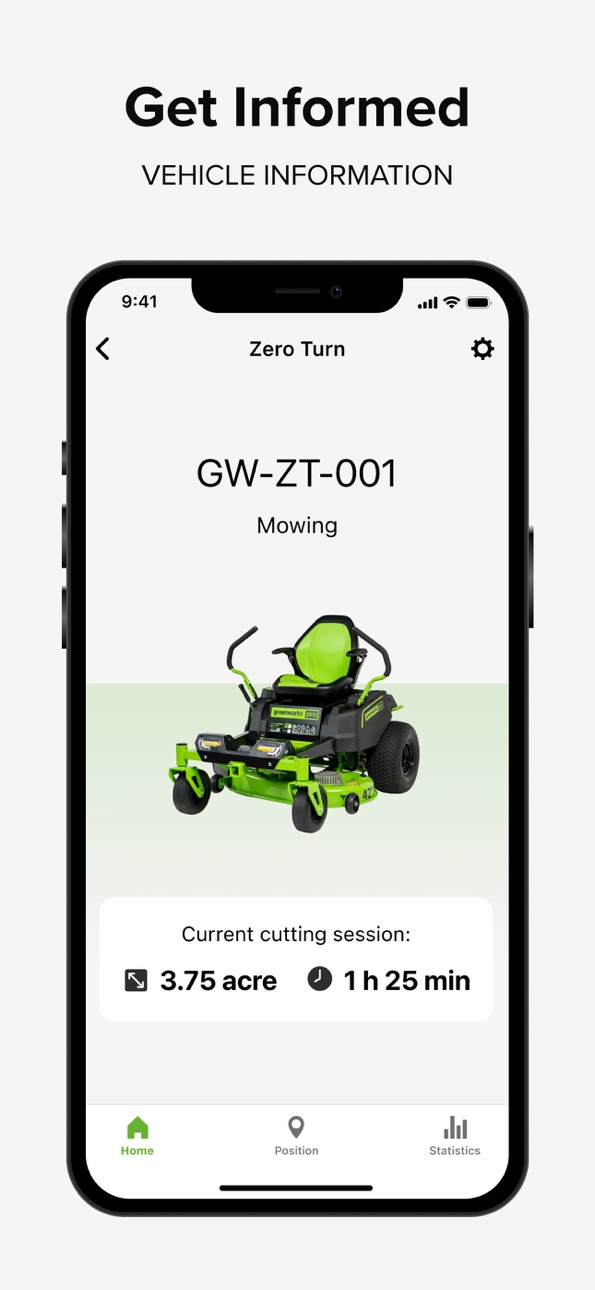
For residential ride-on mowers mowers, the Greenworks app lets you:
• View battery charge status for each individual battery
• View mowing data, like duration and area covered.
• View mower status and view how components are performing at any given time
• Track mower position
For Bluetooth batteries, the Greenworks app lets you:
• View the battery status
• Update the battery software
• Secure the battery using the lock and unlock function
• See the last known position of the battery
Accessibility
ipadiphonemacrealityDevicetvoswatch
Version history 25 versions
Build 886510348v4.5.02026-06-10 03:15:31
- Fixed some issues.
Build 884258699v4.4.02026-04-16 05:52:47
- Fixed some issues.
Build 882232543v4.3.02026-02-26 10:19:44
- Fixed some issues.
Build 879634087v4.2.02025-11-14 03:21:36
1. Updated Help Center.
2. Fixed some issues.
Build 878762576v4.1.02025-10-10 09:28:28
Improvements & Enhancements:
Flow Activation during activation process.
Bug Fixes:
Other minor bug fixes to improve overall experience.
Build 877699388v4.0.12025-09-01 02:19:58
Greenworks Connect – Version 1.2.3 Release Notes
Improvements & Enhancements:
Flow Activation during activation process.
Bug Fixes:
Other minor bug fixes to improve overall experience.
Build 876504684v4.0.02025-08-11 02:39:41
Important Update: Greenworks Tools is now Greenworks Connect
We're announcing a significant evolution of our application.
What's Changed:
New Brand Identity: The application is now officially branded as "Greenworks Connect". This name better reflects our vision and commitment moving forward.
Complete Technical Rebuild: The application has been entirely rebuilt using modern technologies, establishing a more stable and performant foundation.
Redesigned User Interface: We've introduced a completely new UI focused on enhanced usability, modern design, and clarity.
What Hasn't Changed:
Core Functionality: All existing features, your data and your connected devices remain unchanged. Continue to use this application to connect and manage your Greenworks devices - mowers, zero-turns, bluetooth batteries.
Your Account: Log in using your existing credentials – your account and data are preserved.
Action Required for Existing Users:
Update: Install the latest version via the App Store . You will find it listed as "Greenworks Connect".
Search: You may need to search explicitly for "Greenworks Connect" after the update.
Log In: Open the app and log in as usual – your data remains intact.
What This Means For You:
Your experience remains functionally the same, presented under the new name "Greenworks Connect" with a modernized interface.
Links or integrations referencing the previous name "Greenworks Tools" may be redirected or updated over time.
Build 875024123v3.6.02025-05-26 09:36:40
This version adds support for the new CrossoverZ and MaximusZ models.
Build 870457721v3.5.02024-11-17 20:50:18
Added support for the new MaximusZ and CrossoverZ ride-on mowers.
Build 857935351v3.3.02023-06-21 08:24:18
With this version we improved and added functionality for Robotic mowers, like Test wire, Secondary area and Scheduled Park.
Build 855588335v3.0.02023-04-03 05:56:25
With version 3.0 we introduce our new design. In addition to the new fresh look, we have improved performance by creating a more fluent user experience through the app’s functions.
We also introduce our Installation guide for our robotic mowers, a step-by-step guide that will make the setup process easy!
Build 847305241v2.10.02022-02-22 08:14:14
Improved usability and performance for Robotic settings pages.
Extended functionality for After-sales service system for Bluetooth robotic mowers.
Support for new robotic mower models.
Bug fixes.
Build 846260910v2.9.32021-12-29 12:16:31
Optimization of the QR code pairing process for Bluetooth robotic mowers.
Build 844711428v2.9.22021-10-18 07:54:14
1. Extended remote support functionality for BLE connected robotic mowers.
2. Support for new Greenworks Pro® vehicle models
3. Minor bug fixes.
Build 843665403v2.8.22021-09-20 11:56:44
Bug fixes.
Build 843174745v2.8.02021-07-27 08:56:39
1.Support functionality for BLE connected robotic mowers added.
2.Minor bugfixes.
Build 842543844v2.7.02021-07-05 12:25:40
In this release we added "Dealer consent" so that you can give your consent for the dealer to access the data from your mower directly in the app when support is needed.
1. External support organizations can now ask for permission to access mower data and user accept this in app
2. For Robotic mower, you can now test your starting points.
3. Bluetooth connected robotic mower can update more firmwares via app.
4. Minor bug fixes.
Build 842108476v2.6.02021-05-10 09:41:30
In this release we added support for Greenworks Pro residential ride-on mowers
1. New product, Greenworks Pro residential ride-on mowers
2. Language corrections.
3. Minor bug fixes.
Build 840661259v2.5.12021-03-02 15:44:28
In this release we added settings for handling boundary and guide wires
1. Improved the settings about how mower find its way back to charging station.
2. Added possibility to adjust the distance mower drives past the boundary wire.
3. Minor bug fixes.
Build 840128199v2.5.02021-01-25 07:56:13
In this release we made improvements when edit schedule and added new settings for push messages
1. Improved schedule handling.
2. Added support for new robotic mower models.
3. Ability to change push message settings, for supported models.
4. Added links to electronic manuals for each model.
5. License agreement updated to comply with new data privacy laws
6. Added support for new smart battery models.
7. Minor bug fixes.
Build 837232214v2.3.22020-08-11 11:29:16
1. Improve the mower status display in app.
2. Improve app to comply with legal regulations.
3. Minor bug fixes.
Build 836282812v2.3.12020-06-09 08:36:00
In this release we are introducing native push messages so that you get notified if your mower needs your attention.
1. Push notifications
2. Minor bug fixes
Build 834440524v2.3.02020-03-31 13:47:22
In this release the positioning function is improved by showing more information. Also, we have sorted out a couple of bugs.
1. Trail of last mower positions added
2. Geofence area visible on the map
3. Possible to reset all mower user settings
4. Support link added
5. Information about ongoing mower software updates added
6. Battery temperature display
Build 834083698v2.2.12019-12-23 07:12:01
1.Improved battery pairing sequence.
2.Improved battery info pages.
3.Bugfixes.
Build 833415425v2.2.02019-11-06 08:17:35
1 Add FW release notes
2 Add error list
3 Add Frost sensor
4 Show circle include error margin
5 Tactile feedback at successful QR code reading at pairing
6 Adjust start point UI layout
No pricing data captured yet — comparisons appear once the app has paid storefronts or in-app purchases.
Availability 1 of 1 storefronts
| Region | Language | Price | Ratings | Avg | Version |
|---|---|---|---|---|---|
| US | en-US | Free | 10 | 1.3 | 4.5.0 |
Change log 29 changes · US
✎
releaseNotes updated
- Fixed some issues.
✎
description updated
The official Greenworks app provides useful tools for connecting and communicating with Greenworks and Greenworks Pro Optimow robotic lawn mowers, ride-on mower
✎
subtitle updated
Outdoor power equipment
✎
name updated
Greenworks Connect
◆
Version 4.5.0 released
- Fixed some issues.
◆
Version 4.4.0 released
- Fixed some issues.
◆
Version 4.3.0 released
- Fixed some issues.
◆
Version 4.2.0 released
1. Updated Help Center.
2. Fixed some issues.
◆
Version 4.1.0 released
Improvements & Enhancements:
Flow Activation during activation process.
Bug Fixes:
Other minor bug fixes to improve overall experience.
◆
Version 4.0.1 released
Greenworks Connect – Version 1.2.3 Release Notes
Improvements & Enhancements:
Flow Activation during activation process.
Bug Fixes:
Other minor bug fixes to improve overall experience.
◆
Version 4.0.0 released
Important Update: Greenworks Tools is now Greenworks Connect
We're announcing a significant evolution of our application.
What's Changed:
New Brand Identity: The application is now officially branded as "Greenworks Connect"
◆
Version 3.6.0 released
This version adds support for the new CrossoverZ and MaximusZ models.
◆
Version 3.5.0 released
Added support for the new MaximusZ and CrossoverZ ride-on mowers.
◆
Version 3.3.0 released
With this version we improved and added functionality for Robotic mowers, like Test wire, Secondary area and Scheduled Park.
◆
Version 3.0.0 released
With version 3.0 we introduce our new design. In addition to the new fresh look, we have improved performance by creating a more fluent user experience through the app’s functions.
We also introduce our Installation guide for our robotic m
◆
Version 2.10.0 released
Improved usability and performance for Robotic settings pages.
Extended functionality for After-sales service system for Bluetooth robotic mowers.
Support for new robotic mower models.
Bug fixes.
◆
Version 2.9.3 released
Optimization of the QR code pairing process for Bluetooth robotic mowers.
◆
Version 2.9.2 released
1. Extended remote support functionality for BLE connected robotic mowers.
2. Support for new Greenworks Pro® vehicle models
3. Minor bug fixes.
◆
Version 2.8.2 released
Bug fixes.
◆
Version 2.8.0 released
1.Support functionality for BLE connected robotic mowers added.
2.Minor bugfixes.
◆
Version 2.7.0 released
In this release we added "Dealer consent" so that you can give your consent for the dealer to access the data from your mower directly in the app when support is needed.
1. External support organizations can now ask for permission to acces
◆
Version 2.6.0 released
In this release we added support for Greenworks Pro residential ride-on mowers
1. New product, Greenworks Pro residential ride-on mowers
2. Language corrections.
3. Minor bug fixes.
◆
Version 2.5.1 released
In this release we added settings for handling boundary and guide wires
1. Improved the settings about how mower find its way back to charging station.
2. Added possibility to adjust the distance mower drives past the boundary wire.
3. M
◆
Version 2.5.0 released
In this release we made improvements when edit schedule and added new settings for push messages
1. Improved schedule handling.
2. Added support for new robotic mower models.
3. Ability to change push message settings, for supported models
◆
Version 2.3.2 released
1. Improve the mower status display in app.
2. Improve app to comply with legal regulations.
3. Minor bug fixes.
◆
Version 2.3.1 released
In this release we are introducing native push messages so that you get notified if your mower needs your attention.
1. Push notifications
2. Minor bug fixes
◆
Version 2.3.0 released
In this release the positioning function is improved by showing more information. Also, we have sorted out a couple of bugs.
1. Trail of last mower positions added
2. Geofence area visible on the map
3. Possible to reset all mower user s
◆
Version 2.2.1 released
1.Improved battery pairing sequence.
2.Improved battery info pages.
3.Bugfixes.
◆
Version 2.2.0 released
1 Add FW release notes
2 Add error list
3 Add Frost sensor
4 Show circle include error margin
5 Tactile feedback at successful QR code reading at pairing
6 Adjust start point UI layout