Home › Productivity

Information
Preview 3 platforms
iPhone 7 images





iPad 7 images


Mac 6 images




What’s New Version 5.4.1
Improved performance when writing large text files.
Description
The Simplest Writing App for Mac, iPad and iPhone
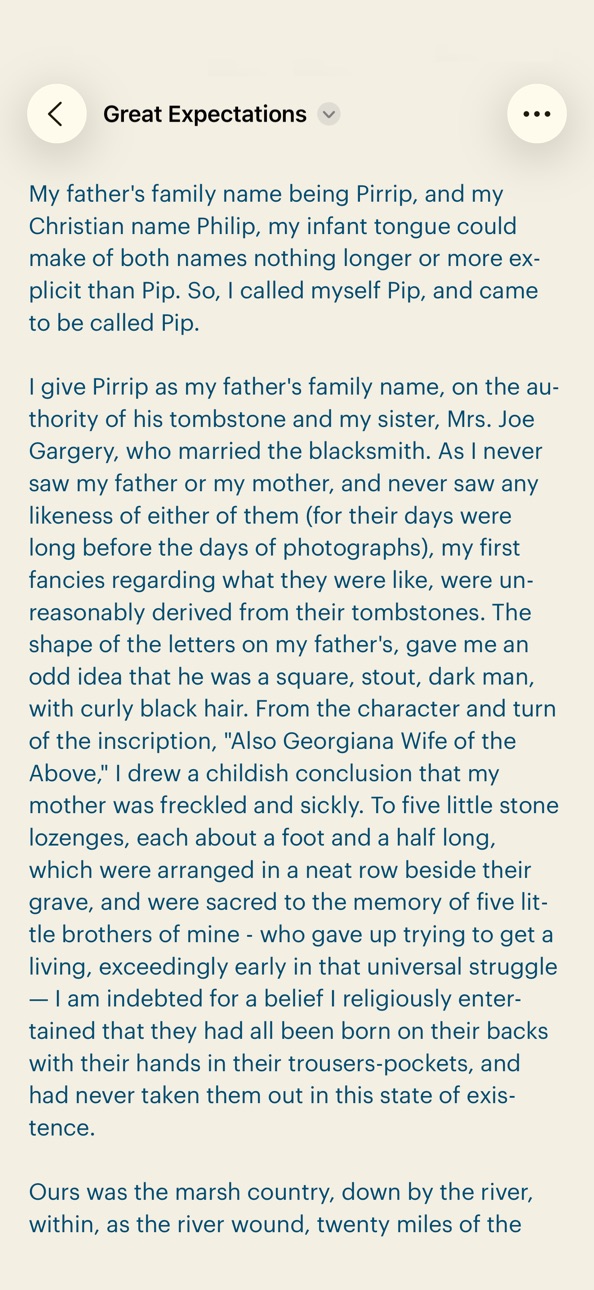
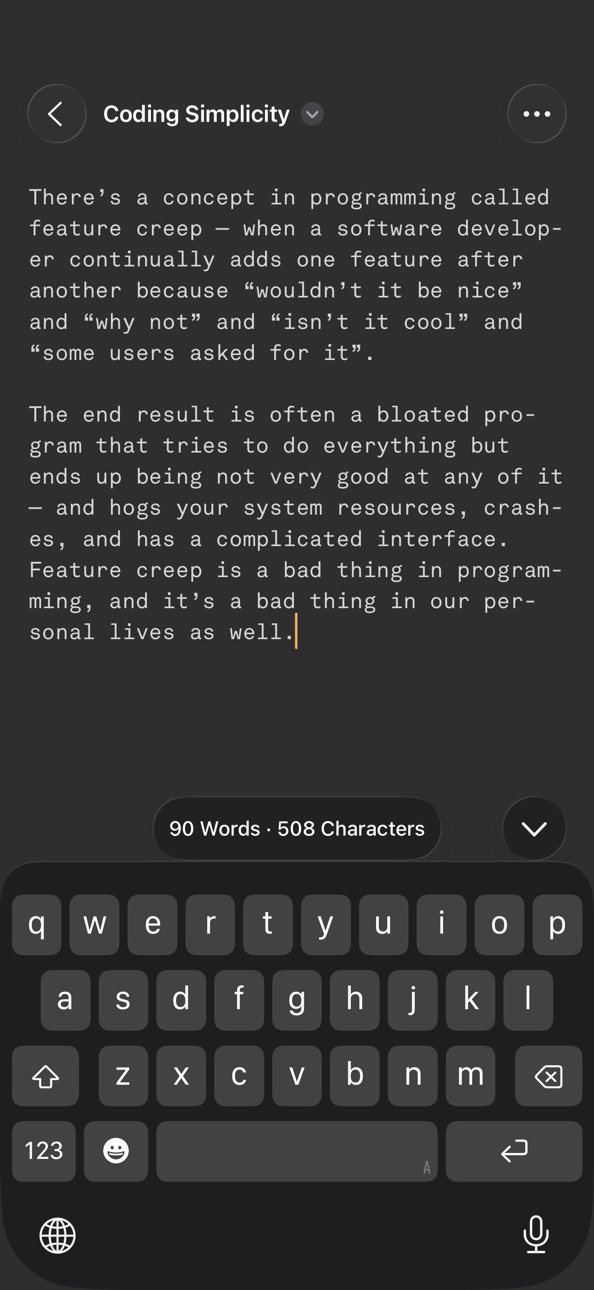
There are many writing apps for you to choose from today, so why bother with yet another one? Because Simpletext is simpler. Its single-minded commitment to simplicity means you’ll get a no-frills writing app that works well and looks great, forever.
Simpletext started as a passion project because I couldn’t find what I was looking for. Most apps were trying to do too much and ended up bloated with features I never needed. So I built Simpletext based on a simple premise — what if there’s an app that refuses to do more, choosing instead to do just one thing, and do it well? For Simpletext, that one thing is writing.
Why Simpletext?
Most people would say Simpletext is lacking in features, and they’re right. In fact, Simpletext began the opposite way — by listing down everything I didn’t want in a writing app. The goal is to create a dumbed-down writing app that inspires you to do nothing else but write. In order to achieve this, I designed Simpletext around four cornerstone principles:
1. Zero Clutter
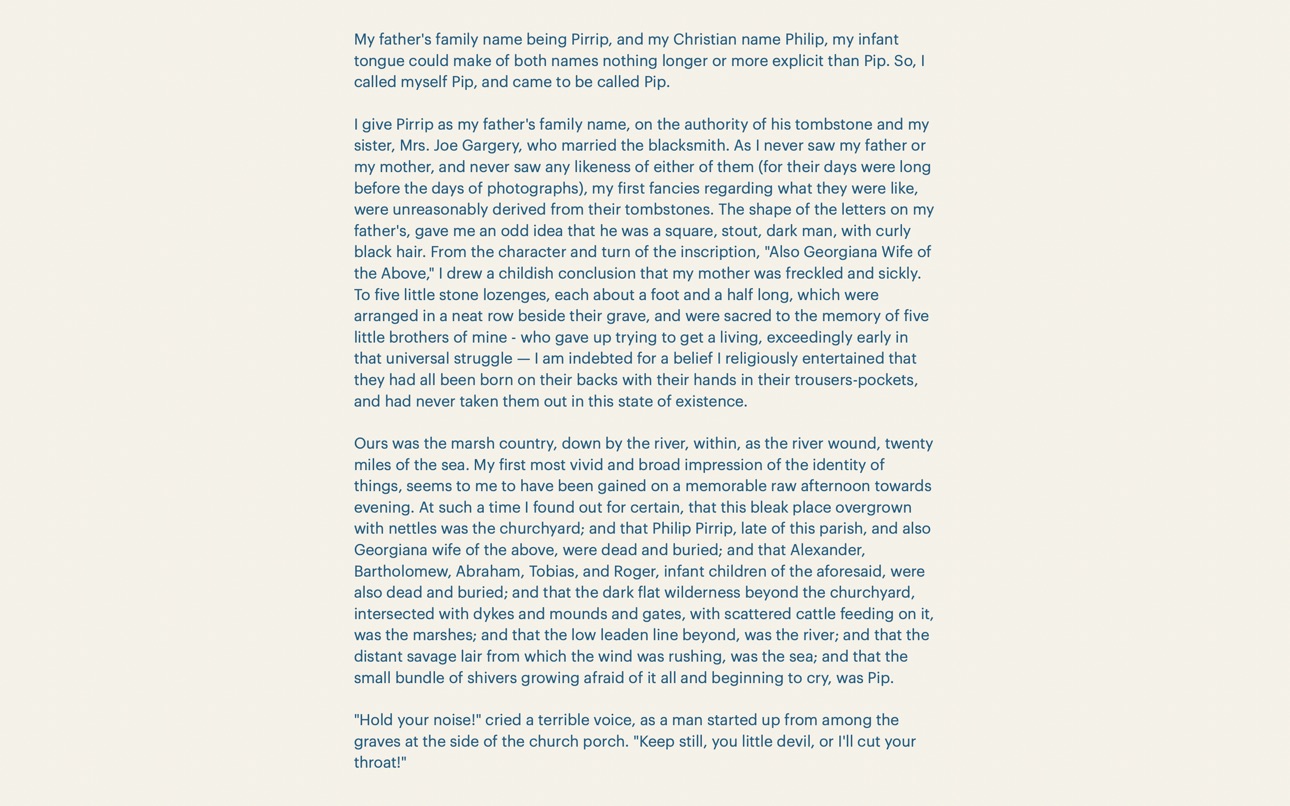
Simpletext is unobtrusive. It provides a blank canvas to write with absolutely nothing to distract you from writing. There’s no visual clutter — the intent is to create a quiet space that helps you connect with your voice, get into the flow, and simply write. With zero clutter, Simpletext lets your words take centre stage.
2. Beautiful Typography
Simpletext comes with three professional fonts for you to choose from, handpicked to provide the finest writing experience. They are: (1) Akkurat Mono by Lineto (Monospaced); (2) Graphik by Commercial Type (Sans Serif); and (3) Tiempos Text by Klim Type Foundry (Serif). And if you have a personal favourite font, you can use it in Simpletext too.
3. Plain Text Only
Simpletext supports only plain text, which is fast, lightweight and platform-independent. It will never have formatting options, so your files will never be filled with unnecessary attributes. Plain text also ensures your files are always accessible on any device, now and in the future.
4. Fully Native
Simpletext is a fully native app developed in Swift and runs natively on Apple silicon. It uses only Apple’s framework and UI components, just as they were intended to be used without any custom workarounds. This approach results in less code, less bugs and better overall performance.
Here's What Others Have to Say
“I just wanted to thank you for developing Simpletext. It’s perfect. I’ve enjoyed its simplicity and smoothness for quite some time, but now that I can use my favourite font in it (Sina Nova, free on Fontspring) it has truly become not just the best app to write in, but my favourite app period. Thank you for creating and maintaining it.”
- Bart
“This app does everything it says on the tin. It is not meant to do a lot, but what it does it does very well. It is well designed and suits well those who want to focus on writing and avoid dealing with formatting, proprietary file types and hidden saving locations. It produces and edits .txt files, which will probably be around for as long as there are computers, and saves them in plain sight. Five stars.”
- Fernando
“I’ve tried all sorts of writing apps but Simpletext is definitely the best of all. So grateful for your dedication and those productivity tips in the blog post are so good. Simpletext is such a joy to use.”
- LWL Art Studio
“A writing app that is as simple as stated, beautiful to write with and opens and closes wherever you want. Simple tweaks are easily accessible, if required, and only add to the minimalistic perfection. Good job.”
- Tuntle
Get Back to Basics
In a world full of feature-rich, subscription-based apps, I wanted to create something that goes back to basics. Simpletext is intentionally simple, yet it has everything you need. It’s an app I use every single day. I hope you will too.
Best wishes,
Yeow Jin
P.S. Simpletext comes with a promise — find out more at simpletext.app/promise
Accessibility
ipadiphonemacrealityDevicetvoswatch
Version history 25 versions
Build 887213383v5.4.12026-06-20 16:42:54
Improved performance when writing large text files.
Build 882675378v5.42026-02-22 21:26:48
This update introduces a new setting for text justification. When enabled, your text will be evenly aligned along both the left and right edges for a cleaner look.
Build 881803187v5.32026-01-25 19:08:54
This update provides a more granular setting for line length to create the perfect writing space.
Build 881177889v5.2.12026-01-16 23:16:04
Minor fixes and performance improvements.
Build 878131411v5.22025-09-16 22:29:20
Updated to support Liquid Glass design in iOS 26.
Build 876545864v5.12025-07-28 06:01:10
New Auto-Hide Caret setting lets you write without the blinking cursor for a truly distraction-free experience.
Build 872018702v5.0.22025-01-26 23:42:30
Minor bug fixes and enhancements.
Build 870000721v5.0.12024-10-27 15:25:01
Fixed an issue where custom installed fonts were not appearing in the font picker.
Build 869178802v5.02024-10-12 02:50:49
Simpletext 5 is completely rebuilt from the ground up using the latest Apple frameworks:
- Powered by TextKit 2 for better performance and forward compatibility
- Fully compatible with iOS 18, including support for the new Dark look and the ability to lock and hide the app for privacy
- An all-new Serif typeface, Tiempos Text, for a more inspiring writing experience
Happy writing!
Build 859970127v4.5.22023-09-17 22:38:17
Minor fixes and performance improvements.
Build 858059260v4.5.12023-06-26 17:10:58
Minor fixes and performance improvements.
Build 854678583v4.52023-02-05 17:37:07
This update provides a more granular setting for line spacing so you can create the perfect writing space.
Build 854319769v4.4.32023-01-11 17:33:34
This update includes a minor enhancement, where the filename now adopts the same theme color to match.
Build 853852608v4.4.22022-12-13 02:35:53
Minor bug fixes and performance improvements.
Build 852283381v4.4.12022-09-18 17:11:48
Version 4.4 supports the latest features of iOS 16, including a new File menu, a redesigned Find and Replace experience, as well as various other improvements under the hood for better performance.
This update removes the inline rename feature introduced in Version 4.4 due to an intermittent error when renaming files stored in cloud storage. It will be reintroduced once the issue is fully resolved. Apologies!
Build 852130843v4.42022-09-16 11:57:06
Updated to support the latest features of iOS 16, including a new File menu, a redesigned Find and Replace experience, as well as various other improvements under the hood for better performance.
Build 849886019v4.32022-06-19 12:31:38
You can now use your personal favourite font in Simpletext! This update adds support for custom typeface, as well as a new setting to toggle automatic full screen.
Build 848736298v4.22022-05-04 17:21:54
This update adds two new settings: (1) Wide line spacing; and (2) Ultra wide line length for larger screen sizes.
Build 846812975v4.12022-01-25 01:43:36
This update includes a new setting for compact line spacing so you can display more text on the screen, as well as other minor enhancements.
Build 845180357v4.02021-12-06 08:44:36
Simpletext V4 is an all-new version rebuilt from the ground up with an even leaner codebase. It has subtle refinements across the entire app, including a new setting to create your own theme, and a modern new app icon to match!
Build 842633914v3.42021-06-13 16:09:10
This update brings the search feature to Simpletext! Just tap on the Search menu and type the text you’re looking for in the search bar. This release also includes a setting to turn hyphenation on or off.
Build 842040721v3.3.12021-05-04 01:14:10
Fixed an issue where the word count is sometimes not vertically centered on the keyboard bar.
Build 840920239v3.32021-03-21 14:39:09
This update introduces and all-new Sans Serif typeface — Graphik by Commercial Type. Designed by Christian Schwartz in 2009, Graphik has an elegant plainness that’s perfectly suited for long text. I hope you’ll enjoy writing with it.
Build 839969496v3.22021-01-13 01:09:49
Introducing themes for Simpletext! You can now pick from three beautiful themes to suit your mood — Monotone, Lo-Fi and Solarized.
Build 839742783v3.1.12020-12-28 18:51:59
- Added a setting to change the line length on iPad.
- Added a Preferences shortcut menu to give you quick access to Settings.
Price history by region
Currency
Show
Columns
Search
Availability 13 of 13 storefronts
| Region | Language | Price | Ratings | Avg | Version |
|---|---|---|---|---|---|
 US US | en-US | USD 14.99 | 23 | 4.1 | 5.4.1 |
 AE AE | en-GB | AED 59.99 | 0 | — | 5.4.1 |
 AG AG | en-GB | USD 14.99 | 0 | — | 5.4.1 |
 BB BB | en-GB | USD 17.99 | 0 | — | 5.4.1 |
 BZ BZ | en-GB | USD 14.99 | 0 | — | 5.4.1 |
 DM DM | en-GB | USD 14.99 | 0 | — | 5.4.1 |
 GW GW | en-GB | USD 14.99 | 0 | — | 5.4.1 |
 GY GY | en-GB | USD 14.99 | 0 | — | 5.4.1 |
 LY LY | en-GB | USD 14.99 | 0 | — | 5.4.1 |
 SC SC | en-GB | USD 14.99 | 0 | — | 5.4.1 |
 SR SR | en-GB | USD 14.99 | 0 | — | 5.4.1 |
 ST ST | en-GB | USD 14.99 | 0 | — | 5.4.1 |
 SZ SZ | en-GB | USD 14.99 | 0 | — | 5.4.1 |
Change log 29 changes · US
✎
releaseNotes updated
Improved performance when writing large text files.
✎
description updated
The Simplest Writing App for Mac, iPad and iPhone
There are many writing apps for you to choose from today, so why bother with yet another one? Because Simplet
✎
subtitle updated
Plain Text Editor
✎
name updated
Simpletext
◆
Version 5.4.1 released
Improved performance when writing large text files.
◆
Version 5.4 released
This update introduces a new setting for text justification. When enabled, your text will be evenly aligned along both the left and right edges for a cleaner look.
◆
Version 5.3 released
This update provides a more granular setting for line length to create the perfect writing space.
◆
Version 5.2.1 released
Minor fixes and performance improvements.
◆
Version 5.2 released
Updated to support Liquid Glass design in iOS 26.
◆
Version 5.1 released
New Auto-Hide Caret setting lets you write without the blinking cursor for a truly distraction-free experience.
◆
Version 5.0.2 released
Minor bug fixes and enhancements.
◆
Version 5.0.1 released
Fixed an issue where custom installed fonts were not appearing in the font picker.
◆
Version 5.0 released
Simpletext 5 is completely rebuilt from the ground up using the latest Apple frameworks:
- Powered by TextKit 2 for better performance and forward compatibility
- Fully compatible with iOS 18, including support for the new Dark look and th
◆
Version 4.5.2 released
Minor fixes and performance improvements.
◆
Version 4.5.1 released
Minor fixes and performance improvements.
◆
Version 4.5 released
This update provides a more granular setting for line spacing so you can create the perfect writing space.
◆
Version 4.4.3 released
This update includes a minor enhancement, where the filename now adopts the same theme color to match.
◆
Version 4.4.2 released
Minor bug fixes and performance improvements.
◆
Version 4.4.1 released
Version 4.4 supports the latest features of iOS 16, including a new File menu, a redesigned Find and Replace experience, as well as various other improvements under the hood for better performance.
This update removes the inline rename fea
◆
Version 4.4 released
Updated to support the latest features of iOS 16, including a new File menu, a redesigned Find and Replace experience, as well as various other improvements under the hood for better performance.
◆
Version 4.3 released
You can now use your personal favourite font in Simpletext! This update adds support for custom typeface, as well as a new setting to toggle automatic full screen.
◆
Version 4.2 released
This update adds two new settings: (1) Wide line spacing; and (2) Ultra wide line length for larger screen sizes.
◆
Version 4.1 released
This update includes a new setting for compact line spacing so you can display more text on the screen, as well as other minor enhancements.
◆
Version 4.0 released
Simpletext V4 is an all-new version rebuilt from the ground up with an even leaner codebase. It has subtle refinements across the entire app, including a new setting to create your own theme, and a modern new app icon to match!
◆
Version 3.4 released
This update brings the search feature to Simpletext! Just tap on the Search menu and type the text you’re looking for in the search bar. This release also includes a setting to turn hyphenation on or off.
◆
Version 3.3.1 released
Fixed an issue where the word count is sometimes not vertically centered on the keyboard bar.
◆
Version 3.3 released
This update introduces and all-new Sans Serif typeface — Graphik by Commercial Type. Designed by Christian Schwartz in 2009, Graphik has an elegant plainness that’s perfectly suited for long text. I hope you’ll enjoy writing with it.
◆
Version 3.2 released
Introducing themes for Simpletext! You can now pick from three beautiful themes to suit your mood — Monotone, Lo-Fi and Solarized.
◆
Version 3.1.1 released
- Added a setting to change the line length on iPad.
- Added a Preferences shortcut menu to give you quick access to Settings.