Home › Photo & Video

 US
US
USen-US MXes-MX
 BRpt-BR
 GHen-GB
 KEen-GB
 NGen-GB
 NAen-GB
 BWen-GB
 DZen-GB
 MGen-GB
 MUen-GB
 TNen-GB
 UGen-GB
 AOen-GB
 MZen-GB
 SCen-GB
 ZMen-GB
 BFNot Available
 BJNot Available
 CDNot Available
 CGNot Available
 CINot Available
 CMNot Available
 CVNot Available
 GANot Available
 GMNot Available
 GWNot Available
 LRNot Available
 LYNot Available
 MANot Available
 MLNot Available
 MWNot Available
 NENot Available
 RWNot Available
 SLNot Available
 SNNot Available
 STNot Available
 SZNot Available
 TDNot Available
 TZNot Available
 ZWNot Available
17 of 41 storefronts
Content in en-US
Content in en-US
Information
Preview 2 platforms
iPhone 4 images


iPad 4 images


What’s New Version 1.12.20
Added support for new Canon cameras.
Description
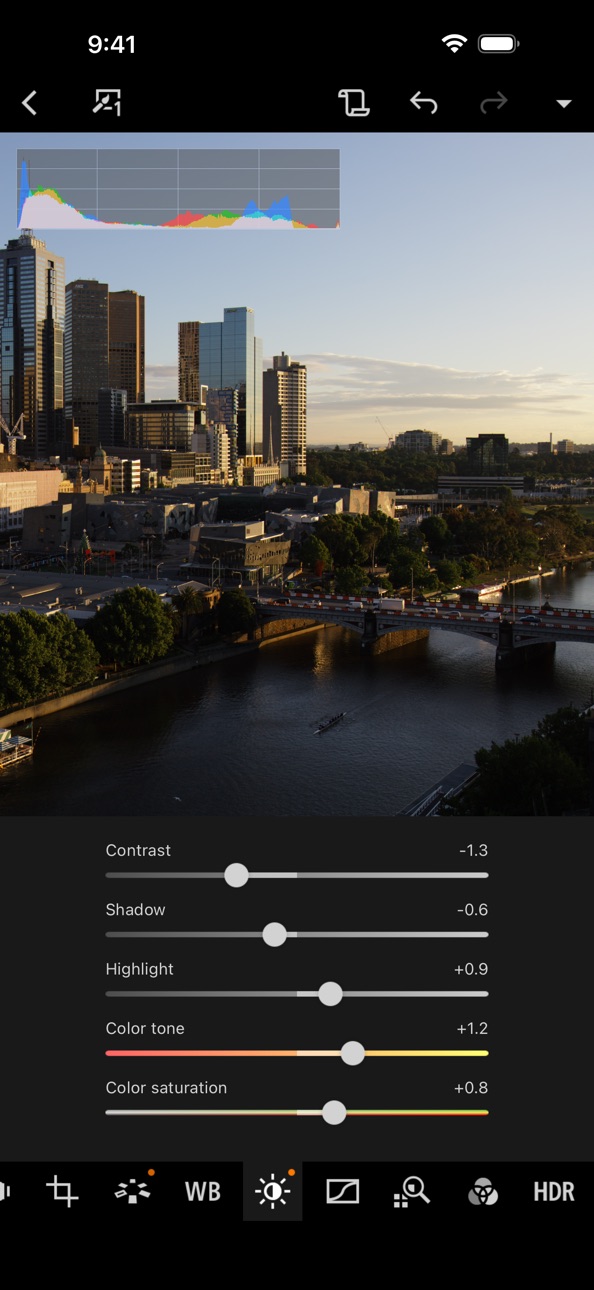
Canon Digital Photo Professional Express (Canon DPP Express) is an iPad/iPhone application to color edit RAW images with intuitive touch operation to be converted to JPEG file afterwards.
To continue using all Digital Photo Professional Express features, you must complete the (paid) subscription process.
When you purchase the subscription,
- Your image adjustments will be recorded.
- You will be able to export images without watermarks.
[Key Features]
- Adjust RAW images freely.
- Quickly and easily adjust RAW images anywhere, any time.
- Save multiple adjustment patterns and compare the results on a single RAW image.
- Use the change history function to readjust images until you achieve the perfect result.
- Save adjusted images to your Camera Roll in JPEG format. "
[Compatible Formats]
RAW(CR3/CR2 ), JPEG, HEIF (10 bit)
* Not compatible with .CRW or video file formats.
CR3/HEIF (10bit) images can now be displayed and saved in HDR PQ. The supported displays are as follows:
- iPad
- Ultra Retina XDR
- Liquid Retina XDR
- iPhone
- Super Retina XDR
- Super Retina HD
Note that the actual displayed image depends on the display performance.
[Image Input]
Via Camera Connect : RAW(CR3/CR2), JPEG, HEIF (10 bit)
Import from Camera Roll: [RAW (CR3/CR2), JPEG], [HEIF (10 bit) *excluding EOS 5D Mark IV/EOS R]
* Image data is saved in the app. In addtion, devices with iOS 12.1 and later can import CR3 files from the Camera Roll.
*HEIF (10-bit) files and RAW images shot with [HDR PQ settings] enabled can be imported using linked mode with the Canon camera app Canon Camera Connect .
*RAW burst files cannot be imported to smart devices. Extract the CR3 images from the RAW burst file in advance on the camera side, and then import them to the smart device.
[Compatible Camera Models]
For compatible models and features, please refer to the following website.
https://ssw.imaging-saas.canon/app/app.html?app=dppex
[System requirement]
iOS 17 / 18 / 26
iPadOS 17 / 18 / 26
[Important Notes]
Payment will be charged to your Apple ID account at the time of purchase confirmation. If you do not cancel at least 24 hours before the end of the current period, the subscription will automatically renew, and charges will continue. You can manage and cancel your subscriptions by going to your account settings on the App Store after purchase.
- If you uninstall the app, all image data imported from your camera will be erased.
- If application does not operate properly, try again after shutting down the application.
- Visit your local Canon Web pages for more details.
https://ssw.imaging-saas.canon/app/app.html?app=dppex
Terms and conditions
https://www.apple.com/legal/internet-services/itunes/dev/stdeula/
Capabilities
In-App Purchases
Accessibility
ipadiphonemacrealityDevicetvoswatch
Version history 25 versions
Build 883010790v1.12.202026-05-27 23:37:05
Added support for new Canon cameras.
Build 878610304v1.12.102025-11-10 00:06:25
Added support for new Canon cameras.
Added the ability to display and save CR3 images in HDR PQ.
Build 870382873v1.11.102025-03-31 23:48:46
Added support for new Canon cameras (EOS R50 V / PowerShot V1).
Added the ability to display and save HEIF images in HDR PQ.
Build 868365611v1.10.202024-09-26 00:29:38
Added support for new Canon cameras(EOS R1)
Build 866485375v1.10.102024-08-19 23:20:27
Added support for new Canon cameras(EOS R5 Mark II)
Build 855376368v1.9.02023-05-31 00:54:11
Added support for new Canon cameras(EOS R100)
Build 853240351v1.8.102023-02-21 00:45:15
Added support for new Canon cameras(EOS R50, EOS R8)
Build 851765912v1.8.02022-11-08 01:34:00
Added support for new Canon cameras(EOS R6 Mark Ⅱ)
Build 850986669v1.7.112022-08-23 00:34:49
Minor bug fixes
Build 847416551v1.7.102022-05-25 01:03:09
Added support for new Canon cameras(EOS R7, EOS R10)
Build 846810556v1.7.02022-02-24 01:04:19
Added support for new Canon cameras(EOS R5 C)
Build 846185460v1.6.112021-12-24 16:02:41
Fixed startup issues
Build 843350418v1.6.102021-10-25 01:11:41
Added support for new Canon cameras(EOS R3)
Build 838508609v1.5.02020-12-03 00:09:27
Added support for new iOS devices(iPhone)
Build 837593047v1.4.02020-10-20 00:23:59
Added support for new Canon cameras
Build 836230631v1.3.302020-07-13 00:01:55
Added support for new Canon cameras
Build 834450088v1.3.102020-02-17 00:28:41
Added support for new Canon cameras
Build 833851527v1.3.02020-01-08 01:34:00
Added support for new Canon cameras
Build 833312906v1.2.102019-11-11 07:11:18
・Added support for new Canon cameras
・Added supported models for processing RAW images
Build 832639849v1.2.02019-10-09 05:03:39
・Added support for new Canon cameras
・Added supported models for processing RAW images
Build 832110566v1.1.412019-08-29 00:30:50
Added support for new Canon cameras
Build 831545034v1.1.302019-07-09 06:17:49
- Added support for new Canon cameras
- Improvement of the user interface
Build 830847243v1.1.102019-04-15 01:17:00
- Added support for new Canon cameras
- Improvement of the user interface
Build 829610688v1.1.02019-02-17 23:40:20
- Added support for new Canon cameras
- Improvement of the user interface
Build 828874194v1.0.112018-10-24 23:41:45
-Added support for new Canon cameras
-Improvement of the user interface
No pricing data captured yet — comparisons appear once the app has paid storefronts or in-app purchases.
Availability 17 of 41 storefronts
| Region | Language | Price | Ratings | Avg | Version |
|---|---|---|---|---|---|
| US | en-US | Free | 2.7k | 4.6 | 1.12.20 |
| MX | es-MX | Free | 216 | 4.7 | 1.12.20 |
| BR | pt-BR | Free | 163 | 4.6 | 1.12.20 |
| GH | en-GB | Free | 5 | 4.6 | 1.12.20 |
| KE | en-GB | Free | 5 | 4.6 | 1.12.20 |
| NG | en-GB | Free | 4 | 4.8 | 1.12.20 |
| NA | en-GB | Free | 3 | 5.0 | 1.12.20 |
| BW | en-GB | Free | 1 | 5.0 | 1.12.20 |
| DZ | en-GB | Free | 1 | 5.0 | 1.12.20 |
| MG | en-GB | Free | 1 | 5.0 | 1.12.20 |
| MU | en-GB | Free | 1 | 5.0 | 1.12.20 |
| TN | en-GB | Free | 1 | 3.0 | 1.12.20 |
| UG | en-GB | Free | 1 | 5.0 | 1.12.20 |
| AO | en-GB | Free | 0 | — | 1.12.20 |
| MZ | en-GB | Free | 0 | — | 1.12.20 |
| SC | en-GB | Free | 0 | — | 1.12.20 |
| ZM | en-GB | Free | 0 | — | 1.12.20 |
Not available in: BF, BJ, CD, CG, CI, CM, CV, GA, GM, GW, LR, LY, MA, ML, MW, NE, RW, SL, SN, ST, SZ, TD, TZ, ZW
Change log 28 changes · US
✎
releaseNotes updated
Added support for new Canon cameras.
✎
description updated
Canon Digital Photo Professional Express (Canon DPP Express) is an iPad/iPhone application to color edit RAW images with intuitive touch operation to be convert
✎
name updated
Canon DPP Express
◆
Version 1.12.20 released
Added support for new Canon cameras.
◆
Version 1.12.10 released
Added support for new Canon cameras.
Added the ability to display and save CR3 images in HDR PQ.
◆
Version 1.11.10 released
Added support for new Canon cameras (EOS R50 V / PowerShot V1).
Added the ability to display and save HEIF images in HDR PQ.
◆
Version 1.10.20 released
Added support for new Canon cameras(EOS R1)
◆
Version 1.10.10 released
Added support for new Canon cameras(EOS R5 Mark II)
◆
Version 1.9.0 released
Added support for new Canon cameras(EOS R100)
◆
Version 1.8.10 released
Added support for new Canon cameras(EOS R50, EOS R8)
◆
Version 1.8.0 released
Added support for new Canon cameras(EOS R6 Mark Ⅱ)
◆
Version 1.7.11 released
Minor bug fixes
◆
Version 1.7.10 released
Added support for new Canon cameras(EOS R7, EOS R10)
◆
Version 1.7.0 released
Added support for new Canon cameras(EOS R5 C)
◆
Version 1.6.11 released
Fixed startup issues
◆
Version 1.6.10 released
Added support for new Canon cameras(EOS R3)
◆
Version 1.5.0 released
Added support for new iOS devices(iPhone)
◆
Version 1.4.0 released
Added support for new Canon cameras
◆
Version 1.3.30 released
Added support for new Canon cameras
◆
Version 1.3.10 released
Added support for new Canon cameras
◆
Version 1.3.0 released
Added support for new Canon cameras
◆
Version 1.2.10 released
・Added support for new Canon cameras
・Added supported models for processing RAW images
◆
Version 1.2.0 released
・Added support for new Canon cameras
・Added supported models for processing RAW images
◆
Version 1.1.41 released
Added support for new Canon cameras
◆
Version 1.1.30 released
- Added support for new Canon cameras
- Improvement of the user interface
◆
Version 1.1.10 released
- Added support for new Canon cameras
- Improvement of the user interface
◆
Version 1.1.0 released
- Added support for new Canon cameras
- Improvement of the user interface
◆
Version 1.0.11 released
-Added support for new Canon cameras
-Improvement of the user interface