Home › Health & Fitness

 US
US
1 of 1 storefronts
Content in en-US
Content in en-US
Information
Preview 3 platforms

iPhone 10 images


iPad 6 images


Apple Watch 7 images



What’s New Version 26.8.3
26.8.3
- Fixed custom calorie calculations for users whose body weight is stored in kilograms.
- Improved Apple Watch syncing for body weight and calorie preferences.
- Improved calorie consistency between workout summary and shift details.
- Added better calorie diagnostics to help validate Apple Calories vs HockeyTracker calorie estimates.
- Stability and reliability improvements for workout saving and post-workout processing.
Please email any issues to hockeytrackerapp@gmail.com
Thanks!
Jaclyn
Description
As Featured by iMore, track and analyze every aspect of your hockey!
HockeyTracker turns every Apple Watch into a sophisticated hockey tracking computer. Start HockeyTracker before a game and track your favorite performance stats, and afterwards, dive deep into your data.
HockeyTracker tracks just about any performance metric you can imagine, plus a few exclusive to HockeyTracker.
Key Features:
• Dedicated Game, Pick-up, Practice, Goalie, Dryland Training, Coach, Stick Time, Open Skate, Pond and Ref modes
• Automatic Shift Detection* (including shift length, calories burned, top speed, and heart rates from each shift)
* Recovered (fresh) Heart Rate Alert
* High Heart Rate Alert
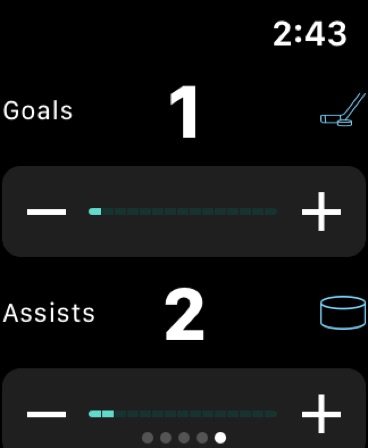
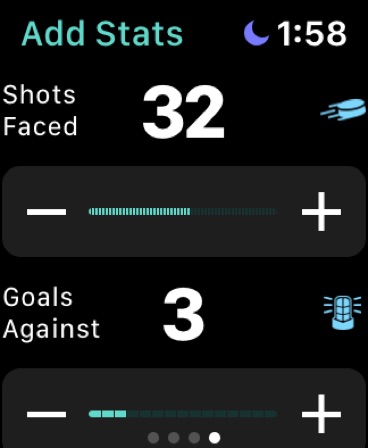
* Live In-Game Stat Tracking
* Live In-Game summary of your last shift (duration, cals, distance, and avg speed)
• Game Scores
• Goals, Assists, and Plus-Minus Rating
• Calories Burned
• Distance Skated
• Heart Rates (including Max and Average Ice Time Heart Rates)
• Max and Average Skating Speed
• Ice time
• VO2 max**
• Heart Rate Recovery
• Maximum Capable Speed
• Hockey Fitness Level
• Skate Efficiency
* Effort Level
* Heart Rate Zone Analysis
• Longest, shortest and average shift times
• Historical graphs of all your metrics over time to see whether you're improving
• Shift Timer: set your desired shift time and get a haptic ping to tell you to get to the bench!
• Share your stats via text, email, Twitter, Facebook, Slack!
• Freshness Meter Complication so you know how prepared you are for your next session
• The notes section lets you keep track of how you played or describe goals, hits and penalties etc.
• Custom heart rate filtering algorithm that will filter out falsely high heart rate values.
HockeyTracker lets you record a full workout, from start to finish, without a phone.
*HockeyTracker uses a proprietary shift tracking algorithm that is able to detect whether a place is on the ice or on the bench.
**Note that in order to calculate VO2Max, HockeyTracker uses your resting heart rate (as is set by Apple during period of inactivity). Series 0 Apple Watches are not capable of resting heart rates therefore VO2Max cannot be calculated at this time on Series 0 Watches.
Notes:
• HockeyTracker requires an Apple Watch to collect the data it displays
• HockeyTrack integrates with the Health App on your iPhone to retrieve the data it displays. It will request permission to access the relevant data types associated with a workout.
Information about HockeyTracker subscriptions:
- Subscribers will receive 1 week free of HockeyTracker
- Any unused portion of a free trial period, if offered, will be forfeited when you purchase a subscription
- Payment will be charged to your iTunes account at confirmation of purchase.
- Your subscription will automatically renew unless auto-renew is turned off at least 24-hours before the end of the current subscription period.
- Depending on what subscription length you choose (Monthly or Annually), so long as your subscription is active, you will have access to the entire iPhone app for these periods, respectfully.
- Your account will be charged for renewal within 24-hours prior to the end of the current subscription period. Automatic renewals will cost the same price you were originally charged for the subscription.
- You can manage your subscriptions and turn off auto-renewal by going to your Account Settings on the App Store after purchase.
- Read our terms of service (https://www.hockeytrackerapp.com/terms-of-service/) and privacy policy (https://www.hockeytrackerapp.com/privacy-policy/) for more information.
In-App Purchases US pricing
HockeyTracker Subscription
Monthly Pass (1st week free) · Monthly 7-day free trial$3.99
Yearly Pass (1st week free) · Yearly 7-day free trial$24.99
Capabilities
In-App Purchases
Accessibility
ipadiphonemacrealityDevicetvoswatch
Version history 25 versions
Build 887697962v26.8.32026-07-01 20:47:54
26.8.3
- Fixed custom calorie calculations for users whose body weight is stored in kilograms.
- Improved Apple Watch syncing for body weight and calorie preferences.
- Improved calorie consistency between workout summary and shift details.
- Added better calorie diagnostics to help validate Apple Calories vs HockeyTracker calorie estimates.
- Stability and reliability improvements for workout saving and post-workout processing.
Please email any issues to hockeytrackerapp@gmail.com
Thanks!
Jaclyn
Build 887405946v26.8.22026-06-25 05:47:07
Fixed an issue where Hockey Fitness Level and Skating Efficiency could appear blank or show as zero for some workouts.
Improved reliability of metric calculations when heart-rate or distance samples are limited.
Improved display of older workouts with missing or invalid saved fitness metrics.
Build 887299336v26.8.12026-06-23 00:30:45
- Improved pause/resume tracking so paused time is handled more reliably.
- Tuned End Workout Reminder so bench/rest time is less likely to trigger unwanted prompts.
Thanks!
Jaclyn
Build 886931687v26.82026-06-14 02:26:38
26.8
This update focuses on workout reliability, distance accuracy, Activity ring syncing, and smoother post-workout summaries. We also added new Workout Reminders through Shortcuts, so you can schedule wrist-tap reminders to start or end a workout before/after ice time.
Activity rings may still take a few minutes to update after a workout. That delay is on Apple’s syncing side, but this version improves how HockeyTracker saves and re-processes workouts to play more reliably with Move and Exercise rings.
**Detailed Notes**
New:
- Added Workout Reminders through Shortcuts.
- Create reminders to start or end HockeyTracker workouts by time, location, or your own Shortcut automation.
- These reminders do not auto-start or auto-end workouts because watchOS does not allow that.
Improved:
- More reliable Watch workout saving, including clearer save state and retry support.
- Better Activity ring compatibility after workouts save.
- HockeyTracker custom calorie calculations and the “Use Apple Calorie Tracking” setting are now respected more consistently.
- Shift calories display more consistently with the saved workout calorie source.
- Share cards now wait for metrics and better match the workout detail screen.
- Recent workout distance, detail distance, and distance cards are more consistent.
- Trends loading should no longer get stuck indefinitely.
- Skate sharpening tracking now excludes Dryland and Figure Skating sessions.
Fixed:
- Some crashes around trimming/deleting workouts.
- Heart Rate Recovery ordering issues that could produce incorrect recovery values.
- Possible hangs from HealthKit heart-rate query failures.
- Watch start/end guardrails to prevent duplicate or invalid workout sessions.
- Widget and cache refresh issues after workouts are deleted or edited.
See you on the ice!
Jaclyn
Build 885927287v26.7.22026-05-20 23:13:21
What's New in 26.7.2
Bug fixes and stability improvements:
- Resolved a crash that could occur during workout summary editing
- Fixed crashes on iPad when sharing or exporting workouts
- Improved Apple Watch stability and reliability
Thanks for using HockeyTracker!
Build 885134464v26.7.12026-05-01 00:03:53
Version 26.7.1
VO2 Max - Better Guidance
- When VO2 Max can't be calculated for a workout, you'll now see a clear explanation instead of "0" - and a pointer to the new manual setting
New: Manual Resting Heart Rate
- If you don't wear your Apple Watch overnight, you can now set your resting heart rate manually in the More tab so VO2 Max can still be calculated
- The setting also displays your current resting heart rate from Apple Health (last 30 days) so you can see what value would be used by default
- Minor bug fixes & improvements
Build 884913204v26.72026-04-25 16:48:43
What's New in 26.7
Apple Activity Ring Fixes
- Apple's Exercise ring should now get credit. If you do not see it automatically, open and view the workout in the HockeyTracker app and then the ring will update. Thanks for your patience on this and please email if you do not see the credit.
- Editing a workout (changing session type, adding stats, etc.) no longer removes calories from some users Move ring
New Feature: Data Export (Pro)
- Export all your workouts to a CSV file you can open in Excel, Numbers, or Google Sheets — great for backups, coaches, or spreadsheet analysis
- Find it under the More tab → Data Export
Calorie Display Fixes
- Games, Pick Up, and Pond sessions that were occasionally showing 0 calories now display a calorie estimate based on workout duration when shift detection falls short
Build 884215281v26.62026-04-07 16:52:14
HockeyTracker 26.6
Added "Use Apple Calorie Tracking" option in the More tab. HockeyTracker uses a hockey-specific calorie calculation based on MET values for ice hockey, adjusted for your session type, effort level, and body weight. However, this custom calculation is not compatible with Apple's Move ring. If you want your workouts to accurately count toward closing your Activity rings, we recommend enabling this setting to use Apple's native calorie tracking instead.
Build 884116078v26.52026-04-04 17:16:59
HT Version 26.5
- Fixed an issue where some workouts were not contributing to Apple's Exercise and Move rings. Your workout calories and exercise minutes should now properly count toward closing your Activity rings during an HT workout. Note: Apple credits Exercise minutes based on your heart rate and movement intensity during the workout, not workout duration alone.
Build 883680245v26.32026-03-25 09:43:24
HT Version 26.3
- Goalie workouts now show game score: The game score is now displayed on goalie workout rows on the home tab alongside saves and goals against.
- Fixed calorie duplication in Apple Health for some users
- All workout analytics now calculated on Watch - Shifts, speed metrics, heart rate recovery, effort level, VO2 max, and all other stats are now calculated immediately when the workout ends on the Watch, rather than waiting for the iPhone to process them. Workouts appear fully populated as soon as they sync.
- Recovery score color update: Adjusted recovery score colors for improved readability.
Build 883033363v26.22026-03-05 01:33:11
HockeyTracker 26.2 Release Notes - Major Updates!
Lots of New Features
- New cockpit-style dashboard with Month / Year / All Time stat summaries with Smart Coaching Insights!
- Gear tab to track your Skate Sharpening, Hollow Preferences, and Skates
- Work:Rest Ratio in Shifts card (ice time vs bench time)
- Trim Workout: trim the end time of any workout from the detail view. Tap the scissors icon, slide to your desired end time, and save. Duration, distance, and heart rate charts all update to reflect the trimmed workout
- Personal Max Speed Cap: new setting in More > Max Speed Cap to filter out GPS speed spikes. Set your realistic max skating speed and any readings above it will be filtered from your stats, trends, personal records, shift analysis, and AI coaching summaries
- Custom photo backgrounds for Share cards: tap Photo to select a background image, then pinch to zoom and drag to reposition
- Interactive Recovery charts (press + drag)
- End Workout Reminder: your Apple Watch will nudge you with a haptic tap if it detects your workout may have ended (enable in Watch app Settings)
- New workout type: Figure Skating
- Appearance setting: choose Dark Mode, Light Mode, or System
Improvements
- Faster app launch and load times
- Charts now use Apple's native Charts framework
- Share cards auto-format to IG Story size
- Score tracking: "No score entered" is now distinct from 0-0; scores start blank and can be cleared
- Personal stats display on workout list rows: Goals/Assists for players, Saves/GA for goalies
- Game scores display inline with a win/loss/tie color indicator
- Edit button on workout detail toolbar replaced with a cleaner + icon
- Water Lock now automatically returns to the stats screen before locking, so your metrics stay visible
- Session type ordering preserved after Watch app updates
- Major under-the-hood modernization for iPhone and Watch app
Bug Fixes
- Fixed shift speed accuracy; shift speeds now use the same calculation as the Speed card
- Shift deletion should now work correctly!
- Fixed potential crash in Recovery chart when a day had no HRV/RHR samples
- Misc. Fixes
Thanks for your support!
Jaclyn
Build 881689124v26.1.12026-01-22 04:26:29
Quick update to fix an issue some users were having seeing the new iOS 26 App Icon.
See you on the ice!
Gary
Build 880462925v26.1.02025-12-09 14:49:41
Quick update to an issue where the restore purchase might of required force quitting and reopening....now if you have an active subscription, restore purchase should automatically unlock for you.
See you on the ice!
Gary
Build 878744566v26.02025-10-08 07:36:10
BIG HockeyTracker 26 fall update just in time for the start of hockey season!
(1) Skate Sharpening Reminder! HockeyTracker will now keep track of your skate sharpening and hours on the ice to let you know when your blades are due for sharpening! You can customize how often you want them sharpened, the default is 15 hours. You can find Skate Sharpening below Recovery on the the home screen. Only available to HockeyTracker Pro users.
(2) Post Workout Insights powered by Apple Intelligence! If Apple Intelligence is available on your iPhone and enabled, you will now see a summary analysis at the top of the screen when you tap on a workout, and can tap on the More Workout Insights button to get an even deeper analysis of your workout. Note Apple Intelligence is only available on iPhone 15 Pro and newer iPhones. Note also that the AI coaching will consider any notes you make (notes are located at the very bottom of the workout screen), so I encourage you to add notes to your workout (e.g. "missed scoring on a breakaway, hit the post" so they can be considered in the analysis. Also HockeyTracker Pro users only.
See you on the ice!
Gary
Build 877983171v3.4.82025-09-10 16:28:23
Quick update to fix a bug when the new share cards were in dark mode.
See you on the ice!
Gary
Build 877167707v3.4.72025-08-12 02:55:31
Some updates to get you ready for fall hockey!
⁃ Updated all charts in Trends to use Apple Charts and to toggle between 30 days, 1 year, and all time
⁃ Updated to Apple system fonts - this should also help with accessibility settings
⁃ Updated share card to a singular share card with a resizable Instagram sticker
⁃ The VO2 max scale is now personalized to you using your age and sex.
See you on the ice!
Gary
Build 870247187v3.4.62024-11-07 02:00:18
Quick update to fix a crash that might occur if you tapped on the Support button in the More tab. Now if you do not have the mail app set up, it won't cause a crash but will alert you to this and give you the hockeytrackerapp@gmail.com email to contact.
See you on the ice!
Gary
Build 869550054v3.4.52024-10-08 11:41:42
All new Dark Mode App Icon!
Also fixed an issue that was preventing the iPhone widgets from displaying correctly.
See you on the ice!
Gary
Build 867664484v3.4.42024-07-23 14:16:27
Quick update to some of the subscription logic under the hood. If you are having any issues with your subscription, please let me know asap at hockeyTrackerApp@gmail.com.
See you on the ice!
Gary
Build 863741571v3.4.32024-02-13 21:31:17
Quick update to fix the iPhone widgets in iOS 17.
See you on the ice!
Gary
Build 860038737v3.4.22024-02-07 14:19:11
A little fall update for hockey season...
(1) The Watch App's in-game screen was tweaked to make the text size of the important metrics a little larger. Thanks for the feedback!
(2) If the text still isn't large enough for you, there is now an option in Settings on the watch to turn on Large Text During Workout, which will show your speed and heart rate is very large text on the main screen. You can then scroll the digital crown down to see the HR chart and distance etc.
(3) If you are using display zoom on your iPhone, it should now display correctly.
(4) Thanks to Apple porting Apple Health to iPad, HockeyTracker will now work on iPad! Check it out!
Also some bug fixes and optimizations including fixing a crash that might occur if you used the Ultra's Action Button to pause a workout (or if it happened inadvertently) that was not started with the Action Button.
See you on the ice!
Gary
Build 857839997v3.4.12023-06-14 21:26:51
Quick Update: Instagram (Facebook) started requiring an App ID to be able to share your HockeyTracker stories to Instagram, so the they should be working again.
See you on the ice!
Gary
Build 854324233v3.4.02023-01-10 23:27:27
This update features an all new in game experience on the watch app including a redesigned heart rate chart with your heart rate zones color coded.
Note also in the last update, Apple Watch Ultra users can configure their watches in settings to start a HT workout from the Ultra's Action Button!
See you on the ice!
Gary
Build 853950066v3.3.92022-12-18 09:59:22
Apple Watch Ultra Users this update is for you! You can now configure the Ultra's Action Button to automatically open HockeyTracker and start a game workout! You can configure this by going to the Apple Watch's Settings App then Action Button and selecting HockeyTracker.
Note: I will say in testing it doesn't always work consistently and seems a little buggy, but its a brand new feature in the AW, so I'm sure it will improve in future watchOS updates. When it does work its very cool!
Also a few other bug fixes and improvements.
See you on the ice!
Gary
Build 852128082v3.3.82022-09-13 11:25:56
Quick update to fix distance skated which was broken somehow in the new iOS 16.
See you on the ice!
Gary
Price history by region
Currency
Show
Columns
Search
Availability 1 of 1 storefronts
| Region | Language | Price | Ratings | Avg | Version |
|---|---|---|---|---|---|
| US | en-US | Free | 973 | 4.7 | 26.8.3 |
Change log 29 changes · US
✎
releaseNotes updated
26.8.3
- Fixed custom calorie calculations for users whose body weight is stored in kilograms.
- Improved Apple Watch syncing for body weight and calorie prefer
✎
description updated
As Featured by iMore, track and analyze every aspect of your hockey!
HockeyTracker turns every Apple Watch into a sophisticated hockey tracking computer. Start
✎
subtitle updated
Personal Hockey Fitness Coach
✎
name updated
HockeyTracker
◆
Version 26.8.3 released
26.8.3
- Fixed custom calorie calculations for users whose body weight is stored in kilograms.
- Improved Apple Watch syncing for body weight and calorie preferences.
- Improved calorie consistency between workout summary and shift details.
◆
Version 26.8.2 released
Fixed an issue where Hockey Fitness Level and Skating Efficiency could appear blank or show as zero for some workouts.
Improved reliability of metric calculations when heart-rate or distance samples are limited.
Improved display of older wo
◆
Version 26.8.1 released
- Improved pause/resume tracking so paused time is handled more reliably.
- Tuned End Workout Reminder so bench/rest time is less likely to trigger unwanted prompts.
Thanks!
Jaclyn
◆
Version 26.8 released
26.8
This update focuses on workout reliability, distance accuracy, Activity ring syncing, and smoother post-workout summaries. We also added new Workout Reminders through Shortcuts, so you can schedule wrist-tap reminders to start or end a
◆
Version 26.7.2 released
What's New in 26.7.2
Bug fixes and stability improvements:
- Resolved a crash that could occur during workout summary editing
- Fixed crashes on iPad when sharing or exporting workouts
- Improved Apple Watch stability and relia
◆
Version 26.7.1 released
Version 26.7.1
VO2 Max - Better Guidance
◆
Version 26.7 released
What's New in 26.7
◆
Version 26.6 released
HockeyTracker 26.6
Added "Use Apple Calorie Tracking" option in the More tab. HockeyTracker uses a hockey-specific calorie calculation based on MET values for ice hockey, adjusted for your session type, effort level, and body weight. Howeve
◆
Version 26.5 released
HT Version 26.5
- Fixed an issue where some workouts were not contributing to Apple's Exercise and Move rings. Your workout calories and exercise minutes should now properly count toward closing your Activity rings during an HT workout. Not
◆
Version 26.3 released
HT Version 26.3
- Goalie workouts now show game score: The game score is now displayed on goalie workout rows on the home tab alongside saves and goals against.
- Fixed calorie duplication in Apple Health for some users
- All workout analy
◆
Version 26.2 released
HockeyTracker 26.2 Release Notes - Major Updates!
◆
Version 26.1.1 released
Quick update to fix an issue some users were having seeing the new iOS 26 App Icon.
See you on the ice!
Gary
◆
Version 26.1.0 released
Quick update to an issue where the restore purchase might of required force quitting and reopening....now if you have an active subscription, restore purchase should automatically unlock for you.
See you on the ice!
Gary
◆
Version 26.0 released
BIG HockeyTracker 26 fall update just in time for the start of hockey season!
(1) Skate Sharpening Reminder! HockeyTracker will now keep track of your skate sharpening and hours on the ice to let you know when your blades are due for shar
◆
Version 3.4.8 released
Quick update to fix a bug when the new share cards were in dark mode.
See you on the ice!
Gary
◆
Version 3.4.7 released
Some updates to get you ready for fall hockey!
⁃ Updated all charts in Trends to use Apple Charts and to toggle between 30 days, 1 year, and all time
⁃ Updated to Apple system fonts - this should also help with accessibi
◆
Version 3.4.6 released
Quick update to fix a crash that might occur if you tapped on the Support button in the More tab. Now if you do not have the mail app set up, it won't cause a crash but will alert you to this and give you the hockeytrackerapp@gmail.com emai
◆
Version 3.4.5 released
All new Dark Mode App Icon!
Also fixed an issue that was preventing the iPhone widgets from displaying correctly.
See you on the ice!
Gary
◆
Version 3.4.4 released
Quick update to some of the subscription logic under the hood. If you are having any issues with your subscription, please let me know asap at hockeyTrackerApp@gmail.com.
See you on the ice!
Gary
◆
Version 3.4.3 released
Quick update to fix the iPhone widgets in iOS 17.
See you on the ice!
Gary
◆
Version 3.4.2 released
A little fall update for hockey season...
(1) The Watch App's in-game screen was tweaked to make the text size of the important metrics a little larger. Thanks for the feedback!
(2) If the text still isn't large enough for you, there is
◆
Version 3.4.1 released
Quick Update: Instagram (Facebook) started requiring an App ID to be able to share your HockeyTracker stories to Instagram, so the they should be working again.
See you on the ice!
Gary
◆
Version 3.4.0 released
This update features an all new in game experience on the watch app including a redesigned heart rate chart with your heart rate zones color coded.
Note also in the last update, Apple Watch Ultra users can configure their watches in setti
◆
Version 3.3.9 released
Apple Watch Ultra Users this update is for you! You can now configure the Ultra's Action Button to automatically open HockeyTracker and start a game workout! You can configure this by going to the Apple Watch's Settings App then Action But
◆
Version 3.3.8 released
Quick update to fix distance skated which was broken somehow in the new iOS 16.
See you on the ice!
Gary