Home › Business

 US
US
USen-US AEen-GB
 AFen-GB
 ALen-GB
 AMen-GB
 ATde-DE
 AUen-AU
 AZen-GB
 BAen-GB
 BEen-GB
 BGen-GB
 BHen-GB
 BMen-GB
 BNen-GB
 BTen-GB
 BYen-GB
 CAen-CA
 CHde-CH
 CNzh-Hans-CN
 CYen-GB
 CZen-GB
 DEde-DE
 DKen-GB
 EEen-GB
 EGen-GB
 ESes-ES
 FIen-GB
 FJen-GB
 FMen-GB
 FRfr-FR
 GBen-GB
 GEen-GB
 GRen-GB
 HKzh-Hant-HK
 HRen-GB
 HUen-GB
 IDen-GB
 IEen-GB
 ILen-GB
 INen-GB
 IQen-GB
 ISen-GB
 ITit
ITit JOen-GB
 JPja
JPja KGen-GB
 KHen-GB
 KRko
KRko KWen-GB
 KZen-GB
 LAen-GB
 LBen-GB
 LKen-GB
 LTen-GB
 LUen-GB
 LVen-GB
 MDen-GB
 MEen-GB
 MKen-GB
 MMen-GB
 MNen-GB
 MOzh-Hant-HK
 MRen-GB
 MTen-GB
 MVen-GB
 MYen-GB
 NLnl
NLnl NOen-GB
 NPen-GB
 NRen-GB
 NZen-AU
 OMen-GB
 PGen-GB
 PHen-GB
 PKen-GB
 PLen-GB
 PTpt-PT
 PWen-GB
 QAen-GB
 ROen-GB
 RSen-GB
 RUru
RUru SAen-GB
 SBen-GB
 SEsv
SEsv SGen-GB
 SIen-GB
 SKen-GB
 THen-GB
 TJen-GB
 TMen-GB
 TOen-GB
 TRen-GB
 TWzh-Hant-TW
 UAen-GB
 UZen-GB
 VNen-GB
 VUen-GB
 XKen-GB
 YEen-GB
 ZAen-GB
101 of 101 storefronts
Content in en-US
Content in en-US
Information
Preview 2 platforms
iPhone 8 images


iPad 1 image
What’s New Version 2.56
New RouteStatus option to switch between the route name and the BOL as the on-screen route identifier. It's available in the menu in the upper righthand corner.
Another new RouteStatus feature: for Penske employees with access to multiple customers, it is sometimes useful to sort the selection list by district number instead of grouping multiple districts by customer - so now there's a button at the top of the Customer Chooser for that.
RouteStatus update: when filtering a listing, "route name" will check 2 different fields depending on the user's route identification selection. It will filter based on the route name or the BOL, not both.
Description
The Penske ClearChain app is designed to provide Penske Logistics customers with real-time visibility on their shipments.
By downloading the free Penske ClearChain app, customers can:
• View updates on routes operated by Penske’s dedicated fleet or transportation management services, showing whether a pickup or delivery has been completed, the arrival time, completion time, address, and type of business.
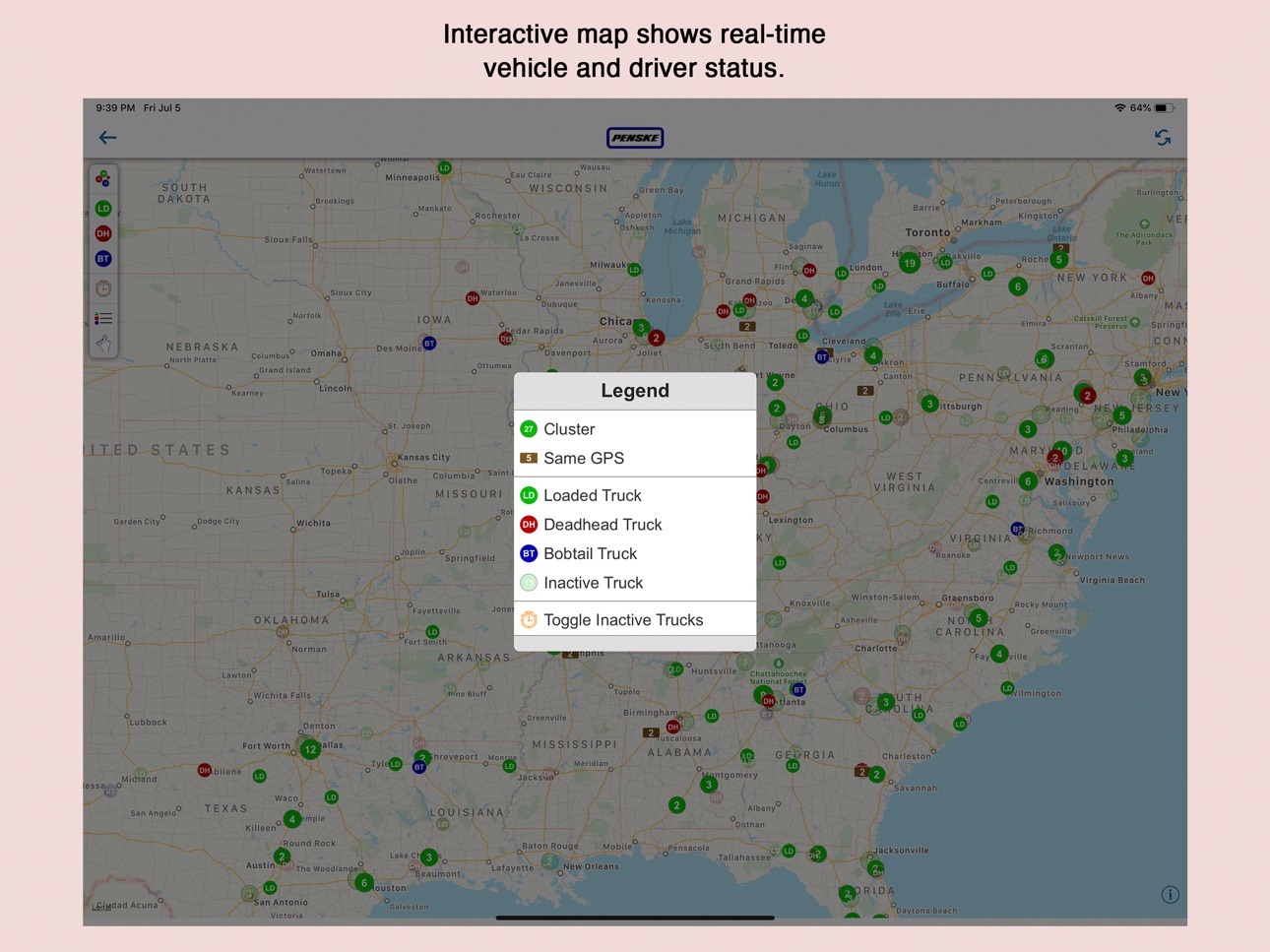
• View a map showing current locations of their vehicles.
• Set up watch lists of select truck routes they want to monitor closely.
Penske ClearChain is designed to provide an at-a-glance view so anyone who manages a supply chain can stay connected while on the go. It is available for customers of Penske Logistics’ dedicated fleet or transportation management services and requires appropriate log-in credentials.
Accessibility
ipadiphonemacrealityDevicetvoswatch
Version history 25 versions
Build 866587964v2.562024-06-10 23:31:03
New RouteStatus option to switch between the route name and the BOL as the on-screen route identifier. It's available in the menu in the upper righthand corner.
Another new RouteStatus feature: for Penske employees with access to multiple customers, it is sometimes useful to sort the selection list by district number instead of grouping multiple districts by customer - so now there's a button at the top of the Customer Chooser for that.
RouteStatus update: when filtering a listing, "route name" will check 2 different fields depending on the user's route identification selection. It will filter based on the route name or the BOL, not both.
Build 865969090v2.552024-05-16 01:31:43
Display bug fix for FreightStatus users.
Build 864530811v2.542024-03-19 14:35:06
RouteStatus - improved listing screen for clarity and consistency
FreightStatus - same listing screen improvements, also bug fix re: Scheduled dates that were sometimes missing
LiveTracking - better color consistency since sometimes statuses were unclear
Build 859086243v2.532024-01-27 18:37:53
Stop List Updates:
- Now using alternate route status field (eg. In Transit) when main one is blank for better display at the top of the Stop List.
- Display bug fix at the top of stop lists (alignment issues cleared up).
- The display of Stop List colors and dates has been refreshed and re-organized for both RouteStatus (OTM) and FreightStatus (TM). Please check both to see if they meet expectations and are easier to understand.
Registration Screen:
- Registration screen refreshed to make requirements clearer. (should head off some Support Team issues)
Vehicle Map updates:
- Routes with GPS older than 5 minutes are no longer distinguished by a lighter map pin color.
- Bobtails and Deadheads are now shown initially by default.
- Map overlay controls are shown or hidden by tapping on the map (useful when pins are being obscured)
Build 855863126v2.512023-03-27 21:17:34
Bug fix: some environments were not seeing breadcrumbs on the Route Status stops map. As long as truck pings are being received, the app will show those locations on the map.
Build 855417162v2.52023-03-09 16:47:59
Updated Stops List: stop identification now shows Site Name (Site City). If city is not available, then only the Site Name is displayed.
Build 855291213v2.42023-03-02 18:20:02
Bug fix: Site code was missing on Stops List. Should now read Site Code (City).
Other internal bug fixes for rare issues.
Fixed issue with incorrect list retrieved for LiveTracking listings.
Build 854303513v2.32023-01-11 11:32:22
Brand new module: "LiveTracking" (see your manager or Penske contact for access)
LiveTracking provides a look at OTM data like RouteStatus but from a Shipment/Orders perspective. Instead of seeing Routes in transit or completed and then drilling down to the Stop level, users are presented immediately with a filter/search screen and dashboard counts of shipments that have Not Started, are In Transit, or are Completed. Drilling down in this case means getting to the Orders that are on these Shipments.
On the Dashboard screen, users can see the current live counts of Shipments in the three categories Not Started, In Transit, and Completed. Any changes to the filter fields immediately updates the counts above.
The Shipment Listing displays each shipment in each status category along with its orders. It is also possible to display shipments in all categories at the same time.
The Shipment Map is a visual representation of where each shipment, according to the search/filter values) are. The initial collection consists of In Transit shipments (red and green.)
The Shipment Details screen, besides displaying essential details in a collapsible section, shows a map of the stops for the shipment’s route and a scrollable list of the stops (also collapsible.)
The Order Details screen is like the Shipment Details screen but from a different perspective. In addition to a list of stops, the user is provided a visual map and a list of shipments the order may have been on.
Some small UI enhancements and bug fixes have also been implemented in RouteStatus and FreightStatus.
Build 848814211v2.22022-05-05 01:31:53
- The display of Stops for dynamic routes has been modified to show only one line of date/times: the actual arrivals and departures.
- Special characters (such as ampersands) are now available for your password.
Build 848196479v2.12022-04-08 00:13:14
- Registration page has been updated to allow user to specify a customer location, and request different security access at some point in the future.
- Map overlay functions are now disabled during truck animation to avoid disturbing the screen.
Build 847572226v2.0.92022-03-09 23:40:45
Welcome to ClearChain 2.0!
This version represents a complete translation of the codebase to a more modern language that will position us much better for new features and enhancements. The new structure is more optimized and should feel a bit faster in certain places.
In terms of the "look" of the app and current features, not much has changed. However, you may notice something here or there that looks a little different.
The biggest visual change is in the Route Status module. If you are looking at a truck animation, you will notice a redesigned HUD showing more than just the speed of the truck.
This is a big update in terms of app development. Every line of code was translated. Some were eliminated, others added. Feel encouraged to report anything we've missed, any bugs or even things you notice that are working better.
Build 845196032v1.16.12021-11-08 10:14:43
Updated for iOS 15.
Build 841075176v1.152021-03-26 13:59:23
Fixed bug that allowed Stops Type popup list to be editable!
Changed default dates of 1/1/2000 to display as --/--/-- in the Orders module
Build 840271921v1.142021-01-30 13:10:37
Corrected some background issues in new iOS
Guarded against bad-looking charts for customers with little or no data
Prevented 404 error for customers with numbers-only route IDs being mistaken as dynamic routes
Build 838249627v1.132020-10-17 14:38:34
Route List:
added driver name in parentheses, if available, to top line
replaced stop site code with customer name for surrent stop
Stops List:
added city name, if available, to top line
Bug fix:
an issue where only one GPS ping had been reported was
showing the current location out in the ocean was fixed
Build 836498325v1.12.42020-06-20 11:45:54
This version has a new display format for Stops Lists. This applies to Route Status and Freight Status. Scheduled and Active datetimes are listed for both Arivals and Departures. If a stop is still in the future, instead of Actual users will see Estimate in Route Status. Freight Status users will not see Actual until a stop has been completed. Otherwise, that field will be left blank.
Build 834957954v1.112020-03-04 00:56:29
Bug fix: Searching by PO or SKU in FreightStatus has been restored.
Build 834726915v1.102020-02-14 21:16:12
Search for RouteStatus and FreightStatus
- totally refactored into a base and subclasses
- combined into one configurable system
- new options for RouteStatus (order#, origin, destination, shipment)
Push Notifications
- Users can opt in to receive notifications for arrivals or departures from specific Stops (as well as all future arrivals or departures). Also, the user can request notification for when a load slips into Late Status.
- FreightStatus: select a given stop of a load to make request
- Limited requests to current and future stops only
- Receipt of notification will attempt to go to the Stop list of specified Route
- Security access handling:
if no module access, return app from background only
if no customer access, user taken to previously viewed customer home screen
if route not current, user taken to specified customer home screen only
Listings (RouteStatus, FreightStatus)
- Added "No Results" label when displayed list is empty
Limited requests for future stop notifications those BEFORE the last stop.
Build 833594323v1.92019-11-13 19:15:39
New Features:
- Stop Maps (RS and FS) can be landscape.
- New search option in Freight Status: SAP Shipment Number. Only works for some customers like WHRLLP.
- Tender Accepted option on FreightStatus dashboard has been implemented.
- Whirlpool locations have updated text in customer popups, etc.
Bug Fixes:
- Dashboard screen once again NOT swipeable.
- Some stops in Stops Listing were not showing their correct status.
Build 831940314v1.8.12019-07-09 21:39:27
Bug fix: date/times for stops are now in UTC.
Build 831918057v1.7.42019-07-07 16:56:07
Added SCAC to Load Listing in FreightStatus (as well as the vehicle map popups). Also fixed a sorting order bug in the Stops Listings.
Build 830954410v1.6.52019-04-12 22:18:53
Route/Load lists and maps are now interchangeable. Switching back and forth between maps and lists is immediately available in FreightStatus and will be coming to RouteStatus in the near future.
Build 830390924v1.5.12019-02-23 09:13:59
Upgrade on map pin clustering throughout the app to use Apple's native API which includes smoother animation and requires less code.
The login process flow has been overhauled to be more efficient and fix a bug. You can access Touch ID/Face ID directly from the Login button (if you have set Touch ID up on your phone).
Build 830161924v1.4.172019-02-02 21:42:29
New Orders module
Enhanced mapping features, especially in FreightStatus
Build 826426518v1.3.32018-03-23 23:43:56
• Color-coded vehicle map
• Enhanced speed in metrics
• Minor bug fixes and tweaks
No pricing data captured yet — comparisons appear once the app has paid storefronts or in-app purchases.
Availability 101 of 101 storefronts
| Region | Language | Price | Ratings | Avg | Version |
|---|---|---|---|---|---|
| US | en-US | Free | 4 | 3.8 | 2.56 |
| AE | en-GB | Free | 0 | — | 2.56 |
| AF | en-GB | Free | 0 | — | 2.56 |
| AL | en-GB | Free | 0 | — | 2.56 |
| AM | en-GB | Free | 0 | — | 2.56 |
| AT | de-DE | Free | 0 | — | 2.56 |
| AU | en-AU | Free | 0 | — | 2.56 |
| AZ | en-GB | Free | 0 | — | 2.56 |
| BA | en-GB | Free | 0 | — | 2.56 |
| BE | en-GB | Free | 0 | — | 2.56 |
| BG | en-GB | Free | 0 | — | 2.56 |
| BH | en-GB | Free | 0 | — | 2.56 |
| BM | en-GB | Free | 0 | — | 2.56 |
| BN | en-GB | Free | 0 | — | 2.56 |
| BT | en-GB | Free | 0 | — | 2.56 |
| BY | en-GB | Free | 0 | — | 2.56 |
| CA | en-CA | Free | 0 | — | 2.56 |
| CH | de-CH | Free | 0 | — | 2.56 |
| CN | zh-Hans-CN | Free | 0 | — | 2.56 |
| CY | en-GB | Free | 0 | — | 2.56 |
| CZ | en-GB | Free | 0 | — | 2.56 |
| DE | de-DE | Free | 0 | — | 2.56 |
| DK | en-GB | Free | 0 | — | 2.56 |
| EE | en-GB | Free | 0 | — | 2.56 |
| EG | en-GB | Free | 0 | — | 2.56 |
| ES | es-ES | Free | 0 | — | 2.56 |
| FI | en-GB | Free | 0 | — | 2.56 |
| FJ | en-GB | Free | 0 | — | 2.56 |
| FM | en-GB | Free | 0 | — | 2.56 |
| FR | fr-FR | Free | 0 | — | 2.56 |
| GB | en-GB | Free | 0 | — | 2.56 |
| GE | en-GB | Free | 0 | — | 2.56 |
| GR | en-GB | Free | 0 | — | 2.56 |
| HK | zh-Hant-HK | Free | 0 | — | 2.56 |
| HR | en-GB | Free | 0 | — | 2.56 |
| HU | en-GB | Free | 0 | — | 2.56 |
| ID | en-GB | Free | 0 | — | 2.56 |
| IE | en-GB | Free | 0 | — | 2.56 |
| IL | en-GB | Free | 0 | — | 2.56 |
| IN | en-GB | Free | 0 | — | 2.56 |
| IQ | en-GB | Free | 0 | — | 2.56 |
| IS | en-GB | Free | 0 | — | 2.56 |
| IT | it | Free | 0 | — | 2.56 |
| JO | en-GB | Free | 0 | — | 2.56 |
| JP | ja | Free | 0 | — | 2.56 |
| KG | en-GB | Free | 0 | — | 2.56 |
| KH | en-GB | Free | 0 | — | 2.56 |
| KR | ko | Free | 0 | — | 2.56 |
| KW | en-GB | Free | 0 | — | 2.56 |
| KZ | en-GB | Free | 0 | — | 2.56 |
| LA | en-GB | Free | 0 | — | 2.56 |
| LB | en-GB | Free | 0 | — | 2.56 |
| LK | en-GB | Free | 0 | — | 2.56 |
| LT | en-GB | Free | 0 | — | 2.56 |
| LU | en-GB | Free | 0 | — | 2.56 |
| LV | en-GB | Free | 0 | — | 2.56 |
| MD | en-GB | Free | 0 | — | 2.56 |
| ME | en-GB | Free | 0 | — | 2.56 |
| MK | en-GB | Free | 0 | — | 2.56 |
| MM | en-GB | Free | 0 | — | 2.56 |
| MN | en-GB | Free | 0 | — | 2.56 |
| MO | zh-Hant-HK | Free | 0 | — | 2.56 |
| MR | en-GB | Free | 0 | — | 2.56 |
| MT | en-GB | Free | 0 | — | 2.56 |
| MV | en-GB | Free | 0 | — | 2.56 |
| MY | en-GB | Free | 0 | — | 2.56 |
| NL | nl | Free | 0 | — | 2.56 |
| NO | en-GB | Free | 0 | — | 2.56 |
| NP | en-GB | Free | 0 | — | 2.56 |
| NR | en-GB | Free | 0 | — | 2.56 |
| NZ | en-AU | Free | 0 | — | 2.56 |
| OM | en-GB | Free | 0 | — | 2.56 |
| PG | en-GB | Free | 0 | — | 2.56 |
| PH | en-GB | Free | 0 | — | 2.56 |
| PK | en-GB | Free | 0 | — | 2.56 |
| PL | en-GB | Free | 0 | — | 2.56 |
| PT | pt-PT | Free | 0 | — | 2.56 |
| PW | en-GB | Free | 0 | — | 2.56 |
| QA | en-GB | Free | 0 | — | 2.56 |
| RO | en-GB | Free | 0 | — | 2.56 |
| RS | en-GB | Free | 0 | — | 2.56 |
| RU | ru | Free | 0 | — | 2.56 |
| SA | en-GB | Free | 0 | — | 2.56 |
| SB | en-GB | Free | 0 | — | 2.56 |
| SE | sv | Free | 0 | — | 2.56 |
| SG | en-GB | Free | 0 | — | 2.56 |
| SI | en-GB | Free | 0 | — | 2.56 |
| SK | en-GB | Free | 0 | — | 2.56 |
| TH | en-GB | Free | 0 | — | 2.56 |
| TJ | en-GB | Free | 0 | — | 2.56 |
| TM | en-GB | Free | 0 | — | 2.56 |
| TO | en-GB | Free | 0 | — | 2.56 |
| TR | en-GB | Free | 0 | — | 2.56 |
| TW | zh-Hant-TW | Free | 0 | — | 2.56 |
| UA | en-GB | Free | 0 | — | 2.56 |
| UZ | en-GB | Free | 0 | — | 2.56 |
| VN | en-GB | Free | 0 | — | 2.56 |
| VU | en-GB | Free | 0 | — | 2.56 |
| XK | en-GB | Free | 0 | — | 2.56 |
| YE | en-GB | Free | 0 | — | 2.56 |
| ZA | en-GB | Free | 0 | — | 2.56 |
Change log 28 changes · US
✎
releaseNotes updated
New RouteStatus option to switch between the route name and the BOL as the on-screen route identifier. It's available in the menu in the upper righthand corner.
✎
description updated
The Penske ClearChain app is designed to provide Penske Logistics customers with real-time visibility on their shipments.
By downloading the free Penske Clear
✎
name updated
ClearChain
◆
Version 2.56 released
New RouteStatus option to switch between the route name and the BOL as the on-screen route identifier. It's available in the menu in the upper righthand corner.
Another new RouteStatus feature: for Penske employees with access to multiple
◆
Version 2.55 released
Display bug fix for FreightStatus users.
◆
Version 2.54 released
RouteStatus - improved listing screen for clarity and consistency
FreightStatus - same listing screen improvements, also bug fix re: Scheduled dates that were sometimes missing
LiveTracking - better color consistency since sometimes statuse
◆
Version 2.53 released
Stop List Updates:
- Now using alternate route status field (eg. In Transit) when main one is blank for better display at the top of the Stop List.
- Display bug fix at the top of stop lists (alignment issues cleared up).
◆
Version 2.51 released
Bug fix: some environments were not seeing breadcrumbs on the Route Status stops map. As long as truck pings are being received, the app will show those locations on the map.
◆
Version 2.5 released
Updated Stops List: stop identification now shows Site Name (Site City). If city is not available, then only the Site Name is displayed.
◆
Version 2.4 released
Bug fix: Site code was missing on Stops List. Should now read Site Code (City).
Other internal bug fixes for rare issues.
Fixed issue with incorrect list retrieved for LiveTracking listings.
◆
Version 2.3 released
Brand new module: "LiveTracking" (see your manager or Penske contact for access)
LiveTracking provides a look at OTM data like RouteStatus but from a Shipment/Orders perspective. Instead of seeing Routes in transit or completed and then
◆
Version 2.2 released
- The display of Stops for dynamic routes has been modified to show only one line of date/times: the actual arrivals and departures.
- Special characters (such as ampersands) are now available for your password.
◆
Version 2.1 released
- Registration page has been updated to allow user to specify a customer location, and request different security access at some point in the future.
- Map overlay functions are now disabled during truck animation to avoid disturbing the sc
◆
Version 2.0.9 released
Welcome to ClearChain 2.0!
This version represents a complete translation of the codebase to a more modern language that will position us much better for new features and enhancements. The new structure is more optimized and should feel a
◆
Version 1.16.1 released
Updated for iOS 15.
◆
Version 1.15 released
Fixed bug that allowed Stops Type popup list to be editable!
Changed default dates of 1/1/2000 to display as --/--/-- in the Orders module
◆
Version 1.14 released
Corrected some background issues in new iOS
Guarded against bad-looking charts for customers with little or no data
Prevented 404 error for customers with numbers-only route IDs being mistaken as dynamic routes
◆
Version 1.13 released
Route List:
added driver name in parentheses, if available, to top line
replaced stop site code with customer name for surrent stop
Stops List:
added city name, if available, to top line
Bug fix:
an issue where only
◆
Version 1.12.4 released
This version has a new display format for Stops Lists. This applies to Route Status and Freight Status. Scheduled and Active datetimes are listed for both Arivals and Departures. If a stop is still in the future, instead of Actual users wil
◆
Version 1.11 released
Bug fix: Searching by PO or SKU in FreightStatus has been restored.
◆
Version 1.10 released
Search for RouteStatus and FreightStatus
- totally refactored into a base and subclasses
- combined into one configurable system
- new options for RouteStatus (order#, origin, destination, shipment)
Push Notifications
- Users can
◆
Version 1.9 released
New Features:
- Stop Maps (RS and FS) can be landscape.
- New search option in Freight Status: SAP Shipment Number. Only works for some customers like WHRLLP.
- Tender Accepted option on FreightStatus dashboard has been implemented.
- Whir
◆
Version 1.8.1 released
Bug fix: date/times for stops are now in UTC.
◆
Version 1.7.4 released
Added SCAC to Load Listing in FreightStatus (as well as the vehicle map popups). Also fixed a sorting order bug in the Stops Listings.
◆
Version 1.6.5 released
Route/Load lists and maps are now interchangeable. Switching back and forth between maps and lists is immediately available in FreightStatus and will be coming to RouteStatus in the near future.
◆
Version 1.5.1 released
Upgrade on map pin clustering throughout the app to use Apple's native API which includes smoother animation and requires less code.
The login process flow has been overhauled to be more efficient and fix a bug. You can access Touch ID/Face
◆
Version 1.4.17 released
New Orders module
Enhanced mapping features, especially in FreightStatus
◆
Version 1.3.3 released
• Color-coded vehicle map
• Enhanced speed in metrics
• Minor bug fixes and tweaks