Home › Business

 US
US
1 of 1 storefronts
Content in en-US
Content in en-US
Information
Apple ID1258042408
Bundle IDcom.fujikura.spliceplus
SellerSeller
Min iOS13.0
Min macOS11.0
Device familiesiphone, ipod
Released2017-07-24
Copyright© 2017 Fujikura Ltd.
Privacy policyLink ↗
Preview 1 platform
iPhone 4 images


What’s New Version 2.2.0
From this version 100 series fusion splicers and CT60 series cleavers are available.
Description
Splice+ is a smartphone application that works in cooperation with Fujikura's devices for optical fiber splicing work which have Bluetooth capability*.
The app provides a function to edit settings of the devices, function to update firmware, tutorials of the devices, and so on.
Also smart lock function is provided for the specific splicers.
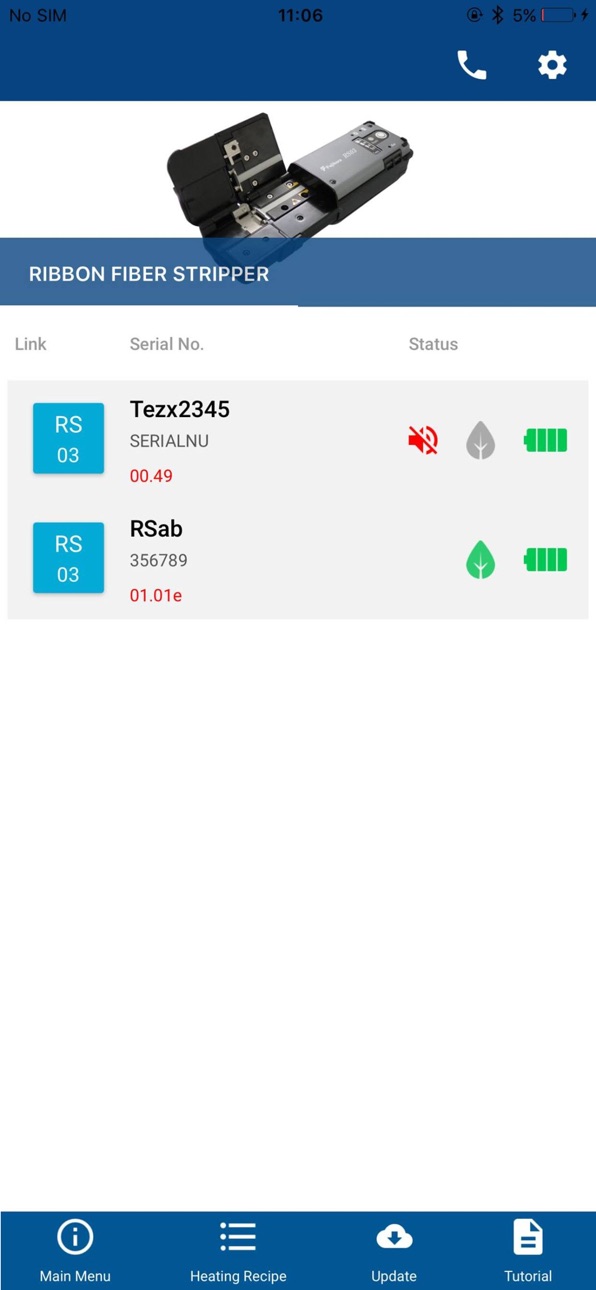
When the app starts, the app shows the list of the devices available to be connected or the devices that were connected once.
+There are rectangular link icons on the left of the top menu.
When there is/are dark blue link icon(s) in the list, tapping that icon establishes a connection between the app and the device.
+The link icon of a connected device is colored with blue.
+When the link icon is grey, the corresponding device isn't ready for connection. However, you can still check the information of the device collected during the last connection.
If you want the app to connect a device that doesn't appear on the list or link icon of which is colored with grey, press and hold the Bluetooth button on the device until the Bluetooth lamp starts blinking.
Once the Bluetooth led starts blinking, the device appears on the list and its link icon becomes dark blue. Then you can connect the device to the app by tapping the icon.
If the Bluetooth button doesn't help the connection, look into the the Bluetooth menu of the iPhone's setting menu and check if the target device is listed in MY DEVICES. If the device is listed, tap the "i" icon and then tap "Forget This Device" to remove old paring information. Then try connection again.
*Currently following devices are available
-Ribbon Fiber Stripper RS02 and RS03
-Optical Fiber Clearver CT50
-Fusion Splicer 86/87/88/90 and 42/43/45 Series
Accessibility
ipadiphonemacrealityDevicetvoswatch
Version history 15 versions
Build 879894670v2.2.02025-11-26 08:29:52
From this version 100 series fusion splicers and CT60 series cleavers are available.
Build 864135858v2.1.12024-03-10 14:47:39
Fixed an issue where symbol characters were no longer accepted when entering the password in the smart lock menu from the previous version.
Build 863282552v2.1.02024-02-19 07:24:45
1) Splice+ is now fully available for 42/43/45 series splicers.
2) Fixed issues in showing splice log data.
NOTE: All of Splice+ settings and pairing information will be cleared when updating the app to this version.
Build 859209270v2.0.52024-01-22 10:53:32
Splice+ is now available for 42/43/45 series splicers.
Build 847386256v2.0.42022-03-11 00:46:13
With this version of the app, you can download splice result data from splicers and see them on your smartphone.
Once you allow the app to access the Google Drive on the approval screen, the downloaded splice result data will be automatically uploaded to the Google Drive for each splice.
Build 837552524v2.0.02020-08-31 17:01:28
Added following functions that work with 86/87/88/90 Series Fujikura Splicers.
- Smart lock
- Monitoring battery and electrode status of the splicer
Build 829110117v1.6.12018-11-29 16:39:43
Battery indicator function for RS series is improved.
Build 828986775v1.6.02018-10-22 18:57:16
Added a page that shows blade conditions in a table format.
Build 828477274v1.5.12018-09-06 00:11:59
The sudden shutdown issue of the version 1.5.0 is fixed.
Build 827748637v1.5.02018-08-31 21:17:40
CT50 series cleavers become available on this App.
With CT50 series cleavers, following functions are available:
Firmware Update
Remote Control of Blade Position
Status Display
Build 826149178v1.42018-03-19 00:15:15
+ Corrected the issue that the app didn't reconnect the RS when the app restarted.
Build 823905098v1.32017-12-25 13:15:43
+ Added function to revert the RS to the default settings.
+ Chinese language is available.
Build 823239940v1.22017-08-20 15:35:26
Background image is corrected.
Build 823009028v1.12017-07-25 23:50:06
Initial language selection is changed in some locations
Build 822864137v1.02017-07-23 23:47:03
No pricing data captured yet — comparisons appear once the app has paid storefronts or in-app purchases.
Availability 1 of 1 storefronts
| Region | Language | Price | Ratings | Avg | Version |
|---|---|---|---|---|---|
| US | en-US | Free | 4 | 3.8 | 2.2.0 |
Change log 18 changes · US
✎
releaseNotes updated
From this version 100 series fusion splicers and CT60 series cleavers are available.
✎
description updated
Splice+ is a smartphone application that works in cooperation with Fujikura's devices for optical fiber splicing work which have Bluetooth capability*.
The app
✎
name updated
Splice+
◆
Version 2.2.0 released
From this version 100 series fusion splicers and CT60 series cleavers are available.
◆
Version 2.1.1 released
Fixed an issue where symbol characters were no longer accepted when entering the password in the smart lock menu from the previous version.
◆
Version 2.1.0 released
1) Splice+ is now fully available for 42/43/45 series splicers.
2) Fixed issues in showing splice log data.
NOTE: All of Splice+ settings and pairing information will be cleared when updating the app to this version.
◆
Version 2.0.5 released
Splice+ is now available for 42/43/45 series splicers.
◆
Version 2.0.4 released
With this version of the app, you can download splice result data from splicers and see them on your smartphone.
Once you allow the app to access the Google Drive on the approval screen, the downloaded splice result data will be automatica
◆
Version 2.0.0 released
Added following functions that work with 86/87/88/90 Series Fujikura Splicers.
- Smart lock
- Monitoring battery and electrode status of the splicer
◆
Version 1.6.1 released
Battery indicator function for RS series is improved.
◆
Version 1.6.0 released
Added a page that shows blade conditions in a table format.
◆
Version 1.5.1 released
The sudden shutdown issue of the version 1.5.0 is fixed.
◆
Version 1.5.0 released
CT50 series cleavers become available on this App.
With CT50 series cleavers, following functions are available:
Firmware Update
Remote Control of Blade Position
Status Display
◆
Version 1.4 released
+ Corrected the issue that the app didn't reconnect the RS when the app restarted.
◆
Version 1.3 released
+ Added function to revert the RS to the default settings.
+ Chinese language is available.
◆
Version 1.2 released
Background image is corrected.
◆
Version 1.1 released
Initial language selection is changed in some locations
◆
Version 1.0 released