Home › Navigation

 US
US
1 of 1 storefronts
Content in en-US
Content in en-US
Information
Preview 1 platform
iPhone 4 images



What’s New Version 2.3.3
This update fixes a bug that happens in a specific firmware version of the belt. For belt firmware version 4, this should improve the navigation signal.
Description
Orientation that you can feel!
Description:
The feelSpace app is a navigation app. It is designed to be used together with the feelSpace naviBelt. The App interfaces with the feelSpace naviBelt via Bluetooth. The naviBelt displays directions through tactile vibration around the waist. Directional information, orientation and navigation cues are intuitively understand in this way. Using tactile directions can help the user focus their eyes and attention on their surroundings during navigation.
In the app, you can select the navigation mode. In routing mode or turn-by-turn-mode mode, the app navigates you from your current location to a desired destination. In the beeline mode, you receive information about the direction of a destination. Directions are displayed in a tactile manner (together with the naviBelt), graphically and, optionally, acoustically.
The app is designed for outdoors use. Care was taken to ensure that visually impaired and blind people can also use the app without any problems.
Features:
• connect via Bluetooth to the naviBelt,
• adapt intensity of the vibration,
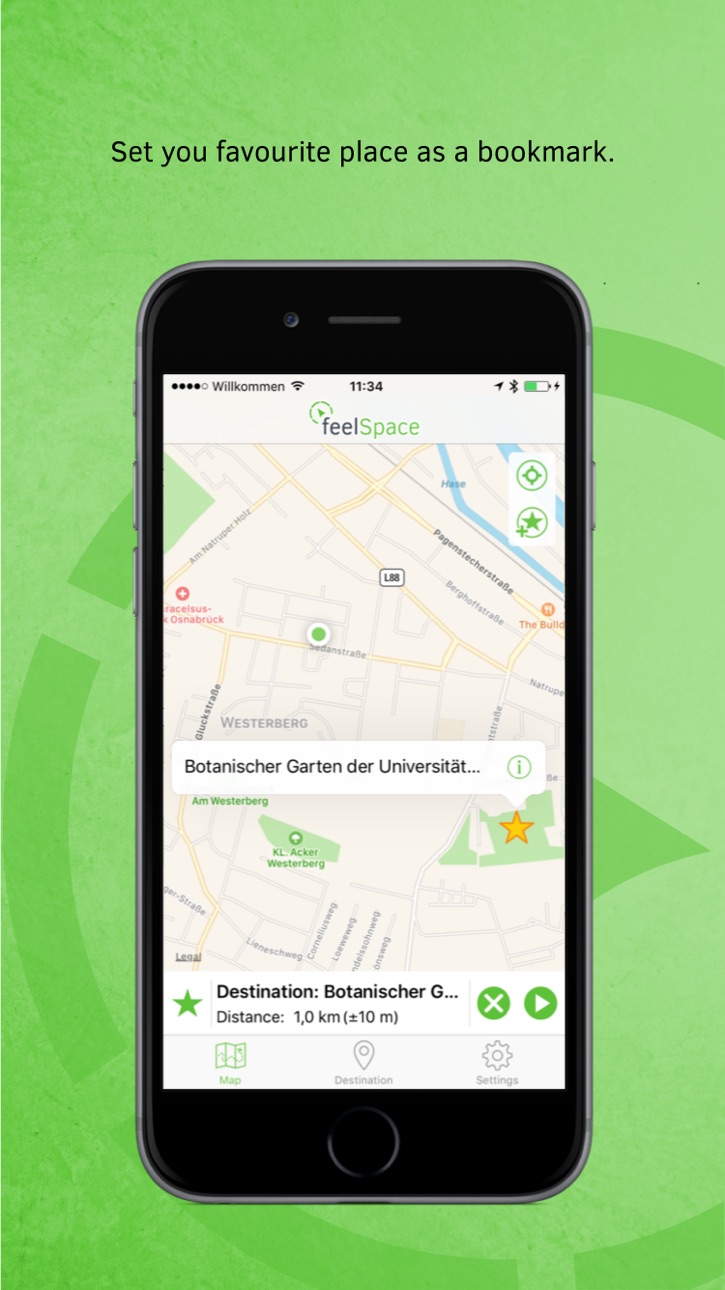
• map view,
• select a destination though clicking on the map, searching for an address, entering coordinates,
• select a navigation mode (compute and display tactilely the direction between your current location and the destination),
• Set bookmarks,
• Supported assistance through Siri Shortcut, VoiceOver Mode.
If you do not yet have your own naviBelt, please visit our website: www.feelSpace.de and contact us.
Feedback:
We are happy to get your feedback. Please contact us by mail: feedback@feelspace.de
Note:
A naviBelt, GPS data, internet and Bluetooth are required to use the application’s full range of features. Their continuous use can greatly reduce the battery life of your smartphone. For long trips, an additional battery for the smartphone is recommended.
The development of this App was supported with funds by the EU (“Europa für Niedersachsen”, EFRE).
Accessibility
ipadiphonemacrealityDevicetvoswatch
Version history 25 versions
Build 878037549v2.3.32025-09-11 17:17:28
This update fixes a bug that happens in a specific firmware version of the belt. For belt firmware version 4, this should improve the navigation signal.
Build 877054603v2.3.22025-08-07 13:59:16
This update fixes a bug in the Siri Shortcuts feature that prevented navigation from starting automatically when a destination was selected.
Build 875141087v2.3.12025-05-28 15:16:10
A new "Share" option has been added to Favourites and Search Results. This option allows you to share a link that contains the Favourite or Location information. When this link is opened on another iPhone, the feelSpace app is automatically launched and the destination is displayed. This version also fixes a bug that appears when a favorite is saved and no internet connection is available.
Build 874835625v2.3.02025-05-16 21:17:57
A new "Share" option has been added to Favourites and Search Results. This option allows you to share a link that contains the Favourite or Location information. When this link is opened on another iPhone, the feelSpace app is automatically launched and the destination is displayed.
Build 870272910v2.2.152024-11-07 19:57:00
This update fixes audio announcement problems, and fixes vibration signal orientation when approaching a destination. Also, the label of the button to start and stop audio announcements has been changed.
We added an option to repeat the current navigation instruction with updated distance, when the Home button on the belt is pressed. This option is available in the settings under 'Favorite button behavior'.
In addition, changes have been made to improve connection stability with the belt.
We added Norwegian and Polish translations.
Build 868443733v2.2.102024-08-23 17:21:16
This update fixes the vibration signal orientation when approaching a destination. Also, the label of the button to start and stop audio announcements has been changed. Finally, a bug has been fixed which should improve connection stability with the belt.
We are still actively working on problems concerning audio announcements that stop working and on disconnection problems that happen since iOS 17.
Build 866815119v2.2.82024-06-19 13:57:06
This update improves the compatibility of audio announcements with other apps. It should solve the problem of audio announcements randomly stopping.
In addition, requests for current location address have been improved and minor adjustments of button labels have been made.
Build 862300969v2.2.52024-01-03 09:09:48
New features:
- Address on shake: You can now request the address of your current location by shaking your phone when you are using the feelSpace application. This feature can be enabled or disabled in the settings of the application.
- Routes with OpenStreetMap: You can now choose between two map providers to calculate the routes for navigation: Apple-Map and OpenStreetMap. Apple-Map remains the default selection for navigation, and you can change to OpenStreetMap in the settings. With OpenStreetMap you can obtain additional information on crossings during navigation.
Additional changes:
- The settings menu has been re-organized into categories that are easier to understand. In addition, the items in the settings menu have been improved for a better experience with Voice-Over.
- Audio announcements during navigation have been improved. Audio from the feelSpace application should now work better with other applications. Also, new pieces of information are now communicated via audio announcement. For instance, the navigation mode is announced at the start of a navigation. Also, a audio announcement is now performed when the destination is reached and the navigation stops.
- Finally, known bugs have been fixed and multiple adjustments on labels have been performed.
Build 861873976v2.2.42023-11-30 12:12:13
New features:
- Address on shake: You can now request the address of your current location by shaking your phone when you are using the feelSpace application. This feature can be enabled or disabled in the settings of the application.
- Routes with OpenStreetMap: You can now choose between two map providers to calculate the routes for navigation: Apple-Map and OpenStreetMap. Apple-Map remains the default selection for navigation, and you can change to OpenStreetMap in the settings. With OpenStreetMap you can obtain additional information on crossings during navigation.
Additional changes:
- The settings menu has been re-organized into categories that are easier to understand. In addition, the items in the settings menu have been improved for a better experience with Voice-Over.
- Audio announcements during navigation have been improved. Audio from the feelSpace application should now work better with other applications. Also, new pieces of information are now communicated via audio announcement. For instance, the navigation mode is announced at the start of a navigation.
- Finally, known bugs have been fixed and multiple adjustments on labels have been performed.
Build 856960534v2.1.42023-05-09 08:28:28
In this version, the distance between turns, in the route details, has been fixed. Previously the full distance from the start to the turn was given, now the distance between turns is provided.
Build 856128207v2.1.32023-04-13 10:17:42
This version integrates a new routing service to cover regions where routes could not be determined. This service is used only when Apple service fails to compute a route to a given destination. Also, a bug that might change the orientation of the vibration signal during navigation has been fixed.
Build 855854485v2.0.212023-03-27 12:46:35
In this version, the newly added Compass+ navigation mode is available and the turn-only navigation mode has been re-integrated.
Build 855505078v2.0.192023-03-13 19:39:31
A new navigation mode has been added 'Compass+'. In this mode, turns are indicated with a pulsating vibration, and when no turn is ongoing, a continuous vibration shows the North as in the compass mode. This 'Compass+' mode replaces the 'turn-only' navigation mode.
Build 855173359v2.0.162023-02-24 19:33:20
In this version, a better precision for location is used when available. Also, a bug impacting the orientation of some turns (in iOS 15.5 and later), has been corrected.
Build 852581722v2.0.152022-10-05 05:57:23
This version fixes a bug that occurs when using the VoiceOver rotor on text.
Build 852249368v2.0.142022-09-16 13:56:43
This version solves problems on rerouting. The app is now able to provide a better route alternative when the user is too far away from the initial route.
Build 851576043v2.0.132022-08-16 07:53:50
In this version, the timing of navigation signals and audio announcement has been improved. In addition, some voice-over labels and actions have been added.
Build 849256696v2.0.112022-05-19 09:28:29
In this version, it is possible to define Siri shortcuts for favorites. When a favorite shortcut is used, the navigation is automatically started to this favorite in the feelSpace app. To set a favorite shortcut, edit a favorite and select the "Add to Siri" option.
Build 847974946v2.0.102022-03-29 09:04:25
In this version, we improved the Siri shortcut available in the settings, and we adjusted some default parameters for the navigation.
Build 847394636v2.0.92022-02-28 07:06:48
In this version, the connection procedure has been simplified. Also, the navigation is now automatically started when an address or favorite is selected. Finally, some audio announcements and voice-over labels have been improved.
Build 845011727v2.0.42021-11-02 11:52:56
This update improves the orientation of the belt and fixes some bugs on route directions.
Build 840299517v2.0.32021-10-22 21:57:30
This version is compatible with the last iOS 15.
Build 838085932v2.0.02020-10-07 19:12:34
We added the following features:
• Additional navigation modes: Beeline, Beeline with Turn-by-Turn, Routing with Turn-by-Turn, Turn-by-Turn,
• Management of the favorites,
• Use of Siri Shortcuts,
• Optimized use of VoiceOver.
Build 827592888v1.22018-06-19 20:40:51
Bugfixes
Build 826831297v1.12018-06-06 20:37:14
Bugfixes
No pricing data captured yet — comparisons appear once the app has paid storefronts or in-app purchases.
Availability 1 of 1 storefronts
| Region | Language | Price | Ratings | Avg | Version |
|---|---|---|---|---|---|
| US | en-US | Free | 0 | — | 2.3.3 |
Change log 28 changes · US
✎
releaseNotes updated
This update fixes a bug that happens in a specific firmware version of the belt. For belt firmware version 4, this should improve the navigation signal.
✎
description updated
Orientation that you can feel!
Description:
The feelSpace app is a navigation app. It is designed to be used together with the feelSpace naviBelt. The App inte
✎
name updated
feelSpace
◆
Version 2.3.3 released
This update fixes a bug that happens in a specific firmware version of the belt. For belt firmware version 4, this should improve the navigation signal.
◆
Version 2.3.2 released
This update fixes a bug in the Siri Shortcuts feature that prevented navigation from starting automatically when a destination was selected.
◆
Version 2.3.1 released
A new "Share" option has been added to Favourites and Search Results. This option allows you to share a link that contains the Favourite or Location information. When this link is opened on another iPhone, the feelSpace app is automatically
◆
Version 2.3.0 released
A new "Share" option has been added to Favourites and Search Results. This option allows you to share a link that contains the Favourite or Location information. When this link is opened on another iPhone, the feelSpace app is automatically
◆
Version 2.2.15 released
This update fixes audio announcement problems, and fixes vibration signal orientation when approaching a destination. Also, the label of the button to start and stop audio announcements has been changed.
We added an option to repeat the c
◆
Version 2.2.10 released
This update fixes the vibration signal orientation when approaching a destination. Also, the label of the button to start and stop audio announcements has been changed. Finally, a bug has been fixed which should improve connection stability
◆
Version 2.2.8 released
This update improves the compatibility of audio announcements with other apps. It should solve the problem of audio announcements randomly stopping.
In addition, requests for current location address have been improved and minor adjustments
◆
Version 2.2.5 released
New features:
- Address on shake: You can now request the address of your current location by shaking your phone when you are using the feelSpace application. This feature can be enabled or disabled in the settings of the application.
- Ro
◆
Version 2.2.4 released
New features:
- Address on shake: You can now request the address of your current location by shaking your phone when you are using the feelSpace application. This feature can be enabled or disabled in the settings of the application.
- Rou
◆
Version 2.1.4 released
In this version, the distance between turns, in the route details, has been fixed. Previously the full distance from the start to the turn was given, now the distance between turns is provided.
◆
Version 2.1.3 released
This version integrates a new routing service to cover regions where routes could not be determined. This service is used only when Apple service fails to compute a route to a given destination. Also, a bug that might change the orientation
◆
Version 2.0.21 released
In this version, the newly added Compass+ navigation mode is available and the turn-only navigation mode has been re-integrated.
◆
Version 2.0.19 released
A new navigation mode has been added 'Compass+'. In this mode, turns are indicated with a pulsating vibration, and when no turn is ongoing, a continuous vibration shows the North as in the compass mode. This 'Compass+' mode replaces the 'tu
◆
Version 2.0.16 released
In this version, a better precision for location is used when available. Also, a bug impacting the orientation of some turns (in iOS 15.5 and later), has been corrected.
◆
Version 2.0.15 released
This version fixes a bug that occurs when using the VoiceOver rotor on text.
◆
Version 2.0.14 released
This version solves problems on rerouting. The app is now able to provide a better route alternative when the user is too far away from the initial route.
◆
Version 2.0.13 released
In this version, the timing of navigation signals and audio announcement has been improved. In addition, some voice-over labels and actions have been added.
◆
Version 2.0.11 released
In this version, it is possible to define Siri shortcuts for favorites. When a favorite shortcut is used, the navigation is automatically started to this favorite in the feelSpace app. To set a favorite shortcut, edit a favorite and select
◆
Version 2.0.10 released
In this version, we improved the Siri shortcut available in the settings, and we adjusted some default parameters for the navigation.
◆
Version 2.0.9 released
In this version, the connection procedure has been simplified. Also, the navigation is now automatically started when an address or favorite is selected. Finally, some audio announcements and voice-over labels have been improved.
◆
Version 2.0.4 released
This update improves the orientation of the belt and fixes some bugs on route directions.
◆
Version 2.0.3 released
This version is compatible with the last iOS 15.
◆
Version 2.0.0 released
We added the following features:
• Additional navigation modes: Beeline, Beeline with Turn-by-Turn, Routing with Turn-by-Turn, Turn-by-Turn,
• Management of the favorites,
• Use of Siri Shortcuts,
• Optimized use of VoiceOver.
◆
Version 1.2 released
Bugfixes
◆
Version 1.1 released
Bugfixes