Home › Business

 US
US
1 of 1 storefronts
Content in en-US
Content in en-US
Information
Preview 2 platforms
iPhone 3 images


iPad 3 images


What’s New Version 25.9.0
performance improvements and bug fixes
Description
Managing shifts is difficult?
Make everything simpler with ZScheduling Enterprise Edition, the app designed to manage the daily activities of those responsible for planning shifts and shift workers.
How?
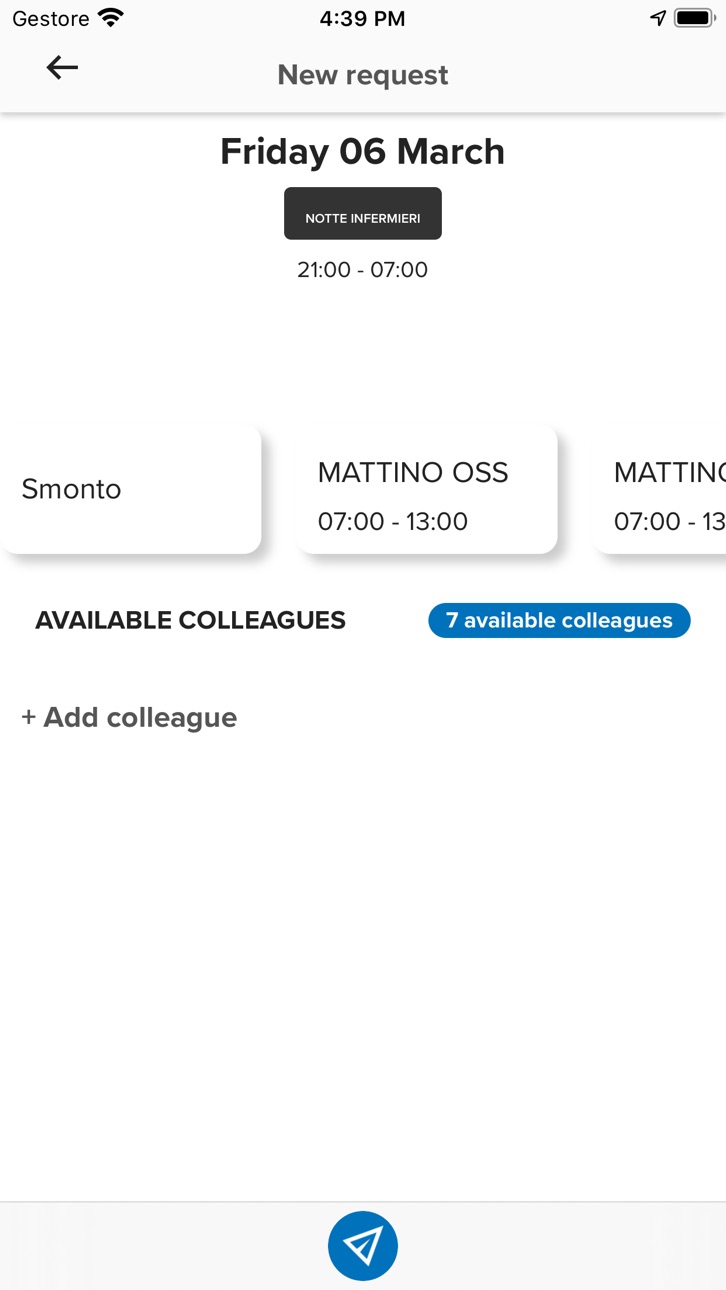
By simplifying shift schedule management, which then becomes accessible from mobile devices for both the planner and for the workers: in this way, everyone knows about the shifts, can propose changes and are updated on each variation.
With ZScheduling app you can in fact:
- see your shifts with a weekly or daily view
- see the colleagues working the same shift
- always have company contact numbers for colleagues assigned to the same shift
- request shift changes to the colleagues assigned to the same shift
- accept/refuse shift change requests proposed by the colleagues assigned to the same shift
- receive notifications for the publishing of the shift calendar
- receive notifications when getting a shift change request
- receive notifications when sending a shift change request
- view your planned activities in Activity Plan
ZScheduling allows workers and company to save time because its uniqueness lies in being natively integrated with:
- Zucchetti’s shift management ZScheduling software
- Zucchetti’s Time & Attendance, Timesheet and Travel & Expenses management software
In this way, all information can be easily accessible with just one click, from any place and at any time, even for those who do not work with a PC or on a fixed work station.
Who is it dedicated to?
ZScheduling Enterprise Edition is available to all companies that purchased Zucchetti’s ZScheduling software.
In particular, the company has to be using the following modules:
- Scheduling: for shift calendar visualization and management
- Workflow Scheduling: to request shift changes
- Activity Plan: to insert and view individual activities
For further information on ZScheduling Enterprise Edition take a look at the FAQ inside the app
Operational notes:
In order for the app to work properly, the company needs to purchase the ZScheduling Enterprise Edition license and enable employees before letting them download the app from the store.
It is necessary to install the HR portal 08.00.00 version or higher and ZScheduling 05.02.00 version or higher.
Technical requirements – Server
HR portal 08.00.00 version or higher
ZScheduling . 05.02.00
Technical requirements – Device
iOS 12.4.5 or higher
Accessibility
ipadiphonemacrealityDevicetvoswatch
Version history 25 versions
Build 877996505v25.9.02025-09-14 12:38:01
performance improvements and bug fixes
Build 877452096v25.8.02025-08-25 08:05:19
performance improvements and bug fixes
Build 868622613v24.8.02024-09-09 07:55:12
performance improvements and bug fixes
Build 854749988v15.2.22023-07-31 12:09:44
performance improvements and bug fixes
Build 847424293v10.3.02022-03-01 16:51:12
performance improvements and bug fixes
Build 845925568v10.1.12021-12-14 08:37:38
performance improvements and bug fixes
Build 845019493v9.18.12021-11-02 08:50:40
performance improvements and bug fixes
Build 841189112v9.10.02021-04-06 11:41:07
performance improvements and bug fixes
Build 840865817v9.9.02021-03-15 09:49:03
performance improvements and bug fixes
Build 839762375v9.6.02021-02-08 10:11:33
performance improvements and bug fixes
Build 839348350v9.2.12020-11-25 10:10:45
performance improvements and bug fixes
Build 839221286v9.2.02020-11-17 07:56:20
performance improvements and bug fixes
Build 838278552v9.0.02020-10-22 08:15:07
added polish translations
performance improvements and bug fixes
Build 835280199v8.0.42020-04-14 06:25:24
Performance improvements, minor bug fixes.
Build 835009804v8.0.32020-03-25 08:12:21
Graphical review.
Dark mode support.
Performance improvements, minor bug fixes.
Build 834454402v7.8.52020-01-22 19:16:11
Minor fixes
Build 833574178v7.8.22019-11-13 15:56:55
Performance improvements
Build 833493669v7.8.12019-11-11 14:40:09
Bug fixes and performance improvements
Build 831483695v7.7.02019-09-18 07:07:20
iOS 13 support. Bug fixes and performance improvements
Build 830455025v6.6.22019-03-04 09:06:57
Minor bug fixes
Build 830030820v6.6.12019-01-28 10:39:01
Performance improvements
Graphical adjustments
Minor bug fixes
Build 829726825v6.4.42018-12-22 00:55:45
Performance improvements
Added support to alphanumeric PIN in documents
Build 829538125v6.4.32018-12-17 08:19:19
Performance improvements
Build 829326909v6.4.12018-11-21 08:02:25
Performance Improvements
Build 828689148v6.3.02018-09-24 13:35:21
Bug fixes and performance improvements
No pricing data captured yet — comparisons appear once the app has paid storefronts or in-app purchases.
Availability 1 of 1 storefronts
| Region | Language | Price | Ratings | Avg | Version |
|---|---|---|---|---|---|
| US | en-US | Free | 0 | — | 25.9.0 |
Change log 28 changes · US
✎
releaseNotes updated
performance improvements and bug fixes
✎
description updated
Managing shifts is difficult?
Make everything simpler with ZScheduling Enterprise Edition, the app designed to manage the daily activities of those responsible
✎
name updated
ZScheduling Enterprise Edition
◆
Version 25.9.0 released
performance improvements and bug fixes
◆
Version 25.8.0 released
performance improvements and bug fixes
◆
Version 24.8.0 released
performance improvements and bug fixes
◆
Version 15.2.2 released
performance improvements and bug fixes
◆
Version 10.3.0 released
performance improvements and bug fixes
◆
Version 10.1.1 released
performance improvements and bug fixes
◆
Version 9.18.1 released
performance improvements and bug fixes
◆
Version 9.10.0 released
performance improvements and bug fixes
◆
Version 9.9.0 released
performance improvements and bug fixes
◆
Version 9.6.0 released
performance improvements and bug fixes
◆
Version 9.2.1 released
performance improvements and bug fixes
◆
Version 9.2.0 released
performance improvements and bug fixes
◆
Version 9.0.0 released
added polish translations
performance improvements and bug fixes
◆
Version 8.0.4 released
Performance improvements, minor bug fixes.
◆
Version 8.0.3 released
Graphical review.
Dark mode support.
Performance improvements, minor bug fixes.
◆
Version 7.8.5 released
Minor fixes
◆
Version 7.8.2 released
Performance improvements
◆
Version 7.8.1 released
Bug fixes and performance improvements
◆
Version 7.7.0 released
iOS 13 support. Bug fixes and performance improvements
◆
Version 6.6.2 released
Minor bug fixes
◆
Version 6.6.1 released
Performance improvements
Graphical adjustments
Minor bug fixes
◆
Version 6.4.4 released
Performance improvements
Added support to alphanumeric PIN in documents
◆
Version 6.4.3 released
Performance improvements
◆
Version 6.4.1 released
Performance Improvements
◆
Version 6.3.0 released
Bug fixes and performance improvements