Home › Productivity

 US
US
 RUru
RUru DEde-DEUSen-US
 UAen-GB
 CAen-CA
 GBen-GB
 INen-GB
 CNzh-Hans-CN
 TWzh-Hant-TW
 THen-GB
 ATde-DE
 AUen-AU
 MYen-GB
 PHen-GB
 EEen-GB
 ILen-GB
 KZen-GB
 NLnl
NLnl SAen-GB
 SKen-GB
 VNen-GB
 AMen-GB
 CHde-CH
 DKen-GB
 FIen-GB
 FRfr-FR
 GHen-GB
 HKzh-Hant-HK
 IDen-GB
 JPja
JPja LKen-GB
 NOen-GB
 NZen-AU
 PLen-GB
 PTpt-PT
 ROen-GB
 SEsv
SEsv TRen-GB
 TZen-GB
 AEen-GB
 AFen-GB
 ALen-GB
 AZen-GB
 BAen-GB
 BEen-GB
 BGen-GB
 BHen-GB
 BMen-GB
 BNen-GB
 BTen-GB
 BYen-GB
 CYen-GB
 CZen-GB
 EGen-GB
 ESes-ES
 FJen-GB
 FMen-GB
 GEen-GB
 GRen-GB
 HRen-GB
 HUen-GB
 IEen-GB
 IQen-GB
 ISen-GB
 ITit
ITit JOen-GB
 KEen-GB
 KGen-GB
 KHen-GB
 KRko
KRko KWen-GB
 LAen-GB
 LBen-GB
 LTen-GB
 LUen-GB
 LVen-GB
 MDen-GB
 MEen-GB
 MKen-GB
 MMen-GB
 MNen-GB
 MOzh-Hant-HK
 MRen-GB
 MTen-GB
 MVen-GB
 NGen-GB
 NPen-GB
 NRen-GB
 OMen-GB
 PGen-GB
 PKen-GB
 PWen-GB
 QAen-GB
 RSen-GB
 SBen-GB
 SGen-GB
 SIen-GB
 TJen-GB
 TMen-GB
 TOen-GB
 UGen-GB
 UZen-GB
 VUen-GB
 XKen-GB
 YEen-GB
 ZAen-GB
106 of 106 storefronts
Content in en-US
Content in en-US
Information
Preview 2 platforms
iPhone 7 images


iPad 6 images




What’s New Version 3.12.0
User experience improvements. Create counters, reach your goals today!
Description
With Counter, you can easily create and manage counters for anything you want to track and monitor.
Whether it's tracking the progress of your book reading, your daily water intake, or a project, Counter makes it simple and intuitive.
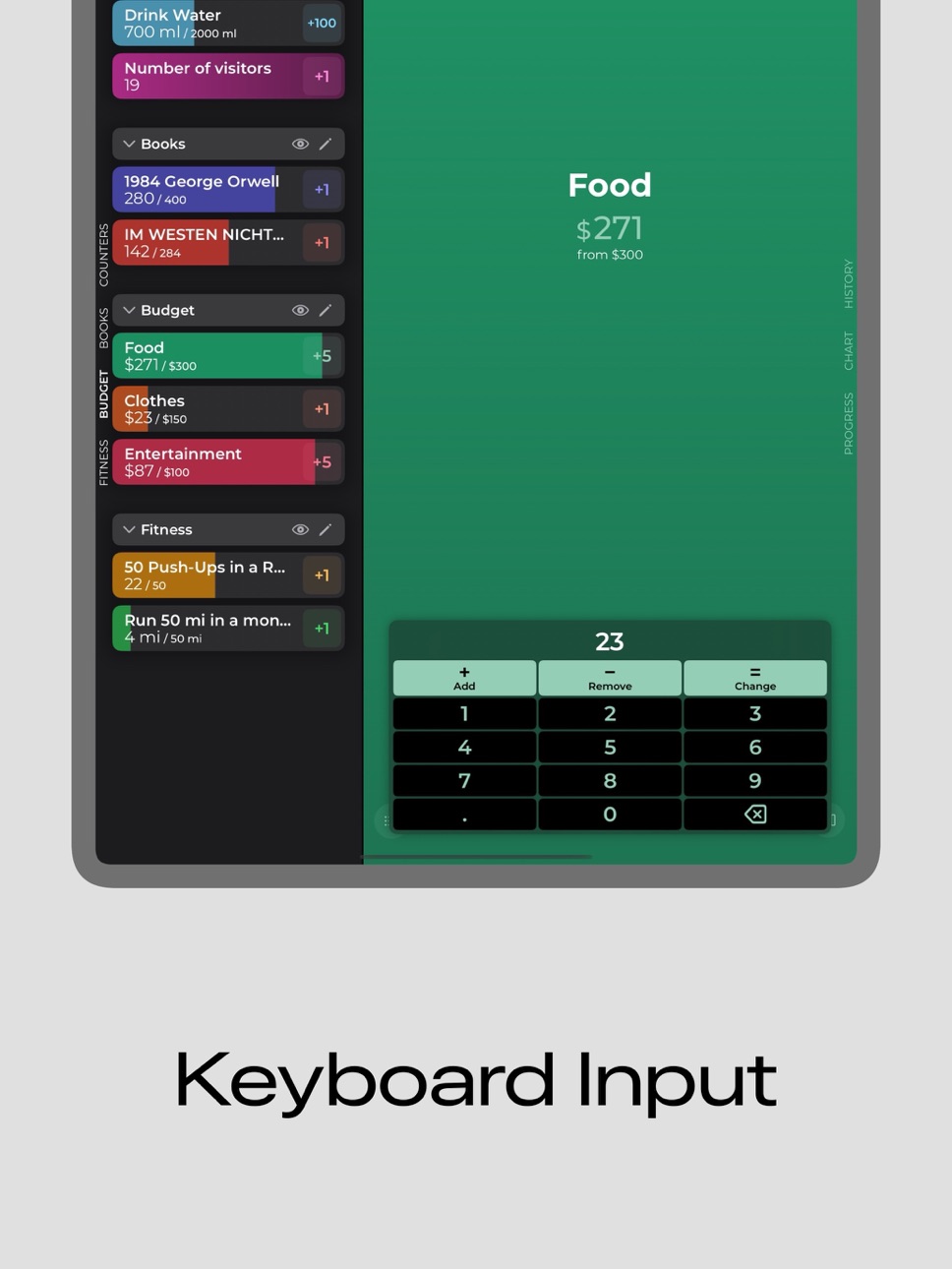
With a clean and user-friendly interface, you can quickly create new counters and set custom goals for each one. To change the count, press the plus button or enter a new value from the keyboard.
You can then easily track your progress and view detailed graphs and statistics that show your progress over time. The history of changes can be exported as a CSV file.
For a better overview, the counters can be divided into categories.
Use interactive Widgets on your Home-Screen so your goals are always in sight.
With the Shortcuts, counters can be automated.
Whether you're looking to make positive changes in your daily habits or simply stay organized, Counter is the perfect app for you. Download Counter today and start making progress towards your goals!
Privacy Policy: https://zipoapps.com/progresstrackerios/privacy
Terms of Use: https://zipoapps.com/progresstrackerios/terms
Capabilities
In-App Purchases
Accessibility
ipadiphonemacrealityDevicetvoswatch
Version history 25 versions
Build 886465227v3.12.02026-07-01 13:58:27
User experience improvements. Create counters, reach your goals today!
Build 885956889v3.11.12026-05-21 20:17:49
Added symbol display in lock screen widgets.
Build 884776710v3.112026-04-22 00:45:27
Customize your counters using symbols that will be displayed in the background of the counter in both the app and the widget.
Get more insights from your history in the updated statistics section.
Build 882956059v3.102026-03-03 02:28:16
The display of statistics and the counter configuration interface have been optimized.
The option to clear the history has been added to the change log overview.
Build 881261099v3.92026-01-07 00:12:34
In the new version, the display of statistics has been optimized and the app’s performance has been improved.
Daily, weekly, monthly, and yearly charts can now be scrolled back to view statistics for previous periods.
Build 879285866v3.82025-10-29 00:46:08
The app has been optimized for iOS 26.
You can now configure up to three quick action buttons with the following possible functions: add, subtract, keyboard input, and reset counter.
Build 873819025v3.72025-04-07 06:23:40
- Interface optimization for iPad
- Categories in the list can be hidden by tapping on the title
Build 873564730v3.6.12025-03-27 08:44:04
I apologize if you encountered a problem with the app not opening for one day. This update should prevent this error from happening again.
Added the ability to hide or show the progress value in percentages and the side menu.
Build 873344470v3.62025-03-19 02:13:08
The updated version contains display of progress in percentages, improved counter list, improved support for dark theme, tips for new users and bug fixes leading to a crash.
Build 872919293v3.5.12025-03-03 07:03:13
- Fixed display of negative count
- Added display of units when selecting a time period on the chart
- Fixed an error when editing automations
- Other improvements
Build 872666437v3.52025-02-21 00:26:48
Selecting units of measure in the new version will help you personalize the counter to calculate distance, weight, volume, time, currency and more. In addition to the preset units, you can create your own units.
Build 872390133v3.4.32025-02-11 15:56:26
Bug fixes.
Build 872214423v3.4.22025-02-04 10:41:19
Improved animation and performance.
Build 870140907v3.4.12024-11-01 21:01:06
Get more useful information from charts with statistics. Highlight a time period on the graph to see the exact value for a specific day, hour or month.
Build 869994692v3.42024-10-27 11:41:16
Count without opening the app with the new widgets on your lock screen. Tap on the widget in lock screen edit mode to select the desired counter.
Build 869188551v3.3.42024-09-22 21:04:24
Optimization for iOS 18.
Build 867067934v3.3.32024-06-29 12:06:00
Added target value to the widget.
Performance Optimisation.
Added the ability to reset all counters of the selected category from the category settings.
Build 864980459v3.3.22024-04-05 17:22:44
Bug fixes:
– sometimes clicking on "plus" in the counter list would add an incorrect value
– when using the automatic counter reset, an incorrect average value was displayed in the bar chart
Build 864773207v3.3.12024-03-27 21:55:35
Fixed bugs with charts and count.
Build 864666177v3.32024-03-25 13:10:35
Counter automation allows you to reset it to the defined value or automatically add a preset value every day, week, month or year.
Use automations to track your daily water consumption, weekly sports activity or keep track of your monthly budget.
Build 863828371v3.2.62024-02-18 15:59:06
Fixed a bug with iCloud synchronization.
Build 863454854v3.2.52024-02-07 00:28:22
Added the ability to hide completed counters in the list with counters.
Build 863427857v3.2.42024-02-06 03:16:11
Added four new color options.
Build 863386053v3.2.32024-02-04 19:14:58
Bug fixes and improvements.
Build 863268806v3.2.22024-01-30 04:51:15
Fixed a bug in the widget.
To synchronize data via iCloud, enable it in the menu on the counter list page and restart the app.
No pricing data captured yet — comparisons appear once the app has paid storefronts or in-app purchases.
Availability 106 of 106 storefronts
| Region | Language | Price | Ratings | Avg | Version |
|---|---|---|---|---|---|
| RU | ru | Free | 86 | 4.5 | 3.12.0 |
| DE | de-DE | Free | 77 | 4.6 | 3.12.0 |
| US | en-US | Free | 63 | 4.6 | 3.12.0 |
| UA | en-GB | Free | 13 | 4.5 | 3.12.0 |
| CA | en-CA | Free | 10 | 4.5 | 3.12.0 |
| GB | en-GB | Free | 8 | 4.8 | 3.12.0 |
| IN | en-GB | Free | 7 | 4.0 | 3.12.0 |
| CN | zh-Hans-CN | Free | 6 | 4.8 | 3.12.0 |
| TW | zh-Hant-TW | Free | 5 | 5.0 | 3.12.0 |
| TH | en-GB | Free | 4 | 5.0 | 3.12.0 |
| AT | de-DE | Free | 3 | 4.7 | 3.12.0 |
| AU | en-AU | Free | 3 | 5.0 | 3.12.0 |
| MY | en-GB | Free | 3 | 4.0 | 3.12.0 |
| PH | en-GB | Free | 3 | 4.0 | 3.12.0 |
| EE | en-GB | Free | 2 | 5.0 | 3.12.0 |
| IL | en-GB | Free | 2 | 5.0 | 3.12.0 |
| KZ | en-GB | Free | 2 | 5.0 | 3.12.0 |
| NL | nl | Free | 2 | 4.5 | 3.12.0 |
| SA | en-GB | Free | 2 | 5.0 | 3.12.0 |
| SK | en-GB | Free | 2 | 5.0 | 3.12.0 |
| VN | en-GB | Free | 2 | 5.0 | 3.12.0 |
| AM | en-GB | Free | 1 | 5.0 | 3.12.0 |
| CH | de-CH | Free | 1 | 1.0 | 3.12.0 |
| DK | en-GB | Free | 1 | 5.0 | 3.12.0 |
| FI | en-GB | Free | 1 | 5.0 | 3.12.0 |
| FR | fr-FR | Free | 1 | 5.0 | 3.12.0 |
| GH | en-GB | Free | 1 | 5.0 | 3.12.0 |
| HK | zh-Hant-HK | Free | 1 | 5.0 | 3.12.0 |
| ID | en-GB | Free | 1 | 5.0 | 3.12.0 |
| JP | ja | Free | 1 | 1.0 | 3.12.0 |
| LK | en-GB | Free | 1 | 4.0 | 3.12.0 |
| NO | en-GB | Free | 1 | 4.0 | 3.12.0 |
| NZ | en-AU | Free | 1 | 5.0 | 3.12.0 |
| PL | en-GB | Free | 1 | 5.0 | 3.12.0 |
| PT | pt-PT | Free | 1 | 5.0 | 3.12.0 |
| RO | en-GB | Free | 1 | 4.0 | 3.12.0 |
| SE | sv | Free | 1 | 5.0 | 3.12.0 |
| TR | en-GB | Free | 1 | 5.0 | 3.12.0 |
| TZ | en-GB | Free | 1 | 5.0 | 3.12.0 |
| AE | en-GB | Free | 0 | — | 3.12.0 |
| AF | en-GB | Free | 0 | — | 3.12.0 |
| AL | en-GB | Free | 0 | — | 3.12.0 |
| AZ | en-GB | Free | 0 | — | 3.12.0 |
| BA | en-GB | Free | 0 | — | 3.12.0 |
| BE | en-GB | Free | 0 | — | 3.12.0 |
| BG | en-GB | Free | 0 | — | 3.12.0 |
| BH | en-GB | Free | 0 | — | 3.12.0 |
| BM | en-GB | Free | 0 | — | 3.12.0 |
| BN | en-GB | Free | 0 | — | 3.12.0 |
| BT | en-GB | Free | 0 | — | 3.12.0 |
| BY | en-GB | Free | 0 | — | 3.12.0 |
| CY | en-GB | Free | 0 | — | 3.12.0 |
| CZ | en-GB | Free | 0 | — | 3.12.0 |
| EG | en-GB | Free | 0 | — | 3.12.0 |
| ES | es-ES | Free | 0 | — | 3.12.0 |
| FJ | en-GB | Free | 0 | — | 3.12.0 |
| FM | en-GB | Free | 0 | — | 3.12.0 |
| GE | en-GB | Free | 0 | — | 3.12.0 |
| GR | en-GB | Free | 0 | — | 3.12.0 |
| HR | en-GB | Free | 0 | — | 3.12.0 |
| HU | en-GB | Free | 0 | — | 3.12.0 |
| IE | en-GB | Free | 0 | — | 3.12.0 |
| IQ | en-GB | Free | 0 | — | 3.12.0 |
| IS | en-GB | Free | 0 | — | 3.12.0 |
| IT | it | Free | 0 | — | 3.12.0 |
| JO | en-GB | Free | 0 | — | 3.12.0 |
| KE | en-GB | Free | 0 | — | 3.12.0 |
| KG | en-GB | Free | 0 | — | 3.12.0 |
| KH | en-GB | Free | 0 | — | 3.12.0 |
| KR | ko | Free | 0 | — | 3.12.0 |
| KW | en-GB | Free | 0 | — | 3.12.0 |
| LA | en-GB | Free | 0 | — | 3.12.0 |
| LB | en-GB | Free | 0 | — | 3.12.0 |
| LT | en-GB | Free | 0 | — | 3.12.0 |
| LU | en-GB | Free | 0 | — | 3.12.0 |
| LV | en-GB | Free | 0 | — | 3.12.0 |
| MD | en-GB | Free | 0 | — | 3.12.0 |
| ME | en-GB | Free | 0 | — | 3.12.0 |
| MK | en-GB | Free | 0 | — | 3.12.0 |
| MM | en-GB | Free | 0 | — | 3.12.0 |
| MN | en-GB | Free | 0 | — | 3.12.0 |
| MO | zh-Hant-HK | Free | 0 | — | 3.12.0 |
| MR | en-GB | Free | 0 | — | 3.12.0 |
| MT | en-GB | Free | 0 | — | 3.12.0 |
| MV | en-GB | Free | 0 | — | 3.12.0 |
| NG | en-GB | Free | 0 | — | 3.12.0 |
| NP | en-GB | Free | 0 | — | 3.12.0 |
| NR | en-GB | Free | 0 | — | 3.12.0 |
| OM | en-GB | Free | 0 | — | 3.12.0 |
| PG | en-GB | Free | 0 | — | 3.12.0 |
| PK | en-GB | Free | 0 | — | 3.12.0 |
| PW | en-GB | Free | 0 | — | 3.12.0 |
| QA | en-GB | Free | 0 | — | 3.12.0 |
| RS | en-GB | Free | 0 | — | 3.12.0 |
| SB | en-GB | Free | 0 | — | 3.12.0 |
| SG | en-GB | Free | 0 | — | 3.12.0 |
| SI | en-GB | Free | 0 | — | 3.12.0 |
| TJ | en-GB | Free | 0 | — | 3.12.0 |
| TM | en-GB | Free | 0 | — | 3.12.0 |
| TO | en-GB | Free | 0 | — | 3.12.0 |
| UG | en-GB | Free | 0 | — | 3.12.0 |
| UZ | en-GB | Free | 0 | — | 3.12.0 |
| VU | en-GB | Free | 0 | — | 3.12.0 |
| XK | en-GB | Free | 0 | — | 3.12.0 |
| YE | en-GB | Free | 0 | — | 3.12.0 |
| ZA | en-GB | Free | 0 | — | 3.12.0 |
Change log 29 changes · US
✎
releaseNotes updated
User experience improvements. Create counters, reach your goals today!
✎
description updated
With Counter, you can easily create and manage counters for anything you want to track and monitor.
Whether it's tracking the progress of your book reading, y
✎
subtitle updated
Habits, Widgets and Goals
✎
name updated
Counter - Progress Tracker
◆
Version 3.12.0 released
User experience improvements. Create counters, reach your goals today!
◆
Version 3.11.1 released
Added symbol display in lock screen widgets.
◆
Version 3.11 released
Customize your counters using symbols that will be displayed in the background of the counter in both the app and the widget.
Get more insights from your history in the updated statistics section.
◆
Version 3.10 released
The display of statistics and the counter configuration interface have been optimized.
The option to clear the history has been added to the change log overview.
◆
Version 3.9 released
In the new version, the display of statistics has been optimized and the app’s performance has been improved.
Daily, weekly, monthly, and yearly charts can now be scrolled back to view statistics for previous periods.
◆
Version 3.8 released
The app has been optimized for iOS 26.
You can now configure up to three quick action buttons with the following possible functions: add, subtract, keyboard input, and reset counter.
◆
Version 3.7 released
- Interface optimization for iPad
- Categories in the list can be hidden by tapping on the title
◆
Version 3.6.1 released
I apologize if you encountered a problem with the app not opening for one day. This update should prevent this error from happening again.
Added the ability to hide or show the progress value in percentages and the side menu.
◆
Version 3.6 released
The updated version contains display of progress in percentages, improved counter list, improved support for dark theme, tips for new users and bug fixes leading to a crash.
◆
Version 3.5.1 released
- Fixed display of negative count
- Added display of units when selecting a time period on the chart
- Fixed an error when editing automations
- Other improvements
◆
Version 3.5 released
Selecting units of measure in the new version will help you personalize the counter to calculate distance, weight, volume, time, currency and more. In addition to the preset units, you can create your own units.
◆
Version 3.4.3 released
Bug fixes.
◆
Version 3.4.2 released
Improved animation and performance.
◆
Version 3.4.1 released
Get more useful information from charts with statistics. Highlight a time period on the graph to see the exact value for a specific day, hour or month.
◆
Version 3.4 released
Count without opening the app with the new widgets on your lock screen. Tap on the widget in lock screen edit mode to select the desired counter.
◆
Version 3.3.4 released
Optimization for iOS 18.
◆
Version 3.3.3 released
Added target value to the widget.
Performance Optimisation.
Added the ability to reset all counters of the selected category from the category settings.
◆
Version 3.3.2 released
Bug fixes:
– sometimes clicking on "plus" in the counter list would add an incorrect value
– when using the automatic counter reset, an incorrect average value was displayed in the bar chart
◆
Version 3.3.1 released
Fixed bugs with charts and count.
◆
Version 3.3 released
Counter automation allows you to reset it to the defined value or automatically add a preset value every day, week, month or year.
Use automations to track your daily water consumption, weekly sports activity or keep track of your monthly
◆
Version 3.2.6 released
Fixed a bug with iCloud synchronization.
◆
Version 3.2.5 released
Added the ability to hide completed counters in the list with counters.
◆
Version 3.2.4 released
Added four new color options.
◆
Version 3.2.3 released
Bug fixes and improvements.
◆
Version 3.2.2 released
Fixed a bug in the widget.
To synchronize data via iCloud, enable it in the menu on the counter list page and restart the app.