Home › Weather

Storm Radar: Weather Tracker
Winter Storm Radar & Alerts
 US
US
1 of 1 storefronts
Content in en-US
Content in en-US
Information
Preview 3 platforms


iPhone 10 images





iPad 8 images




Apple Watch 6 images


What’s New Version 4.0.17
iPhone / iPad / Mac
- Cleaner UI: the side controls now tuck behind a single button — tap it to reveal layers, tools and more, and they stay open until you close them.
- Customise your widgets based on your interests: tap on the "3 lines" button and choose what activities matter to you and we'll set up the matching widgets automatically — then add, remove, and reorder them however you like.
- Redesigned location details page.
- New timeline Loop setting: added to layer settings (3-lines button in layer) and in Classic mode.
- New Wind Speed option in Settings: pick knots, meters per second, or your default, and it applies everywhere — forecasts, radar, and widgets.
- New Layout choice on iPhone: switch between Map & Widgets and a Widgets Only view from Settings or your interests setup.
- New temperature trend line across the top of the Hourly conditions, so you can read the day's rise and fall at a glance.
- New Tides widget: see the rise and fall of the tide across several days with every high and low marked, plus a moon overlay so you can read the tides against the lunar cycle.
- New Live Precipitation alerts: follow incoming rain from your Lock Screen and Dynamic Island, and tap to jump straight to your current location's forecast.
- New Nearby Lightning tile in Current Conditions widget, showing distance and time since the nearest strike.
Watch
- New Nearby Lightning complication, showing distance and time since the nearest strike.
Description
Welcome to the NEW Storm Radar, the next generation of weather radar and storm tracking. We’ve re-imagined the app with smarter insights, powerful tools, and a fresh design built on the trusted accuracy of The Weather Channel.
POWERFUL WEATHER & RADAR FEATURES
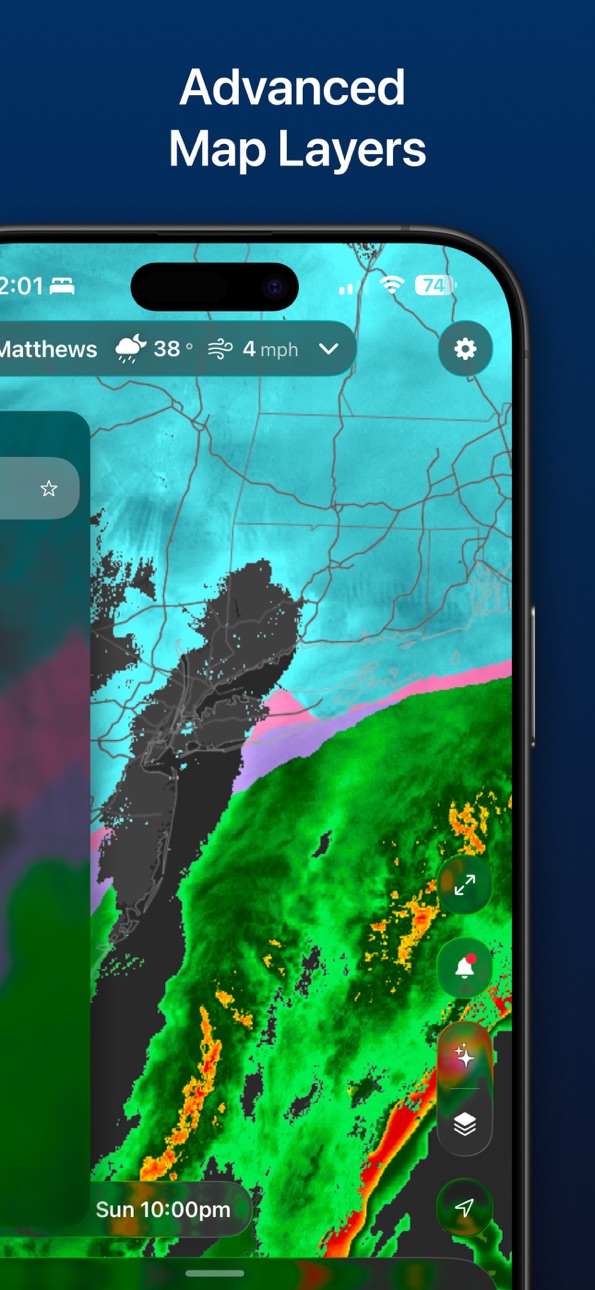
• Expanded weather map layers: Wind, lightning, tropical tracks, hail, and more
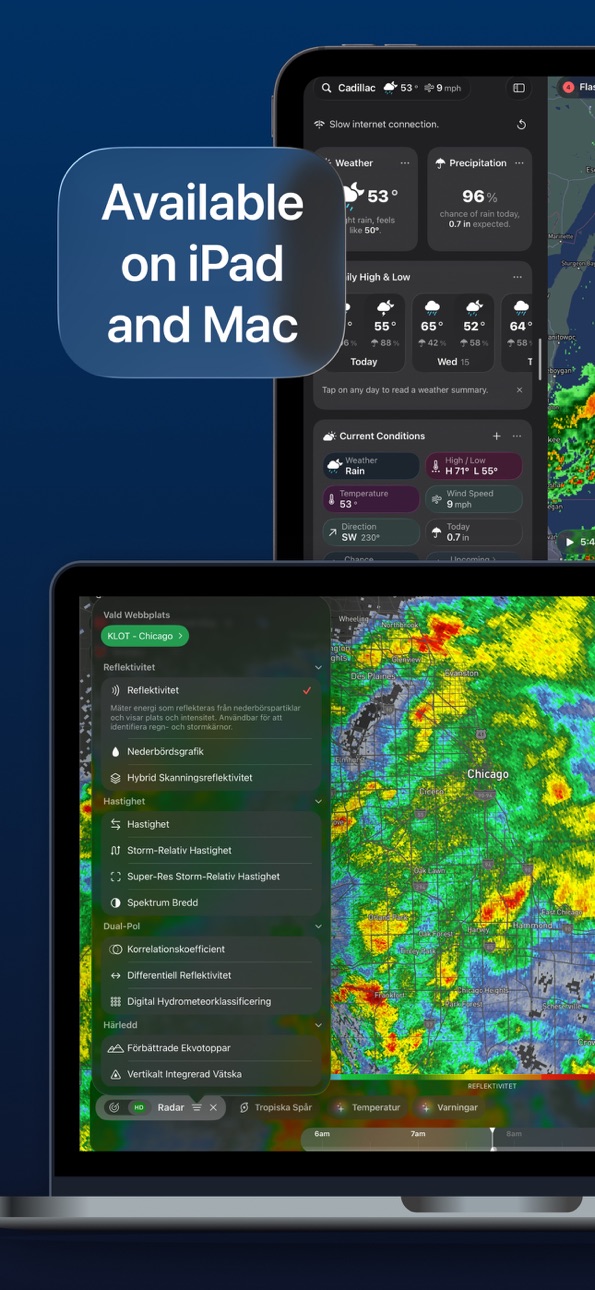
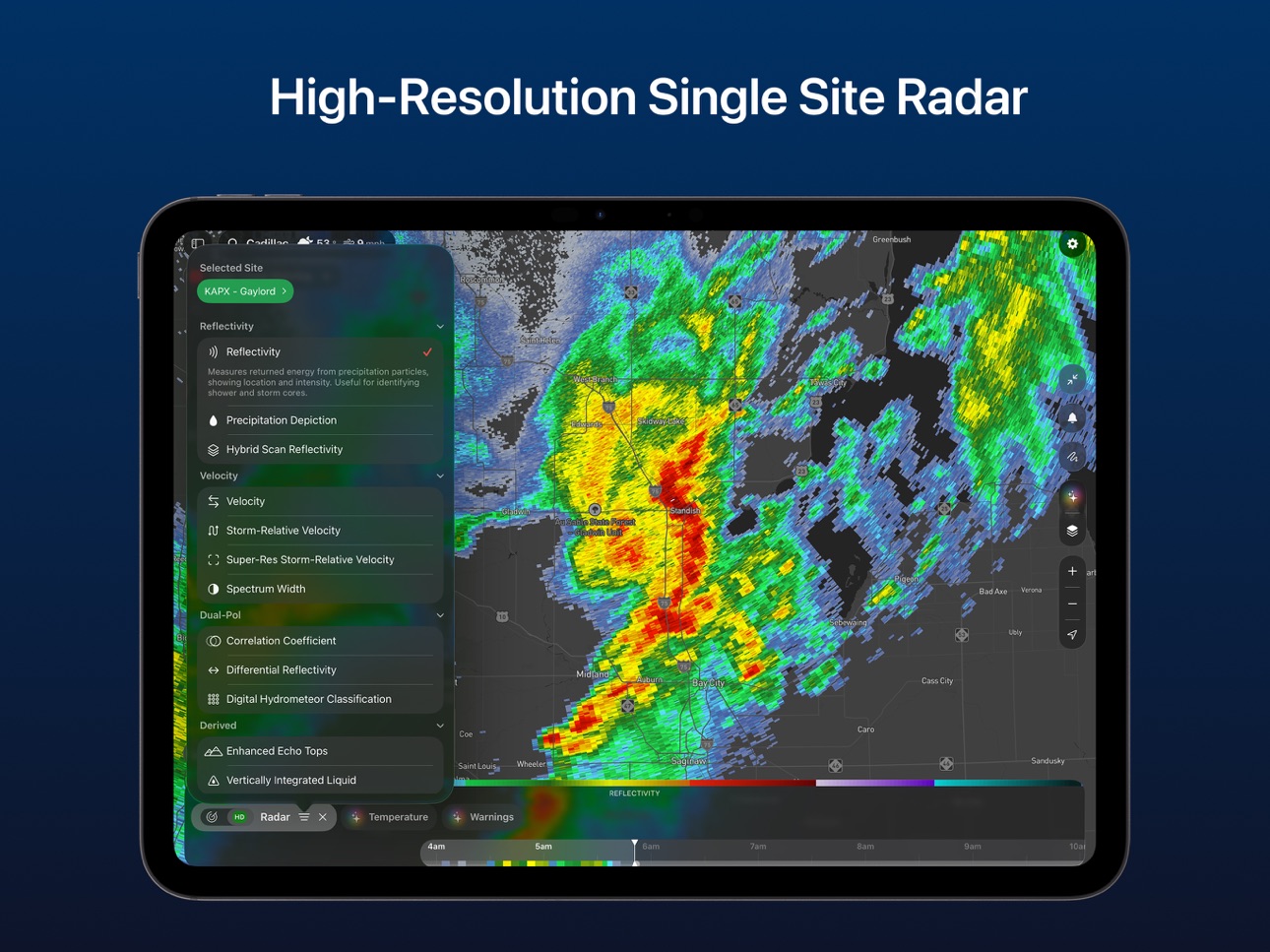
• Advanced high-resolution single site radar for crystal-clear storm visualization
• AI Weather Assistant™: Your personal meteorologist for real-time insights
• Smarter storm alerts: Rain alerts, NOAA severe weather warnings, and more
PLAN AHEAD WITH POWERFUL WEATHER INTELLIGENCE
• Visualize changing weather patterns and incoming wind and rain in vivid detail
• Know exactly when and where the storm will hit with 6 hours of global future radar, and up to 72 hours of future radar in US.
• Get real-time precipitation alerts before the rain begins
STAY SAFE WITH REAL-TIME STORM TRACKING
• Receive live local storm warnings, watches, and advisories
• Get lightning alerts for your location
• Customize map layers to track severe conditions like hurricanes, tropical storms, tornadoes, and cyclones
• Use Storm Tracks to understand storm motion and intensity with up to 30 advanced tracking features
SEE MORE WITH DETAILED WEATHER DATA
• Add overlays such as wind speed, temperature, and more to your weather radar
GO PREMIUM FOR FULL STORM & WEATHER POWER
Unlock the complete Storm Radar experience to level up your storm tracking experience, with
• High-res Single Site Radar
• Advanced map layers
• 72-Hour Future Radar
• Expanded access to the AI Weather Assistant
• Customizable weather widgets
If you choose to purchase the Premium version of Storm Radar, subscription payments will be charged to your App Store account at confirmation of your purchase.
• Storm subscription auto renews annually.
• Cancel anytime in Settings > AppleID at least 24 hours before your renewal date to avoid charges.
• Subscription payments will be charged to your account at confirmation of your purchase and upon commencement of each renewal term.
PRIVACY
• Our Privacy Policy can be viewed here: https://weather.com/en-US/twc/privacy-policy
• Our Terms of Use can be viewed here: http://www.weather.com/common/home/legal.html
FEEDBACK
• Your feedback is important to us! If you love our weather app, please rate and review us in the App Store.
• If you have any questions or suggestions, please email us at twcstormradar@weather.com
In-App Purchases US pricing
Premium Subscription
Storm Premium · 7 days$1.99
Storm Premium · Monthly$3.99
Storm Premium · Yearly 7-day free trial$19.99
Remove Ads · Monthly$0.99
Storm Premium + · Yearly 7-day free trial$29.99
Storm Premium + · Monthly$4.99
Capabilities
In-App Purchases
Accessibility
ipadiphonemacrealityDevicetvoswatch
Version history 25 versions
Build 887373902v4.0.172026-06-25 11:11:29
iPhone / iPad / Mac
- Cleaner UI: the side controls now tuck behind a single button — tap it to reveal layers, tools and more, and they stay open until you close them.
- Customise your widgets based on your interests: tap on the "3 lines" button and choose what activities matter to you and we'll set up the matching widgets automatically — then add, remove, and reorder them however you like.
- Redesigned location details page.
- New timeline Loop setting: added to layer settings (3-lines button in layer) and in Classic mode.
- New Wind Speed option in Settings: pick knots, meters per second, or your default, and it applies everywhere — forecasts, radar, and widgets.
- New Layout choice on iPhone: switch between Map & Widgets and a Widgets Only view from Settings or your interests setup.
- New temperature trend line across the top of the Hourly conditions, so you can read the day's rise and fall at a glance.
- New Tides widget: see the rise and fall of the tide across several days with every high and low marked, plus a moon overlay so you can read the tides against the lunar cycle.
- New Live Precipitation alerts: follow incoming rain from your Lock Screen and Dynamic Island, and tap to jump straight to your current location's forecast.
- New Nearby Lightning tile in Current Conditions widget, showing distance and time since the nearest strike.
Watch
- New Nearby Lightning complication, showing distance and time since the nearest strike.
Build 886082128v4.0.162026-06-07 17:44:48
iPhone / iPad / Mac
- Font sizes now adapt to your system Text Size setting across the entire app, including Home Screen widgets.
- Current Conditions can now collapse to show the first six tiles.
- Added a new Add button to the layers bar.
- Added the ability to dismiss recommended layers.
- Added a new Forecast Home Screen widget, with temperature, feels like, dew point, humidity, pressure, wind, cloud cover, and overlay toggles, just like in the app and on Apple Watch.
- Fixed incorrect day labels in the Daily widget.
- Fixed an issue where the map could needlessly recenter on your location after pan and zoom gestures.
- Fixed long location names being truncated in the summary section in Pro mode.
- Updated the FAQ section.
Apple Watch
- Added a new Next-Hour Precipitation complication, so you can see the next hour of rainfall right on your watch face.
- Fixed refresh issues.
- Added support for hybrid units.
Build 885757706v4.0.152026-05-22 16:34:06
- Introducing the Storm Radar Apple Watch app — pick any of your locations, scrub through the hourly forecast, and glance at conditions right from your wrist. Includes chart, three-step, and nowcast complications so the next few hours are always in view on your watch face.
- Classic mode improvements: timeline scrubber with weekday-aware hour labels and a clearer premium boundary, and a new daily/hourly selector in the chart header.
- Fixed a glitch where the map's location pulse could shine through the far side of the globe.
- Bug fixes and polish.
Build 885717161v4.0.142026-05-16 17:24:15
- Sun & Moon widget now shows remaining daylight at a glance during the day, and the current moon phase with days to the next full and new moon at night.
- Humidity added to the Forecast chart.
- Bug fixes.
Build 885522342v4.0.132026-05-15 06:43:45
- Improved and simplified forecast chart, now showing precipitation amount per hour, and options to hide chart components, like cloud cover, precipitation, precipitation chance and wind.
- Improved Sun & Moon widget, showing the rise and set path across multiple days.
- New widget suggestions — contextual tips appear on the map recommending widgets relevant to what you're looking at. Tap to jump straight to the widget, or dismiss one or all suggestions.
- New map tools — distance calculator and Picture in Picture, so you can keep an eye on the latest radar while using other apps. Available with your premium subscription.
- New Local Reports layer - tap any report pin on the map to see observed severe weather reports from NWS spotters, including event type, magnitude, location, and comments. Available with your premium subscription.
- New Personal Weather Stations layer - tap any PWS pin to see weather data directly from that station. Available with your premium subscription.
- Improved readability of weather symbols in light mode. (But dark is always better :-) )
- Numerous bug fixes.
Build 884310518v4.0.122026-04-21 16:08:55
- App is now available in 10 new languages: Spanish, Brazilian Portuguese, French, German, Dutch, Italian, Swedish, Polish, Portuguese, and Greek.
- New digital accumulation products are now available in for Single Site radar (US only).
- Improved weather data refresh reliability in all situations.
- Improved forecast chart with colorful weather icons and smoother daily curves.
- Improved Daily Conditions widget, now including hourly conditions.
- Very slow animation speed is now very slow indeed.
- New Gen Z weather assistant personality, no cap.
- Simplified email sign in / sign up flow.
- Fixed an issue where the weather-theme background would present incorrect colors.
- Fixed an issue where the forecast chart reset to start position, and would render values incorrectly in daily mode.
- Fixed an issue in Classic mode where the layer selection would reset on app open.
- Fixed an issue where the colors on the timeline would sometimes disappear.
- Fixed an issue where the widget layout view would self-dismiss.
- Fixed an issue where some settings would not sync properly, or would revert back to original value after being set.
- Fixed an issue with search results sometimes not returning nearby locations correctly.
Build 883994195v4.0.102026-04-03 11:41:40
- Home screen widgets!
- Map pins now autoscale as you zoom out, and are fully hidden when using full-screen map-only mode.
- Improved search reliability with more accurate results for points of interest.
- Added wind gusts as a selectable condition in the forecast chart.
- Fixed current location notifications not updating correctly after location changes.
- Fixed an issue where switching between notification alert types did not apply correctly.
- Fixed button colors on iOS 26 devices with the glass appearance.
- Fixed an incorrect expand indicator appearing on notifications that have no additional detail.
- Fixed the map pin not appearing for saved current location entries.
- Fixed the inspect view resize handle tap area on older iPad models.
- Fixed issue where the AI weather briefing would sometimes not refresh correctly after data updates.
Build 883895023v4.0.92026-03-31 23:11:16
- Home screen widgets!
- Map pins now autoscale as you zoom out, and are fully hidden when using full-screen map-only mode.
- Improved search reliability with more accurate results for points of interest.
- Added wind gusts as a selectable condition in the forecast chart.
- Fixed current location notifications not updating correctly after location changes.
- Fixed an issue where switching between notification alert types did not apply correctly.
- Fixed button colors on iOS 26 devices with the glass appearance.
- Fixed an incorrect expand indicator appearing on notifications that have no additional detail.
- Fixed the map pin not appearing for saved current location entries.
- Fixed the inspect view resize handle tap area on older iPad models.
- Fixed issue where the AI weather briefing would sometimes not refresh correctly after data updates.
Build 883593864v4.0.82026-03-24 16:14:41
- Wind speed and direction added to the Wind layer, and expanded conditions in the Conditions layer.
- Next-hour precipitation summary now appears in Summary View in Classic mode.
- New option to prevent a device from syncing preferences and locations to the cloud.
- Improved notification list interactions so taps no longer dismiss the view unexpectedly.
- Fixed storm and warning inspection in Classic mode, warning taps in Single Site, and Single Site Radar mode not being remembered on launch.
- Fixed the forecast chart briefly showing old data when inspecting a new location.
- Fixed search issues in Settings and in the Notifications list.
- Fixed iPad widget list issues while inspecting the map, including unexpected scrolling and forecast chart refreshes.
- Fixed cases where some weather views could show outdated data until tapped, including the top location selector and Daily Conditions widget.
Build 883387265v4.0.72026-03-16 13:29:05
- Improved reliability of weather refresh in Classic mode.
- Added precipitation chance curve to forecast chart.
- Added arrow for Pressure tile, indicating rising or falling trend.
- Fixed issue where custom loop on single site Radar mode would not respect the visual guides.
Build 883352897v4.0.62026-03-15 07:06:56
- Improved reliability of weather refresh in Classic mode.
- Added precipitation chance curve to forecast chart.
- Added arrow for Pressure tile, indicating rising or falling trend.
- Fixed issue where custom loop on single site Radar mode would not respect the visual guides.
Build 883258194v4.0.42026-03-13 00:17:28
- Introducing "Classic" mode, which offers a simpler yet familiar weather experience. Switch from Classic to Pro in Settings.
- Improved forecast chart now extends to 14 days, includes a Now marker, wind and wind gusts, and total precipitation for each rain or snow period.
- Long-press the timeline to set a custom repeat loop, then drag the handles to adjust it.
- Choose how long the map pauses at the end of each loop before restarting.
- Improved Rain and Snow layers: choose a time window to see how much rain or snow has fallen over the last 1, 6, 24, 48, or 72 hours.
- New mini-tutorials to help you find your way around the main controls on the home screen.
- New combined High / Low Temperature current conditions widget.
- Added a Significance filter to the Warnings layer (warnings, watches, statements, etc.) so you can focus on the most critical alerts. When Single Site radar is enabled, only urgent warnings are shown.
- Added search to the Notifications list.
- Smoother map animation on iPad, especially when zoomed out.
- Fixed issue where some map controls would appear unreadable (dark over dark).
- Fixed an issue where the Road Conditions layer could show unwanted colored borders.
- Stopped an inactive Single Site from being auto-selected when panning the map.
- Fixed an issue where some labels could disappear from the map.
- Fixed an issue where notifications added to a newly created location would not appear in the list.
- Fixed a popup overlapping the title in the Notifications list.
- Fixed an issue where Try It Once would not actually let you try the feature.
- Fixed an issue where detailed data for some storm cells failed to load.
Build 883321924v4.0.52026-03-13 17:12:54
- Fixed an issue where the keyboard would sometimes not appear when searching layers.
Build 882755987v4.0.32026-03-10 17:00:00
- Introducing "Classic" mode, which offers a simpler yet familiar weather experience. Switch from Classic to Pro in Settings.
- Improved forecast chart now extends to 14 days, includes a Now marker, wind and wind gusts, and total precipitation for each rain or snow period.
- Long-press the timeline to set a custom repeat loop, then drag the handles to adjust it.
- Choose how long the map pauses at the end of each loop before restarting.
- Improved Rain and Snow layers: choose a time window to see how much rain or snow has fallen over the last 1, 6, 24, 48, or 72 hours.
- New mini-tutorials to help you find your way around the main controls on the home screen.
- New combined High / Low Temperature current conditions widget.
- Added a Significance filter to the Warnings layer (warnings, watches, statements, etc.) so you can focus on the most critical alerts. When Single Site radar is enabled, only urgent warnings are shown.
- Added search to the Notifications list.
- Smoother map animation on iPad, especially when zoomed out.
- Fixed issue where some map controls would appear unreadable (dark over dark).
- Fixed an issue where the Road Conditions layer could show unwanted colored borders.
- Stopped an inactive Single Site from being auto-selected when panning the map.
- Fixed an issue where some labels could disappear from the map.
- Fixed an issue where notifications added to a newly created location would not appear in the list.
- Fixed a popup overlapping the title in the Notifications list.
- Fixed an issue where Try It Once would not actually let you try the feature.
Build 880562302v4.02026-02-13 12:36:24
Say hello to the new Storm Radar. We refreshed the app with a beautiful, immersive design and added smarter tools to help you track the weather like a pro.
• Improved radar and additional map layers like wind stream, road conditions, hail zones, earthquakes, and more.
• Advanced High-Resolution Single Site radar
• A new AI Weather Assistant™ is like having your own personal meteorologist in your pocket
• Calendar integration to help you plan ahead
• Smarter alerts for rain, snow and NOAA/severe weather warnings
• Customizable weather widgets
Same Storm Radar you trust, now more powerful than ever.
Build 878523661v3.322025-12-11 13:09:33
Thanks for using Storm Radar! This update includes bug fixes and performance improvements to keep the app running smoothly. We would love to hear your thoughts, so please email us at twcstormradar@weather.com with any feedback or questions.
Build 876807716v3.312025-09-25 16:10:45
Thanks for using Storm Radar! This update includes bug fixes and performance improvements to keep the app running smoothly. We would love to hear your thoughts, so please email us at twcstormradar@weather.com with any feedback or questions.
Build 875822610v3.302025-06-30 14:04:17
Thanks for using Storm Radar! This update includes bug fixes and performance improvements to keep the app running smoothly. We would love to hear your thoughts, so please email us at twcstormradar@weather.com with any feedback or questions.
Build 871676766v3.292025-03-11 13:12:15
Thanks for choosing Storm Radar! This release contains two new enhanced maps in our Premium Beta experience as well as several bug fixes and performance improvements.
New for Premium Subscribers (Beta):
- Select which government alerts you want to see on the map with our expanded filterable Watches and Warnings map.
- Discover how much precipitation or snow has occurred or is expected with our new enhanced Accumulations map. View up to 72 hours of observed and forecast data, with exact amounts displayed in an easy-to-read way on the map as you explore.
We’d love to hear your feedback! Please email us at twcstormradar@weather.com with any suggestions or questions.
Build 871075169v3.282024-12-16 19:07:05
Thanks for choosing Storm Radar! This release contains two new enhanced maps in our Premium Beta experience as well as several bug fixes and performance improvements.
New for Premium Subscribers (Beta):
- Select which government alerts you want to see on the map with our expanded filterable Watches and Warnings map.
- Discover how much precipitation or snow has occurred or is expected with our new enhanced Accumulations map. View up to 72 hours of observed and forecast data, with exact amounts displayed in an easy-to-read way on the map as you explore.
We’d love to hear your feedback! Please email us at twcstormradar@weather.com with any suggestions or questions.
Build 870275551v3.27.12024-11-25 15:01:40
Thanks for choosing Storm Radar! This release contains bug fixes and performance improvements to give you an even better experience.
New for Premium Subscribers (Beta):
- Maps Just Got Bigger and Better. We're leveling up our Storm Premium experience with enhanced maps, advanced tracking tools, and more ways to customize.
- Storm View. See the location of cells, where they're headed, and when they're expected to reach you.
We’d love to hear your feedback! Please email us at twcstormradar@weather.com with any suggestions or questions.
Build 869876923v3.272024-10-23 15:48:54
Thanks for choosing Storm Radar! This release contains bug fixes and performance improvements to give you an even better experience.
New for Premium Subscribers (Beta):
- Maps Just Got Bigger and Better. We're leveling up our Storm Premium experience with enhanced maps, advanced tracking tools, and more ways to customize.
- Storm View. See the location of cells, where they're headed, and when they're expected to reach you.
We’d love to hear your feedback! Please email us at twcstormradar@weather.com with any suggestions or questions.
Build 869654825v3.26.12024-10-17 13:48:07
Thanks for choosing Storm Radar! This release contains bug fixes and performance improvements to give you an even better experience.
New for Premium Subscribers (Beta):
- Maps Just Got Bigger and Better. We're leveling up our Storm Premium experience with enhanced maps, advanced tracking tools, and more ways to customize.
- Storm View. See the location of cells, where they're headed, and when they're expected to reach you.
We’d love to hear your feedback! Please email us at twcstormradar@weather.com with any suggestions or questions.
Build 869409931v3.262024-10-07 12:56:24
Thanks for choosing Storm Radar! This release contains bug fixes and performance improvements to give you an even better experience.
New for Premium Subscribers (Beta):
- Maps Just Got Bigger and Better. We're leveling up our Storm Premium experience with enhanced maps, advanced tracking tools, and more ways to customize.
- Storm View. See the location of cells, where they're headed, and when they're expected to reach you.
We’d love to hear your feedback! Please email us at twcstormradar@weather.com with any suggestions or questions.
Build 867524046v3.252024-07-18 14:16:25
Thanks for using Storm Radar! This release contains bug fixes and performance improvements. Please email us at twcstormradar@weather.com with any suggestions or questions.
Price history by region
Currency
Show
Columns
Search
Availability 1 of 1 storefronts
| Region | Language | Price | Ratings | Avg | Version |
|---|---|---|---|---|---|
| US | en-US | Free | 117.9k | 4.5 | 4.0.17 |
Change log 29 changes · US
✎
releaseNotes updated
iPhone / iPad / Mac
- Cleaner UI: the side controls now tuck behind a single button — tap it to reveal layers, tools and more, and they stay open until you clos
✎
description updated
Welcome to the NEW Storm Radar, the next generation of weather radar and storm tracking. We’ve re-imagined the app with smarter insights, powerful tools, and a
✎
subtitle updated
Winter Storm Radar & Alerts
✎
name updated
Storm Radar: Weather Tracker
◆
Version 4.0.17 released
iPhone / iPad / Mac
- Cleaner UI: the side controls now tuck behind a single button — tap it to reveal layers, tools and more, and they stay open until you close them.
- Customise your widgets based on your interests: tap on the "3 lines" b
◆
Version 4.0.16 released
iPhone / iPad / Mac
- Font sizes now adapt to your system Text Size setting across the entire app, including Home Screen widgets.
- Current Conditions can now collapse to show the first six tiles.
- Added a new Add button to the layers bar.
◆
Version 4.0.15 released
- Introducing the Storm Radar Apple Watch app — pick any of your locations, scrub through the hourly forecast, and glance at conditions right from your wrist. Includes chart, three-step, and nowcast complications so the next few hours are a
◆
Version 4.0.14 released
- Sun & Moon widget now shows remaining daylight at a glance during the day, and the current moon phase with days to the next full and new moon at night.
- Humidity added to the Forecast chart.
- Bug fixes.
◆
Version 4.0.13 released
- Improved and simplified forecast chart, now showing precipitation amount per hour, and options to hide chart components, like cloud cover, precipitation, precipitation chance and wind.
- Improved Sun & Moon widget, showing the rise and se
◆
Version 4.0.12 released
- App is now available in 10 new languages: Spanish, Brazilian Portuguese, French, German, Dutch, Italian, Swedish, Polish, Portuguese, and Greek.
- New digital accumulation products are now available in for Single Site radar (US only).
- I
◆
Version 4.0.10 released
- Home screen widgets!
- Map pins now autoscale as you zoom out, and are fully hidden when using full-screen map-only mode.
- Improved search reliability with more accurate results for points of interest.
- Added wind gusts as a selectable
◆
Version 4.0.9 released
- Home screen widgets!
- Map pins now autoscale as you zoom out, and are fully hidden when using full-screen map-only mode.
- Improved search reliability with more accurate results for points of interest.
- Added wind gusts as a selectable
◆
Version 4.0.8 released
- Wind speed and direction added to the Wind layer, and expanded conditions in the Conditions layer.
- Next-hour precipitation summary now appears in Summary View in Classic mode.
- New option to prevent a device from syncing preferences an
◆
Version 4.0.7 released
- Improved reliability of weather refresh in Classic mode.
- Added precipitation chance curve to forecast chart.
- Added arrow for Pressure tile, indicating rising or falling trend.
- Fixed issue where custom loop on single site Radar mode
◆
Version 4.0.6 released
- Improved reliability of weather refresh in Classic mode.
- Added precipitation chance curve to forecast chart.
- Added arrow for Pressure tile, indicating rising or falling trend.
- Fixed issue where custom loop on single site Radar mode
◆
Version 4.0.5 released
- Fixed an issue where the keyboard would sometimes not appear when searching layers.
◆
Version 4.0.4 released
- Introducing "Classic" mode, which offers a simpler yet familiar weather experience. Switch from Classic to Pro in Settings.
- Improved forecast chart now extends to 14 days, includes a Now marker, wind and wind gusts, and total precipitat
◆
Version 4.0.3 released
- Introducing "Classic" mode, which offers a simpler yet familiar weather experience. Switch from Classic to Pro in Settings.
- Improved forecast chart now extends to 14 days, includes a Now marker, wind and wind gusts, and total precipitat
◆
Version 4.0 released
Say hello to the new Storm Radar. We refreshed the app with a beautiful, immersive design and added smarter tools to help you track the weather like a pro.
• Improved radar and additional map layers like wind stream, road conditions, hail
◆
Version 3.32 released
Thanks for using Storm Radar! This update includes bug fixes and performance improvements to keep the app running smoothly. We would love to hear your thoughts, so please email us at twcstormradar@weather.com with any feedback or questions.
◆
Version 3.31 released
Thanks for using Storm Radar! This update includes bug fixes and performance improvements to keep the app running smoothly. We would love to hear your thoughts, so please email us at twcstormradar@weather.com with any feedback or questions.
◆
Version 3.30 released
Thanks for using Storm Radar! This update includes bug fixes and performance improvements to keep the app running smoothly. We would love to hear your thoughts, so please email us at twcstormradar@weather.com with any feedback or questions.
◆
Version 3.29 released
Thanks for choosing Storm Radar! This release contains two new enhanced maps in our Premium Beta experience as well as several bug fixes and performance improvements.
New for Premium Subscribers (Beta):
- Select which government alerts you
◆
Version 3.28 released
Thanks for choosing Storm Radar! This release contains two new enhanced maps in our Premium Beta experience as well as several bug fixes and performance improvements.
New for Premium Subscribers (Beta):
- Select which government alerts you
◆
Version 3.27.1 released
Thanks for choosing Storm Radar! This release contains bug fixes and performance improvements to give you an even better experience.
New for Premium Subscribers (Beta):
- Maps Just Got Bigger and Better. We're leveling up our Storm Premium
◆
Version 3.27 released
Thanks for choosing Storm Radar! This release contains bug fixes and performance improvements to give you an even better experience.
New for Premium Subscribers (Beta):
- Maps Just Got Bigger and Better. We're leveling up our Storm Premium
◆
Version 3.26.1 released
Thanks for choosing Storm Radar! This release contains bug fixes and performance improvements to give you an even better experience.
New for Premium Subscribers (Beta):
- Maps Just Got Bigger and Better. We're leveling up our Storm Premium
◆
Version 3.26 released
Thanks for choosing Storm Radar! This release contains bug fixes and performance improvements to give you an even better experience.
New for Premium Subscribers (Beta):
- Maps Just Got Bigger and Better. We're leveling up our Storm Premium
◆
Version 3.25 released
Thanks for using Storm Radar! This release contains bug fixes and performance improvements. Please email us at twcstormradar@weather.com with any suggestions or questions.