Home › Photo & Video

 US
US
1 of 1 storefronts
Content in en-US
Content in en-US
Information
Preview 3 platforms
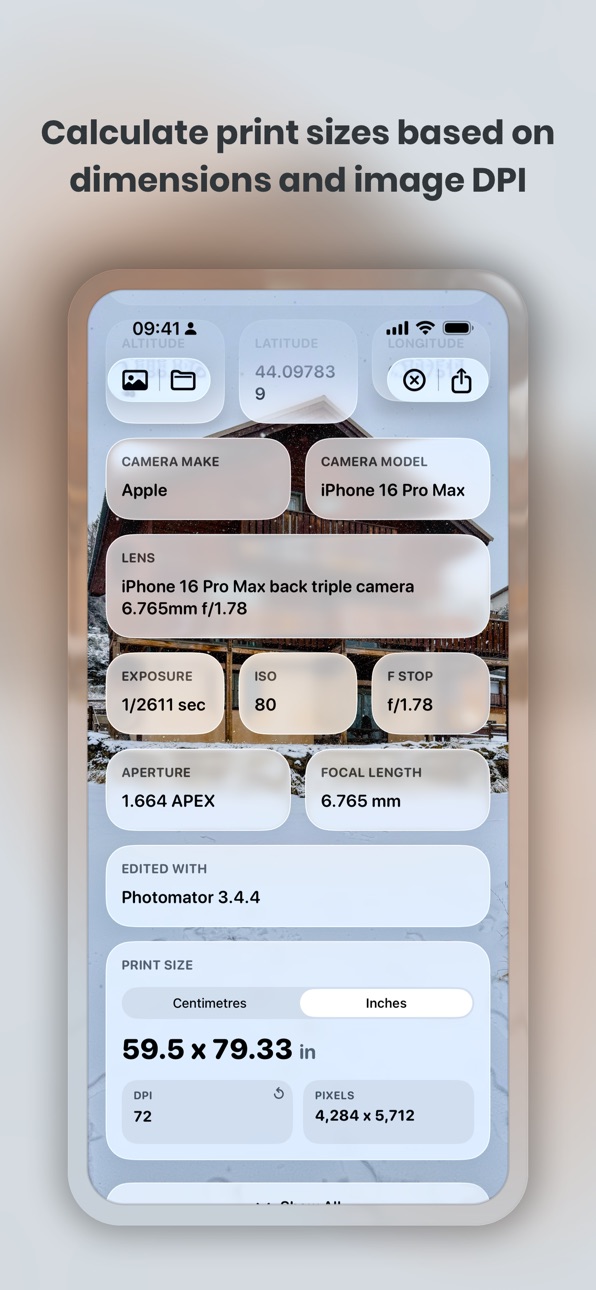
iPhone 6 images



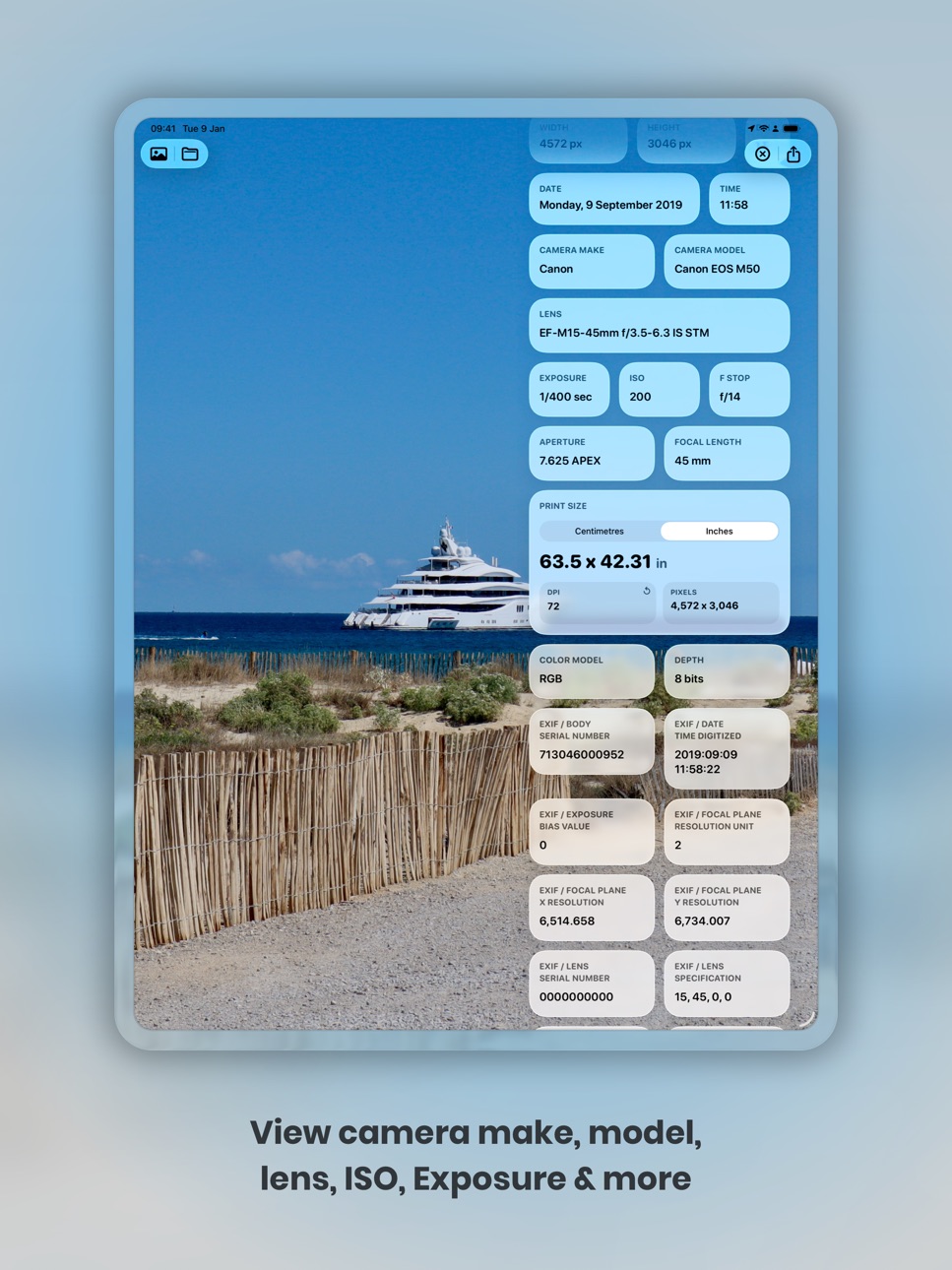
iPad 6 images




Apple Vision Pro 3 images


What’s New Version 2.0
This update includes a brand new design, with simplified and improved navigation, more data from each image and improved support for Liquid Glass.
Description
Metadata is the modern photo metadata viewer for photographers, creators and visual professionals.
Import an image from Photos or Files and instantly discover the hidden information behind your photos. Explore detailed EXIF data, camera settings, image dimensions, DPI, file size, lens details, location information and more — all displayed in a beautiful interface designed for creative workflows.
Whether you shoot on iPhone, DSLR, mirrorless cameras or create artwork in professional editing apps, Metadata helps you inspect, analyse and better understand your images.
Perfect for:
• Photographers
• Designers
• Content creators
• Social media professionals
• Digital artists
• Print studios
• Creative agencies
FEATURES
• View detailed photo metadata and EXIF information
• Inspect ISO, aperture, exposure, focal length and lens details
• See image dimensions, DPI, colour profile and file size
• View device and location information stored in photos
• Import images from Photos, Files and other apps
• Drag and Drop support for fast professional workflows
• Fast, elegant and modern design
• Optimised for creators and creative professionals
METADATA PRO
Unlock advanced creative tools with Metadata Pro:
• Extract text directly from photos using on-device text recognition
• Copy and share recognised text instantly
• Access advanced photography metadata and camera information
• Calculate print sizes with the built-in DPI calculator
• Check image dimensions for print and production workflows
From analysing exported artwork to checking professional camera settings before print, Metadata gives creators a powerful way to inspect and understand their images anywhere.
- Subscription Details -
Subscriptions will be charged to your iTunes account at confirmation of purchase. Your subscription will automatically renew unless automatic renewal is turned off at least 24 hours before the end of the current period. Your account will be charged for renewal within 24 hours prior to the end of the current period. You can manage your subscriptions and automatic renewal status in Account Settings after purchase. Price may vary by location.
Privacy Policy: https://smudge.app/privacy
Terms and Conditions: https://smudge.app/app-terms
In-App Purchases US pricing
Metadata Pro Subscription
Monthly · Monthly$0.99
Capabilities
In-App Purchases
Accessibility
ipadiphonemacrealityDevicetvoswatch
Version history 25 versions
Build 886096124v2.02026-05-26 07:44:57
This update includes a brand new design, with simplified and improved navigation, more data from each image and improved support for Liquid Glass.
Build 866663876v1.8.52024-06-13 12:20:04
• Minor bug fixes and stability improvements.
Build 859775575v1.8.42023-09-08 22:00:49
• Minor UI improvements.
• Bug fixes and stability improvements.
Build 849626269v1.8.32022-06-01 07:45:31
• Import a photo from your Photo Library or from Files using the quick actions by long pressing on the app icon on your Home Screen.
• Minor bug fixes and stability improvements.
Build 848322987v1.8.22022-04-14 06:36:13
• New app icon.
Build 848230106v1.8.12022-04-09 20:52:48
• Minor bug fixes.
Build 841934323v1.82022-02-22 14:29:38
Discover more data about your photos with the new Metadata Subscription.
• Automatically extract text from your photos and see it displayed as plain text that can be copied or shared directly from the app.
• View advanced photography data such as the Aperture, Exposure, ISO, Focal Length, Lens details and more.
• Calculate the print size of your image using the DPI calculator, which can automatically calculate the print size based on the chosen image, or allows you to edit the Size and DPI values.
Other updates
• Minor bug fixes when importing image on some devices.
• Stability improvements.
Build 840246633v1.7.12021-02-21 16:23:02
• Fixes bug with photo location coordinates.
• Minor background updates.
Build 838194408v1.6.22020-10-14 01:12:06
• Bug fixes.
• Improved support for iOS 14.
Build 835500878v1.6.12020-06-17 17:06:47
• New wider side bar UI while using the app at a larger size.
Build 834880342v1.62020-02-29 16:26:12
• New UI design for when using the app in landscape on iPad.
• Dark mode support.
• Support for multiple windows on iPadOS.
• Minor UI/UX improvements.
Build 830461394v1.5.62019-03-01 16:21:00
• Bug fixes and stability improvements.
Build 830444759v1.5.52019-02-28 13:49:45
• Fixes bug where location and camera data was not being shown for some photos when uploaded from Camera Roll.
Build 827251342v1.5.42018-05-22 23:47:38
• Minor UI fixes.
• Minor background updates.
• Stability improvements.
Build 824347990v1.5.32017-11-10 00:00:30
• Improved Support for iPhone X.
• Minor bug fixes and stability improvements.
- - - - - - - - - - -
Previous Update
Even more drag and drop!
• Import images by dragging and dropping them into Metadata.
• Export the images by dragging them back out of the app again.
• Export the data found about the image by dragging the data card from metadata and dropping it into your favourite note taking app.
Sharing
• Open in Marley - Tap on the Marley icon in the top right corner to open your image in the Marley App to analyse the image for text and automatically start reading it to you.*
• Share button allows you to send the image along with its metadata information by Email, iMessage or any of your other favourite communication services.
Also in this update
• Metadata now finds the weather conditions, temperature, sunrise and sunset time from when the photo was taken.*
• Improved support for HEIF Photos.
• Tap on the map in the location card to view the photo location full screen in Apple Maps.
• UI Improvements
* Requires the Marley app to be installed on your device and a valid subscription if you are outside of the free trial period.
** Weather powered by Dark Sky.
Build 823955148v1.5.22017-11-06 18:34:37
• Improved Support for iPhone X.
- - - - - - - - - - -
Previous Update
Even more drag and drop!
• Import images by dragging and dropping them into Metadata.
• Export the images by dragging them back out of the app again.
• Export the data found about the image by dragging the data card from metadata and dropping it into your favourite note taking app.
Sharing
• Open in Marley - Tap on the Marley icon in the top right corner to open your image in the Marley App to analyse the image for text and automatically start reading it to you.*
• Share button allows you to send the image along with its metadata information by Email, iMessage or any of your other favourite communication services.
Also in this update
• Metadata now finds the weather conditions, temperature, sunrise and sunset time from when the photo was taken.*
• Improved support for HEIF Photos.
• Tap on the map in the location card to view the photo location full screen in Apple Maps.
• UI Improvements
* Requires the Marley app to be installed on your device and a valid subscription if you are outside of the free trial period.
** Weather powered by Dark Sky.
Build 823935861v1.5.12017-10-07 21:27:52
• Bug fixes and stability improvements.
- - - - - - - - - - -
Previous Update
Even more drag and drop!
• Import images by dragging and dropping them into Metadata.
• Export the images by dragging them back out of the app again.
• Export the data found about the image by dragging the data card from metadata and dropping it into your favourite note taking app.
Sharing
• Open in Marley - Tap on the Marley icon in the top right corner to open your image in the Marley App to analyse the image for text and automatically start reading it to you.*
• Share button allows you to send the image along with its metadata information by Email, iMessage or any of your other favourite communication services.
Also in this update
• Metadata now finds the weather conditions, temperature, sunrise and sunset time from when the photo was taken.*
• Improved support for HEIF Photos.
• Tap on the map in the location card to view the photo location full screen in Apple Maps.
• UI Improvements
* Requires the Marley app to be installed on your device and a valid subscription if you are outside of the free trial period.
** Weather powered by Dark Sky.
Build 823757774v1.52017-10-05 22:47:44
Even more drag and drop!
• Import images by dragging and dropping them into Metadata.
• Export the images by dragging them back out of the app again.
• Export the data found about the image by dragging the data card from metadata and dropping it into your favourite note taking app.
Sharing
• Open in Marley - Tap on the Marley icon in the top right corner to open your image in the Marley App to analyse the image for text and automatically start reading it to you.*
• Share button allows you to send the image along with its metadata information by Email, iMessage or any of your other favourite communication services.
Also in this update
• Metadata now finds the weather conditions, temperature, sunrise and sunset time from when the photo was taken.*
• Improved support for HEIF Photos.
• Tap on the map in the location card to view the photo location full screen in Apple Maps.
• UI Improvements
* Requires the Marley app to be installed on your device and a valid subscription if you are outside of the free trial period.
** Weather powered by Dark Sky.
Build 823567532v1.42017-09-19 20:52:15
New for iOS 11!
• Support for Drag and Drop for importing images from Photos, Safari, Files and your favourite cloud storage services.
• Updated to Swift 4.
Build 822375287v1.32017-06-07 17:22:16
• New photos extension to view image metadata right inside the Photos app.
• New blur animation when choosing a new photo.
• Updated App Icon.
• Minor changes to the color themes.
• Minor UI changes.
• Improved UX.
Build 822252580v1.2.22017-05-23 21:16:51
• Minor background updates.
Build 822212491v1.2.12017-05-21 18:37:40
• Background updates to help improve the performance of the app.
Build 821861040v1.22017-04-23 19:20:33
• Landscape Support on iPad
• Split Screen support on iPad
• Background updates and improvements
Build 821720653v1.1.52017-04-12 20:49:43
• New review request for devices running iOS 10.3 and above.
Build 821546867v1.1.42017-03-30 21:05:06
• Bug fixes and stability improvements.
Price history by region
Currency
Show
Columns
Search
Availability 1 of 1 storefronts
| Region | Language | Price | Ratings | Avg | Version |
|---|---|---|---|---|---|
| US | en-US | Free | 222 | 4.0 | 2.0 |
Change log 29 changes · US
✎
releaseNotes updated
This update includes a brand new design, with simplified and improved navigation, more data from each image and improved support for Liquid Glass.
✎
description updated
Metadata is the modern photo metadata viewer for photographers, creators and visual professionals.
Import an image from Photos or Files and instantly discover
✎
subtitle updated
Photo EXIF Metadata Viewer
✎
name updated
Metadata
◆
Version 2.0 released
This update includes a brand new design, with simplified and improved navigation, more data from each image and improved support for Liquid Glass.
◆
Version 1.8.5 released
• Minor bug fixes and stability improvements.
◆
Version 1.8.4 released
• Minor UI improvements.
• Bug fixes and stability improvements.
◆
Version 1.8.3 released
• Import a photo from your Photo Library or from Files using the quick actions by long pressing on the app icon on your Home Screen.
• Minor bug fixes and stability improvements.
◆
Version 1.8.2 released
• New app icon.
◆
Version 1.8.1 released
• Minor bug fixes.
◆
Version 1.8 released
Discover more data about your photos with the new Metadata Subscription.
• Automatically extract text from your photos and see it displayed as plain text that can be copied or shared directly from the app.
• View advanced photography data s
◆
Version 1.7.1 released
• Fixes bug with photo location coordinates.
• Minor background updates.
◆
Version 1.6.2 released
• Bug fixes.
• Improved support for iOS 14.
◆
Version 1.6.1 released
• New wider side bar UI while using the app at a larger size.
◆
Version 1.6 released
• New UI design for when using the app in landscape on iPad.
• Dark mode support.
• Support for multiple windows on iPadOS.
• Minor UI/UX improvements.
◆
Version 1.5.6 released
• Bug fixes and stability improvements.
◆
Version 1.5.5 released
• Fixes bug where location and camera data was not being shown for some photos when uploaded from Camera Roll.
◆
Version 1.5.4 released
• Minor UI fixes.
• Minor background updates.
• Stability improvements.
◆
Version 1.5.3 released
• Improved Support for iPhone X.
• Minor bug fixes and stability improvements.
- - - - - - - - - - -
Previous Update
Even more drag and drop!
• Import images by dragging and dropping them into Metadata.
• Export the images by dragging the
◆
Version 1.5.2 released
• Improved Support for iPhone X.
- - - - - - - - - - -
Previous Update
Even more drag and drop!
• Import images by dragging and dropping them into Metadata.
• Export the images by dragging them back out of the app again.
• Export the data
◆
Version 1.5.1 released
• Bug fixes and stability improvements.
- - - - - - - - - - -
Previous Update
Even more drag and drop!
• Import images by dragging and dropping them into Metadata.
• Export the images by dragging them back out of the app again.
• Export t
◆
Version 1.5 released
Even more drag and drop!
• Import images by dragging and dropping them into Metadata.
• Export the images by dragging them back out of the app again.
• Export the data found about the image by dragging the data card from metadata and droppi
◆
Version 1.4 released
New for iOS 11!
• Support for Drag and Drop for importing images from Photos, Safari, Files and your favourite cloud storage services.
• Updated to Swift 4.
◆
Version 1.3 released
• New photos extension to view image metadata right inside the Photos app.
• New blur animation when choosing a new photo.
• Updated App Icon.
• Minor changes to the color themes.
• Minor UI changes.
• Improved UX.
◆
Version 1.2.2 released
• Minor background updates.
◆
Version 1.2.1 released
• Background updates to help improve the performance of the app.
◆
Version 1.2 released
• Landscape Support on iPad
• Split Screen support on iPad
• Background updates and improvements
◆
Version 1.1.5 released
• New review request for devices running iOS 10.3 and above.
◆
Version 1.1.4 released
• Bug fixes and stability improvements.