Home › Lifestyle

 US
US
USen-US CNzh-Hans-CN
 AUen-AU
 CAen-CA
 FRfr-FR
 BEen-GB
 CZen-GB
 DEde-DE
 ESes-ES
 GBen-GB
 JPja
JPja PLen-GB
 TWzh-Hant-TW
 AEen-GB
 AFen-GB
 ALen-GB
 AMen-GB
 ATde-DE
 AZen-GB
 BAen-GB
 BGen-GB
 BHen-GB
 BMen-GB
 BNen-GB
 BTen-GB
 BYen-GB
 CHde-CH
 CYen-GB
 DKen-GB
 EEen-GB
 EGen-GB
 FIen-GB
 FJen-GB
 FMen-GB
 GEen-GB
 GRen-GB
 HKzh-Hant-HK
 HRen-GB
 HUen-GB
 IDen-GB
 IEen-GB
 ILen-GB
 INen-GB
 ISen-GB
 ITit
ITit JOen-GB
 KGen-GB
 KHen-GB
 KRko
KRko KWen-GB
 KZen-GB
 LAen-GB
 LBen-GB
 LKen-GB
 LTen-GB
 LUen-GB
 LVen-GB
 MDen-GB
 MEen-GB
 MKen-GB
 MMen-GB
 MNen-GB
 MOzh-Hant-HK
 MRen-GB
 MTen-GB
 MVen-GB
 MYen-GB
 NLnl
NLnl NOen-GB
 NPen-GB
 NRen-GB
 NZen-AU
 OMen-GB
 PGen-GB
 PHen-GB
 PKen-GB
 PTpt-PT
 PWen-GB
 QAen-GB
 ROen-GB
 RSen-GB
 RUru
RUru SAen-GB
 SBen-GB
 SEsv
SEsv SGen-GB
 SIen-GB
 SKen-GB
 THen-GB
 TJen-GB
 TMen-GB
 TOen-GB
 TRen-GB
 UAen-GB
 UZen-GB
 VNen-GB
 VUen-GB
 XKen-GB
 YEen-GB
 ZAen-GB
100 of 100 storefronts
Content in en-US
Content in en-US
Information
Apple ID1214483482
Bundle IDcom.swaystairs.bnClock
SellerSeller
Min iOS13
Device familiesmac, iphone, ipad, ipod
Released2017-07-26
CopyrightCopyright © 2017-2026, Swaystairs Software. All rights reserved.
Privacy policyLink ↗
Preview 3 platforms
iPhone 10 images


iPad 10 images


Mac 7 images




What’s New Version 6.3.2
Fixed an issue that allowed the status bar to display while bnClock is running.
Description
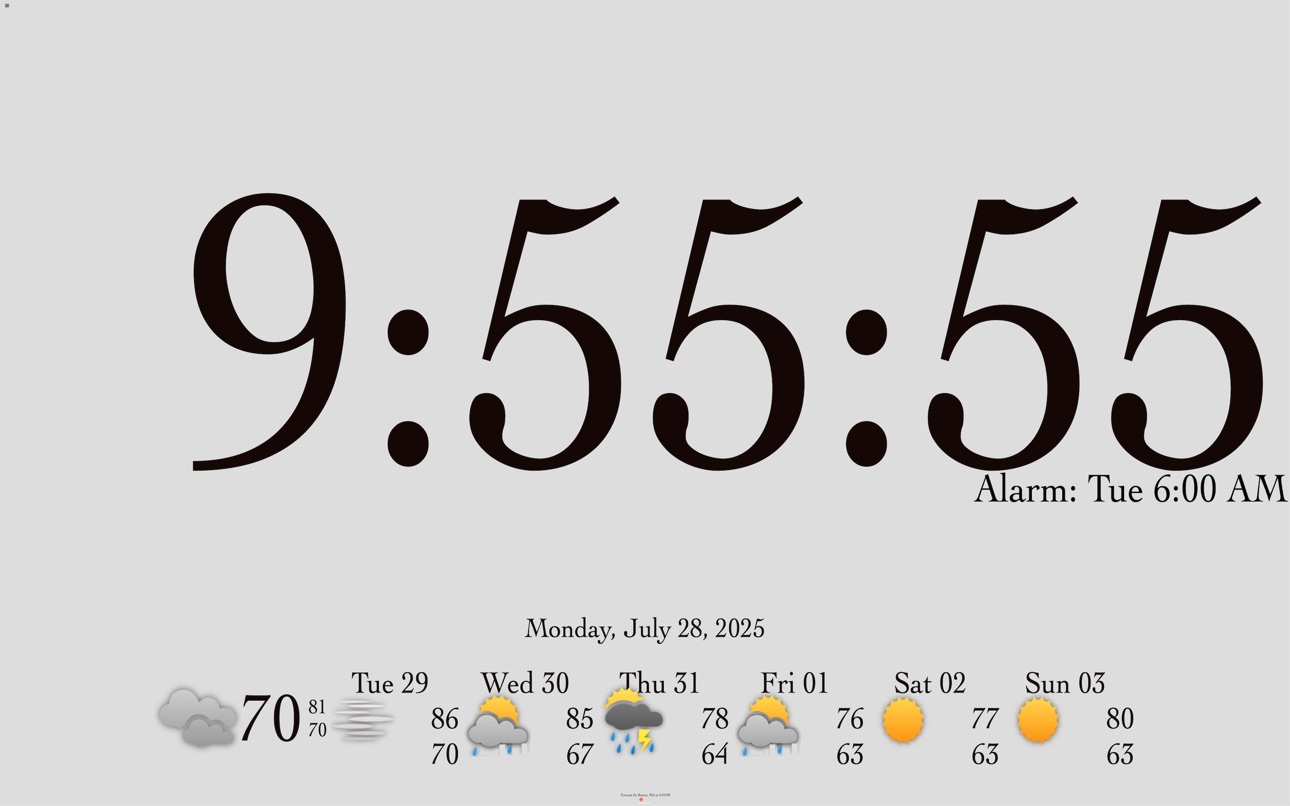
Do you ever have trouble reading the clock in the middle of the night? bnClock (big numbers clock) provides the largest numbers your iPhone or iPad will allow. Great to use as travel alarm clock. Also a great use for an old iPhone or iPad.
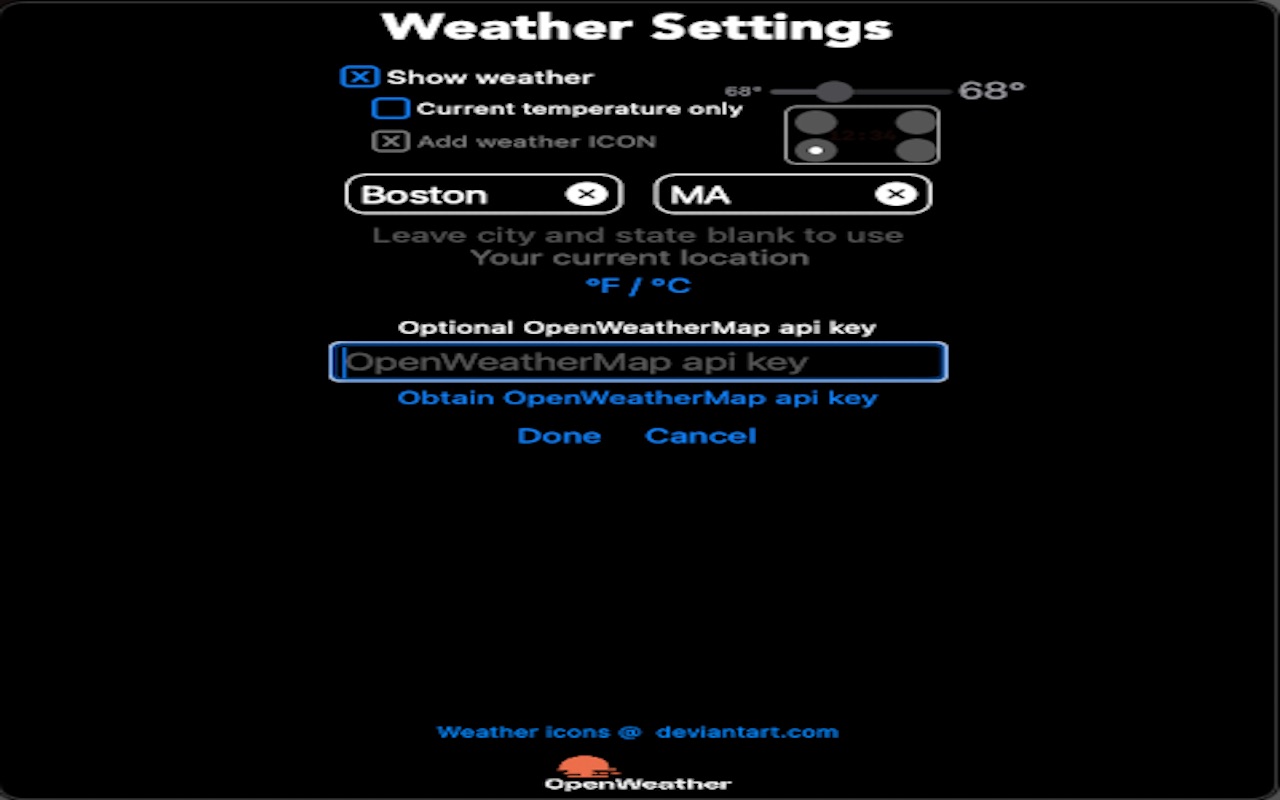
bnClock displays the current weather conditions and the forecast based on your current location. If you prefer, choose a particular location for the forecast. Or, turn off the weather display.
Choose a built-in alarm sound, or a song from your music library to use for the alarms.
Now with custom background colors, or, use a photograph or slide show as a background.
Accessibility
ipadiphonemacrealityDevicetvoswatch
Version history 25 versions
Build 885394426v6.3.22026-05-07 21:18:52
Fixed an issue that allowed the status bar to display while bnClock is running.
Build 885289142v6.3.12026-05-06 18:53:28
Some bugs removed
Build 883346607v6.32026-04-15 23:59:00
Thanks for using bnClock! In this version you can choose a font for the text based clock face.
Build 882548512v6.2.12026-03-12 23:44:08
Bug fixes
Build 882041614v6.22026-02-10 02:03:57
Improved compatibility with iOS 26 - background alarms now use Apple's alarm framework.
Build 877295785v6.1.12025-08-25 20:28:37
Fixes a bug causing clock background slide shows to change every 1/2 second or so.
Build 876487724v6.12025-07-28 23:00:04
Stability improvements and changes to improve behavior when run on Macs.
Build 871185187v6.0.12024-12-17 21:35:37
Bug fix for missing weather ICON
Build 870082979v6.02024-12-08 16:24:31
bnClock now uses the US National Weather Service (NWS) when possible (when the weather location is in the US and no OpenWeatherMap API key exists).
The latest observed weather is retrieved by bnClock from the NWS every 10 minutes. The forecast is retrieved every 3 hours.
Build 867740252v5.52024-07-25 16:48:13
The "temperature only" indicator can now be placed in any corner of the display and battery level indicator can now be displayed.
Build 866362327v5.42024-06-05 15:29:15
Couple of user requested feature additions:
- Current temperature only weather display can now be sized
- Swipe right or left to open Alarm settings can be disabled
and a bug fix or two
Build 865191226v5.32024-05-02 13:29:43
Improved alarms - A single alarms can now be scheduled for multiple days of the week (Monday, Wednesday, Friday for example)
Added the ability to hide the iOS "swipe to home screen" indicator
Fixed an issue on older versions of iOS that settings may not "stick"
Fixed an issue where the current temperature might display as -99° (-73°C).
Build 862368434v5.2.12024-02-17 01:10:50
Bug fixes and better compatibility with iOS 17.
Build 856699324v5.22023-05-23 16:35:48
Requested feature added: optional additional dimming for the weather ICONs
Bug fixes
Build 853796122v5.1.42023-01-20 23:35:56
Fixed some rarely occurring bugs - a layout issue and a crash when access had been previously denied to the photo library
Build 853183199v5.1.32022-11-18 00:02:22
This version resolves an issue preventing bnClock from running on some iOS 9.3.5 devices.
See "What's new" in About for more details of bug fixes.
Build 852395777v5.1.22022-10-18 20:08:18
OpenWeather is in the process of changing their services. This version works better with the old and new OpenWeather services.
Build 850984746v5.1.12022-07-28 19:12:22
Fixed a situation where the keyboard could cover the Done and Cancel buttons in the Weather Settings
Other minor usability improvements
Build 849526783v5.12022-06-15 20:54:14
Thanks for using bnClock. This version of bnClock adds the ability to vertically stacked digits on iPhones in portrait orientation for larger digits. Just enable the new "Allow stacked digits" option in Appearance settings.
Build 848718679v5.0.12022-05-10 20:06:38
Fixes a bug where the temperature forecast was unreadable. Also fixed a couple of other small display issues.
Build 844872862v5.02021-12-01 13:02:41
Now create a custom background color for your clock, or use a photo (or a slide show) as a background.
There's also a new option to show only the current temperature instead of the full weather forecast.
Build 843673645v4.32021-08-26 15:03:54
Custom clock face colors and the optional OpenWeatherMap api key are now shared across all of your devices via iCloud.
Four built-in alarm sounds were added.
A couple of minor bugs were fixed too.
Build 843058458v4.22021-07-21 15:31:39
Now create your own clock face colors!
Build 842725308v4..12021-07-01 18:24:11
The Weather is back!
Build 842606036v4.0.32021-06-11 10:14:35
Weather display is temporarily disabled because Yahoo! has discontinued their free weather service.
No pricing data captured yet — comparisons appear once the app has paid storefronts or in-app purchases.
Availability 100 of 100 storefronts
| Region | Language | Price | Ratings | Avg | Version |
|---|---|---|---|---|---|
| US | en-US | Free | 34 | 4.0 | 6.3.2 |
| CN | zh-Hans-CN | Free | 3 | 4.3 | 6.3.2 |
| AU | en-AU | Free | 2 | 3.5 | 6.3.2 |
| CA | en-CA | Free | 2 | 5.0 | 6.3.2 |
| FR | fr-FR | Free | 2 | 5.0 | 6.3.2 |
| BE | en-GB | Free | 1 | 5.0 | 6.3.2 |
| CZ | en-GB | Free | 1 | 5.0 | 6.3.2 |
| DE | de-DE | Free | 1 | 5.0 | 6.3.2 |
| ES | es-ES | Free | 1 | 5.0 | 6.3.2 |
| GB | en-GB | Free | 1 | 4.0 | 6.3.2 |
| JP | ja | Free | 1 | 5.0 | 6.3.2 |
| PL | en-GB | Free | 1 | 5.0 | 6.3.2 |
| TW | zh-Hant-TW | Free | 1 | 5.0 | 6.3.2 |
| AE | en-GB | Free | 0 | — | 6.3.2 |
| AF | en-GB | Free | 0 | — | 6.3.2 |
| AL | en-GB | Free | 0 | — | 6.3.2 |
| AM | en-GB | Free | 0 | — | 6.3.2 |
| AT | de-DE | Free | 0 | — | 6.3.2 |
| AZ | en-GB | Free | 0 | — | 6.3.2 |
| BA | en-GB | Free | 0 | — | 6.3.2 |
| BG | en-GB | Free | 0 | — | 6.3.2 |
| BH | en-GB | Free | 0 | — | 6.3.2 |
| BM | en-GB | Free | 0 | — | 6.3.2 |
| BN | en-GB | Free | 0 | — | 6.3.2 |
| BT | en-GB | Free | 0 | — | 6.3.2 |
| BY | en-GB | Free | 0 | — | 6.3.2 |
| CH | de-CH | Free | 0 | — | 6.3.2 |
| CY | en-GB | Free | 0 | — | 6.3.2 |
| DK | en-GB | Free | 0 | — | 6.3.2 |
| EE | en-GB | Free | 0 | — | 6.3.2 |
| EG | en-GB | Free | 0 | — | 6.3.2 |
| FI | en-GB | Free | 0 | — | 6.3.2 |
| FJ | en-GB | Free | 0 | — | 6.3.2 |
| FM | en-GB | Free | 0 | — | 6.3.2 |
| GE | en-GB | Free | 0 | — | 6.3.2 |
| GR | en-GB | Free | 0 | — | 6.3.2 |
| HK | zh-Hant-HK | Free | 0 | — | 6.3.2 |
| HR | en-GB | Free | 0 | — | 6.3.2 |
| HU | en-GB | Free | 0 | — | 6.3.2 |
| ID | en-GB | Free | 0 | — | 6.3.2 |
| IE | en-GB | Free | 0 | — | 6.3.2 |
| IL | en-GB | Free | 0 | — | 6.3.2 |
| IN | en-GB | Free | 0 | — | 6.3.2 |
| IS | en-GB | Free | 0 | — | 6.3.2 |
| IT | it | Free | 0 | — | 6.3.2 |
| JO | en-GB | Free | 0 | — | 6.3.2 |
| KG | en-GB | Free | 0 | — | 6.3.2 |
| KH | en-GB | Free | 0 | — | 6.3.2 |
| KR | ko | Free | 0 | — | 6.3.2 |
| KW | en-GB | Free | 0 | — | 6.3.2 |
| KZ | en-GB | Free | 0 | — | 6.3.2 |
| LA | en-GB | Free | 0 | — | 6.3.2 |
| LB | en-GB | Free | 0 | — | 6.3.2 |
| LK | en-GB | Free | 0 | — | 6.3.2 |
| LT | en-GB | Free | 0 | — | 6.3.2 |
| LU | en-GB | Free | 0 | — | 6.3.2 |
| LV | en-GB | Free | 0 | — | 6.3.2 |
| MD | en-GB | Free | 0 | — | 6.3.2 |
| ME | en-GB | Free | 0 | — | 6.3.2 |
| MK | en-GB | Free | 0 | — | 6.3.2 |
| MM | en-GB | Free | 0 | — | 6.3.2 |
| MN | en-GB | Free | 0 | — | 6.3.2 |
| MO | zh-Hant-HK | Free | 0 | — | 6.3.2 |
| MR | en-GB | Free | 0 | — | 6.3.2 |
| MT | en-GB | Free | 0 | — | 6.3.2 |
| MV | en-GB | Free | 0 | — | 6.3.2 |
| MY | en-GB | Free | 0 | — | 6.3.2 |
| NL | nl | Free | 0 | — | 6.3.2 |
| NO | en-GB | Free | 0 | — | 6.3.2 |
| NP | en-GB | Free | 0 | — | 6.3.2 |
| NR | en-GB | Free | 0 | — | 6.3.2 |
| NZ | en-AU | Free | 0 | — | 6.3.2 |
| OM | en-GB | Free | 0 | — | 6.3.2 |
| PG | en-GB | Free | 0 | — | 6.3.2 |
| PH | en-GB | Free | 0 | — | 6.3.2 |
| PK | en-GB | Free | 0 | — | 6.3.2 |
| PT | pt-PT | Free | 0 | — | 6.3.2 |
| PW | en-GB | Free | 0 | — | 6.3.2 |
| QA | en-GB | Free | 0 | — | 6.3.2 |
| RO | en-GB | Free | 0 | — | 6.3.2 |
| RS | en-GB | Free | 0 | — | 6.3.2 |
| RU | ru | Free | 0 | — | 6.3.2 |
| SA | en-GB | Free | 0 | — | 6.3.2 |
| SB | en-GB | Free | 0 | — | 6.3.2 |
| SE | sv | Free | 0 | — | 6.3.2 |
| SG | en-GB | Free | 0 | — | 6.3.2 |
| SI | en-GB | Free | 0 | — | 6.3.2 |
| SK | en-GB | Free | 0 | — | 6.3.2 |
| TH | en-GB | Free | 0 | — | 6.3.2 |
| TJ | en-GB | Free | 0 | — | 6.3.2 |
| TM | en-GB | Free | 0 | — | 6.3.2 |
| TO | en-GB | Free | 0 | — | 6.3.2 |
| TR | en-GB | Free | 0 | — | 6.3.2 |
| UA | en-GB | Free | 0 | — | 6.3.2 |
| UZ | en-GB | Free | 0 | — | 6.3.2 |
| VN | en-GB | Free | 0 | — | 6.3.2 |
| VU | en-GB | Free | 0 | — | 6.3.2 |
| XK | en-GB | Free | 0 | — | 6.3.2 |
| YE | en-GB | Free | 0 | — | 6.3.2 |
| ZA | en-GB | Free | 0 | — | 6.3.2 |
Change log 29 changes · US
✎
releaseNotes updated
Fixed an issue that allowed the status bar to display while bnClock is running.
✎
description updated
Do you ever have trouble reading the clock in the middle of the night? bnClock (big numbers clock) provides the largest numbers your iPhone or iPad will allow.
✎
subtitle updated
big numbers Clock with alarm
✎
name updated
bnClock
◆
Version 6.3.2 released
Fixed an issue that allowed the status bar to display while bnClock is running.
◆
Version 6.3.1 released
Some bugs removed
◆
Version 6.3 released
Thanks for using bnClock! In this version you can choose a font for the text based clock face.
◆
Version 6.2.1 released
Bug fixes
◆
Version 6.2 released
Improved compatibility with iOS 26 - background alarms now use Apple's alarm framework.
◆
Version 6.1.1 released
Fixes a bug causing clock background slide shows to change every 1/2 second or so.
◆
Version 6.1 released
Stability improvements and changes to improve behavior when run on Macs.
◆
Version 6.0.1 released
Bug fix for missing weather ICON
◆
Version 6.0 released
bnClock now uses the US National Weather Service (NWS) when possible (when the weather location is in the US and no OpenWeatherMap API key exists).
The latest observed weather is retrieved by bnClock from the NWS every 10 minutes. The forec
◆
Version 5.5 released
The "temperature only" indicator can now be placed in any corner of the display and battery level indicator can now be displayed.
◆
Version 5.4 released
Couple of user requested feature additions:
- Current temperature only weather display can now be sized
- Swipe right or left to open Alarm settings can be disabled
and a bug fix or two
◆
Version 5.3 released
Improved alarms - A single alarms can now be scheduled for multiple days of the week (Monday, Wednesday, Friday for example)
Added the ability to hide the iOS "swipe to home screen" indicator
Fixed an issue on older versions of iOS that set
◆
Version 5.2.1 released
Bug fixes and better compatibility with iOS 17.
◆
Version 5.2 released
Requested feature added: optional additional dimming for the weather ICONs
Bug fixes
◆
Version 5.1.4 released
Fixed some rarely occurring bugs - a layout issue and a crash when access had been previously denied to the photo library
◆
Version 5.1.3 released
This version resolves an issue preventing bnClock from running on some iOS 9.3.5 devices.
See "What's new" in About for more details of bug fixes.
◆
Version 5.1.2 released
OpenWeather is in the process of changing their services. This version works better with the old and new OpenWeather services.
◆
Version 5.1.1 released
Fixed a situation where the keyboard could cover the Done and Cancel buttons in the Weather Settings
Other minor usability improvements
◆
Version 5.1 released
Thanks for using bnClock. This version of bnClock adds the ability to vertically stacked digits on iPhones in portrait orientation for larger digits. Just enable the new "Allow stacked digits" option in Appearance settings.
◆
Version 5.0.1 released
Fixes a bug where the temperature forecast was unreadable. Also fixed a couple of other small display issues.
◆
Version 5.0 released
Now create a custom background color for your clock, or use a photo (or a slide show) as a background.
There's also a new option to show only the current temperature instead of the full weather forecast.
◆
Version 4.3 released
Custom clock face colors and the optional OpenWeatherMap api key are now shared across all of your devices via iCloud.
Four built-in alarm sounds were added.
A couple of minor bugs were fixed too.
◆
Version 4.2 released
Now create your own clock face colors!
◆
Version 4..1 released
The Weather is back!
◆
Version 4.0.3 released
Weather display is temporarily disabled because Yahoo! has discontinued their free weather service.