Home › Utilities

 US
US
1 of 1 storefronts
Content in en-US
Content in en-US
Information
Preview 1 platform
iPhone 9 images




What’s New Version 4.8.1
v4.8.1 Update
[Fix] Batch export loading not dismissing
Fixed an issue where the loading indicator remained after batch export completed. It now closes correctly when export finishes.
[Improved] Real-time subscription pricing
Subscription prices are now fetched live from the App Store when you tap subscribe, no longer using cached values.
[New] Monthly subscription
Added a monthly subscription option. Quarterly subscription is no longer available for new users (existing subscribers are unaffected).
Thanks for using iFrame! Feel free to share feedback within the app.
Description
「iFrame: Frame screenshots & videos」
iFrame has been recommended by sspai, AppSo, and so on.
「Screenshots Frame」Bring your screenshot a device frame.
1. Device frames with all sizes and colors.
2. Various background styles.
3. Add your text for it, and remove notch.
「Screen Recordings Frame」Add device frames to your screen recordings.
1. Select a video just like selecting a screenshot.
2. Preview with frame before export.
3. Export with or without original audio.
「Rich Tools」
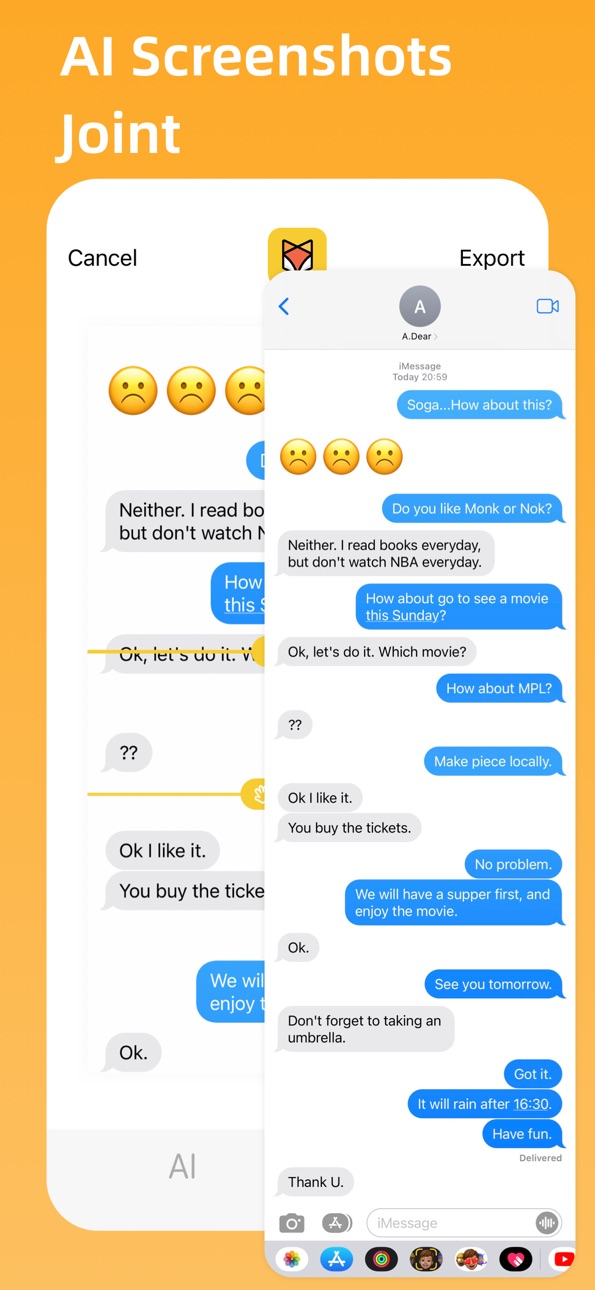
- AI Long Picture: Joint your screenshots by AI to create complete chat history, manually adjust the edge if needed.
- App Poster: Creat nice posters for sharing your App, customize styles, backgrounds, text, etc.
- Join Caption: Captions of movies combined into a picture, adjust the height and export easily.
Let's make iFrame better.
You could send feedbacks inside iFrame, and thank you~
---
「About iFrame Pro」
With subscription, you will be iFrame Pro Member, enjoying more Member-Only features.
Payment: Upon confirmation of purchase and payment, the benefits will be credited to your iTunes account and will be automatically renewed through your iTunes account.
Renewal/Automatic renewal: Apple'S iTunes account will deduct a fee within 24 hours before the expiration date, and the subscription cycle will be extended one more time after the deduction is successful.
Cancel renewal: To cancel your subscription, manually turn off the automatic renewal feature in the iTunes/ApplelD Settings management 24 hours before the current subscription cycle expires.
「Policy」
Privacy Policy: https://www.privacypolicies.com/live/b65b1bb1-ee71-418e-9c25-3bfc6100117c
Terms of Use: https://www.apple.com/legal/internet-services/itunes/dev/stdeula/
In-App Purchases US pricing
iFrame Pro Subscription
Quarterly · 3 months$2.99
Annually · Yearly$5.99
Monthly · Monthly$1.99
Capabilities
In-App Purchases
Accessibility
ipadiphonemacrealityDevicetvoswatch
Version history 25 versions
Build 887865005v4.8.12026-07-07 03:43:31
v4.8.1 Update
[Fix] Batch export loading not dismissing
Fixed an issue where the loading indicator remained after batch export completed. It now closes correctly when export finishes.
[Improved] Real-time subscription pricing
Subscription prices are now fetched live from the App Store when you tap subscribe, no longer using cached values.
[New] Monthly subscription
Added a monthly subscription option. Quarterly subscription is no longer available for new users (existing subscribers are unaffected).
Thanks for using iFrame! Feel free to share feedback within the app.
Build 887527845v4.8.02026-06-30 17:39:43
v4.8.0 Update
[NEW] iPhone 17 Series & iPhone Air Support
Added device frames for iPhone 17, iPhone 17 Pro Max, and iPhone Air. Frame your new device screenshots right away!
[Improvements & Fixes]
- Refined color options for iPhone 17 Pro Max
- Improved device selection experience
Thanks for using iFrame! Feel free to share feedback within the app.
Build 885877919v4.7.02026-05-21 14:56:17
v4.7.0 Update
[NEW] Batch Export
Select multiple screenshots at once, apply device frames, and batch export them to your photo library. Double your efficiency!
[Improvements & Fixes]
- Photo picker now supports multi-select with a thumbnail strip for quick switching
- Fixed loading indicator not dismissing after batch export
- Fixed thumbnail strip remaining after selecting a single photo
Thanks for using iFrame! Feel free to share feedback within the app.
Build 883273565v4.6.52026-03-14 20:38:21
「What's New」
- Screen recordings now support device frames.
- Added iPhone 17 series and Air case support.
- Fixed some issues.
Build 882916578v4.6.02026-03-04 01:23:06
「What's New」
- Screen recordings now support device frames
- Fixed some issues.
Build 878105765v4.5.02025-09-16 18:22:01
「What's New」
- Fixed some issues.
Build 865076707v4.4.02025-05-23 18:28:37
「What's New」
- Support iPhone16 series.
- Screenshots Frame as the first page, other features can be found in Tools.
Build 863844192v4.3.02024-02-19 10:13:30
「What's New」
Fix some user experience issues.
Build 862920490v4.2.02024-01-20 15:18:00
「What's New」
New device frames support for 14/15 series (Subscription required for use).
Build 847781208v4.1.02022-03-18 17:36:51
「What's New」
We have done some optimizations, which will make it easier to use.
Build 846494632v4.0.02022-01-09 15:50:21
「What's New」
1. You can manually adjust the edge if the AI Joint works not perfectly.
2. Adjust the caption height with any values.
3. Add switch of "Tip to remove originals after export".
4. Add switch of "Detect recent screenshots after launch".
Build 845895340v3.7.12021-12-15 04:31:02
「What's New」
Waiting for a long time, we have supported the newest devices!
Build 845604629v3.7.02021-11-30 21:04:18
「What's New」
Waiting for a long time, we have supported the newest devices!
Build 843755190v3.6.02021-08-24 19:08:45
「What's New」
1. You can quickly delete original pictures after processing, such as adding frame for a screenshot.
2. Other small but nice optimizations.
Build 839489645v3.5.02020-12-08 08:03:09
「What Update」
1. Add 12 Series devices support.
2. Provide a recommend when adding device frame.
Build 836747024v3.4.02020-07-09 16:36:01
「What Update」
1. Function of App Poster.
2. More Url Scheme support.
2. Remove animation on launch, quicker to use.
Build 834825580v3.3.02020-02-22 23:52:08
「What Update」
1. More Url Scheme support.
2. Some more detail optimizations.
「Late Update」
1. Remove APP recommendations on the Home.
2. Full dark mode support.
3. Support Url Scheme.
4. Remove image watermark.
5. Separate Screenshots Joint and Caption Joint.
6. Localization for Traditional Chinese, English, and Japanese.
Build 833444534v3.2.02019-11-03 22:03:18
「iFrame 3.0 is HERE (-^O^-)」
「What Update」
1. Remove APP recommendations on the Home.
2. Full dark mode support.
3. Support Url Scheme.
4. Remove image watermark.
5. Separate Screenshots Joint and Caption Joint.
6. Localization for Traditional Chinese, English, and Japanese.
7. Some more detail optimizations.
「Late Updata」
1. Brand new 3.0 UI and logo.
2. Interaction optimizations on Screenshots Frame.
3. New function Long Picture Joint.
4. New function Joint horizontally and vertically.
5. New function Caption Joint.
Build 832941298v3.1.02019-09-27 16:27:20
「iFrame 3.0 来了 (-^O^-)」
「本期更新」
1. 适配iOS13和深色模式
2. 修复导出图片圆角的问题
「近期更新」
1. 全新3.0改版设计
2. 全机型带壳截屏
3. 长图智能拼接
4. 电影字幕拼接
iFrame 还在成长,一起完善她吧。发现问题,或者您有不错的建议,您可以在应用内反馈给我们哦,感恩~
Build 832693255v3.0.02019-09-09 21:17:16
「iFrame 3.0 来了 (-^O^-)」
iFrame 2.x 版本提供了“带壳截屏”功能,丰富的自定义功能被大家所喜爱,也得到了少数派、AppSo 等网站的推荐。
现在推出了全新的 3.0 版本,保留了原有的“带壳截屏”,开拓了“长图拼接”的新玩意儿。
「3.0 特色介绍」
∙ 全机型带壳截屏支持
- 各种屏幕尺寸外壳都有
- 能想到的各种背景样式
- 支持添加介绍文案
∙ 智能长图拼接
- 智能算法拼接截图
- 聊天记录分享神器
∙ 多种长图拼接玩法
- 纵向拼接成漫画样式
- 横向拼接制作橱窗
- 视频截图字幕拼接
iFrame 还在成长,一起完善她吧。发现问题,或者您有不错的建议,您可以在应用内反馈给我们哦,感恩~
Build 831393844v2.9.12019-05-22 16:39:34
「少数派、AppSo、威锋网等网站推荐」
「本次更新」
1. 优化了各机型的刘海
2. 优化设备颜色选择的交互
3. 图片选择、颜色选择功能优化
4. 修复部分稳定性问题
「近期更新」
1. 全机型支持
2. 支持“移除全面屏刘海”
3. 背景支持渐变色、纯色、透明
4. 文字颜色支持
「产品特色」
1. 全机型支持
2. 超高的图片清晰度
3. 毛玻璃背景,更沉浸
4. 聚焦截屏分享
「目前支持功能」
1. 用截屏图片生成精致的带壳截屏图片
2. 自动识别设备,可手动切换设备类型、颜色
3. 切换背景颜色主色调
4. 生成类似 AppStore 预览图风格的带壳截屏图片
Build 831363420v2.9.02019-05-20 16:05:50
「少数派、AppSo、威锋网等网站推荐」
「本次更新」
1. 优化了各机型的刘海
2. 优化设备颜色选择的交互
3. 图片选择、颜色选择功能优化
4. 修复部分稳定性问题
「近期更新」
1. 全机型支持
2. 支持“移除全面屏刘海”
3. 背景支持渐变色、纯色、透明
4. 文字颜色支持
「产品特色」
1. 全机型支持
2. 超高的图片清晰度
3. 毛玻璃背景,更沉浸
4. 聚焦截屏分享
「目前支持功能」
1. 用截屏图片生成精致的带壳截屏图片
2. 自动识别设备,可手动切换设备类型、颜色
3. 切换背景颜色主色调
4. 生成类似 AppStore 预览图风格的带壳截屏图片
Build 830672832v2.8.02019-03-20 16:54:36
「少数派、AppSo、威锋网等网站推荐」
「全新的 2.0 版本」
重新设计和开发的 2.0 版本,精简了原有 iFrame 1.0 中的部分功能,更聚焦做纯粹、易用的带壳截屏工具,创建精致的截屏图片。
「本次更新」
1. 支持“移除全面屏刘海”
2. 部分弹框体验优化
3. 修改默认图片
4. 解决了几个稳定性问题
「近期更新」
1. 背景新增自定义渐变色、自定义纯色
2. 背景新增“透明背景”选项
3. 文字颜色支持自定义
4. 增加了新设备的支持,全机型支持
5. 设备外壳、文字样式的调整,更精美
6. 图标更新,感官更柔和
7. 修复了部分稳定性、性能问题
「产品特色」
1. 全机型支持
2. 超高的图片清晰度
3. 毛玻璃背景,更沉浸
4. 聚焦截屏分享
「目前支持功能」
1. 用截屏图片生成精致的带壳截屏图片
2. 自动识别设备,可手动切换设备类型、颜色
3. 切换背景颜色主色调
4. 生成类似 AppStore 预览图风格的带壳截屏图片
Build 830619124v2.7.02019-03-17 23:33:35
「少数派、AppSo、威锋网等网站推荐」
「全新的 2.0 版本」
重新设计和开发的 2.0 版本,精简了原有 iFrame 1.0 中的部分功能,更聚焦做纯粹、易用的带壳截屏工具,创建精致的截屏图片。
「本次更新」
1. 背景新增“透明背景”选项
2. 修复部分机型出现白线的问题
3. 修复了部分机型截图刘海太长的问题
4. 移除震动反馈
5. 解决了几个稳定性问题
「近期更新」
1. 背景新增自定义渐变色、自定义纯色
2. 文字颜色支持自定义
3. 增加了新设备的支持,全机型支持
4. 设备外壳、文字样式的调整,更精美
5. 图标更新,感官更柔和
6. 修复了部分稳定性、性能问题
「产品特色」
1. 全机型支持
2. 超高的图片清晰度
3. 毛玻璃背景,更沉浸
4. 聚焦截屏分享
「目前支持功能」
1. 用截屏图片生成精致的带壳截屏图片
2. 自动识别设备,可手动切换设备类型、颜色
3. 切换背景颜色主色调
4. 生成类似 AppStore 预览图风格的带壳截屏图片
Build 830460821v2.6.02019-03-01 15:56:40
「少数派、AppSo、威锋网等网站推荐」
「全新的 2.0 版本」
重新设计和开发的 2.0 版本,精简了原有 iFrame 1.0 中的部分功能,更聚焦做纯粹、易用的带壳截屏工具,创建精致的截屏图片。
「本次更新」
1. 背景新增“透明背景”选项
2. 修复部分机型出现白线的问题
3. 修复了部分机型截图刘海太长的问题
4. 移除震动反馈
5. 解决了几个稳定性问题
「近期更新」
1. 背景新增自定义渐变色、自定义纯色
2. 文字颜色支持自定义
3. 增加了新设备的支持,全机型支持
4. 设备外壳、文字样式的调整,更精美
5. 图标更新,感官更柔和
6. 修复了部分稳定性、性能问题
「产品特色」
1. 全机型支持
2. 超高的图片清晰度
3. 毛玻璃背景,更沉浸
4. 聚焦截屏分享
「目前支持功能」
1. 用截屏图片生成精致的带壳截屏图片
2. 自动识别设备,可手动切换设备类型、颜色
3. 切换背景颜色主色调
4. 生成类似 AppStore 预览图风格的带壳截屏图片
Price history by region
Currency
Show
Columns
Search
Availability 1 of 1 storefronts
| Region | Language | Price | Ratings | Avg | Version |
|---|---|---|---|---|---|
| US | en-US | Free | 16 | 4.6 | 4.8.1 |
Change log 29 changes · US
✎
releaseNotes updated
v4.8.1 Update
[Fix] Batch export loading not dismissing
Fixed an issue where the loading indicator remained after batch export completed. It now closes correct
✎
description updated
「iFrame: Frame screenshots & videos」
iFrame has been recommended by sspai, AppSo, and so on.
「Screenshots Frame」Bring your screenshot a device frame.
1. Devic
✎
subtitle updated
Frame screenshots & videos
✎
name updated
iFrame - Frame Screenshots
◆
Version 4.8.1 released
v4.8.1 Update
[Fix] Batch export loading not dismissing
Fixed an issue where the loading indicator remained after batch export completed. It now closes correctly when export finishes.
[Improved] Real-time subscription pricing
Subscription
◆
Version 4.8.0 released
v4.8.0 Update
[NEW] iPhone 17 Series & iPhone Air Support
Added device frames for iPhone 17, iPhone 17 Pro Max, and iPhone Air. Frame your new device screenshots right away!
[Improvements & Fixes]
- Refined color options for iPhone 17 Pro
◆
Version 4.7.0 released
v4.7.0 Update
[NEW] Batch Export
Select multiple screenshots at once, apply device frames, and batch export them to your photo library. Double your efficiency!
[Improvements & Fixes]
- Photo picker now supports multi-select with a thumbna
◆
Version 4.6.5 released
「What's New」
- Screen recordings now support device frames.
- Added iPhone 17 series and Air case support.
- Fixed some issues.
◆
Version 4.6.0 released
「What's New」
- Screen recordings now support device frames
- Fixed some issues.
◆
Version 4.5.0 released
「What's New」
- Fixed some issues.
◆
Version 4.4.0 released
「What's New」
- Support iPhone16 series.
- Screenshots Frame as the first page, other features can be found in Tools.
◆
Version 4.3.0 released
「What's New」
Fix some user experience issues.
◆
Version 4.2.0 released
「What's New」
New device frames support for 14/15 series (Subscription required for use).
◆
Version 4.1.0 released
「What's New」
We have done some optimizations, which will make it easier to use.
◆
Version 4.0.0 released
「What's New」
1. You can manually adjust the edge if the AI Joint works not perfectly.
2. Adjust the caption height with any values.
3. Add switch of "Tip to remove originals after export".
4. Add switch of "Detect recent screenshots after l
◆
Version 3.7.1 released
「What's New」
Waiting for a long time, we have supported the newest devices!
◆
Version 3.7.0 released
「What's New」
Waiting for a long time, we have supported the newest devices!
◆
Version 3.6.0 released
「What's New」
1. You can quickly delete original pictures after processing, such as adding frame for a screenshot.
2. Other small but nice optimizations.
◆
Version 3.5.0 released
「What Update」
1. Add 12 Series devices support.
2. Provide a recommend when adding device frame.
◆
Version 3.4.0 released
「What Update」
1. Function of App Poster.
2. More Url Scheme support.
2. Remove animation on launch, quicker to use.
◆
Version 3.3.0 released
「What Update」
1. More Url Scheme support.
2. Some more detail optimizations.
「Late Update」
1. Remove APP recommendations on the Home.
2. Full dark mode support.
3. Support Url Scheme.
4. Remove image watermark.
5. Separate Screenshots Join
◆
Version 3.2.0 released
「iFrame 3.0 is HERE (-^O^-)」
「What Update」
1. Remove APP recommendations on the Home.
2. Full dark mode support.
3. Support Url Scheme.
4. Remove image watermark.
5. Separate Screenshots Joint and Caption Joint.
6. Localization for Traditi
◆
Version 3.1.0 released
「iFrame 3.0 来了 (-^O^-)」
「本期更新」
1. 适配iOS13和深色模式
2. 修复导出图片圆角的问题
「近期更新」
1. 全新3.0改版设计
2. 全机型带壳截屏
3. 长图智能拼接
4. 电影字幕拼接
iFrame 还在成长,一起完善她吧。发现问题,或者您有不错的建议,您可以在应用内反馈给我们哦,感恩~
◆
Version 3.0.0 released
「iFrame 3.0 来了 (-^O^-)」
iFrame 2.x 版本提供了“带壳截屏”功能,丰富的自定义功能被大家所喜爱,也得到了少数派、AppSo 等网站的推荐。
现在推出了全新的 3.0 版本,保留了原有的“带壳截屏”,开拓了“长图拼接”的新玩意儿。
「3.0 特色介绍」
∙ 全机型带壳截屏支持
- 各种屏幕尺寸外壳都有
- 能想到的各种背景样式
- 支持添加介绍文案
∙ 智能长图拼接
- 智能算法拼接截图
- 聊天记录分享神器
∙ 多种长图
◆
Version 2.9.1 released
「少数派、AppSo、威锋网等网站推荐」
「本次更新」
1. 优化了各机型的刘海
2. 优化设备颜色选择的交互
3. 图片选择、颜色选择功能优化
4. 修复部分稳定性问题
「近期更新」
1. 全机型支持
2. 支持“移除全面屏刘海”
3. 背景支持渐变色、纯色、透明
4. 文字颜色支持
「产品特色」
1. 全机型支持
2. 超高的图片清晰度
3. 毛玻璃背景,更沉浸
4. 聚焦截屏分享
「目前支持功能」
1. 用截屏图片生成精致的带壳截屏图片
2. 自动识别设备,可手
◆
Version 2.9.0 released
「少数派、AppSo、威锋网等网站推荐」
「本次更新」
1. 优化了各机型的刘海
2. 优化设备颜色选择的交互
3. 图片选择、颜色选择功能优化
4. 修复部分稳定性问题
「近期更新」
1. 全机型支持
2. 支持“移除全面屏刘海”
3. 背景支持渐变色、纯色、透明
4. 文字颜色支持
「产品特色」
1. 全机型支持
2. 超高的图片清晰度
3. 毛玻璃背景,更沉浸
4. 聚焦截屏分享
「目前支持功能」
1. 用截屏图片生成精致的带壳截屏图片
2. 自动识别设备,可手
◆
Version 2.8.0 released
「少数派、AppSo、威锋网等网站推荐」
「全新的 2.0 版本」
重新设计和开发的 2.0 版本,精简了原有 iFrame 1.0 中的部分功能,更聚焦做纯粹、易用的带壳截屏工具,创建精致的截屏图片。
「本次更新」
1. 支持“移除全面屏刘海”
2. 部分弹框体验优化
3. 修改默认图片
4. 解决了几个稳定性问题
「近期更新」
1. 背景新增自定义渐变色、自定义纯色
2. 背景新增“透明背景”选项
3. 文字颜色支持自定义
4. 增加了新设备的支持,全机型支持
5.
◆
Version 2.7.0 released
「少数派、AppSo、威锋网等网站推荐」
「全新的 2.0 版本」
重新设计和开发的 2.0 版本,精简了原有 iFrame 1.0 中的部分功能,更聚焦做纯粹、易用的带壳截屏工具,创建精致的截屏图片。
「本次更新」
1. 背景新增“透明背景”选项
2. 修复部分机型出现白线的问题
3. 修复了部分机型截图刘海太长的问题
4. 移除震动反馈
5. 解决了几个稳定性问题
「近期更新」
1. 背景新增自定义渐变色、自定义纯色
2. 文字颜色支持自定义
3. 增加了新设备的支
◆
Version 2.6.0 released
「少数派、AppSo、威锋网等网站推荐」
「全新的 2.0 版本」
重新设计和开发的 2.0 版本,精简了原有 iFrame 1.0 中的部分功能,更聚焦做纯粹、易用的带壳截屏工具,创建精致的截屏图片。
「本次更新」
1. 背景新增“透明背景”选项
2. 修复部分机型出现白线的问题
3. 修复了部分机型截图刘海太长的问题
4. 移除震动反馈
5. 解决了几个稳定性问题
「近期更新」
1. 背景新增自定义渐变色、自定义纯色
2. 文字颜色支持自定义
3. 增加了新设备的支