Home › Utilities

 US
US
1 of 1 storefronts
Content in en-US
Content in en-US
Information
Preview 2 platforms
iPhone 6 images




iPad 6 images


What’s New Version 4.0
What's New in 4.0
- Fractional support - set frequencies to a hundredth of a Hz
- Redesigned frequency picker - type an exact frequency or choose a musical note + octave on a built-in piano keyboard, with live preview
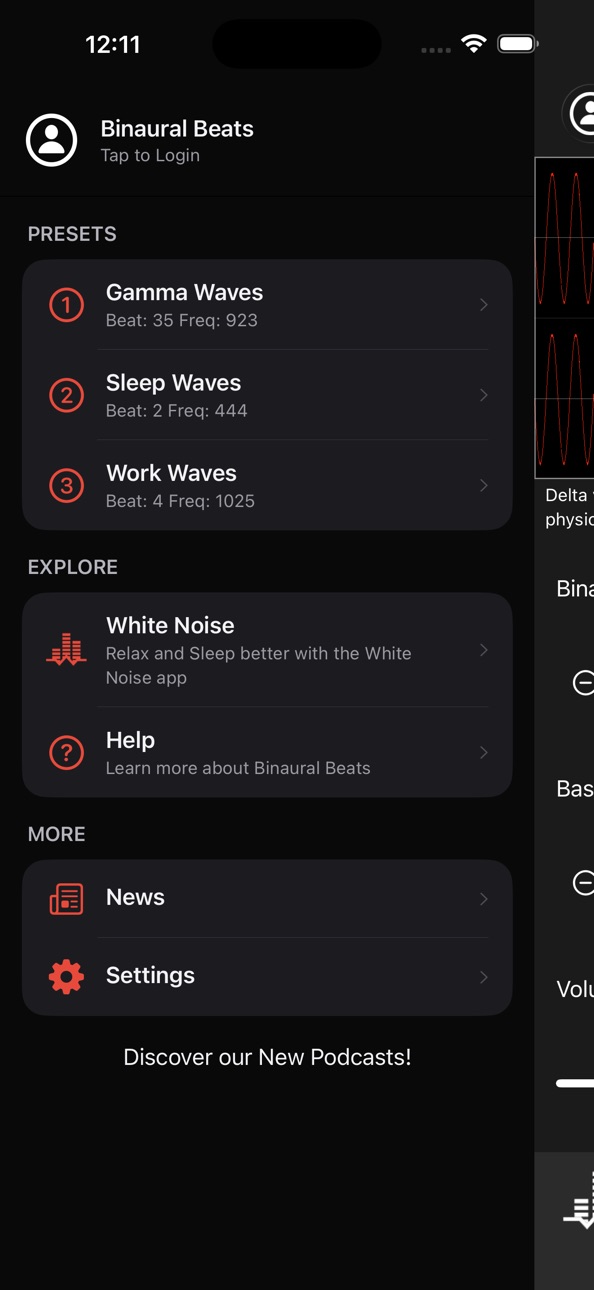
- Preset Manager - a dedicated screen to create, edit, rename, and reorder presets
- Primary Volume setting - choose whether the slider controls the app sound or device volume
- Step Amount setting - customize how much the +/- buttons change a value
- Sleep timer now supports up to 12 hours
- Further improved Reduce Interruptions for more reliable playback through audio interruptions
- Improved UI - values now appear as buttons you can tap to enter an exact amount or bring up the new tone picker
Description
Generate custom binaural beats around any base frequency including Alpha, Beta, Delta, Gamma, Mu, and Theta waves. Simple modern interface allows selecting Binaural Beats from 1 to 50 Hz and a Base Frequency from 20 to 1500 Hz. Binaural Beats require high quality headphones or stereo speakers.
What are binaural beats?
Binaural beats can help with sleep, focus, and meditation. They are an auditory illusion perceived when two different tones of slightly different frequency are presented to each ear. The frequencies are very low and each one is tuned specifically for each ear which is why headphones are required.
What are the different types of binaural beats?
- Alpha waves are associated with a restful and relaxed state that exists when both entering and exiting sleep.
- Beta waves are associated with concentration and moderate alertness.
- Delta waves are associated with deep sleep cycles and the release of physical awareness.
- Gamma waves are associated with alertness and sensitive perception.
- Mu waves are associated with a state of physical rest, stillness, and immobility.
- Theta waves are associated with the heavy relaxation that comes from frequency, deep meditation.
Directions:
Drag slider to select a desired Binaural Beat from 1 to 50 Hz. Next, drag the base frequency to a tone that sounds pleasant to your ears. The binaural beat is generated around this base frequency. Adjust device volume using the on-screen volume slider to a comfortable level. You can also specify to play audio to any AirPlay supported device. Toggle audio playback using the Play/Pause button.
Created by the audio experts at TMSOFT that brought you the famous White Noise app. Check out all our apps and sounds at http://www.tmsoft.com/
Accessibility
ipadiphonemacrealityDevicetvoswatch
Version history 22 versions
Build 887346817v4.02026-06-29 13:55:39
What's New in 4.0
- Fractional support - set frequencies to a hundredth of a Hz
- Redesigned frequency picker - type an exact frequency or choose a musical note + octave on a built-in piano keyboard, with live preview
- Preset Manager - a dedicated screen to create, edit, rename, and reorder presets
- Primary Volume setting - choose whether the slider controls the app sound or device volume
- Step Amount setting - customize how much the +/- buttons change a value
- Sleep timer now supports up to 12 hours
- Further improved Reduce Interruptions for more reliable playback through audio interruptions
- Improved UI - values now appear as buttons you can tap to enter an exact amount or bring up the new tone picker
Build 886197079v3.0.92026-05-27 19:08:01
This update includes improved volume controls, bug fixes, and crash fixes in addition to the 3.0 features:
Presets — Save and restore your favorite beats with a single tap
Settings Sync — Sign in to sync your settings across all your devices
Redesigned Menu and Settings — A cleaner, more modern design that makes everything easier to find and use
Expanded Settings — More ways to customize your listening experience
Sleep Timer — Set playback to stop automatically when you’re ready to sleep
Build 885931807v3.0.82026-05-20 23:24:01
This update includes bug fixes and crash fixes, in addition to the 3.0 features:
Presets — Save and restore your favorite beat mixes with a single tap
Settings Sync — Sign in to sync your settings across all your devices
Redesigned Menu and Settings — A cleaner, more modern design that makes everything easier to find and use
Expanded Settings — More ways to customize your listening experience
Sleep Timer — Set playback to stop automatically when you’re ready to sleep
Performance Improvements — Smoother, more reliable playback
Build 885536782v3.0.42026-05-12 14:13:12
This update includes bug fixes and crash fixes, in addition to the 3.0 features:
Presets — Save and restore your favorite beat mixes with a single tap
Settings Sync — Sign in to sync your settings across all your devices
Redesigned Menu and Settings — A cleaner, more modern design that makes everything easier to find and use
Expanded Settings — More ways to customize your listening experience
Sleep Timer — Set playback to stop automatically when you’re ready to sleep
Performance Improvements — Smoother, more reliable playback
Build 885582056v3.0.52026-05-12 21:21:34
This update includes bug fixes and crash fixes, in addition to the 3.0 features:
Presets — Save and restore your favorite beat mixes with a single tap
Settings Sync — Sign in to sync your settings across all your devices
Redesigned Menu and Settings — A cleaner, more modern design that makes everything easier to find and use
Expanded Settings — More ways to customize your listening experience
Sleep Timer — Set playback to stop automatically when you’re ready to sleep
Performance Improvements — Smoother, more reliable playback
Build 884064061v3.02026-04-29 21:55:24
A major update with a fresh new experience, while keeping the high-quality beats you love.
Presets — Save and restore your favorite beat mixes with a single tap
Settings Sync — Sign in to sync your settings across all your devices
Redesigned Menu and Settings — A cleaner, more modern design that makes everything easier to find and use
Expanded Settings — More ways to customize your listening experience
Sleep Timer — Set playback to stop automatically when you’re ready to sleep
Performance Improvements — Smoother, more reliable playback
Build 878204451v2.22025-09-18 11:45:22
- Updates to support the latest iOS versions
Build 866364163v2.1.72024-06-01 05:33:07
v2.1.7
- Support for latest iOS versions
v2.0 brings a host of new features including:
- New control bar at the bottom of the view to control playback and airplay
- Redesigned layout to make better use of available space and modernize icons
- Added ability to use keyboard input for Hz values. Tap the value label to bring up the keyboard
- Added a sleep timer which can be set from 15 min to 8 hours in 15 min intervals
- Added user configurable presets. Save your favorite configurations and switch between them easily
- Added reset option which reverts controls back to their defaults
- Enabled mixing with music: you can now listen to other media apps alongside Beats Generator
Many of these features were from user requests, so please keep the feedback coming!
Build 864900741v2.1.62024-04-03 00:00:55
v2.1.6
- Support for latest iOS versions
v2.0 brings a host of new features including:
- New control bar at the bottom of the view to control playback and airplay
- Redesigned layout to make better use of available space and modernize icons
- Added ability to use keyboard input for Hz values. Tap the value label to bring up the keyboard
- Added a sleep timer which can be set from 15 min to 8 hours in 15 min intervals
- Added user configurable presets. Save your favorite configurations and switch between them easily
- Added reset option which reverts controls back to their defaults
- Enabled mixing with music: you can now listen to other media apps alongside Beats Generator
Many of these features were from user requests, so please keep the feedback coming!
Build 861516051v2.1.52023-11-17 09:34:17
v2.1.5
- Bug fixes
v2.0 brings a host of new features including:
- New control bar at the bottom of the view to control playback and airplay
- Redesigned layout to make better use of available space and modernize icons
- Added ability to use keyboard input for Hz values. Tap the value label to bring up the keyboard
- Added a sleep timer which can be set from 15 min to 8 hours in 15 min intervals
- Added user configurable presets. Save your favorite configurations and switch between them easily
- Added reset option which reverts controls back to their defaults
- Enabled mixing with music: you can now listen to other media apps alongside Beats Generator
Many of these features were from user requests, so please keep the feedback coming!
Build 854301532v2.1.32023-01-12 00:21:47
v2.1.3
- Bug fixes
v2.0 brings a host of new features including:
- New control bar at the bottom of the view to control playback and airplay
- Redesigned layout to make better use of available space and modernize icons
- Added ability to use keyboard input for Hz values. Tap the value label to bring up the keyboard
- Added a sleep timer which can be set from 15 min to 8 hours in 15 min intervals
- Added user configurable presets. Save your favorite configurations and switch between them easily
- Added reset option which reverts controls back to their defaults
- Enabled mixing with music: you can now listen to other media apps alongside Beats Generator
Many of these features were from user requests, so please keep the feedback coming!
Build 851629809v2.1.22022-08-17 22:05:59
v2.1.2
- Added balance to the bottom control bar
v2.0 brings a host of new features including:
- New control bar at the bottom of the view to control playback and airplay
- Redesigned layout to make better use of available space and modernize icons
- Added ability to use keyboard input for Hz values. Tap the value label to bring up the keyboard
- Added a sleep timer which can be set from 15 min to 8 hours in 15 min intervals
- Added user configurable presets. Save your favorite configurations and switch between them easily
- Added reset option which reverts controls back to their defaults
- Enabled mixing with music: you can now listen to other media apps alongside Beats Generator
Many of these features were from user requests, so please keep the feedback coming!
Build 851131265v2.1.12022-08-02 17:29:05
v2.1
- Fixed bug that was resetting Presets occasionally
- Updated layout and theme for modern iOS
- Support library updates
v2.0 brings a host of new features including:
- New control bar at the bottom of the view to control playback and airplay
- Redesigned layout to make better use of available space and modernize icons
- Added ability to use keyboard input for Hz values. Tap the value label to bring up the keyboard
- Added a sleep timer which can be set from 15 min to 8 hours in 15 min intervals
- Added user configurable presets. Save your favorite configurations and switch between them easily
- Added reset option which reverts controls back to their defaults
- Enabled mixing with music: you can now listen to other media apps alongside Beats Generator
Many of these features were from user requests, so please keep the feedback coming!
Build 847596986v2.0.52022-03-31 17:57:20
v2.0.4
- Adjusted some elements of the UI based on user feedback
- Added Mix with Music setting so that it can be disabled if desired
v2.0 brings a host of new features including:
- New control bar at the bottom of the view to control playback and airplay
- Redesigned layout to make better use of available space and modernize icons
- Added ability to use keyboard input for Hz values. Tap the value label to bring up the keyboard
- Added a sleep timer which can be set from 15 min to 8 hours in 15 min intervals
- Added user configurable presets. Save your favorite configurations and switch between them easily
- Added reset option which reverts controls back to their defaults
- Enabled mixing with music: you can now listen to other media apps alongside Beats Generator
Many of these features were from user requests, so please keep the feedback coming!
Build 847506663v2.0.32022-03-04 22:00:23
v2.0.3
- Adjusted some elements of the UI based on user feedback
- Added Mix with Music setting so that it can be disabled if desired
v2.0 brings a host of new features including:
- New control bar at the bottom of the view to control playback and airplay
- Redesigned layout to make better use of available space and modernize icons
- Added ability to use keyboard input for Hz values. Tap the value label to bring up the keyboard
- Added a sleep timer which can be set from 15 min to 8 hours in 15 min intervals
- Added user configurable presets. Save your favorite configurations and switch between them easily
- Added reset option which reverts controls back to their defaults
- Enabled mixing with music: you can now listen to other media apps alongside Beats Generator
Many of these features were from user requests, so please keep the feedback coming!
Build 846967131v2.02022-02-14 19:25:36
v2.0 brings a host of new features including:
- New control bar at the bottom of the view to control playback, volume, and airplay
- Redesigned layout to make better use of available space and modernize icons
- Added ability to use keyboard input for Hz values. Tap the value label to bring up the keyboard
- Added a sleep timer which can be set from 15 min to 8 hours in 15 min intervals
- Added user configurable presets. Save your favorite configurations and switch between them easily
- Added reset option which reverts controls back to their defaults
- Enabled mixing with music: you can now listen to other media apps alongside Beats Generator
Many of these features were from user requests, so please keep the feedback coming!
Build 839487999v1.2.62020-12-03 17:00:40
Fixed sharing link and library updates.
Build 838381564v1.2.52020-10-26 15:13:22
Added options for Send Feedback and Report Problem to make it easier to contact us. Library updates.
Build 836898537v1.2.32020-07-22 11:57:26
Minor audio engine improvements and updated support libraries.
Build 827446437v1.22018-06-07 00:38:28
Updated libraries to be GDPR compliant and other minor improvements.
Build 826599287v1.12018-04-09 14:08:41
Background audio, UI layout improvements, and iPhone X full screen support!
Build 820973904v1.02017-03-04 20:05:57
No pricing data captured yet — comparisons appear once the app has paid storefronts or in-app purchases.
Availability 1 of 1 storefronts
| Region | Language | Price | Ratings | Avg | Version |
|---|---|---|---|---|---|
| US | en-US | Free | 1.2k | 4.7 | 4.0 |
Change log 26 changes · US
✎
releaseNotes updated
What's New in 4.0
- Fractional support - set frequencies to a hundredth of a Hz
- Redesigned frequency picker - type an exact frequency or choose a musical not
✎
description updated
Generate custom binaural beats around any base frequency including Alpha, Beta, Delta, Gamma, Mu, and Theta waves. Simple modern interface allows selecting Bin
✎
subtitle updated
Alpha, Beta, Delta, Gamma, Mu+
✎
name updated
Binaural Beats Generator +
◆
Version 4.0 released
What's New in 4.0
- Fractional support - set frequencies to a hundredth of a Hz
- Redesigned frequency picker - type an exact frequency or choose a musical note + octave on a built-in piano keyboard, with live preview
- Preset Manager - a
◆
Version 3.0.9 released
This update includes improved volume controls, bug fixes, and crash fixes in addition to the 3.0 features:
Presets — Save and restore your favorite beats with a single tap
Settings Sync — Sign in to sync your settings across all your devic
◆
Version 3.0.8 released
This update includes bug fixes and crash fixes, in addition to the 3.0 features:
Presets — Save and restore your favorite beat mixes with a single tap
Settings Sync — Sign in to sync your settings across all your devices
Redesigned Menu an
◆
Version 3.0.5 released
This update includes bug fixes and crash fixes, in addition to the 3.0 features:
Presets — Save and restore your favorite beat mixes with a single tap
Settings Sync — Sign in to sync your settings across all your devices
Redesigned Menu an
◆
Version 3.0.4 released
This update includes bug fixes and crash fixes, in addition to the 3.0 features:
Presets — Save and restore your favorite beat mixes with a single tap
Settings Sync — Sign in to sync your settings across all your devices
Redesigned Menu an
◆
Version 3.0 released
A major update with a fresh new experience, while keeping the high-quality beats you love.
Presets — Save and restore your favorite beat mixes with a single tap
Settings Sync — Sign in to sync your settings across all your devices
Redesign
◆
Version 2.2 released
- Updates to support the latest iOS versions
◆
Version 2.1.7 released
v2.1.7
- Support for latest iOS versions
v2.0 brings a host of new features including:
- New control bar at the bottom of the view to control playback and airplay
- Redesigned layout to make better use of available space and modernize icon
◆
Version 2.1.6 released
v2.1.6
- Support for latest iOS versions
v2.0 brings a host of new features including:
- New control bar at the bottom of the view to control playback and airplay
- Redesigned layout to make better use of available space and modernize icon
◆
Version 2.1.5 released
v2.1.5
- Bug fixes
v2.0 brings a host of new features including:
- New control bar at the bottom of the view to control playback and airplay
- Redesigned layout to make better use of available space and modernize icons
- Added ability to u
◆
Version 2.1.3 released
v2.1.3
- Bug fixes
v2.0 brings a host of new features including:
- New control bar at the bottom of the view to control playback and airplay
- Redesigned layout to make better use of available space and modernize icons
- Added ability to u
◆
Version 2.1.2 released
v2.1.2
- Added balance to the bottom control bar
v2.0 brings a host of new features including:
- New control bar at the bottom of the view to control playback and airplay
- Redesigned layout to make better use of available space and modern
◆
Version 2.1.1 released
v2.1
- Fixed bug that was resetting Presets occasionally
- Updated layout and theme for modern iOS
- Support library updates
v2.0 brings a host of new features including:
- New control bar at the bottom of the view to control playback and
◆
Version 2.0.5 released
v2.0.4
- Adjusted some elements of the UI based on user feedback
- Added Mix with Music setting so that it can be disabled if desired
v2.0 brings a host of new features including:
- New control bar at the bottom of the view to control play
◆
Version 2.0.3 released
v2.0.3
- Adjusted some elements of the UI based on user feedback
- Added Mix with Music setting so that it can be disabled if desired
v2.0 brings a host of new features including:
- New control bar at the bottom of the view to control play
◆
Version 2.0 released
v2.0 brings a host of new features including:
- New control bar at the bottom of the view to control playback, volume, and airplay
- Redesigned layout to make better use of available space and modernize icons
- Added ability to use keyboard
◆
Version 1.2.6 released
Fixed sharing link and library updates.
◆
Version 1.2.5 released
Added options for Send Feedback and Report Problem to make it easier to contact us. Library updates.
◆
Version 1.2.3 released
Minor audio engine improvements and updated support libraries.
◆
Version 1.2 released
Updated libraries to be GDPR compliant and other minor improvements.
◆
Version 1.1 released
Background audio, UI layout improvements, and iPhone X full screen support!
◆
Version 1.0 released