Fruitful Registry
Home › Weather
WatchMETAR icon

WatchMETAR

METAR/TAF on your wrist
US flag US
USen-USAENot AvailableAFNot AvailableAGNot AvailableAINot AvailableALNot AvailableAMNot AvailableAONot AvailableARNot AvailableATNot AvailableAUNot AvailableAZNot AvailableBANot AvailableBBNot AvailableBENot AvailableBFNot AvailableBGNot AvailableBHNot AvailableBJNot AvailableBMNot AvailableBNNot AvailableBONot AvailableBRNot AvailableBSNot AvailableBTNot AvailableBWNot AvailableBYNot AvailableBZNot AvailableCANot AvailableCDNot AvailableCGNot AvailableCHNot AvailableCINot AvailableCLNot AvailableCMNot AvailableCNNot AvailableCONot AvailableCRNot AvailableCVNot AvailableCYNot AvailableCZNot AvailableDENot AvailableDKNot AvailableDMNot AvailableDONot AvailableDZNot AvailableECNot AvailableEENot AvailableEGNot AvailableESNot AvailableFINot AvailableFJNot AvailableFMNot AvailableFRNot AvailableGANot AvailableGBNot AvailableGDNot AvailableGENot AvailableGHNot AvailableGMNot AvailableGRNot AvailableGTNot AvailableGWNot AvailableGYNot AvailableHKNot AvailableHNNot AvailableHRNot AvailableHUNot AvailableIDNot AvailableIENot AvailableILNot AvailableINNot AvailableIQNot AvailableISNot AvailableITNot AvailableJMNot AvailableJONot AvailableJPNot AvailableKENot AvailableKGNot AvailableKHNot AvailableKNNot AvailableKRNot AvailableKWNot AvailableKYNot AvailableKZNot AvailableLANot AvailableLBNot AvailableLCNot AvailableLKNot AvailableLRNot AvailableLTNot AvailableLUNot AvailableLVNot AvailableLYNot AvailableMANot AvailableMDNot AvailableMENot AvailableMGNot AvailableMKNot AvailableMLNot AvailableMMNot AvailableMNNot AvailableMONot AvailableMRNot AvailableMSNot AvailableMTNot AvailableMUNot AvailableMVNot AvailableMWNot AvailableMXNot AvailableMYNot AvailableMZNot AvailableNANot AvailableNENot AvailableNGNot AvailableNINot AvailableNLNot AvailableNONot AvailableNPNot AvailableNRNot AvailableNZNot AvailableOMNot AvailablePANot AvailablePENot AvailablePGNot AvailablePHNot AvailablePKNot AvailablePLNot AvailablePTNot AvailablePWNot AvailablePYNot AvailableQANot AvailableRONot AvailableRSNot AvailableRUNot AvailableRWNot AvailableSANot AvailableSBNot AvailableSCNot AvailableSENot AvailableSGNot AvailableSINot AvailableSKNot AvailableSLNot AvailableSNNot AvailableSRNot AvailableSTNot AvailableSVNot AvailableSZNot AvailableTCNot AvailableTDNot AvailableTHNot AvailableTJNot AvailableTMNot AvailableTNNot AvailableTONot AvailableTRNot AvailableTTNot AvailableTWNot AvailableTZNot AvailableUANot AvailableUGNot AvailableUYNot AvailableUZNot AvailableVCNot AvailableVENot AvailableVGNot AvailableVNNot AvailableVUNot AvailableXKNot AvailableYENot AvailableZANot AvailableZMNot AvailableZWNot Available
1 of 175 storefronts
Content in en-US
104 Ratings
3.7
★★★★
Age Rating
4+
Years
Language
EN
Size
13.5
MB

Information

Apple ID1204622336
Bundle IDcom.eugr.WatchMetar
SellerSeller
Min iOS17.0
Min macOS14.0
Device familieswatch, iphone, ipad
Released2017-02-15
Copyright© 2017-24 Eugene Rakhmatulin
Privacy policyLink ↗

Preview 3 platforms

iPhone 7 images

iPhone screenshot
iPhone screenshot
iPhone screenshot
iPhone screenshot
iPhone screenshot
iPhone screenshot
iPhone screenshot

iPad 6 images

iPad screenshot
iPad screenshot
iPad screenshot
iPad screenshot
iPad screenshot
iPad screenshot

Apple Watch 10 images

Apple Watch screenshot

What’s New Version 3.0

Completely rewritten from scratch utilizing the most recent frameworks. If you are upgrading from the older version, you may need to re-add your complications to watch faces, but all other settings will be preserved. Now supporting all complication types and SmartStack widgets on Apple Watch! You can also add multiple complications on one watch face for different airports. Additionally, widgets are now supported on iPhone, iPad, and M-series Macs. Both Home Screen and Lock Screen widgets are supported. Furthermore, we are introducing the TAF Preview strip for at-a-glance forecast for the next 12 hours! Other notable changes include a Fahrehneiht/Celsius toggle and a UTC/Local Time toggle in the app settings.

Description

**Aviation Weather for Apple Watch and iPhone/iPad** Access real-time aviation weather data directly from your wrist with this essential app. **Key Features:** - **Watch Face Complications:** Customize your watch face to display weather information for your preferred or nearest airport at a glance. Utilize our proprietary algorithms to prioritize the most relevant weather data and optimize screen space. - **Voice and Scribble Search:** Search for airports by name, city, or identifier. View current weather conditions (METAR) and forecasts (TAF). Enable location services (with permission) to access nearby airports. - **Widget Support:** Display weather information on your Home Screen and Lock Screen for easy access. - **Comprehensive Weather Data:** Display raw and fully decoded METAR and TAF data in a user-friendly format. Provide concise summary information in the airport list, while optimizing the screen space. Our algorithm prioritizes essential information, ensuring it is displayed even within a single line of text. - **U.S. Airport Support:** Currently, the app is available for U.S. airports. **Feedback and Suggestions:** Please report any issues or provide suggestions through the “App Support” link on the App Store page.

Accessibility

ipadiphonemacrealityDevicetvoswatch

Version history 10 versions

Build 870141828v3.02024-11-03 13:34:40
Completely rewritten from scratch utilizing the most recent frameworks. If you are upgrading from the older version, you may need to re-add your complications to watch faces, but all other settings will be preserved. Now supporting all complication types and SmartStack widgets on Apple Watch! You can also add multiple complications on one watch face for different airports. Additionally, widgets are now supported on iPhone, iPad, and M-series Macs. Both Home Screen and Lock Screen widgets are supported. Furthermore, we are introducing the TAF Preview strip for at-a-glance forecast for the next 12 hours! Other notable changes include a Fahrehneiht/Celsius toggle and a UTC/Local Time toggle in the app settings.
Build 832979718v2.5.12019-10-01 14:43:50
Version 2.5.1 is a bugfix release only. Fixed another (and hopefully the last) cause of broken settings/favorites and increased overall stability. Fixed a crash when requesting nearest airports from Watch app. The previous release (2.5) brought iOS 13 support, including Dark Mode and initial iPadOS support, including Slide Over and Split views.  Please note - it won't be able to control your Watch settings when running on iPad. This version requires iOS 11+ and WatchOS 4+
Build 832958681v2.52019-09-28 15:22:55
This version brings WatchOS 6 and iOS 13 support, including Dark Mode and also fixes intermittent bug with settings/favorites and brings other stability improvements. Initial iPadOS support also added, including Slide Over and Split views support. Please note - it won't be able to control your Watch settings when running on iPad. This version requires iOS 11+ and WatchOS 4+
Build 828927080v2.42018-10-18 14:29:19
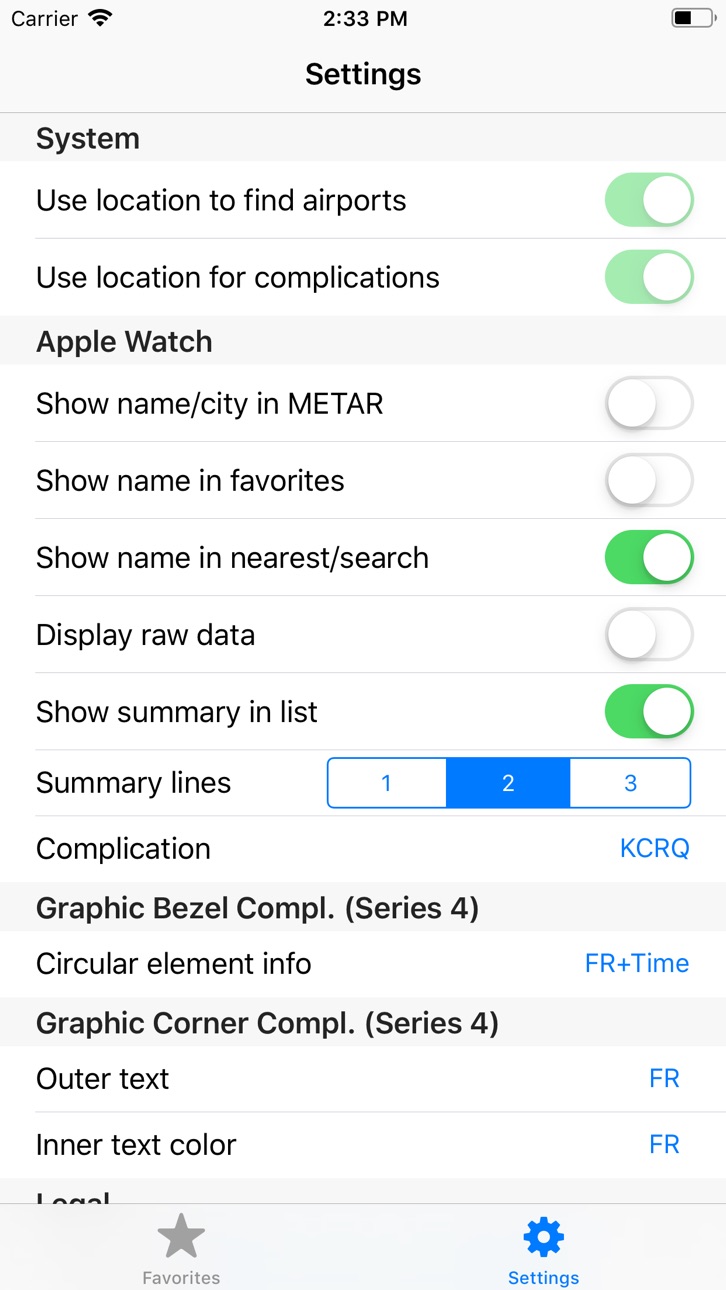
This updates brings new features for Apple Watch Series 4, along with general improvements and bugfixes. NEW: Support for Corner complication on Infograph Watchface. NEW: Customization options for Bezel and Corner complications in the Settings section of the phone app! You can now choose what information to display in the circular element of Bezel complication and also outer text and inner text color in the Corner complication. Circular element now supports one or two customizable slots of data - you can choose to display Flight Rules, Airport ID or Observation Time in any of them. IMPROVED: cloud cover prioritization on watchface complications. FIXED: crash when restarting the watch on Infograph watchface.
Build 827679642v2.32018-10-04 18:14:39
Support for Apple Watch Series 4 and WatchOS 5 is here! You can use large complication on Infograph Modular watchface and bezel complication on Infograph watchface. Also, this release uses location services on the watch for complication updates, so it can be used completely untethered from the iPhone if you have a cellular model. Improved background complication update reliability on WatchOS 5. Improved weather summaries. Fixed a bug when distance was not displayed when requesting nearest airports on WatchOS 5. Fixed a bug when watch app would occasionally not load settings. Fixed a bug when settings would not sync when switching to different paired Apple Watch. Please report any issues via "App Support" link on the App Store page.
Build 825686858v2.22018-01-18 17:52:01
This update improves reliability and weather prioritization for watchface complications.
Build 825568813v2.12018-01-09 18:27:21
Another big update! This time bringing support for watch face complications! You can now display Weather on Modular watch face (center section) or any watch face that has a complication filling up the entire width at the bottom, such as Utility, Photo, Motion, etc - see screenshots. Choose the airport to be used for a complication in Settings section of the phone app. You can also choose Nearest to display the weather for the nearby airport on your watch face. You will need to grant Always location authorization to the app to be able to use Nearest function for complications. Complications use our summary generation algorithm to prioritize and display the most relevant weather data even within a single line of text. Modular watch face is recommended as it fits more information than other watch faces. This update also brings additional setting to toggle airport name separately in favorites and search and improvements in summary generation algorithm, plus minor visual tweaks.
Build 825407318v2.02017-12-21 21:44:04
Major update! Now bringing weather display to the iOS app as well. You can view weather summary for your favorite airports on the main screen and dive into detailed METAR&TAF if needed. It also enables summary information on the Watch too, displaying 1-3 lines of summary weather data in the list view. The algorithm prioritizes the data to to display the most important weather information even within a single line of text, so you don't have to tap on each airport to get an idea about the weather conditions!
Build 824196890v1.12017-10-30 15:48:28
Added favorite airports - now available in one tap on your Watch. Add and manage favorites on the phone app. New settings (available via iOS app): display name/city in the airport list, display airport name in the weather screen and whether to display raw METAR and TAF. Also, not showing airport name in TAF section if it's for the same airport as METAR.
Build 820898257v1.02017-02-15 00:52:06

No pricing data captured yet — comparisons appear once the app has paid storefronts or in-app purchases.

Availability 1 of 175 storefronts

RegionLanguagePriceRatingsAvgVersion
US en-USFree1043.73.0

Not available in: AE, AF, AG, AI, AL, AM, AO, AR, AT, AU, AZ, BA, BB, BE, BF, BG, BH, BJ, BM, BN, BO, BR, BS, BT, BW, BY, BZ, CA, CD, CG, CH, CI, CL, CM, CN, CO, CR, CV, CY, CZ, DE, DK, DM, DO, DZ, EC, EE, EG, ES, FI, FJ, FM, FR, GA, GB, GD, GE, GH, GM, GR, GT, GW, GY, HK, HN, HR, HU, ID, IE, IL, IN, IQ, IS, IT, JM, JO, JP, KE, KG, KH, KN, KR, KW, KY, KZ, LA, LB, LC, LK, LR, LT, LU, LV, LY, MA, MD, ME, MG, MK, ML, MM, MN, MO, MR, MS, MT, MU, MV, MW, MX, MY, MZ, NA, NE, NG, NI, NL, NO, NP, NR, NZ, OM, PA, PE, PG, PH, PK, PL, PT, PW, PY, QA, RO, RS, RU, RW, SA, SB, SC, SE, SG, SI, SK, SL, SN, SR, ST, SV, SZ, TC, TD, TH, TJ, TM, TN, TO, TR, TT, TW, TZ, UA, UG, UY, UZ, VC, VE, VG, VN, VU, XK, YE, ZA, ZM, ZW

Change log 14 changes · US

releaseNotes updated
Completely rewritten from scratch utilizing the most recent frameworks. If you are upgrading from the older version, you may need to re-add your complications t
description updated
**Aviation Weather for Apple Watch and iPhone/iPad** Access real-time aviation weather data directly from your wrist with this essential app. **Key Features:*
subtitle updated
METAR/TAF on your wrist
name updated
WatchMETAR
Version 3.0 released
Completely rewritten from scratch utilizing the most recent frameworks. If you are upgrading from the older version, you may need to re-add your complications to watch faces, but all other settings will be preserved. Now supporting all com
Version 2.5.1 released
Version 2.5.1 is a bugfix release only. Fixed another (and hopefully the last) cause of broken settings/favorites and increased overall stability. Fixed a crash when requesting nearest airports from Watch app. The previous release (2.5) bro
Version 2.5 released
This version brings WatchOS 6 and iOS 13 support, including Dark Mode and also fixes intermittent bug with settings/favorites and brings other stability improvements. Initial iPadOS support also added, including Slide Over and Split views s
Version 2.4 released
This updates brings new features for Apple Watch Series 4, along with general improvements and bugfixes. NEW: Support for Corner complication on Infograph Watchface. NEW: Customization options for Bezel and Corner complications in the Setti
Version 2.3 released
Support for Apple Watch Series 4 and WatchOS 5 is here! You can use large complication on Infograph Modular watchface and bezel complication on Infograph watchface. Also, this release uses location services on the watch for complication up
Version 2.2 released
This update improves reliability and weather prioritization for watchface complications.
Version 2.1 released
Another big update! This time bringing support for watch face complications! You can now display Weather on Modular watch face (center section) or any watch face that has a complication filling up the entire width at the bottom, such as Ut
Version 2.0 released
Major update! Now bringing weather display to the iOS app as well. You can view weather summary for your favorite airports on the main screen and dive into detailed METAR&TAF if needed. It also enables summary information on the Watch too,
Version 1.1 released
Added favorite airports - now available in one tap on your Watch. Add and manage favorites on the phone app. New settings (available via iOS app): display name/city in the airport list, display airport name in the weather screen and whethe
Version 1.0 released
expanded screenshot