Home › Health & Fitness

 US
US
USen-US DEde-DE
 GBen-GB
 FRfr-FR
 ESes-ES
 CAen-CA
 AUen-AU
 NLnl
NLnl CHde-CH
 ATde-DE
 ITit
ITit CZen-GB
 SEsv
SEsv BRpt-BR
 NOen-GB
 BEen-GB
 PLen-GB
 FIen-GB
 DKen-GB
 HUen-GB
 PTpt-PT
 NZen-AU
 SKen-GB
 MXes-MX
 IEen-GB
 ROen-GB
 GRen-GB
 COes-MX
 CLes-MX
 CRes-MX
 HRen-GB
 LUen-GB
 ARes-MX
 BGen-GB
 ECes-MX
 ISen-GB
 PEes-MX
 UYen-GB
 GTes-MX
 HNes-MX
 MAen-GB
 MUen-GB
 PYes-MX
 AGen-GB
 AIen-GB
 AOen-GB
 BBen-GB
 BFen-GB
 BJen-GB
 BOes-MX
 BSen-GB
 BWen-GB
 BZen-GB
 CDen-GB
 CGen-GB
 CIfr-FR
 CMfr-FR
 CVen-GB
 DMen-GB
 DOes-MX
 DZen-GB
 GAfr-FR
 GDen-GB
 GHen-GB
 GMen-GB
 GWen-GB
 GYen-GB
 JMen-GB
 KEen-GB
 KNen-GB
 KYen-GB
 LCen-GB
 LRen-GB
 LYen-GB
 MGen-GB
 MLen-GB
 MSen-GB
 MWen-GB
 MZen-GB
 NAen-GB
 NEen-GB
 NGen-GB
 NIes-MX
 PAes-MX
 RWen-GB
 SCen-GB
 SLen-GB
 SNen-GB
 SRen-GB
 STen-GB
 SVes-MX
 SZen-GB
 TCen-GB
 TDen-GB
 TNen-GB
 TTen-GB
 TZen-GB
 UGen-GB
 VCen-GB
 VEes-MX
 VGen-GB
 ZMen-GB
 ZWen-GB
103 of 103 storefronts
Content in en-US
Content in en-US
Information
Preview 2 platforms
iPhone 10 images


iPad 10 images


What’s New Version 12.11
• Various bug fixes and stability improvements
Description
Turn your Apple Watch into a complete training platform.
HealthFit transforms the workout and health data stored in Apple Health into advanced fitness metrics, training insights, and seamless workout syncing—with no account required.
Whether you're training for your next race, improving your fitness, or simply staying active, HealthFit helps you understand your progress, optimize your training, and achieve your goals.
TRAIN SMARTER
Go beyond basic workout summaries with advanced training analytics designed to help you make better decisions.
HealthFit helps you understand:
• Training Load
• Fitness (CTL), Fatigue (ATL), and Form (TSB)
• Training Load Ratio
• Heart Rate Zones and Training Distribution
• Year Comparisons and Trends
• Explorer Score and Training Heat Maps
These are the kinds of metrics and insights typically reserved for premium coaching platforms.
EVERYTHING IN ONE PLACE
HealthFit combines your workouts, fitness trends, and health metrics in a beautifully designed app.
No more jumping between multiple apps. Track your training load, fitness progression, health metrics, and workout history from a single dashboard.
A BETTER ACTIVITY FEED
Browse all your workouts with maps, photos, and key metrics visible at a glance.
Dive deeper into every activity with advanced analysis including:
• Customizable Heart Rate Zones
• Training Load Tracking
• Equipment Tracking (Shoes, Bikes & More)
• Elevation, Pace, Power & Cadence Analysis
• Detailed Charts & Performance Trends
HealthFit can even automatically associate photos taken during your workouts, bringing your activity history to life.
POWER INSIGHTS
Analyze your running and cycling power with advanced metrics including:
• Estimated Critical Power
• Weighted Average Power
• Mean Maximal Power Curves
• Power Distribution Analysis
• Historical Power Trends
Understand how your power evolves and identify your strengths across different durations.
HEALTH METRICS FOR ATHLETES
HealthFit provides a focused view of the health metrics that matter most, helping you understand how your health, stress, and fitness evolve over time.
• Heart Rate Variability (HRV)
• Resting Heart Rate
• Cardio Fitness (VO₂ Max)
• Sleep Metrics
• Weight, BMI & Body Fat
• Baevsky Stress Index
Everything is presented clearly so you can connect your health trends to your training performance.
BUILT FOR EVERY SPORT
Most fitness apps focus on running and cycling.
HealthFit supports all activity types and automatically adapts its statistics, charts, and analysis to your most frequent activities, whether you specialize in a single sport or enjoy a variety of activities.
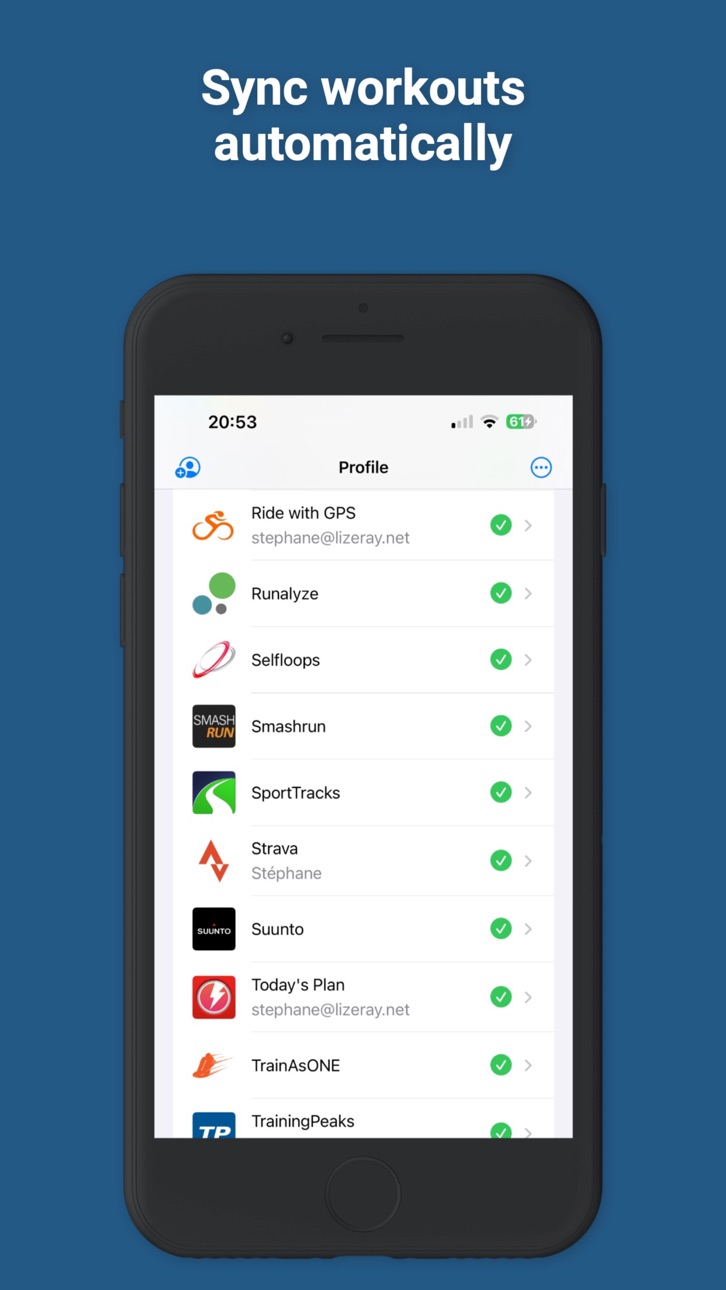
AUTOMATIC WORKOUT SYNCING
HealthFit automatically syncs your workouts in the background to all your favorite fitness platforms.
Every workout recorded with Apple Watch is uploaded automatically—no manual exports, no extra steps, no missing activities.
You can even sync your entire workout history.
MULTISPORT SUPPORT
HealthFit fully supports multisport and interval workouts and is one of the few apps capable of exporting multisport activities as true multisession workouts.
YOUR DATA STAYS YOURS
Privacy is a core principle of HealthFit.
No account required. No login required.
HealthFit works directly with Apple Health and keeps your data on your device—giving you powerful fitness insights without sending your personal data to the cloud.
CONNECTS TO YOUR FAVORITE FITNESS PLATFORMS
Supported services include Strava, TrainingPeaks, Final Surge, Selfloops, Smashrun, Ride with GPS, Cycling Analytics, Today's Plan, Runalyze, Suunto, 2PEAK, Komoot, COROS, Intervals.icu, Nolio, TrainAsONE, Tredict, Stages Link, Map My Tracks, and Xhale.
Export detailed workout reports to Markdown, complete with charts, maps, and workout insights, or export your data in FIT, GPX, CSV, and Google Sheets formats.
Terms of Use:
https://www.apple.com/legal/internet-services/itunes/dev/stdeula/
In-App Purchases US pricing
Supporter Subscription
Fanatical Supporter · Yearly 1-month free trial$9.99
Awesome Supporter · Yearly 1-month free trial$4.99
Capabilities
In-App Purchases
Accessibility
ipadiphonemacrealityDevicetvoswatch
Version history 25 versions
Build 887055235v12.112026-07-01 06:03:47
• Various bug fixes and stability improvements
Build 886390591v12.102026-06-16 18:42:08
• Fixed mapping issues in China
• Various bug fixes and stability improvements
Build 886099387v12.9.22026-06-01 15:41:38
• Improved Markdown export formatting and readability. Markdown exports now include the new Cadence Distribution Chart, the Split Variation Chart, and a dedicated CSV file for raw elevation data.
• New Cadence Distribution Chart for cycling. Instantly visualize your preferred cadence range, pedaling consistency, and variability.
• Introducing the new Split Variation Chart.
Understand your workout at a glance — not by scrolling through endless rows of split numbers. Instantly visualize positive or negative splits, pacing changes, cardiac drift, and performance trends in a single, highly readable chart.
Overlay whatever metrics are available during your workout, including heart rate, pace, power, cadence, elevation, running dynamics, and more.
• Section ordering in workout detail views has been reset and may need to be customized again.
• Various bug fixes and stability improvements
Build 885993613v12.9.12026-05-25 09:37:06
• Improved Markdown export formatting and readability. Markdown exports now include the new Cadence Distribution Chart, the Split Variation Chart, and a dedicated CSV file for raw elevation data.
• New Cadence Distribution Chart for cycling. Instantly visualize your preferred cadence range, pedaling consistency, and variability.
• Introducing the new Split Variation Chart.
Understand your workout at a glance — not by scrolling through endless rows of split numbers. Instantly visualize positive or negative splits, pacing changes, cardiac drift, and performance trends in a single, highly readable chart.
Overlay whatever metrics are available during your workout, including heart rate, pace, power, cadence, elevation, running dynamics, and more.
• Various bug fixes and stability improvements
Build 885554562v12.92026-05-22 02:57:06
• Improved Markdown export formatting and readability. Markdown exports now include the new Cadence Distribution Chart, the Split Variation Chart, and a dedicated CSV file for raw elevation data.
• New Cadence Distribution Chart for cycling. Instantly visualize your preferred cadence range, pedaling consistency, and variability.
• Introducing the new Split Variation Chart.
Understand your workout at a glance — not by scrolling through endless rows of split numbers. Instantly visualize positive or negative splits, pacing changes, cardiac drift, and performance trends in a single, highly readable chart.
Automatic splits can now finally be visualized the way they should be: with a chart, not a glorified table.
Every metric is designed to be immediately glanceable, helping patterns stand out without visual overload.
Overlay whatever metrics are available during your workout, including heart rate, pace, power, cadence, elevation, running dynamics, and more.
• Various bug fixes and stability improvements
Build 885312893v12.8.182026-05-12 04:46:06
• Markdown exports are now more powerful and flexible:
- Bulk export support for Markdown exports (Enable Markdown in the Profile tab → Export Format)
- Export automatic splits to CSV
- Export user segments to CSV
- Improved support for multisport workouts
- Improved support for pool swimming workouts
- Improved support for downhill sports with ski runs exported to CSV
• Various bug fixes and stability improvements
Build 884874934v12.8.172026-05-06 06:04:01
• Export workouts as Markdown
You can now export any workout to a clean, shareable Markdown file—complete with key stats, charts, and structured data.
Each export includes images of your workout charts, plus links to raw data like FIT files (as CSV) and detailed samples for heart rate, power, and more.
Perfect for analyzing your workouts with AI, sharing them with your coach, or simply viewing everything on your desktop in your favorite Markdown reader.
• Various bug fixes and stability improvements
Build 884658327v12.8.162026-04-24 03:22:49
• Various bug fixes and stability improvements
Build 884349731v12.8.152026-04-18 05:40:08
• This update introduces a brand-new Pace Progress chart that allows you to track your pool swimming progress (Statistics tab / Swimming).
• Various bug fixes and stability improvements
Build 884216862v12.8.142026-04-10 03:13:33
• The Effort Profile
Visualize your performance in a whole new way. A 6-axis radar chart layers your current workout over your all-time baseline, showing you exactly where you’re breaking new ground.
• Various bug fixes and stability improvements
Build 883912801v12.8.132026-04-07 04:25:58
• The Effort Profile
Visualize your performance in a whole new way. A 6-axis radar chart layers your current workout over your all-time baseline, showing you exactly where you’re breaking new ground.
• Various bug fixes and stability improvements
Build 883877704v12.8.122026-03-30 04:41:15
• Enhanced Yearly Progression Charts
We’ve reimagined our progression charts to give you a clearer view of your journey. Instead of a crowded view of the last 6 years, we now focus on the benchmarks that actually matter:
- The Big Three: Automatically highlights your Current Year, Previous Year, and your All-Time Best Year.
- Clearer Comparison: Easily see if your 2026 volume is ahead of your peak performance for distance, duration, calories, or activity count.
• Various bug fixes and stability improvements
Build 883599012v12.8.112026-03-28 17:03:20
• Enhanced Yearly Progression Charts
We’ve reimagined our progression charts to give you a clearer view of your journey. Instead of a crowded view of the last 6 years, we now focus on the benchmarks that actually matter:
- The Big Three: Automatically highlights your Current Year, Previous Year, and your All-Time Best Year.
- Cleaner Comparison: Easily see if your 2026 pace is ahead of your peak performance.
• Various bug fixes and stability improvements
Build 883345738v12.8.102026-03-20 20:07:25
• Heart Rate Profiles
A new chart shows how your heart rate is distributed across your top 5 activity types — helping you better understand your training intensity at a glance.
Find it in the Fitness screen.
This update will rebuild the app’s local cache after installation.
• Various bug fixes and stability improvements
Build 883208620v12.8.92026-03-13 13:49:09
• Various bug fixes and stability improvements
Build 883143365v12.8.82026-03-10 07:06:54
• Various bug fixes and stability improvements
Build 882885574v12.8.72026-03-08 07:29:18
• Better support for importing scheduled workouts from Intervals.icu
• Various bug fixes and stability improvements
Build 882836949v12.8.62026-02-28 05:50:55
- Improved Google Sheets Support
• Enhanced export support for downhill skiing, multisport, and pool swimming workouts in Google Sheets
• Better handling and formatting of workout data for these activity types
- Spreadsheet Version Update
• Health metrics and workout spreadsheets are now suffixed with _v5
- Fixes & Improvements
• Bug fixes and performance improvements
Build 882731126v12.8.52026-02-26 20:03:49
- Improved Google Sheets Support
• Enhanced export support for downhill skiing, multisport, and pool swimming workouts in Google Sheets
• Better handling and formatting of workout data for these activity types
- Spreadsheet Version Update
• Health metrics and workout spreadsheets are now suffixed with _v5
- Fixes & Improvements
• Bug fixes and performance improvements
Build 882534523v12.8.42026-02-24 05:56:15
• Advanced Google Sheets Workout Export
HealthFit now gives you even deeper control over your workout data:
- Workout Summary Export
Export your workout summaries from Apple Health to a single spreadsheet in Google Sheets.
- New: Detailed Workout Export (Manual)
From the menu in the workout detailed view, you can now export an individual workout with second-by-second records and full raw performance data.
Each series is organized into its own sheet within the spreadsheet:
1. Heart Rate
2. Running Power
3. Cycling Power
4. Running Dynamics (Vertical Oscillation, Ground Contact Time, Stride Length)
Perfect for advanced analysis, coaching, or building custom dashboards.
• Macronutrients Export
You can now export your Protein, Fat, and Carbohydrates data to:
- Google Sheets
- Intervals.icu
HealthFit will request permission to read macronutrient data from Apple Health.
• Important
- After updating, HealthFit will rebuild its local cache.
This process may take a few minutes and happens only once.
- Google Sheets Sync: Spreadsheet filename for health metrics and workouts are now suffixed with _v4.
As always, this update includes performance improvements and refinements.
Build 882217263v12.8.32026-02-17 10:01:34
• For custom workouts, the charts have additional visual distinction to the work intervals by making the bars wider as well as the color difference. It makes the charts more glanceable.
• The GPS accuracy chart has been improved.
• Bug fixes and performance improvements
Build 882185251v12.8.22026-02-06 07:18:05
This update brings deep integration with Intervals.icu and powerful new ways to visualize your performance data.
• Training & Planning
Intervals.icu Integration: Your workout plans now download automatically. Your training schedule is just there when you need it.
Today’s Plan: We’ve added a "Today’s Plan" section at the very top of your Workouts tab.
• Advanced Data Visualization
Exercise Ring Heatmap: Head to the Statistics tab to see your consistency over time with our new heatmap view.
New Fitness Charts: We’ve added three new relationship charts and a Workout Stream chart to the Fitness screen.
Density Charts: Dive deeper into your effort with new Heart Rate Density and Cycling Power Density charts (available for workouts with power meter data).
• Data & Export Improvements
Enhanced CSV Exports: Workout summaries now include additional columns, including the Apple Effort score.
Metric Exports: You can now export your health and fitness metrics directly via the "More" menu on the Fitness screen.
Google Sheets Sync: Sheet filenames for health metrics and workouts are now suffixed with _v3 for better version management.
Build 882138720v12.8.12026-02-05 10:05:03
This update brings deep integration with Intervals.icu and powerful new ways to visualize your performance data.
• Training & Planning
Intervals.icu Integration: Your workout plans now download automatically. Your training schedule is just there when you need it.
Today’s Plan: We’ve added a "Today’s Plan" section at the very top of your Workouts tab.
• Advanced Data Visualization
Exercise Ring Heatmap: Head to the Statistics tab to see your consistency over time with our new heatmap view.
New Fitness Charts: We’ve added three new relationship charts and a Workout Stream chart to the Fitness screen.
Density Charts: Dive deeper into your effort with new Heart Rate Density and Cycling Power Density charts (available for workouts with power meter data).
• Data & Export Improvements
Enhanced CSV Exports: Workout summaries now include additional columns, including the Apple Effort score.
Metric Exports: You can now export your health and fitness metrics directly via the "More" menu on the Fitness screen.
Google Sheets Sync: Sheet filenames for health metrics and workouts are now suffixed with _v3 for better version management.
Build 879105280v12.82026-02-04 05:35:39
This update brings deep integration with Intervals.icu and powerful new ways to visualize your performance data.
Note: This update will rebuild the local cache. It may take a few minutes to complete.
• Training & Planning
Intervals.icu Integration: Your workout plans now download automatically. Your training schedule is just there when you need it.
Today’s Plan: We’ve added a "Today’s Plan" section at the very top of your Workouts tab.
• Advanced Data Visualization
Exercise Ring Heatmap: Head to the Statistics tab to see your consistency over time with our new heatmap view.
New Fitness Charts: We’ve added three new relationship charts and a Workout Stream chart to the Fitness screen.
Density Charts: Dive deeper into your effort with new Heart Rate Density and Cycling Power Density charts (available for workouts with power meter data).
• Data & Export Improvements
Enhanced CSV Exports: Workout summaries now include additional columns, including the Apple Effort score.
Metric Exports: You can now export your health and fitness metrics directly via the "More" menu on the Fitness screen.
Google Sheets Sync: Sheet filenames for health metrics and workouts are now suffixed with _v3 for better version management.
Build 878945577v12.7.62025-10-21 07:01:05
• Fitness & Fatigue — track how your training load shapes your long-term Fitness (CTL) and short-term Fatigue (ATL).
• AI Coach settings — you’re in control. Keep your coach active for daily insights, or pause it anytime.
- version 12.7
• AI Coaching with 6 distinct personas to match your training style (requires a device that supports Apple Intelligence).
• Sleek new Liquid Glass design for a fluid, modern experience.
• Google Sheets export has been greatly improved — now includes all workout stats and all supported health metrics.
• Better Instagram Stories export for sharing your progress.
• Enhanced workouts heat map with a GitHub-inspired design to visualize your training streaks.
• Import planned workouts from Intervals.icu to sync your training plans. (Sign out and sign back in to Intervals.icu to activate this feature.)
• Bug fixes
Thanks for using HealthFit. To make our app better, we bring updates to the App Store regularly. Feedback is always welcome. Feel free to message us inside the app, or email healthfit@altifondo.com with any issues or suggestions.
Price history by region
Currency
Show
Columns
Search
Availability 103 of 103 storefronts
| Region | Language | Price | Ratings | Avg | Version |
|---|---|---|---|---|---|
| US | en-US | USD 6.99 | 888 | 4.6 | 12.11 |
| DE | de-DE | EUR 7.99 | 778 | 4.7 | 12.11 |
| GB | en-GB | GBP 6.99 | 428 | 4.8 | 12.11 |
| FR | fr-FR | EUR 7.99 | 268 | 4.8 | 12.11 |
| ES | es-ES | EUR 7.99 | 207 | 4.2 | 12.11 |
| CA | en-CA | CAD 9.99 | 168 | 4.8 | 12.11 |
| AU | en-AU | AUD 9.99 | 127 | 4.8 | 12.11 |
| NL | nl | EUR 7.99 | 117 | 4.6 | 12.11 |
| CH | de-CH | CHF 6 | 89 | 4.8 | 12.11 |
| AT | de-DE | EUR 7.99 | 86 | 4.8 | 12.11 |
| IT | it | EUR 7.99 | 71 | 4.8 | 12.11 |
| CZ | en-GB | CZK 199 | 59 | 4.9 | 12.11 |
| SE | sv | SEK 99 | 52 | 4.6 | 12.11 |
| BR | pt-BR | BRL 49.9 | 50 | 4.4 | 12.11 |
| NO | en-GB | NOK 89 | 50 | 4.8 | 12.11 |
| BE | en-GB | EUR 7.99 | 49 | 4.8 | 12.11 |
| PL | en-GB | PLN 29.99 | 46 | 4.8 | 12.11 |
| FI | en-GB | EUR 7.99 | 34 | 4.9 | 12.11 |
| DK | en-GB | DKK 59 | 29 | 4.7 | 12.11 |
| HU | en-GB | HUF 2990 | 25 | 5.0 | 12.11 |
| PT | pt-PT | EUR 7.99 | 24 | 5.0 | 12.11 |
| NZ | en-AU | NZD 12.99 | 18 | 4.7 | 12.11 |
| SK | en-GB | EUR 7.99 | 18 | 4.7 | 12.11 |
| MX | es-MX | MXN 149 | 17 | 4.6 | 12.11 |
| IE | en-GB | EUR 7.99 | 16 | 4.9 | 12.11 |
| RO | en-GB | RON 39.99 | 16 | 4.4 | 12.11 |
| GR | en-GB | EUR 7.99 | 12 | 4.9 | 12.11 |
| CO | es-MX | COP 29900 | 7 | 5.0 | 12.11 |
| CL | es-MX | CLP 7990 | 5 | 4.0 | 12.11 |
| CR | es-MX | USD 6.99 | 5 | 5.0 | 12.11 |
| HR | en-GB | EUR 7.99 | 5 | 4.0 | 12.11 |
| LU | en-GB | EUR 7.99 | 4 | 5.0 | 12.11 |
| AR | es-MX | USD 6.99 | 3 | 5.0 | 12.11 |
| BG | en-GB | EUR 7.99 | 2 | 5.0 | 12.11 |
| EC | es-MX | USD 6.99 | 2 | 3.5 | 12.11 |
| IS | en-GB | USD 7.99 | 2 | 5.0 | 12.11 |
| PE | es-MX | PEN 29.9 | 2 | 5.0 | 12.11 |
| UY | en-GB | USD 6.99 | 2 | 5.0 | 12.11 |
| GT | es-MX | USD 6.99 | 1 | 5.0 | 12.11 |
| HN | es-MX | USD 6.99 | 1 | 5.0 | 12.11 |
| MA | en-GB | USD 6.99 | 1 | 5.0 | 12.11 |
| MU | en-GB | USD 7.99 | 1 | 5.0 | 12.11 |
| PY | es-MX | USD 6.99 | 1 | 5.0 | 12.11 |
| AG | en-GB | USD 6.99 | 0 | — | 12.11 |
| AI | en-GB | USD 6.99 | 0 | — | 12.11 |
| AO | en-GB | USD 6.99 | 0 | — | 12.11 |
| BB | en-GB | USD 7.99 | 0 | — | 12.11 |
| BF | en-GB | USD 6.99 | 0 | — | 12.11 |
| BJ | en-GB | USD 7.99 | 0 | — | 12.11 |
| BO | es-MX | USD 6.99 | 0 | — | 12.11 |
| BS | en-GB | USD 7.99 | 0 | — | 12.11 |
| BW | en-GB | USD 6.99 | 0 | — | 12.11 |
| BZ | en-GB | USD 6.99 | 0 | — | 12.11 |
| CD | en-GB | USD 6.99 | 0 | — | 12.11 |
| CG | en-GB | USD 6.99 | 0 | — | 12.11 |
| CI | fr-FR | USD 7.99 | 0 | — | 12.11 |
| CM | fr-FR | USD 7.99 | 0 | — | 12.11 |
| CV | en-GB | USD 6.99 | 0 | — | 12.11 |
| DM | en-GB | USD 6.99 | 0 | — | 12.11 |
| DO | es-MX | USD 6.99 | 0 | — | 12.11 |
| DZ | en-GB | USD 6.99 | 0 | — | 12.11 |
| GA | fr-FR | USD 6.99 | 0 | — | 12.11 |
| GD | en-GB | USD 6.99 | 0 | — | 12.11 |
| GH | en-GB | USD 7.99 | 0 | — | 12.11 |
| GM | en-GB | USD 6.99 | 0 | — | 12.11 |
| GW | en-GB | USD 6.99 | 0 | — | 12.11 |
| GY | en-GB | USD 6.99 | 0 | — | 12.11 |
| JM | en-GB | USD 6.99 | 0 | — | 12.11 |
| KE | en-GB | USD 7.99 | 0 | — | 12.11 |
| KN | en-GB | USD 6.99 | 0 | — | 12.11 |
| KY | en-GB | USD 6.99 | 0 | — | 12.11 |
| LC | en-GB | USD 6.99 | 0 | — | 12.11 |
| LR | en-GB | USD 6.99 | 0 | — | 12.11 |
| LY | en-GB | USD 6.99 | 0 | — | 12.11 |
| MG | en-GB | USD 6.99 | 0 | — | 12.11 |
| ML | en-GB | USD 6.99 | 0 | — | 12.11 |
| MS | en-GB | USD 6.99 | 0 | — | 12.11 |
| MW | en-GB | USD 6.99 | 0 | — | 12.11 |
| MZ | en-GB | USD 6.99 | 0 | — | 12.11 |
| NA | en-GB | USD 6.99 | 0 | — | 12.11 |
| NE | en-GB | USD 6.99 | 0 | — | 12.11 |
| NG | en-GB | NGN 9900 | 0 | — | 12.11 |
| NI | es-MX | USD 6.99 | 0 | — | 12.11 |
| PA | es-MX | USD 6.99 | 0 | — | 12.11 |
| RW | en-GB | USD 6.99 | 0 | — | 12.11 |
| SC | en-GB | USD 6.99 | 0 | — | 12.11 |
| SL | en-GB | USD 6.99 | 0 | — | 12.11 |
| SN | en-GB | USD 7.99 | 0 | — | 12.11 |
| SR | en-GB | USD 7.99 | 0 | — | 12.11 |
| ST | en-GB | USD 6.99 | 0 | — | 12.11 |
| SV | es-MX | USD 6.99 | 0 | — | 12.11 |
| SZ | en-GB | USD 6.99 | 0 | — | 12.11 |
| TC | en-GB | USD 6.99 | 0 | — | 12.11 |
| TD | en-GB | USD 6.99 | 0 | — | 12.11 |
| TN | en-GB | USD 6.99 | 0 | — | 12.11 |
| TT | en-GB | USD 6.99 | 0 | — | 12.11 |
| TZ | en-GB | TZS 19900 | 0 | — | 12.11 |
| UG | en-GB | USD 7.99 | 0 | — | 12.11 |
| VC | en-GB | USD 6.99 | 0 | — | 12.11 |
| VE | es-MX | USD 6.99 | 0 | — | 12.11 |
| VG | en-GB | USD 6.99 | 0 | — | 12.11 |
| ZM | en-GB | USD 7.99 | 0 | — | 12.11 |
| ZW | en-GB | USD 7.99 | 0 | — | 12.11 |
Change log 29 changes · US
✎
releaseNotes updated
• Various bug fixes and stability improvements
✎
description updated
Turn your Apple Watch into a complete training platform.
HealthFit transforms the workout and health data stored in Apple Health into advanced fitness metrics,
✎
subtitle updated
Your Workout Companion
✎
name updated
HealthFit
◆
Version 12.11 released
• Various bug fixes and stability improvements
◆
Version 12.10 released
• Fixed mapping issues in China
• Various bug fixes and stability improvements
◆
Version 12.9.2 released
• Improved Markdown export formatting and readability. Markdown exports now include the new Cadence Distribution Chart, the Split Variation Chart, and a dedicated CSV file for raw elevation data.
• New Cadence Distribution Chart for cyclin
◆
Version 12.9.1 released
• Improved Markdown export formatting and readability. Markdown exports now include the new Cadence Distribution Chart, the Split Variation Chart, and a dedicated CSV file for raw elevation data.
• New Cadence Distribution Chart for cyclin
◆
Version 12.9 released
• Improved Markdown export formatting and readability. Markdown exports now include the new Cadence Distribution Chart, the Split Variation Chart, and a dedicated CSV file for raw elevation data.
• New Cadence Distribution Chart for cyclin
◆
Version 12.8.18 released
• Markdown exports are now more powerful and flexible:
- Bulk export support for Markdown exports (Enable Markdown in the Profile tab → Export Format)
- Export automatic splits to CSV
- Export user segments to CSV
- Improved support for mu
◆
Version 12.8.17 released
• Export workouts as Markdown
You can now export any workout to a clean, shareable Markdown file—complete with key stats, charts, and structured data.
Each export includes images of your workout charts, plus links to raw data like FIT files
◆
Version 12.8.16 released
• Various bug fixes and stability improvements
◆
Version 12.8.15 released
• This update introduces a brand-new Pace Progress chart that allows you to track your pool swimming progress (Statistics tab / Swimming).
• Various bug fixes and stability improvements
◆
Version 12.8.14 released
• The Effort Profile
Visualize your performance in a whole new way. A 6-axis radar chart layers your current workout over your all-time baseline, showing you exactly where you’re breaking new ground.
• Various bug fixes and stability improv
◆
Version 12.8.13 released
• The Effort Profile
Visualize your performance in a whole new way. A 6-axis radar chart layers your current workout over your all-time baseline, showing you exactly where you’re breaking new ground.
• Various bug fixes and stability improv
◆
Version 12.8.12 released
• Enhanced Yearly Progression Charts
We’ve reimagined our progression charts to give you a clearer view of your journey. Instead of a crowded view of the last 6 years, we now focus on the benchmarks that actually matter:
- The Big Three:
◆
Version 12.8.11 released
• Enhanced Yearly Progression Charts
We’ve reimagined our progression charts to give you a clearer view of your journey. Instead of a crowded view of the last 6 years, we now focus on the benchmarks that actually matter:
- The Big Three:
◆
Version 12.8.10 released
• Heart Rate Profiles
A new chart shows how your heart rate is distributed across your top 5 activity types — helping you better understand your training intensity at a glance.
Find it in the Fitness screen.
This update will rebuild the app
◆
Version 12.8.9 released
• Various bug fixes and stability improvements
◆
Version 12.8.8 released
• Various bug fixes and stability improvements
◆
Version 12.8.7 released
• Better support for importing scheduled workouts from Intervals.icu
• Various bug fixes and stability improvements
◆
Version 12.8.6 released
- Improved Google Sheets Support
• Enhanced export support for downhill skiing, multisport, and pool swimming workouts in Google Sheets
• Better handling and formatting of workout data for these activity types
- Spreadsheet Version Update
•
◆
Version 12.8.5 released
- Improved Google Sheets Support
• Enhanced export support for downhill skiing, multisport, and pool swimming workouts in Google Sheets
• Better handling and formatting of workout data for these activity types
- Spreadsheet Version Update
•
◆
Version 12.8.4 released
• Advanced Google Sheets Workout Export
HealthFit now gives you even deeper control over your workout data:
- Workout Summary Export
Export your workout summaries from Apple Health to a single spreadsheet in Google Sheets.
- New: Detaile
◆
Version 12.8.3 released
• For custom workouts, the charts have additional visual distinction to the work intervals by making the bars wider as well as the color difference. It makes the charts more glanceable.
• The GPS accuracy chart has been improved.
• Bug fixe
◆
Version 12.8.2 released
This update brings deep integration with Intervals.icu and powerful new ways to visualize your performance data.
• Training & Planning
Intervals.icu Integration: Your workout plans now download automatically. Your training schedule is jus
◆
Version 12.8.1 released
This update brings deep integration with Intervals.icu and powerful new ways to visualize your performance data.
• Training & Planning
Intervals.icu Integration: Your workout plans now download automatically. Your training schedule is jus
◆
Version 12.8 released
This update brings deep integration with Intervals.icu and powerful new ways to visualize your performance data.
Note: This update will rebuild the local cache. It may take a few minutes to complete.
• Training & Planning
Intervals.icu I
◆
Version 12.7.6 released
• Fitness & Fatigue — track how your training load shapes your long-term Fitness (CTL) and short-term Fatigue (ATL).
• AI Coach settings — you’re in control. Keep your coach active for daily insights, or pause it anytime.
- version 12.7