Home › Finance

 US
US
1 of 1 storefronts
Content in en-US
Content in en-US
Information
Preview 1 platform
iPhone 9 images



What’s New Version 2024.2.0
• Fixed issues with market cap filter on the Today screen.
• Removed slider used for filtering by market cap and replaced with a segmented control that is much easier to use.
• Added the ability to add a stock to your watchlist from other lists in the app, including the Today screen, Noteworthy screen, Popular screen, etc. Simply swipe from the right to left on a row to reveal the additional actions. The add to watchlist action will include “ + “ icon.
• Fixed an issue when adding a stock to your watchlist from the quick lookup panel, the stock may not show up immediately in your watchlist, often requiring a “pull to refresh” or backgrounding the app.
Description
Crafted by a trader for traders, Earnings Season takes the scattered and tedious process of searching for reliable corporate earnings dates and turns it into an efficient, personal, and delightful experience for you.
"After 20 years of trading and navigating the wild swings of earnings season, Earnings Season has taken the belabored task of searching for earnings dates into a time-efficient, one-stop-task." —Kathy Donnelly, Co-author of The Lifecycle Trade: How to Win at Trading IPOs and Super Growth Stocks, TheLifecycleTrade.com
Create a custom watchlist, see verified corporate earnings dates and analyst estimates, quickly add dozens of stocks to your watchlist all at once, and so much more.
Once you have your watchlist setup, you don't even have to launch the app (or even unlock your iPhone), to see when your stocks are reporting. Instead, you can use Earnings Season's Today Widget and you can see when your stocks are reporting right from your iPhone's lock screen.
You'll never need to launch a web browser, or login to your trading platform to look up earnings dates again. Instead, with just a quick glance you'll know when your stocks are reporting and you'll never be caught off guard.
You can even tap and hold on the App Icon to view a widget with your stocks upcoming earnings dates.
Other Features:
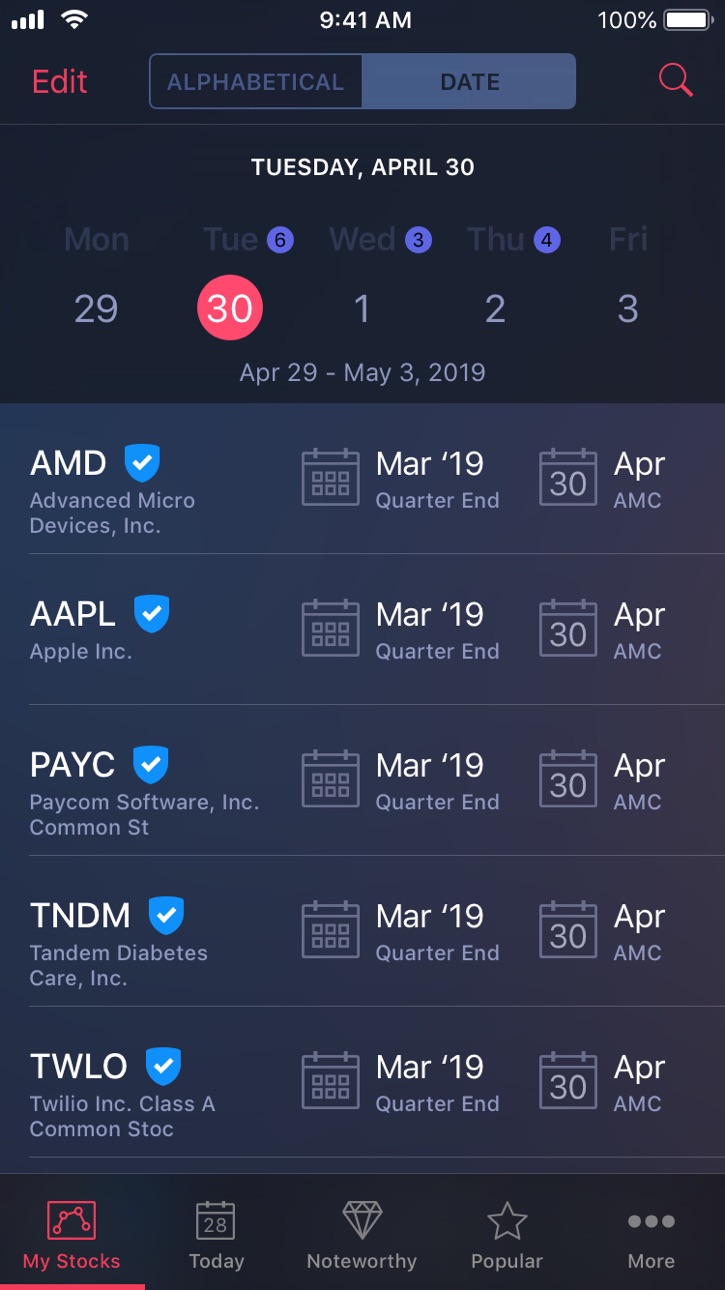
• Blue checkmarks indicate a company confirmed date.
• Time of day indicated with AMC and BMO (After Market Close, Before Market Open).
• View your watchlist either as a list or with a calendar view.
• Tapping on a stock will reveal additional data such as the earnings per share for the prior year-over-year quarter, the consensus estimate for the current quarter, and average surprise data.
• When viewing the additional data, swiping to the left will reveal a Quarterly EPS graph.
• Quickly look up the earnings date for any stock with the Quick Lookup. Tap the magnifying glass icon at the top right of each screen, type the symbol and instantly see the earnings date. Swipe up on this screen to reveal an "Add to Watchlist" button to quickly add the stock to your watchlist.
• The "Today" tab shows you which stocks are reporting on that day. Tap the filter button at the top left of this screen to specify market caps, and an option for only showing company "confirmed" dates only.
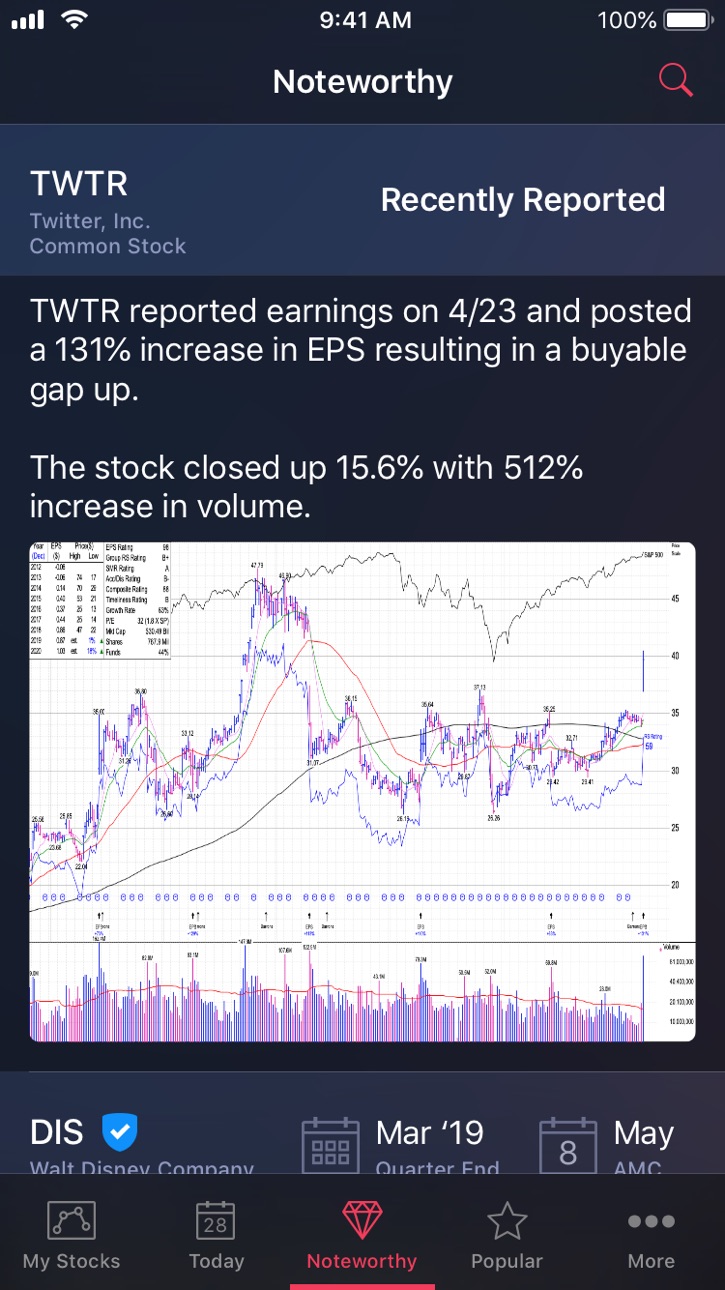
• The "Noteworthy" tab will highlight stocks of interest with annotated charts that are scheduled to report soon, or those stocks that had a noteworthy reaction to their earnings reports.
For feature requests or bug reports, please send an email to:
support@earningsseason.app
Full access to the custom personal watchlist, unlimited earnings lookups, and the today widget access require a subscription. The earnings data subscription is available on a monthly, quarterly or yearly basis. A monthly subscription is available for less than the average cost of an online broker commission, $2.99. The quarterly subscription is $8.99 and a yearly subscription is available for $29.99.
For professional traders, there are also "Pro" level subscriptions for those professional traders who are generously and willing enough to contribute more to the ongoing development of the app and new features. The Monthly Pro subscription is $11.99, while the Quarterly Pro subscription is $35.99 and the Yearly Pro subscription is $119.99.
Payment will be charged to your Apple ID account at the confirmation of purchase. Subscription automatically renews unless it is canceled at least 24 hours before the end of the current period. Your account will be charged for renewal within 24 hours prior to the end of the current period. You can manage and cancel your subscriptions by going to your account settings on the App Store after purchase.
Earnings Season's Privacy Policy:
http://earningsseason.app/privacy
Earnings Season's Terms of Use:
http://earningsseason.app/tou
In-App Purchases US pricing
Earnings Season Subscriptions Subscription
Monthly Subscription · Monthly$2.99
Quarterly Subscription · 3 months$8.99
Monthly Pro Subscription · Monthly$11.99
Yearly Subscription · Yearly$29.99
Quarterly Pro Subscription · 3 months$35.99
One-Time Purchases
$1 Donation$0.99
$5 Donation$4.99
$10 Donation$9.99
$300 Donation$299.99
$700 Donation$699.99
Capabilities
In-App Purchases
Accessibility
ipadiphonemacrealityDevicetvoswatch
Version history 15 versions
Build 866032995v2024.2.02024-05-18 18:33:35
• Fixed issues with market cap filter on the Today screen.
• Removed slider used for filtering by market cap and replaced with a segmented control that is much easier to use.
• Added the ability to add a stock to your watchlist from other lists in the app, including the Today screen, Noteworthy screen, Popular screen, etc. Simply swipe from the right to left on a row to reveal the additional actions. The add to watchlist action will include “ + “ icon.
• Fixed an issue when adding a stock to your watchlist from the quick lookup panel, the stock may not show up immediately in your watchlist, often requiring a “pull to refresh” or backgrounding the app.
Build 865191846v2024.1.02024-04-15 14:38:25
• Added support for Sign in with Apple.
• Added support for utilizing biometrics (Touch and Face ID) to avoid manually having to enter in user name and password.
• Various iOS version compatibility updates, and minor bug fixes.
Build 859136274v2023.1.02023-08-23 03:30:42
• Fixed crash that would occur when deleting a stock from your watchlist on the “My Stocks” screen, if the stock was the last stock in the section.
• Performed “under the hood” maintenance and other minor fixes.
Build 852154244v2022.4.02022-09-13 12:56:18
• Fixed an issue where incorrect data was being shown within the Average Surprise view and EPS Graph, as a result of changes made to the data feed by the data provider. The changes to the feed were made without the data provider informing developers using the feed of this change.
• Added the ability for a user to delete their account and user data.
Build 847603821v2022.3.02022-03-09 14:20:48
• Added the ability to add an earnings event date to your iPhone calendar. Swiping to the left on a stock row will reveal the the Calendar button (along with the Share button).
• Fixed an issue where the login state my not be saved properly resulting in needing to login again, despite already having been logged in.
Build 847317347v2022.2.02022-02-22 18:47:11
• Added the ability to delete stocks from your watchlist from the “My Stocks” screen, by swiping to the left on a stock row. You can also now share an earnings info graphic by swiping on any stock row in the app and tapping on the share button.
• Fixed a potential crash when adding a stock to your watchlist and then going right back and adding in a second (Thanks Michel).
• Fixed a crash when converting an anonymous account into a standard account with username (Thanks Sam).
• Fixed an issue where in some cases if the quarter end was December 31, the current year would display in the Prior Year Over Year label, instead of the previous year (Thanks Sam).
Build 846359295v2022.1.02022-01-05 04:05:52
• iOS 15 compatibility updates.
• Fixed minor user interface visual issues and glitches.
• Fixed end of year issues with the Calendar View and the Number of Stocks Reporting by Day View (as a reminder, rotate the phone to landscape orientation to access this view).
For the later, the graph was only displaying data for the current year; resulting in a few weeks worth of data during the month of December as an example. The graph has now been updated to always display a years worth of earnings dates.
• Various under the hood improvements to maintain compatibility with data partners, as well as some performance optimizations.
Build 841547482v2021.2.02021-04-19 14:07:09
• Updates to the Noteworthy Stocks screen.
Build 840094629v2021.1.02021-01-20 02:35:44
• Support for the latest device screen sizes.
• Fixed an issue where a user’s watchlist may not load if they are currently signed into a second device. Should the user already be logged into a second device, the app will now prompt the user to sign out and sign back in again.
Build 836913141v2020.22020-07-20 12:24:25
• Added a new "Lists" tab which contains curated and filtered lists of stocks for potential earnings plays.
Note: The “Popular” tab has been moved and can now be found by tapping on the “More” tab.
Build 835677236v2020.1.12020-04-24 17:37:45
• Fixed a glitch when sorting your watchlist by “Upcoming” may become out of order after a company reports their earnings, and next quarters earnings date gets displayed instead.
• Updated the Noteworthy screen so that recently updated stocks will be shown first in the list.
Build 835606835v2020.1.02020-04-19 18:49:23
• Added a new view that displays “Number of Stocks Reporting by Day”. A fun way to visualize when earnings season is starting to heat up, and when the bulk of earnings will be announced.
To access this view, simply rotate your iPhone into landscape orientation from any stock list screen. You may then tap on any day in the graph to see all the scheduled earnings announcements for that day.
• Updated the Today Widget so that more stocks will show in the compact view. Such as when you tap and hold on the app icon.
• The Today tab has been updated to include modes for “Today”, “Tomorrow”, and “Week”.
• The My Stocks tab has been updated to include an option for sorting your watchlist based on “Upcoming” earnings reports.
• Added a Settings option to display percentage change values on the quarterly EPS comparison graphs.
• Fixed a bug that could occur in which some stocks on a watchlist may not be displayed if the watchlist was very large.
• Minor tweaks and fixes for small visual issues on smaller sized iPhones.
Build 833389949v2019.2.12019-10-30 19:16:10
• Fixed search bar styling issues on some devices running iOS 13; which prevented the text from being readable.
Build 833122395v2019.2.02019-10-12 13:49:34
• iOS 13 Compatibility.
• Improved VoiceOver support for users who are blind or have low vision. More enhancements to VoiceOver support will continue to come in future versions.
• Added “Pull to Refresh” to each of the screens.
Build 820458924v1.02019-07-23 02:28:21
Price history by region
Currency
Show
Columns
Search
Availability 1 of 1 storefronts
| Region | Language | Price | Ratings | Avg | Version |
|---|---|---|---|---|---|
| US | en-US | Free | 52 | 4.2 | 2024.2.0 |
Change log 19 changes · US
✎
releaseNotes updated
• Fixed issues with market cap filter on the Today screen.
• Removed slider used for filtering by market cap and replaced with a segmented control that is much
✎
description updated
Crafted by a trader for traders, Earnings Season takes the scattered and tedious process of searching for reliable corporate earnings dates and turns it into an
✎
subtitle updated
Corporate Earnings Calendar
✎
name updated
Earnings Season
◆
Version 2024.2.0 released
• Fixed issues with market cap filter on the Today screen.
• Removed slider used for filtering by market cap and replaced with a segmented control that is much easier to use.
• Added the ability to add a stock to your watchlist from othe
◆
Version 2024.1.0 released
• Added support for Sign in with Apple.
• Added support for utilizing biometrics (Touch and Face ID) to avoid manually having to enter in user name and password.
• Various iOS version compatibility updates, and minor bug fixes.
◆
Version 2023.1.0 released
• Fixed crash that would occur when deleting a stock from your watchlist on the “My Stocks” screen, if the stock was the last stock in the section.
• Performed “under the hood” maintenance and other minor fixes.
◆
Version 2022.4.0 released
• Fixed an issue where incorrect data was being shown within the Average Surprise view and EPS Graph, as a result of changes made to the data feed by the data provider. The changes to the feed were made without the data provider informing d
◆
Version 2022.3.0 released
• Added the ability to add an earnings event date to your iPhone calendar. Swiping to the left on a stock row will reveal the the Calendar button (along with the Share button).
• Fixed an issue where the login state my not be saved properl
◆
Version 2022.2.0 released
• Added the ability to delete stocks from your watchlist from the “My Stocks” screen, by swiping to the left on a stock row. You can also now share an earnings info graphic by swiping on any stock row in the app and tapping on the share but
◆
Version 2022.1.0 released
• iOS 15 compatibility updates.
• Fixed minor user interface visual issues and glitches.
• Fixed end of year issues with the Calendar View and the Number of Stocks Reporting by Day View (as a reminder, rotate the phone to landscape orient
◆
Version 2021.2.0 released
• Updates to the Noteworthy Stocks screen.
◆
Version 2021.1.0 released
• Support for the latest device screen sizes.
• Fixed an issue where a user’s watchlist may not load if they are currently signed into a second device. Should the user already be logged into a second device, the app will now prompt the use
◆
Version 2020.2 released
• Added a new "Lists" tab which contains curated and filtered lists of stocks for potential earnings plays.
Note: The “Popular” tab has been moved and can now be found by tapping on the “More” tab.
◆
Version 2020.1.1 released
• Fixed a glitch when sorting your watchlist by “Upcoming” may become out of order after a company reports their earnings, and next quarters earnings date gets displayed instead.
• Updated the Noteworthy screen so that recently updated st
◆
Version 2020.1.0 released
• Added a new view that displays “Number of Stocks Reporting by Day”. A fun way to visualize when earnings season is starting to heat up, and when the bulk of earnings will be announced.
To access this view, simply rotate your iPhone into
◆
Version 2019.2.1 released
• Fixed search bar styling issues on some devices running iOS 13; which prevented the text from being readable.
◆
Version 2019.2.0 released
• iOS 13 Compatibility.
• Improved VoiceOver support for users who are blind or have low vision. More enhancements to VoiceOver support will continue to come in future versions.
• Added “Pull to Refresh” to each of the screens.
◆
Version 1.0 released