Home › Health & Fitness

 US
US
1 of 1 storefronts
Content in en-US
Content in en-US
Information
Preview 3 platforms


iPhone 8 images


iPad 4 images


Apple Watch 5 images


What’s New Version 4.0.7
HealthFace 4.0.7:
* Fixed an issue where widgets may show a value from the wrong time period
* Fixed an issue where the app may freeze when opening the Blood Pressure input
* Fixed an issue where tapping calculated values on Apple Watch may show an error
* Various bug fixes and stability improvements
HealthFace 4.0.6:
* Layout tweaks to circular complications
* Improvements to Digital Crown adjustments when inputting data
* Insulin "Latest" now correctly shows the most recent dose on the dashboard
* Equation editor allows editing a constant number
* Various bug fixes and stability improvements
HealthFace 4.0:
* All-new Apple Watch app — completely rebuilt from the ground up
* Native iPad support with a layout designed for the bigger screen
* Simplified complication positions make it easier to set up your watch face
* Mixed equations — combine different values and metrics in a single formula
* Redesigned data input screens with colorful keyboards and Digital Crown support
* Many performance and UI improvements
* Bug fixes and stability improvements
If you have any questions, comments or suggestions, please email support@healthface.app.
Description
HealthFace is the best app for tracking and recording Health data on iPhone, iPad, and Apple Watch.
* Record data quickly via the iPhone app or Apple Watch app
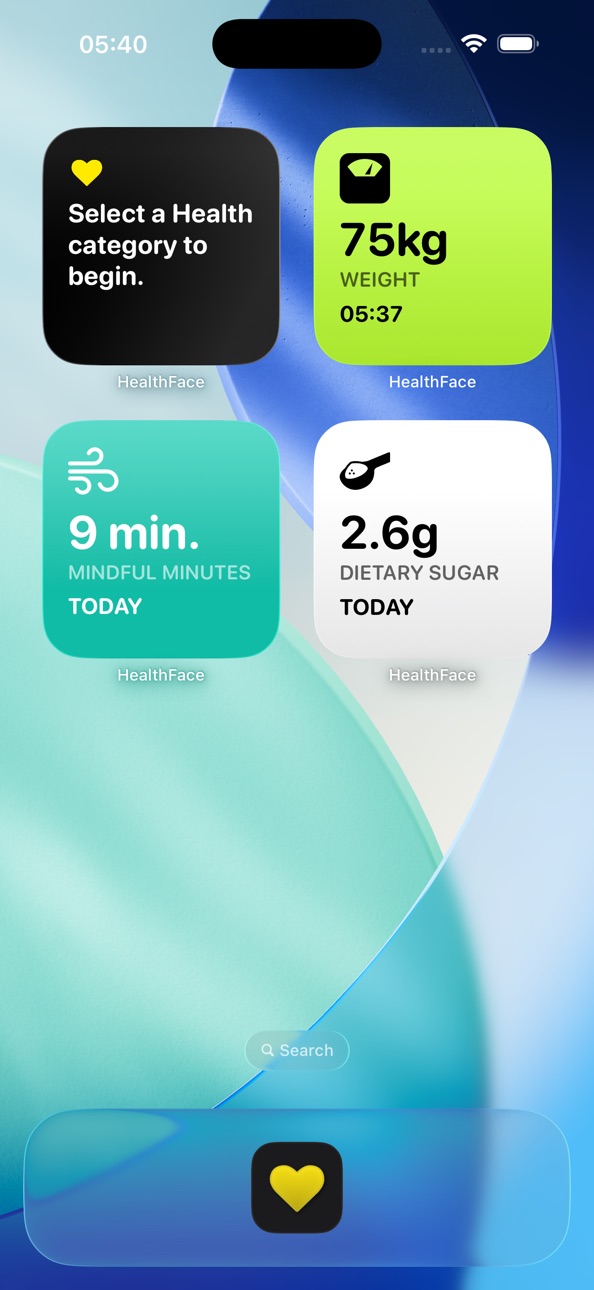
* Display your Health data in beautiful widgets on your Home Screen and Lock Screen
* Show any Health data on the Apple Watch clock face using complications
* Customize the types of data you want to record so you can input data in only a couple of taps
* Tap on any complication to quickly record data
* Supports all types of data from the Health app
* Create custom equations with mixed units — like calculating your daily protein target from your body weight
* Native iPad support with a layout designed for the bigger screen
For example:
* Quickly record your weight after standing on your scales in the morning
* If you're diabetic you can quickly record your blood glucose or insulin intake
* Quickly record your blood pressure
* Quickly record your caffeine, water or sugar intake, or any of the other dietary categories
HealthFace widgets let you see your health data at a glance — right on your Home Screen, Lock Screen, or Apple Watch face.
* Ability to display a goal (e.g. show your progress towards 10,000 steps)
* Real-time preview on your iPhone before saving to your Apple Watch
* 82 data types from the Health app
* Display multiple data types on the same watch face
* Hundreds of high quality icons to choose from
If you have any questions, suggestions or other feedback, please email support@healthface.app, or tweet us @HealthFaceApp.
ABOUT HEALTH DATA:
We take your privacy very seriously. Although HealthFace needs to access your Health data in order to function as advertised, your Health data remains on your iPhone and Apple Watch at all times and is never transmitted anywhere.
All data is accessed in full accordance with the iOS app review rules set by Apple. Please read our privacy policy at https://healthface.app/privacy.html for more information on our use of data. You can contact us at support@healthfaceapp.com if you have any questions or concerns.
Accessibility
ipadiphonemacrealityDevicetvoswatch
Version history 25 versions
Build 887880745v4.0.72026-07-06 22:20:46
HealthFace 4.0.7:
* Fixed an issue where widgets may show a value from the wrong time period
* Fixed an issue where the app may freeze when opening the Blood Pressure input
* Fixed an issue where tapping calculated values on Apple Watch may show an error
* Various bug fixes and stability improvements
HealthFace 4.0.6:
* Layout tweaks to circular complications
* Improvements to Digital Crown adjustments when inputting data
* Insulin "Latest" now correctly shows the most recent dose on the dashboard
* Equation editor allows editing a constant number
* Various bug fixes and stability improvements
HealthFace 4.0:
* All-new Apple Watch app — completely rebuilt from the ground up
* Native iPad support with a layout designed for the bigger screen
* Simplified complication positions make it easier to set up your watch face
* Mixed equations — combine different values and metrics in a single formula
* Redesigned data input screens with colorful keyboards and Digital Crown support
* Many performance and UI improvements
* Bug fixes and stability improvements
If you have any questions, comments or suggestions, please email support@healthface.app.
Build 884867180v4.0.62026-04-28 01:11:40
HealthFace 4.0.6:
* Layout tweaks to circular complications
* Improvements to Digital Crown adjustments when inputting data
* Insulin "Latest" now correctly shows the most recent dose on the dashboard
* Equation editor allows editing a constant number
* Various bug fixes and stability improvements
HealthFace 4.0:
* All-new Apple Watch app — completely rebuilt from the ground up
* Native iPad support with a layout designed for the bigger screen
* Simplified complication positions make it easier to set up your watch face
* Mixed equations — combine different values and metrics in a single formula
* Redesigned data input screens with colorful keyboards and Digital Crown support
* Many performance and UI improvements
* Bug fixes and stability improvements
If you have any questions, comments or suggestions, please email support@healthface.app.
Build 884738875v4.0.52026-04-21 20:47:34
HealthFace 4.0.5:
* Circular complication now has layout where you can select bezel text
* Fixed an issue with Time in Daylight calculation
* Corner complications now render text curved along the bezel
* Blood pressure input fits 3-digit values on smaller screens
* Watch dashboard shows the time of the most recent measurement
HealthFace 4.0:
* All-new Apple Watch app — completely rebuilt from the ground up
* Native iPad support with a layout designed for the bigger screen
* Simplified complication positions make it easier to set up your watch face
* Mixed equations — combine different values and metrics in a single formula
* Redesigned data input screens with colorful keyboards and Digital Crown support
* Many performance and UI improvements
* Bug fixes and stability improvements
If you have any questions, comments or suggestions, please email support@healthface.app.
Build 884703555v4.0.42026-04-20 21:55:04
HealthFace 4.0.4:
* Circular complication now has layout where you can select bezel text
* Fixed an issue with Time in Daylight calculation
* Corner complications now render text curved along the bezel
* Blood pressure input fits 3-digit values on smaller screens
* Watch dashboard shows the time of the most recent measurement
HealthFace 4.0:
* All-new Apple Watch app — completely rebuilt from the ground up
* Native iPad support with a layout designed for the bigger screen
* Simplified complication positions make it easier to set up your watch face
* Mixed equations — combine different values and metrics in a single formula
* Redesigned data input screens with colorful keyboards and Digital Crown support
* Many performance and UI improvements
* Bug fixes and stability improvements
If you have any questions, comments or suggestions, please email support@healthface.app.
Build 884479873v4.0.32026-04-14 20:13:43
HealthFace 4.0.3:
* Fixes digital clock complication
* Improvements to widget refreshing
HealthFace 4.0:
* All-new Apple Watch app — completely rebuilt from the ground up
* Native iPad support with a layout designed for the bigger screen
* Simplified complication positions make it easier to set up your watch face
* Mixed equations — combine different values and metrics in a single formula
* Redesigned data input screens with colorful keyboards and Digital Crown support
* Many performance and UI improvements
* Bug fixes and stability improvements
If you have any questions, comments or suggestions, please email support@healthface.app.
Build 884345731v4.0.22026-04-10 23:01:14
HealthFace 4.0.2:
* Fixed text truncation on circular and corner complications for large numbers and durations
* Fixed custom text not appearing on Apple Watch
* Tapping a complication with "Automatic" tap action now shows the dashboard
* Insulin Delivery complications can now have a target with progress ring
* Improved text sizing for text-only circular complications
HealthFace 4.0:
* All-new Apple Watch app — completely rebuilt from the ground up
* Native iPad support with a layout designed for the bigger screen
* Simplified complication positions make it easier to set up your watch face
* Mixed equations — combine different values and metrics in a single formula
* Redesigned data input screens with colorful keyboards and Digital Crown support
* Many performance and UI improvements
* Bug fixes and stability improvements
If you have any questions, comments or suggestions, please email support@healthface.app.
Build 884250121v4.0.12026-04-08 02:06:15
HealthFace 4.0:
* All-new Apple Watch app — completely rebuilt from the ground up
* Native iPad support with a layout designed for the bigger screen
* Simplified complication positions make it easier to set up your watch face
* Mixed equations — combine different values and metrics in a single formula
* Redesigned data input screens with colorful keyboards and Digital Crown support
* Many performance and UI improvements
* Bug fixes and stability improvements
If you have any questions, comments or suggestions, please email support@healthface.app.
Build 883738742v4.0.02026-04-06 21:42:35
HealthFace 4.0:
* All-new Apple Watch app — completely rebuilt from the ground up
* Native iPad support with a layout designed for the bigger screen
* Simplified complication positions make it easier to set up your watch face
* Mixed equations — combine different values and metrics in a single formula
* Redesigned data input screens with colorful keyboards and Digital Crown support
* Many performance and UI improvements
* Bug fixes and stability improvements
If you have any questions, comments or suggestions, please email support@healthface.app.
Build 883565525v3.5.12026-03-20 23:34:46
HealthFace 3.5.1:
* Fixed calculated energy values (Total Energy Burned, Energy Deficit) showing incorrect values due to a unit conversion error
* Bug fixes and improvements
HealthFace 3.5.0:
* Equations now support multiply and divide operators
* Create custom formulas with mixed units (e.g. Body Weight × 1.2 = Protein Target)
* Add numeric constants to equations
* Choose the input unit for each term and the output unit for results
* Fixed exponent operator calculation order
* Bug fixes and improvements
If you have any questions, comments or suggestions, please email support@healthface.app.
Build 883410600v3.5.02026-03-18 23:58:36
HealthFace 3.5.0:
* Equations now support multiply and divide operators
* Create custom formulas with mixed units (e.g. Body Weight × 1.2 = Protein Target)
* Add numeric constants to equations
* Choose the input unit for each term and the output unit for results
* Fixed exponent operator calculation order
* Bug fixes and improvements
If you have any questions, comments or suggestions, please email support@healthface.app.
Build 883004530v3.4.12026-03-04 23:38:02
HealthFace 3.4.1:
* Bug fixes and improvements
If you have any questions, comments or suggestions, please email support@healthface.app.
Build 882317110v3.4.02026-02-11 01:11:09
HealthFace 3.4.0:
* Fixed several crashes and improved overall stability
* Fixed widgets sometimes showing 0 or stale data
* Fixed health data statistics returning incorrect values
* Fixed complication and widget data not refreshing correctly
* Fixed health data not updating when samples are deleted
* Improved layout for long translations on Apple Watch
* Added missing icons to the icon picker
* Various bug fixes and performance improvements
If you have any questions, comments or suggestions, please email support@healthface.app.
Build 879953011v3.3.32025-11-24 10:24:13
Version 3.3.3:
* Added Time in Daylight
If you have any questions, comments or suggestions, please email support@healthface.app.
Build 879539239v3.3.22025-11-08 08:25:58
Version 3.3.0:
* Update for newer devices
If you have any questions, comments or suggestions, please email support@healthface.app.
Build 879379943v3.3.12025-11-04 23:26:30
Version 3.3.0:
* Update for newer devices
If you have any questions, comments or suggestions, please email support@healthface.app.
Build 879350488v3.3.02025-10-31 01:02:38
Version 3.3.0:
* Update for newer devices
If you have any questions, comments or suggestions, please email support@healthface.app.
Build 852955732v3.2.12022-10-26 01:34:28
Version 3.2.1:
* Added "Wrist Temperature"
* Updated faces and positions to reflect old Modular face being replaced by Infograph Modular
If you have any questions, comments or suggestions, please email support@healthface.app.
Build 852452802v3.2.02022-09-28 11:03:30
Version 3.2.0:
* Add Lock Screen widgets
* Add support for new new devices
* Add additional watch faces to complication management area.
If you have any questions, comments or suggestions, please email support@healthface.app.
Build 848107557v3.1.32022-04-06 01:09:12
Version 3.1.3:
* Minor UI tweaks and display fixes
Version 3.1:
* Added support for iOS 15 and watchOS 8
* Added "number of alcoholic drinks"
* Added "six minute walk distance"
* Added average/smallest/largest options to body weight on dashboard
* Fixed issue where "number of workouts" didn't correctly filter by workout type
If you have any questions, comments or suggestions, please email support@healthface.app.
Build 844575651v3.1.22021-10-09 22:00:21
This update from Apple will improve the functionality of this app. No new features are included.
Version 3.1.2:
* Fixes an issue that caused previously saved data not to appear.
Version 3.1:
* Added support for iOS 15 and watchOS 8
* Added "number of alcoholic drinks"
* Added "six minute walk distance"
* Added average/smallest/largest options to body weight on dashboard
* Fixed issue where "number of workouts" didn't correctly filter by workout type
If you have any questions, comments or suggestions, please email support@healthface.app.
Build 844396284v3.1.02021-10-06 02:32:12
Version 3.1:
* Added support for iOS 15 and watchOS 8
* Added "number of alcoholic drinks"
* Added "six minute walk distance"
* Added average/smallest/largest options to body weight on dashboard
* Fixed issue where "number of workouts" didn't correctly filter by workout type
If you have any questions, comments or suggestions, please email support@healthface.app.
Build 844509205v3.1.12021-10-06 20:36:15
Version 3.1.1:
* Fixes an issue that caused previously saved data not to appear.
Version 3.1:
* Added support for iOS 15 and watchOS 8
* Added "number of alcoholic drinks"
* Added "six minute walk distance"
* Added average/smallest/largest options to body weight on dashboard
* Fixed issue where "number of workouts" didn't correctly filter by workout type
If you have any questions, comments or suggestions, please email support@healthface.app.
Build 839694890v3.0.42020-12-17 22:32:40
Version 3.0.4:
* Add the ability to browse by watch face, in addition to just complication position.
Version 3.0:
Thanks for using HealthFace! This is a significant update that adds support for iOS 14 and watchOS 7, including:
1. Dashboard
* The "Record" tab has been renamed to dashboard
* Each item on the dashboard looks the same as the new iOS 14 widget
* The tabs for configuring the Apple Watch / Today Extension dashboard have been removed. These locations now mirror the main dashboard
2. Widget
* There is now a new widget that can show a single item from the dashboard.
* After adding the widget, tap it while in jiggle mode in order to choose which health item to displayed
3. Health
* Added the ability to record and view symptoms.
* There are 38 different symptoms that you can record
4. Apple Watch
* You can now configure multiple versions of each complication position
* Because of this, we've significantly changed the configuration workflow
* Now, you choose the position, then can configure 1 or more complications that can appear There
* Each complication you create is assigned a 4 character code, used to help you select the right configuration when adding it to your Apple Watch.
If you have any questions, comments or suggestions, please email support@healthface.app.
Build 839447002v3.0.32020-12-01 19:03:31
Version 3.0.3:
* Fixed issue with app launching on watchOS 4
* Made main app interface slightly more compact on Apple Watch
* Changing complication management to ensure that HealthFace always appears as an option for any complication position.
Version 3.0:
Thanks for using HealthFace! This is a significant update that adds support for iOS 14 and watchOS 7, including:
1. Dashboard
* The "Record" tab has been renamed to dashboard
* Each item on the dashboard looks the same as the new iOS 14 widget
* The tabs for configuring the Apple Watch / Today Extension dashboard have been removed. These locations now mirror the main dashboard
2. Widget
* There is now a new widget that can show a single item from the dashboard.
* After adding the widget, tap it while in jiggle mode in order to choose which health item to displayed
3. Health
* Added the ability to record and view symptoms.
* There are 38 different symptoms that you can record
4. Apple Watch
* You can now configure multiple versions of each complication position
* Because of this, we've significantly changed the configuration workflow
* Now, you choose the position, then can configure 1 or more complications that can appear There
* Each complication you create is assigned a 4 character code, used to help you select the right configuration when adding it to your Apple Watch.
If you have any questions, comments or suggestions, please email support@healthface.app.
Build 838736474v3.0.22020-11-28 02:20:23
Version 3.0.3:
* Fix issue with calculating resting energy, including energy deficit
* Improved instruction about how to configuration complications
* Made complication data transfer more reliable
Version 3.0:
Thanks for using HealthFace! This is a significant update that adds support for iOS 14 and watchOS 7, including:
1. Dashboard
* The "Record" tab has been renamed to dashboard
* Each item on the dashboard looks the same as the new iOS 14 widget
* The tabs for configuring the Apple Watch / Today Extension dashboard have been removed. These locations now mirror the main dashboard
2. Widget
* There is now a new widget that can show a single item from the dashboard.
* After adding the widget, tap it while in jiggle mode in order to choose which health item to displayed
3. Health
* Added the ability to record and view symptoms.
* There are 38 different symptoms that you can record
4. Apple Watch
* You can now configure multiple versions of each complication position
* Because of this, we've significantly changed the configuration workflow
* Now, you choose the position, then can configure 1 or more complications that can appear There
* Each complication you create is assigned a 4 character code, used to help you select the right configuration when adding it to your Apple Watch.
If you have any questions, comments or suggestions, please email support@healthface.app.
Price history by region
Currency
Show
Columns
Search
Availability 1 of 1 storefronts
| Region | Language | Price | Ratings | Avg | Version |
|---|---|---|---|---|---|
| US | en-US | USD 1.99 | 539 | 4.4 | 4.0.7 |
Change log 29 changes · US
✎
releaseNotes updated
HealthFace 4.0.7:
* Fixed an issue where widgets may show a value from the wrong time period
* Fixed an issue where the app may freeze when opening the Blood P
✎
description updated
HealthFace is the best app for tracking and recording Health data on iPhone, iPad, and Apple Watch.
* Record data quickly via the iPhone app or Apple Watch app
✎
subtitle updated
Track & Display Health Data
✎
name updated
HealthFace
◆
Version 4.0.7 released
HealthFace 4.0.7:
* Fixed an issue where widgets may show a value from the wrong time period
* Fixed an issue where the app may freeze when opening the Blood Pressure input
* Fixed an issue where tapping calculated values on Apple Watch ma
◆
Version 4.0.6 released
HealthFace 4.0.6:
* Layout tweaks to circular complications
* Improvements to Digital Crown adjustments when inputting data
* Insulin "Latest" now correctly shows the most recent dose on the dashboard
* Equation editor allows editing a con
◆
Version 4.0.5 released
HealthFace 4.0.5:
* Circular complication now has layout where you can select bezel text
* Fixed an issue with Time in Daylight calculation
* Corner complications now render text curved along the bezel
* Blood pressure input fits 3-digit v
◆
Version 4.0.4 released
HealthFace 4.0.4:
* Circular complication now has layout where you can select bezel text
* Fixed an issue with Time in Daylight calculation
* Corner complications now render text curved along the bezel
* Blood pressure input fits 3-digit v
◆
Version 4.0.3 released
HealthFace 4.0.3:
* Fixes digital clock complication
* Improvements to widget refreshing
HealthFace 4.0:
* All-new Apple Watch app — completely rebuilt from the ground up
* Native iPad support with a layout designed for the bigger screen
◆
Version 4.0.2 released
HealthFace 4.0.2:
* Fixed text truncation on circular and corner complications for large numbers and durations
* Fixed custom text not appearing on Apple Watch
* Tapping a complication with "Automatic" tap action now shows the dashboard
*
◆
Version 4.0.1 released
HealthFace 4.0:
* All-new Apple Watch app — completely rebuilt from the ground up
* Native iPad support with a layout designed for the bigger screen
* Simplified complication positions make it easier to set up your watch face
* Mixed equat
◆
Version 4.0.0 released
HealthFace 4.0:
* All-new Apple Watch app — completely rebuilt from the ground up
* Native iPad support with a layout designed for the bigger screen
* Simplified complication positions make it easier to set up your watch face
* Mixed equat
◆
Version 3.5.1 released
HealthFace 3.5.1:
* Fixed calculated energy values (Total Energy Burned, Energy Deficit) showing incorrect values due to a unit conversion error
* Bug fixes and improvements
HealthFace 3.5.0:
* Equations now support multiply and divide o
◆
Version 3.5.0 released
HealthFace 3.5.0:
* Equations now support multiply and divide operators
* Create custom formulas with mixed units (e.g. Body Weight × 1.2 = Protein Target)
* Add numeric constants to equations
* Choose the input unit for each term and the
◆
Version 3.4.1 released
HealthFace 3.4.1:
* Bug fixes and improvements
If you have any questions, comments or suggestions, please email support@healthface.app.
◆
Version 3.4.0 released
HealthFace 3.4.0:
* Fixed several crashes and improved overall stability
* Fixed widgets sometimes showing 0 or stale data
* Fixed health data statistics returning incorrect values
* Fixed complication and widget data not refreshing correc
◆
Version 3.3.3 released
Version 3.3.3:
* Added Time in Daylight
If you have any questions, comments or suggestions, please email support@healthface.app.
◆
Version 3.3.2 released
Version 3.3.0:
* Update for newer devices
If you have any questions, comments or suggestions, please email support@healthface.app.
◆
Version 3.3.1 released
Version 3.3.0:
* Update for newer devices
If you have any questions, comments or suggestions, please email support@healthface.app.
◆
Version 3.3.0 released
Version 3.3.0:
* Update for newer devices
If you have any questions, comments or suggestions, please email support@healthface.app.
◆
Version 3.2.1 released
Version 3.2.1:
* Added "Wrist Temperature"
* Updated faces and positions to reflect old Modular face being replaced by Infograph Modular
If you have any questions, comments or suggestions, please email support@healthface.app.
◆
Version 3.2.0 released
Version 3.2.0:
* Add Lock Screen widgets
* Add support for new new devices
* Add additional watch faces to complication management area.
If you have any questions, comments or suggestions, please email support@healthface.app.
◆
Version 3.1.3 released
Version 3.1.3:
* Minor UI tweaks and display fixes
Version 3.1:
* Added support for iOS 15 and watchOS 8
* Added "number of alcoholic drinks"
* Added "six minute walk distance"
* Added average/smallest/largest options to body weight on d
◆
Version 3.1.2 released
This update from Apple will improve the functionality of this app. No new features are included.
Version 3.1.2:
* Fixes an issue that caused previously saved data not to appear.
Version 3.1:
* Added support for iOS 15 and watchOS 8
* Ad
◆
Version 3.1.1 released
Version 3.1.1:
* Fixes an issue that caused previously saved data not to appear.
Version 3.1:
* Added support for iOS 15 and watchOS 8
* Added "number of alcoholic drinks"
* Added "six minute walk distance"
* Added average/smallest/large
◆
Version 3.1.0 released
Version 3.1:
* Added support for iOS 15 and watchOS 8
* Added "number of alcoholic drinks"
* Added "six minute walk distance"
* Added average/smallest/largest options to body weight on dashboard
* Fixed issue where "number of workouts" did
◆
Version 3.0.4 released
Version 3.0.4:
* Add the ability to browse by watch face, in addition to just complication position.
Version 3.0:
Thanks for using HealthFace! This is a significant update that adds support for iOS 14 and watchOS 7, including:
1. Dashbo
◆
Version 3.0.3 released
Version 3.0.3:
* Fixed issue with app launching on watchOS 4
* Made main app interface slightly more compact on Apple Watch
* Changing complication management to ensure that HealthFace always appears as an option for any complication posit
◆
Version 3.0.2 released
Version 3.0.3:
* Fix issue with calculating resting energy, including energy deficit
* Improved instruction about how to configuration complications
* Made complication data transfer more reliable
Version 3.0:
Thanks for using HealthFace