Home › Utilities

 US
US
1 of 1 storefronts
Content in en-US
Content in en-US
Information
Preview 2 platforms
iPhone 8 images


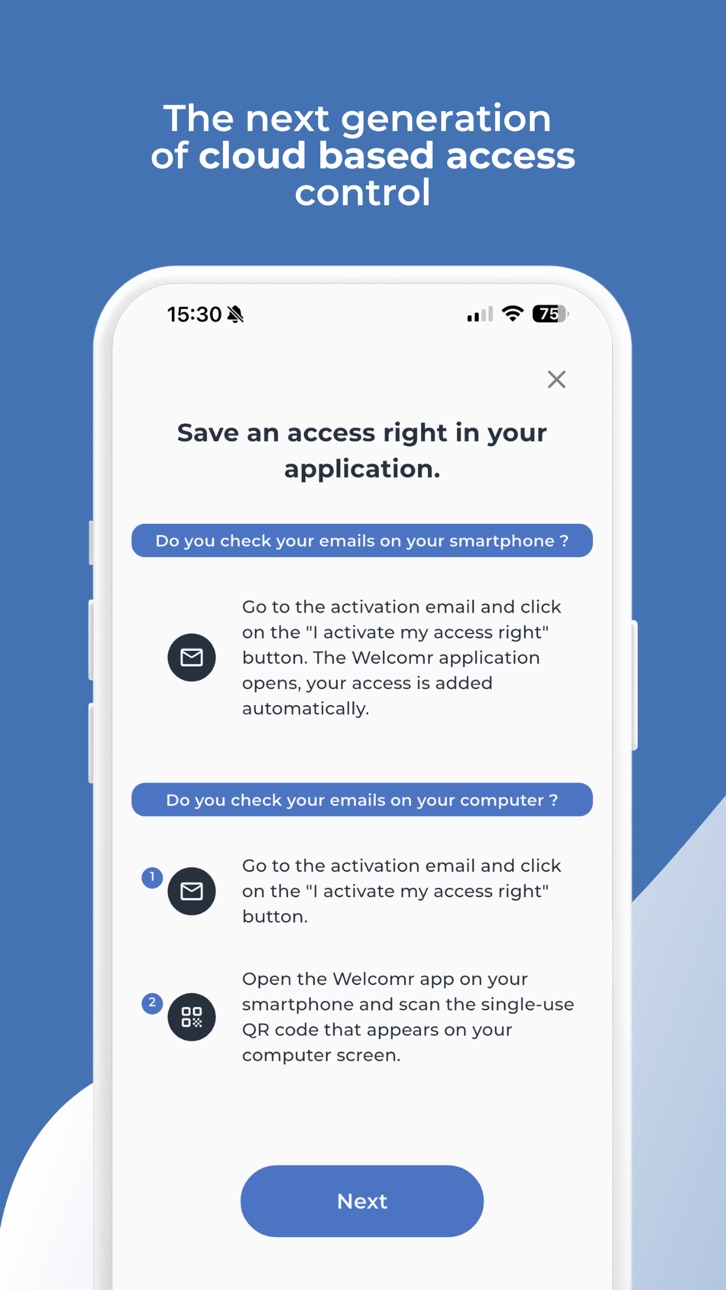
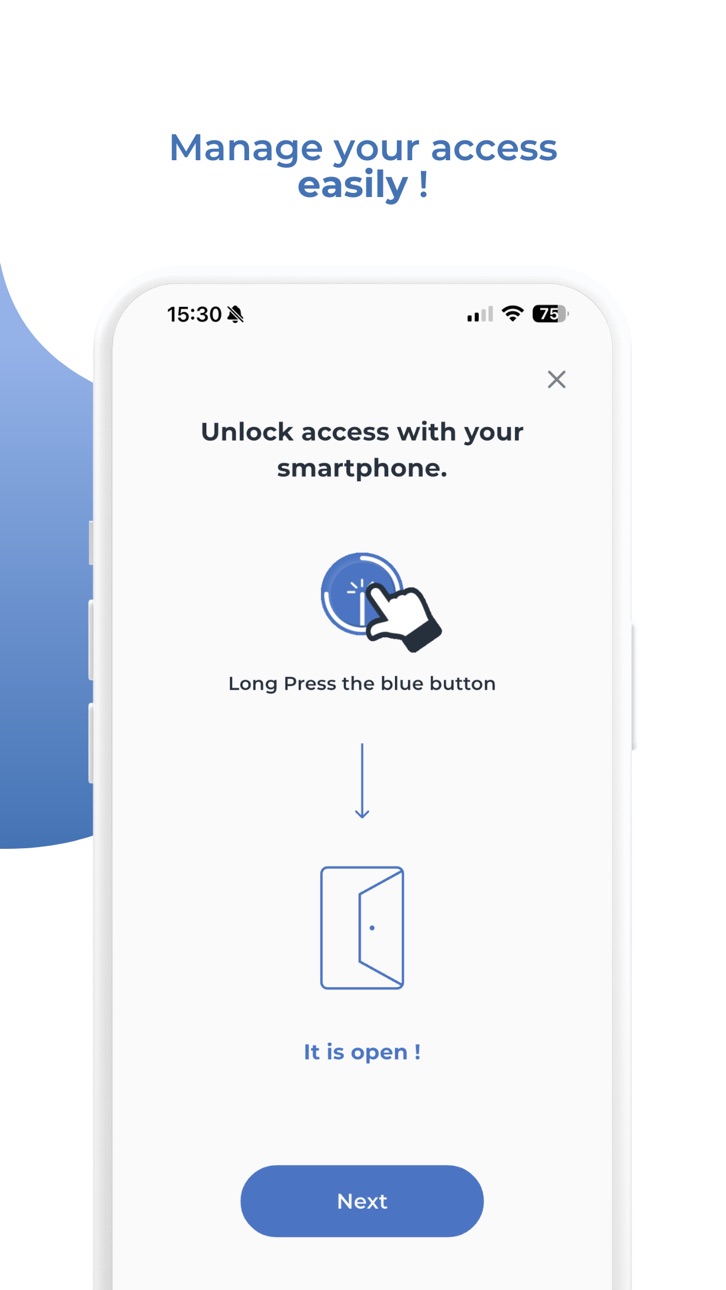

iPad 3 images


What’s New Version 2.0.22
1.Added a new page in tutorial dialog to present how to pull down the access list to sync data when the app is launched for the first time.
2.Optimised error messages.
3.Updated the support method.
Direct contact with the Welcomr Support team from the app is no longer available. If you encounter any issues, please contact your site administrator.
Description
Welcomr is the first centralised access control solution adapted to the flex office which meets the expectations of buildings that are more flexible in their connected and secure uses.
Welcomr is the universal mobile solution that centralises all of your access: reservations, appointments or other rentals in a single application!
You may not know it, but with Welcomr, your smartphone becomes your most secure accessory.
Find all your secure access and practical information (access plan, programs, meeting or reservation details, etc.) concerning your travels and arrive with peace of mind.
Just press the button… and the door opens !
---
This application requires the installation of a Welcomr controller and a personal access authorisation.
Please contact us at contact@welcomr.com for more.
---
Welcomr is made by Kazeko.
Accessibility
ipadiphonemacrealityDevicetvoswatch
Version history 25 versions
Build 881883002v2.0.222026-07-08 07:35:13
1.Added a new page in tutorial dialog to present how to pull down the access list to sync data when the app is launched for the first time.
2.Optimised error messages.
3.Updated the support method.
Direct contact with the Welcomr Support team from the app is no longer available. If you encounter any issues, please contact your site administrator.
Build 881281892v2.0.212026-01-12 09:10:23
1. Raised the minimum supported iOS version to iOS 13.0.
2. Fixed a user interface issue on the list of around Bluetooth devices.
3. Added a new page in tutorial dialog to present how to pull down the access list to sync data when the app is launched for the first time.
Build 878222900v2.0.202025-10-15 12:53:07
1. Added device information support for iPhone 17 series.
2. Added a confirmation dialog when closing the Security Center web view.
3. Added display of an error message when data synchronisation failed.
4. Optimised the access unlocking process.
Build 876030760v2.0.192025-08-04 13:45:52
1. Adaptation of the UI to settings of different font sizes and display.
2. Added a guide to explain how to open the access details screen when first installing the application.
Build 874520591v2.0.182025-06-23 14:02:43
1. Supports custom geographic range thresholds for non-remote access.
2. In the details screen of an access, by pressing the map icon of the address in the ‘site address' section, the map application opens with the site’s address.
3. Added a guide to explain how to open the access details screen when first installing the application.
4. Added a status check for “Bluetooth permission” in the service status dialog.
5. Added vibration for geo-restricted access errors.
6. Changed the map button icon in Access Details screen.
Build 873752452v2.0.172025-05-05 09:16:31
* Added a icon button in the Security-Center Web page to open an external browser with admin session.
* Added an option in the side menu to activate opening the NFC reader on app launch.
* Added an icon to signifie “time restriction” on the Access Detail screen.
* Added some FAQs about errors with geo-restricted network unlock and opening external browser for admin login.
Build 873433317v2.0.162025-04-02 13:41:10
* Fixed reading deep link of webpage button where to retrieve access.
* Integrated a feature to unlock access via network in the absence of remote access with location restriction.
* Accelerated the NFC tag reading and unlocking process by tapping on the NFC button in the application.
* Optimised the content of some error messages.
* Added access rights unlock method icons in its details page.
Build 872784276v2.0.152025-03-11 06:56:05
1. Fixed an issue where some users' appointments could not be unlocked via Bluetooth.
2. Added an additional message if a login fails due to invalid admin access.
Build 872101066v2.0.142025-02-25 13:11:43
* Handled the message displayed by the app when a server error occurs.
* Modified the message displayed when access data is invalid and when users scan the reader's QR code.
* Improved the display of the address content of the site on the access details page.
Build 872006100v2.0.132025-01-29 08:54:51
For users who upgraded from version 2.0.12:
* Corrected an issue with the background data sync function.
For users who upgraded from older versions:
* Added a new feature to be able to remove configuration access.
* Fixed a bug that caused the link to be invalid when opening the links under poor network conditions.
* Resolved an issue where incorrect address data could cause the app to crash.
* Optimised the content on the Discover pages, explaining how to add accesses and unlock them.
* Added a dialog to explain how to unlock access for new users.
* Optimised the UI to improve user experience.
Build 870837020v2.0.122025-01-22 09:00:47
* Added a new feature to be able to remove configuration access.
* Fixed a bug that caused the link to be invalid when opening the links under poor network conditions.
* Resolved an issue where incorrect address data could cause the app to crash.
* Optimised the content on the Discover pages, explaining how to add accesses and unlock them.
* Added a dialog to explain how to unlock access for new users.
* Optimised the UI to improve user experience.
Build 870664261v2.0.112024-11-29 13:33:08
* Improved and detailed the error message displayed when unlocking via Bluetooth and then remote unlocking both fail.
* Added team name on Security-Center login screen to distinguish between different administrator accounts.
* Corrected an UI problem after deleting an administrator account.
* Added a reminder to restart the app after creating a shortcut.
Build 870399577v2.0.102024-11-14 10:55:26
* Resolved an issue with unlocking door handles that some users were encountering.
Build 869412644v2.0.92024-10-30 14:51:25
* Fixed the bug of Site section arrow.
* Added a special icon to indicate that the user has not authorised remote access. By pressing this icon, an information message will be displayed.
* Changed the moment to show Help Button. If user has tapped on the help button, it will no more display.
* Fixed minor bugs to enhance user experience.
Build 867941274v2.0.82024-08-27 08:14:23
* Added the function to synchronise data in the background.
* Optimised the display of search results on the FAQ page.
* Optimised some error codes and error messages.
* Removed the method of checking whether administrator access is valid by creating a session.
Build 867582664v2.0.72024-07-19 09:03:10
1. Optimised some common error messages while unlocking the access to help users to understand and help the support analyse the error reason.
2. Improved the method of checking network connection while starting the app to prevent slow application startup due to poor network connection.
3. Optimised the disappearance behavior of the message box that requires the app to synchronise data after synchronisation.
Build 867116615v2.0.62024-07-02 12:39:58
1.Optimised the restrictions on permanent access.
2.Optimised the restrictions on using remote opening after a Bluetooth failure if access can be unlocked remotely.
3.Optimised result screen display speed by using deep links in emails and scanning QR codes with the camera.
Build 866975942v2.0.52024-06-26 08:48:47
1. Optimized data recovery method when data files are not accessible.
2. Corrected an issue that could cause access to not display when there is no network connection.
3. Changed the UI display when the permanent accesses are not synchronised due to no network connection.
4. Added a function to scan the QR code to log in to the Security Center through the camera.
Build 866531130v2.0.42024-06-08 09:21:05
1.Resolved an issue that prevented the app from opening for certain users.
2.Optimisation of the user interface for permanent access without authorisation and only the QR code or PIN code. The QR code or PIN code will be displayed on the detailed access page.
3.Optimisation of the opening mode of the map application by tapping on the map button on the access detail page.
Build 866361529v2.0.32024-06-04 09:20:51
1. Optimised data saving method to avoid data loss.
2. Optimised the process of handling unlock failure of maintenance type access.
3. Optimised the unlock UI for maintenance-type access.
4. Optimised the error message displayed when access cannot be unlocked by Bluetooth or remotely.
5. Incorporating more log details into the email to make error analysis easier.
Build 865657404v2.0.22024-05-15 12:53:23
* Optimisation of UI: the Site section can be expanded or closed by tapping on the entire row, fixed the issue with the direction of the site arrow icon.
* Fixed the bug that caused the app to jump directly to the welcome page after detecting that some accesses were deleted after opening the app.
* After app resume, the data is statically updated. If the data does not change, the user interface will not be refreshed.
Build 865164336v2.0.12024-04-13 11:46:34
This new version of the Welcomr app on iOS presents a brand new and customizable user interface. Users will discover a new way to unlock their access, a new menu, the possibility of marking access as favorites and even the possibility of creating a shortcut by access to activate voice control.
If you encounter issues or want to suggest improvements, contact us at support@welcomr.com
---
Resolved an issue when opening apps via external links.
Build 865105362v2.0.02024-04-11 13:31:35
This new version of the Welcomr app on iOS presents a brand new and customizable user interface. Users will discover a new way to unlock their access, a new menu, the possibility of marking access as favorites and even the possibility of creating a shortcut by access to activate voice control.
If you encounter issues or want to suggest improvements, contact us at support@welcomr.com
Build 840123486v1.8.12021-01-20 22:42:47
A search field on top of the access list let you filter the door or location you need to access.
If you use a QR or PIN code, you can now see it in the invitation view.
Whether because you encounter issues or want to suggest improvements, contact us at support@welcomr.com
Build 838068403v1.82020-10-04 20:08:28
You can now open compatible doors remotely !
No pricing data captured yet — comparisons appear once the app has paid storefronts or in-app purchases.
Availability 1 of 1 storefronts
| Region | Language | Price | Ratings | Avg | Version |
|---|---|---|---|---|---|
| US | en-US | Free | 3 | 5.0 | 2.0.22 |
Change log 29 changes · US
✎
releaseNotes updated
1.Added a new page in tutorial dialog to present how to pull down the access list to sync data when the app is launched for the first time.
2.Optimised error me
✎
description updated
Welcomr is the first centralised access control solution adapted to the flex office which meets the expectations of buildings that are more flexible in their co
✎
subtitle updated
Security for Smart Building
✎
name updated
Welcomr
◆
Version 2.0.22 released
1.Added a new page in tutorial dialog to present how to pull down the access list to sync data when the app is launched for the first time.
2.Optimised error messages.
3.Updated the support method.
Direct contact with the Welcomr Support t
◆
Version 2.0.21 released
1. Raised the minimum supported iOS version to iOS 13.0.
2. Fixed a user interface issue on the list of around Bluetooth devices.
3. Added a new page in tutorial dialog to present how to pull down the access list to sync data when the app i
◆
Version 2.0.20 released
1. Added device information support for iPhone 17 series.
2. Added a confirmation dialog when closing the Security Center web view.
3. Added display of an error message when data synchronisation failed.
4. Optimised the access unlocking pro
◆
Version 2.0.19 released
1. Adaptation of the UI to settings of different font sizes and display.
2. Added a guide to explain how to open the access details screen when first installing the application.
◆
Version 2.0.18 released
1. Supports custom geographic range thresholds for non-remote access.
2. In the details screen of an access, by pressing the map icon of the address in the ‘site address' section, the map application opens with the site’s address.
3. Added
◆
Version 2.0.17 released
* Added a icon button in the Security-Center Web page to open an external browser with admin session.
* Added an option in the side menu to activate opening the NFC reader on app launch.
* Added an icon to signifie “time restriction” on the
◆
Version 2.0.16 released
* Fixed reading deep link of webpage button where to retrieve access.
* Integrated a feature to unlock access via network in the absence of remote access with location restriction.
* Accelerated the NFC tag reading and unlocking process by
◆
Version 2.0.15 released
1. Fixed an issue where some users' appointments could not be unlocked via Bluetooth.
2. Added an additional message if a login fails due to invalid admin access.
◆
Version 2.0.14 released
* Handled the message displayed by the app when a server error occurs.
* Modified the message displayed when access data is invalid and when users scan the reader's QR code.
* Improved the display of the address content of the site on the a
◆
Version 2.0.13 released
For users who upgraded from version 2.0.12:
* Corrected an issue with the background data sync function.
For users who upgraded from older versions:
* Added a new feature to be able to remove configuration access.
* Fixed a bug that caused
◆
Version 2.0.12 released
* Added a new feature to be able to remove configuration access.
* Fixed a bug that caused the link to be invalid when opening the links under poor network conditions.
* Resolved an issue where incorrect address data could cause the app to
◆
Version 2.0.11 released
* Improved and detailed the error message displayed when unlocking via Bluetooth and then remote unlocking both fail.
* Added team name on Security-Center login screen to distinguish between different administrator accounts.
* Corrected an
◆
Version 2.0.10 released
* Resolved an issue with unlocking door handles that some users were encountering.
◆
Version 2.0.9 released
* Fixed the bug of Site section arrow.
* Added a special icon to indicate that the user has not authorised remote access. By pressing this icon, an information message will be displayed.
* Changed the moment to show Help Button. If user has
◆
Version 2.0.8 released
* Added the function to synchronise data in the background.
* Optimised the display of search results on the FAQ page.
* Optimised some error codes and error messages.
* Removed the method of checking whether administrator access is valid b
◆
Version 2.0.7 released
1. Optimised some common error messages while unlocking the access to help users to understand and help the support analyse the error reason.
2. Improved the method of checking network connection while starting the app to prevent slow appli
◆
Version 2.0.6 released
1.Optimised the restrictions on permanent access.
2.Optimised the restrictions on using remote opening after a Bluetooth failure if access can be unlocked remotely.
3.Optimised result screen display speed by using deep links in emails and s
◆
Version 2.0.5 released
1. Optimized data recovery method when data files are not accessible.
2. Corrected an issue that could cause access to not display when there is no network connection.
3. Changed the UI display when the permanent accesses are not synchronis
◆
Version 2.0.4 released
1.Resolved an issue that prevented the app from opening for certain users.
2.Optimisation of the user interface for permanent access without authorisation and only the QR code or PIN code. The QR code or PIN code will be displayed on the de
◆
Version 2.0.3 released
1. Optimised data saving method to avoid data loss.
2. Optimised the process of handling unlock failure of maintenance type access.
3. Optimised the unlock UI for maintenance-type access.
4. Optimised the error message displayed when access
◆
Version 2.0.2 released
* Optimisation of UI: the Site section can be expanded or closed by tapping on the entire row, fixed the issue with the direction of the site arrow icon.
* Fixed the bug that caused the app to jump directly to the welcome page after detecti
◆
Version 2.0.1 released
This new version of the Welcomr app on iOS presents a brand new and customizable user interface. Users will discover a new way to unlock their access, a new menu, the possibility of marking access as favorites and even the possibility of cr
◆
Version 2.0.0 released
This new version of the Welcomr app on iOS presents a brand new and customizable user interface. Users will discover a new way to unlock their access, a new menu, the possibility of marking access as favorites and even the possibility of cr
◆
Version 1.8.1 released
A search field on top of the access list let you filter the door or location you need to access.
If you use a QR or PIN code, you can now see it in the invitation view.
Whether because you encounter issues or want to suggest improvements,
◆
Version 1.8 released
You can now open compatible doors remotely !