Home › Education

 US
US
1 of 1 storefronts
Content in en-US
Content in en-US
Information
Apple ID1160022250
Bundle IDWT.Groups
SellerSeller
Min iOS26.0
Device familiesmac, iphone, ipad
Released2016-10-24
Copyright© 2025 William Taylor
Privacy policyLink ↗
Preview 3 platforms
iPhone 10 images


iPad 10 images


Mac 10 images




What’s New Version 2.5.0
• New design with support for Liquid Glass
• Bug fixes and performance improvements
Description
Effortlessly organize your students into effective teams with Groups, promoting meaningful collaboration and building teamwork skills in the classroom.
ADVANCED TEAM BUILDING
Have certain students who don’t work well together? Simply list these pairs in the app and Groups will handle the rest, with its advanced team-building algorithm.
BALANCE GENDERS
Ensure each group has an even distribution of genders with the ”Balance Genders” option, promoting diversity and encouraging collaboration.
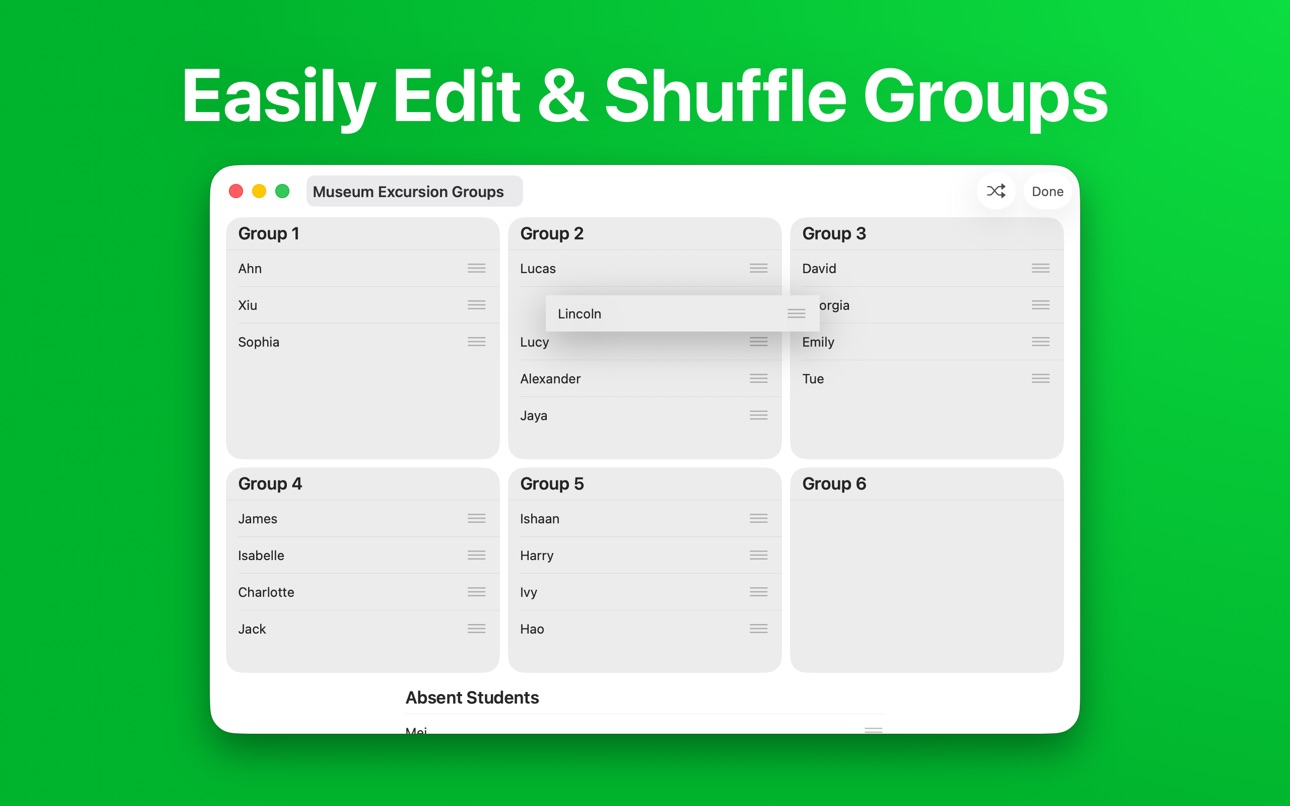
EDIT GROUPS
Need to fine tune the generated groups? Easily rearrange the result to achieve a perfect team composition.
RANDOM STUDENT PICKER
Encourage equal participation in the classroom with Groups’ random student picker. This makes sure everyone gets a chance to provide input, ensuring all voices are heard.
EXPORT AND PRINT
Easily create printable handouts, posters, or a PDF to share using five beautiful themes.
BULK IMPORT
Add students from Microsoft Excel workbooks, CSV files, or plain text lists.
UNLIMITED CLASSES
Enter all your students once, and then create as many groups as you need. You can even add an icon and color to each class to easily tell them apart.
CROSS DEVICE SYNC
Add your classes once, and use them across all your Apple devices with iCloud sync.
———————————————
Groups has helped tens of thousands of teachers sort their students into groups, fostering more positive learning environments for students worldwide.
Privacy Policy: https://wttech.com.au/docs/groups/privacy-policy
Terms & Conditions: https://wttech.com.au/docs/groups/eula
In-App Purchases US pricing
Groups Pro Subscription
Yearly · Yearly 7-day free trial$14.99
Monthly · Monthly$2.99
One-Time Purchases
Groups Pro$39.99
Capabilities
In-App Purchases
Accessibility
ipadiphonemacrealityDevicetvoswatch
Version history 12 versions
Build 885377899v2.5.02026-05-08 11:46:35
• New design with support for Liquid Glass
• Bug fixes and performance improvements
Build 873456245v2.4.12025-03-23 20:49:10
• Bug fixes and performance improvements
Build 872688870v2.4.02025-02-23 21:24:38
• Skip absent students when grouping, and easily add them to existing groups if needed
• Shuffle groups to easily skip unwanted combinations
• Undo changes made when editing groups
• Bug fixes and performance improvements
Build 870655349v2.3.02024-12-10 04:54:49
• Create Shortcuts using the new actions for opening classes and picking students
• Bug fixes and performance improvements
Build 869022375v2.2.12024-09-15 22:10:34
• New tinted and dark mode app icons for iOS 18
• Bug fixes and performance improvements
Build 868845546v2.2.02024-09-08 23:30:11
• Import students from Microsoft Excel workbooks, CSV files, or plain text lists
Build 868476833v2.1.02024-08-25 22:31:11
• Sync classes, students, and groups across your Apple devices using iCloud
• Export or print groups using five beautiful themes
• See more groups at once with an improved, zoomable layout
• Bug fixes and performance improvements
Build 858530256v2.0.12023-07-18 21:11:30
Groups 2 introduces a completely new design and more powerful features.
Some of the improvements include:
- Easily edit generated groups to achieve a perfect team composition
- Assign an icon and color to each class
- View all past groups, not just the most recently generated one
- New grouping algorithm with improved performance and accuracy
This release contains minor bug fixes.
Build 858518916v2.0.02023-07-17 05:57:12
Groups 2 introduces a completely new design and more powerful features.
Some of the improvements include:
- Easily edit generated groups to achieve a perfect team composition
- Assign an icon and color to each class
- View all past groups, not just the most recently generated one
- New grouping algorithm with improved performance and accuracy
Build 824312624v1.22017-11-10 13:56:24
This update from Apple will improve the functionality of this app. No new features are included.
- iPhone X support
- New themes option
Build 819720064v1.12016-11-13 21:02:57
Lots of new features to aid with grouping:
- You can now make groups not just by the size, but the amount.
- When looking at the list of students, you can swipe left for easy and quick deletion.
- We have squashed a few bugs.
Thank you for using groups.
Happy grouping!
Build 819103953v1.02016-10-24 17:58:56
Price history by region
Currency
Show
Columns
Search
Availability 1 of 1 storefronts
| Region | Language | Price | Ratings | Avg | Version |
|---|---|---|---|---|---|
| US | en-US | Free | 135 | 4.9 | 2.5.0 |
Change log 16 changes · US
✎
releaseNotes updated
• New design with support for Liquid Glass
• Bug fixes and performance improvements
✎
description updated
Effortlessly organize your students into effective teams with Groups, promoting meaningful collaboration and building teamwork skills in the classroom.
ADVANCE
✎
subtitle updated
Student Name Picker for Class
✎
name updated
Groups - Random Team Generator
◆
Version 2.5.0 released
• New design with support for Liquid Glass
• Bug fixes and performance improvements
◆
Version 2.4.1 released
• Bug fixes and performance improvements
◆
Version 2.4.0 released
• Skip absent students when grouping, and easily add them to existing groups if needed
• Shuffle groups to easily skip unwanted combinations
• Undo changes made when editing groups
• Bug fixes and performance improvements
◆
Version 2.3.0 released
• Create Shortcuts using the new actions for opening classes and picking students
• Bug fixes and performance improvements
◆
Version 2.2.1 released
• New tinted and dark mode app icons for iOS 18
• Bug fixes and performance improvements
◆
Version 2.2.0 released
• Import students from Microsoft Excel workbooks, CSV files, or plain text lists
◆
Version 2.1.0 released
• Sync classes, students, and groups across your Apple devices using iCloud
• Export or print groups using five beautiful themes
• See more groups at once with an improved, zoomable layout
• Bug fixes and performance improvements
◆
Version 2.0.1 released
Groups 2 introduces a completely new design and more powerful features.
Some of the improvements include:
- Easily edit generated groups to achieve a perfect team composition
- Assign an icon and color to each class
- View all past groups,
◆
Version 2.0.0 released
Groups 2 introduces a completely new design and more powerful features.
Some of the improvements include:
- Easily edit generated groups to achieve a perfect team composition
- Assign an icon and color to each class
- View all past groups,
◆
Version 1.2 released
This update from Apple will improve the functionality of this app. No new features are included.
- iPhone X support
- New themes option
◆
Version 1.1 released
Lots of new features to aid with grouping:
- You can now make groups not just by the size, but the amount.
- When looking at the list of students, you can swipe left for easy and quick deletion.
- We have squashed a few bugs.
Thank you for
◆
Version 1.0 released