Home › Lifestyle

 US
US
1 of 1 storefronts
Content in en-US
Content in en-US
Information
Preview 2 platforms
iPhone 7 images


iPad 6 images


What’s New Version 2.3.8
Updated internal processing.
Description
Collection management, organizing application "MyCollections"
It is an application aimed at registering and managing collected items and organizing belongings that they possess.
For example how to use ...
· Register clothes you have> tag it and create a pattern to wear.
· Register a red seal> Register and manage photos and shrines of temples and shrines.
· Register the mountaintops and badges of Hundred Mountain Mountains> Use for managing the number of mountains.
And etc., how to use it!
I think that it is convenient for you to apologize and check that you do not buy the same thing, register the items you are collecting and look at the pictures! It is!
Please do use it by all means.
【Main function】
It is possible to set one cover photo in the collection group.
You can also change the display size and rearrange.
Up to 10 pictures can be registered for items to be added to the collection.
Items can be sorted in the collection.
In the item list and the photo list, it is possible to check the item with the back and forth movement button.
By tagging, it is also possible to manage the items across the collection.
In the image widget, you can display images of recently registered items and favorite items.
As the theme function of the application,
- White mode or dark mode
- Font color setting
- Display function of badge
there is.
【screen structure】
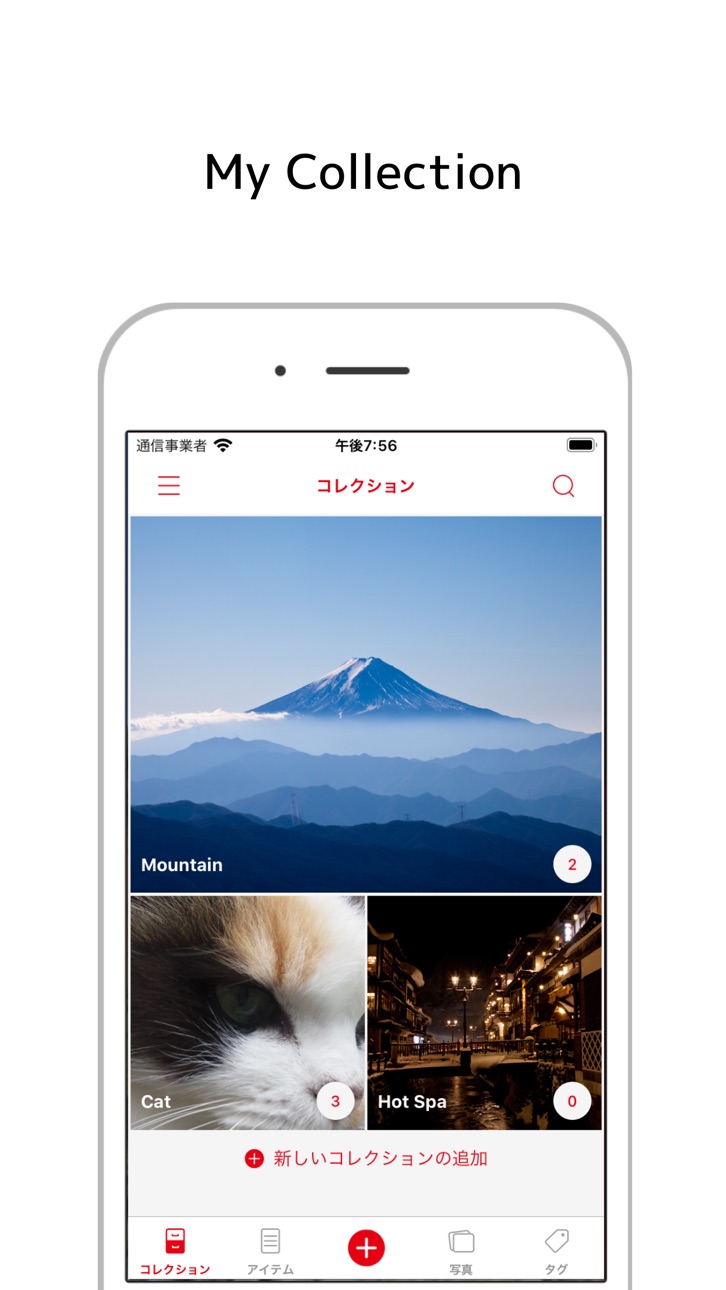
Collection list
Item list
Photo list
Tag list
Collection registration edit screen
Item registration edit screen
Item picture screen
settings screen
【Detailed function by screen】
■ Collection list
- Add collection
- Swipe down to change display format (list, 2 columns, individual settings)
- Change display order with long tap
- Size switching with double tap (when display format is set individually)
- Tap on collection name to transition to collection registration edit screen
■ Item list
- Swipe down to resize (list, 2 columns, 4 columns)
- Tap item name to transition to item registration edit screen
Photo list
- Swipe down to resize (large, 2 columns, 4 columns)
- Photo tap to show pictures in detail (enlargeable)
■ Tag List
- Add new tag
- Change display order with long tap
- Delete or rename with left swipe
- Tap to transition to item list screen
■ Collection registration edit screen
- Create cover image
- Size designation in list (valid when individual display)
■ Item registration edit screen
- Up to 10 photos can be sorted (sortable)
- Favorite settings
- Tag setting
■ Item picture screen
- Set the picture being displayed as the cover image of the collection
- Move backward and forward with reference to the item list of the transition source
- Transition to item edit screen
■ Setting screen
- Badge settings (none, number of items, number of items in a particular collection)
- Dark mode
- Font color setting
- Specify the initial display tab
- Backup and restore (Dropbox)
- Image widget settings (None, favorites, recently registered items, collections, specific collections, selectable from specific tags))
■ Image widget
- Up to 12 items
- Transition to item picture screen by item selection
- Access to new additions
Accessibility
ipadiphonemacrealityDevicetvoswatch
Version history 25 versions
Build 857190116v2.3.82023-05-22 06:37:43
Updated internal processing.
Build 853708267v2.3.72022-12-05 15:21:14
Updated internal processing.
Build 852501538v2.3.62022-10-01 10:29:04
A button to switch the enlarged size has been added to the photo view screen.
Build 852238837v2.3.52022-09-16 23:22:09
Supported iOS 16.
Build 851917042v2.3.42022-09-01 06:01:58
Updated internal processing.
Build 847383564v2.3.32022-02-25 16:30:34
Fixed a bug in the photo selection.
Build 846952250v2.3.22022-02-02 11:59:58
bug fix.
Build 844544632v2.3.12021-10-14 00:32:45
Fixed other minor bugs.
Build 844502579v2.3.02021-10-07 11:57:07
Added support for iPad.
Changed for iOS 11 and later.
Build 844277120v2.2.42021-09-24 20:36:20
iOS 15 is now supported.
Build 843934943v2.2.32021-09-09 17:22:38
It is now easier to set favorites.
When the collection list is displayed, tapping the number of items will display the list of item photos.
Fixed other minor bugs.
Build 842735047v2.2.22021-06-19 23:56:59
* The search history function has been added.
You can now save up to 20 histories and display them above the keyboard when you type.
Tap to search, press and hold to delete. Tap to search, press and hold to delete, delete all is at the end.
To cancel a search, tap the tab in the main screen.
* When registering a new tag in the tag list, pull down the list to open the input area. Pulling while the list is displayed will terminate it.
Translated with www.DeepL.com/Translator (free version)
Build 842657792v2.2.12021-06-15 10:23:50
The photo display of the item edit screen has been improved.
Fixed a bug where a memo disappears in item editing.
Build 842530500v2.2.02021-06-05 13:37:18
Adding Home Screen Widgets
Build 840847207v2.1.62021-03-11 21:56:52
Updated internal processing.
Build 839514149v2.1.52020-12-05 22:15:15
Added "Quick View" to show the entire photo in the photo selection screen (press and hold to display, release to hide)
Other minor modifications were made.
Build 838360353v2.1.42020-10-25 00:56:14
Bug Fixes
Build 838182144v2.1.32020-10-13 07:10:35
Bug Fix.
Build 837989505v2.1.22020-09-28 11:55:47
Support for iOS 14
Build 835811034v2.1.12020-05-04 20:58:16
Fixed a minor bug.
Build 835598721v2.1.02020-04-18 15:39:42
For iOS 13, "Auto" has been added to the style, and the user interface has changed according to the OS.
Added a button to add a collection button and a button to add a tag.
Added to the setting so that you can specify the insertion position when registering a new item as "top" or "bottom".
Other minor corrections have been made.
Build 835419660v2.0.22020-04-06 16:18:53
Fixed a bug when registering photos.
Build 834738123v2.0.12020-02-17 01:33:24
Added "All" or "Only the first photo" item photo display in the photo list.
Change the display order of the photo list based on the descending date order of items
Fixed redisplay bug when deleting items
Build 834470602v2.0.02020-01-25 14:02:45
The user interface was modified.
Build 834349668v1.2.62020-01-14 22:37:42
Added support for multiple lines of comment input.
Photos can be exported.
In addition, the processing has been improved.
No pricing data captured yet — comparisons appear once the app has paid storefronts or in-app purchases.
Availability 1 of 1 storefronts
| Region | Language | Price | Ratings | Avg | Version |
|---|---|---|---|---|---|
| US | en-US | Free | 5 | 3.8 | 2.3.8 |
Change log 29 changes · US
✎
releaseNotes updated
Updated internal processing.
✎
description updated
Collection management, organizing application "MyCollections"
It is an application aimed at registering and managing collected items and organizing belongings
✎
subtitle updated
Collection Gallery
✎
name updated
MyCollections - Gallery
◆
Version 2.3.8 released
Updated internal processing.
◆
Version 2.3.7 released
Updated internal processing.
◆
Version 2.3.6 released
A button to switch the enlarged size has been added to the photo view screen.
◆
Version 2.3.5 released
Supported iOS 16.
◆
Version 2.3.4 released
Updated internal processing.
◆
Version 2.3.3 released
Fixed a bug in the photo selection.
◆
Version 2.3.2 released
bug fix.
◆
Version 2.3.1 released
Fixed other minor bugs.
◆
Version 2.3.0 released
Added support for iPad.
Changed for iOS 11 and later.
◆
Version 2.2.4 released
iOS 15 is now supported.
◆
Version 2.2.3 released
It is now easier to set favorites.
When the collection list is displayed, tapping the number of items will display the list of item photos.
Fixed other minor bugs.
◆
Version 2.2.2 released
* The search history function has been added.
You can now save up to 20 histories and display them above the keyboard when you type.
Tap to search, press and hold to delete. Tap to search, press and hold to delete, delete all is at the end.
◆
Version 2.2.1 released
The photo display of the item edit screen has been improved.
Fixed a bug where a memo disappears in item editing.
◆
Version 2.2.0 released
Adding Home Screen Widgets
◆
Version 2.1.6 released
Updated internal processing.
◆
Version 2.1.5 released
Added "Quick View" to show the entire photo in the photo selection screen (press and hold to display, release to hide)
Other minor modifications were made.
◆
Version 2.1.4 released
Bug Fixes
◆
Version 2.1.3 released
Bug Fix.
◆
Version 2.1.2 released
Support for iOS 14
◆
Version 2.1.1 released
Fixed a minor bug.
◆
Version 2.1.0 released
For iOS 13, "Auto" has been added to the style, and the user interface has changed according to the OS.
Added a button to add a collection button and a button to add a tag.
Added to the setting so that you can specify the insertion position
◆
Version 2.0.2 released
Fixed a bug when registering photos.
◆
Version 2.0.1 released
Added "All" or "Only the first photo" item photo display in the photo list.
Change the display order of the photo list based on the descending date order of items
Fixed redisplay bug when deleting items
◆
Version 2.0.0 released
The user interface was modified.
◆
Version 1.2.6 released
Added support for multiple lines of comment input.
Photos can be exported.
In addition, the processing has been improved.