Home › Business

 US
US
1 of 1 storefronts
Content in en-US
Content in en-US
Information
Preview 2 platforms
iPhone 10 images


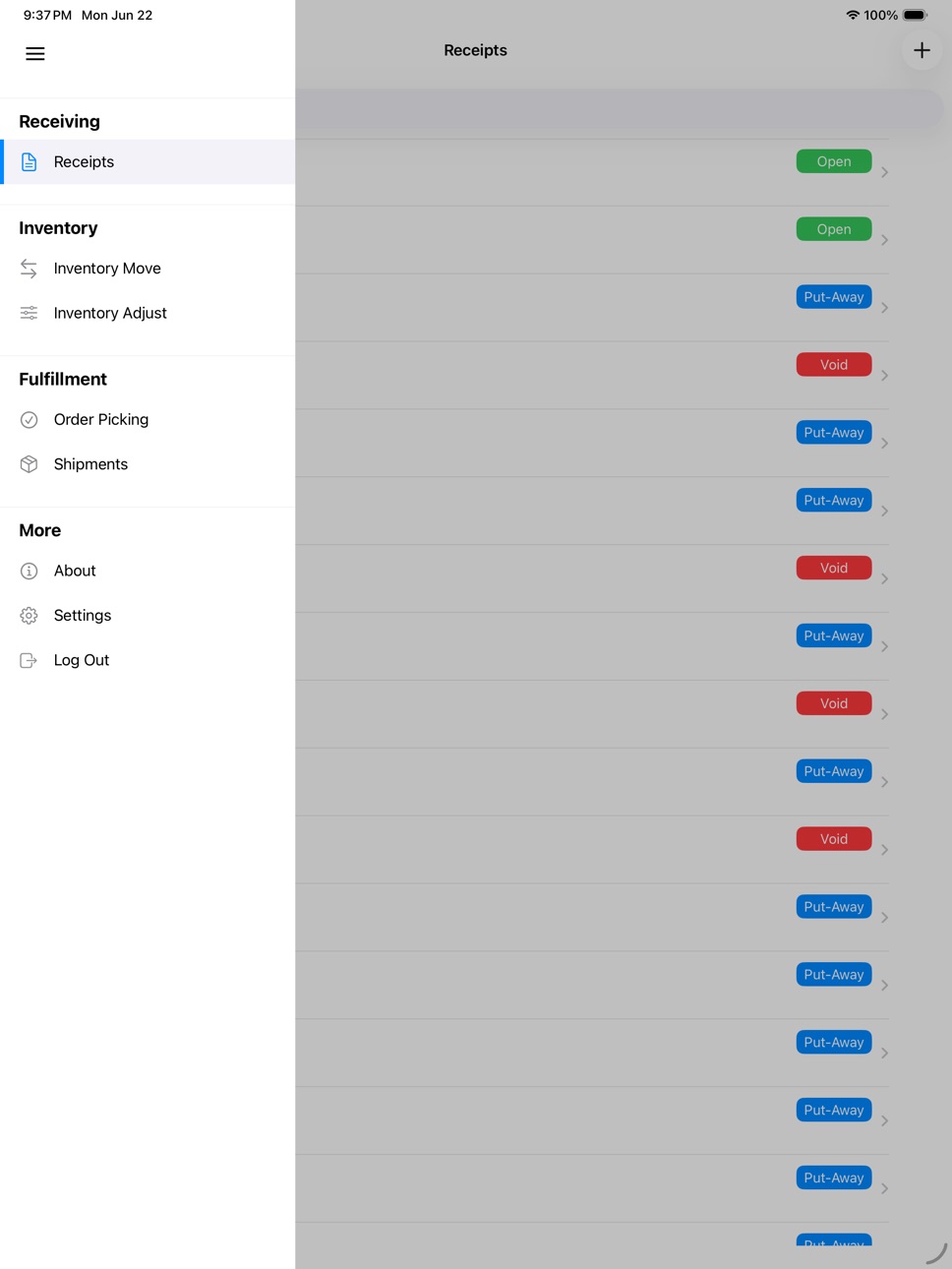
iPad 3 images


What’s New Version 7.0
Version 7.0 includes major scanner and user interface updates for Velocity WMS.
- Updated Socket Mobile scanner support to use CaptureSDK and SocketCam.
- Refreshed receiving, shipping, inventory, and order picking workflows.
- Improved barcode scanning behavior in search fields, editable fields, and picking verification.
- Improved camera, photo library, document, image, and PDF attachment handling.
- Improved layouts for smaller iPhones, modern iPhones, and Dark Mode.
- Improved keyboard behavior across login, settings, inventory, receiving, and shipping forms.
- Fixed issues with date pickers, navigation highlighting, attachments, and screen layout warnings.
- Removed Honeywell Captuvo and legacy Socket Mobile ScanAPI support.
Description
Velocity WMS for iOS provides mobile access to the Velocity WMS warehouse management system. Use your iPhone or iPad to receive inbound shipments, manage inventory, pick orders, ship merchandise, upload attachments, print labels, and scan barcodes throughout warehouse workflows.
Velocity WMS for iOS is designed for existing Velocity WMS subscribers. A valid Velocity WMS account and server connection are required.
Features:
• Receive inbound shipments
• Move and adjust inventory
• Pick orders
• Ship merchandise
• Scan barcodes using Socket Mobile scanners, SocketCam, or supported camera scanning workflows
• Take photos and upload them to receipts and shipments
• Upload files to receiving and shipment records using the iOS Files app
• View image and PDF attachments
• Print warehouse labels from your iOS device
• Create exceptions to notify warehouse managers of inventory, receiving, shipment, or picking issues
Supported Barcode Scanning:
• Socket Mobile scanners supported by Socket Mobile CaptureSDK
• SocketCam camera scanning through Socket Mobile CaptureSDK
• Compatible HID barcode scanners where supported by the active workflow
Note: Honeywell Captuvo and legacy Socket Mobile ScanAPI integrations are no longer supported in this version.
Have a question? Visit https://velocitywms.com/contact/
Accessibility
ipadiphonemacrealityDevicetvoswatch
Version history 13 versions
Build 886907777v7.02026-06-29 21:32:59
Version 7.0 includes major scanner and user interface updates for Velocity WMS.
- Updated Socket Mobile scanner support to use CaptureSDK and SocketCam.
- Refreshed receiving, shipping, inventory, and order picking workflows.
- Improved barcode scanning behavior in search fields, editable fields, and picking verification.
- Improved camera, photo library, document, image, and PDF attachment handling.
- Improved layouts for smaller iPhones, modern iPhones, and Dark Mode.
- Improved keyboard behavior across login, settings, inventory, receiving, and shipping forms.
- Fixed issues with date pickers, navigation highlighting, attachments, and screen layout warnings.
- Removed Honeywell Captuvo and legacy Socket Mobile ScanAPI support.
Build 826516172v6.02018-04-06 17:47:44
This update from Apple will improve the functionality of this app. No new features are included.
Thank you for using Velocity WMS! We update the app as often as possible to make it better for you.
What's New:
• Added barcode scanning capability via the built-in camera.
• Face ID support has been added.
Bug Fixes:
• Scanning barcode into drop-down list field now selects the correct value.
Love the app? Rate us! Your feedback helps us keep improving Velocity WMS.
Have a question? Visit https://velocitywms.com/contact/
Build 826484476v5.22018-03-30 16:40:17
Thank you for using Velocity WMS! We update the app as often as possible to make it better for you.
Bug Fixes:
•Fixed an issue where receipt header records would not display if a system did not have any receiving header user defined fields
Supported Barcode Scanners:
• Honeywell Captuvo SL42 for iPhone 6/6 Plus
• Honeywell Captuvo SL42 for iPhone 5/5s
• Honeywell Captuvo SL22 for iPod touch 5th and 6th Generation
• Socket Mobile 7Pi barcode scanner
• Socket Mobile CHS 8Ci barcode scanner
Love the app? Rate us! Any feedback that we can get would be greatly appreciated.
Have a question? Contact us by email or give us a call https://velocitywms.com/contact/
Build 826237423v5.12018-03-13 23:39:03
Thank you for using Velocity WMS! We update the app as often as possible to make it better for you.
Enhancements, Changes, and Bug Fixes:
•Shipment line quantities can no longer be modified.
•Order picking visual fix for iPhone X.
•Fixed scroll issue when clicking on a text box on the edit shipment line screen.
Supported Barcode Scanners:
• Honeywell Captuvo SL42 for iPhone 6/6 Plus
• Honeywell Captuvo SL42 for iPhone 5/5s
• Honeywell Captuvo SL62 for iPad mini 1st, 2nd, and 3rd Generation
• Honeywell Captuvo SL22 for iPod touch 5th and 6th Generation
• Socket Mobile 7Pi barcode scanner
• Socket Mobile CHS 8Ci barcode scanner
Love the app? Rate us! Any feedback that we can get would be greatly appreciated.
Have a question? Contact us by email or give us a call https://velocitywms.com/contact/
Build 825712206v5.02018-01-24 00:10:08
Thank you for using Velocity WMS! We update the app as often as possible to make it better for you.
What's New:
•You can now upload files in the receiving and shipment modules from iCloud Drive, Google drive, OneDrive, and Dropbox via integration with the Files app on iOS 11.
Bug Fixes and Enhancements:
•Validate attachment name length when uploading a file or an image
•Updated Socket Mobile API to the latest version
Supported Barcode Scanners:
• Honeywell Captuvo SL42 for iPhone 6/6 Plus
• Honeywell Captuvo SL42 for iPhone 5/5s
• Honeywell Captuvo SL62 for iPad mini 1st, 2nd, and 3rd Generation
• Honeywell Captuvo SL22 for iPod touch 5th and 6th Generation
• Socket Mobile 7Pi barcode scanner
• Socket Mobile CHS 8Ci barcode scanner
Love the app? Rate us! Any feedback that we can get would be greatly appreciated.
Have a question? Contact us by email or give us a call https://velocitywms.com/contact/
Build 823922582v4.22017-10-10 18:56:54
Thank you for using Velocity WMS! We update the app as often as possible to make it better for you.
What's New:
•Receiving Pre-Putaway Notice
Bug Fixes and Enhancements:
•Inventory that is on voided receipts can no longer be moved or adjusted
Supported Barcode Scanners:
• Honeywell Captuvo SL42 for iPhone 6/6 Plus
• Honeywell Captuvo SL42 for iPhone 5/5s
• Honeywell Captuvo SL62 for iPad mini 1st, 2nd, and 3rd Generation
• Honeywell Captuvo SL22 for iPod touch 5th and 6th Generation
• Socket Mobile 7Pi barcode scanner
• Socket Mobile CHS 8Ci barcode scanner
Love the app? Rate us! Any feedback that we can get would be greatly appreciated.
Have a question? Contact us by email or give us a call https://velocitywms.com/contact/
Build 823748100v4.12017-09-23 17:41:16
Thank you for using Velocity WMS! We update the app as often as possible to make it better for you.
Version 4.1:
Bug Fixes and Enhancements:
• iOS 11 bug fixes and enhancements
Version 4.0:
What's New:
•Shipment module
•App support is now iOS 9.0 and above
Bug Fixes and Enhancements:
•Label printing optimizations
•Inventory move screen set max length for destination LPN, quantity to move, and destination location fields to prevent data entry errors
•Creating a new receipt and hitting the back button now displays the receipt at the top without having to refresh the screen
•Fixed issue when you load a receipt header or line or shipment header or line and create a new UDF in the system then try to save the record where it would fail validation
•Fixed an issue where you could view a receipt, create a new user defined field, and view the receipt again and the app would crash
•Fixed an issue where the app would crash when displaying user defined field drop downs with no items
•Restkit updated to 0.27.2
•Fixed visual issue on inventory move screen with the item # and item description
•Fixed an issue where an error would occur when doing an inventory move to an existing LPN that is already in the same inventory record
•Fixed issue with inventory move to new location with decimal numbers where the quantity to move would be displayed rounded and the move was not possible because the quantity displayed did not match the actual quantity because of rounding
Supported Barcode Scanners:
• Honeywell Captuvo SL42 for iPhone 6/6 Plus
• Honeywell Captuvo SL42 for iPhone 5/5s
• Honeywell Captuvo SL62 for iPad mini 1st, 2nd, and 3rd Generation
• Honeywell Captuvo SL22 for iPod touch 5th and 6th Generation
• Socket Mobile 7Pi barcode scanner
• Socket Mobile CHS 8Ci barcode scanner
Love the app? Rate us! Any feedback that we can get would be greatly appreciated.
Have a question? Contact us by email or give us a call https://velocitywms.com/contact/
Build 823345150v4.02017-09-19 05:37:33
Thank you for using Velocity WMS! We update the app as often as possible to make it better for you.
What's New:
•Shipment module
•App support is now iOS 9.0 and above
Bug Fixes and Enhancements:
•Label printing optimizations
•Inventory move screen set max length for destination LPN, quantity to move, and destination location fields to prevent data entry errors
•Creating a new receipt and hitting the back button now displays the receipt at the top without having to refresh the screen
•Fixed issue when you load a receipt header or line or shipment header or line and create a new UDF in the system then try to save the record where it would fail validation
•Fixed an issue where you could view a receipt, create a new user defined field, and view the receipt again and the app would crash
•Fixed an issue where the app would crash when displaying user defined field drop downs with no items
•Restkit updated to 0.27.2
•Fixed visual issue on inventory move screen with the item # and item description
•Fixed an issue where an error would occur when doing an inventory move to an existing LPN that is already in the same inventory record
•Fixed issue with inventory move to new location with decimal numbers where the quantity to move would be displayed rounded and the move was not possible because the quantity displayed did not match the actual quantity because of rounding
Supported Barcode Scanners:
• Honeywell Captuvo SL42 for iPhone 6/6 Plus
• Honeywell Captuvo SL42 for iPhone 5/5s
• Honeywell Captuvo SL62 for iPad mini 1st, 2nd, and 3rd Generation
• Honeywell Captuvo SL22 for iPod touch 5th and 6th Generation
• Socket Mobile 7Pi barcode scanner
• Socket Mobile CHS 8Ci barcode scanner
Love the app? Rate us! Any feedback that we can get would be greatly appreciated.
Have a question? Contact us by email or give us a call https://velocitywms.com/contact/
Build 821978125v3.02017-06-15 05:07:31
Thank you for using Velocity WMS! We update the app as often as possible to make it better for you.
What's New:
•Inventory adjustment module
•Receiving: can now copy voided receipts
•Receiving attachments: can now take a photo with the front facing camera
•Labels throughout the app can now be long pressed so that you can copy its text where it can be pasted on any of your iOS 10 or later or macOS or later devices signed into your Apple ID
Bug Fixes and Enhancements:
•Images upload to Velocity faster
•Better support for different image types from camera roll
•Connections are now sorted alphabetically on the login screen
•Added loading indicator to the bottom of the receipts table to indicate when loading is happening
•Added app version number to login screen
•Exception screens added submit button to toolbar for note field in case the submit button is not visible
Supported Barcode Scanners:
• Honeywell Captuvo SL42 for iPhone 6/6 Plus
• Honeywell Captuvo SL42 for iPhone 5/5s
• Honeywell Captuvo SL62 for iPad mini 1st, 2nd, and 3rd Generation
• Honeywell Captuvo SL22 for iPod touch 5th Generation
• Socket Mobile 7Pi barcode scanner
• Socket Mobile CHS 8Ci barcode scanner
Love the app? Rate us! Any feedback that we can get would be greatly appreciated.
Have a question? Contact us by email or give us a call http://www.internationaldatasystems.com/contact-us/
Build 821323580v2.02017-03-29 00:13:36
Thanks for using Velocity WMS! We update the app as often as possible to make it better for you.
What's New:
• Order Picking Module
• If you have a device with 3D touch capability you can now 3D touch to peek and pop receipts, receipt lines, receipt images, inventory locations, inventory, and orders to pick
• Added last update times for UITableViews when pulling down to refresh
• Socket Mobile CHS 8Ci barcode scanner is supported
Bug Fixes and Improvements:
• Fixed display bug where some text from the receiving lines page was showing at the bottom of the receipt info screen on plus sized iOS devices
• UI improvements by removing loading indicator when scrolling/refreshing on receipts screen as well as receiving attachments screen
• Barcode scanner connection/disconnection notifications now show no matter which screen you are on within the app
• Barcode scanner device connected alerts are now shown correctly
• Added better error checking on failure to connect Honeywell Captuvo devices so that it presents error messages such as unsupported firmware for the captuvo device, inability to initialize the scanner sdk etc
• Bug where autocomplete text field suggestions list would not appear on receipt line and receipt info screen has been fixed
• Home screen load time decreased
• Creating and updating receipt lines correctly returns an error if the receipt has already been Putaway
• Receipt lines table view displays data better on smaller devices
• Updated Telerik UI for iOS Controls to the latest version 2017.1.118
• Updated Socket Mobile barcode scanner SDK to the latest version 10.3.90.0
• Updated RestKit to version 0.27
Supported Barcode Scanners:
• Honeywell Captuvo SL42 for iPhone 6/6 Plus
• Honeywell Captuvo SL42 for iPhone 5/5s
• Honeywell Captuvo SL62 for iPad mini 1st, 2nd, and 3rd Generation
• Honeywell Captuvo SL22 for iPod touch 5th Generation
• Socket Mobile 7Pi barcode scanner
• Socket Mobile CHS 8Ci barcode scanner
Love the app? Rate us! Any feedback that we can get would be greatly appreciated.
Have a question? Contact us by email or give us a call http://www.internationaldatasystems.com/contact-us/
Build 820275111v1.22016-12-23 00:14:19
Thanks for using Velocity WMS! We update the app as often as possible to make it better for you.
What's New:
• App now supports https for Apple's January 1st App Transport Security requirements. Please go to "Setup Connections" on the login screen and change your web service URL from http to https in order to continue using the app.
Supported Barcode Scanners:
• Honeywell Captuvo SL42 for iPhone 6/6 Plus
• Honeywell Captuvo SL42 for iPhone 5/5s
• Honeywell Captuvo SL62 for iPad mini 1st, 2nd, and 3rd Generation
• Honeywell Captuvo SL22 for iPod touch 5th Generation
• Socket Mobile 7Pi barcode scanner
• Socket Mobile CHS 8Ci barcode scanner
Love the app? Rate us! Any feedback that we can get would be greatly appreciated.
Have a question? Contact us by email or give us a call http://www.internationaldatasystems.com/contact-us/
Build 819581037v1.12016-11-04 16:54:19
Thanks for using Velocity WMS! We update the app as often as possible to make it better for you.
What's New:
• Fixed a bug where using a scanner for the quantity field on a receipt line was not autofilling weight after selecting an item number
• Updated for compatibility with 2016.4.1101 Velocity WMS release
Note:
• Supports Socket Mobile 7Pi barcode scanner
• Supports Honeywell Captuvo SL22 for iPod touch, Captuvo SL42 for iPhone 5/5s, Captuvo SL42 for iPhone 6/6 Plus, and the Captuvo SL62 for iPad Mini
Love the app? Rate us! Any feedback that we can get would be greatly appreciated.
Have a question? Contact us by email or give us a call http://www.internationaldatasystems.com/contact-us/
Build 818403432v1.02016-10-21 19:30:16
No pricing data captured yet — comparisons appear once the app has paid storefronts or in-app purchases.
Availability 1 of 1 storefronts
| Region | Language | Price | Ratings | Avg | Version |
|---|---|---|---|---|---|
| US | en-US | Free | 0 | — | 7.0 |
Change log 17 changes · US
✎
releaseNotes updated
Version 7.0 includes major scanner and user interface updates for Velocity WMS.
- Updated Socket Mobile scanner support to use CaptureSDK and SocketCam.
- Refr
✎
description updated
Velocity WMS for iOS provides mobile access to the Velocity WMS warehouse management system. Use your iPhone or iPad to receive inbound shipments, manage invent
✎
subtitle updated
Warehouse Management System
✎
name updated
Velocity WMS
◆
Version 7.0 released
Version 7.0 includes major scanner and user interface updates for Velocity WMS.
- Updated Socket Mobile scanner support to use CaptureSDK and SocketCam.
- Refreshed receiving, shipping, inventory, and order picking workflows.
- Improved ba
◆
Version 6.0 released
This update from Apple will improve the functionality of this app. No new features are included.
Thank you for using Velocity WMS! We update the app as often as possible to make it better for you.
What's New:
• Added barcode scanning capa
◆
Version 5.2 released
Thank you for using Velocity WMS! We update the app as often as possible to make it better for you.
Bug Fixes:
•Fixed an issue where receipt header records would not display if a system did not have any receiving header user defined fields
◆
Version 5.1 released
Thank you for using Velocity WMS! We update the app as often as possible to make it better for you.
Enhancements, Changes, and Bug Fixes:
•Shipment line quantities can no longer be modified.
•Order picking visual fix for iPhone X.
•Fixed s
◆
Version 5.0 released
Thank you for using Velocity WMS! We update the app as often as possible to make it better for you.
What's New:
•You can now upload files in the receiving and shipment modules from iCloud Drive, Google drive, OneDrive, and Dropbox via inte
◆
Version 4.2 released
Thank you for using Velocity WMS! We update the app as often as possible to make it better for you.
What's New:
•Receiving Pre-Putaway Notice
Bug Fixes and Enhancements:
•Inventory that is on voided receipts can no longer be moved or adju
◆
Version 4.1 released
Thank you for using Velocity WMS! We update the app as often as possible to make it better for you.
Version 4.1:
Bug Fixes and Enhancements:
• iOS 11 bug fixes and enhancements
Version 4.0:
What's New:
•Shipment module
•App support is now
◆
Version 4.0 released
Thank you for using Velocity WMS! We update the app as often as possible to make it better for you.
What's New:
•Shipment module
•App support is now iOS 9.0 and above
Bug Fixes and Enhancements:
•Label printing optimizations
•Inventory mo
◆
Version 3.0 released
Thank you for using Velocity WMS! We update the app as often as possible to make it better for you.
What's New:
•Inventory adjustment module
•Receiving: can now copy voided receipts
•Receiving attachments: can now take a photo with the fr
◆
Version 2.0 released
Thanks for using Velocity WMS! We update the app as often as possible to make it better for you.
What's New:
• Order Picking Module
• If you have a device with 3D touch capability you can now 3D touch to peek and pop receipts, receipt line
◆
Version 1.2 released
Thanks for using Velocity WMS! We update the app as often as possible to make it better for you.
What's New:
• App now supports https for Apple's January 1st App Transport Security requirements. Please go to "Setup Connections" on the logi
◆
Version 1.1 released
Thanks for using Velocity WMS! We update the app as often as possible to make it better for you.
What's New:
• Fixed a bug where using a scanner for the quantity field on a receipt line was not autofilling weight after selecting an item nu
◆
Version 1.0 released