Home › Business

 US
US
1 of 1 storefronts
Content in en-US
Content in en-US
Information
Preview 2 platforms
iPhone 4 images


iPad 4 images



What’s New Version 26.3.1
We’ve made improvements to how access code keys are managed and stored in the app — the experience of logging in with 2-factor authentication remains the same.
Description
Monitor and manage your supply chain on the Infor Nexus mobile application. Access orders and invoices for an update on your pipeline of products, and access shipments for an update on the location of your products in motion. With the Infor Nexus mobile app, information regarding your global supply chain is always an arm's length away allowing you to make quick and informed decisions when the need arises.
Stay In-Touch
- Connect with your existing Infor Nexus user login.
- Pick up where you left off with quick access to your recently viewed items.
- View tasks & re-assign to teammates.
Extend Your Awareness
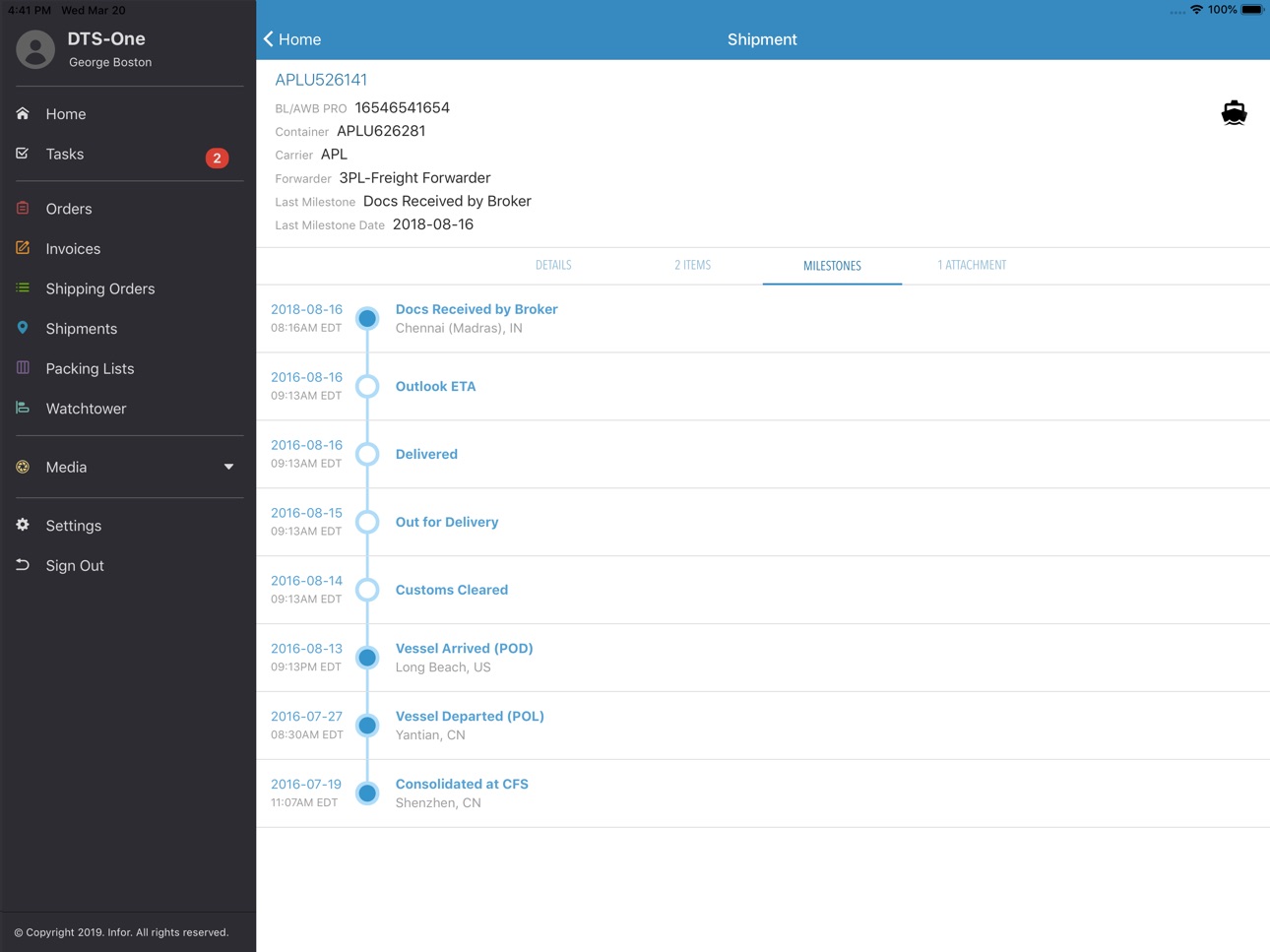
- Roam free from your desk while viewing critical orders, invoices, shipments, shipping orders and packing lists.
- View attached documentation and share new uploads with your trading partners.
- Stay on top of shipment status updates & important milestones.
- Task-based design for on-the-go use.
Security
- Mobile E-ID: Use the app as an access code generator when you are required to log in using two-factor authentication.
- Single Sign-On Support: Sign in using the credentials you have set up with your organization's SSO provider.
- Log in swiftly and securely with Touch ID or Face ID.
Bonus
- Stay on top of supply chain trends, industry hot topics, and best practices with Infor Nexus podcasts.
Accessibility
ipadiphonemacrealityDevicetvoswatch
Version history 25 versions
Build 885941509v26.3.12026-05-22 15:35:36
We’ve made improvements to how access code keys are managed and stored in the app — the experience of logging in with 2-factor authentication remains the same.
Build 882100255v26.1.12026-02-05 18:11:34
-Updated URL for test environment
Build 879961917v25.7.12025-12-11 14:34:02
-The transaction type "Plan To Ship" has been renamed to "Vendor Booking"
-Resolved an Issue that resulted in missing data from the display of Vendor Booking tasks
Build 876210612v25.4.12025-07-15 14:42:19
-You can now self-enable two factor authentication without the assistance of an administrator when your organization's two factor authentication policy is optional. Previous assistance from a Nexus administrator was required to update your user's mode of authentication.
-You can post a milestone to multiple transports shipments at once after creating a batch.
Build 873938152v25.2.32025-04-11 14:37:03
-Resolves an in issue with links that launch external browsers on iOS 18
Build 873472147v25.2.12025-03-27 15:10:40
-Users in organizations that are subscribed to Live Visibility can now share shipment tracking details with any of their partners, including those that are not registered on the Nexus platform
-Removed 'Email PDF' as a distinct option to defer to the user's preferred methods of sharing as presented by their mobile device. The options presented by the mobile device may include email along with other options
-Resolved a bug with sharing PDFs
Build 869410754v24.5.52024-10-23 20:09:05
-Updated the localization files for all supported languages
Build 867907504v24.4.52024-08-20 14:14:36
- Introduced framework upgrades to ensure continued optimal performance.
- Added error logging support to aid in troubleshooting.
- Users that utilize the Switch User feature in the web application can now enjoy the same flexibility within Nexus mobile. It is now possible to switch to alternate user profiles after logging in with the primary user login credentials.
Build 864069794v24.1.12024-02-29 16:42:20
- You can now select which transaction types you want to include when performing a global search.
Build 862322333v23.7.12023-12-20 15:04:41
- Now you can post a milestone to multiple classic shipments at once. Simply toggle to a "select" mode from a list of recently viewed shipments or a shipment search result set.
- The app now displays the updated Infor Nexus logo in the splash screen.
Build 861344511v23.6.12023-11-10 19:05:26
- The Plan To Ship module is now accessible in the mobile app. With this update, you can search for and view Plan To Ship transactions, as well as generate PDFs to share.
- Resolved an issue where the action menu button was sometimes not available on the shipping order details screen.
Build 859794890v23.5.12023-09-13 20:04:15
- Posting milestones to a shipment has been optimized to offer faster processing times for shipments with a large number of line items.
- Resolved an issue with adding attachments that are sourced from OneDrive.
- Fixed an issue that impacted the ability to display and scroll information presented in popovers.
Build 856350704v23.2.12023-04-17 13:34:01
- We have made some updates to the app to ensure it continues to take advantage of features available on the latest mobile operating systems.
- You can now view and add new comments to invoices.
- Updated the app's localization to address fields that required a translation.
Build 852863187v22.5.52022-10-21 14:04:09
- Now you can add additional transactions as references when editing an existing issue.
- Fixed a bug that resulted in a blank page after navigating to the issue list.
- Fixed a missing icon for the transportation mode "Sea Air".
Build 850840730v22.4.12022-07-29 14:06:37
- Improved the usability of all data-entry fields where you can set focus on a textbox by tapping either the textbox or its label.
- Fixed a bug where "Log In" button was not enabled when using a password utility app to supply the username or password.
- Removed "Podcasts" from the in-app menu.
Build 850080306v22.3.52022-06-15 14:12:17
Fixes an issue with mixed-case usernames when Nexus Mobile is used as the authenticating app.
Build 848784860v22.3.12022-05-19 15:10:21
- You can now read comments that were added to a shipment, add replies to existing comments, or add new comments.
- The search result cards that represent transactions or materials not independently supported within the app (like products and locations) will now display more relevant data.
Build 847836363v22.1.52022-03-23 13:34:55
- Explore data that is related to the current transaction you are viewing by clicking the "See Related" option in the overflow menu on the top right corner.
- Nexus Mobile is now eligible to be used as the authenticator when you want to log into other Infor Nexus mobile applications.
Build 846938225v22.1.12022-02-09 14:37:46
- Create an issue while viewing a corresponding transaction to immediately launch an effort to collaborate towards a resolution with the involved partners. You can update the issue as new developments arise and even add additional participants.
Build 845368923v21.6.12021-11-19 14:37:50
- You can now see the progression of products on an order as they advance through downstream supply chain activities. Additionally, more header information is presented on the Details tab, offering a more complete picture of the order.
- Global search result cards now present Related links making it easy to find transactions related to the one presented in the result card.
Build 844474665v21.5.52021-10-07 14:33:52
- Issue related tasks now present a summary of the issue, giving you more contextual information without having to navigate away from the task.
- The Search feature has moved to a more accessible and prominent location at the top of the Home screen making it a little more convenient to find transactions of interest.
- Minor fixes to improve overall usability.
Build 843602216v21.4.52021-08-16 19:10:02
- The maximum number of global search results have been made consistent with the web application.
- Resolved an issue with rendering custom fields.
Build 843281200v21.4.12021-07-28 19:10:01
- You can now initiate a search across all transaction types using the new search bar that is presented at the top of the home screen.
- Fixed a bug where certain transaction types were not visible in an issue's "Related" tab.
- Fixed a bug that prevented the ability to open some attachments.
- Resolved a bug where some fields in tender responses were not properly updated.
Build 842244840v21.3.12021-05-19 14:07:41
- You can now see more relevant information on invoices and issues. Both modules have been updated to present custom data that has been configured specifically for your organization.
Build 841644497v21.2.52021-04-23 13:07:21
- Shipment mode icons have been updated to additionally display the mode in text so that you can distinguish modes that use the same icon.
- The Transport shipment menu option is now only available when it has been enabled for your organization.
- Resolved a bug where the "Delete" button was not presented as an option on Issue comments.
- Resolved a bug where the issue comment avatar appeared taller than its intended height.
No pricing data captured yet — comparisons appear once the app has paid storefronts or in-app purchases.
Availability 1 of 1 storefronts
| Region | Language | Price | Ratings | Avg | Version |
|---|---|---|---|---|---|
| US | en-US | Free | 8 | 4.8 | 26.3.1 |
Change log 29 changes · US
✎
releaseNotes updated
We’ve made improvements to how access code keys are managed and stored in the app — the experience of logging in with 2-factor authentication remains the same.
✎
description updated
Monitor and manage your supply chain on the Infor Nexus mobile application. Access orders and invoices for an update on your pipeline of products, and access s
✎
subtitle updated
Real-time supply chain insight
✎
name updated
Infor Nexus Mobile
◆
Version 26.3.1 released
We’ve made improvements to how access code keys are managed and stored in the app — the experience of logging in with 2-factor authentication remains the same.
◆
Version 26.1.1 released
-Updated URL for test environment
◆
Version 25.7.1 released
-The transaction type "Plan To Ship" has been renamed to "Vendor Booking"
-Resolved an Issue that resulted in missing data from the display of Vendor Booking tasks
◆
Version 25.4.1 released
-You can now self-enable two factor authentication without the assistance of an administrator when your organization's two factor authentication policy is optional. Previous assistance from a Nexus administrator was required to update your
◆
Version 25.2.3 released
-Resolves an in issue with links that launch external browsers on iOS 18
◆
Version 25.2.1 released
-Users in organizations that are subscribed to Live Visibility can now share shipment tracking details with any of their partners, including those that are not registered on the Nexus platform
-Removed 'Email PDF' as a distinct option to de
◆
Version 24.5.5 released
-Updated the localization files for all supported languages
◆
Version 24.4.5 released
- Introduced framework upgrades to ensure continued optimal performance.
- Added error logging support to aid in troubleshooting.
- Users that utilize the Switch User feature in the web application can now enjoy the same flexibility within
◆
Version 24.1.1 released
- You can now select which transaction types you want to include when performing a global search.
◆
Version 23.7.1 released
- Now you can post a milestone to multiple classic shipments at once. Simply toggle to a "select" mode from a list of recently viewed shipments or a shipment search result set.
- The app now displays the updated Infor Nexus logo in the spla
◆
Version 23.6.1 released
- The Plan To Ship module is now accessible in the mobile app. With this update, you can search for and view Plan To Ship transactions, as well as generate PDFs to share.
- Resolved an issue where the action menu button was sometimes not av
◆
Version 23.5.1 released
- Posting milestones to a shipment has been optimized to offer faster processing times for shipments with a large number of line items.
- Resolved an issue with adding attachments that are sourced from OneDrive.
- Fixed an issue that impact
◆
Version 23.2.1 released
- We have made some updates to the app to ensure it continues to take advantage of features available on the latest mobile operating systems.
- You can now view and add new comments to invoices.
- Updated the app's localization to address f
◆
Version 22.5.5 released
- Now you can add additional transactions as references when editing an existing issue.
- Fixed a bug that resulted in a blank page after navigating to the issue list.
- Fixed a missing icon for the transportation mode "Sea Air".
◆
Version 22.4.1 released
- Improved the usability of all data-entry fields where you can set focus on a textbox by tapping either the textbox or its label.
- Fixed a bug where "Log In" button was not enabled when using a password utility app to supply the username
◆
Version 22.3.5 released
Fixes an issue with mixed-case usernames when Nexus Mobile is used as the authenticating app.
◆
Version 22.3.1 released
- You can now read comments that were added to a shipment, add replies to existing comments, or add new comments.
- The search result cards that represent transactions or materials not independently supported within the app (like products a
◆
Version 22.1.5 released
- Explore data that is related to the current transaction you are viewing by clicking the "See Related" option in the overflow menu on the top right corner.
- Nexus Mobile is now eligible to be used as the authenticator when you want to log
◆
Version 22.1.1 released
- Create an issue while viewing a corresponding transaction to immediately launch an effort to collaborate towards a resolution with the involved partners. You can update the issue as new developments arise and even add additional participa
◆
Version 21.6.1 released
- You can now see the progression of products on an order as they advance through downstream supply chain activities. Additionally, more header information is presented on the Details tab, offering a more complete picture of the order.
- Gl
◆
Version 21.5.5 released
- Issue related tasks now present a summary of the issue, giving you more contextual information without having to navigate away from the task.
- The Search feature has moved to a more accessible and prominent location at the top of the Hom
◆
Version 21.4.5 released
- The maximum number of global search results have been made consistent with the web application.
- Resolved an issue with rendering custom fields.
◆
Version 21.4.1 released
- You can now initiate a search across all transaction types using the new search bar that is presented at the top of the home screen.
- Fixed a bug where certain transaction types were not visible in an issue's "Related" tab.
- Fixed a bug
◆
Version 21.3.1 released
- You can now see more relevant information on invoices and issues. Both modules have been updated to present custom data that has been configured specifically for your organization.
◆
Version 21.2.5 released
- Shipment mode icons have been updated to additionally display the mode in text so that you can distinguish modes that use the same icon.
- The Transport shipment menu option is now only available when it has been enabled for your organiza