Home › Navigation

 US
US
USen-US NGNot Available
1 of 2 storefronts
Content in en-US
Content in en-US
Information
Apple ID1108894327
Bundle IDnet.inteltrack.track.inteltrack
SellerSeller
Min iOS16.0
Min macOS13.0
Device familiesiphone, ipad
Released2016-05-06
Copyright© Inteltrack, 2016
Privacy policyLink ↗
Preview 2 platforms
iPhone 5 images


iPad 4 images



What’s New Version 2.22.6
- Bug fixes and performance improvements
Description
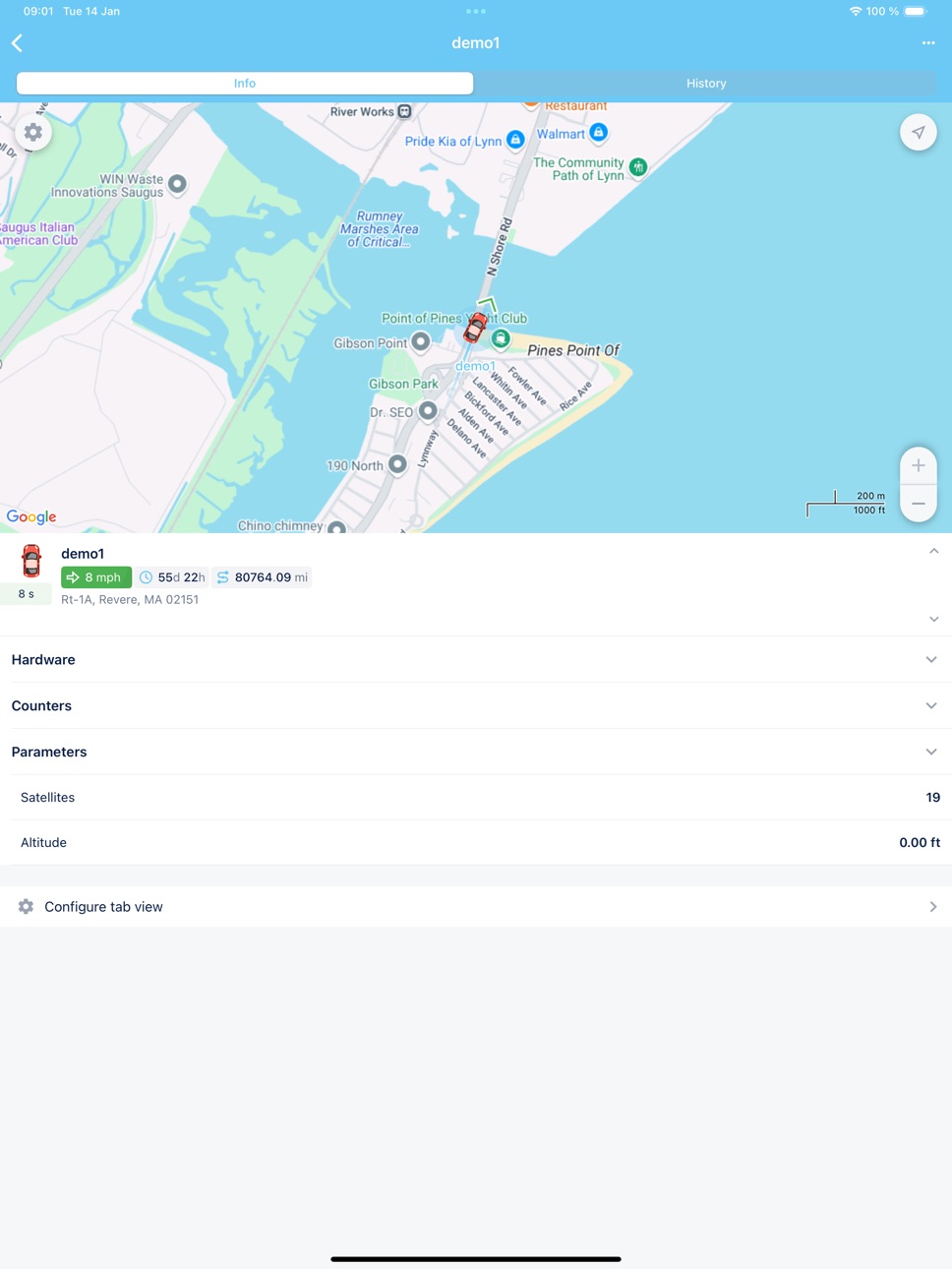
The Inteltrack GPS Fleet Tracker allows you to use your phone to manage your vehicles. With our tracking app, you can access key information in real time, and you can even choose which vehicles or group of vehicles to
show or hide.
Alert notifications will bring you the latest information over the vehicle’s violations and geofence trespassing.
Accessibility
ipadiphonemacrealityDevicetvoswatch
Version history 17 versions
Build 881280355v2.22.62026-01-07 19:46:22
- Bug fixes and performance improvements
Build 871658463v2.20.22025-01-14 16:41:07
- Added the ability to reset the password
- Bug fixes and performance improvements
Build 863372399v2.18.12024-02-03 11:56:32
- Sensor values in the unit section.
- Customizable unit section. In the settings, select what information about the unit you want to see in the unit section: unit name, address, assigned driver, speed, and other indicators.
- Dark theme
Build 859842221v2.17.42023-09-13 04:56:39
Bug fixes and performance improvements
Build 858954048v2.16.32023-08-06 15:57:03
Bug fixes and performance improvements
Build 851657682v2.13.72022-08-19 21:46:11
Bug fixes and performance improvements
Build 840911602v2.12.42021-03-17 22:53:21
Bug fixes and stability improvements
Build 837136901v2.9.02020-07-31 18:48:41
- Quickly create a geofence by a long tap on any place on the map. There is no need to go to the Geofence tab to create a new geofence. All you need to do is long-tap the map, type its name, and save it.
- See the ignition time on the History tab. For stationary units with no trips, the ignition time is displayed instead of the trip history. For units with trips, the ignition time is shown in the parking section.
- Copy a notification to the clipboard by a long tap and send it anywhere you want.
- Bugfix and stability improvement.
Build 833751035v2.3.02019-11-26 19:19:45
- Reports tab: generate a report by selecting the unit, report template, and time interval. Also, export the report in the PDF format.
- Manage unit groups: send commands and search by groups’ titles.
- A new tab for managing notifications: create, edit, and view history.
- The average speed has been replaced with the maximum speed on trips.
- Improved the display of tracks on the map.
Build 829810736v1.16.12019-01-07 23:15:30
Bug fixes to enhance the customer experience.
Build 823314433v1.10.22017-08-24 18:38:55
Italian language added and fixed a few bugs.
Build 821482254v1.6.92017-03-27 15:19:26
Showing kilometers instead of miles.
Build 821418172v1.6.82017-03-22 00:14:58
System was only reading kilometers, this was fixed with this update.
Build 820824092v1.6.72017-02-16 23:42:25
New features
Build 818672109v1.6.62016-09-02 04:18:07
bug fix
Build 817989503v1.632016-07-11 22:49:19
This version fixes a bug that kept freezing the screen.
Build 817221788v1.02016-05-06 16:55:58
No pricing data captured yet — comparisons appear once the app has paid storefronts or in-app purchases.
Availability 1 of 2 storefronts
| Region | Language | Price | Ratings | Avg | Version |
|---|---|---|---|---|---|
| US | en-US | Free | 5 | 5.0 | 2.22.6 |
Not available in: NG
Change log 20 changes · US
✎
releaseNotes updated
- Bug fixes and performance improvements
✎
description updated
The Inteltrack GPS Fleet Tracker allows you to use your phone to manage your vehicles. With our tracking app, you can access key information in real time, and
✎
name updated
inteltrack
◆
Version 2.22.6 released
- Bug fixes and performance improvements
◆
Version 2.20.2 released
- Added the ability to reset the password
- Bug fixes and performance improvements
◆
Version 2.18.1 released
- Sensor values in the unit section.
- Customizable unit section. In the settings, select what information about the unit you want to see in the unit section: unit name, address, assigned driver, speed, and other indicators.
- Dark theme
◆
Version 2.17.4 released
Bug fixes and performance improvements
◆
Version 2.16.3 released
Bug fixes and performance improvements
◆
Version 2.13.7 released
Bug fixes and performance improvements
◆
Version 2.12.4 released
Bug fixes and stability improvements
◆
Version 2.9.0 released
- Quickly create a geofence by a long tap on any place on the map. There is no need to go to the Geofence tab to create a new geofence. All you need to do is long-tap the map, type its name, and save it.
- See the ignition time on the Histo
◆
Version 2.3.0 released
- Reports tab: generate a report by selecting the unit, report template, and time interval. Also, export the report in the PDF format.
- Manage unit groups: send commands and search by groups’ titles.
- A new tab for managing notifications:
◆
Version 1.16.1 released
Bug fixes to enhance the customer experience.
◆
Version 1.10.2 released
Italian language added and fixed a few bugs.
◆
Version 1.6.9 released
Showing kilometers instead of miles.
◆
Version 1.6.8 released
System was only reading kilometers, this was fixed with this update.
◆
Version 1.6.7 released
New features
◆
Version 1.6.6 released
bug fix
◆
Version 1.63 released
This version fixes a bug that kept freezing the screen.
◆
Version 1.0 released