Home › Finance

 US
US
1 of 1 storefronts
Content in en-US
Content in en-US
Information
Preview 2 platforms
iPhone 7 images


iPad 7 images



What’s New Version 2.1.53
This update includes important fixes for tip and paycheck entry.
Fixed an issue where tips could save to the wrong date for some users based on timezone settings. Fixed expense totals and expense details when adding or editing tips and paychecks. Fixed hourly wage fields so they correctly follow the selected position’s wage setting.
Description
Stop guessing what you made — or what you'll make.
ServerLife is a powerful Tip Tracker and Income Tracker built for tipped and commission-based workers who want to clearly see their real take-home pay — shift by shift.
Over 750,000 workers have used ServerLife to log more than 65 million income entries and understand exactly where their money comes from.
If your income changes week to week, ServerLife brings clarity.
Built for Variable Income
Perfect for:
• Servers & Bartenders
• Gaming Dealers
• Uber, Lyft & Delivery Drivers
• Shipt & Instacart Shoppers
• Stylists, Barbers & Makeup Artists
• Fitness & Yoga Instructors
• Commission Sales
• Freelancers & Independent Contractors
• Self-Employed Workers
If you earn tips, commissions, or shift-based income — ServerLife helps you track it all.
Track Your Shifts in Seconds
Log your earnings at the end of your shift and instantly see:
• Total earnings
• Hourly averages
• Weekly & monthly totals
• Your best-paying days
• Income trends over time
No more mental math. No more guessing if it was a "good week."
Free Features
• Track tips
• Track hours
• Add notes
• Daily, weekly, monthly & yearly totals
• Custom pay week start
• Entry reminders
• Income forecasting — see your projected month-end total based on your own shift history
ServerLife makes it simple to stay consistent and build a clear record of your earnings.
Know What You'll Make Before the Month Ends
ServerLife's Forecasting tab uses your last 90 days of shifts to predict what you're likely to earn for the rest of the month — based entirely on your own patterns, not industry averages.
• See how much you've earned so far and what's projected for the rest of the month
• Understand your average earnings and how often you work each day of the week
• Confidence level shows how reliable your estimate is as your history grows
The more you log, the smarter your forecast gets.
Upgrade to Premium for Advanced Income Tracking
Unlock deeper insight and powerful comparison tools:
• Forecast range — see a realistic earnings spread, not just a single number
• What-if scenarios — find out what picking up an extra shift would add to your month
• Goal check — see how many shifts you'd need to hit your monthly target
• Separate Cash & Credit tips
• Service charges
• Tip Out & Tip In
• Hourly wages
• Sales totals & Tip %
• Covers & sales per cover
• Expenses
• Work schedule
• Multiple jobs & positions
• Goals & progress tracking
• Mileage & delivery fees
• Shift, job & role comparisons
• Advanced filtering
See which shifts, sections, or roles make you the most money — and plan smarter.
Built for Real Workers
Cash income is easy to spend and hard to measure. ServerLife gives you a clear, organized view of your earnings so you can make better financial decisions with confidence.
Safe & Secure
Your data is securely backed up to the cloud automatically.
Switch phones? Nothing is lost.
Access your income history anytime across devices.
ServerLife — The Tip Tracker trusted by over 750,000 workers.
In-App Purchases US pricing
ServerLife Subscriptions Subscription
Premium - Yearly · Yearly 1-month free trial$19.99
Premium Yearly · Yearly 1-month free trial$24.99
Premium Yearly · Yearly 1-month free trial$29.99
Premium - 6 Months · 6 months 1-month free trial$11.99
Premium - Monthly · Monthly 1-month free trial$2.99
Premium Monthly · Monthly 1-month free trial$4.99
Remove Ads - Monthly · Monthly$0.99
Remove Ads - Yearly · Yearly$3.99
One-Time Purchases
Premium Features$5.99
Premium Features$6.99
Capabilities
In-App Purchases
Accessibility
ipadiphonemacrealityDevicetvoswatch
Version history 25 versions
Build 886617163v2.1.532026-06-08 15:34:27
This update includes important fixes for tip and paycheck entry.
Fixed an issue where tips could save to the wrong date for some users based on timezone settings. Fixed expense totals and expense details when adding or editing tips and paychecks. Fixed hourly wage fields so they correctly follow the selected position’s wage setting.
Build 886114911v2.1.522026-05-28 20:01:19
This release includes a couple of bug fixes.
- Display issue where tips on the first of the month may not display.
- An issue where a Tip could not be deleted in some rare instances.
Build 884335629v2.1.492026-04-09 23:33:19
Improved Facebook and Apple sign-in reliability for existing accounts.
Fixed an issue where support chats could reset after being logged out.
Fixed a bug that could prevent some tip entries from being updated.
Improved stability around charts and date handling.
General bug fixes and performance improvements.
Build 883766210v2.1.472026-03-26 17:41:25
Forecast improvement: Paycheck entries are now excluded from your day-of-week earning averages. Previously, a paycheck landing on a specific day could make that day appear to be your highest earning shift — throwing off your forecast. Paychecks still count toward your monthly total, but your forecast now reflects your actual shift patterns.
Small Bugs and Enhancements
Build 883524762v2.1.452026-03-19 23:12:18
What's New
New Forecasting - see estimated monthly take-home + earning range
Plan shifts to hit your goals
New Month/Year Picker on Calendar - jump to any past month instantly
Performance improvements & stability fixes
Build 869439914v2.1.242024-10-08 15:23:46
The new version includes these new features and bug fixes. If you see any issues please open a chat with me from the More tab, then Chat with Support.
- Added Days and Shifts Worked calculations on the Totals tab
- Fixed several bugs with the Facebook login
- Fixed a bug while changing subscription duration
- Fixed a bug with the chat and articles software before login
- Sales per Cover and Tips per Cover were in the wrong columns
- Fixed an issue with the password reset process
Build 862130638v2.1.42023-12-12 12:46:43
This release includes many small improvements and bug fixes. One notable new feature is you can now tap the Summary Totals above the Calendar to go to the Totals Charts.
Build 859158722v2.0.272023-08-19 18:43:41
This release includes the following new features and bug fixes.
- We fixed a bug when you selected a Filter for a single Job that had a different start of week than the default, the Calendar totals would be wrong.
- Included help icons on each page to display related help articles.
- Improved the Add Day Off screens so the reason why field is more visible.
- Fixed a spacing issue on the Compare Chart
Build 857117153v2.0.202023-05-17 21:38:26
Fixed a few bugs with the Chart pages.
Improved performance and other small enhancements.
Made more clear when you have a reminder set and haven't enabled the Notification permission.
If you see any issues or have any questions please open a chat directly with me and I can help. You can open a chat from the More tab then Chat with Support.
Build 855047280v2.0.102023-03-06 15:17:55
This new version includes these new features.
1. Job Colors: Easily see which jobs you've entered on the calendar.
2. You can now Choose Pictures from your Camera Roll.
3. New icon on calendar day showing if it has a picture and schedule.
4. New Tip % fields. These include before and after Tip Out and In calculations.
5. You can now delete old Job, Positions, Shifts and Sections that were already used.
6. Several Bugs and other performance improvements.
Build 848707170v1.26.262022-04-30 22:09:09
Fixed an issue where the banner was showing more than once at top and covering the add tip fields. We also reenabled iPads to view the app in landscape orientation.
Build 848258609v1.26.242022-04-13 18:25:56
Fixed some bugs which affected people in timezones not in North America.
Build 848244737v1.26.202022-04-09 23:11:11
Increased the size of the Notes field when adding or updating an entry.
Build 846153128v1.26.192022-04-04 18:23:27
This update includes several new features and also a bunch of bug fixes.
New Features:
1. Added Monthly Summary Fields to the Calendar, Take Home, Hours, Average Hourly. With the Premium option you can change these fields to what's important or even hide them if you want.
2. Add Goals to the Monthly Summary Fields.
3. Change the fields displayed on each day.
4. Add a Weekly goal under each week in the calendar.
5. Add a Daily goal under each day in the calendar.
6. The calendar now follows your start of week.
7. Selecting Week, Month or Year on the Charts selects no longer opens a options screen and selects the current Week, Month and Year. To choose a custom setting tap on Custom or Pay which still open the options screen.
8. You can now choose your own currency.
9. Added Sign in with Apple to create new accounts.
10. Replaced the Add button on the Calendar page with a floating action button.
11. Changed the way you to sync your schedule. You can now subscribe to your schedule as a remote calendar instead of accessing your calendar directly.
12. Added a true number keyboard when entering number.
Build 838221518v1.25.122020-10-15 20:01:08
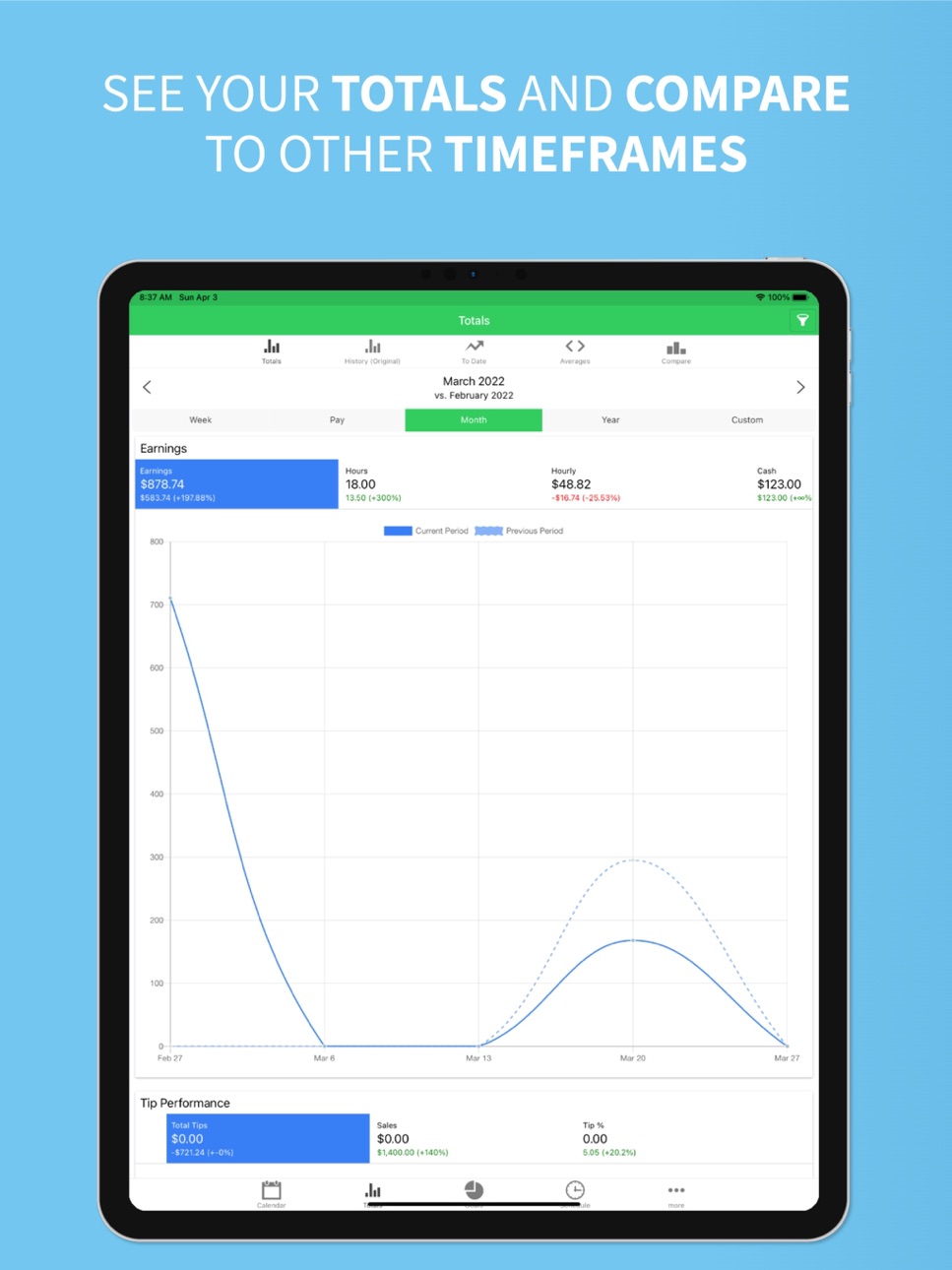
Added new date ranges to the charts including Week, Pay, Month, Year and Custom. You can also compare time periods now. See the increase or decrease between time frames to see if you're doing better.
Added a new To Date chart which shows you your cumulative totals over a given period.
If you love the app please leave a review, or if you have a suggestion or issue contact me from the Chat with Support on the More tab or from www.serverlifeapp.com
Build 838198021v1.25.112020-10-14 17:56:37
Added new date ranges to the charts including Week, Pay, Month, Year and Custom. You can also compare time periods now. See the increase or decrease between time frames to see if you're doing better.
Added a new To Date chart which shows you your cumulative totals over a given period.
If you love the app please leave a review, or if you have a suggestion or issue contact me from the Chat with Support on the More tab or from www.serverlifeapp.com
Build 833934841v1.24.82019-12-10 13:04:26
This release fixes a couple issues:
- An issue with restoring your purchases introduced in the last release.
- If you track hours and minutes you may have had issues getting to the minutes field. For now I've fixed this by moving the minutes field to another line.
If you love the app please leave a review, or if you have a suggestion or issue contact me from the Chat with Support on the More tab or from www.serverlifeapp.com
Build 833873941v1.24.52019-12-05 19:12:41
This release includes couple new features and some minor bug fixes.
1. Everyone can now enter hours worked in Hours and Minutes instead of decimals.
2. There is now a purchase option to turn off the ads.
If you love the app please leave a review, or if you have a suggestion or issue contact me from the Chat with Support on the More tab.
Build 833626949v1.23.332019-11-15 19:46:48
This release contains several new items.
- Now you can enjoy all of the premium features for free by watching a reward video.
- Take Pictures of your checkout slips so you have a record for later.
- Skip the daily reminders if you have already logged a tip or it's day off.
- Fixed a few bugs on the Goals page and with Calendar Syncing.
If you love the app please leave a review, or if you have a suggestion or issue contact me from the Chat with Support on the More tab.
Build 833578598v1.23.322019-11-14 23:55:11
This release contains several new items.
- Now you can enjoy all of the premium features for free by watching a reward video.
- Take Pictures of your checkout slips so you have a record for later.
- Skip the daily reminders if you have already logged a tip or it's day off.
- Fixed a few bugs on the Goals page and with Calendar Syncing.
If you love the app please leave a review, or if you have a suggestion or issue contact me from the Chat with Support on the More tab.
Build 831700359v1.22.42019-06-18 18:05:23
This release contains several new items and a few bugs. Here are the most noteworthy.
- You can now set Yearly Goals, in a addition to Daily, Weekly and Monthly.
- You can now see your Average Weekly and Monthly numbers, in addition to your daily.
- You can now edit a Tip's Date instead of having to delete and re-enter it.
If you love the app please leave a review, or if you have a suggestion or issue contact me from the Chat with Support on the More tab.
Build 831293542v1.21.272019-05-20 16:32:10
This release includes a couple minor fixes.
- An issue that caused your entries to load twice on the calendar page.
- Adjusted the way we let you know what's new in the app.
If you love the app please leave a review on the App Store, or contact me from the Chat with Support page in the app.
Build 830717326v1.21.232019-03-25 14:57:22
This update has several enhancements:
- You can now Sync your Schedule to your own Calendar
- Fixed a few bugs with Schedules and reminder notices
- Tips were displaying twice for some users
- Redesigned the Purchase page
- Fixed a weird date issue when you selected a schedule from the calendar
If you love the app please leave a review on the App Store, or contact me from the Chat with Support page in the app.
Build 829652773v1.20.102018-12-15 15:52:21
This update has several enhancements:
- Schedules now have their own start and end times.
- included a new Announcements section.
- The main navigation was updated to a bottom navigation bar.
- A few more bug fixes.
If you love the app please leave a review on the App Store, or contact me from the Chat with Support page in the app.
Build 829226143v1.19.102018-11-09 00:00:20
You can now save your Work Schedule and Set Reminders when it's time to get ready or leave for work.
There are also a few bug fixes and minor improvements
- Changed the filter icon color when it's set
- When you apply a change to your hourly wage your data refreshes now
- Wages on Paychecks will now display
- Minor issues with Positions and in-active Jobs
If you love the app please leave a review on the App Store, or contact me from the Chat with Support page in the app.
Price history by region
Currency
Show
Columns
Search
Availability 1 of 1 storefronts
| Region | Language | Price | Ratings | Avg | Version |
|---|---|---|---|---|---|
| US | en-US | Free | 9.3k | 4.8 | 2.1.53 |
Change log 29 changes · US
✎
releaseNotes updated
This update includes important fixes for tip and paycheck entry.
Fixed an issue where tips could save to the wrong date for some users based on timezone settin
✎
description updated
Stop guessing what you made — or what you'll make.
ServerLife is a powerful Tip Tracker and Income Tracker built for tipped and commission-based workers who wan
✎
subtitle updated
Start tracking your income!
✎
name updated
ServerLife - Tip Tracker
◆
Version 2.1.53 released
This update includes important fixes for tip and paycheck entry.
Fixed an issue where tips could save to the wrong date for some users based on timezone settings. Fixed expense totals and expense details when adding or editing tips and pay
◆
Version 2.1.52 released
This release includes a couple of bug fixes.
- Display issue where tips on the first of the month may not display.
- An issue where a Tip could not be deleted in some rare instances.
◆
Version 2.1.49 released
Improved Facebook and Apple sign-in reliability for existing accounts.
Fixed an issue where support chats could reset after being logged out.
Fixed a bug that could prevent some tip entries from being updated.
Improved stability around char
◆
Version 2.1.47 released
Forecast improvement: Paycheck entries are now excluded from your day-of-week earning averages. Previously, a paycheck landing on a specific day could make that day appear to be your highest earning shift — throwing off your forecast. Paych
◆
Version 2.1.45 released
What's New
New Forecasting - see estimated monthly take-home + earning range
Plan shifts to hit your goals
New Month/Year Picker on Calendar - jump to any past month instantly
Performance improvements & stability fixes
◆
Version 2.1.24 released
The new version includes these new features and bug fixes. If you see any issues please open a chat with me from the More tab, then Chat with Support.
- Added Days and Shifts Worked calculations on the Totals tab
- Fixed several bugs with
◆
Version 2.1.4 released
This release includes many small improvements and bug fixes. One notable new feature is you can now tap the Summary Totals above the Calendar to go to the Totals Charts.
◆
Version 2.0.27 released
This release includes the following new features and bug fixes.
- We fixed a bug when you selected a Filter for a single Job that had a different start of week than the default, the Calendar totals would be wrong.
- Included help icons on e
◆
Version 2.0.20 released
Fixed a few bugs with the Chart pages.
Improved performance and other small enhancements.
Made more clear when you have a reminder set and haven't enabled the Notification permission.
If you see any issues or have any questions please open
◆
Version 2.0.10 released
This new version includes these new features.
1. Job Colors: Easily see which jobs you've entered on the calendar.
2. You can now Choose Pictures from your Camera Roll.
3. New icon on calendar day showing if it has a picture and schedule.
4
◆
Version 1.26.26 released
Fixed an issue where the banner was showing more than once at top and covering the add tip fields. We also reenabled iPads to view the app in landscape orientation.
◆
Version 1.26.24 released
Fixed some bugs which affected people in timezones not in North America.
◆
Version 1.26.20 released
Increased the size of the Notes field when adding or updating an entry.
◆
Version 1.26.19 released
This update includes several new features and also a bunch of bug fixes.
New Features:
1. Added Monthly Summary Fields to the Calendar, Take Home, Hours, Average Hourly. With the Premium option you can change these fields to what's import
◆
Version 1.25.12 released
Added new date ranges to the charts including Week, Pay, Month, Year and Custom. You can also compare time periods now. See the increase or decrease between time frames to see if you're doing better.
Added a new To Date chart which shows y
◆
Version 1.25.11 released
Added new date ranges to the charts including Week, Pay, Month, Year and Custom. You can also compare time periods now. See the increase or decrease between time frames to see if you're doing better.
Added a new To Date chart which shows y
◆
Version 1.24.8 released
This release fixes a couple issues:
- An issue with restoring your purchases introduced in the last release.
- If you track hours and minutes you may have had issues getting to the minutes field. For now I've fixed this by moving the minut
◆
Version 1.24.5 released
This release includes couple new features and some minor bug fixes.
1. Everyone can now enter hours worked in Hours and Minutes instead of decimals.
2. There is now a purchase option to turn off the ads.
If you love the app please leave a
◆
Version 1.23.33 released
This release contains several new items.
- Now you can enjoy all of the premium features for free by watching a reward video.
- Take Pictures of your checkout slips so you have a record for later.
- Skip the daily reminders if you have alr
◆
Version 1.23.32 released
This release contains several new items.
- Now you can enjoy all of the premium features for free by watching a reward video.
- Take Pictures of your checkout slips so you have a record for later.
- Skip the daily reminders if you have alr
◆
Version 1.22.4 released
This release contains several new items and a few bugs. Here are the most noteworthy.
- You can now set Yearly Goals, in a addition to Daily, Weekly and Monthly.
- You can now see your Average Weekly and Monthly numbers, in addition to
◆
Version 1.21.27 released
This release includes a couple minor fixes.
- An issue that caused your entries to load twice on the calendar page.
- Adjusted the way we let you know what's new in the app.
If you love the app please leave a review on the App Store, or c
◆
Version 1.21.23 released
This update has several enhancements:
- You can now Sync your Schedule to your own Calendar
- Fixed a few bugs with Schedules and reminder notices
- Tips were displaying twice for some users
- Redesigned the Purchase page
- Fixed a weird d
◆
Version 1.20.10 released
This update has several enhancements:
- Schedules now have their own start and end times.
- included a new Announcements section.
- The main navigation was updated to a bottom navigation bar.
- A few more bug fixes.
If you love the app pl
◆
Version 1.19.10 released
You can now save your Work Schedule and Set Reminders when it's time to get ready or leave for work.
There are also a few bug fixes and minor improvements
- Changed the filter icon color when it's set
- When you apply a change to your hou