Home › Sports

 US
US
1 of 1 storefronts
Content in en-US
Content in en-US
Information
Preview 3 platforms
iPhone 10 images




iPad 5 images


Apple Watch 6 images


What’s New Version 1.203
Version 1.203
WHAT'S NEW:
- Liquid-glass polish on iOS 26 — the notification bell and webview back button now use Apple's new glass button style, blending naturally with your content.
FIXES:
- Apple Watch: Golf workout no longer records 0 seconds — durations, calories and heart rate now track the full round in the Health app.
- Round upload after a fresh sign-up or reinstall no longer fails with "No profile data" — your rounds make it to the cloud the first time.
- Sign-in stays signed in — short server hiccups no longer kick you back to the login screen.
Thanks for playing with us. Enjoy your rounds.
Description
Track every shot automatically. bebrassie uses patented Automatic Shot Detection — motion sensors in your iPhone or Apple Watch detect every swing. No data entry during a round. Works for 18-hole and 9-hole rounds.
Trusted by PGA of Germany pros, top amateurs, and thousands of golfers who have tracked over 45 million shots together.
AUTOMATIC SHOT DETECTION (ASD)
Patented technology (US Patent 10,001,563) detects shots in real time via iPhone or Apple Watch motion sensors. Review your detected shots, sign the round, and get a detailed performance breakdown.
APPLE WATCH
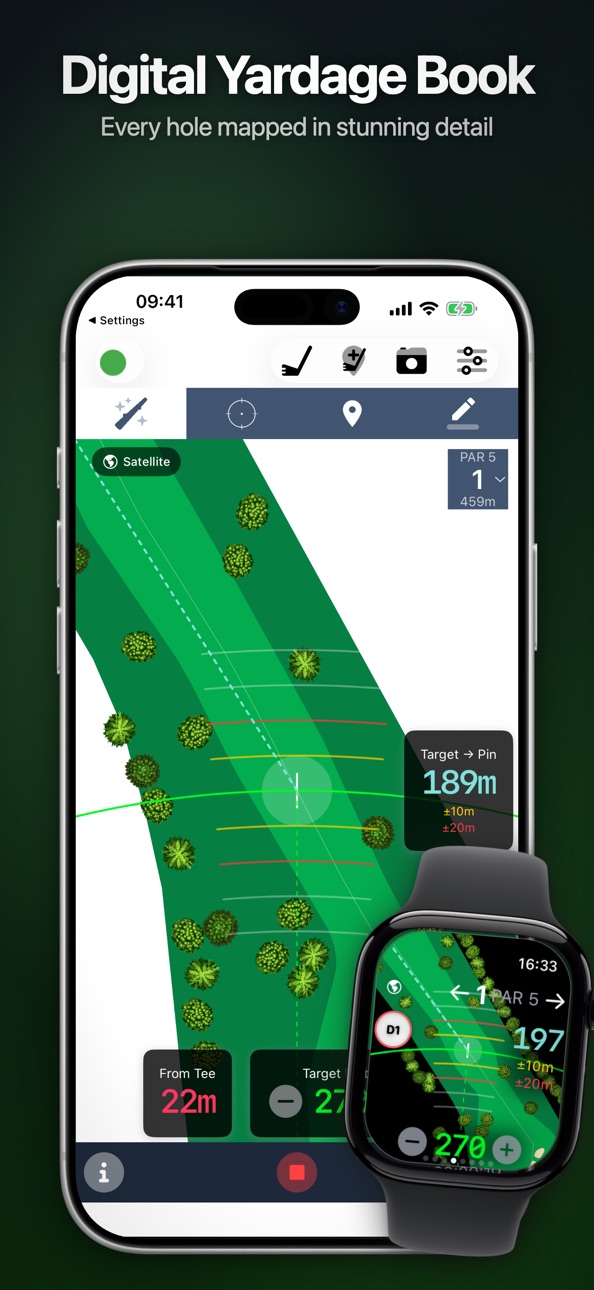
Full Watch app: GPS rangefinder, satellite maps, live scoring, automatic shot detection. Track from your wrist.
GPS RANGEFINDER & SATELLITE MAPS
Precise distances to green, hazards, and layup targets on 40,000+ courses. Standard, satellite, and terrain views on iPhone and Apple Watch. Contour views on iPhone. Download courses for offline use.
STROKES GAINED ANALYSIS
See where you gain and lose strokes vs. your baseline or PGA Tour benchmarks. Long game, approach, short game, putting — track improvement over time.
HANDICAP INDEX & STABLEFORD
Full WHS calculation: Handicap Index from Score Differentials with soft cap, hard cap, and exceptional score adjustments. Automatic Stableford points. Scorecard shows Slope, Course Rating, and playing handicap.
AI REPORTS
AI coaching reports per round, monthly, yearly, and rolling trend analyses. Each identifies playing patterns with actionable tips.
DASHBOARD & 1,000+ STATISTICS
GIR, fairways, scrambling, sand saves, birdie conversion, driving distance, putt analysis, scoring trends, and shot dispersion with confidence ellipses. Filter by weather, golf ball, course, or round type.
CLUB BAG
Virtual bag with real brands. Distance, accuracy, and deviation per club. Recommendations from your last 100 rounds. 14-club rule.
WEATHER TRACKING
Automatic weather capture every round. Filter stats by temperature, wind, and conditions to see how weather affects your game.
EDITROUNDS
Drag-and-drop shot editing with custom target placement, adaptive club suggestions, and penalty area / lost ball / OB handling — on the bebrassie web app.
MYREPORTS
Custom single or multi-round reports. Export as PDF and share with your coach.
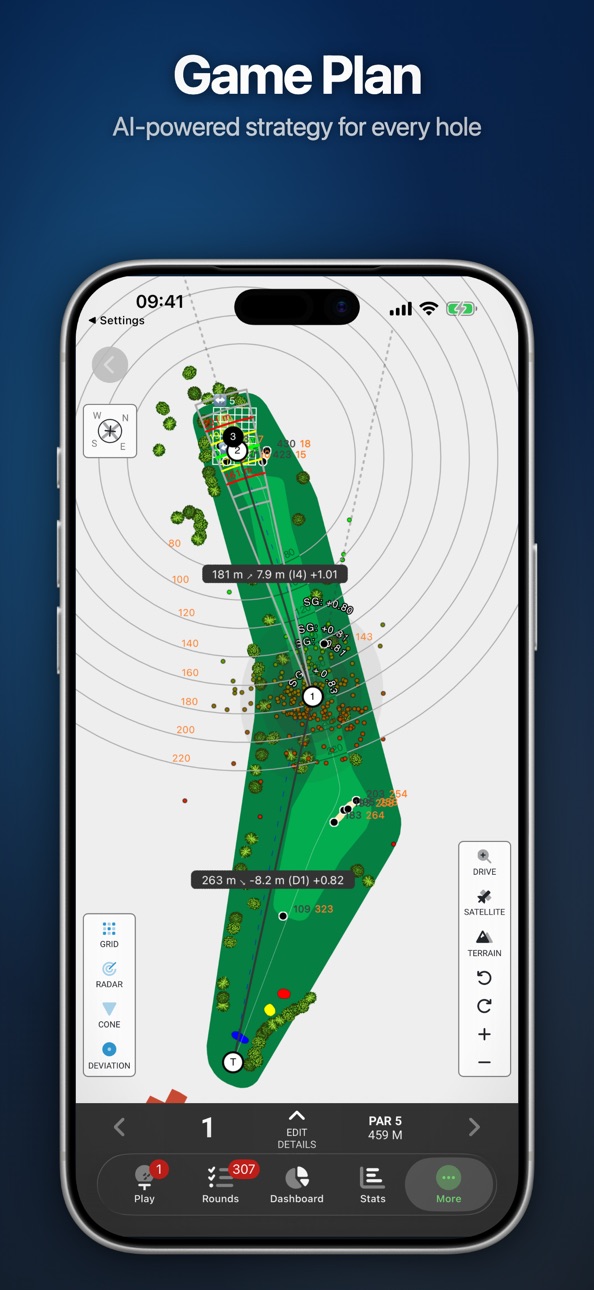
GAME PLAN
Target lines with dispersion cones, elevation-adjusted carries, compass overlay for wind, and printable PDF with green views.
EVENTS & TOURNAMENTS
Find events nearby, register for tournaments and challenges, export to calendar. Create and host your own events.
MYGROUP
Invite players to view rankings, profiles, and stats. Export to Excel for deeper analysis.
GOPRACTICE
Track practice sessions with structured tables based on your Game Plan.
HEALTH INTEGRATION
Saves rounds as HealthKit workouts. Tracks heart rate, steps, distance, and calories.
---
Try free — 14 days with the monthly plan, 60 days with the annual plan. Cancel anytime.
Monthly: $9.99/month (after 14-day free trial)
Annual: $69.99/year (after 60-day free trial)
Payment charged to Apple ID at purchase. Auto-renews unless canceled 24h before period ends. Unused trial forfeited on subscription purchase.
Privacy Policy: https://www.bebrassie.com/privacy-policy/
Terms of Use: https://www.bebrassie.com/terms-of-service/
In-App Purchases US pricing
Subscription Subscription
Monthly Subscription · Monthly 14-day free trial$9.99
Yearly Subscription · Yearly 2-month free trial$69.99
Capabilities
In-App Purchases
Accessibility
ipadiphonemacrealityDevicetvoswatch
Version history 25 versions
Build 886019044v1.2032026-05-22 22:31:45
Version 1.203
WHAT'S NEW:
- Liquid-glass polish on iOS 26 — the notification bell and webview back button now use Apple's new glass button style, blending naturally with your content.
FIXES:
- Apple Watch: Golf workout no longer records 0 seconds — durations, calories and heart rate now track the full round in the Health app.
- Round upload after a fresh sign-up or reinstall no longer fails with "No profile data" — your rounds make it to the cloud the first time.
- Sign-in stays signed in — short server hiccups no longer kick you back to the login screen.
Thanks for playing with us. Enjoy your rounds.
Build 884866326v1.2022026-04-24 17:25:11
Version 1.201
COMPLETELY REDESIGNED NAVIGATION:
We've rebuilt how you move through bebrassie from the ground up. The old side menu is gone — replaced by a modern tab bar that puts everything one tap away:
- Play — Start or continue your round instantly. A pulsing indicator shows when a round is in progress.
- Rounds — See your pending uploads, unsigned rounds, and completed rounds at a glance with color-coded badges.
- Dashboard — Your career overview with full-screen stats and charts.
- Stats — Deep dive into your performance data.
- More — Your clubs, profile, subscription, AI Reports, Game Plan, Events, and support — all in one place with smart cards that guide you to your next step.
Every screen now flows seamlessly.
IN-APP NOTIFICATIONS & AI REPORTS:
A notification bell now lives in the top corner of your main screens. It shows your unread count in real time — updating every minute and instantly when a push notification arrives. Tap it to see all your notifications, then tap any one to jump straight to:
- Round Analysis — AI-powered breakdown of every round you play
- Monthly Insights — How your game is trending over the past month
- Yearly Insights — Long-term progress and patterns across the season
FULL LOCALIZATION:
The entire app is now fully translated in all 28 supported languages, with 16 new in-app translations added this release.
IMPROVEMENTS:
- AI Reports let you rate insights with thumbs up or down
- AI Reports take your selected Strokes Gained benchmark into account
Build 882872520v1.2012026-04-17 21:32:18
Version 1.201
COMPLETELY REDESIGNED NAVIGATION:
We've rebuilt how you move through bebrassie from the ground up. The old side menu is gone — replaced by a modern tab bar that puts everything one tap away:
- Play — Start or continue your round instantly. A pulsing indicator shows when a round is in progress.
- Rounds — See your pending uploads, unsigned rounds, and completed rounds at a glance with color-coded badges.
- Dashboard — Your career overview with full-screen stats and charts.
- Stats — Deep dive into your performance data.
- More — Your clubs, profile, subscription, AI Reports, Game Plan, Events, and support — all in one place with smart cards that guide you to your next step.
Every screen now flows seamlessly.
IN-APP NOTIFICATIONS & AI REPORTS:
A notification bell now lives in the top corner of your main screens. It shows your unread count in real time — updating every minute and instantly when a push notification arrives. Tap it to see all your notifications, then tap any one to jump straight to:
- Round Analysis — AI-powered breakdown of every round you play
- Monthly Insights — How your game is trending over the past month
- Yearly Insights — Long-term progress and patterns across the season
FULL LOCALIZATION:
The entire app is now fully translated in all 28 supported languages, with 16 new in-app translations added this release.
IMPROVEMENTS:
- AI Reports let you rate insights with thumbs up or down
- AI Reports take your selected Strokes Gained benchmark into account
Build 882155022v1.2002026-02-27 17:54:46
Version 1.200
BUG FIXES:
- Fixed course search by name not working when location is enabled.
Thank you for your continued support. Enjoy your rounds!
Build 882032049v1.1182026-02-04 01:20:22
Version 1.118
STABILITY IMPROVEMENTS:
Fixed an issue that could cause the app to crash on launch for some users updating from older versions.
Thank you for your continued support. Enjoy your rounds!
Build 882144600v1.1192026-02-04 13:04:44
Version 1.118
BUG FIXES:
- Fixed a crash on launch affecting devices running iOS 16.
- Fixed course search not returning results when location is enabled.
- Fixed hole info (par, distance) not showing when navigating to a hole from the scorecard.
Thank you for your continued support. Enjoy your rounds!
Build 881931896v1.1172026-01-31 09:13:28
Version 1.117
SATELLITE IMAGERY ON APPLE WATCH:
Satellite view is now available on Apple Watch! Switch between standard and satellite views right from your wrist. Images are automatically synced from your iPhone and optimized for the Watch – using up to 70% less storage.
AI REPORTS – YOUR PERSONAL GOLF COACH:
New in the web app: Get personalized analysis of your rounds with artificial intelligence. The AI analyzes your playing patterns and provides individual tips for improvement. Each report is directly linked to your selected time period – so you can always see which rounds your analysis is based on.
STABLEFORD POINT CALCULATION:
Automatic calculation of your Stableford points according to the World Handicap System (WHS). The scorecard now displays Slope and Course Rating. Your Handicap Index is saved and used for calculations.
NEW IN THE WEB APP:
- Events: Create and participate in golf events. Receive email reminders and find events near you with Google Maps. Webinar content is made available afterwards as documents and videos.
ADDITIONAL IMPROVEMENTS:
- Saved courses are now displayed sorted by distance
- Improved scorecard layout
- Performance improvements and bug fixes
Build 879740152v1.1162025-11-16 22:34:12
Version 1.116
BRAND NEW FEATURE:
Generate and download game plan PDFs. PDFs are created in the background and are ready to download once they are finished.
Get notified when your game plan PDF is ready: opt in to receive email and push alerts
All your shot-based performance statistics can now be analysed by filtering specific holes.
iOS + watchOS:
- Fixed a bug that could cause a problem with the shot detection when multiple trackings were started in succession.
Build 879523572v1.1152025-11-07 02:09:16
Version 1.115
BRAND NEW FEATURE:
Generate and download game plan PDFs. PDFs are created in the background and are ready to download once they are finished.
Get notified when your game plan PDF is ready: opt in to receive email and push alerts
All your shot-based performance statistics can now be analysed by filtering specific holes.
iOS + watchOS:
- Fixed a bug that caused the iOS app to quit after the Watch requested the pedometer.
Build 879175015v1.1142025-11-05 13:51:40
Version 1.114
BRAND NEW FEATURE:
Generate and download game plan PDFs. PDFs are created in the background and are ready to download once they are finished.
Get notified when your game plan PDF is ready: opt in to receive email and push alerts
All your shot-based performance statistics can now be analysed by filtering specific holes.
iOS + watchOS:
- Fixed a bug where the display of the smart yardage book was incorrect.
- Always draw the green on top of the fairway in the map
Build 878963387v1.1132025-10-17 11:30:51
Version 1.112
BRAND NEW FEATURE:
Generate and download game plan PDFs. PDFs are created in the background and are ready to download once they are finished.
Get notified when your game plan PDF is ready: opt in to receive email and push alerts
All your shot-based performance statistics can now be analysed by filtering specific holes.
iOS:
- Fixed a bug where the map was displayed mirrored.
- Fixed a bug where the watch connectivity status was not recognized correctly.
- When asking whether to continue an unfinished round, the time that has passed since the last tracking is now displayed.nk
Build 878791838v1.1122025-10-15 15:35:05
Version 1.112
BRAND NEW FEATURE:
Generate and download game plan PDFs. PDFs are created in the background and are ready to download once they are finished.
Get notified when your game plan PDF is ready: opt in to receive email and push alerts
All your shot-based performance statistics can now be analysed by filtering specific holes.
iOS:
- Download gameplan PDFs directly from the app
watchOS:
- Fixed a problem where the map only showed the distances to the green instead of the fairway
Web:
- Game plan PDFs are now available with satellite imagery
- Onboard people directly into your group with a group invite link
Build 877866876v1.1112025-09-08 15:19:44
Version 1.111
BRAND NEW FEATURE:
Generate and download game plan PDFs. PDFs are created in the background and are ready to download once they are finished.
Get notified when your game plan PDF is ready: opt in to receive email and push alerts
All your shot-based performance statistics can now be analysed by filtering specific holes.
iOS:
No changes in this release.
watchOS:
No changes in this release.
Web:
- Strategy: Start, track and download game plan PDFs with clear progress information, queue position and the option to retry if something fails.
- Strategy: Game plan PDF creation is now more reliable, and compression has been added.
- Strategy: The game plans list now shows instant download if a PDF already exists, plus a reprint option.
- ViewStats: Scoring and classic stats charts have been improved
- ViewStats: Chart trendline calculations have been improved and adapted for charts displaying time intervals.
- ViewStats: Deviation chart performance has been boosted for smoother interaction.
Build 876822168v1.1102025-07-30 23:01:18
Version 1.110
watchOS:
- Club adjustment can now be done directly via a button in the Smart Yardagebook.
- Performance improvements in the map view provide smoother navigation on Apple Watch.
Web:
- Our AI reports under Dashboard -> Profile have been further optimized – now more powerful and detailed.
- All distances to hazards and the front of the green are now displayed directly in the Gameplan.
- The map designs have been thoroughly improved.
- A new map design has been added.
- You can now choose between different designs in the Gameplan print view.
- The visibility of elements in the Gameplan has been significantly improved.
- The print view of the Gameplan has been optimized to better handle printer margin limitations.
- Trees are now displayed consistently (rotation, width, tree type).
Build 873638428v1.1092025-04-14 12:57:31
Version 1.109
BRAND NEW FEATURE - Smart Yardagebook
(Available since version 1.106 – see there for more details.)
We’re excited to introduce the Smart Yardagebook for iPhone – previously only available on Apple Watch.
Simply select your target based on the desired distance on either device. You’ll automatically receive detailed information on tee shots, layups, recovery shots, or approaches without needing to measure distances manually. Enjoy seamless synchronization between iPhone and Apple Watch.
Improvements and bug fixes:
iOS & watchOS:
Smart Yardagebook:
- Temporary deactivation of the feature due to a bug: Course detection – when outside the golf course, your position is automatically set to the tee – ideal for exploring individual holes.
watchOS:
- Fixed a bug that caused a crash
- Improved the display logic for club selection after a shot
Build 873484015v1.1082025-03-29 18:11:40
Version 1.108
BRAND NEW FEATURE - Smart Yardagebook
(Available since Version 1.106 – you can find more details there.)
We are excited to introduce the Smart Yardagebook for the iPhone – previously, it was available exclusively on the Apple Watch.
Simply select your target based on the desired distance on one of your devices. This automatically provides you with detailed information on tee shots, transport shots, recovery shots, or approaches—eliminating the need to measure distances manually. Enjoy seamless synchronization between the iPhone and the Apple Watch.
Improvements and Bug Fixes:
iOS & watchOS:
Smart Yardagebook:
- Course Recognition: When outside the golf course, your position is automatically set to the tee – perfect for familiarizing yourself with each hole.
- Zoom Optimization: Fixed the issue where the zoom using the Apple Watch crown did not work continuously.
- The colors of the polygons have been aligned with the web app.
- Bug Fix: The map can now be moved across the entire area with your finger.
watchOS:
Club Selection:
- Completely redesigned for more intuitive operation.
- Shot Info: Displays the elapsed time since the shot was detected as well as the remaining distance to the flag.
- Bug Fix: Resolved the issue where the club input was unresponsive or could not be deleted.
- Bug Fix: Fixed the issue where an incorrect club was suggested.
- Club Input: Enabled for everyone; it can be disabled via the settings.
Build 873441590v1.1072025-03-23 10:38:33
Version 1.107
BRAND NEW FEATURE
(Available since version 1.106 – find more details there.)
We are pleased to introduce the Smart Yardagebook for the iPhone as well – previously, it was only available for the Apple Watch.
Simply select your target based on the desired distance on one of the devices. This way you automatically get detailed information about tee shots, transport shots, recovery shots, or approach shots without having to measure distances manually. Enjoy seamless synchronization between iPhone and Apple Watch.
iOS & watchOS:
Smart Yardagebook:
- New: Trees are now integrated into the Smart Yardagebook.
- The design of the trees has been adjusted (width of 10–11 meters, random rotation)
- Improved precision of the distance rings.
- Fixed an issue where some map elements were not displayed correctly when zooming.
Web:
- The design of the trees matches iOS & watchOS
- The size of the trees is displayed correctly at every zoom level
Build 871839375v1.1062025-03-20 18:24:57
Version 1.106
BRAND NEW FEATURE:
We're excited to introduce the Smart Yardagebook for iPhone—previously available only on Apple Watch.
Select your target based on your desired distance on either device to gain a detailed understanding of your tee, transport, recovery, or approach shot without the need to manually measure any distances. Enjoy seamless syncing between them.
iOS:
- The Smart Yardagebook is now available on the iPhone.
- Zoom and pan the Smart Yardagebook on both the iPhone and Apple Watch.
- Target distance syncs automatically between the iPhone and Apple Watch.
watchOS:
- Fixed the bug that caused the target circle on the Apple Watch’s Yardagebook to jump.
- Refined the yard display in the Smart Yardagebook.
Web:
- In the game plan printout, all shots are now available as the "Game Plan Practice Table", designed for systematic shot analysis with flexible columns ("1", "2", and "3").
- The grid on the green in the game plan is now precisely aligned with the starting point.
- Group members can now receive notifications via email and push messages for new game plans and rounds—just click the bell next to a member.
- The AI report in Dashboard -> Profile now provides insights into your monthly and yearly golfing progress.
- In the map view and during round editing, optional contour lines offer detailed information about a hole’s elevation profile.
Build 871503715v1.1052025-01-17 18:50:48
Version 1.105
iOS:
- Add players to record scores before starting your round.
Web:
- Analyze your performance with AI-powered reports for monthly and yearly periods under Dashboard -> Profile.
New Gameplan Features
- Display distances to hazards from the tee in the drive landing zone.
- Distance to the start of the fairway.
- Distance rings from 80 to 220 yards in 20-yard increments are displayed.
- Distance rings are color-coded depending on whether they intersect fairways, bunkers, or water hazards.
- Display a grid over the green with 5-yard edge lengths aligned from the approach position toward the front of the green.
- The front point of the green is marked.
- All features are also available for print.
Build 869048397v1.1032024-09-17 09:24:06
Version 1.103
iOS:
- New sharing functionality for sharing the summary incl. screenshot of the summary
- Fixed a bug where the position of the flag was set to a different hole position
Build 869060475v1.1042024-09-17 19:39:27
Version 1.104
iOS:
- Fixed a bug where the GPS path was not visible
- Fixed a bug where the scorecard shared with fellow players did not contain the correct link to the 30-day test
- Fixed a bug where the score and score to par were not calculated correctly in the round overview under UPLOADROUNDS
Build 868874863v1.1022024-09-10 14:00:02
Version 1.102
iOS:
- The input of scores and the structure of the scorecard have been completely revised
WatchOS:
- Fixed a problem with synchronization where the synchronization process stopped at a certain percentage
- Fixed a crash when starting tracking on the watch
Build 866015950v1.1012024-05-18 21:33:07
Version 1.101
WatchOS:
- Fixed an issue with synchronization where the synchronisation from the Apple Watch would crash the iPhone resulting in data loss
Build 865845021v1.1002024-05-16 09:25:02
Version 1.100
WatchOS:
- Fixed an issue with synchronization where scores entered on the Watch were not synced to the iPhone
Build 865650160v1.992024-05-07 15:29:05
Version 1.99
WatchOS:
- Fixed an issue during synchronization that caused tracking data to not be available on the iPhone
Price history by region
Currency
Show
Columns
Search
Availability 1 of 1 storefronts
| Region | Language | Price | Ratings | Avg | Version |
|---|---|---|---|---|---|
| US | en-US | Free | 15 | 4.2 | 1.203 |
Change log 29 changes · US
✎
releaseNotes updated
Version 1.203
WHAT'S NEW:
- Liquid-glass polish on iOS 26 — the notification bell and webview back button now use Apple's new glass button style, blending natu
✎
description updated
Track every shot automatically. bebrassie uses patented Automatic Shot Detection — motion sensors in your iPhone or Apple Watch detect every swing. No data entr
✎
subtitle updated
Golf GPS, Scorecard & AI Coach
✎
name updated
bebrassie: Golf GPS & Score
◆
Version 1.203 released
Version 1.203
WHAT'S NEW:
- Liquid-glass polish on iOS 26 — the notification bell and webview back button now use Apple's new glass button style, blending naturally with your content.
FIXES:
- Apple Watch: Golf workout no longer records 0
◆
Version 1.202 released
Version 1.201
COMPLETELY REDESIGNED NAVIGATION:
We've rebuilt how you move through bebrassie from the ground up. The old side menu is gone — replaced by a modern tab bar that puts everything one tap away:
- Play — Start or continue your r
◆
Version 1.201 released
Version 1.201
COMPLETELY REDESIGNED NAVIGATION:
We've rebuilt how you move through bebrassie from the ground up. The old side menu is gone — replaced by a modern tab bar that puts everything one tap away:
- Play — Start or continue your r
◆
Version 1.200 released
Version 1.200
BUG FIXES:
- Fixed course search by name not working when location is enabled.
Thank you for your continued support. Enjoy your rounds!
◆
Version 1.119 released
Version 1.118
BUG FIXES:
- Fixed a crash on launch affecting devices running iOS 16.
- Fixed course search not returning results when location is enabled.
- Fixed hole info (par, distance) not showing when navigating to a hole from the sco
◆
Version 1.118 released
Version 1.118
STABILITY IMPROVEMENTS:
Fixed an issue that could cause the app to crash on launch for some users updating from older versions.
Thank you for your continued support. Enjoy your rounds!
◆
Version 1.117 released
Version 1.117
SATELLITE IMAGERY ON APPLE WATCH:
Satellite view is now available on Apple Watch! Switch between standard and satellite views right from your wrist. Images are automatically synced from your iPhone and optimized for the Watch
◆
Version 1.116 released
Version 1.116
BRAND NEW FEATURE:
Generate and download game plan PDFs. PDFs are created in the background and are ready to download once they are finished.
Get notified when your game plan PDF is ready: opt in to receive email and push ale
◆
Version 1.115 released
Version 1.115
BRAND NEW FEATURE:
Generate and download game plan PDFs. PDFs are created in the background and are ready to download once they are finished.
Get notified when your game plan PDF is ready: opt in to receive email and push ale
◆
Version 1.114 released
Version 1.114
BRAND NEW FEATURE:
Generate and download game plan PDFs. PDFs are created in the background and are ready to download once they are finished.
Get notified when your game plan PDF is ready: opt in to receive email and push aler
◆
Version 1.113 released
Version 1.112
BRAND NEW FEATURE:
Generate and download game plan PDFs. PDFs are created in the background and are ready to download once they are finished.
Get notified when your game plan PDF is ready: opt in to receive email and push aler
◆
Version 1.112 released
Version 1.112
BRAND NEW FEATURE:
Generate and download game plan PDFs. PDFs are created in the background and are ready to download once they are finished.
Get notified when your game plan PDF is ready: opt in to receive email and push aler
◆
Version 1.111 released
Version 1.111
BRAND NEW FEATURE:
Generate and download game plan PDFs. PDFs are created in the background and are ready to download once they are finished.
Get notified when your game plan PDF is ready: opt in to receive email and push aler
◆
Version 1.110 released
Version 1.110
watchOS:
- Club adjustment can now be done directly via a button in the Smart Yardagebook.
- Performance improvements in the map view provide smoother navigation on Apple Watch.
Web:
- Our AI reports under Dashboard -> Profi
◆
Version 1.109 released
Version 1.109
BRAND NEW FEATURE - Smart Yardagebook
(Available since version 1.106 – see there for more details.)
We’re excited to introduce the Smart Yardagebook for iPhone – previously only available on Apple Watch.
Simply select yo
◆
Version 1.108 released
Version 1.108
BRAND NEW FEATURE - Smart Yardagebook
(Available since Version 1.106 – you can find more details there.)
We are excited to introduce the Smart Yardagebook for the iPhone – previously, it was available exclusively on the Ap
◆
Version 1.107 released
Version 1.107
BRAND NEW FEATURE
(Available since version 1.106 – find more details there.)
We are pleased to introduce the Smart Yardagebook for the iPhone as well – previously, it was only available for the Apple Watch.
Simply select yo
◆
Version 1.106 released
Version 1.106
BRAND NEW FEATURE:
We're excited to introduce the Smart Yardagebook for iPhone—previously available only on Apple Watch.
Select your target based on your desired distance on either device to gain a detailed understanding of y
◆
Version 1.105 released
Version 1.105
iOS:
- Add players to record scores before starting your round.
Web:
- Analyze your performance with AI-powered reports for monthly and yearly periods under Dashboard -> Profile.
New Gameplan Features
- Display distances t
◆
Version 1.104 released
Version 1.104
iOS:
- Fixed a bug where the GPS path was not visible
- Fixed a bug where the scorecard shared with fellow players did not contain the correct link to the 30-day test
- Fixed a bug where the score and score to par were not ca
◆
Version 1.103 released
Version 1.103
iOS:
- New sharing functionality for sharing the summary incl. screenshot of the summary
- Fixed a bug where the position of the flag was set to a different hole position
◆
Version 1.102 released
Version 1.102
iOS:
- The input of scores and the structure of the scorecard have been completely revised
WatchOS:
- Fixed a problem with synchronization where the synchronization process stopped at a certain percentage
- Fixed a crash whe
◆
Version 1.101 released
Version 1.101
WatchOS:
- Fixed an issue with synchronization where the synchronisation from the Apple Watch would crash the iPhone resulting in data loss
◆
Version 1.100 released
Version 1.100
WatchOS:
- Fixed an issue with synchronization where scores entered on the Watch were not synced to the iPhone
◆
Version 1.99 released
Version 1.99
WatchOS:
- Fixed an issue during synchronization that caused tracking data to not be available on the iPhone