Home › Travel

 US
US
1 of 1 storefronts
Content in en-US
Content in en-US
Information
Apple ID1095856653
Bundle IDcom.modesittsoftware.RoadTripPlanner
SellerSeller
Min iOS12.4
Min macOS11.0
Device familiesiphone, ipad, ipod
Released2016-03-31
Copyright© 2025 Copyright Modesitt Software
Privacy policyLink ↗
Preview 2 platforms
iPhone 10 images




iPad 10 images






What’s New Version 4.8.4
- Added enhancement so that when adding a map pin, its name appears not just the address.
- Enhanced "Send all route pins to Apple Maps" so that the route pins are in correct order.
- Bug fixes and interface enhancements.
Description
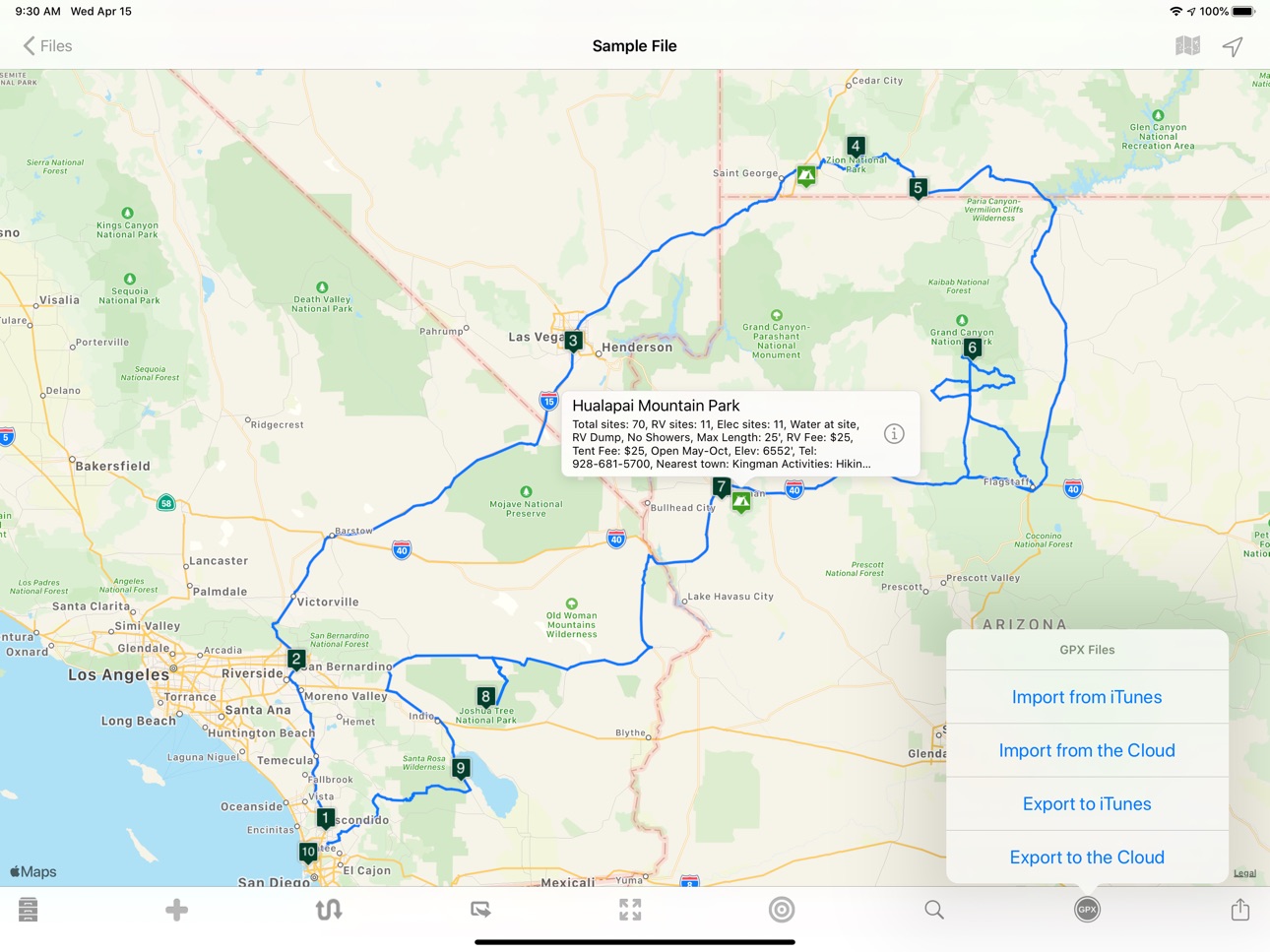
Place pins on a worldwide map for each location you want to visit, then see your route. Enter trip details for each location and create a complete trip itinerary. Multiple sample files are available, including an informative Route 66 sample file.
You can demo this app by downloading our free RTP Viewer app. RPT Viewer is virtually identical to this app except with RTP Viewer you can’t save your edits.
Road Trip Planner does not require any subscription and respects your privacy by not collecting any of your data.
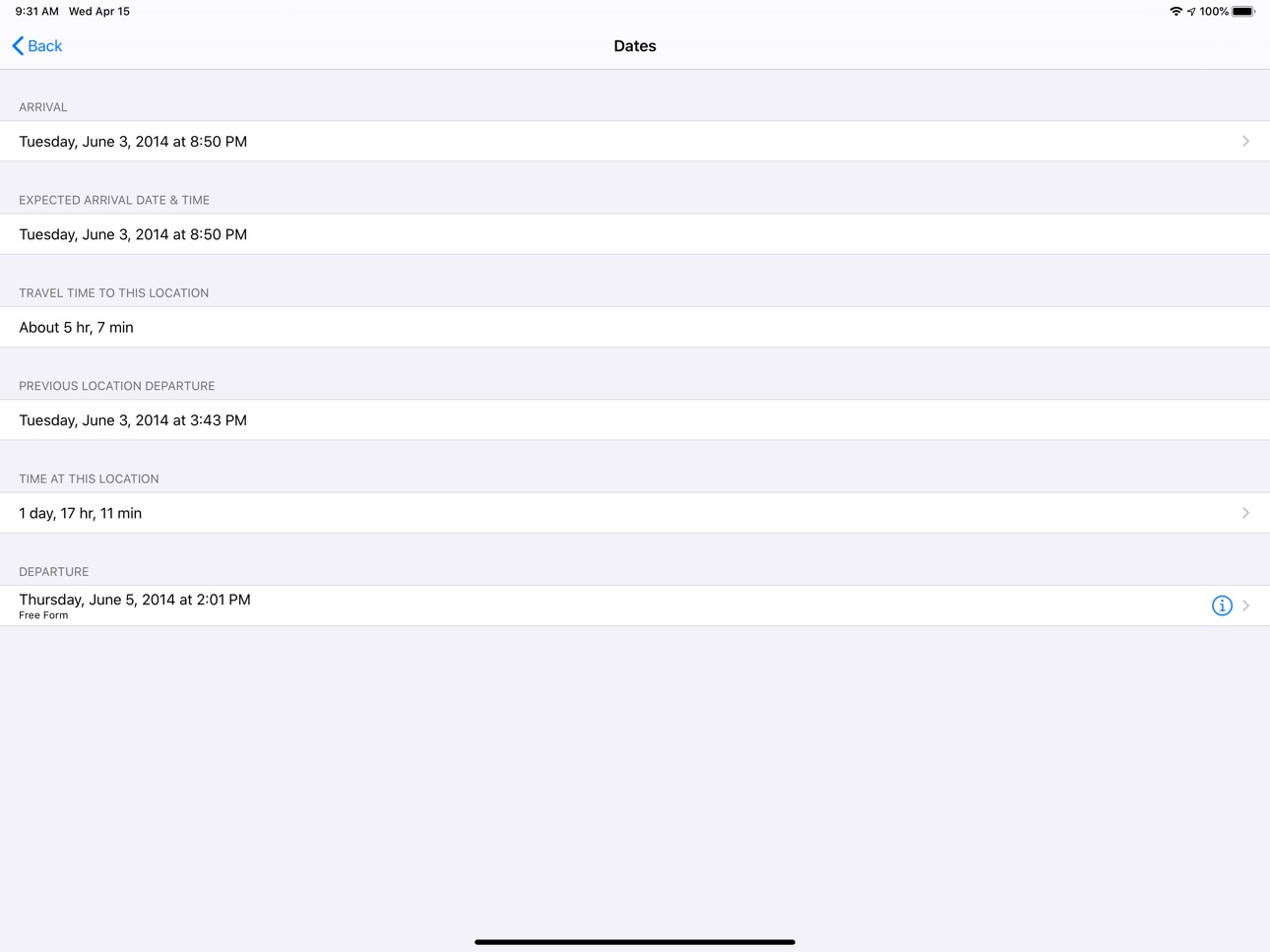
MAP PINS HOLD WHAT YOU NEED. Each pin shows:
- arrival date & time
- departure date & time
- travel time to this location
- time spent at this location
- name of pin (such as John’s house)
- address of pin
- notes and images
- custom pin color and icon
- URL for related information
- weather reports
- transport type (driving or walking)
- Internet Search results
- list of activities (lodging, sights to see, etc.)
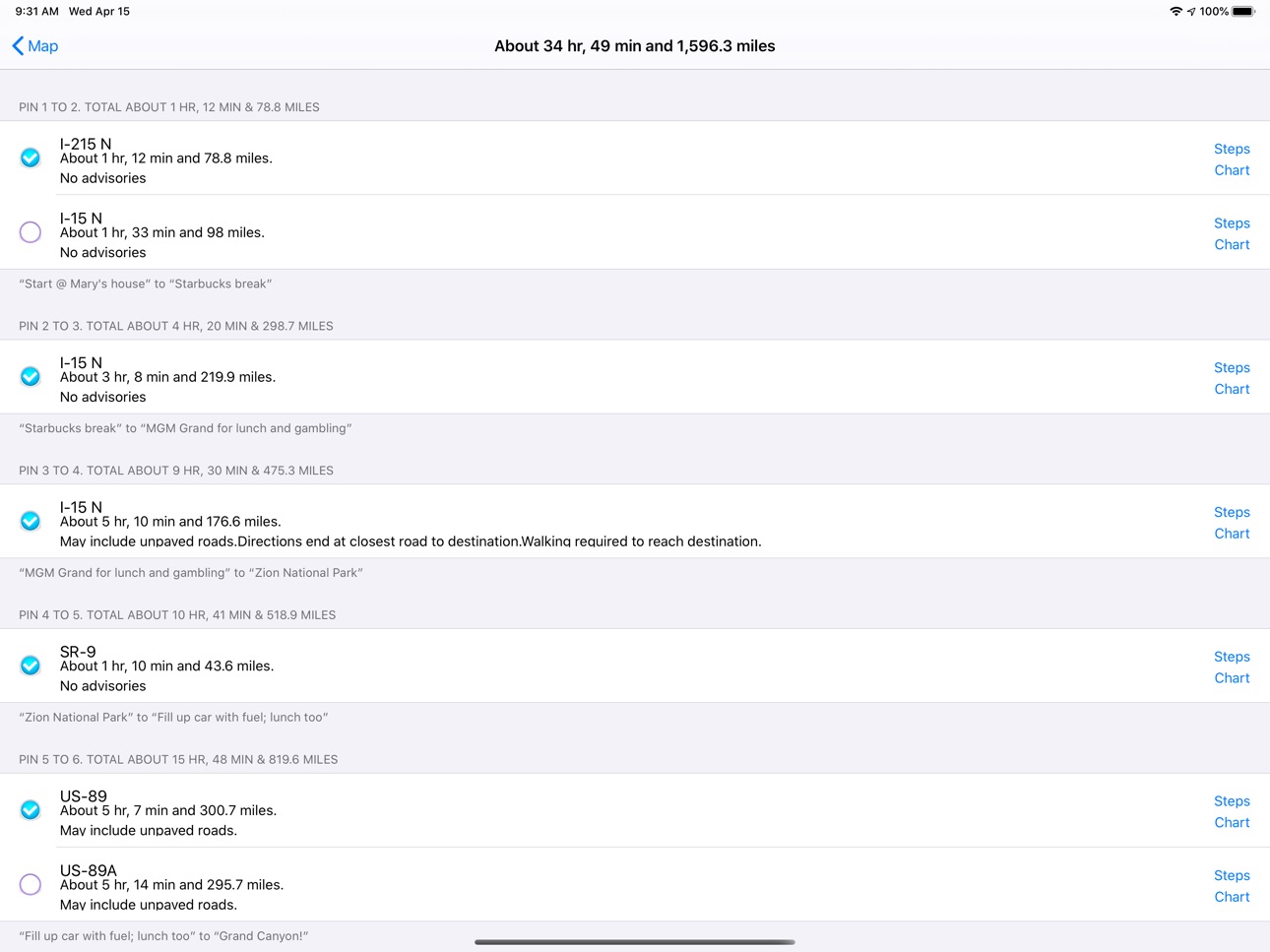
- choose between multiple routes (if available)
- view driving distance between pins, driving time, fuel cost, travel advisories, turn-by-turn driving directions
- Export pin data to your calendar.
EACH PIN CAN HAVE MANY ACTIVITIES. For each activity you can record:
- name of activity
- activity date, time and duration
- cost
- phone
- FAX
- address
- URL
- email address
- confirmation number
- notes
- picture
There are two types of pins. Route Pins are used to create the route. POI Pins mark points of interest on the map.
Choose between Apple Maps or OpenStreet Maps. Cache non-Apple maps to disk for offline use. See the settings and Help for more info.
For air and rail routes a straight line can be displayed between pins.
Add, remove or rearrange the pins in any order you wish. Routes and pins can be sent to Apple Maps.
Import and export GPX data files.
Each trip can be saved as a separate document. Perfect for anyone who wants to maintain a record of past trips.
VIEW YOUR TRIP ON YOUR MAC with our Road Trip Planner app available from the Mac App Store.
Send location data to Road Trip Planner directly from any of our location-savvy apps.
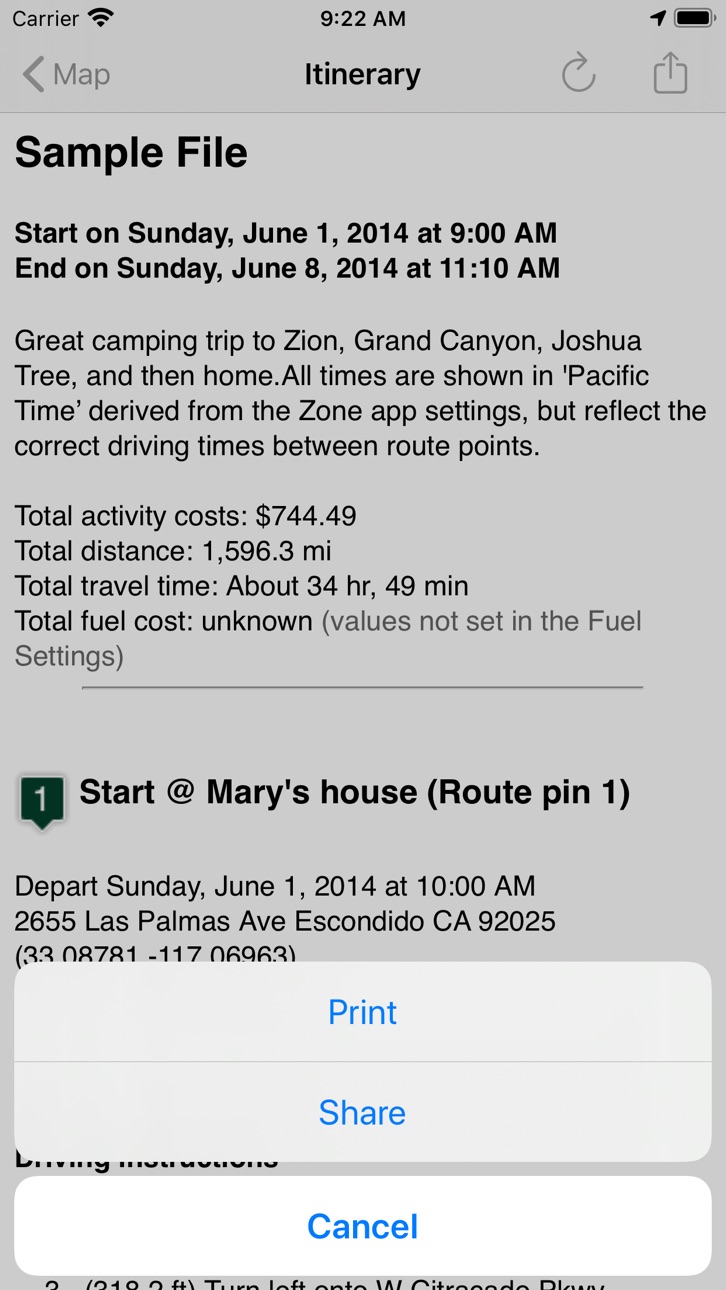
THE ITINERARY HOLDS ALL OF THE DETAILS. Share it and take it with you.
- print the itinerary or share it easily
- includes a map image with pins and routes, activities for each Route Pin, costs for each activity, total fuel cost, total trip cost, information for Points of Interest Pins, and driving instructions.
USE THE TO-DO CHECKLIST. Make sure you don’t forget anything.
We respond quickly to suggestions and questions in our forum.
PLEASE CONTACT US IF YOU HAVE A QUESTION OR AN ISSUE. We promise we'll respond as quickly as we can.
For more info visit the Road Trip Planner web site at https://roadtripplanner.modesittsoftware.com
PLEASE READ CAREFULLY BEFORE PURCHASING:
The mapping and routing functionality Road Trip Planner uses is based upon Apple’s maps technology. If Apple Maps cannot find a route between map pins, then neither can Road Trip Planner. Please test the area you wish to travel using Apple’s Maps app to ensure that the area can be routed. If it cannot be routed, please submit the issue to Apple. If Apple Maps cannot perform routing in the area you wish to travel then neither can Road Trip Planner.
Accessibility
ipadiphonemacrealityDevicetvoswatch
Version history 25 versions
Build 872578016v4.8.42025-02-18 08:34:23
- Added enhancement so that when adding a map pin, its name appears not just the address.
- Enhanced "Send all route pins to Apple Maps" so that the route pins are in correct order.
- Bug fixes and interface enhancements.
Build 858118014v4.8.32023-06-27 22:33:33
Bug fixes and interface enhancements.
Build 854671352v4.8.22023-01-31 00:26:09
- Few grammar errors corrected.
- Can now share a pin's address. To do so, tap on a map pin, then tap on the resulting small window to see the address. To share the address, tap the top right button, second from right.
- Other minor bug fixes and app enhancements.
Build 853350268v4.8.12022-11-15 01:10:29
- Now easier to rename a map pin.
- New setting in Routes tab: append coordinates to address (default is NO).
- Removed optimize pins function as it was problematic.
- Other bug fixes and app enhancements..
Build 852923613v4.82022-10-23 00:30:01
- Chart View: added Cancel button along with other chart view enhancements.
- Look Around: For iOS 16 and above, Apple's Look Around view is available (in the Web tab).
- Miscellaneous bug fixes and other app enhancements.
Build 843927842v4.7.842021-09-03 01:24:53
- Improved and added more options to the "export as a GPX file" functionality.
- Other bug fixes and app enhancements.
Build 842918070v4.7.832021-07-02 14:32:51
- Added more flexibility and accuracy when opening an external URL.
- Other minor bug fixes and app improvements.
Build 842558115v4.7.822021-06-08 07:47:05
- Added a new settings: GPX Export
- GPX Export can now export your data as tracks, routes, combined routes and more.
- Bug fixes and other app enhancements.
Build 840271600v4.7.812021-01-30 15:48:00
- Improved the Settings view.
- Added a “Enable long map taps” to the settings.
- For devices with a keyboard (such as the iPad and M1 Mac), press + to zoom in, press - to zoom out from the map.
- Fixed a bug when importing a GPX file.
- Various bug fixes and app enhancements.
Build 839691602v4.7.802020-12-17 18:25:25
• Minor bug fixes for the Silicon Mac.
• Other misc bug fixes and app enhancements.
Build 838147230v4.7.732020-10-10 07:21:57
Fixes an occasional crash when opening older files.
Build 838067766v4.7.722020-10-04 05:00:03
Few minor tweaks and fixes for iOS 14.
Build 836343505v4.7.712020-06-10 12:47:31
- Added windy.com as a weather source.
- Minor bug fixes and app enhancements.
Build 835992953v4.7.702020-05-17 21:50:29
• Removed Dark Sky weather widget (expiring soon).
• Added link to OpenWeatherMap.
• Added ability to create a new Activity based on the Places tab view list.
• Various bug fixes and app enhancements.
Build 835556902v4.7.612020-04-15 19:37:47
A few minor adjustments and enhancements to make planning your road trip even easier.
Build 835525790v4.7.602020-04-14 09:24:42
- Updated all views that display web content.
- Fixed a bug that sometimes gave an error when selecting a location from your Contacts.
- Many other bug fixes and app enhancements.
Build 834388490v4.7.502020-01-17 00:35:36
Tutorial now is easier to use.
Various bug fixes and app enhancements.
Build 833770405v4.7.422019-11-27 00:20:07
Fixes an issue when optimizing the route pins.
Other app bug fixes and enhancements.
Build 833616450v4.7.412019-11-15 05:40:24
Pin reference address now displays the coordinates.
Other bug fixes and app enhancements.
Build 832829802v4.7.402019-09-22 12:19:21
• Updates for iOS 13.
• Bug fixes and performance enhancements.
Build 831633770v4.7.312019-06-12 15:45:38
Fixed a bug that caused a crash when accessing the camera.
Build 831196645v4.7.32019-05-05 00:03:09
Fixed a bug that sometimes caused a selected map pin to be relocated when creating a new map pin.
Upgraded the tutorial.
Other bug fixes and improvements.
Build 830432254v4.7.22019-02-27 17:09:34
More accurate address displayed when adding a new pin with an address.
Better error control when exporting to iCloud.
Other bug fixes and enhancements.
Build 830054626v4.7.12019-01-23 20:23:58
Improved the "copy pin coordinates" functionality.
Enhanced method of adding a new map pin.
Other bug fixes and improvements.
Build 829940219v4.72019-01-14 17:49:25
- Can now send all map pins to Google maps for navigation purposes.
- Time zone bug fixes.
- Added the ability to send pin locations to Waze.
- Bug fixes and performance enhancements.
Price history by region
Currency
Show
Columns
Search
Availability 1 of 1 storefronts
| Region | Language | Price | Ratings | Avg | Version |
|---|---|---|---|---|---|
| US | en-US | USD 3.99 | 2.3k | 4.2 | 4.8.4 |
Change log 29 changes · US
✎
releaseNotes updated
- Added enhancement so that when adding a map pin, its name appears not just the address.
- Enhanced "Send all route pins to Apple Maps" so that the route pins
✎
description updated
Place pins on a worldwide map for each location you want to visit, then see your route. Enter trip details for each location and create a complete trip itinerar
✎
subtitle updated
Easily plan your road trips!
✎
name updated
Road Trip Planner™
◆
Version 4.8.4 released
- Added enhancement so that when adding a map pin, its name appears not just the address.
- Enhanced "Send all route pins to Apple Maps" so that the route pins are in correct order.
- Bug fixes and interface enhancements.
◆
Version 4.8.3 released
Bug fixes and interface enhancements.
◆
Version 4.8.2 released
- Few grammar errors corrected.
- Can now share a pin's address. To do so, tap on a map pin, then tap on the resulting small window to see the address. To share the address, tap the top right button, second from right.
- Other minor bug fix
◆
Version 4.8.1 released
- Now easier to rename a map pin.
- New setting in Routes tab: append coordinates to address (default is NO).
- Removed optimize pins function as it was problematic.
- Other bug fixes and app enhancements..
◆
Version 4.8 released
- Chart View: added Cancel button along with other chart view enhancements.
- Look Around: For iOS 16 and above, Apple's Look Around view is available (in the Web tab).
- Miscellaneous bug fixes and other app enhancements.
◆
Version 4.7.84 released
- Improved and added more options to the "export as a GPX file" functionality.
- Other bug fixes and app enhancements.
◆
Version 4.7.83 released
- Added more flexibility and accuracy when opening an external URL.
- Other minor bug fixes and app improvements.
◆
Version 4.7.82 released
- Added a new settings: GPX Export
- GPX Export can now export your data as tracks, routes, combined routes and more.
- Bug fixes and other app enhancements.
◆
Version 4.7.81 released
- Improved the Settings view.
- Added a “Enable long map taps” to the settings.
- For devices with a keyboard (such as the iPad and M1 Mac), press + to zoom in, press - to zoom out from the map.
- Fixed a bug when importing a GPX file.
- Va
◆
Version 4.7.80 released
• Minor bug fixes for the Silicon Mac.
• Other misc bug fixes and app enhancements.
◆
Version 4.7.73 released
Fixes an occasional crash when opening older files.
◆
Version 4.7.72 released
Few minor tweaks and fixes for iOS 14.
◆
Version 4.7.71 released
- Added windy.com as a weather source.
- Minor bug fixes and app enhancements.
◆
Version 4.7.70 released
• Removed Dark Sky weather widget (expiring soon).
• Added link to OpenWeatherMap.
• Added ability to create a new Activity based on the Places tab view list.
• Various bug fixes and app enhancements.
◆
Version 4.7.61 released
A few minor adjustments and enhancements to make planning your road trip even easier.
◆
Version 4.7.60 released
- Updated all views that display web content.
- Fixed a bug that sometimes gave an error when selecting a location from your Contacts.
- Many other bug fixes and app enhancements.
◆
Version 4.7.50 released
Tutorial now is easier to use.
Various bug fixes and app enhancements.
◆
Version 4.7.42 released
Fixes an issue when optimizing the route pins.
Other app bug fixes and enhancements.
◆
Version 4.7.41 released
Pin reference address now displays the coordinates.
Other bug fixes and app enhancements.
◆
Version 4.7.40 released
• Updates for iOS 13.
• Bug fixes and performance enhancements.
◆
Version 4.7.31 released
Fixed a bug that caused a crash when accessing the camera.
◆
Version 4.7.3 released
Fixed a bug that sometimes caused a selected map pin to be relocated when creating a new map pin.
Upgraded the tutorial.
Other bug fixes and improvements.
◆
Version 4.7.2 released
More accurate address displayed when adding a new pin with an address.
Better error control when exporting to iCloud.
Other bug fixes and enhancements.
◆
Version 4.7.1 released
Improved the "copy pin coordinates" functionality.
Enhanced method of adding a new map pin.
Other bug fixes and improvements.
◆
Version 4.7 released
- Can now send all map pins to Google maps for navigation purposes.
- Time zone bug fixes.
- Added the ability to send pin locations to Waze.
- Bug fixes and performance enhancements.