Home › Health & Fitness

Information
Preview 3 platforms
iPhone 7 images


iPad 5 images


Apple Watch 3 images


What’s New Version 6.5
You can now add your own photos to routes
Description
Fitmeter Bike turns your iPhone/iPad into a bicycle computer with incredible functionality. Try it once and it’ll remain the only biking app on your iPhone for years to come!
Whether you are an amateur that is just starting, or a pro preparing for a competition, Fitmeter Bike is the advanced tracker you need to track and upgrade your cycling.
REAL TIME TRACKING
Your session is tracked GPS based and all data is presented in real-time. View your current speed, average speed, distance, but also see advanced tracking data like uphill or downhill time. And everything you track is kept neatly organized in History for later viewing.
FEATURES:
- GPS based position and route of the session will be displayed on a map including distance markers.
- Apple and Open Street maps. Standard and Satellite
- Current speed
- Top speed
- Average speed
- Distance
- Duration of the session
- Pause time
- Auto Pause detection. No separate equipment required
- Altitude tracking. Uphill / Downhill
- Burned calories. E-Bike support configurable
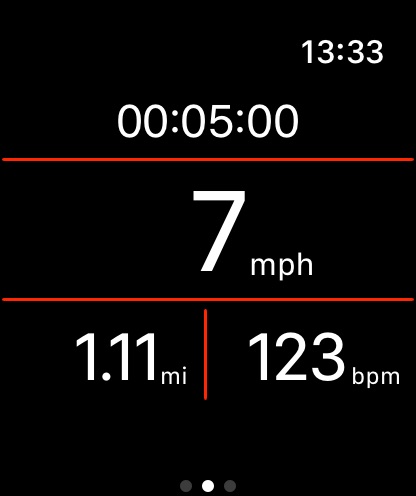
- Apple Watch. Monitor and control your activity using your Apple watch
- Heart rate measurement. Use your Apple Watch or an external Bluetooth sensor
- Support for Bluetooth cadence and speed sensors
- Average pulse
- Split times
- Indoor cycling
- History. All activities will be stored and can be reviewed. No session count limitation.
- Import / Export all activities from / to iCloud or a CSV file
- Statistics. Charts for the last weeks, months, and years
- Records. See your all-time records and a summary over all sessions.
- Facebook support. Post sessions to your Facebook timeline.
- Apple health support: Active Energy, Cycling Distance, Weight, Workouts
- Ad free
- No registration required
- No email advertisement
- Languages: English, Danish, German, French, Italian, Dutch, Portuguese, Russian, Spanish, Hungarian
Now go, get this cycling tracker app and turn your iPhone into a bicycle computer!
Accessibility
ipadiphonemacrealityDevicetvoswatch
Version history 25 versions
Build 885508464v6.52026-05-17 20:03:39
You can now add your own photos to routes
Build 884127387v6.42026-04-27 05:45:13
The activty summary now shows the pulse range in addtion to the average.
Inreased the font size of the bottom navigation bar.
Build 883635111v6.32026-03-26 07:12:12
Bug fixes and improvements
Build 882292566v6.22026-03-09 06:59:41
Major redesign of the Routes feature. The list now shows each route on a larger map with additional information like estimated duration and elevation. You can also view routes in full screen, including distance markers as well as the highest and lowest points.
Build 881853492v6.12026-02-02 05:29:24
Support for multiple speed and cadence sensors
Many riders have more than one bike, each with its own speed and cadence sensors. You can now connect and manage multiple sensors at the same time. There’s no longer any need to remove and re-pair sensors when switching bikes.
Build 880590848v5.312026-01-05 07:11:06
Bug fixes and improvements
Build 878819040v5.302025-10-14 11:01:17
Table layout and color corrections for iOS 26
Build 876862712v5.292025-08-18 09:32:23
In the session view the elevation field now shows separate values for uphill and downhill
Build 876235275v5.282025-07-10 10:28:46
Bug fix: Occasionally the app closed while running in the background with the screen locked. It only happened when using Open Street Maps.
Build 875601007v5.272025-06-17 04:30:58
Speed sensors: Increased the wheel diameter and circumference settings range.
Bug fix: The app occasionally closed when adding a session manually.
Build 874074368v5.262025-04-30 09:59:35
Support for hybrid maps. These maps show satellite images together with road names.
Build 873061043v5.252025-03-10 13:30:24
Bugfix: Occasionally the map wasn’t stored for the workout transmitted to Apple Health
Build 871694634v5.242025-01-30 13:20:16
- When exporting a CSV file, you can select the destination
- Increased the minimum iOS version to 15
Build 870619732v5.232024-11-25 14:12:30
Performance improvement. The initial loading of the database has been significantly accelerated.
Build 870178170v5.222024-11-11 06:17:10
Apple Health integration: Indoor cycling activities are now flagged accordingly
Build 869372693v5.212024-10-02 16:15:01
Color adjustments for iOS 18 and WatchOS 11. The app icon follows the tinted and dark mode guidelines.
Build 868139878v5.202024-08-26 08:48:02
The average cadence is now split into two values. The total cadence is the average of all values. The active cadence takes the pedaling pauses into account.
Build 867324209v5.192024-07-22 06:40:14
The drawing colors on the map for the path and route are adjustable in the user settings.
Bugfix: The auto pause created drawing gaps in the user’s path on the map.
Build 866873519v5.182024-07-01 06:43:07
Bug fixes and improvements
Build 866188322v5.172024-05-27 08:59:45
Adjustable colors for the Start/Stop buttons and the navigation bar
Build 865154384v5.162024-04-30 05:41:15
Graphical redesign and improvement of the records page
Build 864638070v5.152024-03-25 21:24:48
The absolute altitude is shown on various screens in addition to the elevation change
Build 863361119v5.142024-02-06 21:38:22
The activities with the best performances are marked in the history
Build 862575589v5.122024-01-08 10:41:18
Bug fix: Occasionally the users track was not drawn on the session map when the app was running in the background.
Build 861718934v5.112023-11-28 06:26:11
It’s now possible to manually add activities and take the path from a GPX file.
Price history by region
Currency
Show
Columns
Search
Availability 18 of 18 storefronts
| Region | Language | Price | Ratings | Avg | Version |
|---|---|---|---|---|---|
 US US | en-US | USD 5.99 | 3.5k | 4.8 | 6.5 |
 HR HR | en-GB | EUR 6.99 | 5 | 5.0 | 6.5 |
 JP JP | ja | JPY 1000 | 5 | 4.6 | 6.5 |
 HK HK | zh-Hant-HK | HKD 48 | 4 | 5.0 | 6.5 |
 EE EE | en-GB | EUR 6.99 | 3 | 5.0 | 6.5 |
 CN CN | zh-Hans-CN | CNY 38 | 2 | 5.0 | 6.5 |
 AM AM | en-GB | USD 6.99 | 1 | 5.0 | 6.5 |
 BT BT | en-GB | USD 5.99 | 1 | 4.0 | 6.5 |
 AZ AZ | en-GB | USD 6.99 | 0 | — | 6.5 |
 BN BN | en-GB | USD 5.99 | 0 | — | 6.5 |
 GE GE | en-GB | USD 6.99 | 0 | — | 6.5 |
 MN MN | en-GB | USD 5.99 | 0 | — | 6.5 |
 NI NI | es-MX | USD 5.99 | 0 | — | 6.5 |
 RW RW | en-GB | USD 5.99 | 0 | — | 6.5 |
 SI SI | en-GB | EUR 6.99 | 0 | — | 6.5 |
 ST ST | en-GB | USD 5.99 | 0 | — | 6.5 |
 TJ TJ | en-GB | USD 6.99 | 0 | — | 6.5 |
 TN TN | en-GB | USD 5.99 | 0 | — | 6.5 |
Change log 29 changes · US
✎
releaseNotes updated
You can now add your own photos to routes
✎
description updated
Fitmeter Bike turns your iPhone/iPad into a bicycle computer with incredible functionality. Try it once and it’ll remain the only biking app on your iPhone for
✎
subtitle updated
Bicycle ride tracker
✎
name updated
Fitmeter Bike - GPS Cycling
◆
Version 6.5 released
You can now add your own photos to routes
◆
Version 6.4 released
The activty summary now shows the pulse range in addtion to the average.
Inreased the font size of the bottom navigation bar.
◆
Version 6.3 released
Bug fixes and improvements
◆
Version 6.2 released
Major redesign of the Routes feature. The list now shows each route on a larger map with additional information like estimated duration and elevation. You can also view routes in full screen, including distance markers as well as the highes
◆
Version 6.1 released
Support for multiple speed and cadence sensors
Many riders have more than one bike, each with its own speed and cadence sensors. You can now connect and manage multiple sensors at the same time. There’s no longer any need to remove and re-
◆
Version 5.31 released
Bug fixes and improvements
◆
Version 5.30 released
Table layout and color corrections for iOS 26
◆
Version 5.29 released
In the session view the elevation field now shows separate values for uphill and downhill
◆
Version 5.28 released
Bug fix: Occasionally the app closed while running in the background with the screen locked. It only happened when using Open Street Maps.
◆
Version 5.27 released
Speed sensors: Increased the wheel diameter and circumference settings range.
Bug fix: The app occasionally closed when adding a session manually.
◆
Version 5.26 released
Support for hybrid maps. These maps show satellite images together with road names.
◆
Version 5.25 released
Bugfix: Occasionally the map wasn’t stored for the workout transmitted to Apple Health
◆
Version 5.24 released
- When exporting a CSV file, you can select the destination
- Increased the minimum iOS version to 15
◆
Version 5.23 released
Performance improvement. The initial loading of the database has been significantly accelerated.
◆
Version 5.22 released
Apple Health integration: Indoor cycling activities are now flagged accordingly
◆
Version 5.21 released
Color adjustments for iOS 18 and WatchOS 11. The app icon follows the tinted and dark mode guidelines.
◆
Version 5.20 released
The average cadence is now split into two values. The total cadence is the average of all values. The active cadence takes the pedaling pauses into account.
◆
Version 5.19 released
The drawing colors on the map for the path and route are adjustable in the user settings.
Bugfix: The auto pause created drawing gaps in the user’s path on the map.
◆
Version 5.18 released
Bug fixes and improvements
◆
Version 5.17 released
Adjustable colors for the Start/Stop buttons and the navigation bar
◆
Version 5.16 released
Graphical redesign and improvement of the records page
◆
Version 5.15 released
The absolute altitude is shown on various screens in addition to the elevation change
◆
Version 5.14 released
The activities with the best performances are marked in the history
◆
Version 5.12 released
Bug fix: Occasionally the users track was not drawn on the session map when the app was running in the background.
◆
Version 5.11 released
It’s now possible to manually add activities and take the path from a GPX file.