Home › Utilities

 US
US
1 of 1 storefronts
Content in en-US
Content in en-US
Information
Apple ID1081009674
Bundle IDSoftronix.com.V1-Driver
SellerSeller
Min iOS14.7
Min macOS11.5
Device familieswatch, iphone, ipad, ipod
Released2016-05-19
Copyright© George Mills 2025
Privacy policyLink ↗
Preview 3 platforms
iPhone 4 images


iPad 5 images


Apple Watch 4 images


What’s New Version 3.0.10
Bug - Fix crash happening in Audio
Hook - added hook to completely ignore Apple Watch even when present by using 0x4 debug mask
Description
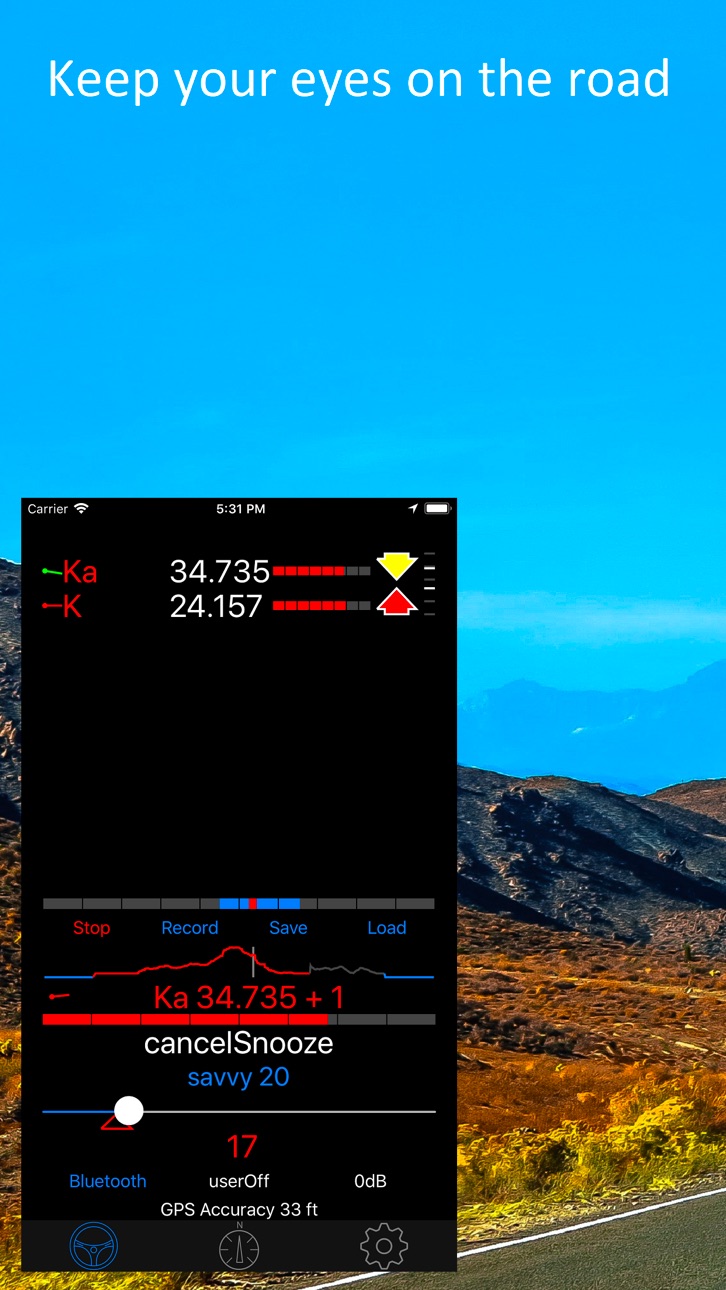
V1Driver is designed to add intelligence to your Radar Detector so you can enjoy your Drive.
V1Driver now supports the following Radar Detectors (you must have at least one)
Valentine One Gen 2
Valentine One Gen 1 (BLE Dongle Only)
Uniden R8,R4 (R9 coming soon)
Radenso DS1
It adds 3 forms of automatic muting (all selectable by Band):
1) By Speed (Savvy Emulation), if you are under the specified speed it will keep the Radar Detector muted.
2) By Time, it will AutoMute (or AutoSnooze) after a specified time. AutoSnooze tracks Blind Spot Monitor frequency
3) By GPS Location, by long term frequency tracking. This tracks hits of the same frequency in the same location spread over several days before considering it for lockout. If a signal later becomes absent it will remove the lock.
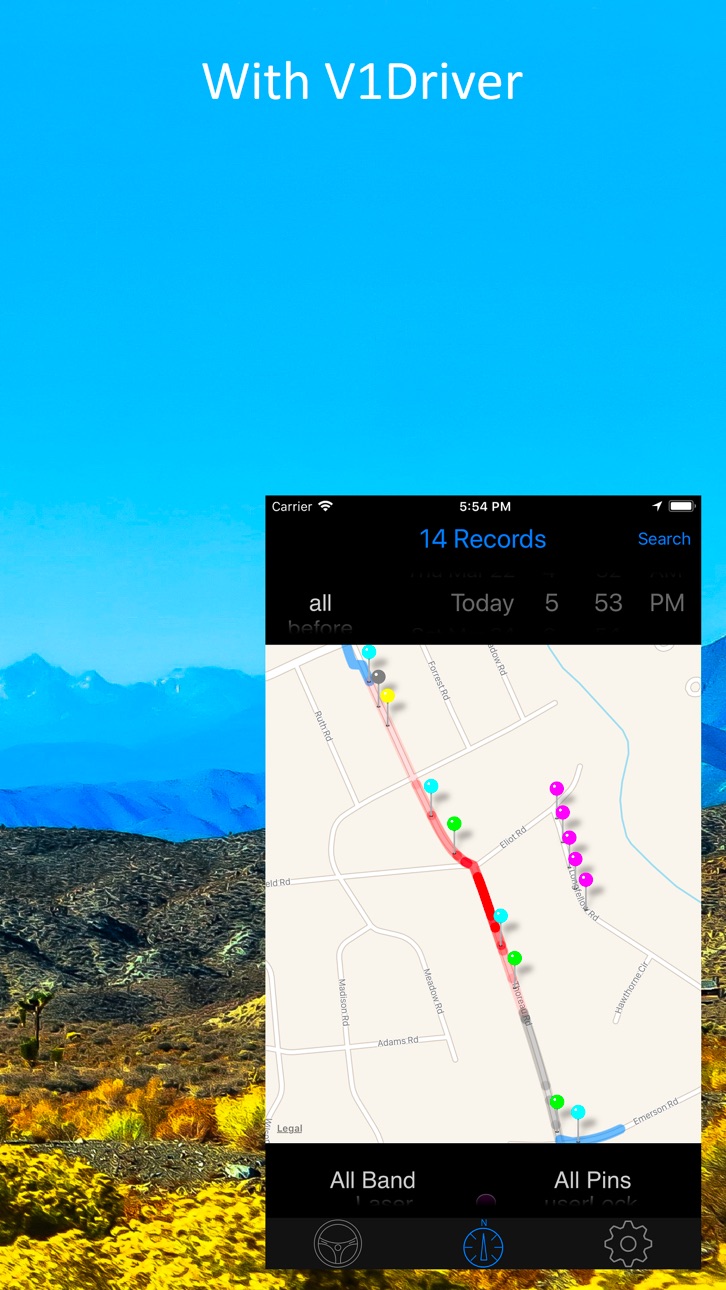
V1Driver takes the famous V1 "Arrows" to a new level by displaying the bogeys on a 2 dimensional map. So you can track relative position more accurately before waiting for the arrows to "flip" direction.
It has extensive audible options. Including Text-To-Speech of Band and Frequency. Audio can optionally use Hands Free Protocol (a phone call) on your car or motor cycle.
This app is compatible with all iPhones and iPads that support iOS 12.0 or greater that include GPS. It will work in any orientation. An active cellular connection is not required. For viewing the map or backing up to the iCloud you will need a Data connection, but that is not required for day to day operation.
iPads that do not have Cellular Chips have no GPS chip and will NOT work.
V1Driver will automatically connect to the Radar Detector in the background. This feature of watching for the Radar Detector when away from your car does not use the GPS, it uses very little battery and can be disabled if you wish.
There is no guarantee V1Driver won't lock out an undesired signal. But it should clean itself up over time if it does.
Other features include:
- Alert Notifications with "Mute", "Lock" or "Snooze" acknowledgment
- Alerts are Apple Watch compatible
- Manual Mute (with automatic unmute from other bands)
- Snooze feature (e.g. you are stuck near someones Blind Spot Monitor)
- Live Map showing learning and unlearning process as V1Driver does it's thing
- Live Alert status on the Map (strongest threat only, mirrors V1 display)
- Compatible with Hardware version of Savvy and still Band selectable
- Signal Strength meter with higher resolution than 8 fixed levels.
- Rate of Ramp Up on Main threat and each Bogey on the Bogey Map.
- iCloud Backup and Restore of your Database and Settings
- Two Level Savvy Speed Setting (Startup and Quick Override) with automatic Reset and integrated current Speed
- Extensive Data Filtering on the "Pin Map" to closer inspect what V1Driver is doing.
- Delete unwanted individual or groups of pins or any "filtered" view directly on the Map.
- View detailed information on any collected data point (Pin) from the Map
- Savvy Warmup feature to allow GPS to get good lock but keep detector quiet in false dense areas (e.g. Parking Garage)
- Integrated help on each control throughout the app.
- Savvy GPS Learning, it can learn what you set your Savvy Setting to and reapply it on your next trip to the same location.
- User Settable GPS Accuracy.
- Instant Replay that captures all events in real time all the time and can be played back at any time.
- Live Histogram of your signal strength also shown as color intensity on your route on the Map
- Support for Ku Band for European Users
- Demo mode that uses the "Instant Replay" feature that has Speed, Location, Direction and Alerts, etc. of a real encounter. It will even drop "New Pins" along the route.
- Support for "White Areas" these are designated areas like Police stations that you never want to lock out
Note: "Continued use of GPS running in the background can dramatically decrease battery life."
Accessibility
ipadiphonemacrealityDevicetvoswatch
Version history 25 versions
Build 876931343v3.0.102025-08-03 15:51:05
Bug - Fix crash happening in Audio
Hook - added hook to completely ignore Apple Watch even when present by using 0x4 debug mask
Build 875889036v3.0.92025-06-26 15:20:16
Bug - Fix Network Alerts stopped working
Bug - Fix HFP (Hands Free Protocol) inconsistently working
Build 874509832v3.0.82025-05-05 05:09:50
Bug - Fixed car play detection so it will work correctly wether you use or don't use it automatically
Build 867500721v3.0.72024-07-16 12:57:50
Bugfix - The Signal Strength meter colors were getting smeared
Bugfix - The priority order of signals was incorrect, Radar signals should always be on top
Bugfix - Fixed Audio getting stuck on Non Radar alerts
Build 865848512v3.0.62024-05-12 01:07:32
Bugfix - Finally found the issue with Audio getting stuck.
Bugfix - Fixed up background connection on V1 Radar Detectors
Enhanced - Updated to V1 latest library as well as every library V1Driver uses
Enhanced - Support poi-factory red-light cameras (Import on iCloud & Reset Settings Page)
Build 862688821v3.0.52024-01-05 22:32:12
Change - Changed the way V1 Auto Dark works it will stay dark until a real threat is active
Feature - Now has support of Red Light Cameras goto iCloud Backup & Reset Settings to import (still sorting out how updates get distributed)
Bug - Fixed repeated audio alerts. Sorry about that glitch
Bug - More bugs on Audio Notifications
Bug - Reminder Distance had a unit conversion error so you'd get whacko values
Debug - Added a hook to allow debugging some users having issues with background reconnect on V1
Bug - V1Driver would not unmute a 2nd K band if it already muted another K band on a different Frequency on Uniden R8 (R4 and DS1 likely as well)
Bug - If you had an active muteInBox hit get muted and another hit of the same band and different frequency and not in the muteInBox the RD was not unmuted
Bug - Fixed Mute/AutoMute/Snooze on Radar Alerts getting unmuted while Non Radar alerts were present
Build 860202937v3.0.42023-09-29 01:25:03
Reworked - Text to Speech and Notifications stop repeating the same alert, sorry this took so long to fix
Enhanced - Pairing and Reconnecting Uniden R4, R8, Radenso DS1 is now little more informative of what's going on, it will tell you which radar detector it's trying to connect to. This mostly effects folks with multiple radar detectors
Enhanced - Updated the built in Recorder to support all recent changes, this is critical for when reporting bugs and I have found new bugs since updating it
Build 860081317v3.0.32023-09-21 14:46:13
Enhanced - Now shows which RD it is trying to connect to (helps when juggling multiple RD)
Enhanced - Slightly better control over connecting to multiple RD
Enhanced - Easter Egg
Known issue of Voice Stuttering - Working on it
Build 859606214v3.0.22023-09-05 01:32:32
Bug fix - Distance was always reporting at 0.0 miles
Bug fix - Anything that used Heading was stuck using compass instead of switching to GPS Heading once you were moving (recent change caused this)
Enhanced - Reconnecting in background on Uniden R4, R8 and Radenso DS1 should be easier and smoother now
Enhanced - Voice Speed is not linear and didn't have enough precision to manage it (between 5 and 6 was to large a jump in speed) So I changed it from 0 - 10 to 0 - 100 and so now you can adjust 51, 52, 53..., 60 for more control. Note: Voice Speed is reset to Default (50)
Build 859548765v3.0.12023-09-01 02:02:59
Bug Fix - V1 was not always reconnecting in background since making changes to support R4,R8,DS1 Radar Detector
Build 858856567v3.0.02023-08-21 10:42:58
Major Feature - Now supports Uniden R4, R8, R9 (future), Radenso DS1
Bug Fix - Hopefully fixed Voice getting stuck in a loop
You Must enable Uniden in Bluetooth Settings in V1Driver
Here is video to help Pair the Uniden or Radenso Radar Detectors https://youtu.be/hVL6hN0QH2M
Build 855944436v2.0.672023-03-30 14:22:13
Enhancement - Turns out iOS 16 added "Eloquence" Voices for the blind. This caused some confusion in the code. And if you chose one it did some weird stuff (sometimes). So for now I mask them out.
Bug - Noticed that you could not choose "Samantha" (un-enhanced) it would always choose "Samatha (Enhance)". I believe "Samatha (Enhanced)" is causing the crashes. So I fixed this and reset the default to "Samantha" un-enhanced.
Tweak - The Picker for voice would close as soon as you stopped on a selection (even if you didn't want it. The picker now stays open until you click on something else. Not great but I think it's better.
Enhance - Added another "sound check" button on the Voice Settings page
Build 854537861v2.0.662023-01-25 02:31:59
Feature - Added Sound Check button in the Sound Settings Page
Feature - Added Option to Include Band Name in Text to Speech Alerts
Known Issue - iOS 16.x has problems with Text to Speech causing V1Driver to crash. It appears to only be the Voice Samantha & Samantha (Enhanced)
Work Around - Don't use Samantha Voice in V1Driver
To change the Voice in V1Driver:
Goto Settings -> Voice Settings -> Text to Speech Voice -> Change to something Not Samantha
You can also download alternative voices (e.g. Alex):
Goto Phone Settings -> Accessibility -> Spoken Content -> Voices -> English -> Alex -> Click Download Icon
If you do download a new Voice you need to restart V1Driver to see it.
I have tested Alex but you likely need to download it.
Build 847059906v2.0.652022-02-08 23:54:22
Bug - Fixed crash discovered in analytics.
Build 846559680v2.0.642022-01-16 03:22:27
Enhanced - Fine tuned GPS update handling when stationary
Feature - You can now select any Band for AutoSnoozing (was restricted to K and Laser band).
Bug - Fixed crash related to CarPlay
Build 844744977v2.0.632021-10-18 00:18:31
Maintenance - Added Analytics. It does not upload any person info. Just crashes, disconnects etc. It is on by default and can be turned off under Debug Settings.
Bug - Window now scrolls box into view when Keyboard pops up.
Build 843081940v2.0.612021-07-14 13:00:00
Bug - When V1 Display Mode was set to Auto (under hardware settings) the V1 Display was not correctly being controlled and turn off in situations it shouldn't have.
Build 842200617v2.0.602021-05-13 22:12:03
Enhanced - Added -cp to the v1 connection status when CarPlay is detected.
Maintenance - Built on new compiler and iOS 14.5 libraries
Enhancement - Changed Text to Speech Voice to a Picker Control. Long overdue. It will list all the valid voices you have downloaded. Previously you had to look at the Tool Tip and type it.
Experimental - Ignore the new Widget, it's not functional and work in progress.
Build 839787671v2.0.592020-12-24 06:25:24
Bug - Fixed Colors for Pickers on Map the Map page on iOS 12.*.
Bug - Fixed Audio randomly stopping on iOS 14.*
Bug - Don't pop Notifications when App is in foreground
Bug - AutoSnooze not working correctly (muting before or immediately after V1 audibly alerted) with V1G2 (Next Gen V1)
Bug - Notification issues fixed (namely) the Watch will work more consistent now.
Build 838371500v2.0.582020-10-27 02:52:44
Bug - Fixed the Help Text on the info button on the Presentation Settings.
Bug - Editing any field with distance or speed units on a Pin could not be edited.
Undo - By popular demand V1Driver can run Dark or Light theme independent of the Global Theme set in your phone.
Build 838239478v2.0.572020-10-16 19:24:48
Change - Defaulted Speak Delay under Voice Settings to 1.0 second (currently required for iOS14 changes)
Change - The old Night and Day theme and Sunset option is no longer supported on iOS version that support Dark Theme (iOS 13 and up) and relies on the OS for that.
Change - iOS 12 is now the oldest version supported for new updates.
Enhanced - Now checks for new Precise location option that is new to iOS14. Precise must be Enabled and you'll get a reminder if it's Disabled.
Bug - iCloud back up fixed with better status messages. A change in iCloud occurred sometime during the year that it will not sync folders but just files.
Bug - Notifications not working correctly on iOS14. This affected the Watch and the Phone.
Change - Fixed Pickers on Map to work with iOS14 changes, should work better on older versions and smaller devices too.
Change - More conservative GPS learning. If while driving you pass through a "Learning" Pin and is found to be absent of that Radar Frequency, it will rewind to New state.
Change - Default Wrist mute on Watch to be Disabled (buggy).
Build 835756525v2.0.562020-05-02 03:23:17
Feature - Full suite of Apple Watch Complications
Feature - HTML Help on all settings pages (see info icon in the upper right corner). More is coming.
Build 835153174v2.0.552020-03-28 01:06:25
Bug - Random crashing fixed for folks using Savvy Hardware.
Bug - Mute button can now be used on the V1 again.
Feature - Auto Dark to darken the V1 Display when V1Driver locks out an Alert by GPS or Speed
Debug - Embedded Valentine API library source code for more accurate crash reports. This was a big change, so couple bugs might pop up.
Build 835064560v2.0.542020-03-12 00:37:45
Compatibility - Support for V1-Gen2
Feature - Savvy Cooldown. When you lose GPS, for example when entering a parking garage at low speed V1Driver will remember your last speed for a limited time to use for Savvy Muting. This feature is Off (0 seconds) by default. This is useful if you park regular in a K False Garage or similar.
Bug - Fixed case where V1Driver could not send the mute to the V1.
Build 834956562v2.0.532020-03-04 00:21:54
Change - New option under GPS Settings to control repeated demoting of pins. I have noticed a higher number of gpsMuteDem pins than expected. These are cases where V1Driver creates a gpsMute pin then sees it absent numerous days, demotes it and later it returns and gets muted again. V1Driver keeps track of this. This flip flop has to happen numerous times as well for V1Driver to declare it as gpsMuteDem (which means stop letting it flip and mute it, for good). This was meant for things like door openers that might shut off at night. The new option lets the user decide what to do with this case. Keep Flip Flopping (safer but could go through lots of relearning), Mute it For Good (what it has been doing and may not be so safe if there are to many) this creates gpsMuteDem pins, or Never Mute it (safer but might be a bit more chatty) changes to a new pin type called stayDemoted. You can switch modes and it will update your database accordingly. The Default is to let it Flip back and forth rather than stay muted.
Bug - New iOS 13 color themes were not coloring "Segmented" buttons correctly.
Price history by region
Currency
Show
Columns
Search
Availability 1 of 1 storefronts
| Region | Language | Price | Ratings | Avg | Version |
|---|---|---|---|---|---|
| US | en-US | USD 11.99 | 568 | 4.7 | 3.0.10 |
Change log 28 changes · US
✎
releaseNotes updated
Bug - Fix crash happening in Audio
Hook - added hook to completely ignore Apple Watch even when present by using 0x4 debug mask
✎
description updated
V1Driver is designed to add intelligence to your Radar Detector so you can enjoy your Drive.
V1Driver now supports the following Radar Detectors (you must have
✎
name updated
V1Driver
◆
Version 3.0.10 released
Bug - Fix crash happening in Audio
Hook - added hook to completely ignore Apple Watch even when present by using 0x4 debug mask
◆
Version 3.0.9 released
Bug - Fix Network Alerts stopped working
Bug - Fix HFP (Hands Free Protocol) inconsistently working
◆
Version 3.0.8 released
Bug - Fixed car play detection so it will work correctly wether you use or don't use it automatically
◆
Version 3.0.7 released
Bugfix - The Signal Strength meter colors were getting smeared
Bugfix - The priority order of signals was incorrect, Radar signals should always be on top
Bugfix - Fixed Audio getting stuck on Non Radar alerts
◆
Version 3.0.6 released
Bugfix - Finally found the issue with Audio getting stuck.
Bugfix - Fixed up background connection on V1 Radar Detectors
Enhanced - Updated to V1 latest library as well as every library V1Driver uses
Enhanced - Support poi-factory red-ligh
◆
Version 3.0.5 released
Change - Changed the way V1 Auto Dark works it will stay dark until a real threat is active
Feature - Now has support of Red Light Cameras goto iCloud Backup & Reset Settings to import (still sorting out how updates get distributed)
Bug - F
◆
Version 3.0.4 released
Reworked - Text to Speech and Notifications stop repeating the same alert, sorry this took so long to fix
Enhanced - Pairing and Reconnecting Uniden R4, R8, Radenso DS1 is now little more informative of what's going on, it will tell you whi
◆
Version 3.0.3 released
Enhanced - Now shows which RD it is trying to connect to (helps when juggling multiple RD)
Enhanced - Slightly better control over connecting to multiple RD
Enhanced - Easter Egg
Known issue of Voice Stuttering - Working on it
◆
Version 3.0.2 released
Bug fix - Distance was always reporting at 0.0 miles
Bug fix - Anything that used Heading was stuck using compass instead of switching to GPS Heading once you were moving (recent change caused this)
Enhanced - Reconnecting in background on
◆
Version 3.0.1 released
Bug Fix - V1 was not always reconnecting in background since making changes to support R4,R8,DS1 Radar Detector
◆
Version 3.0.0 released
Major Feature - Now supports Uniden R4, R8, R9 (future), Radenso DS1
Bug Fix - Hopefully fixed Voice getting stuck in a loop
You Must enable Uniden in Bluetooth Settings in V1Driver
Here is video to help Pair the Uniden or Radenso Radar D
◆
Version 2.0.67 released
Enhancement - Turns out iOS 16 added "Eloquence" Voices for the blind. This caused some confusion in the code. And if you chose one it did some weird stuff (sometimes). So for now I mask them out.
Bug - Noticed that you could not choose "Sa
◆
Version 2.0.66 released
Feature - Added Sound Check button in the Sound Settings Page
Feature - Added Option to Include Band Name in Text to Speech Alerts
Known Issue - iOS 16.x has problems with Text to Speech causing V1Driver to crash. It appears to only be the
◆
Version 2.0.65 released
Bug - Fixed crash discovered in analytics.
◆
Version 2.0.64 released
Enhanced - Fine tuned GPS update handling when stationary
Feature - You can now select any Band for AutoSnoozing (was restricted to K and Laser band).
Bug - Fixed crash related to CarPlay
◆
Version 2.0.63 released
Maintenance - Added Analytics. It does not upload any person info. Just crashes, disconnects etc. It is on by default and can be turned off under Debug Settings.
Bug - Window now scrolls box into view when Keyboard pops up.
◆
Version 2.0.61 released
Bug - When V1 Display Mode was set to Auto (under hardware settings) the V1 Display was not correctly being controlled and turn off in situations it shouldn't have.
◆
Version 2.0.60 released
Enhanced - Added -cp to the v1 connection status when CarPlay is detected.
Maintenance - Built on new compiler and iOS 14.5 libraries
Enhancement - Changed Text to Speech Voice to a Picker Control. Long overdue. It will list all the valid v
◆
Version 2.0.59 released
Bug - Fixed Colors for Pickers on Map the Map page on iOS 12.*.
Bug - Fixed Audio randomly stopping on iOS 14.*
Bug - Don't pop Notifications when App is in foreground
Bug - AutoSnooze not working correctly (muting before or immediately aft
◆
Version 2.0.58 released
Bug - Fixed the Help Text on the info button on the Presentation Settings.
Bug - Editing any field with distance or speed units on a Pin could not be edited.
Undo - By popular demand V1Driver can run Dark or Light theme independent of the G
◆
Version 2.0.57 released
Change - Defaulted Speak Delay under Voice Settings to 1.0 second (currently required for iOS14 changes)
Change - The old Night and Day theme and Sunset option is no longer supported on iOS version that support Dark Theme (iOS 13 and up) an
◆
Version 2.0.56 released
Feature - Full suite of Apple Watch Complications
Feature - HTML Help on all settings pages (see info icon in the upper right corner). More is coming.
◆
Version 2.0.55 released
Bug - Random crashing fixed for folks using Savvy Hardware.
Bug - Mute button can now be used on the V1 again.
Feature - Auto Dark to darken the V1 Display when V1Driver locks out an Alert by GPS or Speed
Debug - Embedded Valentine API libr
◆
Version 2.0.54 released
Compatibility - Support for V1-Gen2
Feature - Savvy Cooldown. When you lose GPS, for example when entering a parking garage at low speed V1Driver will remember your last speed for a limited time to use for Savvy Muting. This feature is Off
◆
Version 2.0.53 released
Change - New option under GPS Settings to control repeated demoting of pins. I have noticed a higher number of gpsMuteDem pins than expected. These are cases where V1Driver creates a gpsMute pin then sees it absent numerous days, demotes it