Home › Travel

 US
US
1 of 1 storefronts
Content in en-US
Content in en-US
Information
Preview 4 platforms
iPhone 10 images


iPad 7 images




Mac 5 images


Apple Watch 2 images


What’s New Version 2.9
• Updated MetService integration
• Add WeatherWatch NZ (Wellington) as a new weather provider
• Overdue replacement of DarkSky with AccuWeather (global) as a new weather provider
Description
Do you live in Wellington, New Zealand and use the bus often? If so, you need Bus Panda!
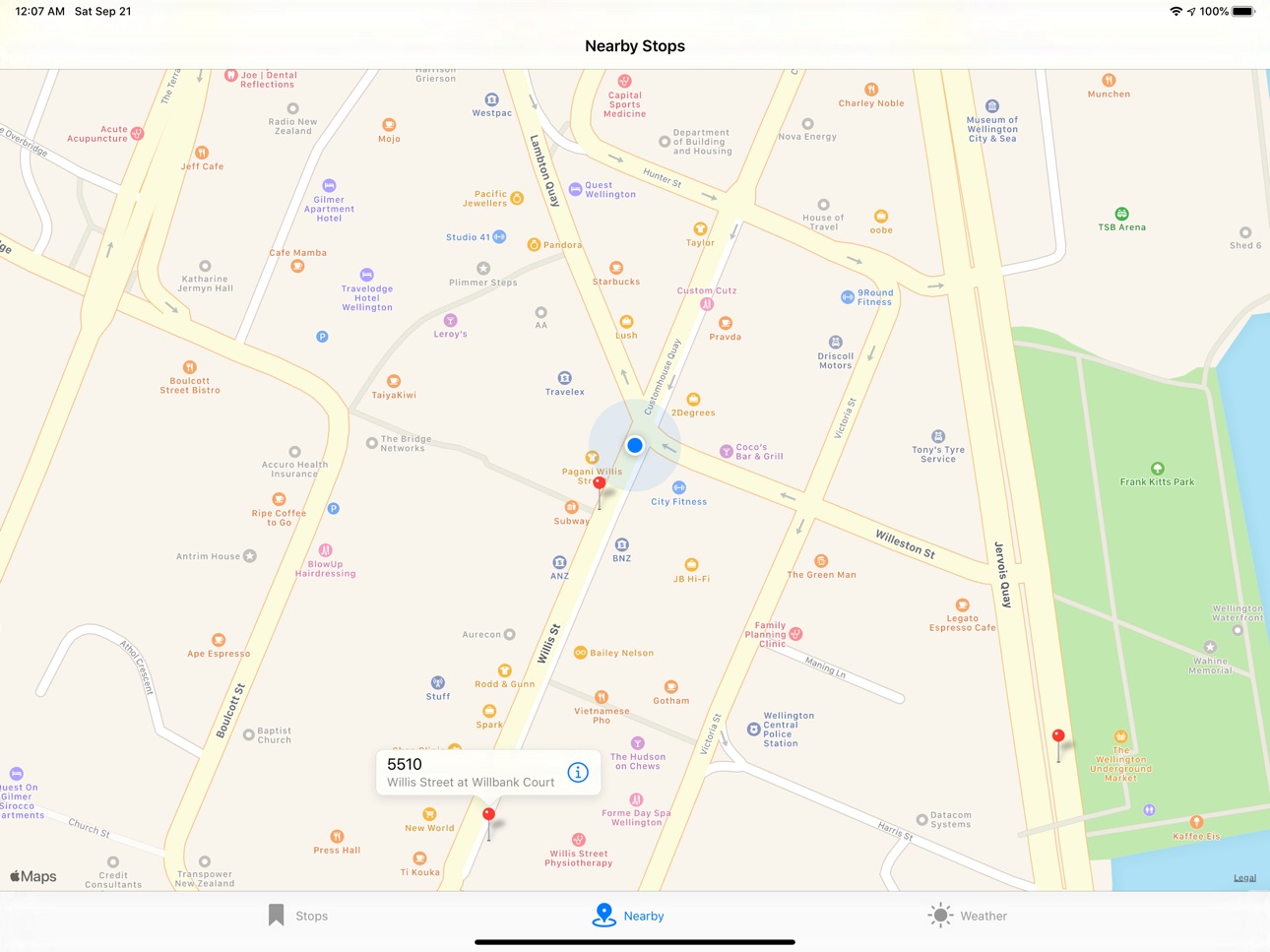
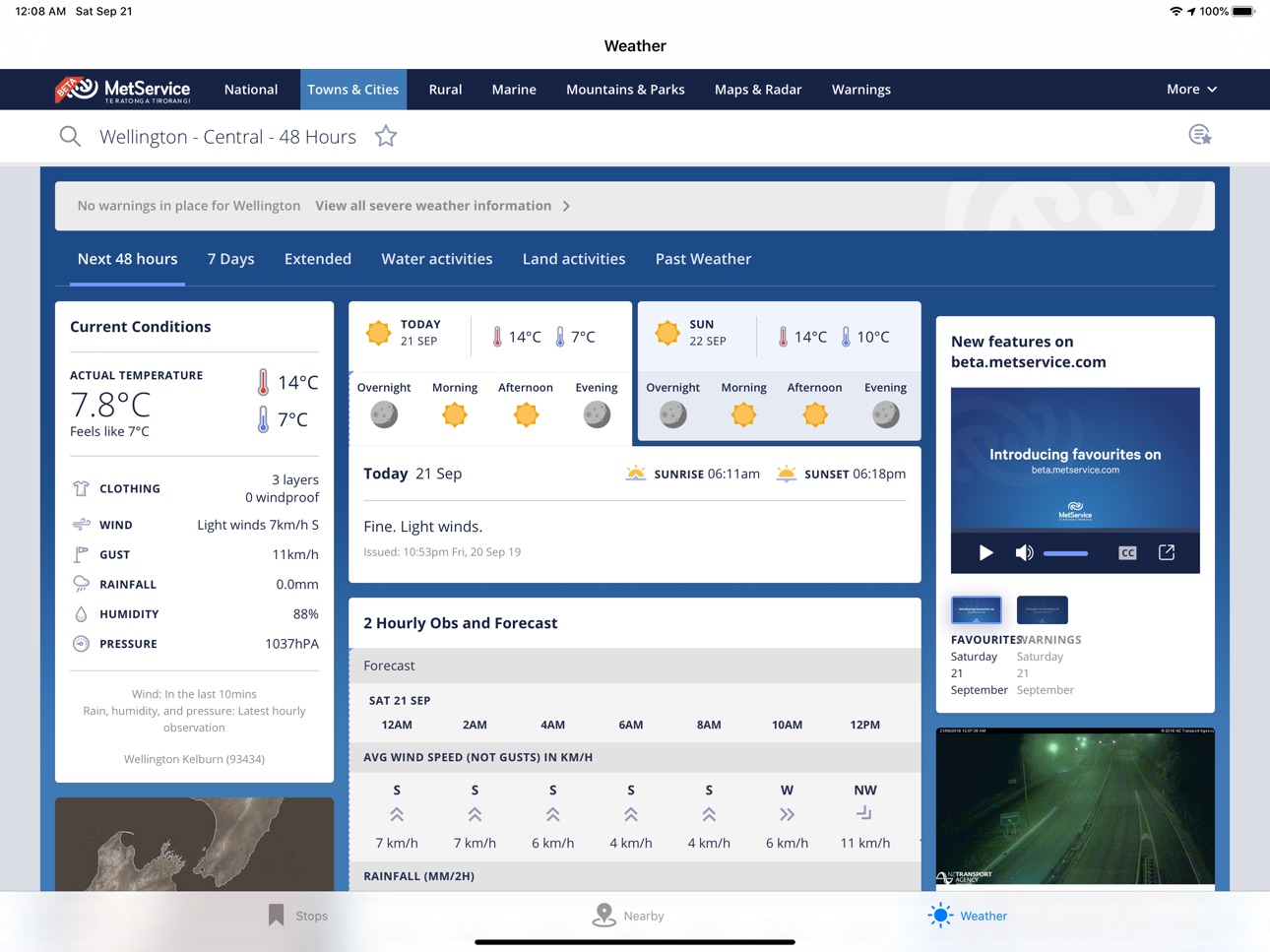
The information you want, when you want it, with minimum fuss and distraction. Store as many favourite bus stops as you want by adding them from a map or by stop ID. Very quickly access realtime departure information along with timetables and see local Wellington weather from a variety of weather providers.
Bus Panda uses iCloud to sync stop information between your iOS and macOS devices, should you choose to install it on more than one under the same iCloujd account and the bundled Apple Watch application shows a condensed view of the full iPhone application.
Accessibility
ipadiphonemacrealityDevicetvoswatch
Version history 14 versions
Build 875395818v2.92025-06-08 11:29:37
• Updated MetService integration
• Add WeatherWatch NZ (Wellington) as a new weather provider
• Overdue replacement of DarkSky with AccuWeather (global) as a new weather provider
Build 849785551v2.82022-06-04 11:02:47
• Updates to content blocker to prevent "black screen" problem with weather
• Now runs on Macs via Mac Catalyst, just in case you might find it useful to run it there
Build 843043206v2.72021-07-11 21:45:33
Updated to keep up with another set of changes in the way that Metlink bus information is published.
Build 842435393v2.62021-05-30 23:39:14
Updated to account for changes in the way MetLink provide real-time information. If saw some stops showing departures that were not properly sorted by departure time, or showing very strange looking times, then this update should fix that.
Build 838887545v2.52020-11-11 16:35:33
Bus Panda self-isolated for a bit, but now it's all rested, tested and ready to go with fixes for the intermittent loading problems that sprung up over the last few months, a fix for the intermittent horizontal scrolling problem in the weather view and a new lime green dark mode colour scheme. Have fun!
Build 833634673v2.42019-11-16 14:33:15
The weather provider MetService had a beta web site which has now gone live, replacing their old public site. Bus Panda's 'MetService Beta' weather provider setting has therefore been removed and if you'd chosen that, you'll be migrated over to the main MetService setting instead. Display rules have been updated to "optimise the experience" of the new site when viewed within Bus Panda.
Build 832858731v2.32019-09-25 23:25:57
• Supports iOS 13, including Dark Mode.
• Small improvements to layout on a few screens.
• New weather providers - MetService Beta and Windfinder. Choose via the iOS Settings app - scroll down to Bus Panda.
Build 828517601v2.22018-09-12 00:22:30
New in v2.2:
• Better display of cancelled services
• Auto-refresh of a stop's list of buses - every 60 seconds, so long as the phone is awake
• A few bugs fixed
Build 827809100v2.12018-07-16 20:57:52
Version 2 is here, with all the new mid-2018 routes ready to go! The v2.1 update:
• Fixes the 'Prefer' feature, which didn't work in v2.0
• Gives a more comprehensive weather view on iPad
Version 2 introduces a few new features:
• Improved synchronisation via iCloud and CloudKit, including pull-to-refresh of your favourite stops
• New weather view - change weather provider from the Bus Panda entry in System Settings
• Tab bar for rapid access to main features, including nearby stop map
• Faster timetable views and faster display of services due at a stop
Build 827793455v2.02018-07-07 18:55:19
Version 2 is here, all ready for the July 15th route changes!
• New route colours for July 15th ready to go
• Improved synchronisation via iCloud and CloudKit, including pull-to-refresh of your favourite stops
• New weather view - change weather provider from the Bus Panda entry in System Settings
• Tab bar for rapid access to main features, including nearby stop map
• Faster timetable views and faster display of services due at a stop
Build 823251099v1.62017-09-19 02:06:51
Minor update to be ready for iOS 11. Has a few minor interface fixes and may run a little smoother on Apple Watch too.
Build 816939151v1.52016-04-14 03:18:26
Lots of new things in 1.5, including Apple Watch support!
• New automatic shortening of long descriptions to help legibility, especially on iPhones. You can turn this off using the iPhone Settings application - scroll down to Bus Panda from the main Settings screen.
• Swipe left on a Favourites list item for some new options:
• – "Prefer" lets you indicate a frequently-used stop. For those of you with lots of saved bus stops, you probably only use a few very often. You can make these Preferred and they'll appear in a special section at the top of the list.
• – "More" lets you edit the description of a bus stop to something you find more recognisable.
• A new "Nearby Stops" map view make it really easy to find a stop near you.
On Apple Watch:
• You'll just your Preferred bus stops if there are any, else you see all favourites.
• Tap through to see the most recent upcoming ten departures.
• The application features a Glance, which asks your iPhone for stops within a 500m radius of your position. It searches this for one of your Preferred stops, expands that search to all favourites, or just shows you the nearest one if all else fails. It then displays the most recent upcoming four departures at that location.
Build 816446092v1.42016-02-16 19:33:56
This version improves the map view:
* Shows your current location, to make it easier to find stops near you quickly
* Faster display of bus stop locations
Build 815619378v1.32016-01-15 18:49:14
No pricing data captured yet — comparisons appear once the app has paid storefronts or in-app purchases.
Availability 1 of 1 storefronts
| Region | Language | Price | Ratings | Avg | Version |
|---|---|---|---|---|---|
| US | en-US | Free | 0 | — | 2.9 |
Change log 18 changes · US
✎
releaseNotes updated
• Updated MetService integration
• Add WeatherWatch NZ (Wellington) as a new weather provider
• Overdue replacement of DarkSky with AccuWeather (global) as a ne
✎
description updated
Do you live in Wellington, New Zealand and use the bus often? If so, you need Bus Panda!
The information you want, when you want it, with minimum fuss and dist
✎
subtitle updated
Wellington bus information
✎
name updated
Bus Panda
◆
Version 2.9 released
• Updated MetService integration
• Add WeatherWatch NZ (Wellington) as a new weather provider
• Overdue replacement of DarkSky with AccuWeather (global) as a new weather provider
◆
Version 2.8 released
• Updates to content blocker to prevent "black screen" problem with weather
• Now runs on Macs via Mac Catalyst, just in case you might find it useful to run it there
◆
Version 2.7 released
Updated to keep up with another set of changes in the way that Metlink bus information is published.
◆
Version 2.6 released
Updated to account for changes in the way MetLink provide real-time information. If saw some stops showing departures that were not properly sorted by departure time, or showing very strange looking times, then this update should fix that.
◆
Version 2.5 released
Bus Panda self-isolated for a bit, but now it's all rested, tested and ready to go with fixes for the intermittent loading problems that sprung up over the last few months, a fix for the intermittent horizontal scrolling problem in the weat
◆
Version 2.4 released
The weather provider MetService had a beta web site which has now gone live, replacing their old public site. Bus Panda's 'MetService Beta' weather provider setting has therefore been removed and if you'd chosen that, you'll be migrated ove
◆
Version 2.3 released
• Supports iOS 13, including Dark Mode.
• Small improvements to layout on a few screens.
• New weather providers - MetService Beta and Windfinder. Choose via the iOS Settings app - scroll down to Bus Panda.
◆
Version 2.2 released
New in v2.2:
• Better display of cancelled services
• Auto-refresh of a stop's list of buses - every 60 seconds, so long as the phone is awake
• A few bugs fixed
◆
Version 2.1 released
Version 2 is here, with all the new mid-2018 routes ready to go! The v2.1 update:
• Fixes the 'Prefer' feature, which didn't work in v2.0
• Gives a more comprehensive weather view on iPad
Version 2 introduces a few new features:
• Improv
◆
Version 2.0 released
Version 2 is here, all ready for the July 15th route changes!
• New route colours for July 15th ready to go
• Improved synchronisation via iCloud and CloudKit, including pull-to-refresh of your favourite stops
• New weather view - change w
◆
Version 1.6 released
Minor update to be ready for iOS 11. Has a few minor interface fixes and may run a little smoother on Apple Watch too.
◆
Version 1.5 released
Lots of new things in 1.5, including Apple Watch support!
• New automatic shortening of long descriptions to help legibility, especially on iPhones. You can turn this off using the iPhone Settings application - scroll down to Bus Panda fro
◆
Version 1.4 released
This version improves the map view:
* Shows your current location, to make it easier to find stops near you quickly
* Faster display of bus stop locations
◆
Version 1.3 released