Home › Entertainment

 US
US
1 of 1 storefronts
Content in en-US
Content in en-US
Information
Apple ID1065311870
Bundle IDcom.mobixn.vrplayerpro
SellerSeller
Min iOS15.6
Min macOS12.5
Device familiesiphone, ipad, ipod
Released2015-12-17
Copyright© 2015 mobixn soft
Privacy policyLink ↗
Preview 2 platforms
iPhone 6 images



iPad 6 images



What’s New Version 3.3.5
● fix bug about back to center feature (was not working when roll angle is over 90°)
● improve audio/subtitle track selection for VRPlayer Helper
Description
● VRPlayer can record screen/audio of your desktop and streaming it to VRPlayer via VRPlayer Helper.
- to use this feature "VRPlayer Helper" should be installed and executed on your desktop.
please select or add "VRPlayer Helper" item on vrplayer app and follow instruction first.
- this feature is experimental for now.
so there might be considerable amount of latency and unstability depends on network environment and system spec where helper is running
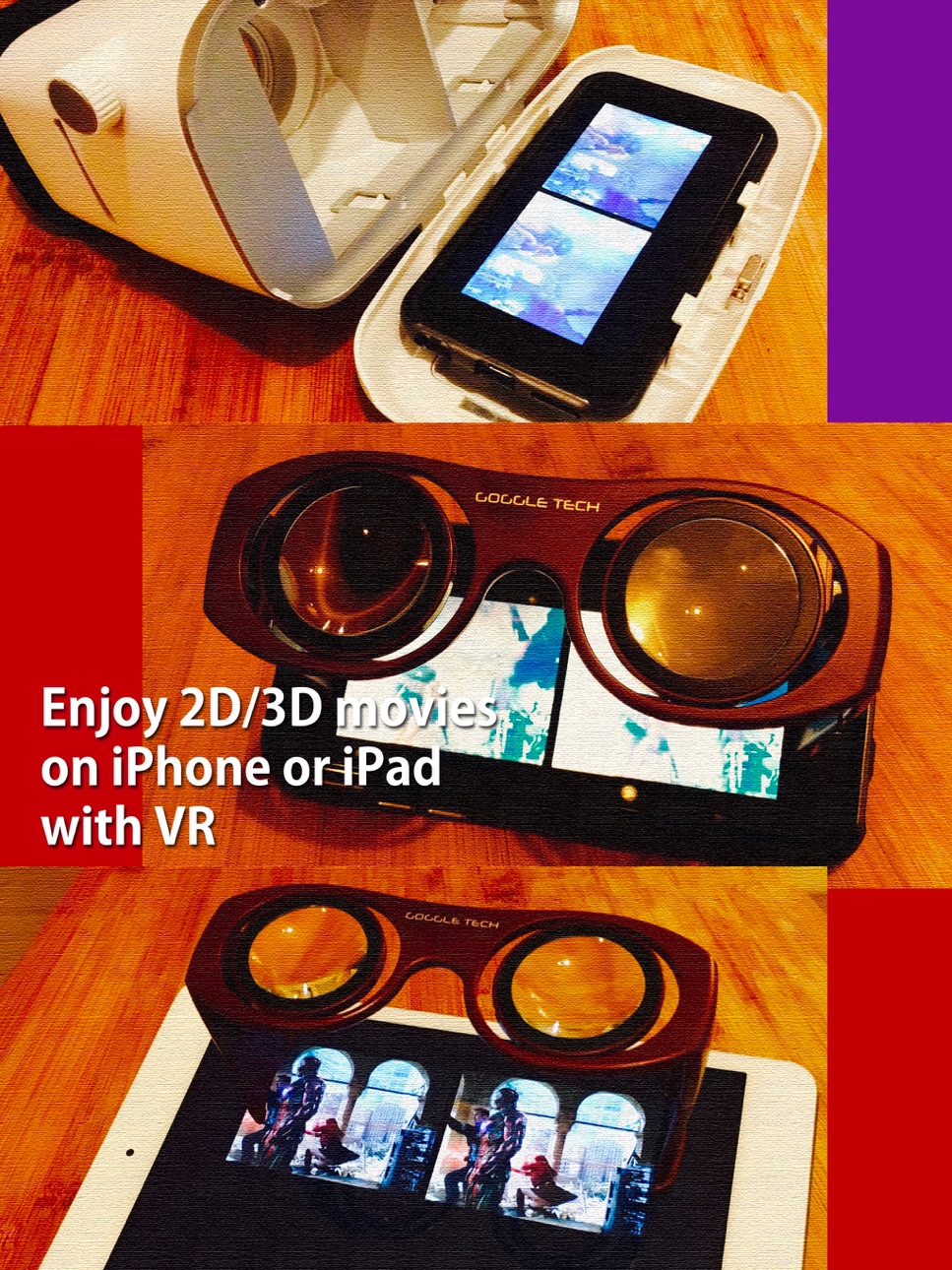
● VRPlayer can play not only general 2D movies but also 3D movies (half side by side or over and under) for VR (google cardboard)
● and support the following file formats.
- video : mp4, mov, DRM free m4v
- subtitle : smi, srt
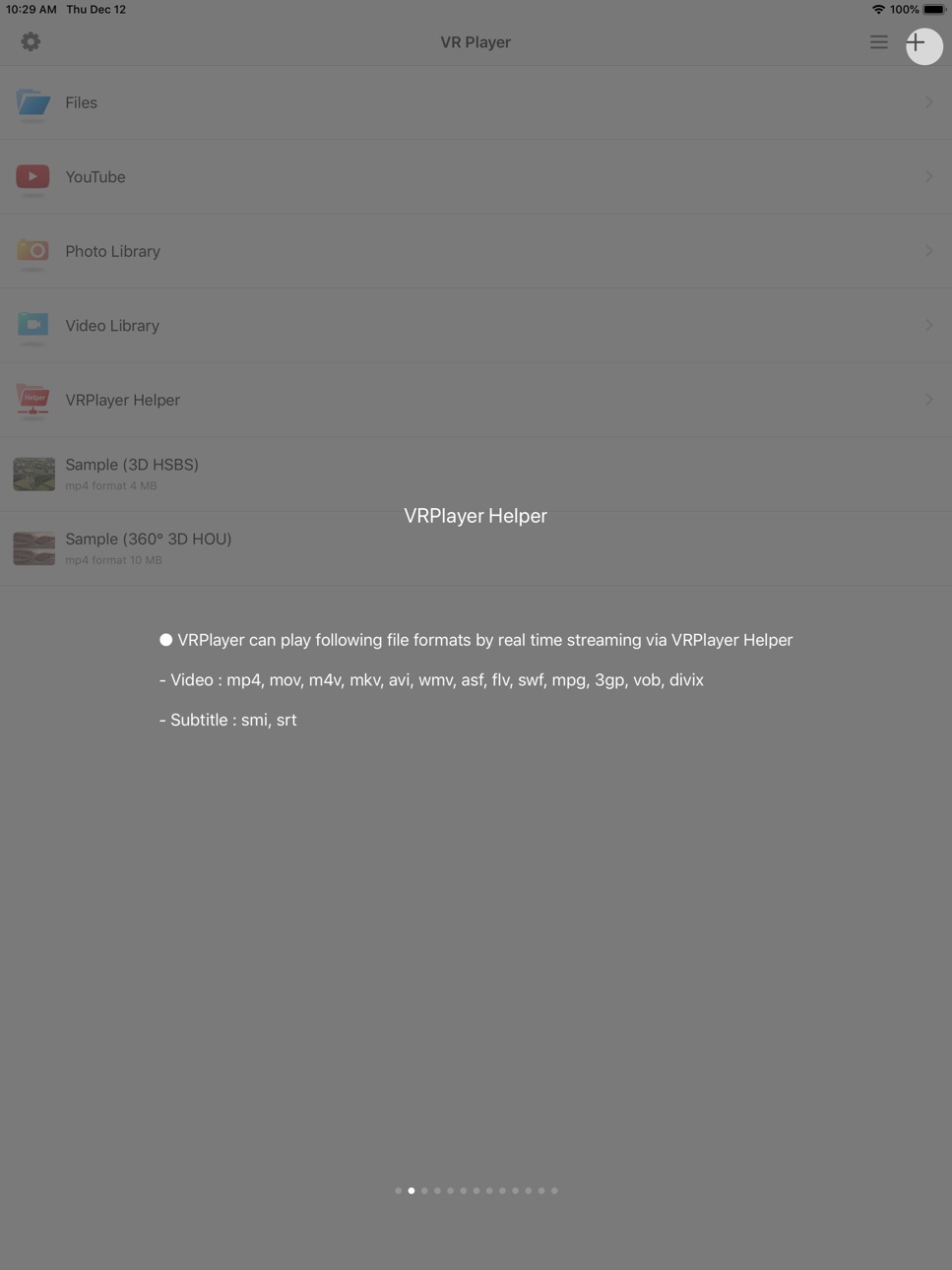
● VRPlayer can play following file formats by real time streaming via VRPlayer Helper
- Video : mp4, mov, m4v, mkv, avi, wmv, asf, flv, swf, mpg, 3gp, vob, divix
- Subtitle : smi, srt
※ this app can not play DRM protected videos purchased from iTunes store.
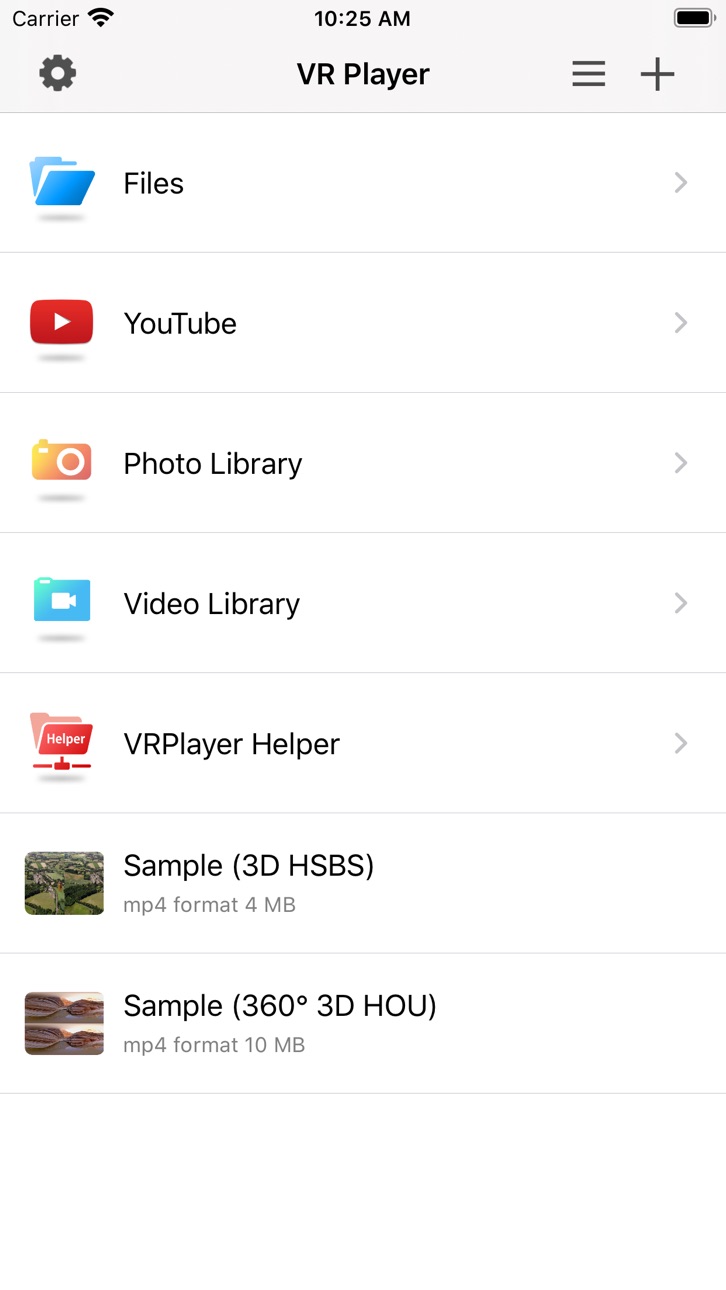
● You can add or access following items
- VRPlayer Helper (streaming server)
- Folder
- FTP Server
- GoogleDrive, Dropbox
- Video Library
※ VRPlayer Helper is embedded in your own VRPlayer app and the download URL provided by VRPlayer is your own iPhone's IP address itself not an external web server.
so iPhone and the server PC should be in the same wifi network to download Helper.
tap the "+"button at top right corner of VRPlayer and select VRPlayer Helper then you will see the URL from which you can download helper.
● You can control VRPlayer with keyboard
- Bluetooth Keyboard
- USB Keyboard (connected by camera kit)
- Keyboard of PC on which VRPlayer Helper is installed
※ while navigating
- up / down : move cursor by item
- up / down + shift : move cursor by page
- right / enter / space : select item
- left / esc : back to previous
※ while playing
- up / down : move cursor by button
- enter : select button & do action
- esc : stop & back to list
- space : play & pause
- right : move forward 5 seconds
- left : move backward 5 seconds
- right + shift : move forward 1 minute
- left + shift : move backward 1 minute
- up + shift : play previous video
- down + shift : play next video
- [ : slow down the playback rate
- ] : speed up the playback rate
- 1 : Toggle 360°/180° Video
- 2 : Toggle VR Mode
- 3 : Change 2D/3D Mode
- 4 : Zoom In/Out
- 5 : Back To Center / Motion Tracking
- 6 : Motion Tracking Constraint
- 7 : Loop
- 8 : Audio/Subtitle
● You can control VRPlayer with Game Controller
※ supported controller
- XBox controller
- Playstation Dualshock controller
- Other MFi certified game controller
※ while navigating
- up / down : move cursor by item
- up / down + RB : move cursor by page
- right / A : select item
- left / B : back to previous
※ while playing
- up / down : move cursor by button
- A : select button & do action
- B : stop & back to list
- X : play & pause
- right : move forward 5 seconds
- left : move backward 5 seconds
- right + RB : move forward 1 minute
- left + RB : move backward 1 minute
- up + RB : play previous video
- down + RB : play next video
● support panorama photo
- enjoy your own panorama photos in VR
● Use multiple gestures to control playing
- Tap the screen with two fingers to change 2D/3D screen mode.
- Double tap the screen to zoom in/out.
- Swipe right to skip forward 5 seconds.
- Swipe left to skip back 5 seconds.
- Swipe right with two fingers to speed up the playback rate.
- Swipe left with two fingers to slow down the playback rate.
- Long press with one finger to select audio or subtitle.
- Drag & drop subtitle to change position.
- Pinch in or out screen to change font size of subtitle.
Accessibility
ipadiphonemacrealityDevicetvoswatch
Version history 25 versions
Build 875246333v3.3.52025-06-03 00:59:30
● fix bug about back to center feature (was not working when roll angle is over 90°)
● improve audio/subtitle track selection for VRPlayer Helper
Build 869607992v3.3.32024-10-10 11:38:18
● fix minor bugs on iOS 18 (replace deprecated function)
Build 854698639v3.3.12024-10-09 07:13:20
● VRPlayer can record screen/audio of your desktop and streaming it to VRPlayer via VRPlayer Helper.
- to use this feature "VRPlayer Helper" should be installed and executed on your desktop.
please select or add "VRPlayer Helper" item on vrplayer app and follow instruction first.
- this feature is experimental for now.
so there might be considerable amount of latency and unstability depends on network environment and system spec where helper is running
● improve transcoding performance of VRPlayer Helper.
● fix minor bugs on iOS 18.
Build 844322695v3.3.02021-09-27 21:04:23
● fix minor bugs on iOS 15
Build 844221961v3.2.92021-09-22 13:29:10
● support iOS 15
● minor bug fixes
Build 831637106v3.2.82019-12-12 20:01:16
● support iOS 13 dark mode feature.
● You can control VRPlayer with Game Controller
※ supported controller
- XBox controller
- Playstation Dualshock controller
- Other MFi certified game controller
※ while navigating
- up / down : move cursor by item
- up / down + RB : move cursor by page
- right / A : select item
- left / B : back to previous
※ while playing
- up / down : move cursor by button
- A : select button & do action
- B : stop & back to list
- X : play & pause
- right : move forward 5 seconds
- left : move backward 5 seconds
- right + RB : move forward 1 minute
- left + RB : move backward 1 minute
- up + RB : play previous video
- down + RB : play next video
● minor bug fixes.
Build 829176405v3.2.72018-11-06 21:02:56
● Folder lock feature bug fixes for face ID devices.
Build 828502056v3.2.62018-11-03 00:57:32
● Add import/export feature for 'Files' app.
● Minor bug fixes
Build 827811266v3.2.52018-07-14 02:28:27
● iPhone X layout bug fixes
● Minor bug fixes
Build 825130807v3.2.32017-12-01 23:51:47
● iPhone X compatibility
● Bug fixes
Build 823913631v3.2.22017-10-06 22:07:26
● bug fixes for 180° video
Build 822851660v3.2.12017-09-14 09:21:09
● support OpenGL
● bug fixes for iOS 11
Build 822617842v3.2.02017-06-23 00:26:10
● bug fixes for recognizing hevc & h265 codec
● now you can control function buttons on video screen
with number key when using keyboard control
- 1 : Toggle 360°/180° Video
- 2 : Toggle VR Mode
- 3 : Change 2D/3D Mode
- 4 : Zoom In/Out
- 5 : Back To Center / Motion Tracking
- 6 : Motion Tracking Constraint
- 7 : Loop
- 8 : Audio/Subtitle
Build 822362255v3.1.92017-06-11 01:23:06
● bug fixes for Dropbox & GoogleDrive
Build 822347663v3.1.82017-05-30 22:07:37
● critical initialize bug fixes on iOS 10.3.2
Build 821616800v3.1.72017-04-05 22:34:23
● FTP bug fixes on iOS 10.3.x
Build 821404777v3.1.62017-03-21 14:19:47
● Bug fixes
Build 821044057v3.1.52017-02-28 00:29:16
● Bug fixes
Build 820846253v3.1.32017-02-09 18:45:55
● Bug fixes
Build 820764710v3.1.22017-02-06 04:12:59
● minor bug fix
Build 820301093v3.1.12017-01-05 05:38:41
● support Picture In Picture mode for iPad.
● add more options for screen position.
● bug fix for dropbox.
● minor bug fix
Build 819851100v3.1.02016-12-19 08:21:36
● support "open In" feature for smi/srt files.
● minor bug fix
Build 819766416v3.0.92016-11-21 23:10:36
● support multilingual filesystem for VRPlayer Helper.
● minor bug fix
Build 819204056v3.0.82016-10-07 23:54:46
● partial screen display bug fix on iPhone Plus
● video library listing bug fix on iOS 8.x
● minor bug fix
Build 819006629v3.0.72016-10-04 00:36:37
● supported by Google VR SDK
● minor bug fix
Price history by region
Currency
Show
Columns
Search
Availability 1 of 1 storefronts
| Region | Language | Price | Ratings | Avg | Version |
|---|---|---|---|---|---|
| US | en-US | USD 1.99 | 56 | 3.6 | 3.3.5 |
Change log 29 changes · US
✎
releaseNotes updated
● fix bug about back to center feature (was not working when roll angle is over 90°)
● improve audio/subtitle track selection for VRPlayer Helper
✎
description updated
● VRPlayer can record screen/audio of your desktop and streaming it to VRPlayer via VRPlayer Helper.
- to use this feature "VRPlayer Helper" should be instal
✎
subtitle updated
2D 3D 360° Video Player for VR
✎
name updated
VRPlayer Pro : 2D 3D 360°Video
◆
Version 3.3.5 released
● fix bug about back to center feature (was not working when roll angle is over 90°)
● improve audio/subtitle track selection for VRPlayer Helper
◆
Version 3.3.3 released
● fix minor bugs on iOS 18 (replace deprecated function)
◆
Version 3.3.1 released
● VRPlayer can record screen/audio of your desktop and streaming it to VRPlayer via VRPlayer Helper.
- to use this feature "VRPlayer Helper" should be installed and executed on your desktop.
please select or add "VRPlayer Helper" i
◆
Version 3.3.0 released
● fix minor bugs on iOS 15
◆
Version 3.2.9 released
● support iOS 15
● minor bug fixes
◆
Version 3.2.8 released
● support iOS 13 dark mode feature.
● You can control VRPlayer with Game Controller
※ supported controller
- XBox controller
- Playstation Dualshock controller
- Other MFi certified game controller
※ while navigating
- u
◆
Version 3.2.7 released
● Folder lock feature bug fixes for face ID devices.
◆
Version 3.2.6 released
● Add import/export feature for 'Files' app.
● Minor bug fixes
◆
Version 3.2.5 released
● iPhone X layout bug fixes
● Minor bug fixes
◆
Version 3.2.3 released
● iPhone X compatibility
● Bug fixes
◆
Version 3.2.2 released
● bug fixes for 180° video
◆
Version 3.2.1 released
● support OpenGL
● bug fixes for iOS 11
◆
Version 3.2.0 released
● bug fixes for recognizing hevc & h265 codec
● now you can control function buttons on video screen
with number key when using keyboard control
- 1 : Toggle 360°/180° Video
- 2 : Toggle VR Mode
- 3 : Change 2D/3D Mode
- 4 :
◆
Version 3.1.9 released
● bug fixes for Dropbox & GoogleDrive
◆
Version 3.1.8 released
● critical initialize bug fixes on iOS 10.3.2
◆
Version 3.1.7 released
● FTP bug fixes on iOS 10.3.x
◆
Version 3.1.6 released
● Bug fixes
◆
Version 3.1.5 released
● Bug fixes
◆
Version 3.1.3 released
● Bug fixes
◆
Version 3.1.2 released
● minor bug fix
◆
Version 3.1.1 released
● support Picture In Picture mode for iPad.
● add more options for screen position.
● bug fix for dropbox.
● minor bug fix
◆
Version 3.1.0 released
● support "open In" feature for smi/srt files.
● minor bug fix
◆
Version 3.0.9 released
● support multilingual filesystem for VRPlayer Helper.
● minor bug fix
◆
Version 3.0.8 released
● partial screen display bug fix on iPhone Plus
● video library listing bug fix on iOS 8.x
● minor bug fix
◆
Version 3.0.7 released
● supported by Google VR SDK
● minor bug fix