Home › Productivity

 US
US
1 of 1 storefronts
Content in en-US
Content in en-US
Information
Preview 3 platforms
iPhone 8 images



iPad 6 images


Apple Watch 3 images


What’s New Version 7.0.1
7.0.1
● Fixed a few crashes as reported by users
7.0.0
● Passkeys — sign in to passkey-enabled sites without a password.
● Built-in one-time passwords (OTP) — keep your 2FA codes alongside your logins, no separate authenticator app required.
● Sharing Center — a unified place to manage vaults and shared records.
● Redesigned Record Details, Edit, and Recents views.
● Custom filters — up to 5 saved views.
● Enhanced search with the search bar pinned to the top.
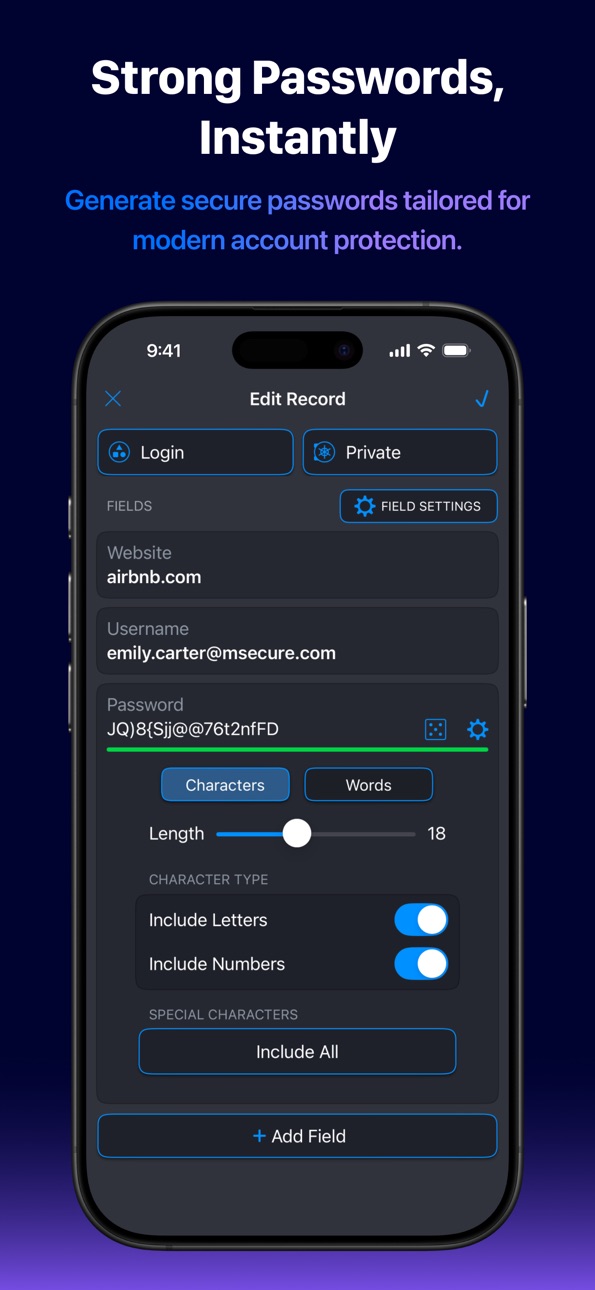
● Improved password generator and a refreshed light mode.
Description
Don't take chances with your passwords or private information. mSecure is the simple, secure way to manage logins, passkeys, 2FA codes, and sensitive data across every device you own - protected by industry-standard AES-256 encryption and zero-knowledge architecture.
WHAT'S NEW IN mSECURE 7
● Passkeys - sign in to passkey-enabled sites without a password.
● Built-in one-time passwords (OTPs) - keep your 2FA codes alongside your logins, no separate authenticator app required.
● Sharing Center - a unified place to manage vaults and shared records.
● Redesigned Record Details, Edit, and Recent views.
● Custom filters - up to 5 saved views.
● Enhanced search, with the search bar pinned to the top.
● Improved password generator and a refreshed light mode.
CHOOSE THE PLAN THAT FITS
Every tier is protected by the same AES-256 encryption and zero-knowledge architecture.
● Free - unlimited records, password generator, AutoFill, customizable templates, enhanced search.
● Essentials - adds cloud syncing (mSecure Cloud, Dropbox, iCloud, or WiFi), Face ID/Touch ID, passkeys, built-in OTP, Security Center, backup & CSV import, Mac browser extension, and Apple Watch support.
● Premium - adds the Sharing Center, custom filters, advanced field settings, multiple tags per record, and file attachments (PDF, text, image).
● Family - every Premium feature for up to 5 seats, plus shared vaults and a Family Sharing Center for admins.
—————————————————
SECURE - Protect your information with confidence.
● AES-256 encryptions, end to end, on every plan.
● Zero-knowledge architecture - your master password never leaves your device.
● Biometric unlock with Face ID or Touch ID.
● Auto-lock keeps your vault safe when you step away.
● Security Center surfaces weak, reused, or compromised passwords.
● Password generator with customizable lengths, symbols and complexity.
SIMPLE - Add, find, and organize without friction.
● iOS Password AutoFill in Safari and support third-party apps.
● Over 20 built-in templates, plus full custom templates.
● Powerful search, smart sorting, tags, and custom filters.
● Redesigned Record Details and Edit views speed up data entry.
● Apple Watch support for quick lookups on the go.
SEAMLESS - Sync all of your devices seamlessly. Choose to sync via mSecure Cloud, Dropbox, iCloud, or Wi-Fi to access your records on all of your devices across multiple platforms.
Keep your data safe and secure with mSecure.
—————————————————
SUPPORT
Questions or feedback? Visit support.msecure.com/support/discussions or email support@msevensoftware.com.
Terms of Use: https://www.apple.com/legal/internet-services/itunes/dev/stdeula/
Privacy Policy: https://redirect.msecure.com/ios/privacy
In-App Purchases US pricing
mSecure Subscription Subscription
Family Yearly · Yearly$59.99
Family Monthly · Monthly$5.99
Premium Yearly · Yearly$29.99
Premium Monthly · Monthly$2.99
Premium Yearly Upgrade · Yearly$14.99
Premium Monthly Upgrade · Monthly$1.49
Essentials Yearly · Yearly$19.99
Essentials Monthly · Monthly$1.99
Capabilities
In-App Purchases
Accessibility
ipadiphonemacrealityDevicetvoswatch
Version history 25 versions
Build 887612353v7.0.12026-06-30 23:34:24
7.0.1
● Fixed a few crashes as reported by users
7.0.0
● Passkeys — sign in to passkey-enabled sites without a password.
● Built-in one-time passwords (OTP) — keep your 2FA codes alongside your logins, no separate authenticator app required.
● Sharing Center — a unified place to manage vaults and shared records.
● Redesigned Record Details, Edit, and Recents views.
● Custom filters — up to 5 saved views.
● Enhanced search with the search bar pinned to the top.
● Improved password generator and a refreshed light mode.
Build 885356408v7.0.02026-06-15 18:39:40
● Passkeys — sign in to passkey-enabled sites without a password.
● Built-in one-time passwords (OTP) — keep your 2FA codes alongside your logins, no separate authenticator app required.
● Sharing Center — a unified place to manage vaults and shared records.
● Redesigned Record Details, Edit, and Recents views.
● Custom filters — up to 5 saved views.
● Enhanced search with the search bar pinned to the top.
● Improved password generator and a refreshed light mode.
● And much more!
Build 878574921v6.1.142025-10-01 17:04:52
* Bug fixes related to iOS 26.
* Stay tuned — a major update (version 7.0) is coming soon!
Build 873004139v6.1.132025-09-24 19:10:26
* Bug fixes related to iOS 26.
* Stay tuned — a major update (version 7.0) is coming soon!
Build 872008076v6.1.122025-01-27 17:40:05
- Various bug fixes and improvements
Build 870629201v6.1.112024-12-03 23:17:25
- Minor improvements and bug fixes.
Build 870407026v6.1.102024-11-13 23:32:06
- Fix for iPad crash on iOS 18
Build 870250419v6.1.92024-11-07 23:53:19
- Various minor bug fixes
Build 867446376v6.1.82024-07-15 14:56:36
- Bug fixes and performance improvements
Build 864808185v6.1.62024-04-03 20:50:46
- Performance enhancements and minor bug fixes.
Build 861541053v6.1.52023-11-17 22:27:30
6.1.5
- Implements saving the section states for the Security Center
- Fixes a bug with displaying the incorrect modification date
- Fixes an issue that if tags field has focus when dismissing the edit view, it would crash
- Other minor bug fixes and improvements
Build 858657811v6.1.42023-09-26 20:15:37
- Minor improvements and bug fixes
Build 856876868v6.1.32023-05-15 19:38:13
6.1.3
- Dropbox sync bugs fixed
- New App Icon
- Removed attachment limits
- Other minor bug fixes and improvements
6.1.2
- Fix for other issues related to viewing attachments
- Fixed issue copying authenticator code to clipboard
- Fixed now using phone keyboard for 2FA auth phone number
- Other minor bug fixes
6.1.1
- Fix for opening legacy attachments
- Adds copy to clipboard for password history
Major 6.1 update includes:
- Family and Team license plans
- Two-Factor Authentication for signing into your mSecure account
- Login Password History
- You can now attach any file to an mSecure record
- Many more features
Build 856388033v6.1.22023-04-24 19:24:13
6.1.2
- Fix for other issues related to viewing attachments
- Fixed issue copying authenticator code to clipboard
- Fixed now using phone keyboard for 2FA auth phone number
- Other minor bug fixes
6.1.1
- Fix for opening legacy attachments
- Adds copy to clipboard for password history
Major 6.1 update includes:
- Family and Team license plans
- Two-Factor Authentication for signing into your mSecure account
- Login Password History
- You can now attach any file to an mSecure record
- Many more features
Build 856141966v6.1.12023-04-12 23:29:05
6.1.1
- Fix for opening legacy attachments
- Adds copy to clipboard for password history
Major 6.1 update includes:
- Family and Team license plans
- Two-Factor Authentication for signing into your mSecure account
- Login Password History
- You can now attach any file to an mSecure record
- Many more features
Build 855269697v6.1.02023-04-05 22:20:50
Major 6.1 update includes:
- Family and Team license plans
- Two-Factor Authentication for signing into your mSecure account
- Login Password History
- You can now attach any file to an mSecure record
- Many more features
Build 851664769v6.0.82022-08-22 16:20:45
6.0.7
- Improved Apple Watch support
- Large passcode screen
- Improved performance
- Improved stability
- Added mSecure as Watch Complication
- Implemented One Time Password field for Watch
- Added "All Records" item to hamburger menu
- Added ability to delete user account
- Enhanced Month/Year picker for larger range of dates
- Other minor improvements and bug fixes
6.0.6
- Fixed a crash in the Safari auto-fill extension. If Safari auto-fill isn't working, please try turning it off and back on in iOS settings.
6.0.5
- Added sorting by tags and "Untagged" filter option
- Backup Enhancements (made default max backups 20, added 15, 30 and 40 options)
- Various crash fixes
- Other minor bug fixes and improvements
Build 850463513v6.0.72022-07-14 16:41:02
6.0.7
- Improved Apple Watch support
- Large passcode screen
- Improved performance
- Improved stability
- Added mSecure as Watch Complication
- Implemented One Time Password field for Watch
- Added "All Records" item to hamburger menu
- Added ability to delete user account
- Enhanced Month/Year picker for larger range of dates
- Other minor improvements and bug fixes
6.0.6
- Fixed a crash in the Safari auto-fill extension. If Safari auto-fill isn't working, please try turning it off and back on in iOS settings.
6.0.5
- Added sorting by tags and "Untagged" filter option
- Backup Enhancements (made default max backups 20, added 15, 30 and 40 options)
- Various crash fixes
- Other minor bug fixes and improvements
Build 849034811v6.0.62022-05-12 20:37:27
6.0.6
- Fixed a crash in the Safari auto-fill extension. If Safari auto-fill isn't working, please try turning it off and back on in iOS settings.
6.0.5
- Added sorting by tags and "Untagged" filter option
- Backup Enhancements (made default max backups 20, added 15, 30 and 40 options)
- Various crash fixes
- Other minor bug fixes and improvements
Build 848945538v6.0.52022-05-11 18:58:23
- Added sorting by tags and "Untagged" filter option
- Backup Enhancements (made default max backups 20, added 15, 30 and 40 options)
- Various crash fixes
- Other minor bug fixes and improvements
Build 848332449v6.0.42022-04-15 23:39:57
6.0.4
- Fixed tapping URL field using the display URL and not the full URL
- Fixed issue with scrolling when initiating scroll on section headers
- Fixed context menus in detail view
- Fixed copying text to clipboard and being available on other devices
- Other minor bug fixes
6.0.3
- New search tags logic
- Now saves password generator settings globally as well as on the record level
- Minor fix for tags visibility in light mode
- Fix for OTP field copy using secret instead of token
6.0.2
- Added clarification for v5 Pro users that they won't loose any features (and gain some) if they don't purchase a subscription. The app will continue to have all of the features they had in v5 going forward.
6.0.0
- Major release of mSecure. Includes new Sharing Center, Browser Plugins, Safari Auto-fill, tags and much, much more.
Build 848145209v6.0.32022-04-06 21:27:37
6.0.3
- New search tags logic
- Now saves password generator settings globally as well as on the record level
- Minor fix for tags visibility in light mode
- Fix for OTP field copy using secret instead of token
6.0.2
- Added clarification for v5 Pro users that they won't loose any features (and gain some) if they don't purchase a subscription. The app will continue to have all of the features they had in v5 going forward.
6.0.0
- Major release of mSecure. Includes new Sharing Center, Browser Plugins, Safari Auto-fill, tags and much, much more.
Build 847873120v6.0.22022-03-25 17:12:20
6.0.2
- Added clarification for v5 Pro users that they won't loose any features (and gain some) if they don't purchase a subscription. The app will continue to have all of the features they had in v5 going forward.
6.0.0
- Major release of mSecure. Includes new Sharing Center, Browser Plugins, Safari Auto-fill, tags and much, much more.
Build 847622057v6.0.02022-03-17 00:59:48
- Major release of mSecure. Includes new Sharing Center, Browser Plugins, Safari Auto-fill, tags and much, much more.
Build 843363081v5.7.32021-08-02 18:01:59
- Improved migration of older mSecure version 4 data
- Other bug fixes and improvements
Price history by region
Currency
Show
Columns
Search
Availability 1 of 1 storefronts
| Region | Language | Price | Ratings | Avg | Version |
|---|---|---|---|---|---|
| US | en-US | Free | 50.7k | 4.8 | 7.0.1 |
Change log 29 changes · US
✎
releaseNotes updated
7.0.1
● Fixed a few crashes as reported by users
7.0.0
● Passkeys — sign in to passkey-enabled sites without a password.
● Built-in one-time passwords (OTP) —
✎
description updated
Don't take chances with your passwords or private information. mSecure is the simple, secure way to manage logins, passkeys, 2FA codes, and sensitive data acros
✎
subtitle updated
Secure Storage Digital Wallet
✎
name updated
Password Manager - mSecure
◆
Version 7.0.1 released
7.0.1
● Fixed a few crashes as reported by users
7.0.0
● Passkeys — sign in to passkey-enabled sites without a password.
● Built-in one-time passwords (OTP) — keep your 2FA codes alongside your logins, no separate authenticator app require
◆
Version 7.0.0 released
● Passkeys — sign in to passkey-enabled sites without a password.
● Built-in one-time passwords (OTP) — keep your 2FA codes alongside your logins, no separate authenticator app required.
● Sharing Center — a unified place to manage vaults a
◆
Version 6.1.14 released
* Bug fixes related to iOS 26.
* Stay tuned — a major update (version 7.0) is coming soon!
◆
Version 6.1.13 released
* Bug fixes related to iOS 26.
* Stay tuned — a major update (version 7.0) is coming soon!
◆
Version 6.1.12 released
- Various bug fixes and improvements
◆
Version 6.1.11 released
- Minor improvements and bug fixes.
◆
Version 6.1.10 released
- Fix for iPad crash on iOS 18
◆
Version 6.1.9 released
- Various minor bug fixes
◆
Version 6.1.8 released
- Bug fixes and performance improvements
◆
Version 6.1.6 released
- Performance enhancements and minor bug fixes.
◆
Version 6.1.5 released
6.1.5
- Implements saving the section states for the Security Center
- Fixes a bug with displaying the incorrect modification date
- Fixes an issue that if tags field has focus when dismissing the edit view, it would crash
- Other minor bug
◆
Version 6.1.4 released
- Minor improvements and bug fixes
◆
Version 6.1.3 released
6.1.3
- Dropbox sync bugs fixed
- New App Icon
- Removed attachment limits
- Other minor bug fixes and improvements
6.1.2
- Fix for other issues related to viewing attachments
- Fixed issue copying authenticator code to clipboard
- Fixed n
◆
Version 6.1.2 released
6.1.2
- Fix for other issues related to viewing attachments
- Fixed issue copying authenticator code to clipboard
- Fixed now using phone keyboard for 2FA auth phone number
- Other minor bug fixes
6.1.1
- Fix for opening legacy attachments
◆
Version 6.1.1 released
6.1.1
- Fix for opening legacy attachments
- Adds copy to clipboard for password history
Major 6.1 update includes:
- Family and Team license plans
- Two-Factor Authentication for signing into your mSecure account
- Login Password History
◆
Version 6.1.0 released
Major 6.1 update includes:
- Family and Team license plans
- Two-Factor Authentication for signing into your mSecure account
- Login Password History
- You can now attach any file to an mSecure record
- Many more features
◆
Version 6.0.8 released
6.0.7
- Improved Apple Watch support
- Large passcode screen
- Improved performance
- Improved stability
- Added mSecure as Watch Complication
- Implemented One Time Password field for Watch
- Added "All Records" item to hamb
◆
Version 6.0.7 released
6.0.7
- Improved Apple Watch support
- Large passcode screen
- Improved performance
- Improved stability
- Added mSecure as Watch Complication
- Implemented One Time Password field for Watch
- Added "All Records" item to hamb
◆
Version 6.0.6 released
6.0.6
- Fixed a crash in the Safari auto-fill extension. If Safari auto-fill isn't working, please try turning it off and back on in iOS settings.
6.0.5
- Added sorting by tags and "Untagged" filter option
- Backup Enhancements (made defau
◆
Version 6.0.5 released
- Added sorting by tags and "Untagged" filter option
- Backup Enhancements (made default max backups 20, added 15, 30 and 40 options)
- Various crash fixes
- Other minor bug fixes and improvements
◆
Version 6.0.4 released
6.0.4
- Fixed tapping URL field using the display URL and not the full URL
- Fixed issue with scrolling when initiating scroll on section headers
- Fixed context menus in detail view
- Fixed copying text to clipboard and being available on
◆
Version 6.0.3 released
6.0.3
- New search tags logic
- Now saves password generator settings globally as well as on the record level
- Minor fix for tags visibility in light mode
- Fix for OTP field copy using secret instead of token
6.0.2
- Added clarification
◆
Version 6.0.2 released
6.0.2
- Added clarification for v5 Pro users that they won't loose any features (and gain some) if they don't purchase a subscription. The app will continue to have all of the features they had in v5 going forward.
6.0.0
- Major release of
◆
Version 6.0.0 released
- Major release of mSecure. Includes new Sharing Center, Browser Plugins, Safari Auto-fill, tags and much, much more.
◆
Version 5.7.3 released
- Improved migration of older mSecure version 4 data
- Other bug fixes and improvements