Home › Utilities

 US
US
 BRpt-BR
 AGen-GB
 AIen-GB
 AOen-GB
 ARes-MX
 BBen-GB
 BFen-GB
 BJen-GB
 BOes-MX
 BSen-GB
 BWen-GB
 BZen-GB
 CDen-GB
 CGen-GB
 CIfr-FR
 CLes-MX
 CMfr-FR
 COes-MX
 CRes-MX
 CVen-GB
 DMen-GB
 DOes-MX
 DZen-GB
 ECes-MX
 GAfr-FR
 GDen-GB
 GHen-GB
 GMen-GB
 GTes-MX
 GWen-GB
 GYen-GB
 HNes-MX
 JMen-GB
 KEen-GB
 KNen-GB
 KYen-GB
 LCen-GB
 LRen-GB
 LYen-GB
 MAen-GB
 MGen-GB
 MLen-GB
 MSen-GB
 MUen-GB
 MWen-GB
 MXes-MX
 MZen-GB
 NAen-GB
 NEen-GB
 NGen-GB
 NIes-MX
 PAes-MX
 PEes-MX
 PYes-MX
 RWen-GB
 SCen-GB
 SLen-GB
 SNen-GB
 SRen-GB
 STen-GB
 SVes-MX
 SZen-GB
 TCen-GB
 TDen-GB
 TNen-GB
 TTen-GB
 TZen-GB
 UGen-GBUSen-US
 UYen-GB
 VCen-GB
 VEes-MX
 VGen-GB
 ZMen-GB
 ZWen-GB
75 of 75 storefronts
Content in en-US
Content in en-US
Information
Preview 2 platforms
iPhone 5 images


iPad 2 images

What’s New Version 10.0
- updated deployment target to iOS 15
- minor bugfixes
Description
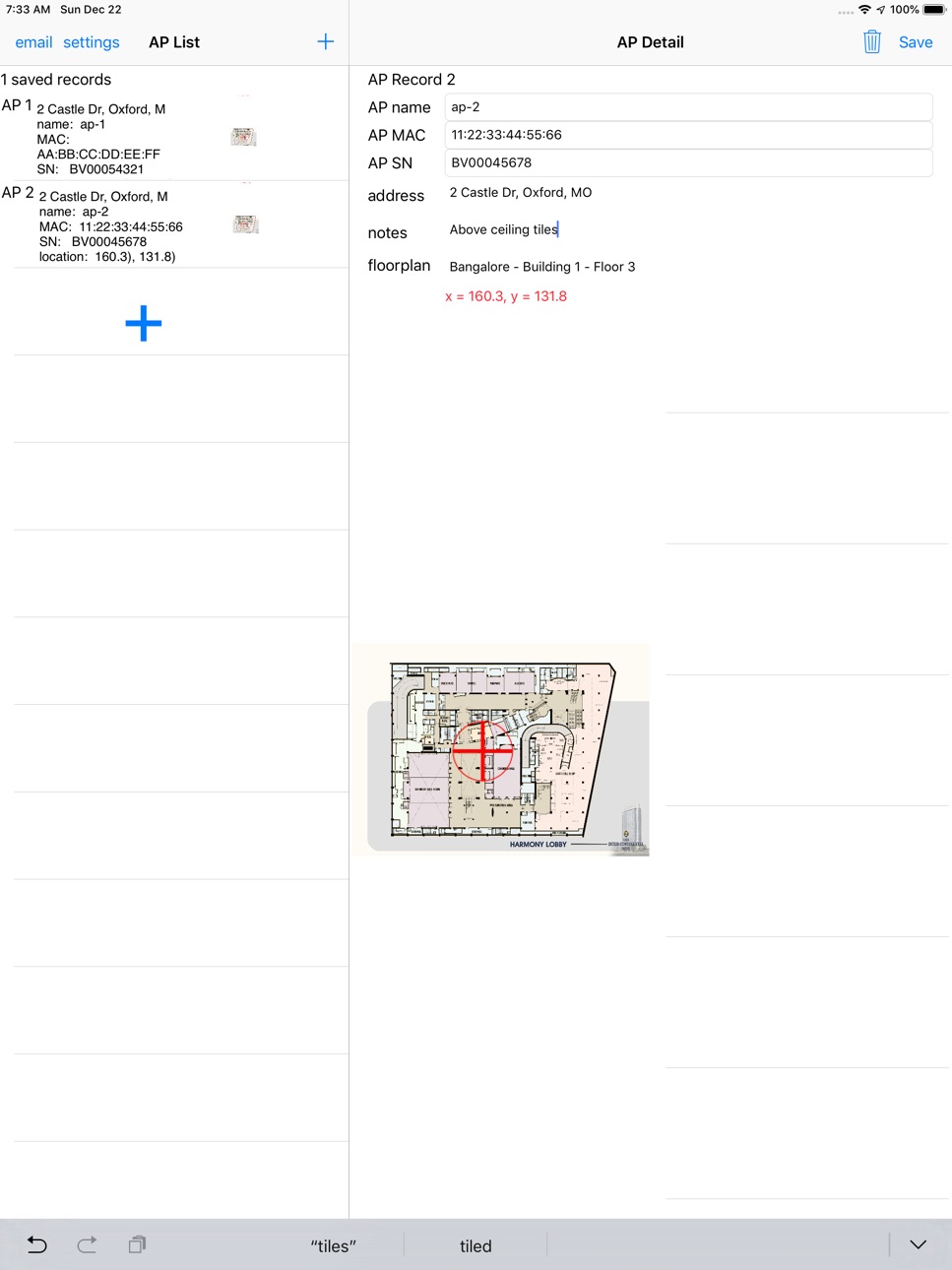
The AP Installer app provides a record of Wi-Fi access point installations, using data captured on-site by the installer. It is not specific to HPE Aruba Networking equipment but offers additional features when used with AirWave network management.
This app will look best on an iPad, but works on smaller screens.
The app provides a structure for the installer to record data about the installation:
- Serial number or MAC of the AP can be scanned using a bar-code reading function or entered by keypad.
- Text entry fields allow keypad entry of AP name, serial number, MAC, location and notes about the installation.
- Up to 5 photographs can be attached to the record. These can show details of the installation, location or surroundings.
- When used with an AirWave network management server, the app will download floorplans and the installer can indicate the position of the installed AP on the floorplan. Once the AP is placed on the floorplan, its location can be automatically updated to AirWave.
- If AirWave is not present, the app can import a floorplan image from the photo album or an email attachment and APs can be placed on this image and their location recorded in relative dimensions.
- If the device has GPS enabled, the latitude & longitude of the installation is recorded. If a simple street address lookup (from GPS) succeeds, the (approximate) street address is added.
At the end of an installation run, the list of AP information may be emailed as a spreadsheet and a set of images: this can be archived as a permanent record and proof of each AP installed.
Accessibility
ipadiphonemacrealityDevicetvoswatch
Version history 7 versions
Build 876334401v10.02025-07-13 08:47:10
- updated deployment target to iOS 15
- minor bugfixes
Build 861626339v9.02023-11-30 21:16:00
2023-11-20 Build v9 for iOS
- Updated to MacOS14.1.1, Xcode15.0.1, iOS SDK17.1.1
- New icon with modern AP photo
- Updated help text for HPE Aruba Networking
- Removed cr and commas from address for csv file
Build 839858603v8.02020-12-31 17:59:09
Build 8.0 for iOS
- updated code to Swift 5
- updated target version to iOS 12.0
- many code changes for new frameworks, particularly for the camera
- minor bugfixes including better barcode scanning
Build 836262462v6.02020-06-04 02:13:25
Build 6.0 for iOS
- Bugfix adding barcode scanner permission for iPhone11
- Other minor bug fixes
- Changes for iOS up to 13.5
Build 834047958v5.02019-12-24 01:05:02
Updated for iOS 12
New privacy policy
Build 820382285v3.02017-01-05 16:14:34
- Aruba serial numbers can now be 10 characters long
- File aging and deleting checks improved
Build 814689828v1.02015-12-09 01:49:37
No pricing data captured yet — comparisons appear once the app has paid storefronts or in-app purchases.
Availability 75 of 75 storefronts
| Region | Language | Price | Ratings | Avg | Version |
|---|---|---|---|---|---|
| BR | pt-BR | Free | 1 | 4.0 | 10.0 |
| AG | en-GB | Free | 0 | — | 10.0 |
| AI | en-GB | Free | 0 | — | 10.0 |
| AO | en-GB | Free | 0 | — | 10.0 |
| AR | es-MX | Free | 0 | — | 10.0 |
| BB | en-GB | Free | 0 | — | 10.0 |
| BF | en-GB | Free | 0 | — | 10.0 |
| BJ | en-GB | Free | 0 | — | 10.0 |
| BO | es-MX | Free | 0 | — | 10.0 |
| BS | en-GB | Free | 0 | — | 10.0 |
| BW | en-GB | Free | 0 | — | 10.0 |
| BZ | en-GB | Free | 0 | — | 10.0 |
| CD | en-GB | Free | 0 | — | 10.0 |
| CG | en-GB | Free | 0 | — | 10.0 |
| CI | fr-FR | Free | 0 | — | 10.0 |
| CL | es-MX | Free | 0 | — | 10.0 |
| CM | fr-FR | Free | 0 | — | 10.0 |
| CO | es-MX | Free | 0 | — | 10.0 |
| CR | es-MX | Free | 0 | — | 10.0 |
| CV | en-GB | Free | 0 | — | 10.0 |
| DM | en-GB | Free | 0 | — | 10.0 |
| DO | es-MX | Free | 0 | — | 10.0 |
| DZ | en-GB | Free | 0 | — | 10.0 |
| EC | es-MX | Free | 0 | — | 10.0 |
| GA | fr-FR | Free | 0 | — | 10.0 |
| GD | en-GB | Free | 0 | — | 10.0 |
| GH | en-GB | Free | 0 | — | 10.0 |
| GM | en-GB | Free | 0 | — | 10.0 |
| GT | es-MX | Free | 0 | — | 10.0 |
| GW | en-GB | Free | 0 | — | 10.0 |
| GY | en-GB | Free | 0 | — | 10.0 |
| HN | es-MX | Free | 0 | — | 10.0 |
| JM | en-GB | Free | 0 | — | 10.0 |
| KE | en-GB | Free | 0 | — | 10.0 |
| KN | en-GB | Free | 0 | — | 10.0 |
| KY | en-GB | Free | 0 | — | 10.0 |
| LC | en-GB | Free | 0 | — | 10.0 |
| LR | en-GB | Free | 0 | — | 10.0 |
| LY | en-GB | Free | 0 | — | 10.0 |
| MA | en-GB | Free | 0 | — | 10.0 |
| MG | en-GB | Free | 0 | — | 10.0 |
| ML | en-GB | Free | 0 | — | 10.0 |
| MS | en-GB | Free | 0 | — | 10.0 |
| MU | en-GB | Free | 0 | — | 10.0 |
| MW | en-GB | Free | 0 | — | 10.0 |
| MX | es-MX | Free | 0 | — | 10.0 |
| MZ | en-GB | Free | 0 | — | 10.0 |
| NA | en-GB | Free | 0 | — | 10.0 |
| NE | en-GB | Free | 0 | — | 10.0 |
| NG | en-GB | Free | 0 | — | 10.0 |
| NI | es-MX | Free | 0 | — | 10.0 |
| PA | es-MX | Free | 0 | — | 10.0 |
| PE | es-MX | Free | 0 | — | 10.0 |
| PY | es-MX | Free | 0 | — | 10.0 |
| RW | en-GB | Free | 0 | — | 10.0 |
| SC | en-GB | Free | 0 | — | 10.0 |
| SL | en-GB | Free | 0 | — | 10.0 |
| SN | en-GB | Free | 0 | — | 10.0 |
| SR | en-GB | Free | 0 | — | 10.0 |
| ST | en-GB | Free | 0 | — | 10.0 |
| SV | es-MX | Free | 0 | — | 10.0 |
| SZ | en-GB | Free | 0 | — | 10.0 |
| TC | en-GB | Free | 0 | — | 10.0 |
| TD | en-GB | Free | 0 | — | 10.0 |
| TN | en-GB | Free | 0 | — | 10.0 |
| TT | en-GB | Free | 0 | — | 10.0 |
| TZ | en-GB | Free | 0 | — | 10.0 |
| UG | en-GB | Free | 0 | — | 10.0 |
| US | en-US | Free | 0 | — | 10.0 |
| UY | en-GB | Free | 0 | — | 10.0 |
| VC | en-GB | Free | 0 | — | 10.0 |
| VE | es-MX | Free | 0 | — | 10.0 |
| VG | en-GB | Free | 0 | — | 10.0 |
| ZM | en-GB | Free | 0 | — | 10.0 |
| ZW | en-GB | Free | 0 | — | 10.0 |
Change log 10 changes · US
✎
releaseNotes updated
- updated deployment target to iOS 15
- minor bugfixes
✎
description updated
The AP Installer app provides a record of Wi-Fi access point installations, using data captured on-site by the installer. It is not specific to HPE Aruba Netwo
✎
name updated
AP Installer
◆
Version 10.0 released
- updated deployment target to iOS 15
- minor bugfixes
◆
Version 9.0 released
2023-11-20 Build v9 for iOS
- Updated to MacOS14.1.1, Xcode15.0.1, iOS SDK17.1.1
- New icon with modern AP photo
- Updated help text for HPE Aruba Networking
- Removed cr and commas from address for csv file
◆
Version 8.0 released
Build 8.0 for iOS
- updated code to Swift 5
- updated target version to iOS 12.0
- many code changes for new frameworks, particularly for the camera
- minor bugfixes including better barcode scanning
◆
Version 6.0 released
Build 6.0 for iOS
- Bugfix adding barcode scanner permission for iPhone11
- Other minor bug fixes
- Changes for iOS up to 13.5
◆
Version 5.0 released
Updated for iOS 12
New privacy policy
◆
Version 3.0 released
- Aruba serial numbers can now be 10 characters long
- File aging and deleting checks improved
◆
Version 1.0 released