Home › Productivity

 US
US
1 of 1 storefronts
Content in en-US
Content in en-US
Information
Preview 2 platforms
iPhone 7 images

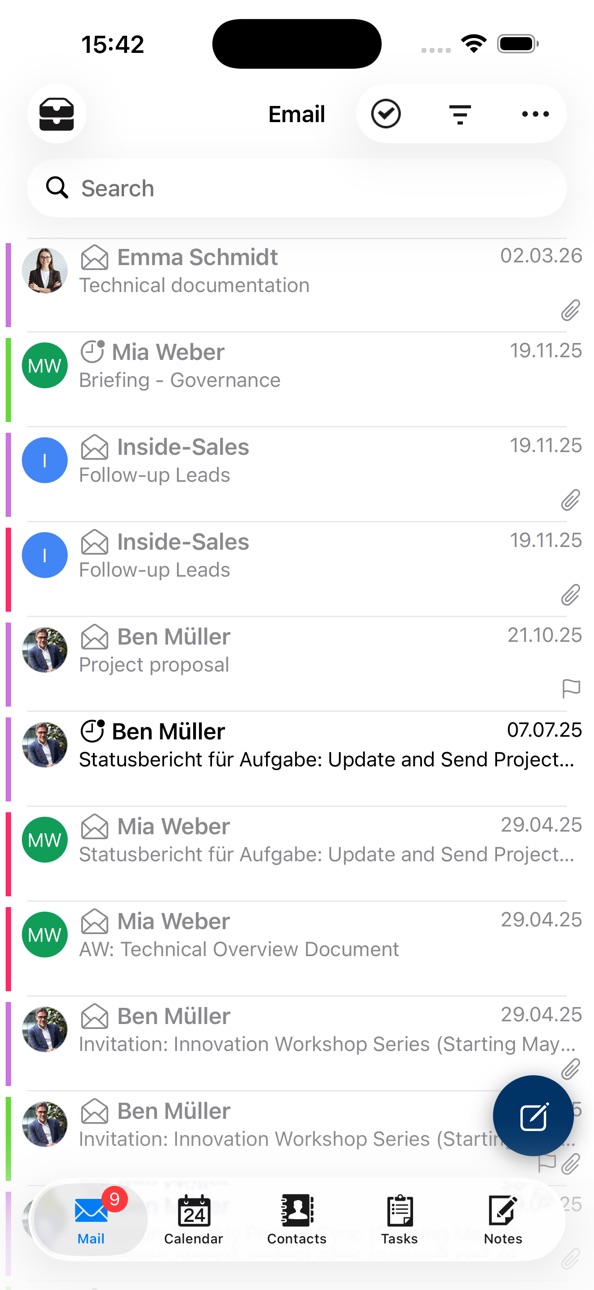


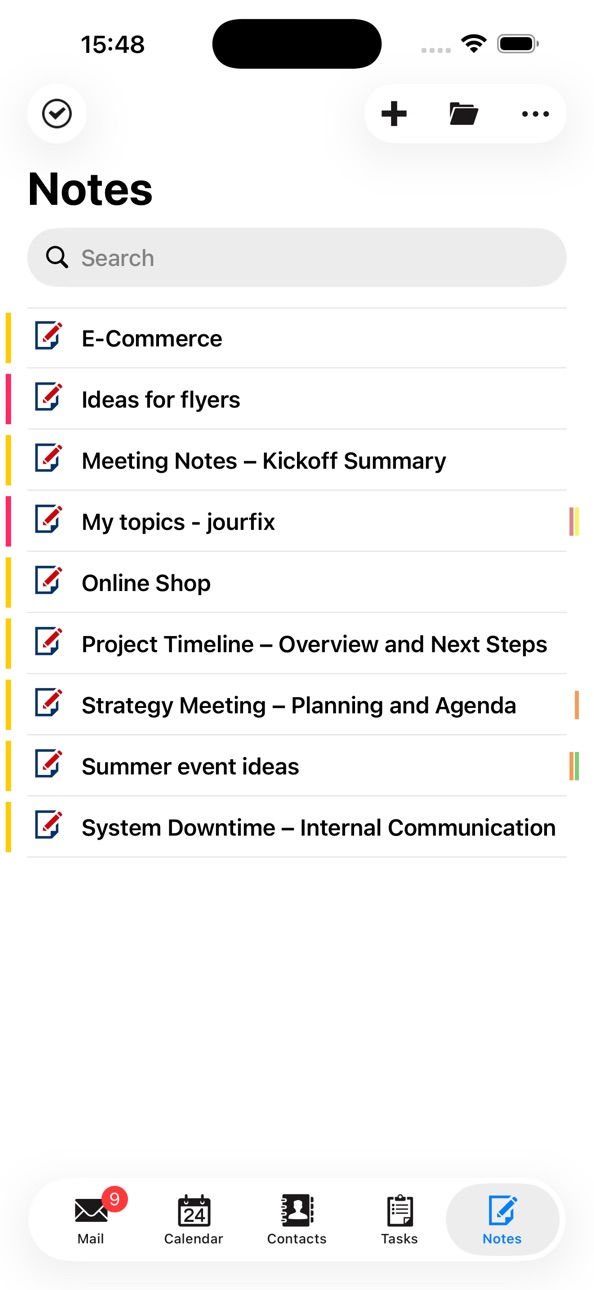
iPad 7 images


What’s New Version 1.10.7
- Improvements
- Bugfixes
Description
ISEC7 MAIL enables access to Microsoft Exchange and Office 365 environments with secure Personal Information Management (PIM) data such as contacts, calendar, tasks, and notes.
ISEC7 MAIL also allows for mailbox delegation capabilities and public folder integration. ISEC7 MAIL operates with modern and certificate-based authentication (CBA) and allows users to securely send, receive, and enforce encrypted and signed emails (S/MIME).
As the top priorities of ISEC7 MAIL are security, classification, and authentication, it is an ideal tool for managing classified or sensitive information, organizational or group mailboxes, and supporting executive leadership and their staff.
Easiliy manage inboxes from your mobile device
Easily managed from a mobile device, ISEC7 MAIL enables mobile access to Microsoft Exchange accounts with the ability to delegate access for approved staff. Delegation gives authorized users read and write access to email, calendar, public folders and more. No complex technical skills are required, simply add delegates from the Outlook client.
With access to a delegated account, the user can book or change calendar appointments with ISEC7 Mail's Smart Scheduler, monitor and respond to emails, and access content in the public folders–directly from any mobile device.
KEY BENEFITS
• Easily access and delegate access to email, calendar, contacts, public folders, and more
• Ability to use functional & shared mailboxes and multiple email domains
• Utilize helpful classification tool ISEC7 CLASSIFY and automation of deployment
• Share your business card with a touch of a button
• Improve productivity and response time with significant impact on customer satisfaction
• Maintain security of sensitive information and comply with security policies
• Build greater team collaboration and transparency of knowledge share
ISEC7 MAIL is free to download and use with limited features.
Upgrading to Premium removes the restrictions of the free version mentioned below and is available through an auto-renewing subscription. A yearly subscription is available for $32.99.
Free version:
• Only one master account
• Only one delegate access
• Only 3 default folders for the master account (inbox, contacts, calendar)
• Only 3 default folders for the delegate access (inbox, contacts, calendar)
• No access to public folders
• No action possible, such as create/forward/delete e-mails; create/delete appointments and contacts
• Only the last 10 emails are displayed
• In the calendar, only the current week is available
Subscription automatically renews unless auto-renew is turned off at least 24-hours before the end of the current period. Account will be charged for renewal within 24-hours prior to the end of the current period, and identify the cost of the renewal. Subscriptions may be managed by the user and auto-renewal may be turned off by going to the user's Account Settings after purchase. No cancellation of the current subscription is allowed during active subscription period.
Technical Requirements
• Microsoft Exchange Server 2007 SP1 or higher, 2010, 2013 or 2016
• Microsoft Office 365
• Microsoft Exchange WebService must be activated and available to connect to
Privacy policy available at: https://apps.isec7.com/privacy/https://apps.isec7.com/privacy/ISEC7_DataPrivacyPolicy_ISEC7_MAIL.pdf
End User License Agreement available at: https://apps.isec7.com/eula/ISEC7_EULA.pdf
In-App Purchases US pricing
Premium Subscription Subscription
Yearly$32.99
Capabilities
In-App PurchasesWallet
Accessibility
ipadiphonemacrealityDevicetvoswatch
Version history 25 versions
Build 887904496v1.10.72026-07-09 09:23:14
- Improvements
- Bugfixes
Build 887099212v1.10.62026-07-01 15:00:10
This release focuses on general bug fixes and user experience improvements, while introducing helpful new features like meeting availability suggestions and various ISEC7 CLASSIFY enhancements.
Build 885532959v1.10.52026-05-15 08:15:02
- Improvements
- Bugfixes
Build 885074061v1.10.42026-05-06 12:45:23
- Bugfixes
Build 883982357v1.10.32026-04-05 14:57:38
- Added support for Hybrid Modern Authentication, enabling Modern Auth for On-Premises Exchange Servers
- Improvements
- Bugfixes
Build 883712444v1.10.22026-03-26 10:05:49
Bugfixes
Build 883497450v1.10.12026-03-22 18:54:01
- Improvements
- Bugfixes
Build 882380777v1.10.02026-03-16 08:33:11
- A side menu has been added for quick navigation through folders, including favorites.
- Improvements
- Bugfixes
Build 880776078v1.9.142025-12-19 09:14:24
- Improvements
- Bugfixes
Build 880421909v1.9.132025-12-16 12:18:21
Improvements and Bugfixes
Build 880083536v1.9.122025-11-27 15:57:58
Improvements and Bugfixes
Build 879177838v1.9.112025-11-23 13:52:46
- Device calendars can now be displayed in the app side by side to synchronized Exchange calendars.
- Links show an alert showing the link and actions to open, copy and share...
- Emails can now be summarized using private on-device Apple Intelligence capabilities.
- Support for Liquid Glass.
- Improvements
- Bugfixes
Build 877847309v1.9.102025-09-15 12:20:56
- Added support for S/MIME certificates located on smartcards available with CryptoTokenKit
- You can now choose which details are encoded into the QR code of your own business card under Settings > Business card.
- Selection of contact fields before sharing a contact
- Improvements
- Bugfixes
Build 876679720v1.9.92025-08-19 07:15:09
- Multiple swipe actions can now be configured under Settings > Swipe options for swiping left or right in the email list.
- Reply and forward actions for meetings
- Contacts for the main account can now be marked as private.
- Added support for certificate based authentication together with other authentications like NTLM
- Improvements
- Bug fixes
Build 874994565v1.9.72025-07-15 07:47:04
- Offline support: Deleting mails, appointments, contacts, tasks or notes and updating mail properties like flag, categories or read status is now available when offline. All offline actions are automatically queued in the background and can be managed in a new Operations menu.
- Contacts and phone numbers can be shared from the telephone app with ISEC7 MAIL
- Microsoft Information Protection sensitivity labels can be set when composing new emails (if available in your Microsoft 365 tenant).
- A new "Listen" action in the mail details reads out the email subject, sender and message text using on-device text-to-speech with language auto-detection. If connected via CarPlay, additional bigger buttons are displayed.
- Added support for requesting delivery and read receipts
- Notes can now be grouped by category, if configured under Settings > Notes > Sort order.
- Calendar: A period for automatically loading the details of upcoming meetings and appointments during background sync can be configured in settings.
- Improvements and bugfixes
Build 872786595v1.9.62025-03-26 13:25:15
- Added support for account configuration backup enabled by ISEC7 SPHERE
- Microsoft Information Protection sensitivity labels are displayed for emails
- LinkedIn and Xing profile barcodes can be added to the business card by entering the profile names.
- Several improvements
- Bugfixes
Build 871975685v1.9.52025-01-24 14:08:07
Bugfixes and Improvements
Build 869955862v1.9.42024-12-17 12:07:37
- QR codes of vCards can be scanned and processed
- Added mark all as read action
- Tasks: Attachments of tasks are now displayed and can be added or changed.
- Added support for requesting delivery and read receipts
- Added support for multiple signatures
- A new action for emails allows creating a new meeting with all recipients as attendees.
- Added relevant people while composing a mail
- Several improvements
- Bugfixes
Build 868530442v1.9.32024-09-11 11:36:11
Improvements and Bugfixes
Build 867767850v1.9.22024-08-19 12:21:50
- Added contact sync to local address book.
- Added action for adding contact to local address book.
- Added support for proposing new times for meeting requests.
- Improvements
- Bugfixes
Build 865660501v1.9.12024-06-03 12:53:02
Improvements and Bugfixes
Build 864960631v1.9.02024-04-23 11:24:38
- New app icon and app name
- A new agenda view is available for the calendar which displays all appointments in a list.
- The locally synchronized calendars can now be searched.
- Calendars available online can now be searched.
- The contact list contains a new section with contact favourites.
- The own business card can shown via a button in the contacts or via a short cut on the app icon.
- The Global Address Book (GAL) can be synchronised in its entirety for offline access for Office 365 accounts
- Mails, appointments, contacts, tasks and notes can be added as attachments when creating a mail.
- Added support for ISEC7 CLASSIFY.
- Improvements and Bugfixes
Build 862233807v1.8.212023-12-21 09:01:52
Improvements and Bugfixes
Build 861815763v1.8.202023-12-14 14:02:34
Improvements and Bugfixes
Build 860117358v1.8.182023-09-26 13:26:20
Bugfixes
Price history by region
Currency
Show
Columns
Search
Availability 1 of 1 storefronts
| Region | Language | Price | Ratings | Avg | Version |
|---|---|---|---|---|---|
| US | en-US | Free | 0 | — | 1.10.7 |
Change log 29 changes · US
✎
releaseNotes updated
- Improvements
- Bugfixes
✎
description updated
ISEC7 MAIL enables access to Microsoft Exchange and Office 365 environments with secure Personal Information Management (PIM) data such as contacts, calendar, t
✎
subtitle updated
Secure email
✎
name updated
ISEC7 MAIL
◆
Version 1.10.7 released
- Improvements
- Bugfixes
◆
Version 1.10.6 released
This release focuses on general bug fixes and user experience improvements, while introducing helpful new features like meeting availability suggestions and various ISEC7 CLASSIFY enhancements.
◆
Version 1.10.5 released
- Improvements
- Bugfixes
◆
Version 1.10.4 released
- Bugfixes
◆
Version 1.10.3 released
- Added support for Hybrid Modern Authentication, enabling Modern Auth for On-Premises Exchange Servers
- Improvements
- Bugfixes
◆
Version 1.10.2 released
Bugfixes
◆
Version 1.10.1 released
- Improvements
- Bugfixes
◆
Version 1.10.0 released
- A side menu has been added for quick navigation through folders, including favorites.
- Improvements
- Bugfixes
◆
Version 1.9.14 released
- Improvements
- Bugfixes
◆
Version 1.9.13 released
Improvements and Bugfixes
◆
Version 1.9.12 released
Improvements and Bugfixes
◆
Version 1.9.11 released
- Device calendars can now be displayed in the app side by side to synchronized Exchange calendars.
- Links show an alert showing the link and actions to open, copy and share...
- Emails can now be summarized using private on-device Apple I
◆
Version 1.9.10 released
- Added support for S/MIME certificates located on smartcards available with CryptoTokenKit
- You can now choose which details are encoded into the QR code of your own business card under Settings > Business card.
- Selection of contact fie
◆
Version 1.9.9 released
- Multiple swipe actions can now be configured under Settings > Swipe options for swiping left or right in the email list.
- Reply and forward actions for meetings
- Contacts for the main account can now be marked as private.
- Added suppor
◆
Version 1.9.7 released
- Offline support: Deleting mails, appointments, contacts, tasks or notes and updating mail properties like flag, categories or read status is now available when offline. All offline actions are automatically queued in the background and ca
◆
Version 1.9.6 released
- Added support for account configuration backup enabled by ISEC7 SPHERE
- Microsoft Information Protection sensitivity labels are displayed for emails
- LinkedIn and Xing profile barcodes can be added to the business card by entering the p
◆
Version 1.9.5 released
Bugfixes and Improvements
◆
Version 1.9.4 released
- QR codes of vCards can be scanned and processed
- Added mark all as read action
- Tasks: Attachments of tasks are now displayed and can be added or changed.
- Added support for requesting delivery and read receipts
- Added support for mul
◆
Version 1.9.3 released
Improvements and Bugfixes
◆
Version 1.9.2 released
- Added contact sync to local address book.
- Added action for adding contact to local address book.
- Added support for proposing new times for meeting requests.
- Improvements
- Bugfixes
◆
Version 1.9.1 released
Improvements and Bugfixes
◆
Version 1.9.0 released
- New app icon and app name
- A new agenda view is available for the calendar which displays all appointments in a list.
- The locally synchronized calendars can now be searched.
- Calendars available online can now be searched.
- The conta
◆
Version 1.8.21 released
Improvements and Bugfixes
◆
Version 1.8.20 released
Improvements and Bugfixes
◆
Version 1.8.18 released
Bugfixes