Home › Navigation

 US
US
1 of 1 storefronts
Content in en-US
Content in en-US
Information
Preview 1 platform
iPhone 7 images



What’s New Version 4.2
Deletion of clips now can be reversed during 30 days after deletion. Clips list now has a filter to show/hide recently deleted. Each deleted clip can be either undelete or erased completely. Also user may want to erase all deleted clips at ones. Erased clips will free the storage space. Minor defects are fixed as well.
Description
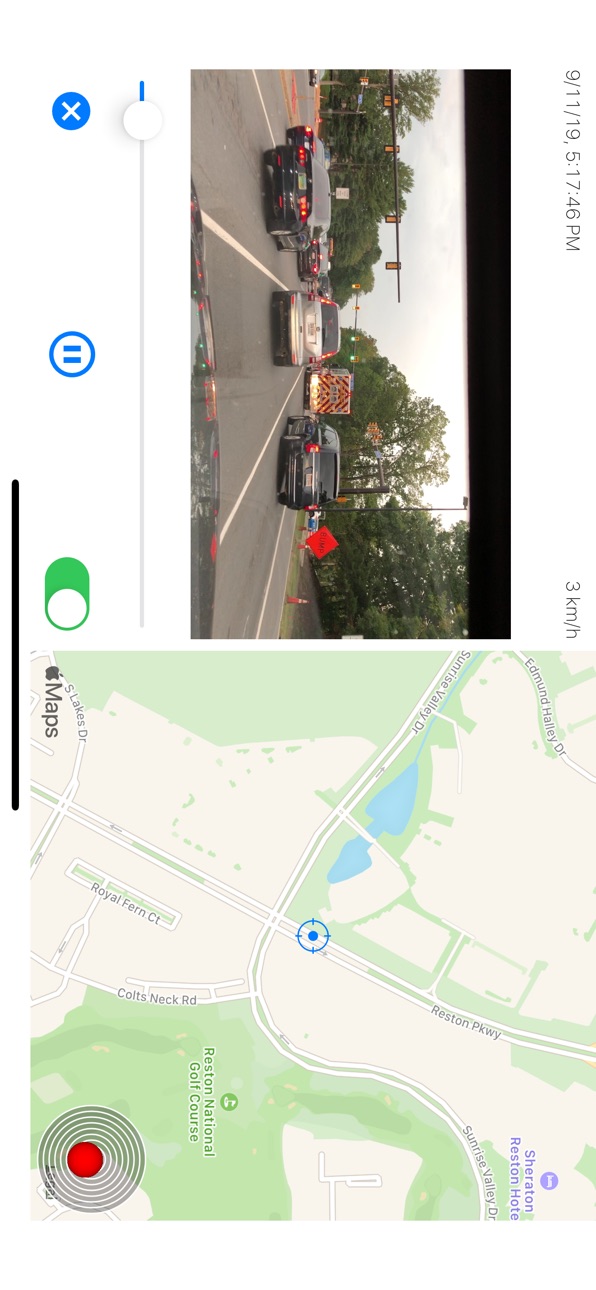
CamCarDer Lite (reads "Cam-Car-Der") is a lite/demo version of a famous car's dash camera DVR CamCarDer. It can capture video along with GPS location, speed and optional audio. Once recorded, clip can be played side-by-side with Map where marker moved along with the video. Clip can also be exported with timestamp, speed and map with dynamic marker imprint on exported video.
Features:
* Capture video in 3 resolutions (Low, Medium, High) with option to include audio and perform image stabilization
* Turn-by-turn navigation assistance while recording video
* Record GPS location and speed along with video frames
* Play back video with showing marker on a map and timestamp / speed of a moment
* Export video to album for sharing or storage (see limitations below)
* Take photo snapshots while recording video
* Imprints date/time, speed stamp into exporting video as well as actual map with dynamic marker
* Keep recorded clips as a history; view History as a List (by Date) or on an interactive Map (by Location)
* Show path for particular clip on a map with speed indicated by color
* Option to start recording when open the app (or 3D Touch)
* G-Force sensor to record acceleration and braking
* Show/hide map on main screen for easy navigation
* Dim screen to reduce heating and power consumption
* Detect speed limit signs and optionally notify if exceeding
NOTE: Continued use of GPS running in the background can dramatically decrease battery life. Please see details on our website at http://oxigenator.com/products/camcarder/. We suggest that you connect your iPhone to a power, rather than using it on a battery.
History feature allow you to keep up to 3 recorded clips (you can delete some to record others). Clips can be viewed in chronological order or by their locations on interactive map. When export clips to Camera Roll, only first 30 seconds are visible in a Lite version.
If your phone receives an incoming call or you want to switch to another app, CamCarDer will save current clip and stop recording.
Accessibility
ipadiphonemacrealityDevicetvoswatch
Version history 25 versions
Build 875034057v4.22025-06-02 16:00:42
Deletion of clips now can be reversed during 30 days after deletion. Clips list now has a filter to show/hide recently deleted. Each deleted clip can be either undelete or erased completely. Also user may want to erase all deleted clips at ones. Erased clips will free the storage space. Minor defects are fixed as well.
Build 865719150v4.12024-05-06 23:01:22
Interface layout improvements. Fix for video rotation switch on Settings interface. Fix for re-starting recording after the interruption. Fixes for several minor defects.
Build 853699673v4.0.42022-12-04 12:15:02
Address anomaly when application may crash during video export when not enough operational memory in some phone models. Also the maximum number of clips to keep for auto-cleaning was increased to 500.
Build 852556933v4.0.32022-10-02 20:39:14
Fix for the problems with exporting clips above certain size on certain phone models. For application to work better when exporting clips, the possible clip lengths are now 1 and 5 minutes. On clip details interface user may now go to next or previous clip without going back to history interface.
Build 852516121v4.0.22022-10-01 00:09:01
Make map marker moving smooth in application and in exported video. Make zoom level of a map on exported video better related to clip duration.
Build 850467326v4.0.12022-06-28 11:53:08
Fix for anomaly when selection of certain cameras and focusing mode may lead to app crash. Selection of video quality was re-enabled for single camera mode (in dual camera mode the ios limitations won't allow changes for quality).
Build 850378544v4.02022-06-23 21:11:58
Support for dual camera (front and back together) for devices with modern CPU chip and hardware. Merged Camera and General Settings into one menu item. Moved map to upper-right corner on exported video for better ground events observability. Added a clip delete protection button on the main screen (applies to currently recording clip only).
Build 848495021v3.92022-04-21 22:28:35
We added the ability to export videos which were recorded without location service turned on
Build 846872597v3.82022-01-26 23:04:53
Settings control added to flip video vertically upon export in case it was recoded upside-down (on devices with old version of iOS).
Build 845906137v3.7.22021-12-12 18:10:03
Fixed issue when some speed warning settings were not persisted properly.
Build 835813823v3.7.12020-05-04 23:48:04
User may now turn navigation audio feedback on and off in settings. Minor improvement in re-routing algorithm. Delete button added to details view for convenience
Build 835063748v3.72020-03-11 16:21:42
Turn-by-turn navigation with voice was added.
Build 834921724v3.6.32020-02-29 17:58:17
Fix for abnormality when application may crash with attempt manually adjust focus position on a camera that does not support manual focusing.
Build 834732884v3.6.22020-02-15 20:22:37
Minor fixes in speed sign detection feature
Build 834690413v3.6.12020-02-12 21:09:21
Ability to detect and recognize speed limit signs (subject to weather and other conditions) as well as warn driver if speed exceeds detected level. Threshold of warning can be selected. Currently only US and alike speed limit signs are supported. Other speed limit sign types support is coming soon. Minor issue with recording interruption by phone calls is fixed as well.
Build 833566110v3.52019-11-12 17:21:06
Ability to select specific camera in multi-camera devices. Minor fixes and improvements.
Build 833478961v3.4.12019-11-05 22:24:27
Minor fixes and improvements
Build 833373019v3.42019-10-29 17:00:08
Ability to take photos during video recording was added (photos saved into camera roll; include coordinates and timestamp). Now you also may include coordinates into exporting video (shown under the map). Application will auto-rotate when phone mounted with connector facing left or right. We also made few minor fixes and improvements.
Build 833320423v3.3.12019-10-24 23:17:44
Fixed anomaly that app may crash on a first launch
Build 833304154v3.32019-10-23 22:43:33
Support for dark mode in iOS 13 was added. Minor fixes and improvements.
Build 830883520v3.2.42019-04-06 21:18:49
Fix for anomaly with export of video that may lead to an error. Minor user interface improvements.
Build 827908031v3.2.32018-07-25 13:15:37
*Improvements in stability
Build 827743696v3.2.22018-07-03 18:34:43
*Add user consent form regarding servicing ads for EU users
*Minor improvements and fixes
Build 825582460v3.2.12018-01-10 00:23:51
+ Free version now allowed to export full clip (with conditions)
+ Improved stability
+ Minor fixes
Build 823594731v3.22017-09-08 22:34:04
+ Now on exporting video we move map instead of position marker. This allow to see map in much more detailed way
+ Start / Stop button no longer blocks the retracted map on main screen
+ Minor fixes and interface improvements
No pricing data captured yet — comparisons appear once the app has paid storefronts or in-app purchases.
Availability 1 of 1 storefronts
| Region | Language | Price | Ratings | Avg | Version |
|---|---|---|---|---|---|
| US | en-US | Free | 159 | 4.4 | 4.2 |
Change log 29 changes · US
✎
releaseNotes updated
Deletion of clips now can be reversed during 30 days after deletion. Clips list now has a filter to show/hide recently deleted. Each deleted clip can be either
✎
description updated
CamCarDer Lite (reads "Cam-Car-Der") is a lite/demo version of a famous car's dash camera DVR CamCarDer. It can capture video along with GPS location, speed and
✎
subtitle updated
GPS car dash camera recorder
✎
name updated
CamCarDer Lite
◆
Version 4.2 released
Deletion of clips now can be reversed during 30 days after deletion. Clips list now has a filter to show/hide recently deleted. Each deleted clip can be either undelete or erased completely. Also user may want to erase all deleted clips at
◆
Version 4.1 released
Interface layout improvements. Fix for video rotation switch on Settings interface. Fix for re-starting recording after the interruption. Fixes for several minor defects.
◆
Version 4.0.4 released
Address anomaly when application may crash during video export when not enough operational memory in some phone models. Also the maximum number of clips to keep for auto-cleaning was increased to 500.
◆
Version 4.0.3 released
Fix for the problems with exporting clips above certain size on certain phone models. For application to work better when exporting clips, the possible clip lengths are now 1 and 5 minutes. On clip details interface user may now go to next
◆
Version 4.0.2 released
Make map marker moving smooth in application and in exported video. Make zoom level of a map on exported video better related to clip duration.
◆
Version 4.0.1 released
Fix for anomaly when selection of certain cameras and focusing mode may lead to app crash. Selection of video quality was re-enabled for single camera mode (in dual camera mode the ios limitations won't allow changes for quality).
◆
Version 4.0 released
Support for dual camera (front and back together) for devices with modern CPU chip and hardware. Merged Camera and General Settings into one menu item. Moved map to upper-right corner on exported video for better ground events observability
◆
Version 3.9 released
We added the ability to export videos which were recorded without location service turned on
◆
Version 3.8 released
Settings control added to flip video vertically upon export in case it was recoded upside-down (on devices with old version of iOS).
◆
Version 3.7.2 released
Fixed issue when some speed warning settings were not persisted properly.
◆
Version 3.7.1 released
User may now turn navigation audio feedback on and off in settings. Minor improvement in re-routing algorithm. Delete button added to details view for convenience
◆
Version 3.7 released
Turn-by-turn navigation with voice was added.
◆
Version 3.6.3 released
Fix for abnormality when application may crash with attempt manually adjust focus position on a camera that does not support manual focusing.
◆
Version 3.6.2 released
Minor fixes in speed sign detection feature
◆
Version 3.6.1 released
Ability to detect and recognize speed limit signs (subject to weather and other conditions) as well as warn driver if speed exceeds detected level. Threshold of warning can be selected. Currently only US and alike speed limit signs are supp
◆
Version 3.5 released
Ability to select specific camera in multi-camera devices. Minor fixes and improvements.
◆
Version 3.4.1 released
Minor fixes and improvements
◆
Version 3.4 released
Ability to take photos during video recording was added (photos saved into camera roll; include coordinates and timestamp). Now you also may include coordinates into exporting video (shown under the map). Application will auto-rotate when p
◆
Version 3.3.1 released
Fixed anomaly that app may crash on a first launch
◆
Version 3.3 released
Support for dark mode in iOS 13 was added. Minor fixes and improvements.
◆
Version 3.2.4 released
Fix for anomaly with export of video that may lead to an error. Minor user interface improvements.
◆
Version 3.2.3 released
*Improvements in stability
◆
Version 3.2.2 released
*Add user consent form regarding servicing ads for EU users
*Minor improvements and fixes
◆
Version 3.2.1 released
+ Free version now allowed to export full clip (with conditions)
+ Improved stability
+ Minor fixes
◆
Version 3.2 released
+ Now on exporting video we move map instead of position marker. This allow to see map in much more detailed way
+ Start / Stop button no longer blocks the retracted map on main screen
+ Minor fixes and interface improvements