Home › Business

WiFi Guard - Scan devices and protect your Wi-Fi from intruders
 US
US
1 of 1 storefronts
Content in en-US
Content in en-US
Information
Apple ID1030022183
Bundle IDcom.plashchynski.wifi-guard-pro
SellerSeller
Min iOS9.0
Min macOS11.0
Device familiestvos, watch, iphone, ipad, ipod
Released2016-01-15
Copyright© Dzmitry Plashchynski, 2017
Preview 4 platforms
iPhone 5 images


iPad 5 images


Apple TV 3 images

Apple Watch 2 images


What’s New Version 2.4.1
This update from Apple will improve the functionality of this app. No new features are included.
● Bug fixes and stability improvements
If you enjoy using WiFi Guard let us know by leaving a review on the App Store. It really helps.
Description
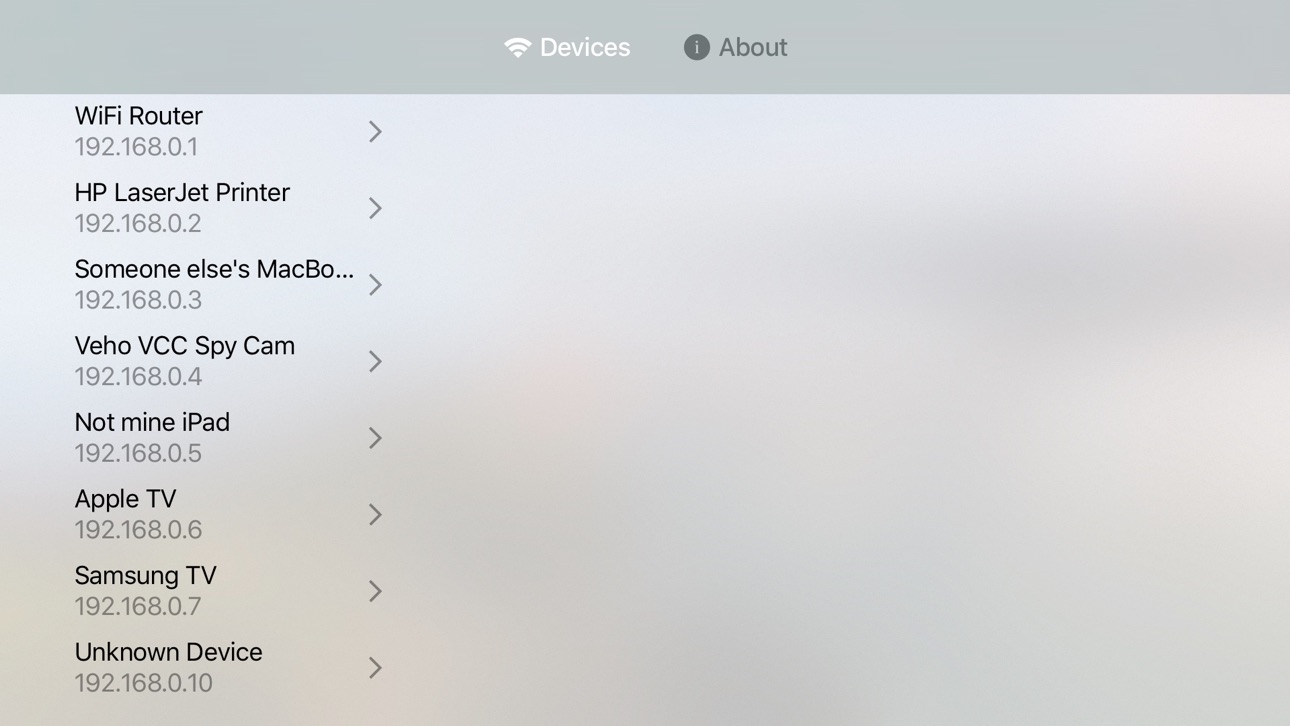
Laggy Wi-Fi? Maybe your neighbor has hacked your password and quietly use it. With WiFi Guard app you will be able to prevent unauthorized access to your network. This application scans your Wi-Fi and detects all connected devices.
Most of the discovered devices have readable names, like “HP Printer” or “John's iPhone”. Thus, you can easily identify if any of them are foreign. So you’ll know when it’s time to change your Wi-Fi password or talk to your neighbor :)
WiFi Guard can scan your networks automatically and send notifications about new devices. This application is designed for both casual and professional use. It's a great tool for system administrators to monitor and diagnose Wi-Fi networks.
Capabilities:
● Discovers all devices connected to your Wi-Fi network
● Automatic Wake-on-LAN to “wake up” sleeping devices
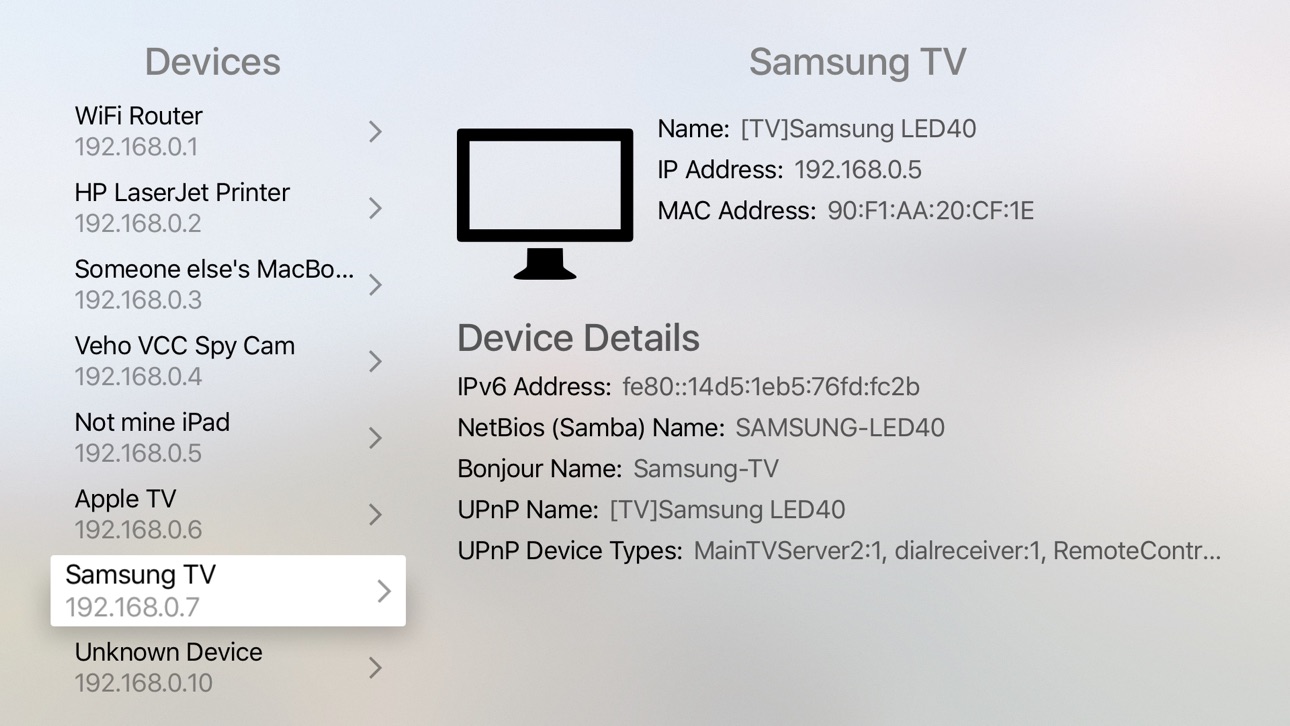
● Provides detailed technical information about every device, particularly:
● IP and MAC addresses
● Device’s name from network name services (UPnP, NetBIOS, Bonjour, etc.)
● Device’s manufacturer (Apple, Samsung, etc.)
● WiFi network signal strength and protection status
● Automatic background scanning
● Notifications about new devices
Download it now for peace of mind to be confident nobody steals your Wi-Fi.
Reviews:
I like the app. Is very helpful and keep your device networks secure!!! Thanks guys
—by Metadona2007, United States
App works great, your able to get notices and see when new devices access the network your on. You can even block the device. Hey, if your kids are suppose to be off line at a certain time and connect after cut off then block their wireless device when your notified they tried to get back on.
—by Tim, United States
Thus shows me every device on my network. I have it setup to notify me when a new device grabs an IP address.
—by fbara, United States
Just a simple little app that does what it promises. . . In less time than it takes to find the installed app (uh, yeah, I have a few more pages than the factory install!) it shows you all you need to know. I didn't think it would matter that much to me, but I was curiously relieved to see I was hacker-free! And no useless, memory-wasting "bells and whistles" to bloat it up. To address a previous review concern, I don't think the app can provide any more information than what the connected device is "pinging;" if I wasn't ...
—by Saintsinger, United States
Gives me peace of mind to see what devices are connected
—by Sctty7, United States
Accessibility
ipadiphonemacrealityDevicetvoswatch
Version history 9 versions
Build 818438875v2.4.12016-08-11 17:10:17
This update from Apple will improve the functionality of this app. No new features are included.
● Bug fixes and stability improvements
If you enjoy using WiFi Guard let us know by leaving a review on the App Store. It really helps.
Build 817418781v2.42016-05-26 19:36:51
● Added an option to disable the icon badge use for displaying the number of devices in the network
● Significantly improved a frequency of network scanning
● Router vendor detection fixed
If you enjoy using WiFi Guard let us know by leaving a review on the App Store. It really helps.
Build 817185946v2.3.22016-04-28 14:53:55
● Fixed crash on big networks scan
● Fixed Wake-on-LAN function
Build 816887172v2.3.12016-04-04 15:19:46
● iOS 9.3 support
● IPv6 support
● Bug fixes
Build 816393627v2.32016-03-24 07:06:15
● WatchOS support
● Bug fixes
Build 816290187v2.22016-02-04 06:33:32
● Bug fixes
Build 816168436v2.12016-01-28 03:52:19
● Mark offline devices
● General improvements and bug fixes
Build 815956797v2.02016-01-21 15:21:59
● Enabled location-based tracking to scan your networks more frequently
● Fixed a number of crashes
Build 813082136v12016-01-15 21:26:52
No pricing data captured yet — comparisons appear once the app has paid storefronts or in-app purchases.
Availability 1 of 1 storefronts
| Region | Language | Price | Ratings | Avg | Version |
|---|---|---|---|---|---|
| US | en-US | Free | 2.4k | 4.2 | 2.4.1 |
Change log 12 changes · US
✎
releaseNotes updated
This update from Apple will improve the functionality of this app. No new features are included.
● Bug fixes and stability improvements
If you enjoy using WiF
✎
description updated
Laggy Wi-Fi? Maybe your neighbor has hacked your password and quietly use it. With WiFi Guard app you will be able to prevent unauthorized access to your networ
✎
name updated
WiFi Guard - Scan devices and protect your Wi-Fi from intruders
◆
Version 2.4.1 released
This update from Apple will improve the functionality of this app. No new features are included.
● Bug fixes and stability improvements
If you enjoy using WiFi Guard let us know by leaving a review on the App Store. It really helps.
◆
Version 2.4 released
● Added an option to disable the icon badge use for displaying the number of devices in the network
● Significantly improved a frequency of network scanning
● Router vendor detection fixed
If you enjoy using WiFi Guard let us know by leavi
◆
Version 2.3.2 released
● Fixed crash on big networks scan
● Fixed Wake-on-LAN function
◆
Version 2.3.1 released
● iOS 9.3 support
● IPv6 support
● Bug fixes
◆
Version 2.3 released
● WatchOS support
● Bug fixes
◆
Version 2.2 released
● Bug fixes
◆
Version 2.1 released
● Mark offline devices
● General improvements and bug fixes
◆
Version 2.0 released
● Enabled location-based tracking to scan your networks more frequently
● Fixed a number of crashes
◆
Version 1 released