Home › Business

 US
US
1 of 1 storefronts
Content in en-US
Content in en-US
Information
Preview 2 platforms
iPhone 5 images


iPad 5 images

What’s New Version 2.4
Removed function:
• eSupport
• System owner
Bug fix:
• Scanning for Bluetooth Dongle with Bluetooth off leads to app crash
• Demo devices are unavailable
• Layout issues
Description
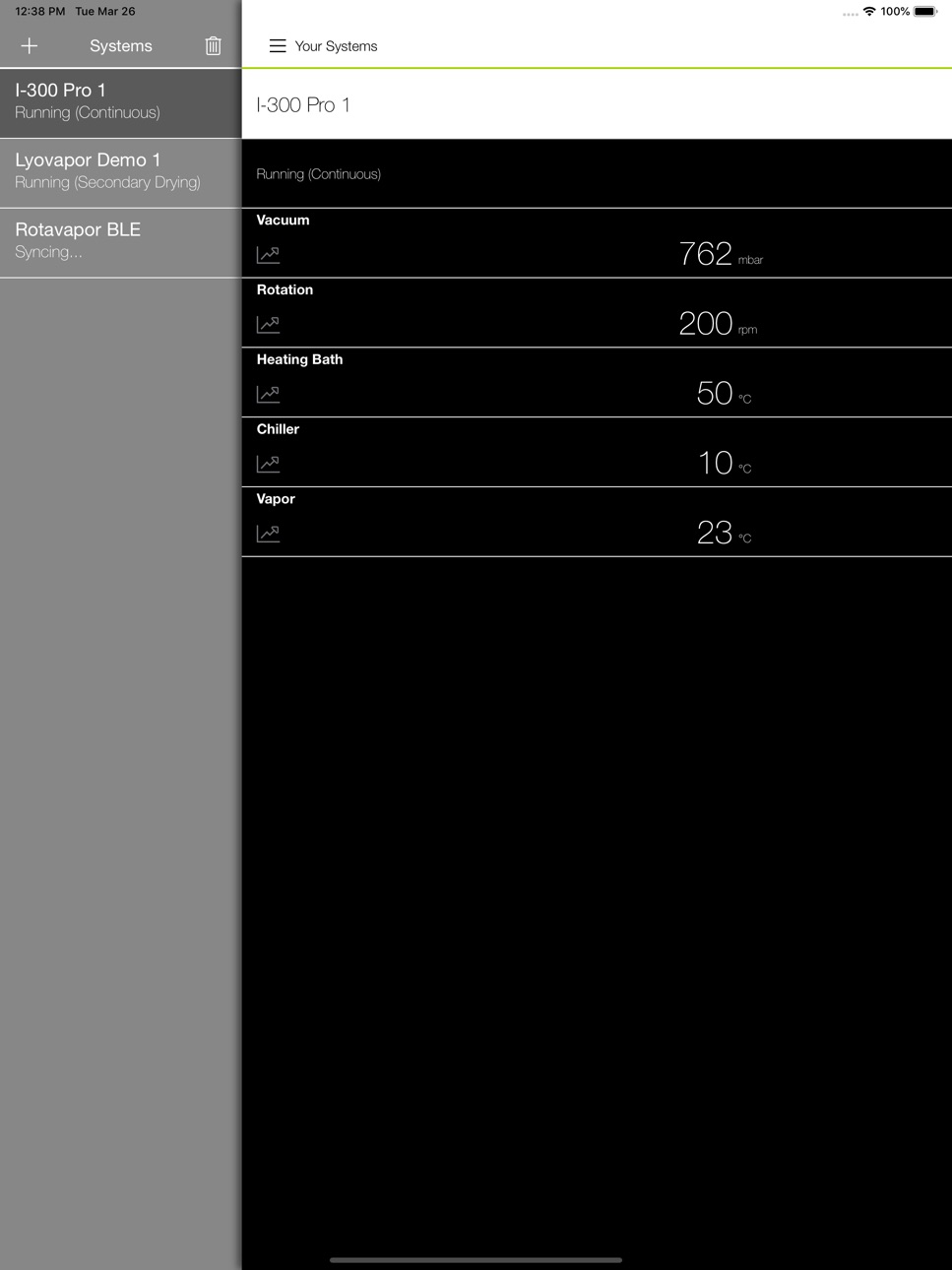
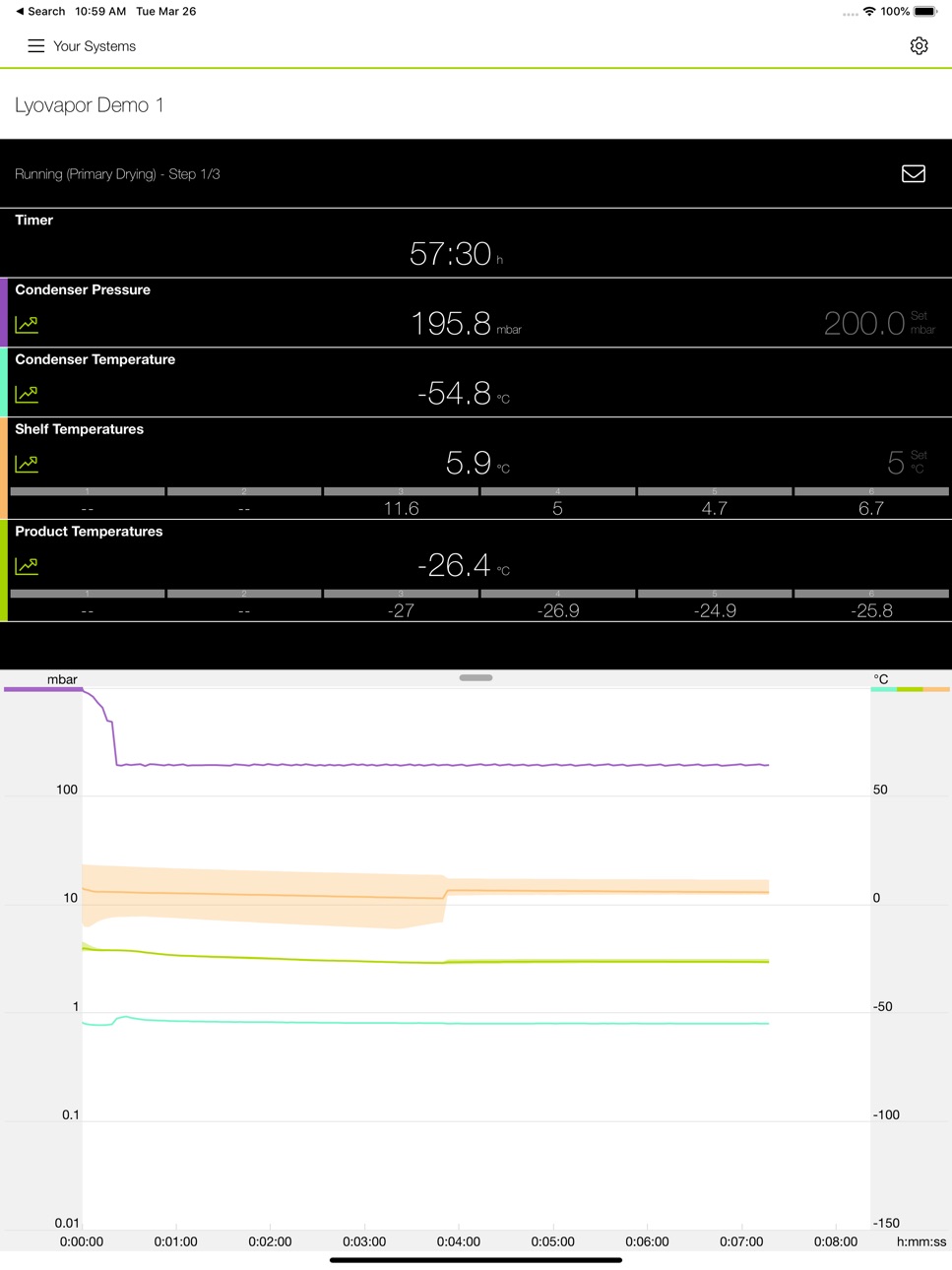
BUCHI Monitor App offers live view of all Rotavapor® in conjunction with the Interface I-300 or I-300 Pro and all Lyovapor™ instruments. The BUCHI Cloud enables better connectivity, faster support and increased level of automation.
The BUCHI Monitor App also works simultaneously with the Interface I-300 or I-300 Pro and the BUCHI Bluetooth® Dongle, which will provide a secure and fast way of connecting your Rotavapor® System with BUCHI Cloud Services. The BUCHI Cloud Services provide free firmware updates by the push of a button and facilitate requesting support for your Rotavapor® System.
Features:
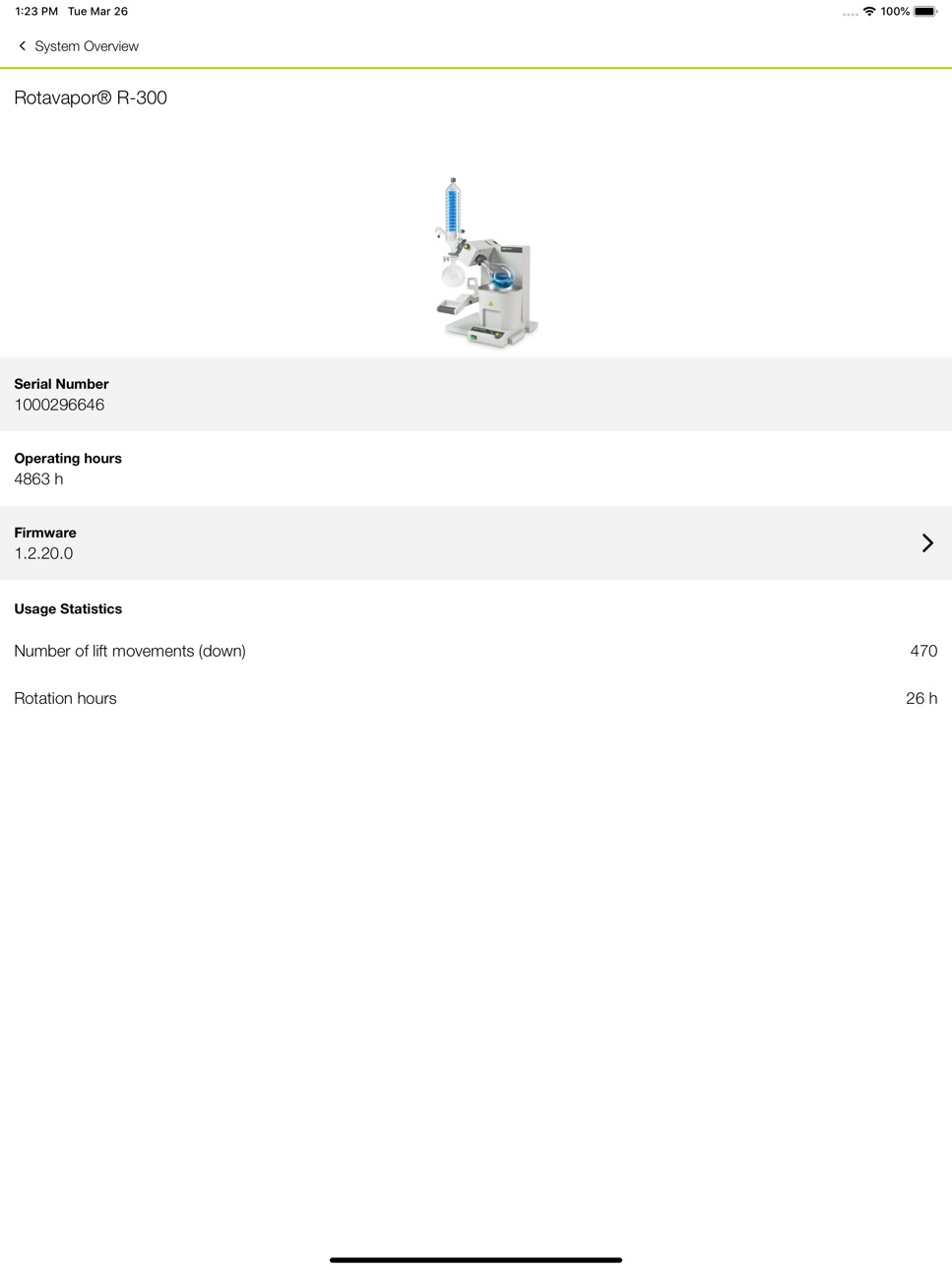
• Rotavapor® R-300 System overview: the app informs you of your relevant information of the components in your system, for example, serial number, firmware version, working hours, error messages history, etc.
• Firmware Update: quick and effortless firmware updates with the BUCHI Monitor App in combination with the BUCHI Bluetooth® Dongle.
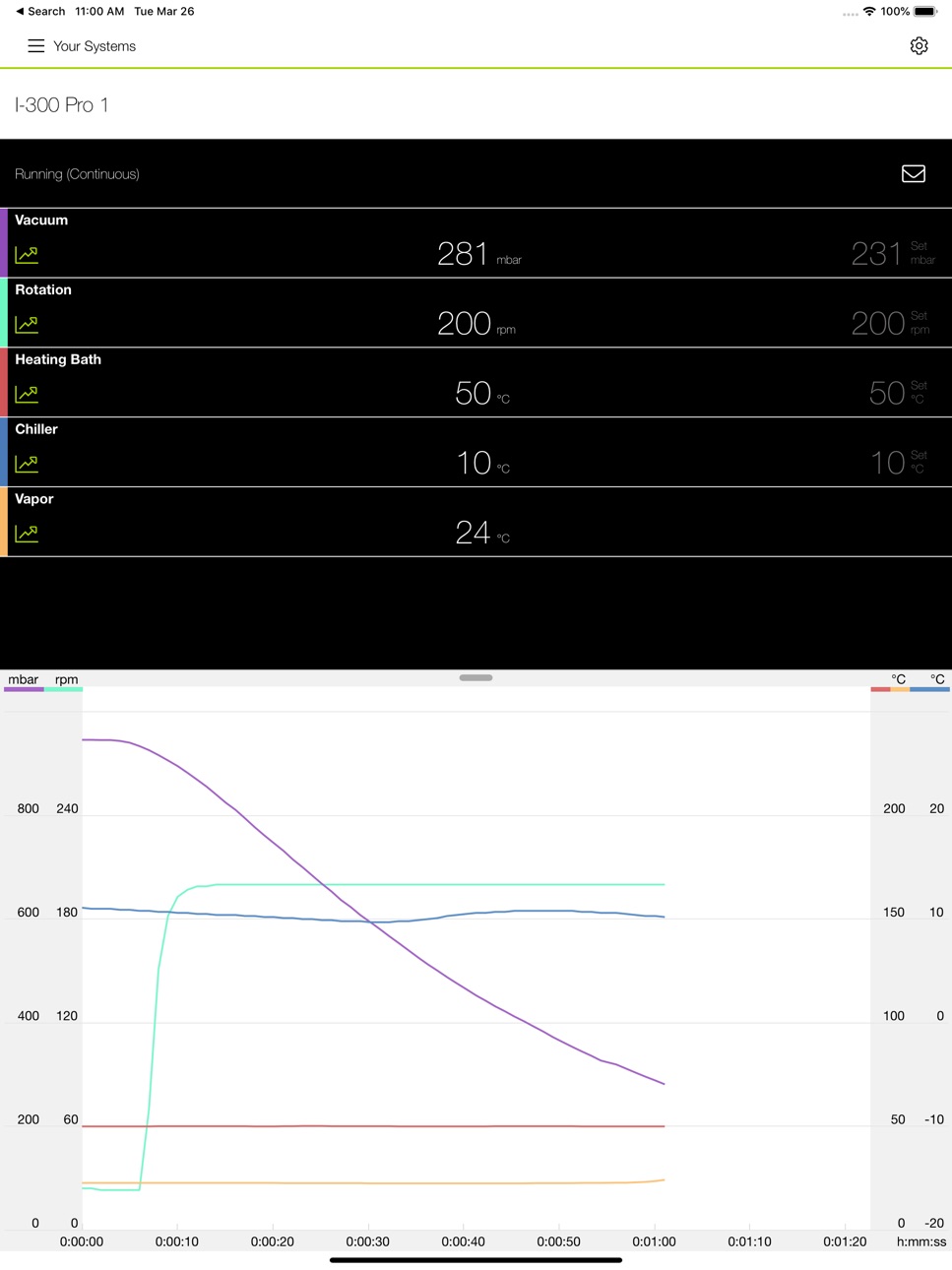
• Live view of set and actual parameters such as temperature (heating and cooling) and pressure.
• Push notifications when the process is finished or in case of an unexpected event.
• Graphical representation of the progression of process.
• Availability of all connected instruments in the status overview.
• Diagnosis features for possible remote maintenance and servicing.
• Additional language and unit settings independent of settings chosen on instrument.
Accessibility
ipadiphonemacrealityDevicetvoswatch
Version history 7 versions
Build 865473249v2.42024-04-29 05:49:29
Removed function:
• eSupport
• System owner
Bug fix:
• Scanning for Bluetooth Dongle with Bluetooth off leads to app crash
• Demo devices are unavailable
• Layout issues
Build 830616436v2.32020-06-26 07:04:48
The BUCHI Monitor App now works simultaneously with the Interface I-300 or I-300 Pro and the BUCHI Bluetooth® Dongle, which will provide a secure and fast way of connecting your Rotavapor® System with BUCHI Cloud Services. The BUCHI Cloud Services provide free firmware updates by the push of a button and facilitate requesting support for your Rotavapor® System.
New features:
• Rotavapor® R-300 System overview: the app informs you of your relevant information of the components in your system, for example, serial number, firmware version, working hours, error messages history, etc.
• System Owner: the contact person for BUCHI Cloud Services.
• Firmware Update: quick and effortless firmware updates with the BUCHI Monitor App in combination with the BUCHI Bluetooth® Dongle.
• eSupport: write your request directly from the mobile device or from the Interface, press send and receive support just with one click.
Build 828415105v2.12018-11-02 21:32:48
Additional features apply for Lyovapor™ L-200 and L-300 product lines (freeze drying):
• Longer display time of freeze drying process
• Update of display messages for error, warning and information
Build 822167777v2.02017-08-21 13:31:00
The app now supports the new BUCHI Lyovapor L-200 and L-300 product lines (freeze drying).
Therefore the Rotavapor App is renamed to BUCHI Monitor App.
In addition it includes the following improvements:
•The chart now supports zooming (pinch-in for zooming in, pinch out or double click for zooming out)
Build 817151966v1.22016-12-14 22:13:59
An updated Rotavapor app is here:
It now also supports the new BUCHI Rotavapor® R-220 Pro.
In addition it includes the following improvements:
• Improved Portuguese translations
Build 813731454v1.12016-03-30 15:27:26
This update expands the app with new functionalities:
- Multiple languages
- Demo function
Within the settings of the app (top right corner) you can now select your language of the app. There are 12 different languages available.
A new “Demo” button has been created in order to experience the app functionality without having an actual Rotavapor R-300.
Build 813007839v1.02015-08-28 09:31:08
No pricing data captured yet — comparisons appear once the app has paid storefronts or in-app purchases.
Availability 1 of 1 storefronts
| Region | Language | Price | Ratings | Avg | Version |
|---|---|---|---|---|---|
| US | en-US | Free | 1 | 5.0 | 2.4 |
Change log 11 changes · US
✎
releaseNotes updated
Removed function:
• eSupport
• System owner
Bug fix:
• Scanning for Bluetooth Dongle with Bluetooth off leads to app crash
• Demo devices are unavailable
• Lay
✎
description updated
BUCHI Monitor App offers live view of all Rotavapor® in conjunction with the Interface I-300 or I-300 Pro and all Lyovapor™ instruments. The BUCHI Cloud enables
✎
subtitle updated
For your BUCHI Instruments
✎
name updated
BUCHI Monitor
◆
Version 2.4 released
Removed function:
• eSupport
• System owner
Bug fix:
• Scanning for Bluetooth Dongle with Bluetooth off leads to app crash
• Demo devices are unavailable
• Layout issues
◆
Version 2.3 released
The BUCHI Monitor App now works simultaneously with the Interface I-300 or I-300 Pro and the BUCHI Bluetooth® Dongle, which will provide a secure and fast way of connecting your Rotavapor® System with BUCHI Cloud Services. The BUCHI Cloud S
◆
Version 2.1 released
Additional features apply for Lyovapor™ L-200 and L-300 product lines (freeze drying):
• Longer display time of freeze drying process
• Update of display messages for error, warning and information
◆
Version 2.0 released
The app now supports the new BUCHI Lyovapor L-200 and L-300 product lines (freeze drying).
Therefore the Rotavapor App is renamed to BUCHI Monitor App.
In addition it includes the following improvements:
•The chart now supports zooming (p
◆
Version 1.2 released
An updated Rotavapor app is here:
It now also supports the new BUCHI Rotavapor® R-220 Pro.
In addition it includes the following improvements:
• Improved Portuguese translations
◆
Version 1.1 released
This update expands the app with new functionalities:
- Multiple languages
- Demo function
Within the settings of the app (top right corner) you can now select your language of the app. There are 12 different languages available.
A new “
◆
Version 1.0 released