Home › Education

 US
US
1 of 1 storefronts
Content in en-US
Content in en-US
Information
Preview 2 platforms
iPhone 8 images


iPad 8 images



What’s New Version 1.12.163
1. Improved the AI question analysis experience
2. Made minor UI improvements to the Home and Question screens
3. Fixed an issue that could cause a white screen during screen casting
Description
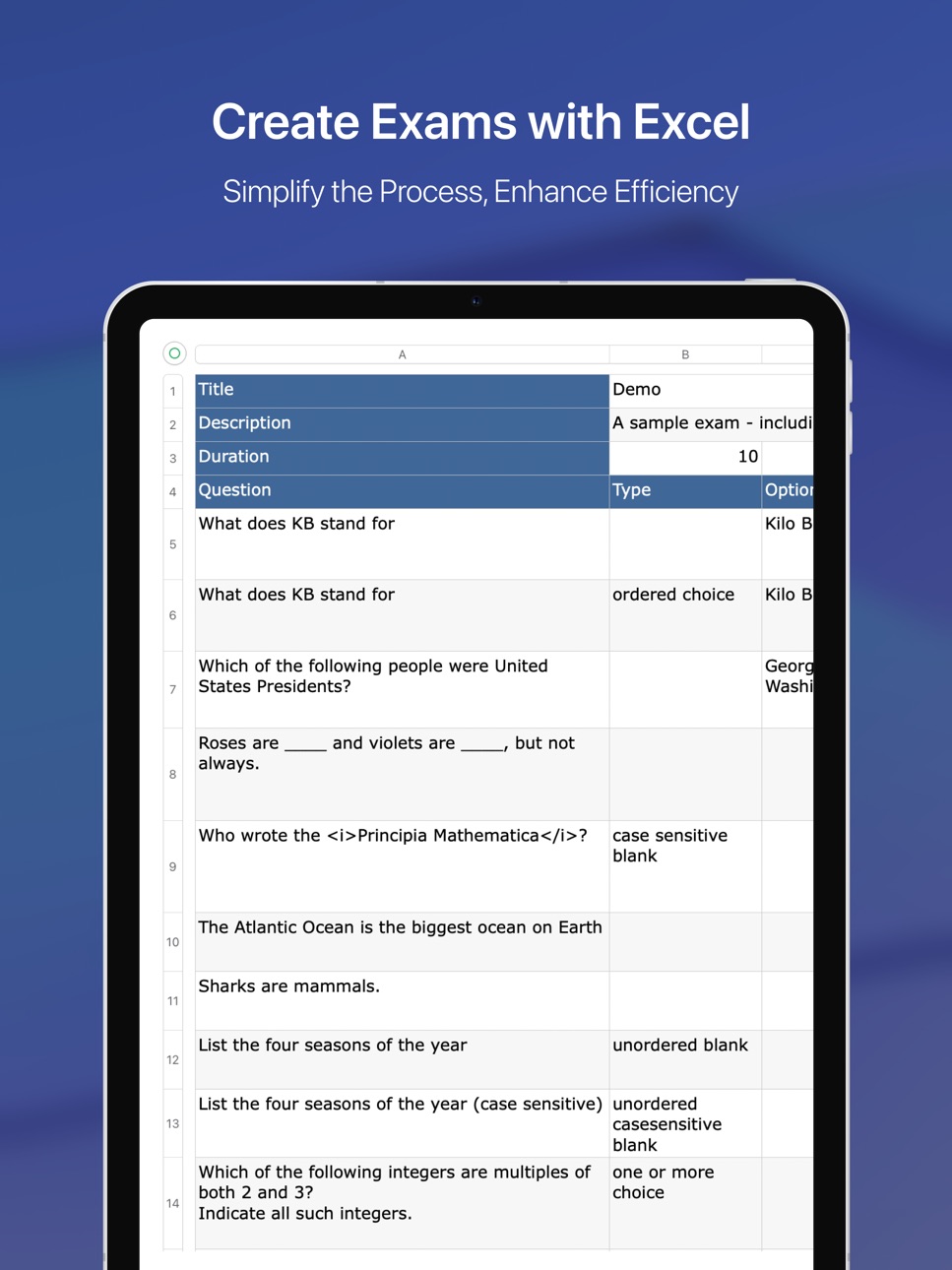
MTestM is an exam creator application that allows you to create, publish and share exams. Creating an exam has never been easier. You can add different types of questions on an Excel spreadsheet.
MTestM is used by educators, trainers, non-profits, businesses and other professionals who need an easy way to quickly make exams, tests, and quizzes online. You can create and publish your first exam in a few minutes!
1.Create exams easily
Excel is a great program for creating questions. Exams can be created offline using Excel. By taking a tour, it’s easy to understand the MTestM format and add your own questions in the spreadsheet.
MTestM allows you to use Excel to write multiple-choice, fill-in-the-blank and matching questions in a simple format that can be imported. When creating a large numbers of questions, MTestM can provide a quick way of bulk importing questions.
2.Advanced question types
MTestM allows you to create single choice, multiple choice, fill in the blank and matching questions. MTestM supports case sensitive answers and questions having more than one correct correct answer.
You can also create questions that are based on the same material or based on the same stem. You can also specify HTML, MathML, image, audio and video for the question.
3.Publish exams
After you have created an exam, you can publish it. You can mark your exams as private if you do not want others to see your exams, otherwise your exam can be seen by others.
In order to create high quality exams, we recommend you to update your exams regularly. MTestM allows you to update your published exams. If an exam is not the current version, it will be kept for 30 days on the server.
4.Share exams
Anyone can share public exams with others. Only you can share your own private exams with others. Others cannot share your private exams.
If you are a teacher, sharing exams is an alternative way to assign homework to your students. If you are a student, share your study quiz with your classmates and test each other as much as possible in order to discover even more details and areas you may have overlooked.
5.Organize exams into folders
Organizing exams is very important. You can organize exams into folders and subfolders.
Exams are saved locally on your phone, so you can search exams quickly using keywords. You can also find the exams and questions you recently took.
6.Take exams offline
MTestM allows you to take your exam anytime, anywhere at your convenience. You do not need to be connected to the internet while you are taking the exam.
After the exam is scored, you can review the grade report and see which questions you got wrong.
You can re-test yourself on the questions you’ve missed and you can re-test yourself on your favorite questions.
In-App Purchases US pricing
1 month VIP membership Subscription
Subscription$1.99
2 months VIP membership Subscription
Subscription$3.79
3 months VIP membership Subscription
Subscription$5.49
6 months VIP membership Subscription
Subscription$10.49
1 year VIP membership Subscription
Subscription$19.99
Capabilities
In-App Purchases
Accessibility
ipadiphonemacrealityDevicetvoswatch
Version history 25 versions
Build 886151200v1.12.1632026-05-26 17:57:35
1. Improved the AI question analysis experience
2. Made minor UI improvements to the Home and Question screens
3. Fixed an issue that could cause a white screen during screen casting
Build 884283205v1.12.1622026-04-08 18:56:21
1. Added “Sequenced Choice” questions
Sequenced Choice is a question type where the order of selection matters. You must tap the options in the correct sequence (e.g., D → A → C) to get it right. Your answer will be evaluated based on the order you select, and both the correct sequence and your answer will be shown after submission.
2. Faster downloads & uploads
Now supports resume — no need to restart if interrupted.
3. Improved payment reliability
Better handling of incomplete transactions to avoid duplicate charges.
Build 883420602v1.12.1592026-03-16 23:12:27
1. Added Retake option on the answer report page
2. Improved UI experience on the question answering page
3. Fixed issues related to wrong-question practice
4. Optimized Facebook login
Build 881043670v1.12.1582025-12-28 09:10:16
1. Added a Flashcard learning mode for efficient memorization.
2. Added an Intensive Practice mode that requires retrying incorrect answers until all are correct.
3. Added an Answer History Recycle Bin to prevent accidental deletion and allow recovery.
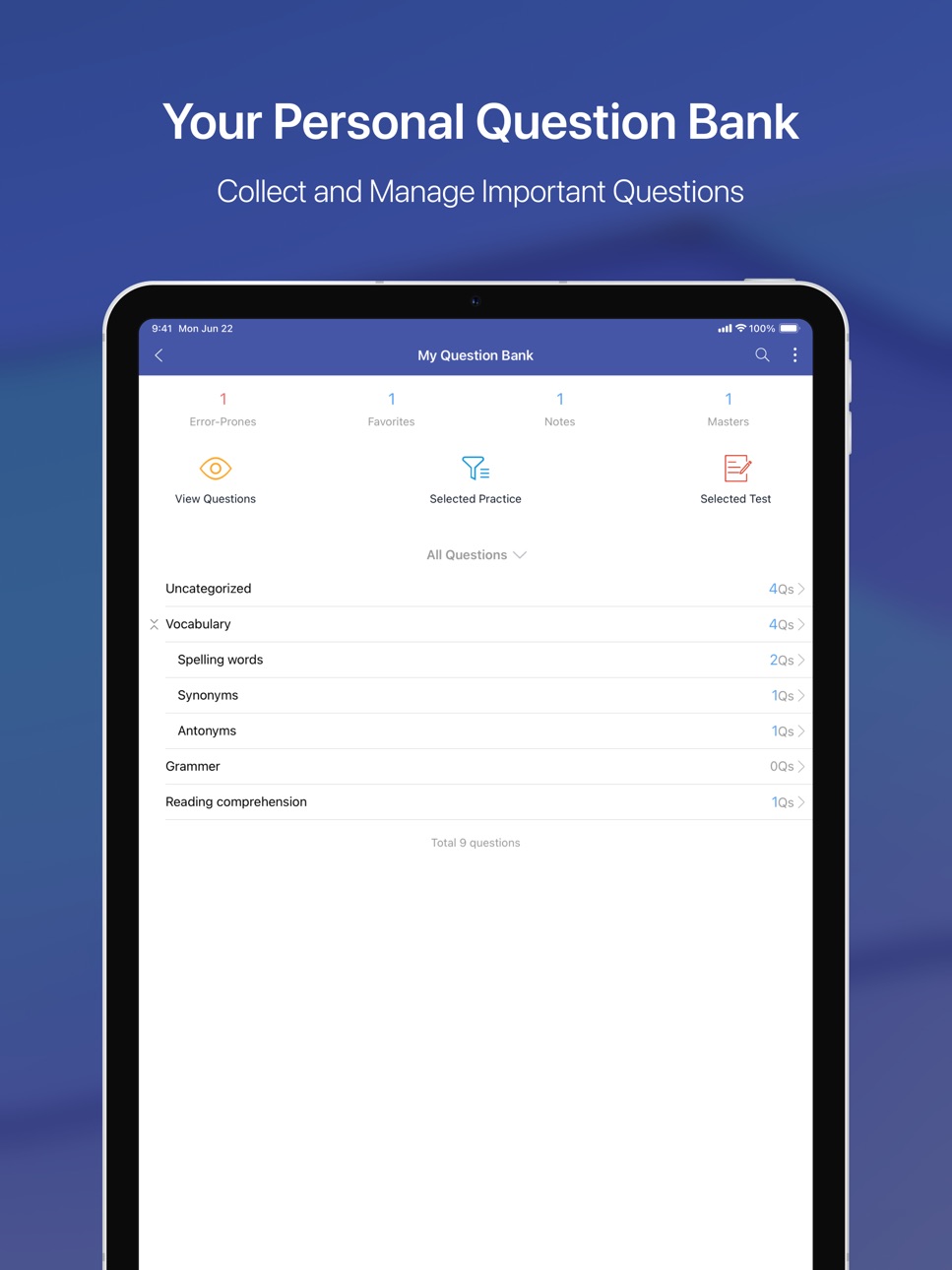
4. Question copying is now supported in My Question Bank for faster editing.
5. Added data export and import to easily transfer data between devices.
6. Exam imports now support WebP image format.
7. Improved answering experience with Select All / Deselect All options and show or hide correct answers.
Build 877842917v1.12.1562025-09-05 23:03:28
1. Added a privacy options screen to comply with regional regulations.
Build 877604203v1.12.1532025-08-27 20:43:27
1. Added the option to select only “special questions.” Special questions refer to multiple-choice questions where all answers are correct, and true/false questions where the answer is “false.”
2. Added the option “Shuffle answer choices” when exporting to PDF.
3. Optimized the wrong-question practice feature.
4. Improved AI-generated explanations.
Build 876372979v1.12.1522025-07-14 18:23:48
1. Added answer statistics feature
2. Fixed other known bugs
Build 875113019v1.12.1502025-05-27 19:11:21
1. Fixed known bugs
Build 874412746v1.12.1492025-04-30 14:26:42
1. Added volume button page-turning feature
2. LaTeX formulas can now be rendered offline
3. Questions can include emojis
4. Improved pending grading feature
Build 873090144v1.12.1482025-03-09 23:12:44
1. Fixed known bugs
Build 873062438v1.12.1472025-03-07 23:10:01
1. Fixed an issue where the options in exported PDFs were incorrect.
2. Fixed several app crash issues.
Build 872721362v1.12.1462025-02-23 22:47:10
1. Added AI-generated parsing functionality.
2. Supported displaying LaTeX formulas.
Build 871683787v1.12.1452025-01-13 06:26:43
1. Added Spanish and Portuguese
Build 870965769v1.12.1402024-12-07 16:56:47
1. Fixed Known Issues
Build 870751047v1.12.1392024-11-28 11:28:25
1. Optimized the Help Page
2. Improved English and Japanese Translations
3. Fixed Known Issues
Build 869477426v1.12.1372024-10-04 09:09:05
1. Support for logging into the same account on both mobile and tablet devices simultaneously.
2. When downloading an updated version of the exam papers, wrongs, favorites, and notes from the previous version will automatically sync to the new version.
3. Optimized practice question selection, prioritizing unanswered and incorrect questions.
4. Fixed known issues.
Build 866897189v1.12.1362024-06-22 17:45:46
1. Fixed known bugs.
Build 865159043v1.2.1332024-04-12 21:40:54
1. Optimize feedback function
2. Optimize the import function and support the merged import of multiple sheets
3. Fixed known bugs
Build 863937260v1.2.1322024-02-24 22:00:20
1. Optimize answer page turning animation
2. Fixed known bugs
Build 863423049v1.2.1312024-02-06 11:37:34
1. Optimize the UI of the question answering module
2. Fixed known bugs
Build 862033293v1.2.1272023-12-07 09:12:12
1. Optimized the function of answering questions
2. Fixed known bugs
Build 859372861v1.2.1232023-08-24 05:44:26
1. Add learning statistics function
2. Add the function of batch importing wrong questions, favorites, and notes to my question bank
3. Added the function of deleting uncategorized questions in my question bank
4. Fix known bugs
Build 857927805v1.2.1192023-06-21 06:55:43
1. Optimize the search page
2. Optimize the way of sending wrong questions, favorites, and note questions
3. Fix known bugs.
Build 855358034v1.12.1182023-03-07 13:58:53
1. Fixed known bugs
Build 855032295v1.12.1172023-02-19 10:55:00
1. Added "Sign in with Google" for more convenient access to your account.
2. Improved the functionality of editing exam questions.
3. Fixed several known bugs to enhance the overall user experience.
4. Streamlined the payment process to make it faster and more intuitive.
Price history by region
Currency
Show
Columns
Search
Availability 1 of 1 storefronts
| Region | Language | Price | Ratings | Avg | Version |
|---|---|---|---|---|---|
| US | en-US | Free | 94 | 4.9 | 1.12.163 |
Change log 29 changes · US
✎
releaseNotes updated
1. Improved the AI question analysis experience
2. Made minor UI improvements to the Home and Question screens
3. Fixed an issue that could cause a white screen
✎
description updated
MTestM is an exam creator application that allows you to create, publish and share exams. Creating an exam has never been easier. You can add different types of
✎
subtitle updated
An exam creator app
✎
name updated
MTestM
◆
Version 1.12.163 released
1. Improved the AI question analysis experience
2. Made minor UI improvements to the Home and Question screens
3. Fixed an issue that could cause a white screen during screen casting
◆
Version 1.12.162 released
1. Added “Sequenced Choice” questions
Sequenced Choice is a question type where the order of selection matters. You must tap the options in the correct sequence (e.g., D → A → C) to get it right. Your answer will be evaluated based on the
◆
Version 1.12.159 released
1. Added Retake option on the answer report page
2. Improved UI experience on the question answering page
3. Fixed issues related to wrong-question practice
4. Optimized Facebook login
◆
Version 1.12.158 released
1. Added a Flashcard learning mode for efficient memorization.
2. Added an Intensive Practice mode that requires retrying incorrect answers until all are correct.
3. Added an Answer History Recycle Bin to prevent accidental deletion and all
◆
Version 1.12.156 released
1. Added a privacy options screen to comply with regional regulations.
◆
Version 1.12.153 released
1. Added the option to select only “special questions.” Special questions refer to multiple-choice questions where all answers are correct, and true/false questions where the answer is “false.”
2. Added the option “Shuffle answer choices” w
◆
Version 1.12.152 released
1. Added answer statistics feature
2. Fixed other known bugs
◆
Version 1.12.150 released
1. Fixed known bugs
◆
Version 1.12.149 released
1. Added volume button page-turning feature
2. LaTeX formulas can now be rendered offline
3. Questions can include emojis
4. Improved pending grading feature
◆
Version 1.12.148 released
1. Fixed known bugs
◆
Version 1.12.147 released
1. Fixed an issue where the options in exported PDFs were incorrect.
2. Fixed several app crash issues.
◆
Version 1.12.146 released
1. Added AI-generated parsing functionality.
2. Supported displaying LaTeX formulas.
◆
Version 1.12.145 released
1. Added Spanish and Portuguese
◆
Version 1.12.140 released
1. Fixed Known Issues
◆
Version 1.12.139 released
1. Optimized the Help Page
2. Improved English and Japanese Translations
3. Fixed Known Issues
◆
Version 1.12.137 released
1. Support for logging into the same account on both mobile and tablet devices simultaneously.
2. When downloading an updated version of the exam papers, wrongs, favorites, and notes from the previous version will automatically sync to the
◆
Version 1.12.136 released
1. Fixed known bugs.
◆
Version 1.2.133 released
1. Optimize feedback function
2. Optimize the import function and support the merged import of multiple sheets
3. Fixed known bugs
◆
Version 1.2.132 released
1. Optimize answer page turning animation
2. Fixed known bugs
◆
Version 1.2.131 released
1. Optimize the UI of the question answering module
2. Fixed known bugs
◆
Version 1.2.127 released
1. Optimized the function of answering questions
2. Fixed known bugs
◆
Version 1.2.123 released
1. Add learning statistics function
2. Add the function of batch importing wrong questions, favorites, and notes to my question bank
3. Added the function of deleting uncategorized questions in my question bank
4. Fix known bugs
◆
Version 1.2.119 released
1. Optimize the search page
2. Optimize the way of sending wrong questions, favorites, and note questions
3. Fix known bugs.
◆
Version 1.12.118 released
1. Fixed known bugs
◆
Version 1.12.117 released
1. Added "Sign in with Google" for more convenient access to your account.
2. Improved the functionality of editing exam questions.
3. Fixed several known bugs to enhance the overall user experience.
4. Streamlined the payment process to ma